Microsoft Visual Basic 2005 BASICS Lesson 7 Strings and Decimal Types
Objectives Declare string variables. Assign text to string variables. Concatenate strings. Use decimal data types. Use the  Format  function.
Objectives (cont.) Use the Enabled property. Use the SelectionStart and SelectionLength properties.
Declaring String Variables Text is often called alphanumeric data.  Can include letters or numbers Data types that hold text are usually referred to as strings. When you declare a string, t he  resulting variable can hold a string of any practical length.
Assigning Text to String Variables Place the text in quotation marks. Hard-coded text is called a string literal. Like a numeric variable, a string variable can only hold one string. Each time you assign a string to a string variable, the existing data is replaced.
Assigning Text to String Variables (cont.)
Concatenation Concatenation Appends one string to the end of another Ampersand (&) You can concatenate more than two strings in one expression. You can also use concatenation when creating the text for a label.
Concatenation (cont.)
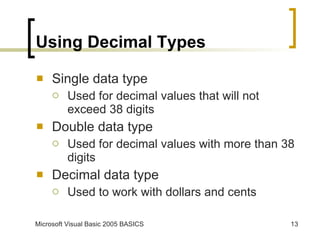
Using Decimal Types Single data type Used for decimal values that will not exceed 38 digits Double data type Used for decimal values with more than 38 digits Decimal data type Used to work with dollars and cents
Using the Format Function The  Format  function Allows you to apply custom formatting to a number before displaying the value The  Format  function can be used to format decimal values, phone numbers, and more.
Using the Format Function (cont.)
Using the Enabled Property Enabled property Makes a control take on a grayed appearance that makes it inactive but still visible Objects that are inactive can be seen by the user, but will not respond to user actions.
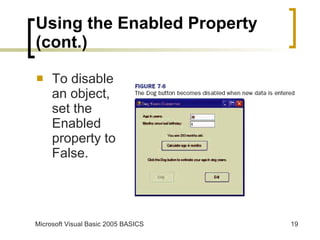
Using the Enabled Property (cont.) To disable an object, set the Enabled property to False.
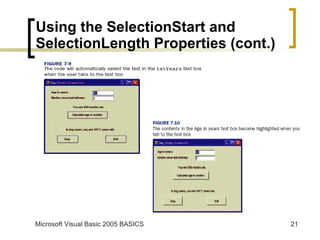
Using the SelectionStart and SelectionLength Properties SelectionStart property Specifies the location where the insertion point will be inserted when the text box gets the focus SelectionLength property Specifies how many characters should be selected to the right of the cursor
Using the SelectionStart and SelectionLength Properties (cont.)
Summary Strings hold text or alphanumeric data. Visual Basic has a data type for strings. Text assigned to a string variable must be placed in quotation marks. You can use the assignment operator to assign text from a text box to a string variable or from a string variable to another string variable.
Summary (cont.) Concatenation is the process of appending one string to the end of another. The ampersand (&) is the symbol used for concatenation. The Single, Double, and Decimal data types hold decimal data. The Decimal data type is specially designed for handling dollars and cents.
Summary (cont.) The  Format  function uses a string of symbols to format decimal values, phone numbers, and more. The  Enabled  property is used to make a control inactive or active. The  SelectionStart  and  SelectionLength  properties and the  Len  function can be used together to highlight the text in a text box.

Ppt lesson 07

  • 1.
    Microsoft Visual Basic2005 BASICS Lesson 7 Strings and Decimal Types
  • 2.
    Objectives Declare stringvariables. Assign text to string variables. Concatenate strings. Use decimal data types. Use the Format function.
  • 3.
    Objectives (cont.) Usethe Enabled property. Use the SelectionStart and SelectionLength properties.
  • 4.
    Declaring String VariablesText is often called alphanumeric data. Can include letters or numbers Data types that hold text are usually referred to as strings. When you declare a string, t he resulting variable can hold a string of any practical length.
  • 5.
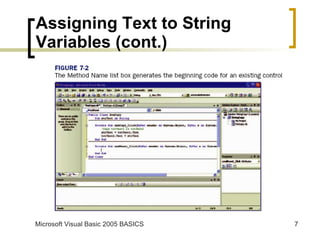
    Assigning Text toString Variables Place the text in quotation marks. Hard-coded text is called a string literal. Like a numeric variable, a string variable can only hold one string. Each time you assign a string to a string variable, the existing data is replaced.
  • 6.
    Assigning Text toString Variables (cont.)
  • 7.
    Assigning Text toString Variables (cont.)
  • 8.
    Concatenation Concatenation Appendsone string to the end of another Ampersand (&) You can concatenate more than two strings in one expression. You can also use concatenation when creating the text for a label.
  • 9.
  • 10.
  • 11.
  • 12.
  • 13.
    Using Decimal TypesSingle data type Used for decimal values that will not exceed 38 digits Double data type Used for decimal values with more than 38 digits Decimal data type Used to work with dollars and cents
  • 14.
    Using the FormatFunction The Format function Allows you to apply custom formatting to a number before displaying the value The Format function can be used to format decimal values, phone numbers, and more.
  • 15.
    Using the FormatFunction (cont.)
  • 16.
    Using the FormatFunction (cont.)
  • 17.
    Using the FormatFunction (cont.)
  • 18.
    Using the EnabledProperty Enabled property Makes a control take on a grayed appearance that makes it inactive but still visible Objects that are inactive can be seen by the user, but will not respond to user actions.
  • 19.
    Using the EnabledProperty (cont.) To disable an object, set the Enabled property to False.
  • 20.
    Using the SelectionStartand SelectionLength Properties SelectionStart property Specifies the location where the insertion point will be inserted when the text box gets the focus SelectionLength property Specifies how many characters should be selected to the right of the cursor
  • 21.
    Using the SelectionStartand SelectionLength Properties (cont.)
  • 22.
    Summary Strings holdtext or alphanumeric data. Visual Basic has a data type for strings. Text assigned to a string variable must be placed in quotation marks. You can use the assignment operator to assign text from a text box to a string variable or from a string variable to another string variable.
  • 23.
    Summary (cont.) Concatenationis the process of appending one string to the end of another. The ampersand (&) is the symbol used for concatenation. The Single, Double, and Decimal data types hold decimal data. The Decimal data type is specially designed for handling dollars and cents.
  • 24.
    Summary (cont.) The Format function uses a string of symbols to format decimal values, phone numbers, and more. The Enabled property is used to make a control inactive or active. The SelectionStart and SelectionLength properties and the Len function can be used together to highlight the text in a text box.