Chapter 6:  Arrays  Presentation slides for Java Software Solutions for AP* Computer Science by John Lewis, William Loftus, and Cara Cocking Java Software Solutions is published by Addison-Wesley Presentation slides are copyright 2002 by John Lewis, William Loftus, and Cara Cocking. All rights reserved. Instructors using the textbook may use and modify these slides for pedagogical purposes. *AP is a registered trademark of The College Entrance Examination Board which was not involved in the production of, and does not endorse, this product.
Arrays Arrays are objects that help us organize large amounts of information Chapter 6 focuses on: array declaration and use passing arrays and array elements as parameters arrays of objects searching an array sorting elements in an array hashing two-dimensional arrays the  ArrayList  class polygons, polylines, and more button components
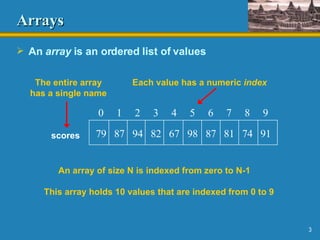
Arrays An  array  is an ordered list of values 0  1  2  3  4  5  6  7  8  9 An array of size N is indexed from zero to N-1 This array holds 10 values that are indexed from 0 to 9 79  87  94  82  67  98  87  81  74  91 scores The entire array has a single name Each value has a numeric  index
Arrays A particular value in an array is referenced using the array name followed by the index in brackets For example, the expression scores[2] refers to the value  94  (the 3rd value in the array) That expression represents a place to store a single integer and can be used wherever an integer variable can be used
Arrays For example, an array element can be assigned a value, printed, or used in a calculation : scores[2] = 89; scores[first] = scores[first] + 2; mean = (scores[0] + scores[1])/2; System.out.println ("Top = " + scores[5]);
Arrays The values held in an array are called  array elements An array stores multiple values of the same type (the  element type ) The element type can be a primitive type or an object reference Therefore, we can create an array of integers, or an array of characters, or an array of  String  objects, etc. In Java, the array itself is an object Therefore the name of the array is a object reference variable, and the array itself must be instantiated
Declaring Arrays The  scores  array could be declared as follows: int[] scores = new int[10]; The type of the variable  scores  is  int[]  (an array of integers) Note that the type of the array does not specify its size, but each object of that type has a specific size The reference variable  scores  is set to a new array object that can hold 10 integers See  BasicArray .java   (page 300)
Declaring Arrays Some examples of array declarations: double[] prices = new double[500]; boolean[] flags; flags = new boolean[20]; char[] codes = new char[1750];
Bounds Checking Once an array is created, it has a fixed size An index used in an array reference must specify a valid element That is, the index value must be in bounds (0 to N-1) The Java interpreter throws an  ArrayIndexOutOfBoundsException   if an array index is out of bounds  This is called  automatic   bounds checking
Bounds Checking For example, if the array  codes  can hold 100 values, it can be indexed using only the numbers 0 to 99 If  count  has the value 100, then the following reference will cause an exception to be thrown: System.out.println (codes[count]); It’s common to introduce  off-by-one errors  when using arrays for (int index=0; index <= 100; index++) codes[index] = index*50 + epsilon; problem
Bounds Checking Each array object has a public constant called  length  that stores the size of the array It is referenced using the array name: scores.length Note that  length  holds the number of elements, not the largest index See  ReverseOrder .java   (page 302) See  LetterCount .java   (page 304)
Initializer Lists An  initializer list  can be used to instantiate and initialize an array in one step The values are delimited by braces and separated by commas Examples: int[] units = {147, 323, 89, 933, 540,    269, 97, 114, 298, 476}; char[] letterGrades = {'A', 'B', 'C', 'D', ’F'};
Initializer Lists Note that when an initializer list is used: the  new  operator is not used no size value is specified The size of the array is determined by the number of items in the initializer list An initializer list can only be used only in the array declaration See   Primes.java   (page 308)
Arrays as Parameters An entire array can be passed as a parameter to a method Like any other object, the reference to the array is passed, making the formal and actual parameters aliases of each other Changing an array element within the method changes the original An array element can be passed to a method as well, and follows the parameter passing rules of that element's type
Arrays of Objects The elements of an array can be object references The following declaration reserves space to store 25 references to  String  objects String[] words = new String[25]; It does NOT create the  String  objects themselves Each object stored in an array must be instantiated separately See  GradeRange .java  (page 310)
Command-Line Arguments The signature of the  main  method indicates that it takes an array of  String  objects as a parameter These values come from command-line arguments that are provided when the interpreter is invoked For example, the following invocation of the interpreter passes an array of three  String  objects into  main : > java StateEval pennsylvania texas arizona These strings are stored at indexes 0-2 of the parameter See  NameTag .java  (page 311)
Arrays of Objects Objects can have arrays as instance variables Many useful structures can be created with arrays and objects The software designer must determine carefully an organization of data and objects that makes sense for the situation See  Tunes.java   (page 312) See  CDCollection .java  (page 314) See  CD.java  (page 316)
Searching A common task when working with arrays is to search an array for a particular element A linear or sequential search examines each element of the array in turn until the desired element is found A binary search is more efficient than a linear search but it can only be performed on an ordered list A binary search examines the middle element and moves left if the desired element is less than the middle, and right if the desired element is greater This process repeats until the desired element is found See  Searches.java   (page 319)
Sorting Sorting is the process of arranging a list of items in a particular order The sorting process is based on specific value(s) sorting a list of test scores in ascending numeric order sorting a list of people alphabetically by last name There are many algorithms for sorting a list of items These algorithms vary in efficiency We will examine two specific algorithms:  Selection Sort Insertion Sort
Selection Sort The approach of Selection Sort: select a value and put it in its final place into the list repeat for all other values In more detail: find the smallest value in the list switch it with the value in the first position find the next smallest value in the list switch it with the value in the second position repeat until all values are in their proper places
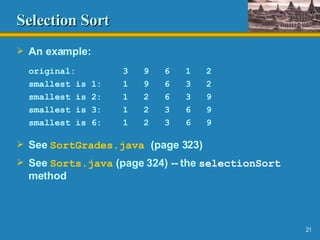
Selection Sort An example: original:  3  9  6  1  2 smallest is 1:  1  9  6  3  2 smallest is 2:  1  2  6  3  9 smallest is 3:  1  2  3  6  9 smallest is 6:  1  2  3  6  9 See  SortGrades .java   (page 323) See  Sorts.java  (page 324) -- the  selectionSort  method
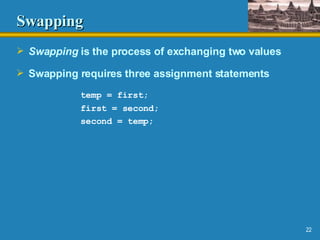
Swapping Swapping  is the process of exchanging two values Swapping requires three assignment statements temp = first; first = second; second = temp;
Insertion Sort The approach of Insertion Sort: pick any item and insert it into its proper place in a sorted sublist repeat until all items have been inserted In more detail: consider the first item to be a sorted sublist (of one item) insert the second item into the sorted sublist, shifting the first item as needed to make room to insert the new addition insert the third item into the sorted sublist (of two items), shifting items as necessary repeat until all values are inserted into their proper positions
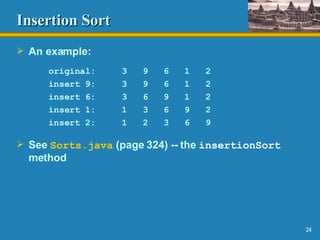
Insertion Sort An example: original:  3  9  6  1  2 insert 9:  3  9  6  1  2 insert 6:  3  6  9  1  2 insert 1:  1  3  6  9  2 insert 2:  1  2  3  6  9 See  Sorts.java  (page 324) -- the  insertionSort  method
Sorting Objects Integers have an inherent order, but the ordering criteria of a collection of objects must be defined Recall that a Java interface can be used as a type name and guarantees that a particular class implements particular methods We can use the  Comparable  interface and the  compareTo  method to develop a generic sort for a set of objects See  SortPhoneList .java   (page 328) See  Contact.java  (page 329) See  Sorts.java  (page 324) – the second  insertionSort  method
Comparing Sorts Time efficiency refers to how long it takes an algorithm to run Space efficiency refers to the amount of space an algorithm uses Algorithms are compared to each other by expressing their efficiency in  big-oh notation An efficiency of O(n) is better than O(n 2 ), where n refers to the size of the input Time efficiency O(2 n ) means that as the size of the input increases, the running time increases exponentially
Comparing Sorts Both Selection and Insertion sorts are similar in efficiency They both have outer loops that scan all elements, and inner loops that compare the value of the outer loop with almost all values in the list Approximately n 2  number of comparisons are made to sort a list of size n We therefore say that these sorts have efficiency O(n 2 ), or are of  order n 2 Other sorts are more efficient: O(n log 2  n)
Hashing Hashing is a technique used to efficiently store and retrieve data in an array An array used for hashing is called a hash table A hash function calculates a hash code for each data item. The hash code is used as an index into the array, telling where the data item should be stored Example: hash function f(n) = n % 7 Element 18 would be stored in array cell 18 % 7 or 4
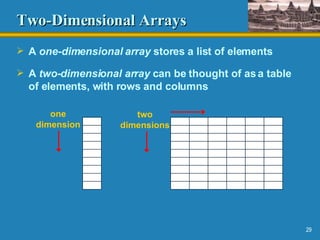
Two-Dimensional Arrays A  one-dimensional array  stores a list of elements A  two-dimensional array  can be thought of as a table of elements, with rows and columns one dimension two dimensions
Two-Dimensional Arrays To be precise, a two-dimensional array in Java is an array of arrays A two-dimensional array is declared by specifying the size of each dimension separately: int[][] scores = new int[12][50]; A two-dimensional array element is referenced using two index values value = scores[3][6] The array stored in one row or column can be specified using one index
Two-Dimensional Arrays See  TwoDArray .java  (page 335) See  SodaSurvey .java   (page 336) integer int scores[5][12] array of integers int[] scores[5] 2D array of integers, or array of integer arrays int[][] scores Description Type Expression
The ArrayList Class The  ArrayList  class is part of the  java.util  package Like an array, it can store a list of values and reference them with an index Unlike an array, an  ArrayList  object grows and shrinks as needed Items can be inserted or removed with a single method invocation It stores references to the  Object  class, which allows it to store any kind of object See  DestinysChild .java  (page 339) See  Recipe.java  (page 341)
ArrayList   Efficiency The  ArrayList  class is implemented using an array The code of the  ArrayList  class automatically expands the array's capacity to accommodate additional elements The array is manipulated so that indexes remain continuous as elements are added or removed If elements are added to and removed from the end of the list, this processing is fairly efficient If elements are inserted and removed from the middle of the list, the elements are constantly being shifted around
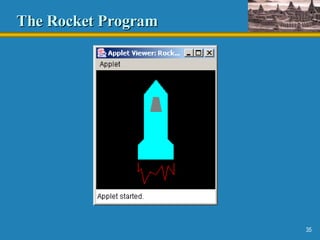
Polygons and Polylines Arrays often are helpful in graphics processing Polygons and polylines are shapes that can be defined by values stored in arrays A polyline is similar to a polygon except that its endpoints do not meet, and it cannot be filled See  Rocket.java  (page 359)
The Rocket Program
The Polygon   Class The  Polygon  class, defined in the  java.awt  package can be used to define and draw a polygon Two versions of the overloaded  drawPolygon  and  fillPolygon  methods each take a single  Polygon  object as a parameter A  Polygon  object encapsulates the coordinates of the polygon
Check Boxes A  check box  is a button that can be toggled on or off A check box is represented by the  JCheckBox  class A change of state generates an  item event The  ItemListener  interface corresponds to item events The  itemStateChanged  method of the listener responds when a check box changes state
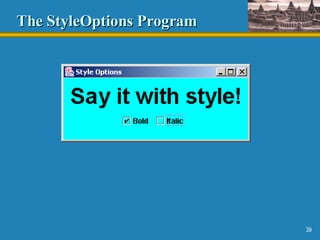
The StyleOptions Program A  frame  is a container that can be used to create stand-alone GUI applications A frame is represented by the  JFrame  class A  Font  object represents by the font's: family name (such as Times or Courier) style (bold, italic, or both) font size See  StyleOptions.java  (page 363) See  StyleGUI.java  (page 364)
The StyleOptions Program
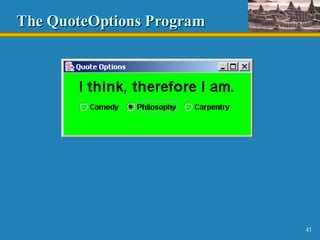
Radio Buttons A set of  radio buttons  represents a set of mutually exclusive options When a radio button from a group is selected, the other button currently &quot;on&quot; in the group is toggled off A radio button generates an action event See  QuoteOptions.java  (page 366) See  QuoteGUI.java  (page 368)
The QuoteOptions Program
Summary Chapter 6 has focused on: array declaration and use passing arrays and array elements as parameters arrays of objects searching an array sorting elements in an array hashing two-dimensional arrays the  ArrayList  class polygons, polylines, and more button components

Ap Power Point Chpt6

  • 1.
    Chapter 6: Arrays Presentation slides for Java Software Solutions for AP* Computer Science by John Lewis, William Loftus, and Cara Cocking Java Software Solutions is published by Addison-Wesley Presentation slides are copyright 2002 by John Lewis, William Loftus, and Cara Cocking. All rights reserved. Instructors using the textbook may use and modify these slides for pedagogical purposes. *AP is a registered trademark of The College Entrance Examination Board which was not involved in the production of, and does not endorse, this product.
  • 2.
    Arrays Arrays areobjects that help us organize large amounts of information Chapter 6 focuses on: array declaration and use passing arrays and array elements as parameters arrays of objects searching an array sorting elements in an array hashing two-dimensional arrays the ArrayList class polygons, polylines, and more button components
  • 3.
    Arrays An array is an ordered list of values 0 1 2 3 4 5 6 7 8 9 An array of size N is indexed from zero to N-1 This array holds 10 values that are indexed from 0 to 9 79 87 94 82 67 98 87 81 74 91 scores The entire array has a single name Each value has a numeric index
  • 4.
    Arrays A particularvalue in an array is referenced using the array name followed by the index in brackets For example, the expression scores[2] refers to the value 94 (the 3rd value in the array) That expression represents a place to store a single integer and can be used wherever an integer variable can be used
  • 5.
    Arrays For example,an array element can be assigned a value, printed, or used in a calculation : scores[2] = 89; scores[first] = scores[first] + 2; mean = (scores[0] + scores[1])/2; System.out.println (&quot;Top = &quot; + scores[5]);
  • 6.
    Arrays The valuesheld in an array are called array elements An array stores multiple values of the same type (the element type ) The element type can be a primitive type or an object reference Therefore, we can create an array of integers, or an array of characters, or an array of String objects, etc. In Java, the array itself is an object Therefore the name of the array is a object reference variable, and the array itself must be instantiated
  • 7.
    Declaring Arrays The scores array could be declared as follows: int[] scores = new int[10]; The type of the variable scores is int[] (an array of integers) Note that the type of the array does not specify its size, but each object of that type has a specific size The reference variable scores is set to a new array object that can hold 10 integers See BasicArray .java (page 300)
  • 8.
    Declaring Arrays Someexamples of array declarations: double[] prices = new double[500]; boolean[] flags; flags = new boolean[20]; char[] codes = new char[1750];
  • 9.
    Bounds Checking Oncean array is created, it has a fixed size An index used in an array reference must specify a valid element That is, the index value must be in bounds (0 to N-1) The Java interpreter throws an ArrayIndexOutOfBoundsException if an array index is out of bounds This is called automatic bounds checking
  • 10.
    Bounds Checking Forexample, if the array codes can hold 100 values, it can be indexed using only the numbers 0 to 99 If count has the value 100, then the following reference will cause an exception to be thrown: System.out.println (codes[count]); It’s common to introduce off-by-one errors when using arrays for (int index=0; index <= 100; index++) codes[index] = index*50 + epsilon; problem
  • 11.
    Bounds Checking Eacharray object has a public constant called length that stores the size of the array It is referenced using the array name: scores.length Note that length holds the number of elements, not the largest index See ReverseOrder .java (page 302) See LetterCount .java (page 304)
  • 12.
    Initializer Lists An initializer list can be used to instantiate and initialize an array in one step The values are delimited by braces and separated by commas Examples: int[] units = {147, 323, 89, 933, 540, 269, 97, 114, 298, 476}; char[] letterGrades = {'A', 'B', 'C', 'D', ’F'};
  • 13.
    Initializer Lists Notethat when an initializer list is used: the new operator is not used no size value is specified The size of the array is determined by the number of items in the initializer list An initializer list can only be used only in the array declaration See Primes.java (page 308)
  • 14.
    Arrays as ParametersAn entire array can be passed as a parameter to a method Like any other object, the reference to the array is passed, making the formal and actual parameters aliases of each other Changing an array element within the method changes the original An array element can be passed to a method as well, and follows the parameter passing rules of that element's type
  • 15.
    Arrays of ObjectsThe elements of an array can be object references The following declaration reserves space to store 25 references to String objects String[] words = new String[25]; It does NOT create the String objects themselves Each object stored in an array must be instantiated separately See GradeRange .java (page 310)
  • 16.
    Command-Line Arguments Thesignature of the main method indicates that it takes an array of String objects as a parameter These values come from command-line arguments that are provided when the interpreter is invoked For example, the following invocation of the interpreter passes an array of three String objects into main : > java StateEval pennsylvania texas arizona These strings are stored at indexes 0-2 of the parameter See NameTag .java (page 311)
  • 17.
    Arrays of ObjectsObjects can have arrays as instance variables Many useful structures can be created with arrays and objects The software designer must determine carefully an organization of data and objects that makes sense for the situation See Tunes.java (page 312) See CDCollection .java (page 314) See CD.java (page 316)
  • 18.
    Searching A commontask when working with arrays is to search an array for a particular element A linear or sequential search examines each element of the array in turn until the desired element is found A binary search is more efficient than a linear search but it can only be performed on an ordered list A binary search examines the middle element and moves left if the desired element is less than the middle, and right if the desired element is greater This process repeats until the desired element is found See Searches.java (page 319)
  • 19.
    Sorting Sorting isthe process of arranging a list of items in a particular order The sorting process is based on specific value(s) sorting a list of test scores in ascending numeric order sorting a list of people alphabetically by last name There are many algorithms for sorting a list of items These algorithms vary in efficiency We will examine two specific algorithms: Selection Sort Insertion Sort
  • 20.
    Selection Sort Theapproach of Selection Sort: select a value and put it in its final place into the list repeat for all other values In more detail: find the smallest value in the list switch it with the value in the first position find the next smallest value in the list switch it with the value in the second position repeat until all values are in their proper places
  • 21.
    Selection Sort Anexample: original: 3 9 6 1 2 smallest is 1: 1 9 6 3 2 smallest is 2: 1 2 6 3 9 smallest is 3: 1 2 3 6 9 smallest is 6: 1 2 3 6 9 See SortGrades .java (page 323) See Sorts.java (page 324) -- the selectionSort method
  • 22.
    Swapping Swapping is the process of exchanging two values Swapping requires three assignment statements temp = first; first = second; second = temp;
  • 23.
    Insertion Sort Theapproach of Insertion Sort: pick any item and insert it into its proper place in a sorted sublist repeat until all items have been inserted In more detail: consider the first item to be a sorted sublist (of one item) insert the second item into the sorted sublist, shifting the first item as needed to make room to insert the new addition insert the third item into the sorted sublist (of two items), shifting items as necessary repeat until all values are inserted into their proper positions
  • 24.
    Insertion Sort Anexample: original: 3 9 6 1 2 insert 9: 3 9 6 1 2 insert 6: 3 6 9 1 2 insert 1: 1 3 6 9 2 insert 2: 1 2 3 6 9 See Sorts.java (page 324) -- the insertionSort method
  • 25.
    Sorting Objects Integershave an inherent order, but the ordering criteria of a collection of objects must be defined Recall that a Java interface can be used as a type name and guarantees that a particular class implements particular methods We can use the Comparable interface and the compareTo method to develop a generic sort for a set of objects See SortPhoneList .java (page 328) See Contact.java (page 329) See Sorts.java (page 324) – the second insertionSort method
  • 26.
    Comparing Sorts Timeefficiency refers to how long it takes an algorithm to run Space efficiency refers to the amount of space an algorithm uses Algorithms are compared to each other by expressing their efficiency in big-oh notation An efficiency of O(n) is better than O(n 2 ), where n refers to the size of the input Time efficiency O(2 n ) means that as the size of the input increases, the running time increases exponentially
  • 27.
    Comparing Sorts BothSelection and Insertion sorts are similar in efficiency They both have outer loops that scan all elements, and inner loops that compare the value of the outer loop with almost all values in the list Approximately n 2 number of comparisons are made to sort a list of size n We therefore say that these sorts have efficiency O(n 2 ), or are of order n 2 Other sorts are more efficient: O(n log 2 n)
  • 28.
    Hashing Hashing isa technique used to efficiently store and retrieve data in an array An array used for hashing is called a hash table A hash function calculates a hash code for each data item. The hash code is used as an index into the array, telling where the data item should be stored Example: hash function f(n) = n % 7 Element 18 would be stored in array cell 18 % 7 or 4
  • 29.
    Two-Dimensional Arrays A one-dimensional array stores a list of elements A two-dimensional array can be thought of as a table of elements, with rows and columns one dimension two dimensions
  • 30.
    Two-Dimensional Arrays Tobe precise, a two-dimensional array in Java is an array of arrays A two-dimensional array is declared by specifying the size of each dimension separately: int[][] scores = new int[12][50]; A two-dimensional array element is referenced using two index values value = scores[3][6] The array stored in one row or column can be specified using one index
  • 31.
    Two-Dimensional Arrays See TwoDArray .java (page 335) See SodaSurvey .java (page 336) integer int scores[5][12] array of integers int[] scores[5] 2D array of integers, or array of integer arrays int[][] scores Description Type Expression
  • 32.
    The ArrayList ClassThe ArrayList class is part of the java.util package Like an array, it can store a list of values and reference them with an index Unlike an array, an ArrayList object grows and shrinks as needed Items can be inserted or removed with a single method invocation It stores references to the Object class, which allows it to store any kind of object See DestinysChild .java (page 339) See Recipe.java (page 341)
  • 33.
    ArrayList Efficiency The ArrayList class is implemented using an array The code of the ArrayList class automatically expands the array's capacity to accommodate additional elements The array is manipulated so that indexes remain continuous as elements are added or removed If elements are added to and removed from the end of the list, this processing is fairly efficient If elements are inserted and removed from the middle of the list, the elements are constantly being shifted around
  • 34.
    Polygons and PolylinesArrays often are helpful in graphics processing Polygons and polylines are shapes that can be defined by values stored in arrays A polyline is similar to a polygon except that its endpoints do not meet, and it cannot be filled See Rocket.java (page 359)
  • 35.
  • 36.
    The Polygon Class The Polygon class, defined in the java.awt package can be used to define and draw a polygon Two versions of the overloaded drawPolygon and fillPolygon methods each take a single Polygon object as a parameter A Polygon object encapsulates the coordinates of the polygon
  • 37.
    Check Boxes A check box is a button that can be toggled on or off A check box is represented by the JCheckBox class A change of state generates an item event The ItemListener interface corresponds to item events The itemStateChanged method of the listener responds when a check box changes state
  • 38.
    The StyleOptions ProgramA frame is a container that can be used to create stand-alone GUI applications A frame is represented by the JFrame class A Font object represents by the font's: family name (such as Times or Courier) style (bold, italic, or both) font size See StyleOptions.java (page 363) See StyleGUI.java (page 364)
  • 39.
  • 40.
    Radio Buttons Aset of radio buttons represents a set of mutually exclusive options When a radio button from a group is selected, the other button currently &quot;on&quot; in the group is toggled off A radio button generates an action event See QuoteOptions.java (page 366) See QuoteGUI.java (page 368)
  • 41.
  • 42.
    Summary Chapter 6has focused on: array declaration and use passing arrays and array elements as parameters arrays of objects searching an array sorting elements in an array hashing two-dimensional arrays the ArrayList class polygons, polylines, and more button components