ECE 421
Introduction to Power System
1
Lab 1 - Power System Structure, Transmission Lines, Power
Flow and Supervision
Objective
Introduce electrical power system structure; Become familiar with the Analog Model Power
System (AMPS); Show SCADA system running; System behavior with variation in transmission
line impedance; Compare practical results with theoretical calculations and different line models.
1. Introduction
2.1. Power System Structure
Nowadays, electrical energy is fundamental in our society both in our personal activities
(electronic devices, heating, cooling and so on) and industry (manufacturing of some products
requires a big amount of energy). Therefore, when energy is missed, it usually causes big losses.
For example, when a manufacturing process is interrupted, it may imply losses in all products
which were being produced.
The electrical energy is produced from a different energy source (coal, oil, natural gas,
nuclear, hydro, wind, solar, etc.), which is converted through the electrical machines. After
generated, this energy needs to go up to the load, where it is consumed. The load is usually far
from the power plants and in order to transfer the energy between them, transmission lines are
used. The transmission system often has high voltage level. Finally, most part of the loads are in
low voltage level, in distribution systems. Generation, Transmission and Distribution systems,
further transformers, CTs, PTs, substations and some others compose the Power System. The
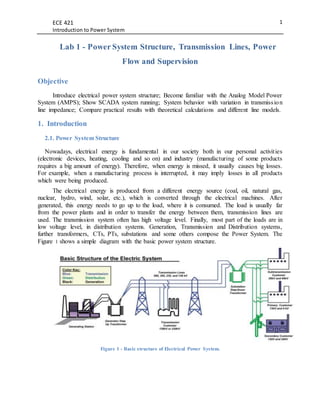
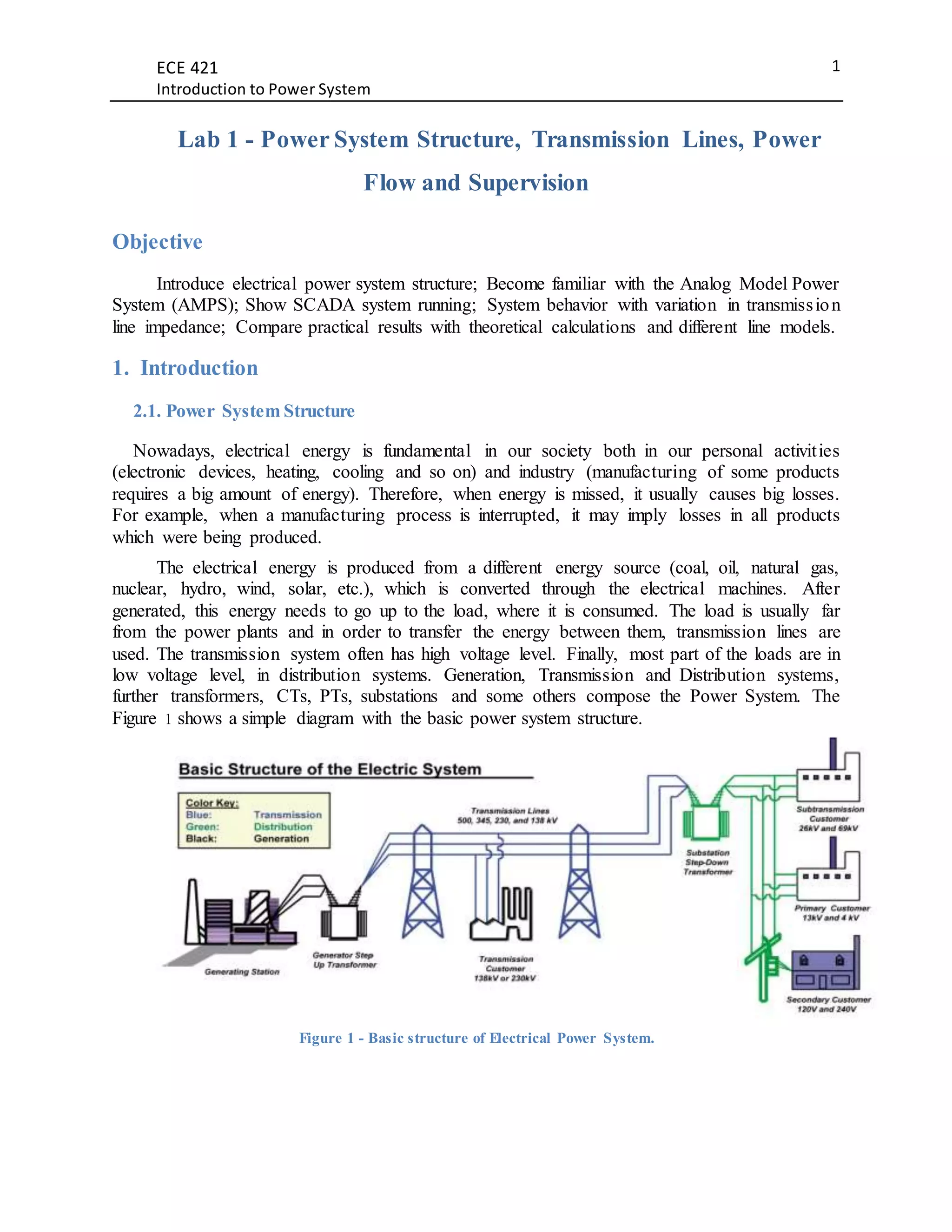
Figure 1 shows a simple diagram with the basic power system structure.
Figure 1 - Basic structure of Electrical Power System.
ECE 421
Introduction to Power System
2
2.2. Supervisory and Phasor Measurement Unit (PMU)
In each sector of this system, we have a lot of devices monitoring all operation. Measures,
sensors, CTs, PTs, relays and electronic devices are used to get data all the time from different
places and units. This information is transferred through various communications types, protocols
and channels existing in the Power System. All of these can be concentrated and send to computers
in an operation center, for example. There, people will be able to deal with these data according to
their needs.
SCADA
One common example of this process of gathering data and sending to computers (servers),
is the SCADA (Supervisory Control and Data Acquisition). This system is very popular in
industrial systems and also it is used in electrical power system. Through it, engineers can
supervise voltages, currents, breakers status (opened/closed), power flow as well as they can
control breakers, relay's outputs, excitation or speed of machines, depending on the application.
How a SCADA system works is not important to this experiment.
HMI
The computer screen is where all information is exhibited to the users through an HMI
(Human Machine Interface), which is a software able to show all the data. Usually, an HMI has a
nice interface which makes it easier to the users to understand what is going on. Besides, the HMI
usually provides buttons to carry out remote control about any controllable variable on the system.
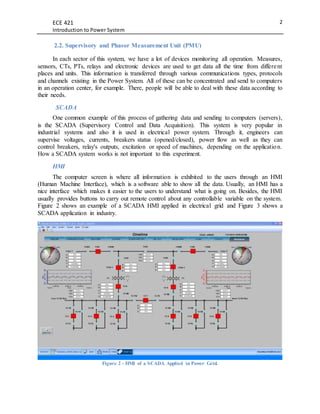
Figure 2 shows an example of a SCADA HMI applied in electrical grid and Figure 3 shows a
SCADA application in industry.
Figure 2 - HMI of a SCADA Applied in Power Grid.
ECE 421
Introduction to Power System
3
Figure 3 - HMI of a SCADA applied in Industry.
2. Analog Model Power System (AMPS)
The AMPS is located in the room G-10 of the Buchanan Engineering Building. This analog
power system contains six buses which can be connected in different ways in order to get various
networks depending on desired application.
The lab represents a real power system in small scale. You can find there a system with: six
buses, four transmission lines, an infinite bus (Avista), a synchronous machine, loads, breakers,
relays, logic processors, CTs, PTs, meters, communication cables, Ethernet switch, routers, server,
SCADA and some other things.
Further AMPS specifications can be found in the Chapter 1 of the "Draft User’s Manual for
Analog Model Power Systems (AMPS)" [2].
3. Equipment and Lab. Methods - before starting up
Loads
Two different kinds of loads will be used in these tests and both are going to be Y connection.
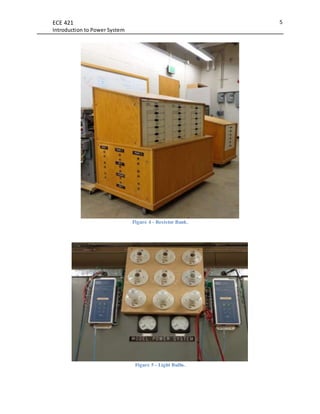
Resistive Load: Light bulbs of 100W per phase + Resistor bank with all resistors in series
(around 77.3 Ω each phase);
Inductive Load: Resistive load + Inductor bank with all reactances in series (around
6.3234+j69.7948 Ω each phase, pf = 0.09);
ECE 421
Introduction to Power System
4
Loads for Part 2 of the lab
Resistive bank: We are going to vary the load of the resistor bank from all in series
(𝑅1, 𝑅2, 𝑅3, 𝑅4, 𝑅5).
Resistive Bank and Light bulbs: Light bulbs of 100W each (300W 3 phase load) will be
constant + Resistor bank varying the load as previous step.
Inductive Bank and Light bulbs: Light bulbs of 100W each (300W 3 phase load) will be
constant + Inductor bank varying from all in series (𝑋 𝐿1, 𝑋 𝐿2, 𝑋 𝐿3, 𝑋 𝐿4, 𝑋 𝐿5).
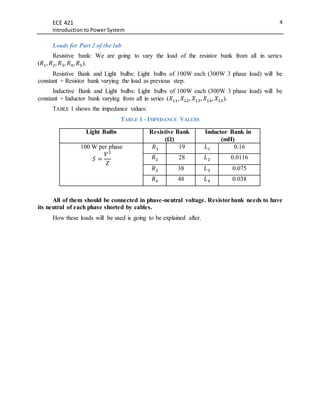
TABLE 1 shows the impedance values:
TABLE 1 - IMPEDANCE VALUES
Light Bulbs Resistive Bank
(Ω)
Inductor Bank in
(mH)
100 W per phase
𝑆 =
𝑉2
𝑍
𝑅1 19 𝐿1 0.16
𝑅2 28 𝐿2 0.0116
𝑅3 38 𝐿3 0.075
𝑅4 48 𝐿4 0.038
All of them should be connected in phase-neutral voltage. Resistorbank needs to have
its neutral of each phase shorted by cables.
How these loads will be used is going to be explained after.
ECE 421
Introduction to Power System
5
Figure 4 - Resistor Bank.
Figure 5 - Light Bulbs.
ECE 421
Introduction to Power System
6
Meters
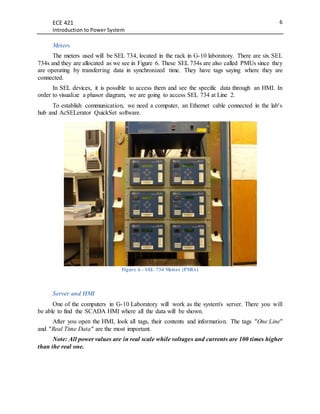
The meters used will be SEL 734, located in the rack in G-10 laboratory. There are six SEL
734s and they are allocated as we see in Figure 6. These SEL 734s are also called PMUs since they
are operating by transferring data in synchronized time. They have tags saying where they are
connected.
In SEL devices, it is possible to access them and see the specific data through an HMI. In
order to visualize a phasor diagram, we are going to access SEL 734 at Line 2.
To establish communication, we need a computer, an Ethernet cable connected in the lab's
hub and AcSELerator QuickSet software.
Figure 6 - SEL 734 Meters (PMUs)
Server and HMI
One of the computers in G-10 Laboratory will work as the system's server. There you will
be able to find the SCADA HMI where all the data will be shown.
After you open the HMI, look all tags, their contents and information. The tags "One Line"
and "Real Time Data" are the most important.
Note: All power values are in real scale while voltages and currents are 100 times higher
than the real one.
ECE 421
Introduction to Power System
7
System Network
a) The experiment will be done with an infinite bus feeding a load by two parallel
transmission lines as seen in Figure 7;
Figure 7 - System Network used in this Lab.
Note: 52 → AC Circuit Breaker by ANSI/IEEE Standard Device Numbers.
b) To certify that the system is correctly connected, check/make the following connections
using jumpers cables:
[J1-J2], [J5-J26], [J27-J29], [J30-J31], [J32-J33], [J34-J36], [J38-J22], [J20-J18], [J15-J17],
[J13-J14], [J11-J12], [J8-J10];
DO NOT connect [J23-24].
Figure 8 - Breaker and Jumper Cables on AMPS.
ECE 421
Introduction to Power System
8
c) The line impedances should be always equal to each other. Initially, let's use 100%
percent of Lines 1 and 2, and completely by-pass Lines 3 and 4. It is done to reduce
errors, as explained in [2];
d) Certify that both source impedances are in tap 10 (100%).
Start Up
The energization must be done by the lab instructor or with his agreement.
"To start up the AMPS, first remove the padlock and turn on the main breaker located on the
south wall. Flip on the “Fault Matrix” and “DC Power Supply” switch located on panel number
2F on the left side of AMPS." 11[2]. Do not energize the system yet.
4. Lab. Methods - after start up
4.1 Part 1
4.1.2 Resistive Load Test
a) Set up all resistances on resistor bank in series and insert it at Bus R, as well as the light
bulbs;
Note: Now, the initial condition test is 100% of top and bottom lines with resistive load.
Note: The load bulbs can draw more power than their nominal power since their resistive load is
not accurate.
b) Press the START button on AMPS and close all breakers (red lights on);
c) Check the Power Flow in One Line tag of the HMI, voltages, currents and their angles
in Real Time Data tag and also in the Phasor Diagram from SEL 734 Human Interface;
d) Record (print screen) all those screens;
e) Now, open all breakers and turn the system off (OFF bottom);
f) Reduce the line impedance to 70% (0.7 + j7.0 Ω) always using line one and line two;
g) Repeat steps b) up to f);
h) Now, reduce the line impedance to 30 % (0.3 + j3.0 Ω) and repeat steps b) up to f);
i) After that, turn off the system and go to heavy load test.
ECE 421
Introduction to Power System
9
4.1.3 Inductive Load Test
a) Put line impedances back to 100% and set up all inductances of the bank in series. After
that, insert the inductor bank at Bus R;
b) Press the START button on AMPS and close all breakers (red lights on);
c) Check the Power Flow in One Line tag of the HMI, voltages, currents and their angles
in Real Time Data tag and also in the Phasor Diagram from SEL 734 Human Interface;
d) Record (print screen) all those screens;
e) Now, open all breakers and turn the system off (OFF button);
f) Reduce the line impedance to 70% (0.7 + j7.0 Ω) always using line one and line two;
g) Repeat steps b) up to f);
h) Now, reduce the line impedance to 30 % (0.3 + j3.0 Ω) and repeat steps b) up to f);
i) After finished, turn off the AMPS.
4.2 Part 2
4.2.1 Resistor Bank + Light Bulbs Test
a) Set up all resistances on resistor bank in series and insert it at Bus R;
b) Connect the light bulbs at Bus R;
c) Press the START button on AMPS and close all breakers (red lights on);
d) Check the Power Flow in One Line tag of the HMI, voltages, currents and their angles
in Real Time Data tag and also in the Phasor Diagram from SEL 734 Human Interface.
Also observe the light bulbs;
e) Record (print screen) all those screens;
f) Now, open both breakers at right hand side in order to isolate Bus R. This way we are
able to disconnect/connect loads in that bus without risks);
ECE 421
Introduction to Power System
10
g) Reduce the bank's resistance pulling next switch to left side and putting the switch
above on middle position;
h) Repeat steps b) up to f) up to rest only 𝑅1;
i) After that, open all breakers and turn off the system and go to the next test.
4.2.2 Inductor Bank + Light Bulbs Test
a) Disconnect the resistor bank from the system. Set up all inductances of the bank in series
and connect them at Bus R;
b) Press the START button on AMPS and close all breakers (red lights on);
c) Check the Power Flow in One Line tag of the HMI, voltages, currents and their angles
in Real Time Data tag and also in the Phasor Diagram from SEL 734 Human Interface.
Also observe the light bulbs;
d) Record (print screen) all those screens;
e) Now, open both breakers at right hand side in order to isolate Bus R. This way we are
able to disconnect/connect loads in that bus without risks);
f) Reduce the bank's inductance pulling next switch to left side and putting the switch
above on middle position;
g) Repeat steps b) up to f) up to rest only 𝑋 𝐿1;
h) After that, open all breakers and turn off the system and go to the next test.
5. Post Lab
In order to get a theoretical comparative to this lab, calculate in MathCAD everything what
will be done. Create a variable transmission line impedance vector (10% step) and calculate to
Avista bus, Bus S and Bus R (load bus): voltages and currents, real and reactive power, losses and
power factor.
Do it to different transmission lines models: series impedance and Pi-Circuit. More about
transmission lines models can be found in [3].
Plot all calculations to get a easier visualization.
ECE 421
Introduction to Power System
11
Tip: To each step of line impedance we have 0.1+j1 ohm. The line capacitive effect is
created by real capacitors of 0.47𝜇𝐹 (to phase-ground and phase-phase is the same value). When
calculating the equivalent transmission line you should use 𝑌𝑒𝑞𝑢𝑖𝑣𝑎𝑙𝑒𝑛𝑡 = 16. 𝑌𝐶.
6. Report
a) In G10 Lab we have, in smaller scale, all structures present in a real Power System.
Describe the Power System lab with a real one. Write all you have learned about how
the lab work (AMPS, Communications, server and so on);
b) Transfer all data to a MathCAD spreadsheet or similar, where you will be able to deal
with those information. Calculate measures which were not present on HMI and you
feel they are important;
c) Compare your MathCAD calculations and plots with the results gotten in lab. Compare
also results from pi model and series impedance models of transmission Lines. Use
graphs to get a better visualization. Plot together real power at Avista bus measured
from: HMI and also from your calculations. Then, compare if they are similar. Do the
same to reactive power, voltage and current;
d) For resistive load, show the results and write about the questions bellow:
 What are the effects of line impedance variation in real and reactive power flow,
voltages and currents (take care about unbalances) and power factors (calculate them,
specially the system power factor);
 Calculate real and reactive power losses in the line. What do you conclude with the
results?
e) Repeat item 6.b) for the heavy loads;
f) Reflect about obtained results to only resistive load and resistive and inductive loads.
Write your conclusions.
7. References
[1] D. P. Kothari, I. J. Nagrath; Modern Power System Analysis, Mc Graw Hill, 2008;
[2] Draft Users Manual for Analog Model Power Systems (AMPS);
[3] J. Ducan Glover, M. S. Sarma, T. J. Overbye; Power System Analysis and Design -
Fifth Edition.
[4] SEL University IA 309, Synchrophasor Measurement & Application;
ECE 421
Introduction to Power System
12
[5] J. V. Espinoza, A. Guzmán, F. Calero, M. V. Mynam, E. Palma, SEL; Wide- Area
Measurement and Control Scheme Maintains Central America's Power System
Stability.

Power System Structure

  • 1.
    ECE 421 Introduction toPower System 1 Lab 1 - Power System Structure, Transmission Lines, Power Flow and Supervision Objective Introduce electrical power system structure; Become familiar with the Analog Model Power System (AMPS); Show SCADA system running; System behavior with variation in transmission line impedance; Compare practical results with theoretical calculations and different line models. 1. Introduction 2.1. Power System Structure Nowadays, electrical energy is fundamental in our society both in our personal activities (electronic devices, heating, cooling and so on) and industry (manufacturing of some products requires a big amount of energy). Therefore, when energy is missed, it usually causes big losses. For example, when a manufacturing process is interrupted, it may imply losses in all products which were being produced. The electrical energy is produced from a different energy source (coal, oil, natural gas, nuclear, hydro, wind, solar, etc.), which is converted through the electrical machines. After generated, this energy needs to go up to the load, where it is consumed. The load is usually far from the power plants and in order to transfer the energy between them, transmission lines are used. The transmission system often has high voltage level. Finally, most part of the loads are in low voltage level, in distribution systems. Generation, Transmission and Distribution systems, further transformers, CTs, PTs, substations and some others compose the Power System. The Figure 1 shows a simple diagram with the basic power system structure. Figure 1 - Basic structure of Electrical Power System.
  • 2.
    ECE 421 Introduction toPower System 2 2.2. Supervisory and Phasor Measurement Unit (PMU) In each sector of this system, we have a lot of devices monitoring all operation. Measures, sensors, CTs, PTs, relays and electronic devices are used to get data all the time from different places and units. This information is transferred through various communications types, protocols and channels existing in the Power System. All of these can be concentrated and send to computers in an operation center, for example. There, people will be able to deal with these data according to their needs. SCADA One common example of this process of gathering data and sending to computers (servers), is the SCADA (Supervisory Control and Data Acquisition). This system is very popular in industrial systems and also it is used in electrical power system. Through it, engineers can supervise voltages, currents, breakers status (opened/closed), power flow as well as they can control breakers, relay's outputs, excitation or speed of machines, depending on the application. How a SCADA system works is not important to this experiment. HMI The computer screen is where all information is exhibited to the users through an HMI (Human Machine Interface), which is a software able to show all the data. Usually, an HMI has a nice interface which makes it easier to the users to understand what is going on. Besides, the HMI usually provides buttons to carry out remote control about any controllable variable on the system. Figure 2 shows an example of a SCADA HMI applied in electrical grid and Figure 3 shows a SCADA application in industry. Figure 2 - HMI of a SCADA Applied in Power Grid.
  • 3.
    ECE 421 Introduction toPower System 3 Figure 3 - HMI of a SCADA applied in Industry. 2. Analog Model Power System (AMPS) The AMPS is located in the room G-10 of the Buchanan Engineering Building. This analog power system contains six buses which can be connected in different ways in order to get various networks depending on desired application. The lab represents a real power system in small scale. You can find there a system with: six buses, four transmission lines, an infinite bus (Avista), a synchronous machine, loads, breakers, relays, logic processors, CTs, PTs, meters, communication cables, Ethernet switch, routers, server, SCADA and some other things. Further AMPS specifications can be found in the Chapter 1 of the "Draft User’s Manual for Analog Model Power Systems (AMPS)" [2]. 3. Equipment and Lab. Methods - before starting up Loads Two different kinds of loads will be used in these tests and both are going to be Y connection. Resistive Load: Light bulbs of 100W per phase + Resistor bank with all resistors in series (around 77.3 Ω each phase); Inductive Load: Resistive load + Inductor bank with all reactances in series (around 6.3234+j69.7948 Ω each phase, pf = 0.09);
  • 4.
    ECE 421 Introduction toPower System 4 Loads for Part 2 of the lab Resistive bank: We are going to vary the load of the resistor bank from all in series (𝑅1, 𝑅2, 𝑅3, 𝑅4, 𝑅5). Resistive Bank and Light bulbs: Light bulbs of 100W each (300W 3 phase load) will be constant + Resistor bank varying the load as previous step. Inductive Bank and Light bulbs: Light bulbs of 100W each (300W 3 phase load) will be constant + Inductor bank varying from all in series (𝑋 𝐿1, 𝑋 𝐿2, 𝑋 𝐿3, 𝑋 𝐿4, 𝑋 𝐿5). TABLE 1 shows the impedance values: TABLE 1 - IMPEDANCE VALUES Light Bulbs Resistive Bank (Ω) Inductor Bank in (mH) 100 W per phase 𝑆 = 𝑉2 𝑍 𝑅1 19 𝐿1 0.16 𝑅2 28 𝐿2 0.0116 𝑅3 38 𝐿3 0.075 𝑅4 48 𝐿4 0.038 All of them should be connected in phase-neutral voltage. Resistorbank needs to have its neutral of each phase shorted by cables. How these loads will be used is going to be explained after.
  • 5.
    ECE 421 Introduction toPower System 5 Figure 4 - Resistor Bank. Figure 5 - Light Bulbs.
  • 6.
    ECE 421 Introduction toPower System 6 Meters The meters used will be SEL 734, located in the rack in G-10 laboratory. There are six SEL 734s and they are allocated as we see in Figure 6. These SEL 734s are also called PMUs since they are operating by transferring data in synchronized time. They have tags saying where they are connected. In SEL devices, it is possible to access them and see the specific data through an HMI. In order to visualize a phasor diagram, we are going to access SEL 734 at Line 2. To establish communication, we need a computer, an Ethernet cable connected in the lab's hub and AcSELerator QuickSet software. Figure 6 - SEL 734 Meters (PMUs) Server and HMI One of the computers in G-10 Laboratory will work as the system's server. There you will be able to find the SCADA HMI where all the data will be shown. After you open the HMI, look all tags, their contents and information. The tags "One Line" and "Real Time Data" are the most important. Note: All power values are in real scale while voltages and currents are 100 times higher than the real one.
  • 7.
    ECE 421 Introduction toPower System 7 System Network a) The experiment will be done with an infinite bus feeding a load by two parallel transmission lines as seen in Figure 7; Figure 7 - System Network used in this Lab. Note: 52 → AC Circuit Breaker by ANSI/IEEE Standard Device Numbers. b) To certify that the system is correctly connected, check/make the following connections using jumpers cables: [J1-J2], [J5-J26], [J27-J29], [J30-J31], [J32-J33], [J34-J36], [J38-J22], [J20-J18], [J15-J17], [J13-J14], [J11-J12], [J8-J10]; DO NOT connect [J23-24]. Figure 8 - Breaker and Jumper Cables on AMPS.
  • 8.
    ECE 421 Introduction toPower System 8 c) The line impedances should be always equal to each other. Initially, let's use 100% percent of Lines 1 and 2, and completely by-pass Lines 3 and 4. It is done to reduce errors, as explained in [2]; d) Certify that both source impedances are in tap 10 (100%). Start Up The energization must be done by the lab instructor or with his agreement. "To start up the AMPS, first remove the padlock and turn on the main breaker located on the south wall. Flip on the “Fault Matrix” and “DC Power Supply” switch located on panel number 2F on the left side of AMPS." 11[2]. Do not energize the system yet. 4. Lab. Methods - after start up 4.1 Part 1 4.1.2 Resistive Load Test a) Set up all resistances on resistor bank in series and insert it at Bus R, as well as the light bulbs; Note: Now, the initial condition test is 100% of top and bottom lines with resistive load. Note: The load bulbs can draw more power than their nominal power since their resistive load is not accurate. b) Press the START button on AMPS and close all breakers (red lights on); c) Check the Power Flow in One Line tag of the HMI, voltages, currents and their angles in Real Time Data tag and also in the Phasor Diagram from SEL 734 Human Interface; d) Record (print screen) all those screens; e) Now, open all breakers and turn the system off (OFF bottom); f) Reduce the line impedance to 70% (0.7 + j7.0 Ω) always using line one and line two; g) Repeat steps b) up to f); h) Now, reduce the line impedance to 30 % (0.3 + j3.0 Ω) and repeat steps b) up to f); i) After that, turn off the system and go to heavy load test.
  • 9.
    ECE 421 Introduction toPower System 9 4.1.3 Inductive Load Test a) Put line impedances back to 100% and set up all inductances of the bank in series. After that, insert the inductor bank at Bus R; b) Press the START button on AMPS and close all breakers (red lights on); c) Check the Power Flow in One Line tag of the HMI, voltages, currents and their angles in Real Time Data tag and also in the Phasor Diagram from SEL 734 Human Interface; d) Record (print screen) all those screens; e) Now, open all breakers and turn the system off (OFF button); f) Reduce the line impedance to 70% (0.7 + j7.0 Ω) always using line one and line two; g) Repeat steps b) up to f); h) Now, reduce the line impedance to 30 % (0.3 + j3.0 Ω) and repeat steps b) up to f); i) After finished, turn off the AMPS. 4.2 Part 2 4.2.1 Resistor Bank + Light Bulbs Test a) Set up all resistances on resistor bank in series and insert it at Bus R; b) Connect the light bulbs at Bus R; c) Press the START button on AMPS and close all breakers (red lights on); d) Check the Power Flow in One Line tag of the HMI, voltages, currents and their angles in Real Time Data tag and also in the Phasor Diagram from SEL 734 Human Interface. Also observe the light bulbs; e) Record (print screen) all those screens; f) Now, open both breakers at right hand side in order to isolate Bus R. This way we are able to disconnect/connect loads in that bus without risks);
  • 10.
    ECE 421 Introduction toPower System 10 g) Reduce the bank's resistance pulling next switch to left side and putting the switch above on middle position; h) Repeat steps b) up to f) up to rest only 𝑅1; i) After that, open all breakers and turn off the system and go to the next test. 4.2.2 Inductor Bank + Light Bulbs Test a) Disconnect the resistor bank from the system. Set up all inductances of the bank in series and connect them at Bus R; b) Press the START button on AMPS and close all breakers (red lights on); c) Check the Power Flow in One Line tag of the HMI, voltages, currents and their angles in Real Time Data tag and also in the Phasor Diagram from SEL 734 Human Interface. Also observe the light bulbs; d) Record (print screen) all those screens; e) Now, open both breakers at right hand side in order to isolate Bus R. This way we are able to disconnect/connect loads in that bus without risks); f) Reduce the bank's inductance pulling next switch to left side and putting the switch above on middle position; g) Repeat steps b) up to f) up to rest only 𝑋 𝐿1; h) After that, open all breakers and turn off the system and go to the next test. 5. Post Lab In order to get a theoretical comparative to this lab, calculate in MathCAD everything what will be done. Create a variable transmission line impedance vector (10% step) and calculate to Avista bus, Bus S and Bus R (load bus): voltages and currents, real and reactive power, losses and power factor. Do it to different transmission lines models: series impedance and Pi-Circuit. More about transmission lines models can be found in [3]. Plot all calculations to get a easier visualization.
  • 11.
    ECE 421 Introduction toPower System 11 Tip: To each step of line impedance we have 0.1+j1 ohm. The line capacitive effect is created by real capacitors of 0.47𝜇𝐹 (to phase-ground and phase-phase is the same value). When calculating the equivalent transmission line you should use 𝑌𝑒𝑞𝑢𝑖𝑣𝑎𝑙𝑒𝑛𝑡 = 16. 𝑌𝐶. 6. Report a) In G10 Lab we have, in smaller scale, all structures present in a real Power System. Describe the Power System lab with a real one. Write all you have learned about how the lab work (AMPS, Communications, server and so on); b) Transfer all data to a MathCAD spreadsheet or similar, where you will be able to deal with those information. Calculate measures which were not present on HMI and you feel they are important; c) Compare your MathCAD calculations and plots with the results gotten in lab. Compare also results from pi model and series impedance models of transmission Lines. Use graphs to get a better visualization. Plot together real power at Avista bus measured from: HMI and also from your calculations. Then, compare if they are similar. Do the same to reactive power, voltage and current; d) For resistive load, show the results and write about the questions bellow:  What are the effects of line impedance variation in real and reactive power flow, voltages and currents (take care about unbalances) and power factors (calculate them, specially the system power factor);  Calculate real and reactive power losses in the line. What do you conclude with the results? e) Repeat item 6.b) for the heavy loads; f) Reflect about obtained results to only resistive load and resistive and inductive loads. Write your conclusions. 7. References [1] D. P. Kothari, I. J. Nagrath; Modern Power System Analysis, Mc Graw Hill, 2008; [2] Draft Users Manual for Analog Model Power Systems (AMPS); [3] J. Ducan Glover, M. S. Sarma, T. J. Overbye; Power System Analysis and Design - Fifth Edition. [4] SEL University IA 309, Synchrophasor Measurement & Application;
  • 12.
    ECE 421 Introduction toPower System 12 [5] J. V. Espinoza, A. Guzmán, F. Calero, M. V. Mynam, E. Palma, SEL; Wide- Area Measurement and Control Scheme Maintains Central America's Power System Stability.