CLOUD JOURNEY USER GROUP
SHARE TO CARE
POWER APPS FOR DEVELOPERS
MOHAMED ASHIQ FALEEL THIRUNAVUKARASU KANNAPPAN
RUI SANTOS
https://www.linkedin.com/in/ashiqf/
@AshiqFaleel
ashiqf@gmail.com
https://ashiqf.com
https://www.linkedin.com/in/thirubaikm/
@thirubai
https://www.linkedin.com/in/ruisantosnor/
Agenda
• Keynote from Rui Santos
• Introduction to PCF
• Demo - I
• Real Time notification PCF control using Azure SignalR
• Demo – II
• Questions & Answers
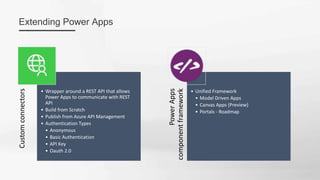
Custom
connectors
• Wrapper around a REST API that allows
Power Apps to communicate with REST
API
• Build from Scratch
• Publish from Azure API Management
• Authentication Types
• Anonymous
• Basic Authentication
• API Key
• Oauth 2.0
Power
Apps
component
framework
• Unified Framework
• Model Driven Apps
• Canvas Apps (Preview)
• Portals - Roadmap
Extending Power Apps
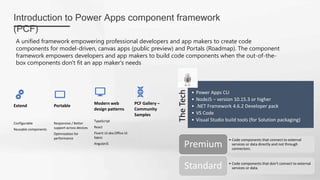
Introduction to Power Apps component framework
(PCF)
• Code components that connect to external
services or data directly and not through
connectors.
Premium
• Code components that don't connect to external
services or data.
Standard
A unified framework empowering professional developers and app makers to create code
components for model-driven, canvas apps (public preview) and Portals (Roadmap). The component
framework empowers developers and app makers to build code components when the out-of-the-
box components don't fit an app maker's needs
The
Tech
• Power Apps CLI
• NodeJS – version 10.15.3 or higher
• .NET Framework 4.6.2 Developer pack
• VS Code
• Visual Studio build tools (for Solution packaging)
Extend
Configurable
Reusable components
Portable
Responsive / Better
support across devices
Optimization for
performance
Modern web
design patterns
TypeScript
React
Fluent UI aka Office UI
fabric
AngularJS
PCF Gallery –
Community
Samples
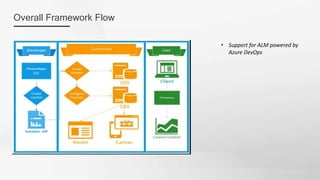
• Support for ALM powered by
Azure DevOps
Overall Framework Flow
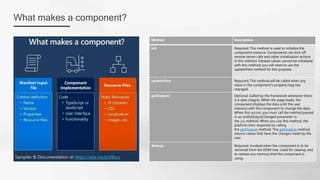
What makes a component?
Method Description
init Required. This method is used to initialize the
component instance. Components can kick off
remote server calls and other initialization actions
in this method. Dataset values cannot be initialized
with this method; you will need to use the
updateView method for this purpose.
updateView Required. This method will be called when any
value in the component’s property bag has
changed.
getOutputs Optional. Called by the framework whenever there
is a data chagne. When the page loads, the
component displays the data until the user
interacts with the component to change the data.
When this occurs, you must call the method passed
in as notifyOutputChanged parameter in
the init method. When you use this method, the
platform then responds by calling
the getOutputs method. The getOutputs method
returns values that have the changes made by the
user
destroy Required. Invoked when the component is to be
removed from the DOM tree. Used for cleanup and
to release any memory that the component is
using.
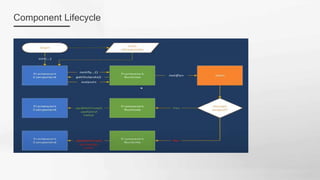
Component Lifecycle
• pac –help
• pac pcf help
• pac install latest
• https://docs.microsoft.com/en-
us/powerapps/developer/data-
platform/powerapps-cli
Your first control – Power Apps CLI commands
Initialize your component project on
the any CLI
•pac pcf init --namespace SampleNamespace --
name ComponentName --template field
Install the dependencies
•npm install
Code Editor
•Update the component – VS Code
•Code .
Build
•npm run build
•Typescript converts to JavaScript
Test & Debug
•npm start – Test harness
•Browser tools
•Breakpoint
•Console logs
Solutions Package
•Create solutions folder
•pac solution init --publisher-name mslearn --
publisher-prefix msl
•pac solution add-reference --path <path to your
Power Apps component framework project>
•msbuild /t:build /restore
•msbuild /p:configuration=Release.
Demo I
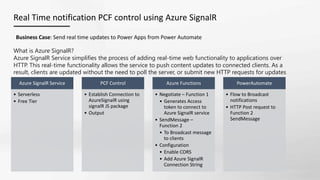
Real Time notification PCF control using Azure SignalR
What is Azure SignalR?
Azure SignalR Service simplifies the process of adding real-time web functionality to applications over
HTTP. This real-time functionality allows the service to push content updates to connected clients. As a
result, clients are updated without the need to poll the server, or submit new HTTP requests for updates
Azure SignalR Service
• Serverless
• Free Tier
PCF Control
• Establish Connection to
AzureSignalR using
signalR JS package
• Output
Azure Functions
• Negotiate – Function 1
• Generates Access
token to connect to
Azure SignalR service
• SendMessage –
Function 2
• To Broadcast message
to clients
• Configuration
• Enable CORS
• Add Azure SignalR
Connection String
PowerAutomate
• Flow to Broadcast
notifications
• HTTP Post request to
Function 2
SendMessage
Business Case: Send real time updates to Power Apps from Power Automate
Demo II
References
https://docs.microsoft.com/en-us/powerapps/maker/dev-community-plan
https://docs.microsoft.com/en-us/connectors/custom-connectors/
https://docs.microsoft.com/en-us/azure/api-management/export-api-power-platform
Pre-Requisites: https://docs.microsoft.com/en-us/powerapps/developer/data-platform/powerapps-cli
MS Learn Module: https://docs.microsoft.com/en-us/learn/paths/use-power-apps-component-framework/
Community samples: https://pcf.gallery/ & https://aka.ms/PCFDemos
Getting Started: https://aka.ms/pcfblog
Documentation: https://aka.ms/pcfdocs
Community Forum: https://aka.ms/pcfforum
Feature Ideas: https://aka.ms/pcfIdeas
ALM for Power Platform: https://docs.microsoft.com/en-us/power-platform/alm/
https://powerapps.microsoft.com/en-us/blog/notification-control-using-powerapps-component-framework-
and-azure-signalr/
https://docs.microsoft.com/en-us/azure/azure-signalr/signalr-concept-serverless-development-config
https://docs.microsoft.com/en-us/azure/azure-functions/functions-bindings-signalr-service-output
Develop using Docker Containers (Windows): https://dreamingincrm.com/2020/09/17/developing-pcf-
components-inside-a-container/
Thank you
https://www.meetup.com/cloudjourneyusergroup/

Power Apps for developers

  • 1.
    CLOUD JOURNEY USERGROUP SHARE TO CARE POWER APPS FOR DEVELOPERS MOHAMED ASHIQ FALEEL THIRUNAVUKARASU KANNAPPAN RUI SANTOS https://www.linkedin.com/in/ashiqf/ @AshiqFaleel ashiqf@gmail.com https://ashiqf.com https://www.linkedin.com/in/thirubaikm/ @thirubai https://www.linkedin.com/in/ruisantosnor/
  • 2.
    Agenda • Keynote fromRui Santos • Introduction to PCF • Demo - I • Real Time notification PCF control using Azure SignalR • Demo – II • Questions & Answers
  • 3.
    Custom connectors • Wrapper arounda REST API that allows Power Apps to communicate with REST API • Build from Scratch • Publish from Azure API Management • Authentication Types • Anonymous • Basic Authentication • API Key • Oauth 2.0 Power Apps component framework • Unified Framework • Model Driven Apps • Canvas Apps (Preview) • Portals - Roadmap Extending Power Apps
  • 4.
    Introduction to PowerApps component framework (PCF) • Code components that connect to external services or data directly and not through connectors. Premium • Code components that don't connect to external services or data. Standard A unified framework empowering professional developers and app makers to create code components for model-driven, canvas apps (public preview) and Portals (Roadmap). The component framework empowers developers and app makers to build code components when the out-of-the- box components don't fit an app maker's needs The Tech • Power Apps CLI • NodeJS – version 10.15.3 or higher • .NET Framework 4.6.2 Developer pack • VS Code • Visual Studio build tools (for Solution packaging) Extend Configurable Reusable components Portable Responsive / Better support across devices Optimization for performance Modern web design patterns TypeScript React Fluent UI aka Office UI fabric AngularJS PCF Gallery – Community Samples
  • 5.
    • Support forALM powered by Azure DevOps Overall Framework Flow
  • 6.
    What makes acomponent? Method Description init Required. This method is used to initialize the component instance. Components can kick off remote server calls and other initialization actions in this method. Dataset values cannot be initialized with this method; you will need to use the updateView method for this purpose. updateView Required. This method will be called when any value in the component’s property bag has changed. getOutputs Optional. Called by the framework whenever there is a data chagne. When the page loads, the component displays the data until the user interacts with the component to change the data. When this occurs, you must call the method passed in as notifyOutputChanged parameter in the init method. When you use this method, the platform then responds by calling the getOutputs method. The getOutputs method returns values that have the changes made by the user destroy Required. Invoked when the component is to be removed from the DOM tree. Used for cleanup and to release any memory that the component is using.
  • 7.
  • 8.
    • pac –help •pac pcf help • pac install latest • https://docs.microsoft.com/en- us/powerapps/developer/data- platform/powerapps-cli Your first control – Power Apps CLI commands Initialize your component project on the any CLI •pac pcf init --namespace SampleNamespace -- name ComponentName --template field Install the dependencies •npm install Code Editor •Update the component – VS Code •Code . Build •npm run build •Typescript converts to JavaScript Test & Debug •npm start – Test harness •Browser tools •Breakpoint •Console logs Solutions Package •Create solutions folder •pac solution init --publisher-name mslearn -- publisher-prefix msl •pac solution add-reference --path <path to your Power Apps component framework project> •msbuild /t:build /restore •msbuild /p:configuration=Release.
  • 9.
  • 10.
    Real Time notificationPCF control using Azure SignalR What is Azure SignalR? Azure SignalR Service simplifies the process of adding real-time web functionality to applications over HTTP. This real-time functionality allows the service to push content updates to connected clients. As a result, clients are updated without the need to poll the server, or submit new HTTP requests for updates Azure SignalR Service • Serverless • Free Tier PCF Control • Establish Connection to AzureSignalR using signalR JS package • Output Azure Functions • Negotiate – Function 1 • Generates Access token to connect to Azure SignalR service • SendMessage – Function 2 • To Broadcast message to clients • Configuration • Enable CORS • Add Azure SignalR Connection String PowerAutomate • Flow to Broadcast notifications • HTTP Post request to Function 2 SendMessage Business Case: Send real time updates to Power Apps from Power Automate
  • 11.
  • 12.
    References https://docs.microsoft.com/en-us/powerapps/maker/dev-community-plan https://docs.microsoft.com/en-us/connectors/custom-connectors/ https://docs.microsoft.com/en-us/azure/api-management/export-api-power-platform Pre-Requisites: https://docs.microsoft.com/en-us/powerapps/developer/data-platform/powerapps-cli MS LearnModule: https://docs.microsoft.com/en-us/learn/paths/use-power-apps-component-framework/ Community samples: https://pcf.gallery/ & https://aka.ms/PCFDemos Getting Started: https://aka.ms/pcfblog Documentation: https://aka.ms/pcfdocs Community Forum: https://aka.ms/pcfforum Feature Ideas: https://aka.ms/pcfIdeas ALM for Power Platform: https://docs.microsoft.com/en-us/power-platform/alm/ https://powerapps.microsoft.com/en-us/blog/notification-control-using-powerapps-component-framework- and-azure-signalr/ https://docs.microsoft.com/en-us/azure/azure-signalr/signalr-concept-serverless-development-config https://docs.microsoft.com/en-us/azure/azure-functions/functions-bindings-signalr-service-output Develop using Docker Containers (Windows): https://dreamingincrm.com/2020/09/17/developing-pcf- components-inside-a-container/
  • 14.