PostgreSQL Cloud Performance | PGConf APAC 2018
PostgreSQL Cloud
Performance
Oskari Saarenmaa
PGConf APAC 2018 - Singapore
Agenda
1. Introduction
2. Why cloud – why not cloud?
3. Running PostgreSQL in a cloud
4. Performance considerations
5. Benchmark methodology and setup
6. Results
7. Q & A
This presentation was created by Aiven Ltd - https://aiven.io.
All content is owned by Aiven or used with owner’s permission.
PostgreSQL Cloud Performance | PGConf APAC 2018
Speaker
● CEO, co-founder @ Aiven, a cloud DBaaS company
● Previously: database consultant, software architect
● PostgreSQL user since 1999 (rel 6.4)
○ Contributed bug fixes and features to core
○ Worked on extensions and tooling in the
PG ecosystem
@OskariSaarenmaa
PostgreSQL Cloud Performance | PGConf APAC 2018
Aiven
● Independent Database as a Service provider
● Based in Helsinki and Boston
○ APAC presence later in 2018
● 7 DB products now available in 70 regions
○ including 23 in APAC
● First to offer PostgreSQL 10 as a service!
Why cloud?
PostgreSQL Cloud Performance | PGConf APAC 2018
It’s someone else’s computer:
● They buy the hardware and cover capital costs
● They install new and replace broken hardware
● Resources available on-demand, no waiting for procurement
When using DBaaS:
● They install, maintain, and backup the software
● You are provided integrated monitoring and metrics
● Backups, replication and other tooling is up in minutes
Why not cloud?
As it is “someone else’s computer”, you’ll have:
● Less control over details
● Operational concerns
○ Will there be someone to fix issues in case of problems?
● Compliance concerns
○ Someone else has physical access to the data
● Potentially higher operational costs
○ When only looking at the infrastructure costs
○ Assuming you can plan your hardware use well in advance
PostgreSQL Cloud Performance | PGConf APAC 2018
Roll your own or use a DBaaS?
PostgreSQL Cloud Performance | PGConf APAC 2018
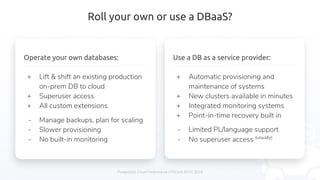
Use a DB as a service provider:
+ Automatic provisioning and
maintenance of systems
+ New clusters available in minutes
+ Integrated monitoring systems
+ Point-in-time recovery built in
- Limited PL/language support
- No superuser access (usually)
Operate your own databases:
+ Lift & shift an existing production
on-prem DB to cloud
+ Superuser access
+ All custom extensions
- Manage backups, plan for scaling
- Slower provisioning
- No built-in monitoring
Performance considerations
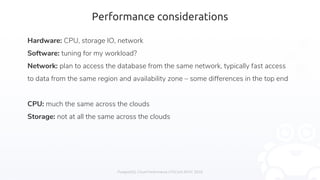
Hardware: CPU, storage IO, network
Software: tuning for my workload?
Network: plan to access the database from the same network, typically fast access
to data from the same region and availability zone – some differences in the top end
CPU: much the same across the clouds
Storage: not at all the same across the clouds
PostgreSQL Cloud Performance | PGConf APAC 2018
Storage systems
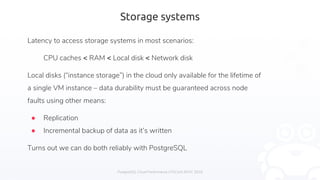
Latency to access storage systems in most scenarios:
CPU caches < RAM < Local disk < Network disk
Local disks (“instance storage”) in the cloud only available for the lifetime of
a single VM instance – data durability must be guaranteed across node
faults using other means:
● Replication
● Incremental backup of data as it’s written
Turns out we can do both reliably with PostgreSQL
PostgreSQL Cloud Performance | PGConf APAC 2018
Block storage system options
PostgreSQL Cloud Performance | PGConf APAC 2018
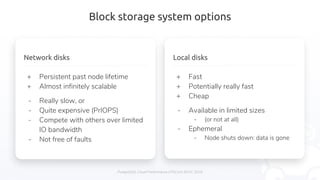
Local disks
+ Fast
+ Potentially really fast
+ Cheap
- Available in limited sizes
- (or not at all)
- Ephemeral
- Node shuts down: data is gone
Network disks
+ Persistent past node lifetime
+ Almost infinitely scalable
- Really slow, or
- Quite expensive (PrIOPS)
- Compete with others over limited
IO bandwidth
- Not free of faults
Important considerations for benchmarking
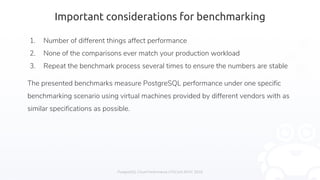
1. Number of different things affect performance
2. None of the comparisons ever match your production workload
3. Repeat the benchmark process several times to ensure the numbers are stable
The presented benchmarks measure PostgreSQL performance under one specific
benchmarking scenario using virtual machines provided by different vendors with as
similar specifications as possible.
PostgreSQL Cloud Performance | PGConf APAC 2018
Methodology
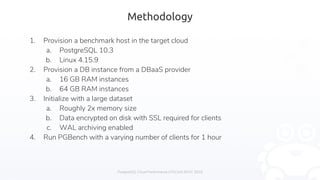
1. Provision a benchmark host in the target cloud
a. PostgreSQL 10.3
b. Linux 4.15.9
2. Provision a DB instance from a DBaaS provider
a. 16 GB RAM instances
b. 64 GB RAM instances
3. Initialize with a large dataset
a. Roughly 2x memory size
b. Data encrypted on disk with SSL required for clients
c. WAL archiving enabled
4. Run PGBench with a varying number of clients for 1 hour
PostgreSQL Cloud Performance | PGConf APAC 2018
Benchmarks: network disks
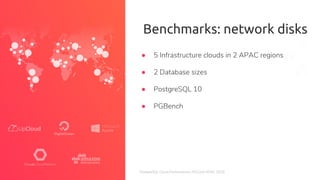
● 5 Infrastructure clouds in 2 APAC regions
● 2 Database sizes
● PostgreSQL 10
● PGBench
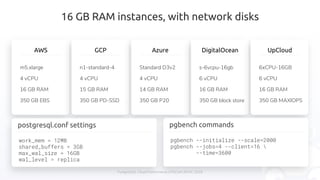
16 GB RAM instances, with network disks
AWS
m5.xlarge
4 vCPU
16 GB RAM
350 GB EBS
GCP
n1-standard-4
4 vCPU
15 GB RAM
350 GB PD-SSD
Azure
Standard D3v2
4 vCPU
14 GB RAM
350 GB P20
DigitalOcean
s-6vcpu-16gb
6 vCPU
16 GB RAM
350 GB block store
UpCloud
6xCPU-16GB
6 vCPU
16 GB RAM
350 GB MAXIOPS
pgbench commands
pgbench --initialize --scale=2000
pgbench --jobs=4 --client=16 
--time=3600
postgresql.conf settings
work_mem = 12MB
shared_buffers = 3GB
max_wal_size = 16GB
wal_level = replica
PostgreSQL Cloud Performance | PGConf APAC 2018
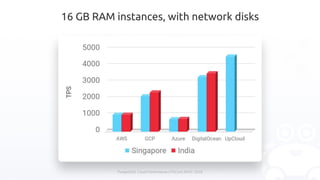
16 GB RAM instances, with network disks
PostgreSQL Cloud Performance | PGConf APAC 2018
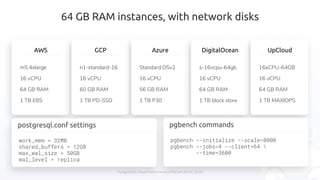
64 GB RAM instances, with network disks
AWS
m5.4xlarge
16 vCPU
64 GB RAM
1 TB EBS
GCP
n1-standard-16
16 vCPU
60 GB RAM
1 TB PD-SSD
Azure
Standard D5v2
16 vCPU
56 GB RAM
1 TB P30
DigitalOcean
s-16vcpu-64gb
16 vCPU
64 GB RAM
1 TB block store
UpCloud
16xCPU-64GB
16 vCPU
64 GB RAM
1 TB MAXIOPS
pgbench commands
pgbench --initialize --scale=8000
pgbench --jobs=4 --client=64 
--time=3600
postgresql.conf settings
work_mem = 32MB
shared_buffers = 12GB
max_wal_size = 50GB
wal_level = replica
PostgreSQL Cloud Performance | PGConf APAC 2018
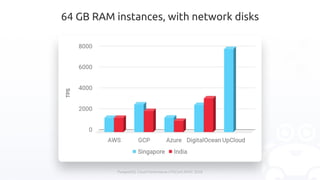
64 GB RAM instances, with network disks
PostgreSQL Cloud Performance | PGConf APAC 2018
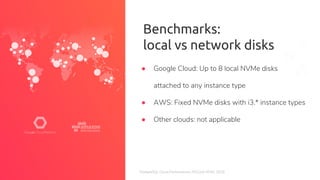
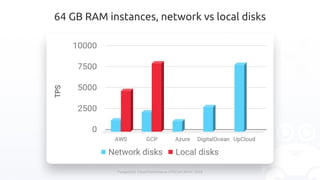
Benchmarks:
local vs network disks
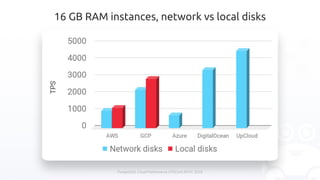
● Google Cloud: Up to 8 local NVMe disks
attached to any instance type
● AWS: Fixed NVMe disks with i3.* instance types
● Other clouds: not applicable
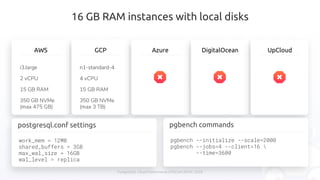
16 GB RAM instances with local disks
AWS
i3.large
2 vCPU
15 GB RAM
350 GB NVMe
(max 475 GB)
GCP
n1-standard-4
4 vCPU
15 GB RAM
350 GB NVMe
(max 3 TB)
Azure DigitalOcean UpCloud
pgbench commands
pgbench --initialize --scale=2000
pgbench --jobs=4 --client=16 
--time=3600
postgresql.conf settings
work_mem = 12MB
shared_buffers = 3GB
max_wal_size = 16GB
wal_level = replica
PostgreSQL Cloud Performance | PGConf APAC 2018
16 GB RAM instances, network vs local disks
PostgreSQL Cloud Performance | PGConf APAC 2018
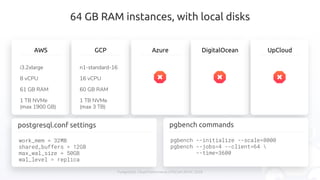
64 GB RAM instances, with local disks
AWS
i3.2xlarge
8 vCPU
61 GB RAM
1 TB NVMe
(max 1900 GB)
GCP
n1-standard-16
16 vCPU
60 GB RAM
1 TB NVMe
(max 3 TB)
Azure DigitalOcean UpCloud
pgbench commands
pgbench --initialize --scale=8000
pgbench --jobs=4 --client=64 
--time=3600
work_mem = 32MB
shared_buffers = 12GB
max_wal_size = 50GB
wal_level = replica
postgresql.conf settings
PostgreSQL Cloud Performance | PGConf APAC 2018
64 GB RAM instances, network vs local disks
PostgreSQL Cloud Performance | PGConf APAC 2018
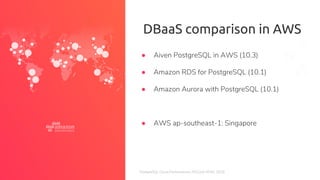
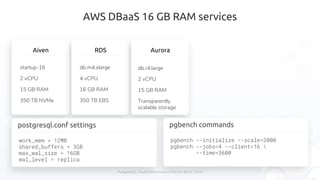
DBaaS comparison in AWS
● Aiven PostgreSQL in AWS (10.3)
● Amazon RDS for PostgreSQL (10.1)
● Amazon Aurora with PostgreSQL (10.1)
● AWS ap-southeast-1: Singapore
AWS DBaaS 16 GB RAM services
Aiven
startup-16
2 vCPU
15 GB RAM
350 TB NVMe
RDS
db.m4.xlarge
4 vCPU
16 GB RAM
350 TB EBS
PostgreSQL Cloud Performance | PGConf APAC 2018
Aurora
db.r4.large
2 vCPU
15 GB RAM
Transparently
scalable storage
pgbench commands
pgbench --initialize --scale=2000
pgbench --jobs=4 --client=16 
--time=3600
postgresql.conf settings
work_mem = 12MB
shared_buffers = 3GB
max_wal_size = 16GB
wal_level = replica
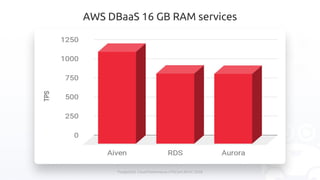
AWS DBaaS 16 GB RAM services
PostgreSQL Cloud Performance | PGConf APAC 2018
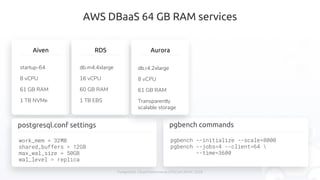
AWS DBaaS 64 GB RAM services
Aiven
startup-64
8 vCPU
61 GB RAM
1 TB NVMe
RDS
db.m4.4xlarge
16 vCPU
60 GB RAM
1 TB EBS
pgbench commands
pgbench --initialize --scale=8000
pgbench --jobs=4 --client=64 
--time=3600
work_mem = 32MB
shared_buffers = 12GB
max_wal_size = 50GB
wal_level = replica
postgresql.conf settings
PostgreSQL Cloud Performance | PGConf APAC 2018
Aurora
db.r4.2xlarge
8 vCPU
61 GB RAM
Transparently
scalable storage
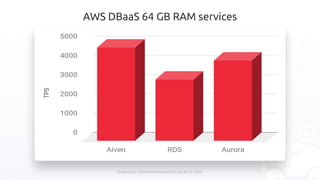
AWS DBaaS 64 GB RAM services
PostgreSQL Cloud Performance | PGConf APAC 2018
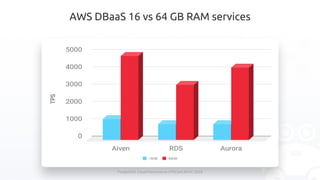
AWS DBaaS 16 vs 64 GB RAM services
PostgreSQL Cloud Performance | PGConf APAC 2018
Questions?
Cool t-shirts for the first ones to ask a question!
P.S. try out Aiven and get a cool t-shirt even if you didn’t ask a question
Thanks!
https://aiven.io
@aiven_io
@OskariSaarenmaa
PostgreSQL Cloud Performance | PGConf APAC 2018

PGConf APAC 2018 - PostgreSQL performance comparison in various clouds

  • 1.
    PostgreSQL Cloud Performance| PGConf APAC 2018 PostgreSQL Cloud Performance Oskari Saarenmaa PGConf APAC 2018 - Singapore
  • 2.
    Agenda 1. Introduction 2. Whycloud – why not cloud? 3. Running PostgreSQL in a cloud 4. Performance considerations 5. Benchmark methodology and setup 6. Results 7. Q & A This presentation was created by Aiven Ltd - https://aiven.io. All content is owned by Aiven or used with owner’s permission. PostgreSQL Cloud Performance | PGConf APAC 2018
  • 3.
    PostgreSQL Cloud Performance| PGConf APAC 2018 Speaker ● CEO, co-founder @ Aiven, a cloud DBaaS company ● Previously: database consultant, software architect ● PostgreSQL user since 1999 (rel 6.4) ○ Contributed bug fixes and features to core ○ Worked on extensions and tooling in the PG ecosystem @OskariSaarenmaa
  • 4.
    PostgreSQL Cloud Performance| PGConf APAC 2018 Aiven ● Independent Database as a Service provider ● Based in Helsinki and Boston ○ APAC presence later in 2018 ● 7 DB products now available in 70 regions ○ including 23 in APAC ● First to offer PostgreSQL 10 as a service!
  • 5.
    Why cloud? PostgreSQL CloudPerformance | PGConf APAC 2018 It’s someone else’s computer: ● They buy the hardware and cover capital costs ● They install new and replace broken hardware ● Resources available on-demand, no waiting for procurement When using DBaaS: ● They install, maintain, and backup the software ● You are provided integrated monitoring and metrics ● Backups, replication and other tooling is up in minutes
  • 6.
    Why not cloud? Asit is “someone else’s computer”, you’ll have: ● Less control over details ● Operational concerns ○ Will there be someone to fix issues in case of problems? ● Compliance concerns ○ Someone else has physical access to the data ● Potentially higher operational costs ○ When only looking at the infrastructure costs ○ Assuming you can plan your hardware use well in advance PostgreSQL Cloud Performance | PGConf APAC 2018
  • 7.
    Roll your ownor use a DBaaS? PostgreSQL Cloud Performance | PGConf APAC 2018 Use a DB as a service provider: + Automatic provisioning and maintenance of systems + New clusters available in minutes + Integrated monitoring systems + Point-in-time recovery built in - Limited PL/language support - No superuser access (usually) Operate your own databases: + Lift & shift an existing production on-prem DB to cloud + Superuser access + All custom extensions - Manage backups, plan for scaling - Slower provisioning - No built-in monitoring
  • 8.
    Performance considerations Hardware: CPU,storage IO, network Software: tuning for my workload? Network: plan to access the database from the same network, typically fast access to data from the same region and availability zone – some differences in the top end CPU: much the same across the clouds Storage: not at all the same across the clouds PostgreSQL Cloud Performance | PGConf APAC 2018
  • 9.
    Storage systems Latency toaccess storage systems in most scenarios: CPU caches < RAM < Local disk < Network disk Local disks (“instance storage”) in the cloud only available for the lifetime of a single VM instance – data durability must be guaranteed across node faults using other means: ● Replication ● Incremental backup of data as it’s written Turns out we can do both reliably with PostgreSQL PostgreSQL Cloud Performance | PGConf APAC 2018
  • 10.
    Block storage systemoptions PostgreSQL Cloud Performance | PGConf APAC 2018 Local disks + Fast + Potentially really fast + Cheap - Available in limited sizes - (or not at all) - Ephemeral - Node shuts down: data is gone Network disks + Persistent past node lifetime + Almost infinitely scalable - Really slow, or - Quite expensive (PrIOPS) - Compete with others over limited IO bandwidth - Not free of faults
  • 11.
    Important considerations forbenchmarking 1. Number of different things affect performance 2. None of the comparisons ever match your production workload 3. Repeat the benchmark process several times to ensure the numbers are stable The presented benchmarks measure PostgreSQL performance under one specific benchmarking scenario using virtual machines provided by different vendors with as similar specifications as possible. PostgreSQL Cloud Performance | PGConf APAC 2018
  • 12.
    Methodology 1. Provision abenchmark host in the target cloud a. PostgreSQL 10.3 b. Linux 4.15.9 2. Provision a DB instance from a DBaaS provider a. 16 GB RAM instances b. 64 GB RAM instances 3. Initialize with a large dataset a. Roughly 2x memory size b. Data encrypted on disk with SSL required for clients c. WAL archiving enabled 4. Run PGBench with a varying number of clients for 1 hour PostgreSQL Cloud Performance | PGConf APAC 2018
  • 13.
    PostgreSQL Cloud Performance| PGConf APAC 2018 Benchmarks: network disks ● 5 Infrastructure clouds in 2 APAC regions ● 2 Database sizes ● PostgreSQL 10 ● PGBench
  • 14.
    16 GB RAMinstances, with network disks AWS m5.xlarge 4 vCPU 16 GB RAM 350 GB EBS GCP n1-standard-4 4 vCPU 15 GB RAM 350 GB PD-SSD Azure Standard D3v2 4 vCPU 14 GB RAM 350 GB P20 DigitalOcean s-6vcpu-16gb 6 vCPU 16 GB RAM 350 GB block store UpCloud 6xCPU-16GB 6 vCPU 16 GB RAM 350 GB MAXIOPS pgbench commands pgbench --initialize --scale=2000 pgbench --jobs=4 --client=16 --time=3600 postgresql.conf settings work_mem = 12MB shared_buffers = 3GB max_wal_size = 16GB wal_level = replica PostgreSQL Cloud Performance | PGConf APAC 2018
  • 15.
    16 GB RAMinstances, with network disks PostgreSQL Cloud Performance | PGConf APAC 2018
  • 16.
    64 GB RAMinstances, with network disks AWS m5.4xlarge 16 vCPU 64 GB RAM 1 TB EBS GCP n1-standard-16 16 vCPU 60 GB RAM 1 TB PD-SSD Azure Standard D5v2 16 vCPU 56 GB RAM 1 TB P30 DigitalOcean s-16vcpu-64gb 16 vCPU 64 GB RAM 1 TB block store UpCloud 16xCPU-64GB 16 vCPU 64 GB RAM 1 TB MAXIOPS pgbench commands pgbench --initialize --scale=8000 pgbench --jobs=4 --client=64 --time=3600 postgresql.conf settings work_mem = 32MB shared_buffers = 12GB max_wal_size = 50GB wal_level = replica PostgreSQL Cloud Performance | PGConf APAC 2018
  • 17.
    64 GB RAMinstances, with network disks PostgreSQL Cloud Performance | PGConf APAC 2018
  • 18.
    PostgreSQL Cloud Performance| PGConf APAC 2018 Benchmarks: local vs network disks ● Google Cloud: Up to 8 local NVMe disks attached to any instance type ● AWS: Fixed NVMe disks with i3.* instance types ● Other clouds: not applicable
  • 19.
    16 GB RAMinstances with local disks AWS i3.large 2 vCPU 15 GB RAM 350 GB NVMe (max 475 GB) GCP n1-standard-4 4 vCPU 15 GB RAM 350 GB NVMe (max 3 TB) Azure DigitalOcean UpCloud pgbench commands pgbench --initialize --scale=2000 pgbench --jobs=4 --client=16 --time=3600 postgresql.conf settings work_mem = 12MB shared_buffers = 3GB max_wal_size = 16GB wal_level = replica PostgreSQL Cloud Performance | PGConf APAC 2018
  • 20.
    16 GB RAMinstances, network vs local disks PostgreSQL Cloud Performance | PGConf APAC 2018
  • 21.
    64 GB RAMinstances, with local disks AWS i3.2xlarge 8 vCPU 61 GB RAM 1 TB NVMe (max 1900 GB) GCP n1-standard-16 16 vCPU 60 GB RAM 1 TB NVMe (max 3 TB) Azure DigitalOcean UpCloud pgbench commands pgbench --initialize --scale=8000 pgbench --jobs=4 --client=64 --time=3600 work_mem = 32MB shared_buffers = 12GB max_wal_size = 50GB wal_level = replica postgresql.conf settings PostgreSQL Cloud Performance | PGConf APAC 2018
  • 22.
    64 GB RAMinstances, network vs local disks PostgreSQL Cloud Performance | PGConf APAC 2018
  • 23.
    PostgreSQL Cloud Performance| PGConf APAC 2018 DBaaS comparison in AWS ● Aiven PostgreSQL in AWS (10.3) ● Amazon RDS for PostgreSQL (10.1) ● Amazon Aurora with PostgreSQL (10.1) ● AWS ap-southeast-1: Singapore
  • 24.
    AWS DBaaS 16GB RAM services Aiven startup-16 2 vCPU 15 GB RAM 350 TB NVMe RDS db.m4.xlarge 4 vCPU 16 GB RAM 350 TB EBS PostgreSQL Cloud Performance | PGConf APAC 2018 Aurora db.r4.large 2 vCPU 15 GB RAM Transparently scalable storage pgbench commands pgbench --initialize --scale=2000 pgbench --jobs=4 --client=16 --time=3600 postgresql.conf settings work_mem = 12MB shared_buffers = 3GB max_wal_size = 16GB wal_level = replica
  • 25.
    AWS DBaaS 16GB RAM services PostgreSQL Cloud Performance | PGConf APAC 2018
  • 26.
    AWS DBaaS 64GB RAM services Aiven startup-64 8 vCPU 61 GB RAM 1 TB NVMe RDS db.m4.4xlarge 16 vCPU 60 GB RAM 1 TB EBS pgbench commands pgbench --initialize --scale=8000 pgbench --jobs=4 --client=64 --time=3600 work_mem = 32MB shared_buffers = 12GB max_wal_size = 50GB wal_level = replica postgresql.conf settings PostgreSQL Cloud Performance | PGConf APAC 2018 Aurora db.r4.2xlarge 8 vCPU 61 GB RAM Transparently scalable storage
  • 27.
    AWS DBaaS 64GB RAM services PostgreSQL Cloud Performance | PGConf APAC 2018
  • 28.
    AWS DBaaS 16vs 64 GB RAM services PostgreSQL Cloud Performance | PGConf APAC 2018
  • 29.
    PostgreSQL Cloud Performance| PGConf APAC 2018 Questions? Cool t-shirts for the first ones to ask a question! P.S. try out Aiven and get a cool t-shirt even if you didn’t ask a question
  • 30.