P a g e | 1
ACKNOWLEDGEMENTS
The internship opportunity with Alumnus Software Ltd. was a great chance for learning
and professional development. Therefore, I consider myself as a very lucky individual as I was a
part of it. I am also grateful for having a chance to meet so many wonderful people and
professionals who led me though this internship period.
I would like to thank Dr Amlan Chakroborti, the Head Of the Department, A.K. Choudhury
School of I.T. because of him I got the opportunity to do my internship at Alumnus Software Ltd.
I am using this opportunity to express my deepest gratitude and special thanks to Dr.
Probal Sengupta, the founder and CTO of Alumnus Software Ltd. and my project guide during
this internship, who gave me this interesting project and in spite of being extraordinarily busy
with his duties, took time out to hear, guide and keep me on the correct path and allowing me
to carry out my project at their esteemed organization and extending during the training.
Next, I would like to thanks Mr. Sudhindu Bikash Mondal, my internal guide, for his time
and advices, those help me a lot to stay connected with my college, and stay updated with the
requirements of my project at the department.
It is my radiant sentiment to place on record my best regards, deepest sense of gratitude
to Mr Deep [Software engineer], Mr. Sowvik [Software engineer] and Mr. Binayek [Software
engineer] for their careful and precious guidance which were extremely valuable for my study
both theoretically and practically.
I perceive this opportunity as a big milestone in my career development. I will strive to
use gained skills and knowledge in the best possible way, and I will continue to work on their
improvement, in order to attain desired career objectives. Hope to continue cooperation with all
of you in the future.
Sincerely,
……………………………………..
P a g e | 2
ABSTRACT
I pursued my studies at A.K.C.S.I.T Department of University of Calcutta with an
internship, an internship with the aim to improve my technical abilities in computer science.
My topic for this project is to learn how to design a platform independent application
that can be used in android, windows as well as in ios. The design of such an application is made
in HTML5, CSS3 and Angularjs. That means by the help of this project, a web developer can
became an app developer for all platforms, and as the web development is much easy and
flexible, apps designed by this technique will be more attractive. I am submitting a TicTacToe
app as a worm-up and a SUDOKU app (player and solver) as my final project. The purpose of the
final application is to provide an application for your device, which will help you to make your
mind sharp, by giving you a new challenge every time. It also helps Sudoku lovers to play games,
as well as to find the solution of almost every Sudoku puzzle.
This internship enhanced my knowledge in JavaScript, a language with which I was not so
familiar. It introduced me with MVC architecture of Angularjs, and CORDOVA plugins and
framework.
P a g e | 3
INTRODUCTION
As part of my MCA (Master of Computer Application), in the 6th semester a project is
required. We can either do it in our department, or in a company, or in other University.
Fortunately, I got an opportunity to work in Alumnus Software Ltd., a company which is well
known for their well established business in Kolkata since 1996.
In the starting period of my internship, I was working in “statistical data analysis using
R”. With that I was incorporated with two running projects of the company. After completion of
those projects, company assigned me a new project, which is to learn “platform independent
app design for mobile devices”. I was under tutelage of Dr. Probal Sengupta, who helped me
to design a platform independent application using CORDOVA framework as my final project
work.
This project was conducted in two stages: the first is to familiarize myself with the
platform independent design (development tools, coding instructions, setting up with the
testing on device). During this first step I tried to make a Tictactoe, because this is a simple
application, easily coded, and it involves few hardware (speakers and vibrator). So it was like a
warm up for me, to start the final project. For the second part of my project, I needed a topic
that can be useful and accessible for me. Dr. Sengupta proposed the idea of a SUDOKU game.
Thus the application consists of a brain storming game “SUDOKU” and a “SUDOKU solver”.
The main focus was : how to design a platform independent SUDOKU application that
can be installed in any device (android, windows or ios) for SUDOKU lovers.
I intended to improve the application as there is always a room for improvement. I
would like to upgrade Sudoku solver algorithm, and I would like to make sure every puzzle has a
unique solution.
P a g e | 4
CONTENTS
Acknowledgements 1
Abstract 2
Introduction 3
1. About Alumnus Software Ltd. 5
2. Why go platform independent? 5
3. My project : How to design platform independent application 6
3.1. Technology used
3.1.1. Cordova 7
3.1.2. Angularjs 8
3.1.3. Intel XDK 10
3.1.4. Eclipse JUNA (logCat) 10
3.1.5. Adobe Photoshop 10
3.2. First project : Tictactoe
3.2.1. The basic of design application 10
3.2.2. The project 11
3.2.3. Improvements 16
3.3. Second project : SUDOKU
3.3.1. Plugins 16
3.3.2. Angular services 16
3.3.3. The project 17
3.3.4. Testing details 25
3.3.5. Future work 25
4. What did I learn? 25
4.1. Technically
4.2. Humanly 25
Conclusion 26
References 26
Annexure 27
P a g e | 5
1. ABOUT ALUMNUS SOFTWARE LTD.
Alumnus Software, Ltd. was established in 1996 by Arindam Mukherjee and Probal Sengupta
and is based in Kolkata, India. Good place to work, learn, cooperative colleagues. Relaxed environment,
as long as you get your work done, you are praised. If you don’t you are helped with your task.
2. MY PROJECT : DESIGN OF PLATFORM INDEPENDENT APPLICATION
2.1.1. WHY GO PLATFORM INDEPENDENT?
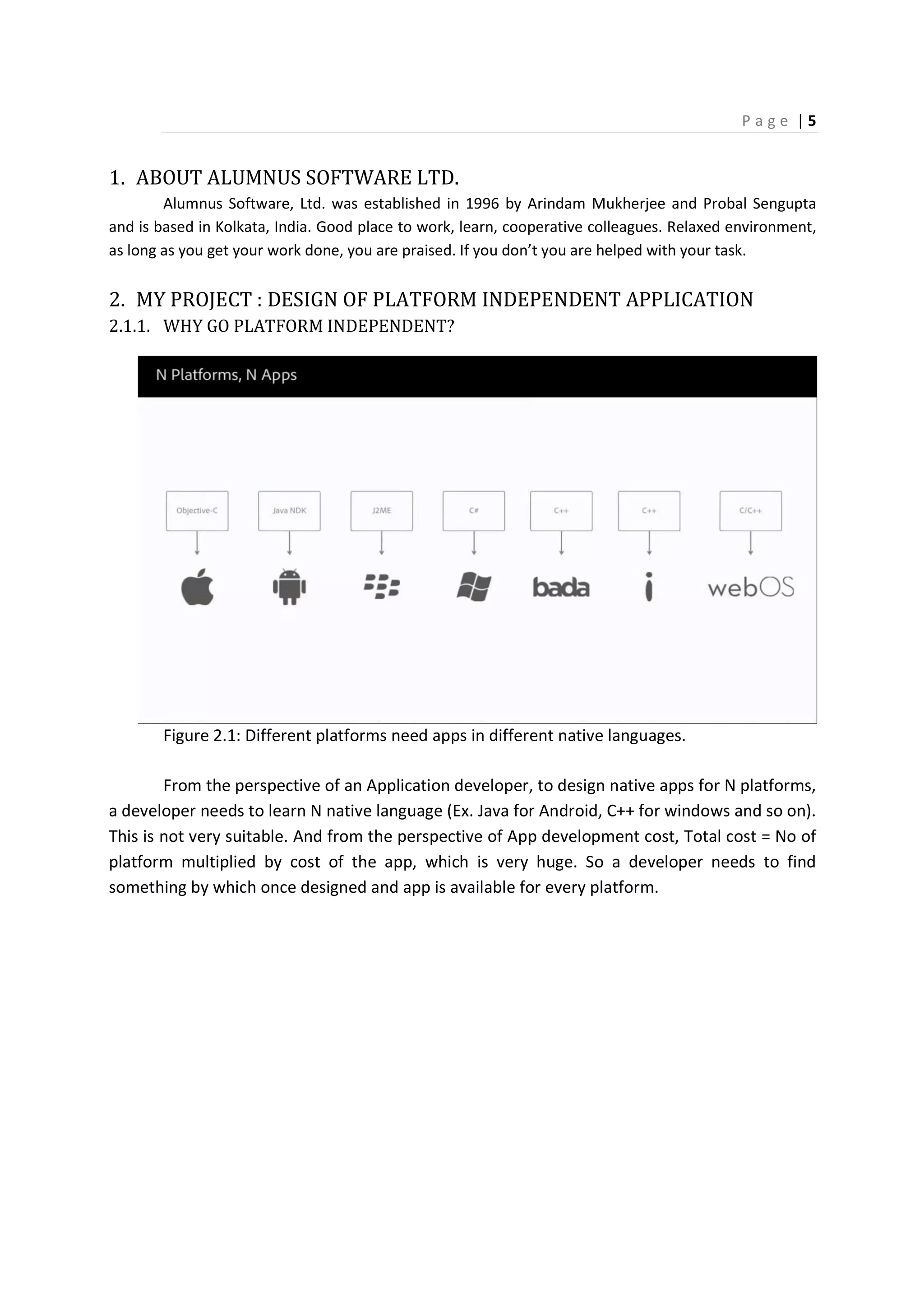
Figure 2.1: Different platforms need apps in different native languages.
From the perspective of an Application developer, to design native apps for N platforms,
a developer needs to learn N native language (Ex. Java for Android, C++ for windows and so on).
This is not very suitable. And from the perspective of App development cost, Total cost = No of
platform multiplied by cost of the app, which is very huge. So a developer needs to find
something by which once designed and app is available for every platform.
P a g e | 6
3. HOW TO DESIGN PLATFORM INDEPENDENTLY?
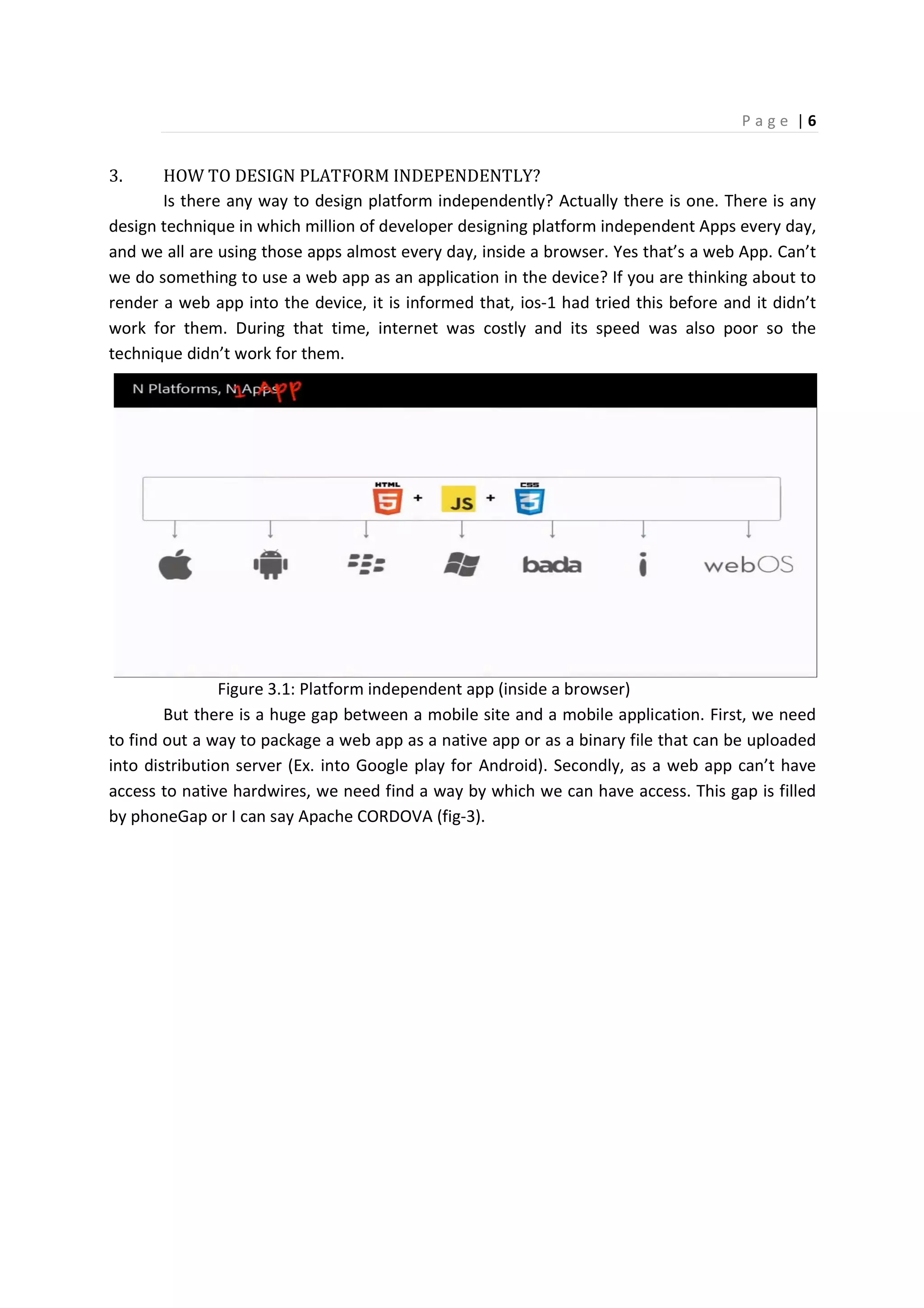
Is there any way to design platform independently? Actually there is one. There is any
design technique in which million of developer designing platform independent Apps every day,
and we all are using those apps almost every day, inside a browser. Yes that’s a web App. Can’t
we do something to use a web app as an application in the device? If you are thinking about to
render a web app into the device, it is informed that, ios-1 had tried this before and it didn’t
work for them. During that time, internet was costly and its speed was also poor so the
technique didn’t work for them.
Figure 3.1: Platform independent app (inside a browser)
But there is a huge gap between a mobile site and a mobile application. First, we need
to find out a way to package a web app as a native app or as a binary file that can be uploaded
into distribution server (Ex. into Google play for Android). Secondly, as a web app can’t have
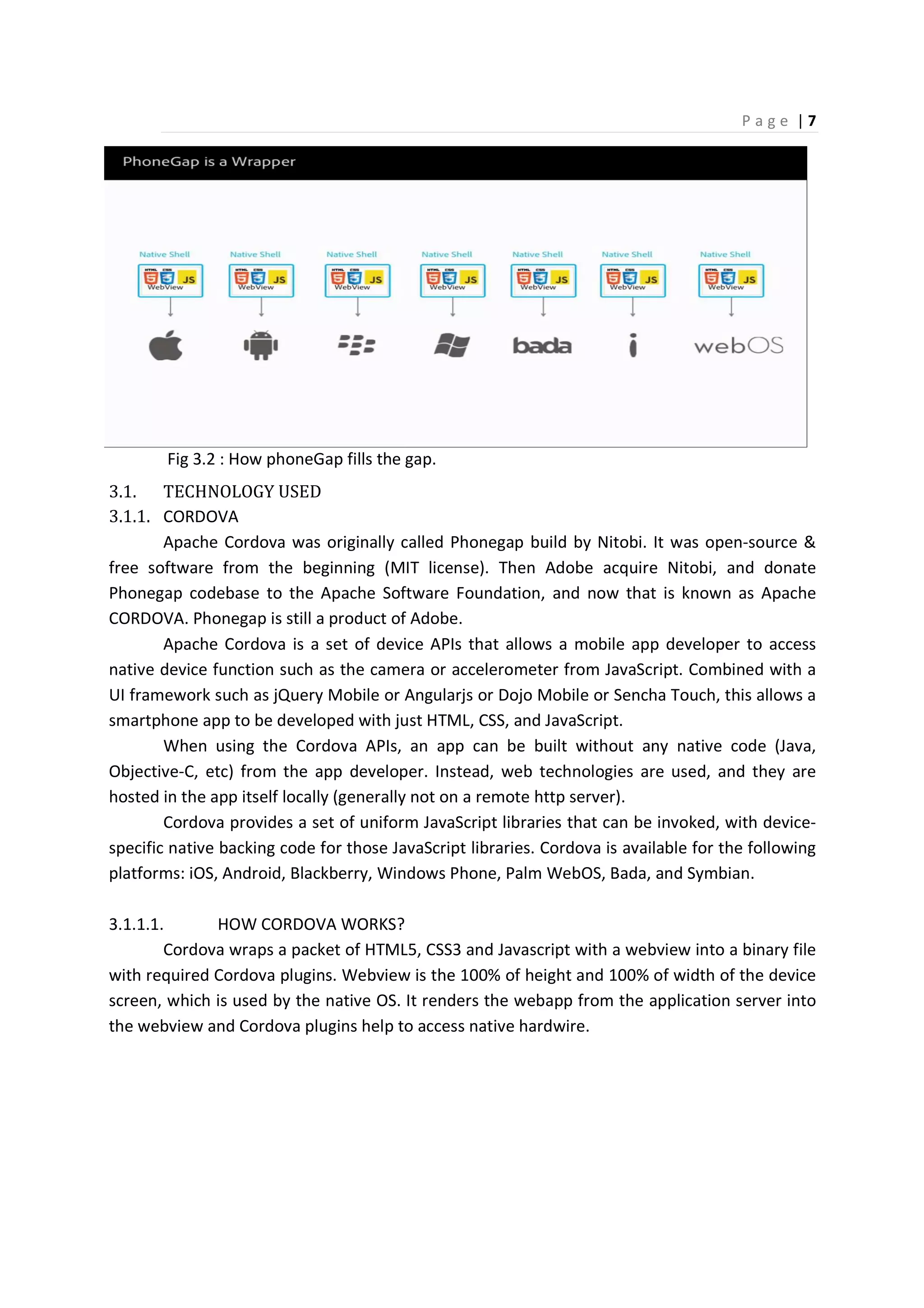
access to native hardwires, we need find a way by which we can have access. This gap is filled
by phoneGap or I can say Apache CORDOVA (fig-3).
P a g e | 7
Fig 3.2 : How phoneGap fills the gap.
3.1. TECHNOLOGY USED
3.1.1. CORDOVA
Apache Cordova was originally called Phonegap build by Nitobi. It was open-source &
free software from the beginning (MIT license). Then Adobe acquire Nitobi, and donate
Phonegap codebase to the Apache Software Foundation, and now that is known as Apache
CORDOVA. Phonegap is still a product of Adobe.
Apache Cordova is a set of device APIs that allows a mobile app developer to access
native device function such as the camera or accelerometer from JavaScript. Combined with a
UI framework such as jQuery Mobile or Angularjs or Dojo Mobile or Sencha Touch, this allows a
smartphone app to be developed with just HTML, CSS, and JavaScript.
When using the Cordova APIs, an app can be built without any native code (Java,
Objective-C, etc) from the app developer. Instead, web technologies are used, and they are
hosted in the app itself locally (generally not on a remote http server).
Cordova provides a set of uniform JavaScript libraries that can be invoked, with device-
specific native backing code for those JavaScript libraries. Cordova is available for the following
platforms: iOS, Android, Blackberry, Windows Phone, Palm WebOS, Bada, and Symbian.
3.1.1.1. HOW CORDOVA WORKS?
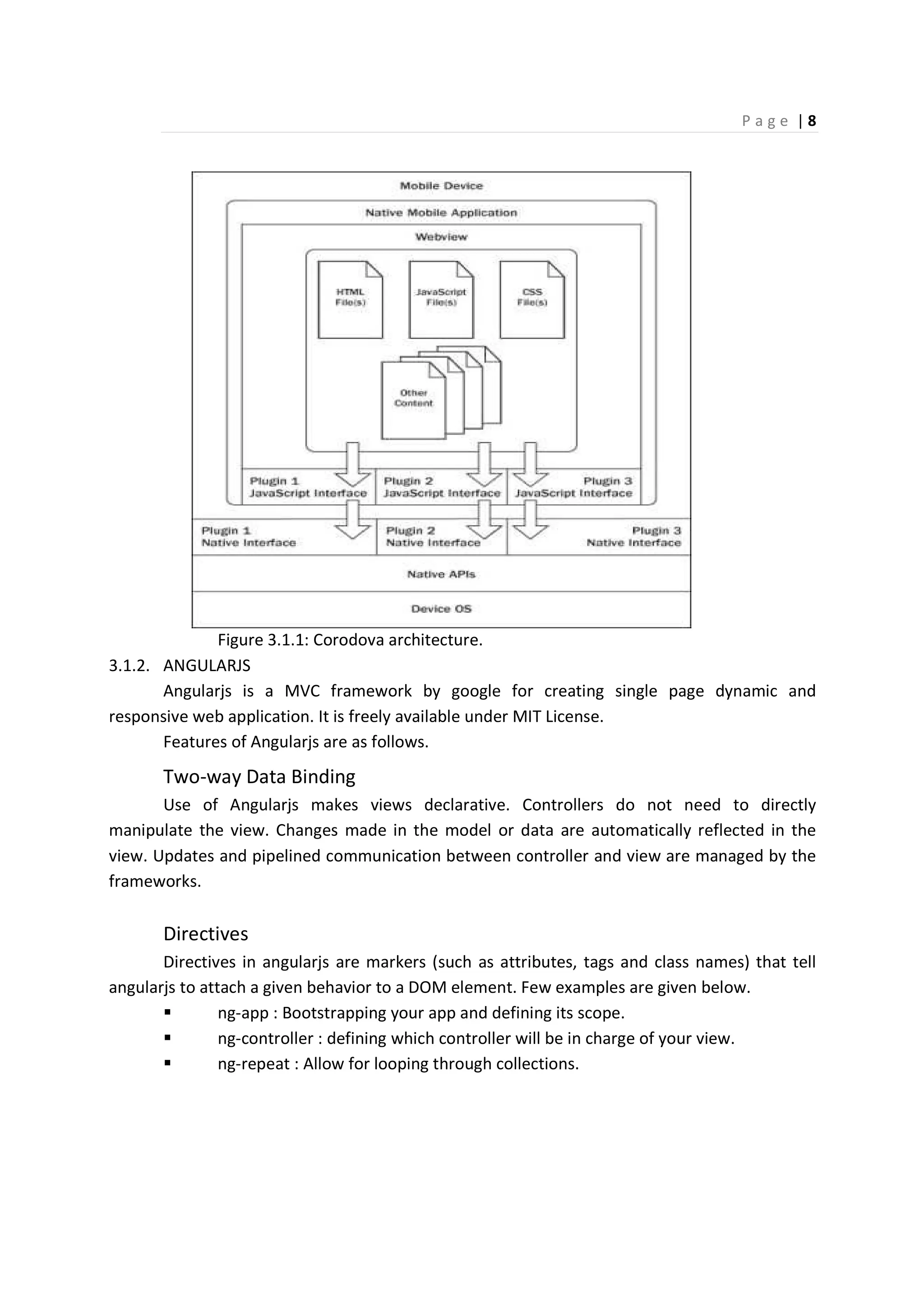
Cordova wraps a packet of HTML5, CSS3 and Javascript with a webview into a binary file
with required Cordova plugins. Webview is the 100% of height and 100% of width of the device
screen, which is used by the native OS. It renders the webapp from the application server into
the webview and Cordova plugins help to access native hardwire.
P a g e | 8
Figure 3.1.1: Corodova architecture.
3.1.2. ANGULARJS
Angularjs is a MVC framework by google for creating single page dynamic and
responsive web application. It is freely available under MIT License.
Features of Angularjs are as follows.
Two-way Data Binding
Use of Angularjs makes views declarative. Controllers do not need to directly
manipulate the view. Changes made in the model or data are automatically reflected in the
view. Updates and pipelined communication between controller and view are managed by the
frameworks.
Directives
Directives in angularjs are markers (such as attributes, tags and class names) that tell
angularjs to attach a given behavior to a DOM element. Few examples are given below.
ng-app : Bootstrapping your app and defining its scope.
ng-controller : defining which controller will be in charge of your view.
ng-repeat : Allow for looping through collections.
P a g e | 9
MVC (Model View Controller)
Angular implements MVC by asking you to split your app into MVC components, then
just let Angular do the rest. Angular manages your components for you and also serves as the
pipeline that connects them. In Angular Model is a javascript object, View is the DOM and
controllers are javascript methods.
Dependency Injection
Dependency Injection of Angular helps to keep complex tasks out of the controller as a
service or factory, and makes your controller to stay focus on its actual work. As unit testing
front end code is usually hard because there are so many sticky dependencies, Angular’s
Dependency Injection allows us to mock out many of these dependencies and isolate individual
components.
Other features are as follows
• Deep linking & server communication support
• Scope management
• Form validation
• Animation
• Routing
• Filters
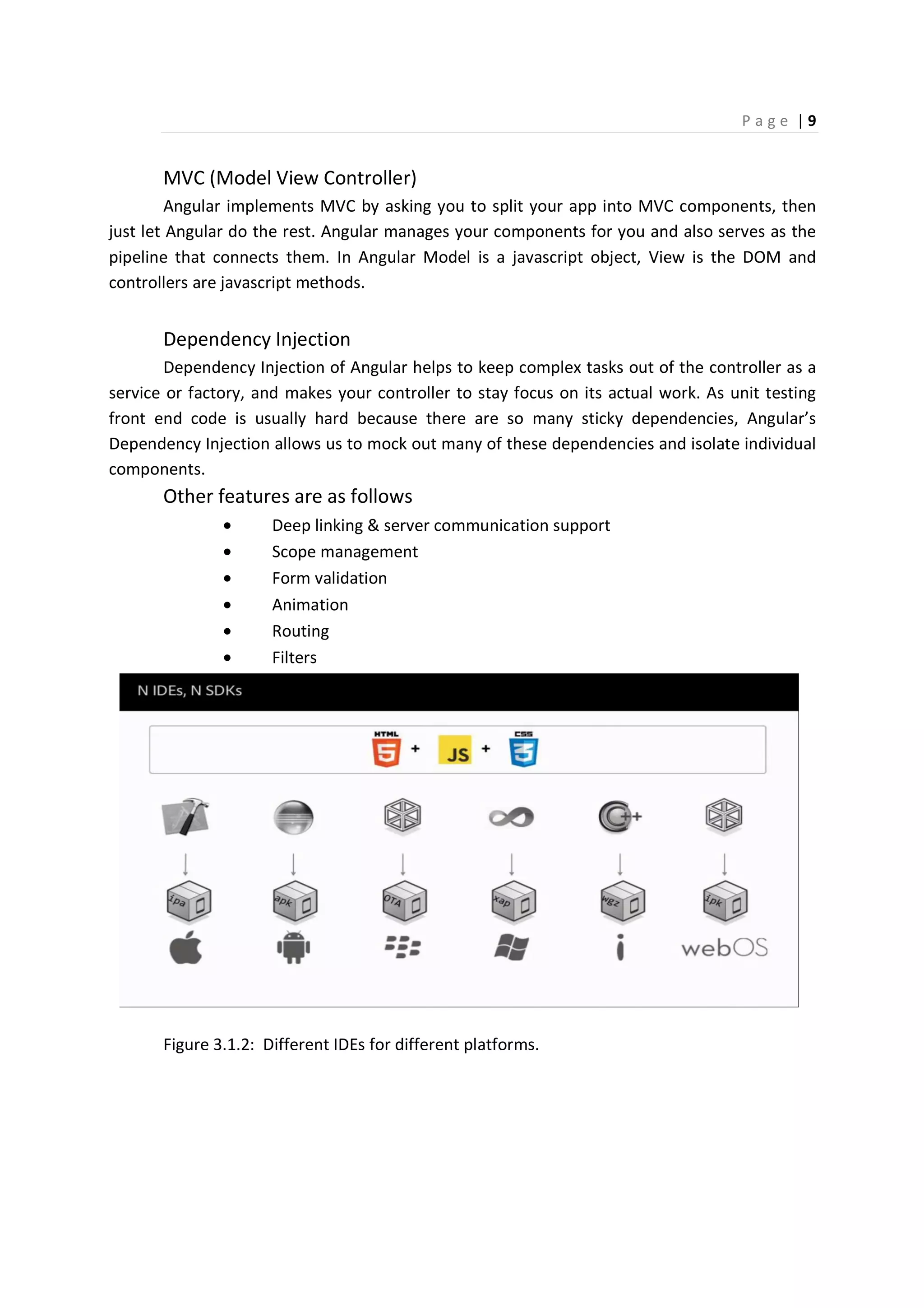
Figure 3.1.2: Different IDEs for different platforms.
P a g e | 10
3.1.3. INTEL XDK (CROSS PLATFORM DEVELOPMENT KIT)
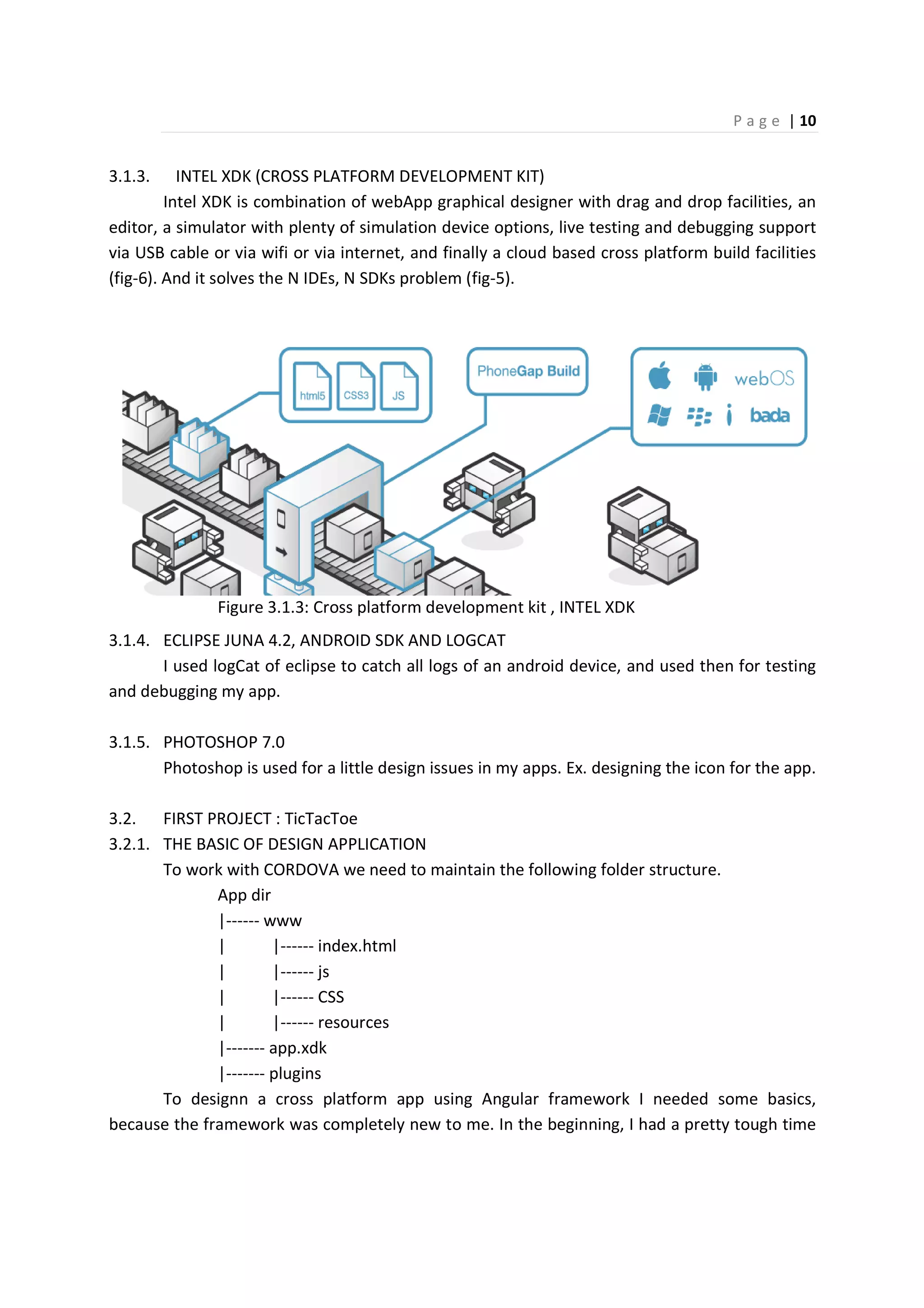
Intel XDK is combination of webApp graphical designer with drag and drop facilities, an
editor, a simulator with plenty of simulation device options, live testing and debugging support
via USB cable or via wifi or via internet, and finally a cloud based cross platform build facilities
(fig-6). And it solves the N IDEs, N SDKs problem (fig-5).
Figure 3.1.3: Cross platform development kit , INTEL XDK
3.1.4. ECLIPSE JUNA 4.2, ANDROID SDK AND LOGCAT
I used logCat of eclipse to catch all logs of an android device, and used then for testing
and debugging my app.
3.1.5. PHOTOSHOP 7.0
Photoshop is used for a little design issues in my apps. Ex. designing the icon for the app.
3.2. FIRST PROJECT : TicTacToe
3.2.1. THE BASIC OF DESIGN APPLICATION
To work with CORDOVA we need to maintain the following folder structure.
App dir
|------ www
| |------ index.html
| |------ js
| |------ CSS
| |------ resources
|------- app.xdk
|------- plugins
To designn a cross platform app using Angular framework I needed some basics,
because the framework was completely new to me. In the beginning, I had a pretty tough time
P a g e | 11
with Angular for getting started. After few days, I became a little bit comfortable with angularjs.
I understood that, Angular comes with a great MVC architecture. First, we need to create a
module for the app, and then we need define the scope of our app in the DOM element with
angular’s “ng-app” directive.
var app = angular.module("app", []);
<html ng-app="app">
An app can have only one “ng-app” directive in the whole page.
Then we need to create a controller and define in DOM that it is in charge for every
control of a DOM element. One of the ways to do that is, to define controller inside DOM
element by “ng-controller” directive.
app.controller("viewController", function($scope, $rootScope){
});
Here $scope and $rootScope are angular defined services.
<div ng-controller="menuController" class=”menu”>
An app can have multiple controllers working simultaneously.
The next step is to bind the data or model with a DOM element. If the DOM element is
an input element, then we can do that using “ng-model” directive.
<input type="text" ng-model="developerName" name="developerName" required>
Otherwise we can use Angular expression to bind a data element with any DOM
element. Example is given below.
<div>Developer name : {{developerName}}</div>
In case of a reusable DOM element, we can create a custom directive, and use that
directive as a replacement of the DOM element anywhere of the page. The example is as
follows:
app.directive('playGround',function(){
return{
restrict: 'E',
templateUrl: "html/playGround.html"
P a g e | 12
};
});
<play-ground ng-hide="$root.IsStartingPage" class="playGround"></play-ground>
3.2.2. THE PROJECT
For my first application, I was not really comfortable with intel XDK and Angularjs, so in
this application there is only two different screen, and so two different controllers, but it was a
good training to try how to communicate between the controllers, how to display models on
the screen.
First, I have created a module for the app, with usernames and score. Making
“$roorScope.isStartingPage = true” I make sure that; initially the registration page is loaded.
var app = angular.module("tikTak", []);
app.run(function($rootScope){
$rootScope.players =[{playerName : '', score : 0},
{playerName : '', score : 0}];
$rootScope.IsStartingPage = true;
});
fig-3.2.1 : registration page fig-3.2.2: play ground
P a g e | 13
The first screen or the welcome page is the registration page for two users. To pass data
between two controllers here I have used Angular’s global service $rootScope. Input fields on
the registration page are also bind with the rootScope variables.
<input type="text" class="textInput" ng-model="$root.players[0].playerName"
placeholder="First Player Name">
<input type="text" class="textInput" ng-model="$root.players[1].playerName"
placeholder="Second Player Name">
Then I have created a controller for this registration page in the name of
“viewController”, as its job is to change the view by changing the page from registration to
ready to play.
app.controller("viewController", function($scope, $rootScope){
$scope.changePage = function(){
if($rootScope.players[0].playerName != "" && $rootScope.players[1].playerName !=
""){
$rootScope.IsStartingPage = false;
} else {
alert("Please enter player Names");
}
};
});
As you can see, this controller contains a method, called “changepage()”. When this
method invoked it verifies is there any empty username? If not, it changes the page by making
“$rootScope.isStartingpage = false”.
This method is invoked from a DOM element, as shown below.
<button ng-click="changePage()">Play</button>
Ng-click is an angular directive, works same as click method of js with some additional
functionalities.
<div class="body">
<welcome-page ng-show="$root.IsStartingPage"></welcome-page>
<play-ground ng-hide="$root.IsStartingPage" class="playGround"></play-ground>
</div>
P a g e | 14
Here in the above example you can see, how the page changes with the rootScope
variable.
For the second page, there is a controller called “gameController”. As the name says, its
job is to control the flow of game.
app.controller("tikTakGameController", function($scope,$rootScope) {
$scope.newGame=function(){
$scope.board = [[9,9,9],
[9,9,9],
[9,9,9]];
$scope.viewBoard = [["[ ]", "[ ]", "[ ]"],
["[ ]", "[ ]", "[ ]"],
["[ ]", "[ ]", "[ ]"]];
$scope.win= false;
$scope.draw= false;
$scope.clickCount = 0;
};
…….
This controller has a method called “newGame()”, its job is to create a blank board. Its
$scope.board module keeps the record about, which cell is occupied by whom? 9 in this
module defines the cell is empty. $scope.viewBoard module is to manipulate the GUI. This page
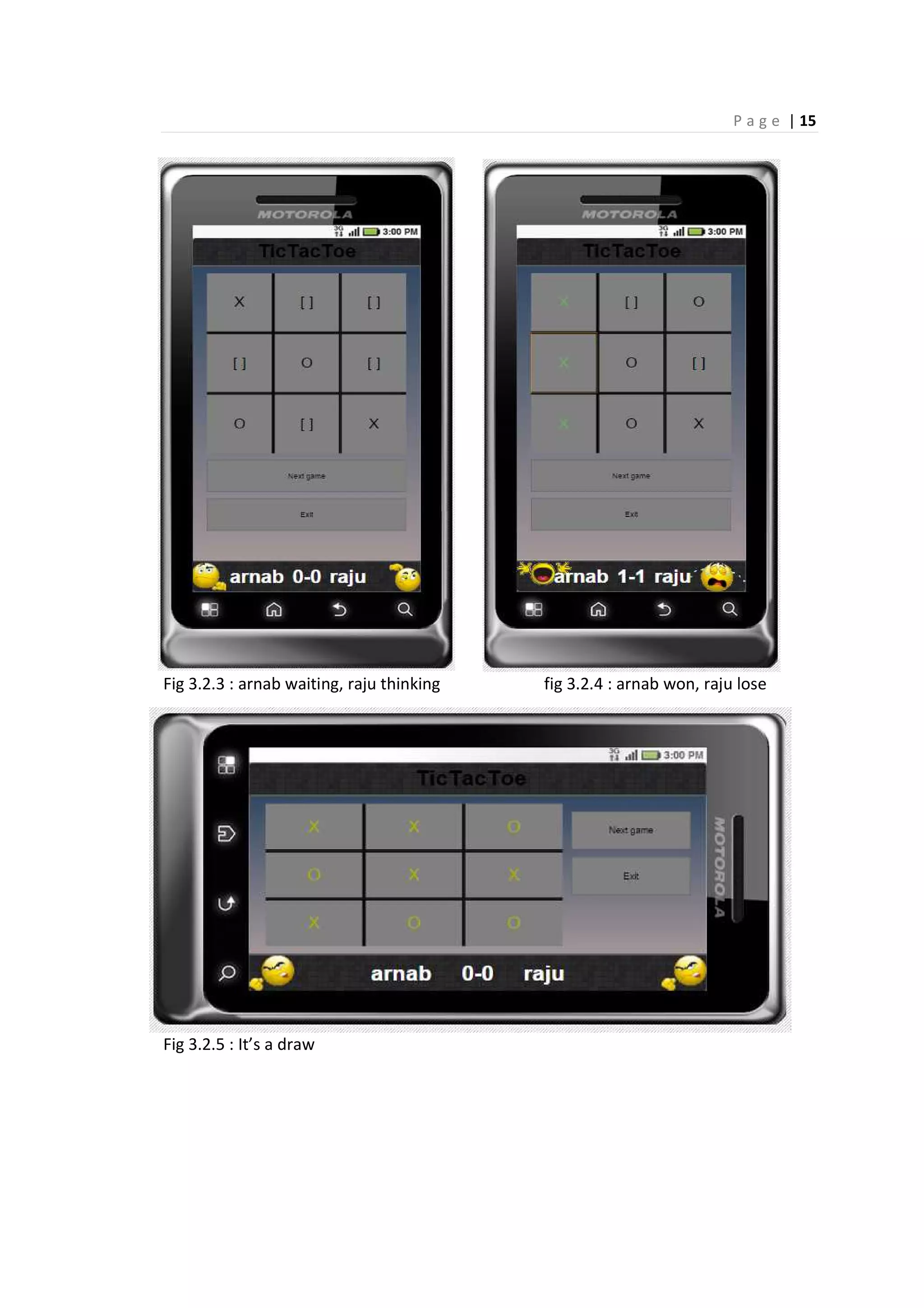
also contains two animated icons in the bottom of the GUI, one is thinking which refers whose
turn it is, and other one is waiting for its turn (fig-3.3).
When a player wins, a laughing animated simile comes in, and a crying animation comes
in the side of the loser (fig- 3.4). And the matched row/column/diagonal gets highlighted by
green color.
If it is a draw, whole board gets highlighted by yellow color, and an angry animated
simile comes in place of both users (fig-3.5).
You can go for a new game every time, but according to game’s rule, turn will be toggled
with every new game.
P a g e | 15
Fig 3.2.3 : arnab waiting, raju thinking fig 3.2.4 : arnab won, raju lose
Fig 3.2.5 : It’s a draw
P a g e | 16
3.2.3. IMPROVEMENTS
The improvements I want to add to this app is to make this an online playable with a
friend. The GUI could also be improved.
3.3. SECOND PROJECT : SUDOKU
3.3.1. PLUGINS
For the second project, I needed to learn plenty of new things, use of CORDOVA plugins
was one of them. To use a CORDOVA plugin we first need to tell the XML to include the plugin
with the program. And that has to be done separately for every platform. But as I was using
intel XDK, I just checked the check box on plugin list, and XDK did the rest of the job for me.
After that I just need to find out how can I use them? File, vibration, notification dialog, device
and splash screen are the name of the plugins I used for the second application.
3.3.2. ANGULAR SERVICES
This second project was consisting of seven different pages. To manage them efficiently, I used
a lot of angular services; those are “ngAnimate”, “ngRoute”, “swipe”, “ngTouch”,
“$interval”, “$filter”, “$q” etc.
ngAnimate is used to add animation to a DOM element from angular.
ngRoute is used to support deep linking.
Swipe is used to give used a feel of native like left right swap experience.
ngTouch is used for vertical swap experience.
$interval is an angular service which invokes a function in every mentioned time interval.
$filter is used for filtering data.
$q is a promise service, which is used for asynchronous events to force execute synchronously.
P a g e | 17
3.3.3. THE PROJECT
3.3.3.1. PROJECT REQUIREMENT
As a mobile game, this app has almost every functionality that an app must have. Below
is the list of functionalities that this app has.
1) A Sudoku game with a new game every-time facility.
2) A Sudoku solver.
3) The view of Sudoku solver and games is same.
4) Keep Sudoku board always square and always visible.
5) Pause and resume facility.
6) Score history.
7) File based repository for solutions, puzzle template, saved games and score
history.
8) Warning for error with notification sound and vibration.
9) Show the best score and the current score on puzzle solved notification.
10) Customize device’s back button and menu button event.
11) Timer.
12) Auto solve facility.
13) Use Sudoku solvers output to train the app.
14) Provide a how to play page to guide the user.
15) User must have the control over making notification sound and vibration on/off.
P a g e | 18
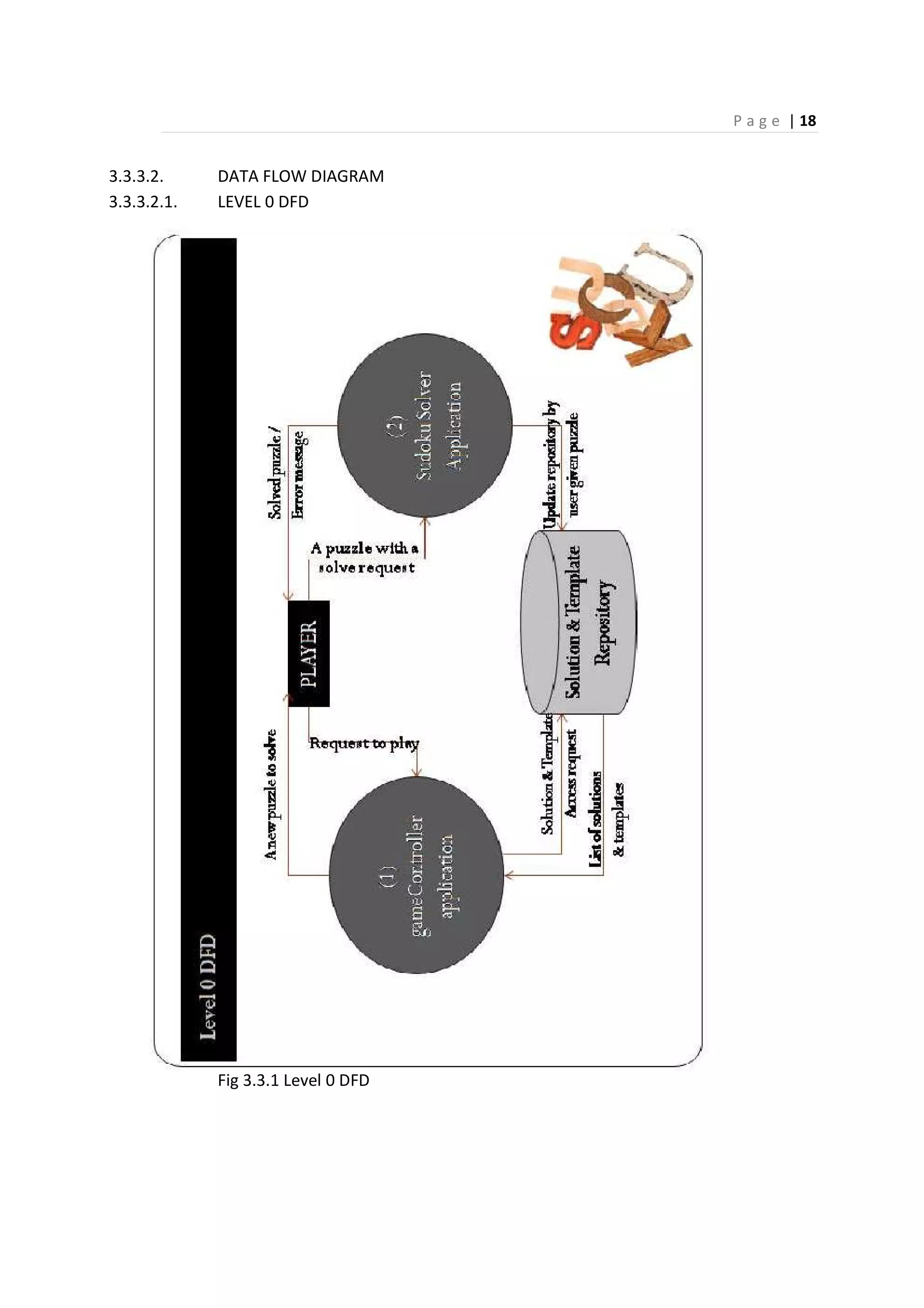
3.3.3.2. DATA FLOW DIAGRAM
3.3.3.2.1. LEVEL 0 DFD
Fig 3.3.1 Level 0 DFD
P a g e | 19
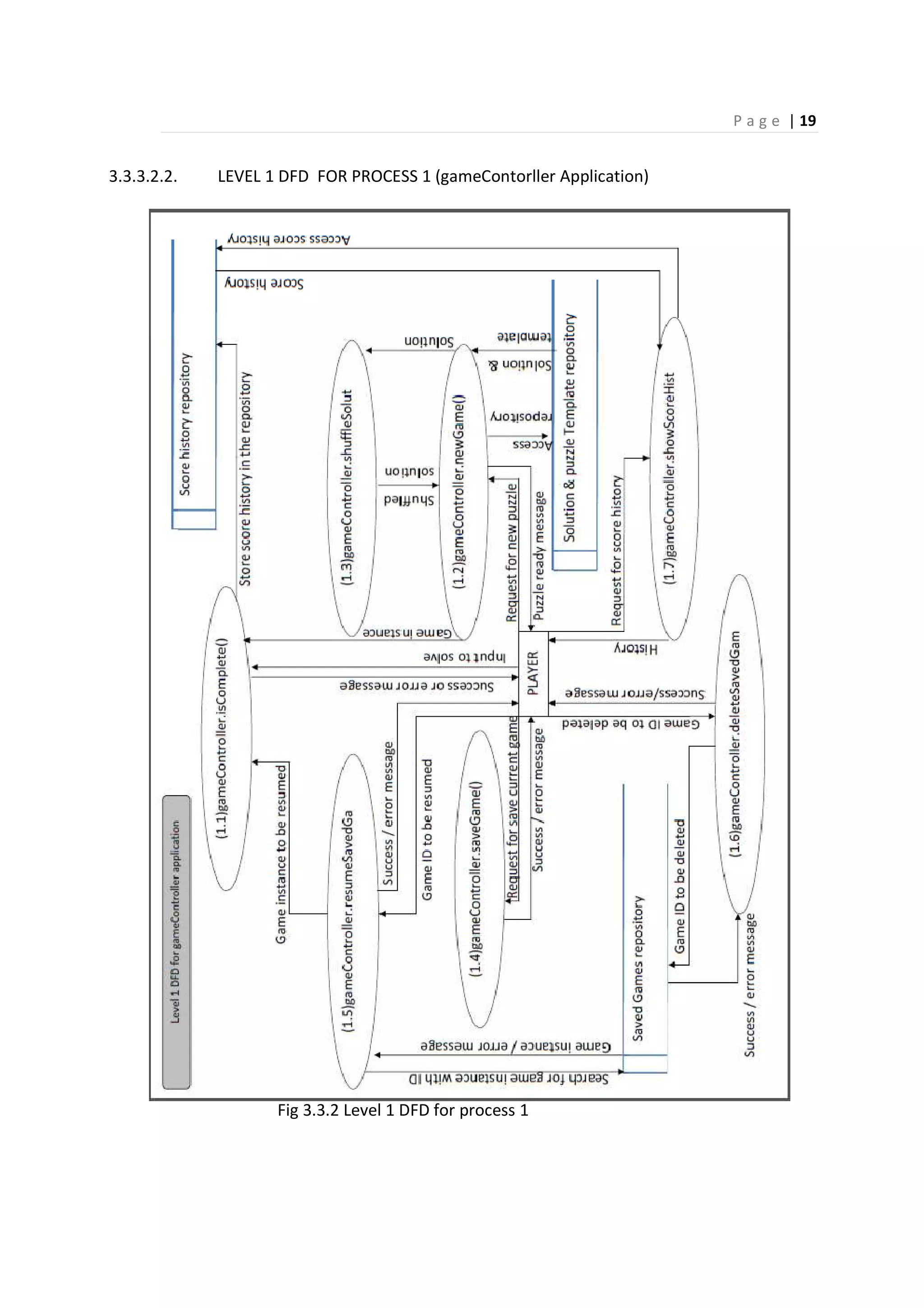
3.3.3.2.2. LEVEL 1 DFD FOR PROCESS 1 (gameContorller Application)
Fig 3.3.2 Level 1 DFD for process 1
P a g e | 20
3.3.3.3. GUI OVERVIEW
At first, the registration page consists of a user name (mandatory), game mode options
(play SUDOKU/ solve SUDOKU) and play button. If a valid user name is given(not empty), the
clicking on the play button will lead you to your chosen option.
It also consists a how to play button which will lead you to the instructions manual.
Fig 3.3.3.1: Registration Page
After registration you will get an options page, where there will be two options, new
game or load saved game. Initially, you have to go for a new game because you don’t have any
saved games. But if you have a saved game you can go for load saved gamed to resume any
saved game.
Fig 3.3.3.2: Option Page
P a g e | 21
Fig 3.3.3.3 Saved games list
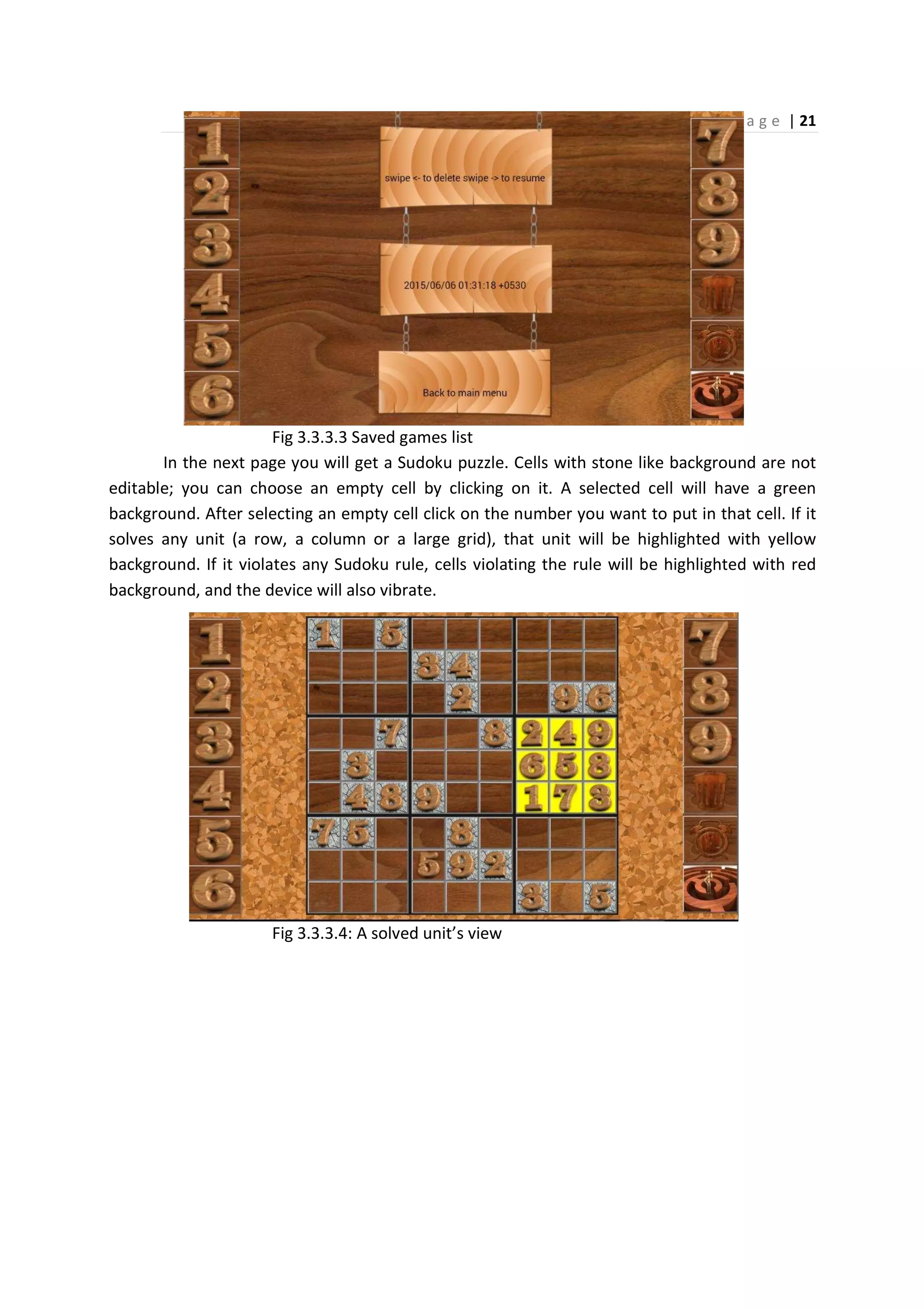
In the next page you will get a Sudoku puzzle. Cells with stone like background are not
editable; you can choose an empty cell by clicking on it. A selected cell will have a green
background. After selecting an empty cell click on the number you want to put in that cell. If it
solves any unit (a row, a column or a large grid), that unit will be highlighted with yellow
background. If it violates any Sudoku rule, cells violating the rule will be highlighted with red
background, and the device will also vibrate.
Fig 3.3.3.4: A solved unit’s view
P a g e | 22
Fig 3.3.3.5: View of a wrong entry
It contains a menu also, where you can switch on and off the notification sound and
vibration.
Fig 3.3.3.6: View of the menu bar
P a g e | 23
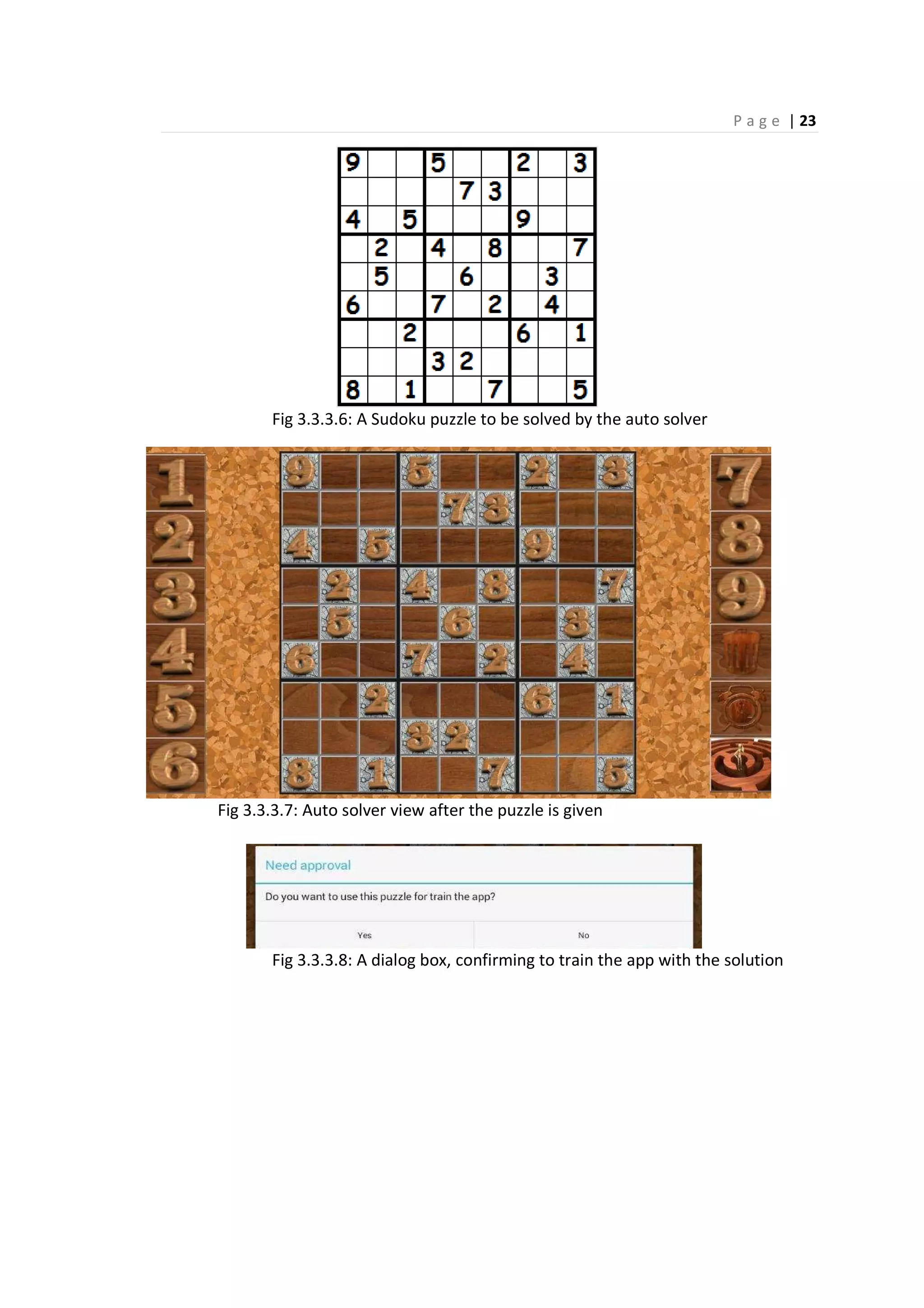
Fig 3.3.3.6: A Sudoku puzzle to be solved by the auto solver
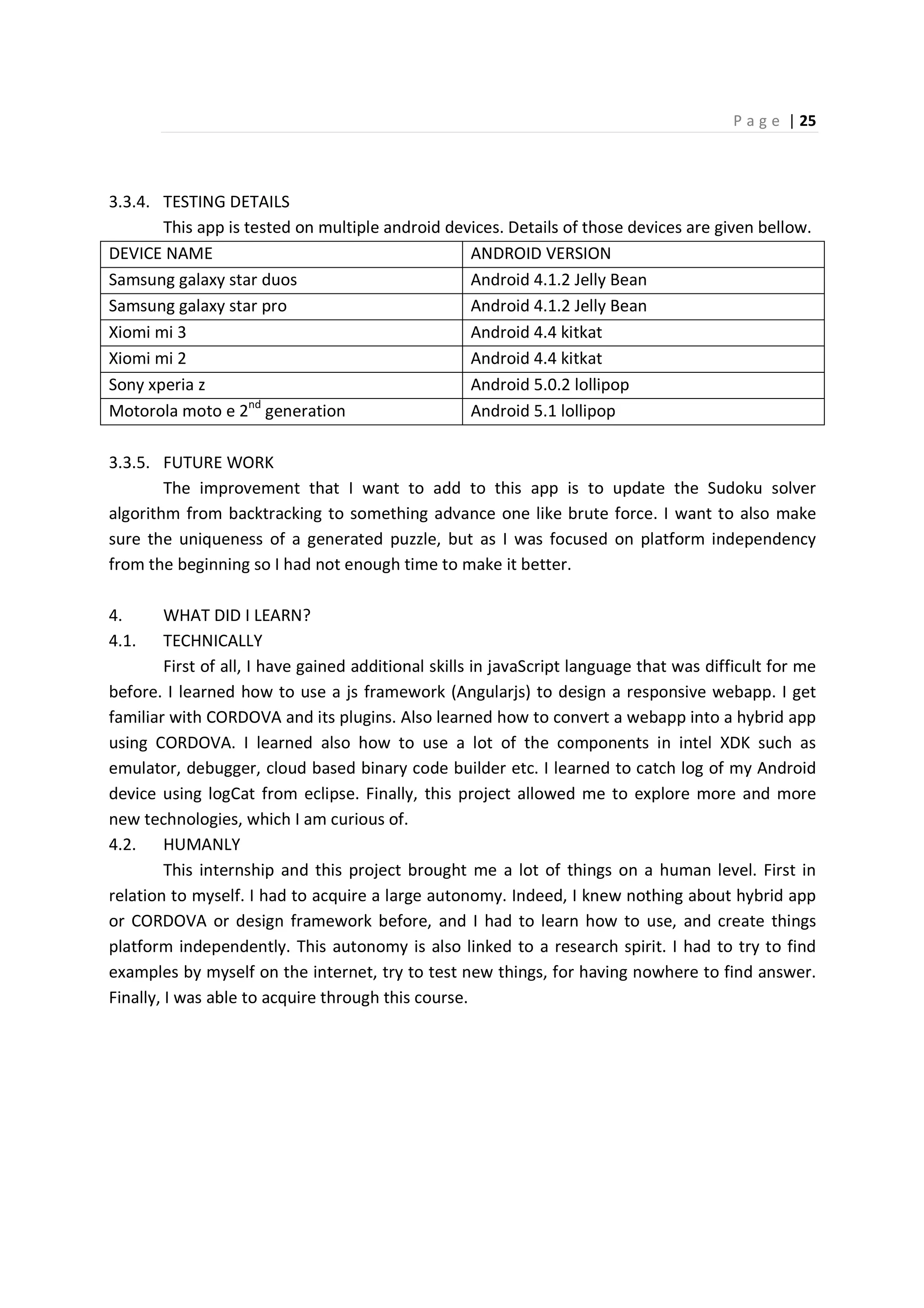
Fig 3.3.3.7: Auto solver view after the puzzle is given
Fig 3.3.3.8: A dialog box, confirming to train the app with the solution
P a g e | 24
Fig 3.3.3.9: The auto solved puzzle
Fig 3.3.3.10: User manual
P a g e | 25
3.3.4. TESTING DETAILS
This app is tested on multiple android devices. Details of those devices are given bellow.
DEVICE NAME ANDROID VERSION
Samsung galaxy star duos Android 4.1.2 Jelly Bean
Samsung galaxy star pro Android 4.1.2 Jelly Bean
Xiomi mi 3 Android 4.4 kitkat
Xiomi mi 2 Android 4.4 kitkat
Sony xperia z Android 5.0.2 lollipop
Motorola moto e 2nd
generation Android 5.1 lollipop
3.3.5. FUTURE WORK
The improvement that I want to add to this app is to update the Sudoku solver
algorithm from backtracking to something advance one like brute force. I want to also make
sure the uniqueness of a generated puzzle, but as I was focused on platform independency
from the beginning so I had not enough time to make it better.
4. WHAT DID I LEARN?
4.1. TECHNICALLY
First of all, I have gained additional skills in javaScript language that was difficult for me
before. I learned how to use a js framework (Angularjs) to design a responsive webapp. I get
familiar with CORDOVA and its plugins. Also learned how to convert a webapp into a hybrid app
using CORDOVA. I learned also how to use a lot of the components in intel XDK such as
emulator, debugger, cloud based binary code builder etc. I learned to catch log of my Android
device using logCat from eclipse. Finally, this project allowed me to explore more and more
new technologies, which I am curious of.
4.2. HUMANLY
This internship and this project brought me a lot of things on a human level. First in
relation to myself. I had to acquire a large autonomy. Indeed, I knew nothing about hybrid app
or CORDOVA or design framework before, and I had to learn how to use, and create things
platform independently. This autonomy is also linked to a research spirit. I had to try to find
examples by myself on the internet, try to test new things, for having nowhere to find answer.
Finally, I was able to acquire through this course.
P a g e | 26
CONCLUSION
Thanks to this internship, I discovered an amazing work environment, and beautiful
people. I have learned new skills, and tried to apply whatever I have learned for three years. I
do not regret anything in this experience and I thank all those who have allowed such thing
feasible. The people I met here are not just professionals, they are approachable, and once
again I thank you all.
6. REFERENCES
1. http://ngcordova.com/docs/plugins/file/
2. http://campus.codeschool.com/courses/shaping-up-with-angular-js/
3. https://github.com/angular/angular.js
4. http://www.nganimate.org/
5. https://docs.angularjs.org/api/ngRoute#!
6. http://angular-js.in/panhandler/
7. https://docs.angularjs.org/api/ngTouch/service/$swipe#!
8. https://docs.angularjs.org/api/ngTouch#!
9. https://docs.angularjs.org/api/ngRoute/provider/$routeProvider#!
10. https://github.com/apache/cordova-plugin-file
11. http://docs.phonegap.com/en/edge/cordova_notification_notificatio
n.md.html
12. https://www.youtube.com/watch?v=u6YBDqIFlvg [PhoneGap:
Building & Testing Mobile Apps with Web Standards] by christophi
Conraets (Software engineer, Adobe)
13. http://ngmodules.org/modules/ngtimeago
14. http://learnlayout.com/media-queries.html
P a g e | 27
ANNEXURE: Please find attached cd for source code of both TicTacToe
application and SUDOKU application
CONTENT STRUCTURE
TicTacToe
|------- .idea (auto generated files and folders, by intel XDK)
|------- plugins (auto generated files and folders, by intel XDK)
|------- www
| |----- css
| | |----- app.css
| | |----- view.css
| |------ html
| | |------ board.html
| | |------ playground.html
| | |------ scoreboard.html
| | |------ welcomePage.html
| |------- images (folder containing all images)
| |------- js
| | |------ angular.js (downloaded from aggular.org)
| | |------ app.js
| | |------ gameController.js
| | |------ module.js
| | |------ viewController.js
| |------- index.html
|------- intelxdk.config.android
|------- intelxdk.config.crosswalk
|------- intelxdk.config.ios
|------- intelxdk.config.windows8
|------- TicTacToe.xdk
P a g e | 28
CONTENT STRUCTURE OF SUDOKU APPLICATION
SUDOKU
|----- .idea (auto generated by xdk)
|----- plugins (auto generated by xdk)
|----- www
| |----- css
| | |----- app.css
| | |----- firstPage.css
| | |----- history.css
| | |----- howToPlay.css
| | |----- index.css
| | |----- onOffSwitch.css
| | |----- options.css
| | |----- sideMenu.css
| | |----- view.css
| |----- html
| | |----- gameOn.html
| | |----- howToePlay.html
| | |----- options.html
| | |----- playBoard.html
| | |----- processing.html
| | |----- scoreHistory.html
| | |----- sideMenu.html
| | |----- welcomePage.html
| |----- image (image folder)
| |----- js
| | |----- angular.js [3]
| | |----- angular-animate.js [4]
| | |----- angular-panhandler.js [6]
| | |----- angular-route.js [5]
| | |----- angular-swipe.js [7]
| | |----- angular-touch.js [8]
| | |----- app.js
| | |----- gameController.js
| | |----- howToPlay.js
| | |----- ng-cordova.js [1]
| | |----- ngtimeago.js [13]
| | |----- pageController.js
| | |----- solutionFinder.js
|----- intelxdk config files and SUDOKU.xdk

Platform Independent App design

  • 2.
    P a ge | 1 ACKNOWLEDGEMENTS The internship opportunity with Alumnus Software Ltd. was a great chance for learning and professional development. Therefore, I consider myself as a very lucky individual as I was a part of it. I am also grateful for having a chance to meet so many wonderful people and professionals who led me though this internship period. I would like to thank Dr Amlan Chakroborti, the Head Of the Department, A.K. Choudhury School of I.T. because of him I got the opportunity to do my internship at Alumnus Software Ltd. I am using this opportunity to express my deepest gratitude and special thanks to Dr. Probal Sengupta, the founder and CTO of Alumnus Software Ltd. and my project guide during this internship, who gave me this interesting project and in spite of being extraordinarily busy with his duties, took time out to hear, guide and keep me on the correct path and allowing me to carry out my project at their esteemed organization and extending during the training. Next, I would like to thanks Mr. Sudhindu Bikash Mondal, my internal guide, for his time and advices, those help me a lot to stay connected with my college, and stay updated with the requirements of my project at the department. It is my radiant sentiment to place on record my best regards, deepest sense of gratitude to Mr Deep [Software engineer], Mr. Sowvik [Software engineer] and Mr. Binayek [Software engineer] for their careful and precious guidance which were extremely valuable for my study both theoretically and practically. I perceive this opportunity as a big milestone in my career development. I will strive to use gained skills and knowledge in the best possible way, and I will continue to work on their improvement, in order to attain desired career objectives. Hope to continue cooperation with all of you in the future. Sincerely, ……………………………………..
  • 3.
    P a ge | 2 ABSTRACT I pursued my studies at A.K.C.S.I.T Department of University of Calcutta with an internship, an internship with the aim to improve my technical abilities in computer science. My topic for this project is to learn how to design a platform independent application that can be used in android, windows as well as in ios. The design of such an application is made in HTML5, CSS3 and Angularjs. That means by the help of this project, a web developer can became an app developer for all platforms, and as the web development is much easy and flexible, apps designed by this technique will be more attractive. I am submitting a TicTacToe app as a worm-up and a SUDOKU app (player and solver) as my final project. The purpose of the final application is to provide an application for your device, which will help you to make your mind sharp, by giving you a new challenge every time. It also helps Sudoku lovers to play games, as well as to find the solution of almost every Sudoku puzzle. This internship enhanced my knowledge in JavaScript, a language with which I was not so familiar. It introduced me with MVC architecture of Angularjs, and CORDOVA plugins and framework.
  • 4.
    P a ge | 3 INTRODUCTION As part of my MCA (Master of Computer Application), in the 6th semester a project is required. We can either do it in our department, or in a company, or in other University. Fortunately, I got an opportunity to work in Alumnus Software Ltd., a company which is well known for their well established business in Kolkata since 1996. In the starting period of my internship, I was working in “statistical data analysis using R”. With that I was incorporated with two running projects of the company. After completion of those projects, company assigned me a new project, which is to learn “platform independent app design for mobile devices”. I was under tutelage of Dr. Probal Sengupta, who helped me to design a platform independent application using CORDOVA framework as my final project work. This project was conducted in two stages: the first is to familiarize myself with the platform independent design (development tools, coding instructions, setting up with the testing on device). During this first step I tried to make a Tictactoe, because this is a simple application, easily coded, and it involves few hardware (speakers and vibrator). So it was like a warm up for me, to start the final project. For the second part of my project, I needed a topic that can be useful and accessible for me. Dr. Sengupta proposed the idea of a SUDOKU game. Thus the application consists of a brain storming game “SUDOKU” and a “SUDOKU solver”. The main focus was : how to design a platform independent SUDOKU application that can be installed in any device (android, windows or ios) for SUDOKU lovers. I intended to improve the application as there is always a room for improvement. I would like to upgrade Sudoku solver algorithm, and I would like to make sure every puzzle has a unique solution.
  • 5.
    P a ge | 4 CONTENTS Acknowledgements 1 Abstract 2 Introduction 3 1. About Alumnus Software Ltd. 5 2. Why go platform independent? 5 3. My project : How to design platform independent application 6 3.1. Technology used 3.1.1. Cordova 7 3.1.2. Angularjs 8 3.1.3. Intel XDK 10 3.1.4. Eclipse JUNA (logCat) 10 3.1.5. Adobe Photoshop 10 3.2. First project : Tictactoe 3.2.1. The basic of design application 10 3.2.2. The project 11 3.2.3. Improvements 16 3.3. Second project : SUDOKU 3.3.1. Plugins 16 3.3.2. Angular services 16 3.3.3. The project 17 3.3.4. Testing details 25 3.3.5. Future work 25 4. What did I learn? 25 4.1. Technically 4.2. Humanly 25 Conclusion 26 References 26 Annexure 27
  • 6.
    P a ge | 5 1. ABOUT ALUMNUS SOFTWARE LTD. Alumnus Software, Ltd. was established in 1996 by Arindam Mukherjee and Probal Sengupta and is based in Kolkata, India. Good place to work, learn, cooperative colleagues. Relaxed environment, as long as you get your work done, you are praised. If you don’t you are helped with your task. 2. MY PROJECT : DESIGN OF PLATFORM INDEPENDENT APPLICATION 2.1.1. WHY GO PLATFORM INDEPENDENT? Figure 2.1: Different platforms need apps in different native languages. From the perspective of an Application developer, to design native apps for N platforms, a developer needs to learn N native language (Ex. Java for Android, C++ for windows and so on). This is not very suitable. And from the perspective of App development cost, Total cost = No of platform multiplied by cost of the app, which is very huge. So a developer needs to find something by which once designed and app is available for every platform.
  • 7.
    P a ge | 6 3. HOW TO DESIGN PLATFORM INDEPENDENTLY? Is there any way to design platform independently? Actually there is one. There is any design technique in which million of developer designing platform independent Apps every day, and we all are using those apps almost every day, inside a browser. Yes that’s a web App. Can’t we do something to use a web app as an application in the device? If you are thinking about to render a web app into the device, it is informed that, ios-1 had tried this before and it didn’t work for them. During that time, internet was costly and its speed was also poor so the technique didn’t work for them. Figure 3.1: Platform independent app (inside a browser) But there is a huge gap between a mobile site and a mobile application. First, we need to find out a way to package a web app as a native app or as a binary file that can be uploaded into distribution server (Ex. into Google play for Android). Secondly, as a web app can’t have access to native hardwires, we need find a way by which we can have access. This gap is filled by phoneGap or I can say Apache CORDOVA (fig-3).
  • 8.
    P a ge | 7 Fig 3.2 : How phoneGap fills the gap. 3.1. TECHNOLOGY USED 3.1.1. CORDOVA Apache Cordova was originally called Phonegap build by Nitobi. It was open-source & free software from the beginning (MIT license). Then Adobe acquire Nitobi, and donate Phonegap codebase to the Apache Software Foundation, and now that is known as Apache CORDOVA. Phonegap is still a product of Adobe. Apache Cordova is a set of device APIs that allows a mobile app developer to access native device function such as the camera or accelerometer from JavaScript. Combined with a UI framework such as jQuery Mobile or Angularjs or Dojo Mobile or Sencha Touch, this allows a smartphone app to be developed with just HTML, CSS, and JavaScript. When using the Cordova APIs, an app can be built without any native code (Java, Objective-C, etc) from the app developer. Instead, web technologies are used, and they are hosted in the app itself locally (generally not on a remote http server). Cordova provides a set of uniform JavaScript libraries that can be invoked, with device- specific native backing code for those JavaScript libraries. Cordova is available for the following platforms: iOS, Android, Blackberry, Windows Phone, Palm WebOS, Bada, and Symbian. 3.1.1.1. HOW CORDOVA WORKS? Cordova wraps a packet of HTML5, CSS3 and Javascript with a webview into a binary file with required Cordova plugins. Webview is the 100% of height and 100% of width of the device screen, which is used by the native OS. It renders the webapp from the application server into the webview and Cordova plugins help to access native hardwire.
  • 9.
    P a ge | 8 Figure 3.1.1: Corodova architecture. 3.1.2. ANGULARJS Angularjs is a MVC framework by google for creating single page dynamic and responsive web application. It is freely available under MIT License. Features of Angularjs are as follows. Two-way Data Binding Use of Angularjs makes views declarative. Controllers do not need to directly manipulate the view. Changes made in the model or data are automatically reflected in the view. Updates and pipelined communication between controller and view are managed by the frameworks. Directives Directives in angularjs are markers (such as attributes, tags and class names) that tell angularjs to attach a given behavior to a DOM element. Few examples are given below. ng-app : Bootstrapping your app and defining its scope. ng-controller : defining which controller will be in charge of your view. ng-repeat : Allow for looping through collections.
  • 10.
    P a ge | 9 MVC (Model View Controller) Angular implements MVC by asking you to split your app into MVC components, then just let Angular do the rest. Angular manages your components for you and also serves as the pipeline that connects them. In Angular Model is a javascript object, View is the DOM and controllers are javascript methods. Dependency Injection Dependency Injection of Angular helps to keep complex tasks out of the controller as a service or factory, and makes your controller to stay focus on its actual work. As unit testing front end code is usually hard because there are so many sticky dependencies, Angular’s Dependency Injection allows us to mock out many of these dependencies and isolate individual components. Other features are as follows • Deep linking & server communication support • Scope management • Form validation • Animation • Routing • Filters Figure 3.1.2: Different IDEs for different platforms.
  • 11.
    P a ge | 10 3.1.3. INTEL XDK (CROSS PLATFORM DEVELOPMENT KIT) Intel XDK is combination of webApp graphical designer with drag and drop facilities, an editor, a simulator with plenty of simulation device options, live testing and debugging support via USB cable or via wifi or via internet, and finally a cloud based cross platform build facilities (fig-6). And it solves the N IDEs, N SDKs problem (fig-5). Figure 3.1.3: Cross platform development kit , INTEL XDK 3.1.4. ECLIPSE JUNA 4.2, ANDROID SDK AND LOGCAT I used logCat of eclipse to catch all logs of an android device, and used then for testing and debugging my app. 3.1.5. PHOTOSHOP 7.0 Photoshop is used for a little design issues in my apps. Ex. designing the icon for the app. 3.2. FIRST PROJECT : TicTacToe 3.2.1. THE BASIC OF DESIGN APPLICATION To work with CORDOVA we need to maintain the following folder structure. App dir |------ www | |------ index.html | |------ js | |------ CSS | |------ resources |------- app.xdk |------- plugins To designn a cross platform app using Angular framework I needed some basics, because the framework was completely new to me. In the beginning, I had a pretty tough time
  • 12.
    P a ge | 11 with Angular for getting started. After few days, I became a little bit comfortable with angularjs. I understood that, Angular comes with a great MVC architecture. First, we need to create a module for the app, and then we need define the scope of our app in the DOM element with angular’s “ng-app” directive. var app = angular.module("app", []); <html ng-app="app"> An app can have only one “ng-app” directive in the whole page. Then we need to create a controller and define in DOM that it is in charge for every control of a DOM element. One of the ways to do that is, to define controller inside DOM element by “ng-controller” directive. app.controller("viewController", function($scope, $rootScope){ }); Here $scope and $rootScope are angular defined services. <div ng-controller="menuController" class=”menu”> An app can have multiple controllers working simultaneously. The next step is to bind the data or model with a DOM element. If the DOM element is an input element, then we can do that using “ng-model” directive. <input type="text" ng-model="developerName" name="developerName" required> Otherwise we can use Angular expression to bind a data element with any DOM element. Example is given below. <div>Developer name : {{developerName}}</div> In case of a reusable DOM element, we can create a custom directive, and use that directive as a replacement of the DOM element anywhere of the page. The example is as follows: app.directive('playGround',function(){ return{ restrict: 'E', templateUrl: "html/playGround.html"
  • 13.
    P a ge | 12 }; }); <play-ground ng-hide="$root.IsStartingPage" class="playGround"></play-ground> 3.2.2. THE PROJECT For my first application, I was not really comfortable with intel XDK and Angularjs, so in this application there is only two different screen, and so two different controllers, but it was a good training to try how to communicate between the controllers, how to display models on the screen. First, I have created a module for the app, with usernames and score. Making “$roorScope.isStartingPage = true” I make sure that; initially the registration page is loaded. var app = angular.module("tikTak", []); app.run(function($rootScope){ $rootScope.players =[{playerName : '', score : 0}, {playerName : '', score : 0}]; $rootScope.IsStartingPage = true; }); fig-3.2.1 : registration page fig-3.2.2: play ground
  • 14.
    P a ge | 13 The first screen or the welcome page is the registration page for two users. To pass data between two controllers here I have used Angular’s global service $rootScope. Input fields on the registration page are also bind with the rootScope variables. <input type="text" class="textInput" ng-model="$root.players[0].playerName" placeholder="First Player Name"> <input type="text" class="textInput" ng-model="$root.players[1].playerName" placeholder="Second Player Name"> Then I have created a controller for this registration page in the name of “viewController”, as its job is to change the view by changing the page from registration to ready to play. app.controller("viewController", function($scope, $rootScope){ $scope.changePage = function(){ if($rootScope.players[0].playerName != "" && $rootScope.players[1].playerName != ""){ $rootScope.IsStartingPage = false; } else { alert("Please enter player Names"); } }; }); As you can see, this controller contains a method, called “changepage()”. When this method invoked it verifies is there any empty username? If not, it changes the page by making “$rootScope.isStartingpage = false”. This method is invoked from a DOM element, as shown below. <button ng-click="changePage()">Play</button> Ng-click is an angular directive, works same as click method of js with some additional functionalities. <div class="body"> <welcome-page ng-show="$root.IsStartingPage"></welcome-page> <play-ground ng-hide="$root.IsStartingPage" class="playGround"></play-ground> </div>
  • 15.
    P a ge | 14 Here in the above example you can see, how the page changes with the rootScope variable. For the second page, there is a controller called “gameController”. As the name says, its job is to control the flow of game. app.controller("tikTakGameController", function($scope,$rootScope) { $scope.newGame=function(){ $scope.board = [[9,9,9], [9,9,9], [9,9,9]]; $scope.viewBoard = [["[ ]", "[ ]", "[ ]"], ["[ ]", "[ ]", "[ ]"], ["[ ]", "[ ]", "[ ]"]]; $scope.win= false; $scope.draw= false; $scope.clickCount = 0; }; ……. This controller has a method called “newGame()”, its job is to create a blank board. Its $scope.board module keeps the record about, which cell is occupied by whom? 9 in this module defines the cell is empty. $scope.viewBoard module is to manipulate the GUI. This page also contains two animated icons in the bottom of the GUI, one is thinking which refers whose turn it is, and other one is waiting for its turn (fig-3.3). When a player wins, a laughing animated simile comes in, and a crying animation comes in the side of the loser (fig- 3.4). And the matched row/column/diagonal gets highlighted by green color. If it is a draw, whole board gets highlighted by yellow color, and an angry animated simile comes in place of both users (fig-3.5). You can go for a new game every time, but according to game’s rule, turn will be toggled with every new game.
  • 16.
    P a ge | 15 Fig 3.2.3 : arnab waiting, raju thinking fig 3.2.4 : arnab won, raju lose Fig 3.2.5 : It’s a draw
  • 17.
    P a ge | 16 3.2.3. IMPROVEMENTS The improvements I want to add to this app is to make this an online playable with a friend. The GUI could also be improved. 3.3. SECOND PROJECT : SUDOKU 3.3.1. PLUGINS For the second project, I needed to learn plenty of new things, use of CORDOVA plugins was one of them. To use a CORDOVA plugin we first need to tell the XML to include the plugin with the program. And that has to be done separately for every platform. But as I was using intel XDK, I just checked the check box on plugin list, and XDK did the rest of the job for me. After that I just need to find out how can I use them? File, vibration, notification dialog, device and splash screen are the name of the plugins I used for the second application. 3.3.2. ANGULAR SERVICES This second project was consisting of seven different pages. To manage them efficiently, I used a lot of angular services; those are “ngAnimate”, “ngRoute”, “swipe”, “ngTouch”, “$interval”, “$filter”, “$q” etc. ngAnimate is used to add animation to a DOM element from angular. ngRoute is used to support deep linking. Swipe is used to give used a feel of native like left right swap experience. ngTouch is used for vertical swap experience. $interval is an angular service which invokes a function in every mentioned time interval. $filter is used for filtering data. $q is a promise service, which is used for asynchronous events to force execute synchronously.
  • 18.
    P a ge | 17 3.3.3. THE PROJECT 3.3.3.1. PROJECT REQUIREMENT As a mobile game, this app has almost every functionality that an app must have. Below is the list of functionalities that this app has. 1) A Sudoku game with a new game every-time facility. 2) A Sudoku solver. 3) The view of Sudoku solver and games is same. 4) Keep Sudoku board always square and always visible. 5) Pause and resume facility. 6) Score history. 7) File based repository for solutions, puzzle template, saved games and score history. 8) Warning for error with notification sound and vibration. 9) Show the best score and the current score on puzzle solved notification. 10) Customize device’s back button and menu button event. 11) Timer. 12) Auto solve facility. 13) Use Sudoku solvers output to train the app. 14) Provide a how to play page to guide the user. 15) User must have the control over making notification sound and vibration on/off.
  • 19.
    P a ge | 18 3.3.3.2. DATA FLOW DIAGRAM 3.3.3.2.1. LEVEL 0 DFD Fig 3.3.1 Level 0 DFD
  • 20.
    P a ge | 19 3.3.3.2.2. LEVEL 1 DFD FOR PROCESS 1 (gameContorller Application) Fig 3.3.2 Level 1 DFD for process 1
  • 21.
    P a ge | 20 3.3.3.3. GUI OVERVIEW At first, the registration page consists of a user name (mandatory), game mode options (play SUDOKU/ solve SUDOKU) and play button. If a valid user name is given(not empty), the clicking on the play button will lead you to your chosen option. It also consists a how to play button which will lead you to the instructions manual. Fig 3.3.3.1: Registration Page After registration you will get an options page, where there will be two options, new game or load saved game. Initially, you have to go for a new game because you don’t have any saved games. But if you have a saved game you can go for load saved gamed to resume any saved game. Fig 3.3.3.2: Option Page
  • 22.
    P a ge | 21 Fig 3.3.3.3 Saved games list In the next page you will get a Sudoku puzzle. Cells with stone like background are not editable; you can choose an empty cell by clicking on it. A selected cell will have a green background. After selecting an empty cell click on the number you want to put in that cell. If it solves any unit (a row, a column or a large grid), that unit will be highlighted with yellow background. If it violates any Sudoku rule, cells violating the rule will be highlighted with red background, and the device will also vibrate. Fig 3.3.3.4: A solved unit’s view
  • 23.
    P a ge | 22 Fig 3.3.3.5: View of a wrong entry It contains a menu also, where you can switch on and off the notification sound and vibration. Fig 3.3.3.6: View of the menu bar
  • 24.
    P a ge | 23 Fig 3.3.3.6: A Sudoku puzzle to be solved by the auto solver Fig 3.3.3.7: Auto solver view after the puzzle is given Fig 3.3.3.8: A dialog box, confirming to train the app with the solution
  • 25.
    P a ge | 24 Fig 3.3.3.9: The auto solved puzzle Fig 3.3.3.10: User manual
  • 26.
    P a ge | 25 3.3.4. TESTING DETAILS This app is tested on multiple android devices. Details of those devices are given bellow. DEVICE NAME ANDROID VERSION Samsung galaxy star duos Android 4.1.2 Jelly Bean Samsung galaxy star pro Android 4.1.2 Jelly Bean Xiomi mi 3 Android 4.4 kitkat Xiomi mi 2 Android 4.4 kitkat Sony xperia z Android 5.0.2 lollipop Motorola moto e 2nd generation Android 5.1 lollipop 3.3.5. FUTURE WORK The improvement that I want to add to this app is to update the Sudoku solver algorithm from backtracking to something advance one like brute force. I want to also make sure the uniqueness of a generated puzzle, but as I was focused on platform independency from the beginning so I had not enough time to make it better. 4. WHAT DID I LEARN? 4.1. TECHNICALLY First of all, I have gained additional skills in javaScript language that was difficult for me before. I learned how to use a js framework (Angularjs) to design a responsive webapp. I get familiar with CORDOVA and its plugins. Also learned how to convert a webapp into a hybrid app using CORDOVA. I learned also how to use a lot of the components in intel XDK such as emulator, debugger, cloud based binary code builder etc. I learned to catch log of my Android device using logCat from eclipse. Finally, this project allowed me to explore more and more new technologies, which I am curious of. 4.2. HUMANLY This internship and this project brought me a lot of things on a human level. First in relation to myself. I had to acquire a large autonomy. Indeed, I knew nothing about hybrid app or CORDOVA or design framework before, and I had to learn how to use, and create things platform independently. This autonomy is also linked to a research spirit. I had to try to find examples by myself on the internet, try to test new things, for having nowhere to find answer. Finally, I was able to acquire through this course.
  • 27.
    P a ge | 26 CONCLUSION Thanks to this internship, I discovered an amazing work environment, and beautiful people. I have learned new skills, and tried to apply whatever I have learned for three years. I do not regret anything in this experience and I thank all those who have allowed such thing feasible. The people I met here are not just professionals, they are approachable, and once again I thank you all. 6. REFERENCES 1. http://ngcordova.com/docs/plugins/file/ 2. http://campus.codeschool.com/courses/shaping-up-with-angular-js/ 3. https://github.com/angular/angular.js 4. http://www.nganimate.org/ 5. https://docs.angularjs.org/api/ngRoute#! 6. http://angular-js.in/panhandler/ 7. https://docs.angularjs.org/api/ngTouch/service/$swipe#! 8. https://docs.angularjs.org/api/ngTouch#! 9. https://docs.angularjs.org/api/ngRoute/provider/$routeProvider#! 10. https://github.com/apache/cordova-plugin-file 11. http://docs.phonegap.com/en/edge/cordova_notification_notificatio n.md.html 12. https://www.youtube.com/watch?v=u6YBDqIFlvg [PhoneGap: Building & Testing Mobile Apps with Web Standards] by christophi Conraets (Software engineer, Adobe) 13. http://ngmodules.org/modules/ngtimeago 14. http://learnlayout.com/media-queries.html
  • 28.
    P a ge | 27 ANNEXURE: Please find attached cd for source code of both TicTacToe application and SUDOKU application CONTENT STRUCTURE TicTacToe |------- .idea (auto generated files and folders, by intel XDK) |------- plugins (auto generated files and folders, by intel XDK) |------- www | |----- css | | |----- app.css | | |----- view.css | |------ html | | |------ board.html | | |------ playground.html | | |------ scoreboard.html | | |------ welcomePage.html | |------- images (folder containing all images) | |------- js | | |------ angular.js (downloaded from aggular.org) | | |------ app.js | | |------ gameController.js | | |------ module.js | | |------ viewController.js | |------- index.html |------- intelxdk.config.android |------- intelxdk.config.crosswalk |------- intelxdk.config.ios |------- intelxdk.config.windows8 |------- TicTacToe.xdk
  • 29.
    P a ge | 28 CONTENT STRUCTURE OF SUDOKU APPLICATION SUDOKU |----- .idea (auto generated by xdk) |----- plugins (auto generated by xdk) |----- www | |----- css | | |----- app.css | | |----- firstPage.css | | |----- history.css | | |----- howToPlay.css | | |----- index.css | | |----- onOffSwitch.css | | |----- options.css | | |----- sideMenu.css | | |----- view.css | |----- html | | |----- gameOn.html | | |----- howToePlay.html | | |----- options.html | | |----- playBoard.html | | |----- processing.html | | |----- scoreHistory.html | | |----- sideMenu.html | | |----- welcomePage.html | |----- image (image folder) | |----- js | | |----- angular.js [3] | | |----- angular-animate.js [4] | | |----- angular-panhandler.js [6] | | |----- angular-route.js [5] | | |----- angular-swipe.js [7] | | |----- angular-touch.js [8] | | |----- app.js | | |----- gameController.js | | |----- howToPlay.js | | |----- ng-cordova.js [1] | | |----- ngtimeago.js [13] | | |----- pageController.js | | |----- solutionFinder.js |----- intelxdk config files and SUDOKU.xdk