



Planning with Planner
by Dragan Panjkov
GOLD SPONSORS
SILVER SPONSORS BRONZE SPONSORS
Dragan Panjkov
Microsoft MVP – Office Servers and Services
Consultant at K2 NE (www.k2.com)
Website and blog: www.dragan-panjkov.com
Twitter: @panjkov
 Work Management Today
 Introduction to Planner
 Demo
 Management and Extensibility
30% of executives say the greatest
challenge to executing strategy is
the failure to coordinate across units1
62% of employees work
from multiple locations in
a month2
25% of the average worker’s time
goes into looking for information3
1. Harvard Business Review. “Why Strategy Execution
Unravels—and What to Do About It.”
2. Forrester Remote Work Survey
3. IDC. “The High Cost of Not Finding Information.”
Modern workplace challenges
One size doesn’t fit all
SMS
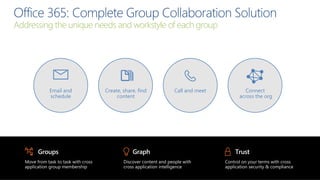
Addressing the unique needs and workstyle of each group
Groups
Move from task to task with cross
application group membership
Graph
Discover content and people with
cross application intelligence
Trust
Control on your terms with cross
application security & compliance
Email and
schedule
Call and meetCreate, share, find
content
Connect
across the org
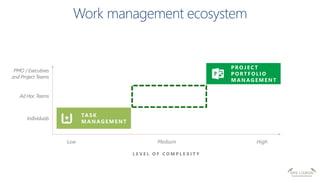
Low Medium High
Ad Hoc Teams
PMO / Executives
and Project Teams
L E V E L O F C O M P L E X I T Y
TASK
MA NAG E ME NT
Individuals
PROJE C T
PORT F OL I O
MA NAG E ME NT
W O R K M A N A G E M E N T F O R T H E
M O D E R N W O R K P L A C E
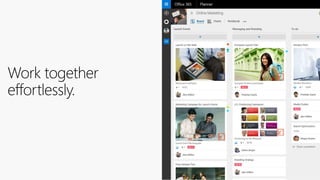
Planner
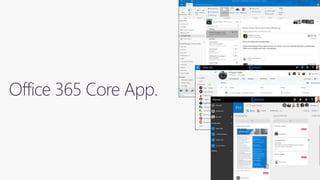
Office 365 Core App.
https://tasks.office.com/
Demo
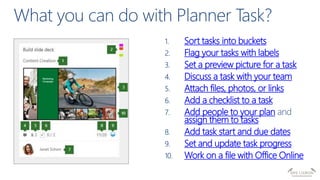
Sort tasks into buckets
Flag your tasks with labels
Set a preview picture for a task
Discuss a task with your team
Attach files, photos, or links
Add a checklist to a task
Add people to your plan
assign them to tasks
Add task start and due dates
Set and update task progress
Work on a file with Office Online
Microsoft Planner
Included in Office 365
Integrated with Groups
Easy to learn
Empowers teams
Secure
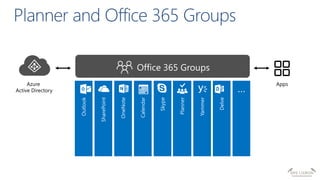
Azure
Active Directory
Apps
 App launcher visibility
 Control Planner tile visibility via service plan licensing
 O365 Admin UI and PowerShell to set
 Group creation permissions
 AD policy limits which users can create Office 365 groups
 Does not prevent users from using groups
 Tenant Admins can still create groups
 Naming conventions (In progress)
 Enforce naming conventions during group creation/edit
 Blocked word list, pre/post-fix strings, IT admin override
 Additional controls
$Policy = Get-MsolSettingTemplate –TemplateId 62375ab9-6b52-47ed-
826b-58e47e0e304b
$Setting = $Policy.CreateSettingsObject()
$Setting[“EnableGroupCreation”] = “false”
$Setting[“GroupCreationAllowedGroupId”] = “--guid object id for
your security group --“
New-MsolSettings –SettingsObject $Setting
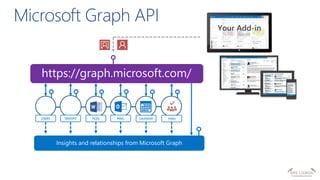
https://graph.microsoft.com/
USERS FILES MAIL CALENDARGROUPS
Insights and relationships from Microsoft Graph
TASKS
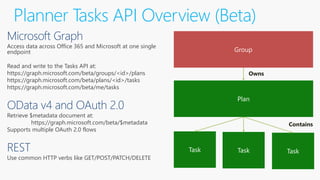
Planner Tasks API Overview (Beta)
Access data across Office 365 and Microsoft at one single
endpoint
Read and write to the Tasks API at:
https://graph.microsoft.com/beta/groups/<id>/plans
https://graph.microsoft.com/beta/plans/<id>/tasks
https://graph.microsoft.com/beta/me/tasks
Retrieve $metadata document at:
https://graph.microsoft.com/beta/$metadata
Supports multiple OAuth 2.0 flows
Use common HTTP verbs like GET/POST/PATCH/DELETE
Plan
Owns
Contains
GOLD SPONSORS
SILVER SPONSORS BRONZE SPONSORS
Planning with Planner - SPS Lisbon 2016

Planning with Planner - SPS Lisbon 2016

  • 1.
  • 2.
  • 3.
    Dragan Panjkov Microsoft MVP– Office Servers and Services Consultant at K2 NE (www.k2.com) Website and blog: www.dragan-panjkov.com Twitter: @panjkov
  • 4.
     Work ManagementToday  Introduction to Planner  Demo  Management and Extensibility
  • 5.
    30% of executivessay the greatest challenge to executing strategy is the failure to coordinate across units1 62% of employees work from multiple locations in a month2 25% of the average worker’s time goes into looking for information3 1. Harvard Business Review. “Why Strategy Execution Unravels—and What to Do About It.” 2. Forrester Remote Work Survey 3. IDC. “The High Cost of Not Finding Information.” Modern workplace challenges
  • 6.
    One size doesn’tfit all SMS
  • 7.
    Addressing the uniqueneeds and workstyle of each group Groups Move from task to task with cross application group membership Graph Discover content and people with cross application intelligence Trust Control on your terms with cross application security & compliance Email and schedule Call and meetCreate, share, find content Connect across the org
  • 8.
    Low Medium High AdHoc Teams PMO / Executives and Project Teams L E V E L O F C O M P L E X I T Y TASK MA NAG E ME NT Individuals PROJE C T PORT F OL I O MA NAG E ME NT
  • 9.
    W O RK M A N A G E M E N T F O R T H E M O D E R N W O R K P L A C E Planner
  • 12.
  • 13.
  • 14.
    Sort tasks intobuckets Flag your tasks with labels Set a preview picture for a task Discuss a task with your team Attach files, photos, or links Add a checklist to a task Add people to your plan assign them to tasks Add task start and due dates Set and update task progress Work on a file with Office Online
  • 15.
    Microsoft Planner Included inOffice 365 Integrated with Groups Easy to learn Empowers teams Secure
  • 17.
  • 18.
     App launchervisibility  Control Planner tile visibility via service plan licensing  O365 Admin UI and PowerShell to set  Group creation permissions  AD policy limits which users can create Office 365 groups  Does not prevent users from using groups  Tenant Admins can still create groups  Naming conventions (In progress)  Enforce naming conventions during group creation/edit  Blocked word list, pre/post-fix strings, IT admin override  Additional controls $Policy = Get-MsolSettingTemplate –TemplateId 62375ab9-6b52-47ed- 826b-58e47e0e304b $Setting = $Policy.CreateSettingsObject() $Setting[“EnableGroupCreation”] = “false” $Setting[“GroupCreationAllowedGroupId”] = “--guid object id for your security group --“ New-MsolSettings –SettingsObject $Setting
  • 19.
    https://graph.microsoft.com/ USERS FILES MAILCALENDARGROUPS Insights and relationships from Microsoft Graph TASKS
  • 20.
    Planner Tasks APIOverview (Beta) Access data across Office 365 and Microsoft at one single endpoint Read and write to the Tasks API at: https://graph.microsoft.com/beta/groups/<id>/plans https://graph.microsoft.com/beta/plans/<id>/tasks https://graph.microsoft.com/beta/me/tasks Retrieve $metadata document at: https://graph.microsoft.com/beta/$metadata Supports multiple OAuth 2.0 flows Use common HTTP verbs like GET/POST/PATCH/DELETE Plan Owns Contains
  • 21.

Editor's Notes

  • #2 The session will be end-to-end overview of Microsoft Planner functionality and features. Even if attendees didn't have any opportunity to work with Planner prior to this session, it is not an issue. After this session, attendees will know how to create Plans, work with Tasks and Buckets, and to manage collaborative projects for their teams with ease.
  • #5 ABSTRACT: Microsoft Planner is a new experience in Microsoft Office 365 to organize work, manage and assign tasks and collaborate within your teams. We go hands-on and show you how to use Planner—including integrated experiences across Office 365. This show demonstrates how to get started with creating plans, assigning tasks and the things you can do while working through a plan. We walk through the integrated experiences with Office 365 Groups, board and chart views to visualize tasks and monitor progress—and finally what the team is building in the coming months.