DARI BAB :  PHYSICAL ELEMENTS OF DATA Dimara Kusuma Hakim, ST. STRUKTUR DAN PENYIMPANAN BASISDATA
tables, views, and data types. Physical Storage
Physical Storage tables, views, and data types. Tables Tables are the building blocks on which relational databases are built.  Underneath everything else, all data in your database ends up in a table. Tables are made up of rows and columns. Like a single instance in an entity, each row stores information pertaining to a single record. For example, in an employee table, each row would store the information for a single employee.  The columns in the table store information about the rows in the table. The FirstName column in the Employee table would store the first names of all the employees.  Columns map to attributes from your logical model , and, like the logical model, each column has a data type assigned.
cont… You can think of  a table as a single spreadsheet  in an application such as Microsoft  Excel . In fact, an Excel spreadsheet is a table, but  Excel is not a relational database management system . A database is really nothing more than a collection of tables that store information. Sure, there are many other objects in a database, but without tables you would not have any data.  Using SQL, you can manipulate the data in a table. The four basic Data Manipulation Language ( DML ) statements are defined as follows  : SELECT : Allows users to retrieve data in a table or tables INSERT : Allows users to add data to a table UPDATE : Allows users to change data in a table DELETE : Allows users to remove data from a table
Views Views are simply stored SQL that uses SELECT statements to display data from one or more tables.  The tables referenced by views are often referred to as the view’s base tables. Views, as the name implies, allow you to create various pictures of the underlying information. You can reference as many or as few columns from each base table as you need to make your views. This capability allows you to slice up data and display only relevant information.
cont… You access views in almost the same way that you access tables. All the basic DML statements work against views in the same way they do on tables, with a few exceptions.
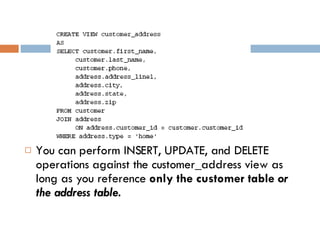
cont… If you have a view that references more than one base table, you can use only INSERT, UPDATE, or DELETE statements that reference columns from one base table. For example, let’s assume that we have a view that returns customer data from two tables. One table stores the customer’s information, and the other holds the address data for that customer. The definition of the customer_address view is as follows:
You can perform INSERT, UPDATE, and DELETE operations against the customer_address view as long as you reference  only the customer table  or the address table.
several reasons to use views : Obscure the complexity of the  underlying tables eliminates the need for users to understand the entire database allows you to change the tables or the location where the data is stored without affecting users better manage security save time when querying your database execution plan  is cached and reused the next time the view is called For " Nested Query " (sub-query) reason, people tend to avoid the use of views or use them in  inefficient ways.
Data Types every column in each of your tables must be configured to store a specific type of data. You do this by associating a data type with the column.  Data types are what you use to specify the type, length, precision, and scale of data that can be stored in the column. DB Server gives you several general categories of data types, with each category containing specific data types.
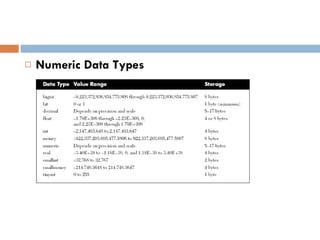
Numeric Data Types
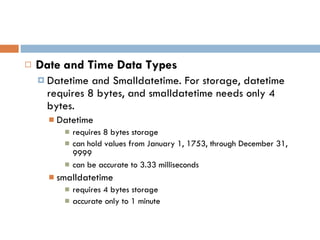
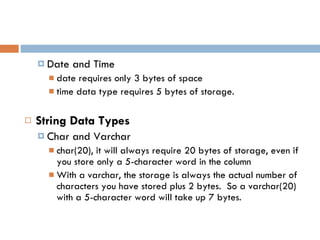
Date and Time Data Types Datetime and Smalldatetime . For storage, datetime requires 8 bytes, and smalldatetime needs only 4 bytes. Datetime requires 8 bytes storage can hold values from January 1, 1753, through December 31, 9999 can be accurate to 3.33 milliseconds smalldatetime  requires 4 bytes storage accurate only to 1 minute
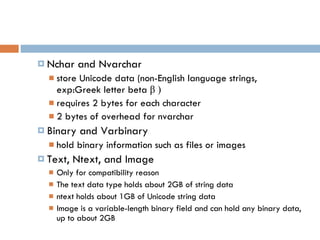
Date and Time date requires only 3 bytes of space time data type requires 5 bytes of storage. String Data Types Char and Varchar char(20), it will always require 20 bytes of storage, even if you store only a 5-character word in the column With a varchar, the storage is always the actual number of characters you have stored plus 2 bytes.  So a varchar(20) with a 5-character word will take up 7 bytes.
Nchar and Nvarchar store Unicode data  (non-English language strings,  exp:Greek letter beta  β  ) requires 2 bytes for each character 2 bytes of overhead  for nvarchar Binary and Varbinary hold binary information such as files or images Text, Ntext, and Image Only for compatibility reason The text data type holds about 2GB of string data ntext holds about 1GB of Unicode string data Image is a variable-length binary field and can hold any binary data, up to about 2GB
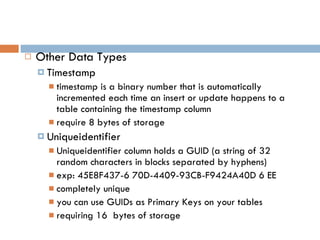
Other Data Types Timestamp timestamp is a binary number that is automatically incremented each time an insert or update happens to a table containing the timestamp column require 8 bytes of storage Uniqueidentifier Uniqueidentifier column holds a GUID (a string of 32 random characters in blocks separated by hyphens) exp: 45E8F437-6 70D-4409-93CB-F9424A40D 6 EE completely unique you can use GUIDs as Primary Keys on your tables requiring 16  bytes of storage
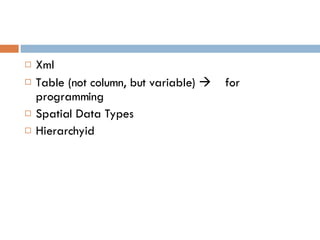
Xml Table (not column, but variable)     for programming Spatial Data Types Hierarchyid
User   -   De   fined Data Types When defining userdefined data types, you still must use the standard data types It is really a fixed definition of a data type, complete with length, precision, or scale as applicable R ecommend for :  “ consistency ” Example, if you need to store phone numbers in various tables in your database, you can create a phone number data type as a varchar(25), then every column that you define as a phone number will be exactly the same, a varchar(25).
Primary Keys Foreign Keys Constraints Implementing Referential Integrity Referential Integrity
Referential Integrity data integrity is the concept of keeping your data consistent and helping to ensure that your data is an accurate representation of the real world and that it is easy to retrieve. referential integrity ensures that the relationships between tables are adhered to when you insert or update data.
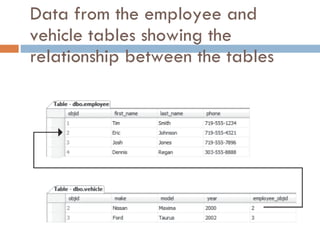
Referential Integrity  - Example For example,  suppose you have two tables: one called Employee and one called Vehicle. You require that each vehicle be assigned to an employee; this is done via a relationship, and the rule is maintained with RI. You physically implement this relationship using primary and foreign keys.
Primary Keys A primary key is made up of the column or columns that uniquely identify the row in any given table Any column or combination of columns in your table that can uniquely identify the row are known as  candidate keys.
Choosing PK from Candidate Keys - RULES Avoid using string columns. Use integer data when possible. Avoid composite primary keys.
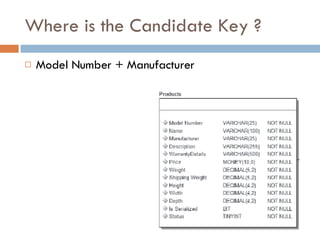
Where is the Candidate Key ? Model Number + Manufacturer
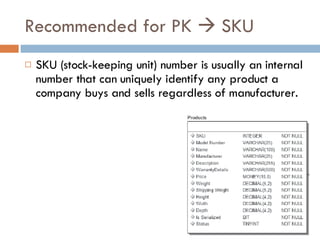
Recommended for PK    SKU SKU (stock-keeping unit) number is usually an internal number that can uniquely identify any product a company buys and sells regardless of manufacturer.
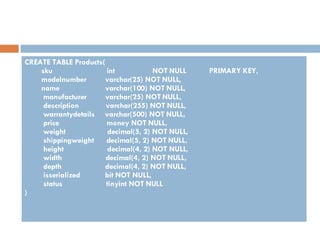
CREATE TABLE Products( sku  int  NOT NULL  PRIMARY KEY, modelnumber  varchar(25) NOT NULL, name  varchar(100) NOT NULL, manufacturer  varchar(25) NOT NULL, description  varchar(255) NOT NULL, warrantydetails  varchar(500) NOT NULL, price  money NOT NULL, weight  decimal(5, 2) NOT NULL, shippingweight  decimal(5, 2) NOT NULL, height  decimal(4, 2) NOT NULL, width  decimal(4, 2) NOT NULL, depth  decimal(4, 2) NOT NULL, isserialized  bit NOT NULL, status  tinyint NOT NULL )
a different column name in each table that holds the primary key ? This is not necessarily a bad thing, but it means that you must look up the data type and column name whenever you want to add another column with a foreign key or you need to write a piece of code to join tables.
Wouldn’t it be nice if all your tables had their PKs in columns having the same name? For example, every table in your database could be given a column named objectid and that column could simply have an arbitrary unique integer. In this case, you can use an identity column in SQL Server to manage your integer PK value.
Autonumber ? Identity / Sequence / etc.. It is  automatically  increments a number with each insert into the table. When you make a column an identity, you specify a  seed, or starting value, and an increment,  which is the number to add each time a new record is added. Most commonly, the seed and increment are both set to 1, meaning that each new row will be given an identity value that is 1 higher than the preceding  row.
GUID ? GUIDs are most often used as PKs when you need to copy data between databases and you need to be sure that data copied from another database does not conflict with existing data. The disadvantages of GUIDs are that they are larger than integers and they are not easily readable for humans.
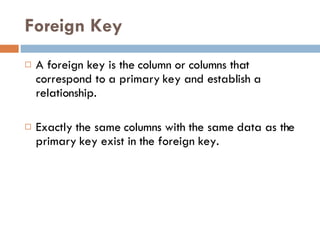
Foreign Key A foreign key is the column or columns that correspond to a primary key and establish a relationship. Exactly the same  columns with the same data as the primary key exist in the foreign key.
Data from the employee and vehicle tables showing the relationship between the tables
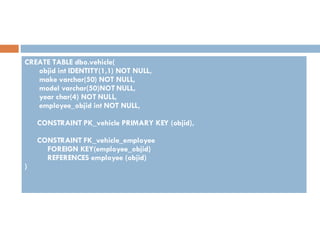
CREATE TABLE dbo.vehicle( objid int IDENTITY(1,1) NOT NULL, make varchar(50) NOT NULL, model varchar(50)NOT NULL, year char(4) NOT NULL, employee_objid int NOT NULL, CONSTRAINT PK_vehicle PRIMARY KEY (objid), CONSTRAINT FK_vehicle_employee FOREIGN KEY(employee_objid) REFERENCES employee (objid) )
what to do if an update or delete is issued on the parent  table  ? By default, if you attempt to delete a record in the parent table, the delete will fail because it would result in orphaned rows in the referencing table An  orphaned row is a row  that exists in a child table that has no corresponding parent. Another solution     CASCADE
Another solution     CASCADE Delete Cascade Update Cascade
Cascade meaning that DBMS will delete all the child rows along with the parent row you are deleting.  Be very careful  when using this option. If you have several levels of relationships with cascading delete enabled, you could wipe out a large chunk of data by issuing a delete on a single record.
Constraints Unique Constraints Check Constraints
Implementing Referential Integrity One-to-Many Relationships One-to-One Relationships Many-to-Many Relationships
One-to-Many Relationships the most common kind of relationship you will use in a database
One-to-One Relationships To implement  a one-to-one relationship that is enforced, you must get a little  creative. Basically, a  trigger is a  piece of code that can be executed after or instead of the actual insert statement.  Using this method, you could roll back & commit any insert for integrity problem .
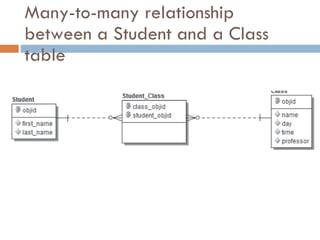
Many-to-Many Relationships One of the most complex relationships Even though you can have a many-to-many relationship between two entities, you cannot create a many-to-many relationship between only two tables. To implement this relationship, you must create a third table, called a  junction table, and two one-to-many  relationships.
Many-to-many relationship between a Student and a Class table
Stored Procedures User-Defined Functions Triggers Programming

Physical elements of data

  • 1.
    DARI BAB : PHYSICAL ELEMENTS OF DATA Dimara Kusuma Hakim, ST. STRUKTUR DAN PENYIMPANAN BASISDATA
  • 2.
    tables, views, anddata types. Physical Storage
  • 3.
    Physical Storage tables,views, and data types. Tables Tables are the building blocks on which relational databases are built. Underneath everything else, all data in your database ends up in a table. Tables are made up of rows and columns. Like a single instance in an entity, each row stores information pertaining to a single record. For example, in an employee table, each row would store the information for a single employee. The columns in the table store information about the rows in the table. The FirstName column in the Employee table would store the first names of all the employees. Columns map to attributes from your logical model , and, like the logical model, each column has a data type assigned.
  • 4.
    cont… You canthink of a table as a single spreadsheet in an application such as Microsoft Excel . In fact, an Excel spreadsheet is a table, but Excel is not a relational database management system . A database is really nothing more than a collection of tables that store information. Sure, there are many other objects in a database, but without tables you would not have any data. Using SQL, you can manipulate the data in a table. The four basic Data Manipulation Language ( DML ) statements are defined as follows : SELECT : Allows users to retrieve data in a table or tables INSERT : Allows users to add data to a table UPDATE : Allows users to change data in a table DELETE : Allows users to remove data from a table
  • 5.
    Views Views aresimply stored SQL that uses SELECT statements to display data from one or more tables. The tables referenced by views are often referred to as the view’s base tables. Views, as the name implies, allow you to create various pictures of the underlying information. You can reference as many or as few columns from each base table as you need to make your views. This capability allows you to slice up data and display only relevant information.
  • 6.
    cont… You accessviews in almost the same way that you access tables. All the basic DML statements work against views in the same way they do on tables, with a few exceptions.
  • 7.
    cont… If youhave a view that references more than one base table, you can use only INSERT, UPDATE, or DELETE statements that reference columns from one base table. For example, let’s assume that we have a view that returns customer data from two tables. One table stores the customer’s information, and the other holds the address data for that customer. The definition of the customer_address view is as follows:
  • 8.
    You can performINSERT, UPDATE, and DELETE operations against the customer_address view as long as you reference only the customer table or the address table.
  • 9.
    several reasons touse views : Obscure the complexity of the underlying tables eliminates the need for users to understand the entire database allows you to change the tables or the location where the data is stored without affecting users better manage security save time when querying your database execution plan is cached and reused the next time the view is called For " Nested Query " (sub-query) reason, people tend to avoid the use of views or use them in inefficient ways.
  • 10.
    Data Types everycolumn in each of your tables must be configured to store a specific type of data. You do this by associating a data type with the column. Data types are what you use to specify the type, length, precision, and scale of data that can be stored in the column. DB Server gives you several general categories of data types, with each category containing specific data types.
  • 11.
  • 12.
    Date and TimeData Types Datetime and Smalldatetime . For storage, datetime requires 8 bytes, and smalldatetime needs only 4 bytes. Datetime requires 8 bytes storage can hold values from January 1, 1753, through December 31, 9999 can be accurate to 3.33 milliseconds smalldatetime requires 4 bytes storage accurate only to 1 minute
  • 13.
    Date and Timedate requires only 3 bytes of space time data type requires 5 bytes of storage. String Data Types Char and Varchar char(20), it will always require 20 bytes of storage, even if you store only a 5-character word in the column With a varchar, the storage is always the actual number of characters you have stored plus 2 bytes. So a varchar(20) with a 5-character word will take up 7 bytes.
  • 14.
    Nchar and Nvarcharstore Unicode data (non-English language strings, exp:Greek letter beta β ) requires 2 bytes for each character 2 bytes of overhead for nvarchar Binary and Varbinary hold binary information such as files or images Text, Ntext, and Image Only for compatibility reason The text data type holds about 2GB of string data ntext holds about 1GB of Unicode string data Image is a variable-length binary field and can hold any binary data, up to about 2GB
  • 15.
    Other Data TypesTimestamp timestamp is a binary number that is automatically incremented each time an insert or update happens to a table containing the timestamp column require 8 bytes of storage Uniqueidentifier Uniqueidentifier column holds a GUID (a string of 32 random characters in blocks separated by hyphens) exp: 45E8F437-6 70D-4409-93CB-F9424A40D 6 EE completely unique you can use GUIDs as Primary Keys on your tables requiring 16 bytes of storage
  • 16.
    Xml Table (notcolumn, but variable)  for programming Spatial Data Types Hierarchyid
  • 17.
    User - De fined Data Types When defining userdefined data types, you still must use the standard data types It is really a fixed definition of a data type, complete with length, precision, or scale as applicable R ecommend for : “ consistency ” Example, if you need to store phone numbers in various tables in your database, you can create a phone number data type as a varchar(25), then every column that you define as a phone number will be exactly the same, a varchar(25).
  • 18.
    Primary Keys ForeignKeys Constraints Implementing Referential Integrity Referential Integrity
  • 19.
    Referential Integrity dataintegrity is the concept of keeping your data consistent and helping to ensure that your data is an accurate representation of the real world and that it is easy to retrieve. referential integrity ensures that the relationships between tables are adhered to when you insert or update data.
  • 20.
    Referential Integrity - Example For example, suppose you have two tables: one called Employee and one called Vehicle. You require that each vehicle be assigned to an employee; this is done via a relationship, and the rule is maintained with RI. You physically implement this relationship using primary and foreign keys.
  • 21.
    Primary Keys Aprimary key is made up of the column or columns that uniquely identify the row in any given table Any column or combination of columns in your table that can uniquely identify the row are known as candidate keys.
  • 22.
    Choosing PK fromCandidate Keys - RULES Avoid using string columns. Use integer data when possible. Avoid composite primary keys.
  • 23.
    Where is theCandidate Key ? Model Number + Manufacturer
  • 24.
    Recommended for PK  SKU SKU (stock-keeping unit) number is usually an internal number that can uniquely identify any product a company buys and sells regardless of manufacturer.
  • 25.
    CREATE TABLE Products(sku int NOT NULL PRIMARY KEY, modelnumber varchar(25) NOT NULL, name varchar(100) NOT NULL, manufacturer varchar(25) NOT NULL, description varchar(255) NOT NULL, warrantydetails varchar(500) NOT NULL, price money NOT NULL, weight decimal(5, 2) NOT NULL, shippingweight decimal(5, 2) NOT NULL, height decimal(4, 2) NOT NULL, width decimal(4, 2) NOT NULL, depth decimal(4, 2) NOT NULL, isserialized bit NOT NULL, status tinyint NOT NULL )
  • 26.
    a different columnname in each table that holds the primary key ? This is not necessarily a bad thing, but it means that you must look up the data type and column name whenever you want to add another column with a foreign key or you need to write a piece of code to join tables.
  • 27.
    Wouldn’t it benice if all your tables had their PKs in columns having the same name? For example, every table in your database could be given a column named objectid and that column could simply have an arbitrary unique integer. In this case, you can use an identity column in SQL Server to manage your integer PK value.
  • 28.
    Autonumber ? Identity/ Sequence / etc.. It is automatically increments a number with each insert into the table. When you make a column an identity, you specify a seed, or starting value, and an increment, which is the number to add each time a new record is added. Most commonly, the seed and increment are both set to 1, meaning that each new row will be given an identity value that is 1 higher than the preceding row.
  • 29.
    GUID ? GUIDsare most often used as PKs when you need to copy data between databases and you need to be sure that data copied from another database does not conflict with existing data. The disadvantages of GUIDs are that they are larger than integers and they are not easily readable for humans.
  • 30.
    Foreign Key Aforeign key is the column or columns that correspond to a primary key and establish a relationship. Exactly the same columns with the same data as the primary key exist in the foreign key.
  • 31.
    Data from theemployee and vehicle tables showing the relationship between the tables
  • 32.
    CREATE TABLE dbo.vehicle(objid int IDENTITY(1,1) NOT NULL, make varchar(50) NOT NULL, model varchar(50)NOT NULL, year char(4) NOT NULL, employee_objid int NOT NULL, CONSTRAINT PK_vehicle PRIMARY KEY (objid), CONSTRAINT FK_vehicle_employee FOREIGN KEY(employee_objid) REFERENCES employee (objid) )
  • 33.
    what to doif an update or delete is issued on the parent table ? By default, if you attempt to delete a record in the parent table, the delete will fail because it would result in orphaned rows in the referencing table An orphaned row is a row that exists in a child table that has no corresponding parent. Another solution  CASCADE
  • 34.
    Another solution  CASCADE Delete Cascade Update Cascade
  • 35.
    Cascade meaning thatDBMS will delete all the child rows along with the parent row you are deleting. Be very careful when using this option. If you have several levels of relationships with cascading delete enabled, you could wipe out a large chunk of data by issuing a delete on a single record.
  • 36.
  • 37.
    Implementing Referential IntegrityOne-to-Many Relationships One-to-One Relationships Many-to-Many Relationships
  • 38.
    One-to-Many Relationships themost common kind of relationship you will use in a database
  • 39.
    One-to-One Relationships Toimplement a one-to-one relationship that is enforced, you must get a little creative. Basically, a trigger is a piece of code that can be executed after or instead of the actual insert statement. Using this method, you could roll back & commit any insert for integrity problem .
  • 40.
    Many-to-Many Relationships Oneof the most complex relationships Even though you can have a many-to-many relationship between two entities, you cannot create a many-to-many relationship between only two tables. To implement this relationship, you must create a third table, called a junction table, and two one-to-many relationships.
  • 41.
    Many-to-many relationship betweena Student and a Class table
  • 42.
    Stored Procedures User-DefinedFunctions Triggers Programming