MySQL Basics
Explanation of Database Schema
A database schema serves as the blueprint for how data is organized within a
relational database.
It encompasses various aspects, including
• Table name : Identifying the different entities (or tables) in the database
• Fields: Describing the attributes or columns within each table.
• Data types: Specifying the type of data each field can hold (e.g., text,
numbers, dates)
• Relationships: Defining how tables are related to one another (e.g., one-to-
many, many-to-many)
• Importantly, the schema does not actually contain data; it merely outlines
the structure.
Table
• A table is a fundamental component in a relational database.
• It represents a collection of related data entries organized in a tabular
format.
• Each row in the table corresponds to a specific record, while each
column represents an attribute or field associated with that record.
• For example, consider a table named "Employees":
• Rows represent individual employees (each row is a record).
• Columns might include attributes like "Employee ID," "Name," "Department,"
and "Salary."
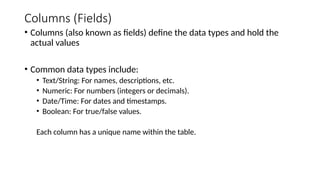
Columns (Fields)
• Columns (also known as fields) define the data types and hold the
actual values
• Common data types include:
• Text/String: For names, descriptions, etc.
• Numeric: For numbers (integers or decimals).
• Date/Time: For dates and timestamps.
• Boolean: For true/false values.
Each column has a unique name within the table.
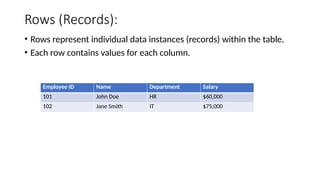
Rows (Records):
• Rows represent individual data instances (records) within the table.
• Each row contains values for each column.
Employee ID Name Department Salary
101 John Doe HR $60,000
102 Jane Smith IT $75,000
Primary Key
• A primary key uniquely identifies each row in the table.
• It ensures data integrity and facilitates efficient data retrieval.
• Common examples of primary keys include employee IDs, product
codes, or customer account numbers.
Foreign Key
• A foreign key is a field (or a collection of fields) in one table that refers
to the primary key in another table.
• It establishes a relationship between two tables, ensuring referential
integrity.
• It prevents invalid data from being inserted into the foreign key
column.
• It creates a link between related tables, allowing us to navigate data
across them.
• When data changes in the parent table (the referenced table), the
foreign key ensures that corresponding changes occur in the child
table (the table with the foreign key).
Relationships
• Tables can be related to each other through keys (e.g., primary keys
and foreign keys).
• Relationships include:
• One-to-One: Each record in one table corresponds to exactly one record in
another table.
• One-to-Many: One record in the first table relates to multiple records in the
second table.
• Many-to-Many: Multiple records in both tables are related.
Overview of MySQL Data Types
• MySQL supports a variety of data types to handle different kinds of
data efficiently and accurately. Choosing the appropriate data type for
each column in a table is crucial for performance and data integrity.
• Data Type Categories
• Numeric Data Types
• String Data Types
• Date and Time Data Types
• Binary Data Types
• Special Data Types
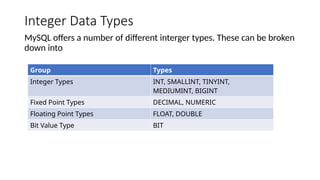
Integer Data Types
MySQL offers a number of different interger types. These can be broken
down into
Group Types
Integer Types INT, SMALLINT, TINYINT,
MEDIUMINT, BIGINT
Fixed Point Types DECIMAL, NUMERIC
Floating Point Types FLOAT, DOUBLE
Bit Value Type BIT
CHAR
• CHAR(n) is a string of a fixed length of n characters. If it is CHARACTER
SET utf-8, that means it occupies exactly 4*n bytes, regardless of what
text is in it.
• Most use cases for CHAR(n) involve strings that contain English
characters, hence should be CHARACTER SET ascii
Syntax : CHAR(n) CHARACTER SET ascii where n is the maximum
number of characters
VARCHAR
• Stands for variable character. It is a variable-length string data type in
MySQL. sed to store text data where the length can vary, optimizing
space usage.
• Can store up to 65,535 characters, but the actual maximum length is
subject to the maximum row size(usually 65,535 bytes, including
overhead)
Syntax : VARCHAR(n) where n is the maximum number of characters
Maximum Length Calculation
• Total Row Size: The maximum row size in MySQL is 65,535 bytes,
including all columns and their overhead.
• Overhead
• 1 byte of overhead for strings of 0-255 characters.
• 2 bytes of overhead for strings of 256-65,535 characters.
• Practical Limit: The actual maximum length of a VARCHAR column is
determined by the total row size limit.
For a single VARCHAR column, this is 65,533 bytes (65,535 bytes minus 2 bytes
overhead).
TEXT
• A data type in MySQL used for storing long text strings overhead. Ideal for large
blocks of text such as articles, descriptions, and comments.
• Can store up to 65,535 characters.
• Requires 2 bytes of overhead for each entry, in addition to the actual length of the
text.
• Example: A TEXT entry with 100 characters uses 102 bytes (100 bytes for the text + 2 bytes
for overhead).
• TINYTEXT Up to 255 characters.
• TEXT Up to 65,535 characters.
• MEDIUMTEXT Up to 16,777,215 characters.
• LONGTEXT Up to 4,294,967,295 characters.
BestPractice
• Never use TINYTEXT.
• Almost never use CHAR -- it is fixed length; each character is the max length
of the CHARACTER SET (eg, 4 bytes/character for utf8).
• With CHAR, use CHARACTER SET ascii unless you know otherwise.
• VARCHAR(n) will truncate at n characters; TEXT will truncate at some
number of bytes. (But, do you want truncation?)
• TEXT may slow down complex SELECTs due to how temp tables are handled.
Numeric Data Type
• Decimal : Used for exact numeric values where precision is important, such as
financial data
• Syntax : DECIMAL(p, s), where p is the precision (total number of digits) and s is the scale
(number of digits after the decimal point).
• Example: `DECIMAL(10, 2)` can store up to 10 digits with 2 decimal places
• Float and Double : Used for approximate numeric values, suitable for scientific
calculations and large data ranges.
• Float Syntax : FLOAT[(m, d)], where `m` is the total number of digits and `d` is the
number of digits after the decimal point.
• Example: `FLOAT(10, 4)` can store up to 10 digits with 4 decimal places.
• Double Syntax: DOUBLE[(m, d)], similar to FLOAT but with double precision.
• Example: `DOUBLE(15, 8)` can store up to 15 digits with 8 decimal places.
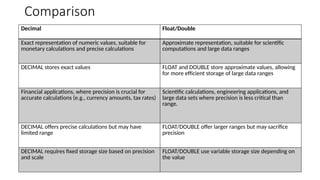
Comparison
Decimal Float/Double
Exact representation of numeric values, suitable for
monetary calculations and precise calculations
Approximate representation, suitable for scientific
computations and large data ranges
DECIMAL stores exact values FLOAT and DOUBLE store approximate values, allowing
for more efficient storage of large data ranges
Financial applications, where precision is crucial for
accurate calculations (e.g., currency amounts, tax rates)
Scientific calculations, engineering applications, and
large data sets where precision is less critical than
range.
DECIMAL offers precise calculations but may have
limited range
FLOAT/DOUBLE offer larger ranges but may sacrifice
precision
DECIMAL requires fixed storage size based on precision
and scale
FLOAT/DOUBLE use variable storage size depending on
the value
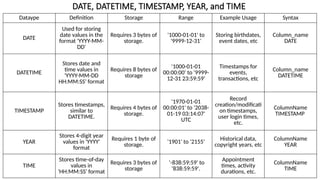
DATE, DATETIME, TIMESTAMP, YEAR, and TIME
Dataype Definition Storage Range Example Usage Syntax
DATE
Used for storing
date values in the
format 'YYYY-MM-
DD'
Requires 3 bytes of
storage.
'1000-01-01' to
'9999-12-31'
Storing birthdates,
event dates, etc
Column_name
DATE
DATETIME
Stores date and
time values in
'YYYY-MM-DD
HH:MM:SS' format
Requires 8 bytes of
storage
'1000-01-01
00:00:00' to '9999-
12-31 23:59:59'
Timestamps for
events,
transactions, etc
Column_name
DATETIME
TIMESTAMP
Stores timestamps,
similar to
DATETIME.
Requires 4 bytes of
storage.
'1970-01-01
00:00:01' to '2038-
01-19 03:14:07'
UTC
Record
creation/modificati
on timestamps,
user login times,
etc.
ColumnName
TIMESTAMP
YEAR
Stores 4-digit year
values in 'YYYY'
format
Requires 1 byte of
storage. '1901' to '2155'
Historical data,
copyright years, etc
ColumnName
YEAR
TIME
Stores time-of-day
values in
'HH:MM:SS' format
Requires 3 bytes of
storage
'-838:59:59' to
'838:59:59'.
Appointment
times, activity
durations, etc.
ColumnName
TIME
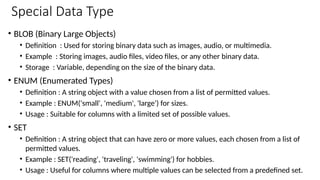
Special Data Type
• BLOB (Binary Large Objects)
• Definition : Used for storing binary data such as images, audio, or multimedia.
• Example : Storing images, audio files, video files, or any other binary data.
• Storage : Variable, depending on the size of the binary data.
• ENUM (Enumerated Types)
• Definition : A string object with a value chosen from a list of permitted values.
• Example : ENUM('small', 'medium', 'large') for sizes.
• Usage : Suitable for columns with a limited set of possible values.
• SET
• Definition : A string object that can have zero or more values, each chosen from a list of
permitted values.
• Example : SET('reading', 'traveling', 'swimming') for hobbies.
• Usage : Useful for columns where multiple values can be selected from a predefined set.
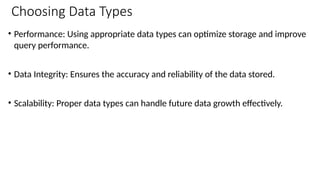
Choosing Data Types
• Performance: Using appropriate data types can optimize storage and improve
query performance.
• Data Integrity: Ensures the accuracy and reliability of the data stored.
• Scalability: Proper data types can handle future data growth effectively.
Building Foundations
Crafting a Database in MySQL from Scratch
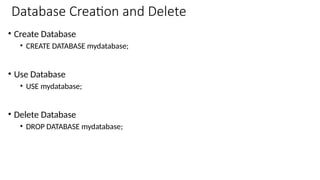
Database Creation and Delete
• Create Database
• CREATE DATABASE mydatabase;
• Use Database
• USE mydatabase;
• Delete Database
• DROP DATABASE mydatabase;
How to Craft the Perfect MySQL
Table
A Comprehensive Guide to Creating Tables with Detailed Constraints
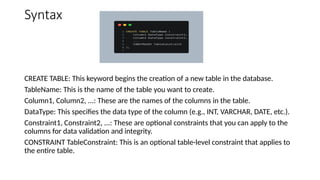
Syntax
CREATE TABLE: This keyword begins the creation of a new table in the database.
TableName: This is the name of the table you want to create.
Column1, Column2, ...: These are the names of the columns in the table.
DataType: This specifies the data type of the column (e.g., INT, VARCHAR, DATE, etc.).
Constraint1, Constraint2, ...: These are optional constraints that you can apply to the
columns for data validation and integrity.
CONSTRAINT TableConstraint: This is an optional table-level constraint that applies to
the entire table.
Questions & Discussions
Thank You !

Session 2 - "MySQL Basics & Schema Design"

  • 1.
  • 2.
    Explanation of DatabaseSchema A database schema serves as the blueprint for how data is organized within a relational database. It encompasses various aspects, including • Table name : Identifying the different entities (or tables) in the database • Fields: Describing the attributes or columns within each table. • Data types: Specifying the type of data each field can hold (e.g., text, numbers, dates) • Relationships: Defining how tables are related to one another (e.g., one-to- many, many-to-many) • Importantly, the schema does not actually contain data; it merely outlines the structure.
  • 3.
    Table • A tableis a fundamental component in a relational database. • It represents a collection of related data entries organized in a tabular format. • Each row in the table corresponds to a specific record, while each column represents an attribute or field associated with that record. • For example, consider a table named "Employees": • Rows represent individual employees (each row is a record). • Columns might include attributes like "Employee ID," "Name," "Department," and "Salary."
  • 4.
    Columns (Fields) • Columns(also known as fields) define the data types and hold the actual values • Common data types include: • Text/String: For names, descriptions, etc. • Numeric: For numbers (integers or decimals). • Date/Time: For dates and timestamps. • Boolean: For true/false values. Each column has a unique name within the table.
  • 5.
    Rows (Records): • Rowsrepresent individual data instances (records) within the table. • Each row contains values for each column. Employee ID Name Department Salary 101 John Doe HR $60,000 102 Jane Smith IT $75,000
  • 6.
    Primary Key • Aprimary key uniquely identifies each row in the table. • It ensures data integrity and facilitates efficient data retrieval. • Common examples of primary keys include employee IDs, product codes, or customer account numbers.
  • 7.
    Foreign Key • Aforeign key is a field (or a collection of fields) in one table that refers to the primary key in another table. • It establishes a relationship between two tables, ensuring referential integrity. • It prevents invalid data from being inserted into the foreign key column. • It creates a link between related tables, allowing us to navigate data across them. • When data changes in the parent table (the referenced table), the foreign key ensures that corresponding changes occur in the child table (the table with the foreign key).
  • 8.
    Relationships • Tables canbe related to each other through keys (e.g., primary keys and foreign keys). • Relationships include: • One-to-One: Each record in one table corresponds to exactly one record in another table. • One-to-Many: One record in the first table relates to multiple records in the second table. • Many-to-Many: Multiple records in both tables are related.
  • 9.
    Overview of MySQLData Types • MySQL supports a variety of data types to handle different kinds of data efficiently and accurately. Choosing the appropriate data type for each column in a table is crucial for performance and data integrity. • Data Type Categories • Numeric Data Types • String Data Types • Date and Time Data Types • Binary Data Types • Special Data Types
  • 10.
    Integer Data Types MySQLoffers a number of different interger types. These can be broken down into Group Types Integer Types INT, SMALLINT, TINYINT, MEDIUMINT, BIGINT Fixed Point Types DECIMAL, NUMERIC Floating Point Types FLOAT, DOUBLE Bit Value Type BIT
  • 11.
    CHAR • CHAR(n) isa string of a fixed length of n characters. If it is CHARACTER SET utf-8, that means it occupies exactly 4*n bytes, regardless of what text is in it. • Most use cases for CHAR(n) involve strings that contain English characters, hence should be CHARACTER SET ascii Syntax : CHAR(n) CHARACTER SET ascii where n is the maximum number of characters
  • 12.
    VARCHAR • Stands forvariable character. It is a variable-length string data type in MySQL. sed to store text data where the length can vary, optimizing space usage. • Can store up to 65,535 characters, but the actual maximum length is subject to the maximum row size(usually 65,535 bytes, including overhead) Syntax : VARCHAR(n) where n is the maximum number of characters
  • 13.
    Maximum Length Calculation •Total Row Size: The maximum row size in MySQL is 65,535 bytes, including all columns and their overhead. • Overhead • 1 byte of overhead for strings of 0-255 characters. • 2 bytes of overhead for strings of 256-65,535 characters. • Practical Limit: The actual maximum length of a VARCHAR column is determined by the total row size limit. For a single VARCHAR column, this is 65,533 bytes (65,535 bytes minus 2 bytes overhead).
  • 14.
    TEXT • A datatype in MySQL used for storing long text strings overhead. Ideal for large blocks of text such as articles, descriptions, and comments. • Can store up to 65,535 characters. • Requires 2 bytes of overhead for each entry, in addition to the actual length of the text. • Example: A TEXT entry with 100 characters uses 102 bytes (100 bytes for the text + 2 bytes for overhead). • TINYTEXT Up to 255 characters. • TEXT Up to 65,535 characters. • MEDIUMTEXT Up to 16,777,215 characters. • LONGTEXT Up to 4,294,967,295 characters.
  • 15.
    BestPractice • Never useTINYTEXT. • Almost never use CHAR -- it is fixed length; each character is the max length of the CHARACTER SET (eg, 4 bytes/character for utf8). • With CHAR, use CHARACTER SET ascii unless you know otherwise. • VARCHAR(n) will truncate at n characters; TEXT will truncate at some number of bytes. (But, do you want truncation?) • TEXT may slow down complex SELECTs due to how temp tables are handled.
  • 16.
    Numeric Data Type •Decimal : Used for exact numeric values where precision is important, such as financial data • Syntax : DECIMAL(p, s), where p is the precision (total number of digits) and s is the scale (number of digits after the decimal point). • Example: `DECIMAL(10, 2)` can store up to 10 digits with 2 decimal places • Float and Double : Used for approximate numeric values, suitable for scientific calculations and large data ranges. • Float Syntax : FLOAT[(m, d)], where `m` is the total number of digits and `d` is the number of digits after the decimal point. • Example: `FLOAT(10, 4)` can store up to 10 digits with 4 decimal places. • Double Syntax: DOUBLE[(m, d)], similar to FLOAT but with double precision. • Example: `DOUBLE(15, 8)` can store up to 15 digits with 8 decimal places.
  • 17.
    Comparison Decimal Float/Double Exact representationof numeric values, suitable for monetary calculations and precise calculations Approximate representation, suitable for scientific computations and large data ranges DECIMAL stores exact values FLOAT and DOUBLE store approximate values, allowing for more efficient storage of large data ranges Financial applications, where precision is crucial for accurate calculations (e.g., currency amounts, tax rates) Scientific calculations, engineering applications, and large data sets where precision is less critical than range. DECIMAL offers precise calculations but may have limited range FLOAT/DOUBLE offer larger ranges but may sacrifice precision DECIMAL requires fixed storage size based on precision and scale FLOAT/DOUBLE use variable storage size depending on the value
  • 18.
    DATE, DATETIME, TIMESTAMP,YEAR, and TIME Dataype Definition Storage Range Example Usage Syntax DATE Used for storing date values in the format 'YYYY-MM- DD' Requires 3 bytes of storage. '1000-01-01' to '9999-12-31' Storing birthdates, event dates, etc Column_name DATE DATETIME Stores date and time values in 'YYYY-MM-DD HH:MM:SS' format Requires 8 bytes of storage '1000-01-01 00:00:00' to '9999- 12-31 23:59:59' Timestamps for events, transactions, etc Column_name DATETIME TIMESTAMP Stores timestamps, similar to DATETIME. Requires 4 bytes of storage. '1970-01-01 00:00:01' to '2038- 01-19 03:14:07' UTC Record creation/modificati on timestamps, user login times, etc. ColumnName TIMESTAMP YEAR Stores 4-digit year values in 'YYYY' format Requires 1 byte of storage. '1901' to '2155' Historical data, copyright years, etc ColumnName YEAR TIME Stores time-of-day values in 'HH:MM:SS' format Requires 3 bytes of storage '-838:59:59' to '838:59:59'. Appointment times, activity durations, etc. ColumnName TIME
  • 19.
    Special Data Type •BLOB (Binary Large Objects) • Definition : Used for storing binary data such as images, audio, or multimedia. • Example : Storing images, audio files, video files, or any other binary data. • Storage : Variable, depending on the size of the binary data. • ENUM (Enumerated Types) • Definition : A string object with a value chosen from a list of permitted values. • Example : ENUM('small', 'medium', 'large') for sizes. • Usage : Suitable for columns with a limited set of possible values. • SET • Definition : A string object that can have zero or more values, each chosen from a list of permitted values. • Example : SET('reading', 'traveling', 'swimming') for hobbies. • Usage : Useful for columns where multiple values can be selected from a predefined set.
  • 20.
    Choosing Data Types •Performance: Using appropriate data types can optimize storage and improve query performance. • Data Integrity: Ensures the accuracy and reliability of the data stored. • Scalability: Proper data types can handle future data growth effectively.
  • 21.
    Building Foundations Crafting aDatabase in MySQL from Scratch
  • 22.
    Database Creation andDelete • Create Database • CREATE DATABASE mydatabase; • Use Database • USE mydatabase; • Delete Database • DROP DATABASE mydatabase;
  • 23.
    How to Craftthe Perfect MySQL Table A Comprehensive Guide to Creating Tables with Detailed Constraints
  • 24.
    Syntax CREATE TABLE: Thiskeyword begins the creation of a new table in the database. TableName: This is the name of the table you want to create. Column1, Column2, ...: These are the names of the columns in the table. DataType: This specifies the data type of the column (e.g., INT, VARCHAR, DATE, etc.). Constraint1, Constraint2, ...: These are optional constraints that you can apply to the columns for data validation and integrity. CONSTRAINT TableConstraint: This is an optional table-level constraint that applies to the entire table.
  • 25.
  • 26.