
TRANSACTION Pemateri : Dimara Kusuma Hakim, ST.
Sumber MS SQL Server 2005 Unleashed 2007 by Sams Publishing Author : Ray Rankins, Paul Bertucci, Chris Gallelli, Alex T. Silverstein. MCTS MS SQL Server 2005, Implementation and Maintenance Studi Guide, Exam 70-431 2006 Sybex
What Is a Transaction? A  transaction is one or more SQL statements that must be completed as a whole. Transactions provide a way of collecting and associating multiple actions into a single all-or-nothing multiple-operation action. All operations within the transaction must be fully completed or not performed at all.
Sample… Bank Transaction Consider a bank transaction in which you transfer $1,000 from your savings account to your friend’s account.  This transaction is, in fact,  two operations:  a decrement of your  savings account and  an increment of your friend’s account.  Consider the impact on your finances if the bank’s server went down after it completed the first step and never got to the second  !!! By combining the two operations together, as a transaction, they either both succeed or both fail as a single, complete unit of work.
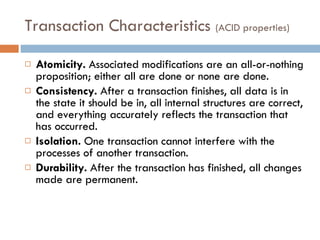
Transaction Characteristics  (ACID properties) Atomicity.  Associated modifications are an all-or-nothing proposition; either all are done or none are done. Consistency.  After a transaction finishes, all data is in the state it should be in, all internal structures are correct, and everything accurately reflects the transaction that has occurred. Isolation.  One transaction cannot interfere with the processes of another transaction. Durability.  After the transaction has finished, all changes made are permanent.
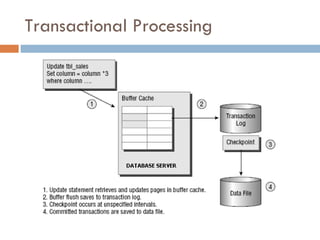
Transactional Processing
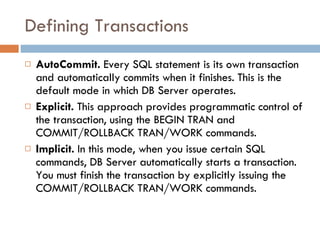
Defining Transactions AutoCommit.  Every SQL statement is its own transaction and automatically commits when it finishes. This is the default mode in which DB Server operates. Explicit.  This approach provides programmatic control of the transaction, using the BEGIN TRAN and COMMIT/ROLLBACK TRAN/WORK commands. Implicit.  In this mode, when you issue certain SQL commands, DB Server automatically starts a transaction. You must finish the transaction by explicitly issuing the COMMIT/ROLLBACK TRAN/WORK commands.
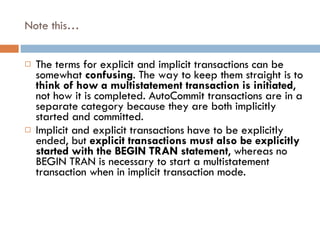
Note this… The terms for explicit and implicit transactions can be somewhat  confusing . The way to keep them straight is to  think of how a multistatement transaction is initiated , not how it is completed. AutoCommit transactions are in a separate category because they are both implicitly started and committed. Implicit and explicit transactions have to be explicitly ended, but  explicit transactions must also be explicitly started with the BEGIN TRAN statement , whereas no BEGIN TRAN is necessary to start a multistatement transaction when in implicit transaction mode.
AutoCommit Transactions AutoCommit is the default transaction mode for SQL Server. Each individual T-SQL command automatically commits or rolls back its work at the end of its execution. Each SQL statement is considered to be its own transaction, with  begin and end control points implied .
… The following is an example : If an error is present in the execution of the statement, the action is undone (that is, Rolled Back); if no errors occur, the action is completed (Commit), and the changes are saved. [implied begin transaction] UPDATE account SET balance = balance + 1000 WHERE account_no = “123456789” [implied commit or rollback transaction]
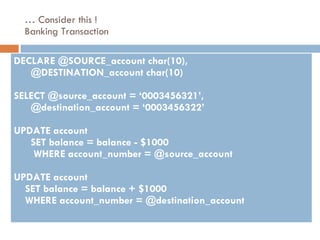
…  Consider this ! Banking Transaction DECLARE @SOURCE_account char(10),  @DESTINATION_account char(10) SELECT @source_account = ‘0003456321’,  @destination_account = ‘0003456322’ UPDATE account  SET balance = balance - $1000  WHERE account_number = @source_account UPDATE account  SET balance = balance + $1000 WHERE account_number = @destination_account
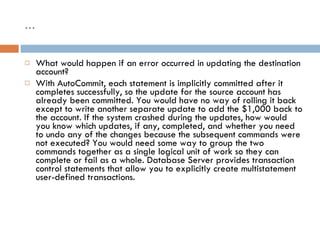
… What would happen if an error occurred in updating the destination account? With AutoCommit, each statement is implicitly committed after it completes successfully, so the update for the source account has already been committed. You would have no way of rolling it back except to write another separate update to add the $1,000 back to the account. If the system crashed during the updates, how would you know which updates, if any, completed, and whether you need to undo any of the changes because the subsequent commands were not executed? You would need some way to group the two commands together as a single logical unit of work so they can complete or fail as a whole. Database Server provides transaction control statements that allow you to explicitly create multistatement user-defined transactions.
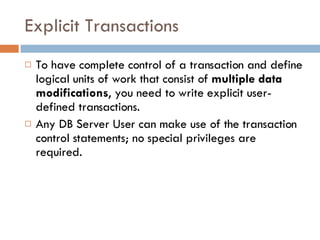
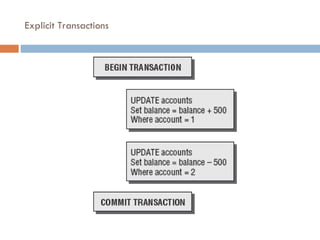
Explicit Transactions To have complete control of a transaction and define logical units of work that consist of  multiple data modifications , you need to write explicit user-defined transactions.  Any DB Server User can make use of the transaction control statements; no special privileges are required.
… BEGIN TRAN[SACTION] Statement1 Statement2 etc… COMMIT [TRAN[SACTION] OR ROLLBACK [TRAN[SACTION]
… BEGIN TRAN[SACTION] [ transaction_name [WITH MARK [‘description’]]] Statement1 Statement2 etc… COMMIT [TRAN[SACTION] [ transaction_name]] | [WORK] OR ROLLBACK [TRAN[SACTION] [ transaction_name | savepointname]] | [WORK]
Explicit Transactions
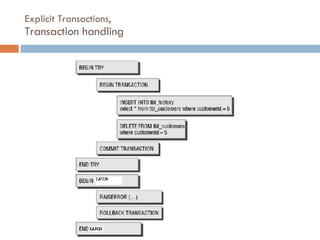
Explicit Transactions, Transaction handling
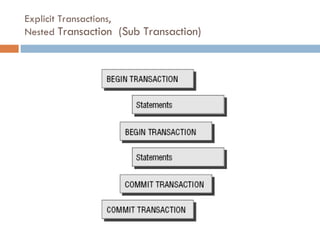
Explicit Transactions, Nested  Transaction  (Sub Transaction)
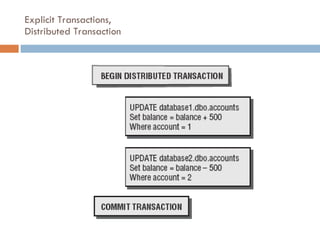
Explicit Transactions, Distributed Transaction
Explicit Transactions, Banking Transaction declare @source_account char(10), @destination_account char(10) select @source_account = ‘0003456321’, @destination_account = ‘0003456322’ BEGIN TRAN update account set balance = balance - $1000 where account_number = @source_account if @@error != 0 begin rollback tran return end update account set balance = balance + $1000 where account_number = @destination_account if @@error != 0 begin rollback tran return end commit tran
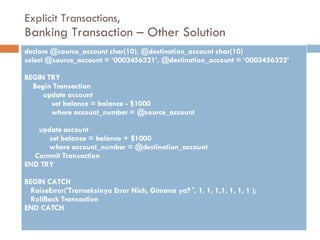
Explicit Transactions, Banking Transaction – Other Solution declare @source_account char(10), @destination_account char(10) select @source_account = ‘0003456321’, @destination_account = ‘0003456322’ BEGIN TRY Begin Transaction update account set balance = balance - $1000 where account_number = @source_account update account set balance = balance + $1000 where account_number = @destination_account Commit Transaction END TRY BEGIN CATCH  RaiseError('Transaksinya Error Nich, Gimana ya? ', 1, 1, 1,1, 1, 1, 1 ); RollBack Transaction END CATCH
Savepoints A savepoint allows you to set a marker in a transaction that you can roll back to undo a portion of the transaction but commit the remainder of the transaction. The syntax is as follows: SAVE TRAN[SACTION]  savepointname BEGIN TRAN mywork UPDATE table1... SAVE TRAN savepoint1 INSERT INTO table2... DELETE table3... IF @@error = -1 ROLLBACK TRAN savepoint1 COMMIT TRAN
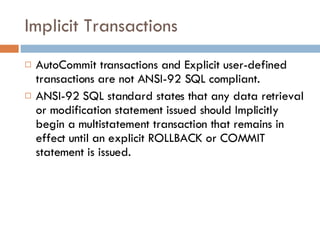
Implicit Transactions AutoCommit transactions and Explicit user-defined transactions are not ANSI-92 SQL compliant. ANSI-92 SQL standard states that any data retrieval or modification statement issued should Implicitly begin a multistatement transaction that remains in effect until an explicit ROLLBACK or COMMIT statement is issued.
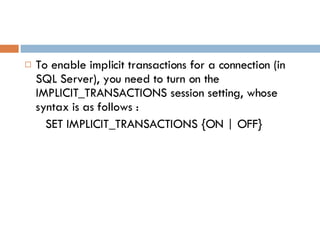
To enable implicit transactions for a connection (in SQL Server), you need to turn on the IMPLICIT_TRANSACTIONS session setting, whose syntax is as follows : SET IMPLICIT_TRANSACTIONS {ON | OFF}
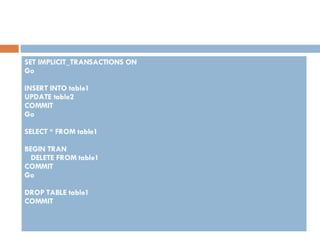
SET IMPLICIT_TRANSACTIONS ON Go INSERT INTO table1 UPDATE table2 COMMIT Go SELECT * FROM table1 BEGIN TRAN DELETE FROM table1 COMMIT Go DROP TABLE table1 COMMIT
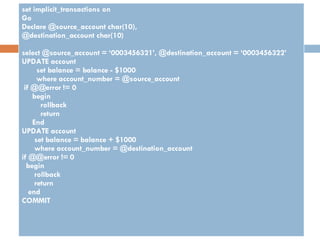
set implicit_transactions on Go Declare @source_account char(10), @destination_account char(10) select @source_account = ‘0003456321’, @destination_account = ‘0003456322’ UPDATE account set balance = balance - $1000 where account_number = @source_account if @@error != 0 begin rollback return End UPDATE account set balance = balance + $1000 where account_number = @destination_account if @@error != 0 begin rollback return end COMMIT
… That example is nearly identical to the explicit transaction example except for the lack of a BEGIN TRAN statement. In addition, when in implicit transaction mode, you cannot roll back to a named transaction because no name is assigned when the transaction is invoked implicitly. You can, however, still set savepoints and roll back to savepoints to partially roll back work within an implicit transaction.
Transactions and Stored Procedures Because SQL code in stored procedures runs locally on the server, it is recommended that transactions be coded in stored procedures to speed transaction processing. The less network traffic going on within transactions, the faster they can finish.
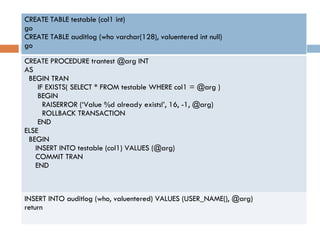
… CREATE TABLE testable (col1 int) go CREATE TABLE auditlog (who varchar(128), valuentered int null) go CREATE PROCEDURE trantest @arg INT AS BEGIN TRAN IF EXISTS( SELECT * FROM testable WHERE col1 = @arg ) BEGIN RAISERROR (‘Value %d already exists!’, 16, -1, @arg) ROLLBACK TRANSACTION END ELSE BEGIN INSERT INTO testable (col1) VALUES (@arg) COMMIT TRAN END INSERT INTO auditlog (who, valuentered) VALUES (USER_NAME(), @arg) return
Distributed Transactions Typically, transaction management controls only the data modifications made within a single SQL Server instance. However, the increasing interest and implementation of distributed systems brings up the need to access and modify data distributed across multiple SQL Server instances within a single unit of work.
… What if in the banking example, the checking accounts reside on one SQL Server instance and the savings accounts on another? Moving money from one account to another would require updates to two separate instances. How do you modify data on two different instances and still treat it as a single unit of work? You need some way to ensure that the distributed transaction retains the same ACID properties as a local transaction. To provide this capability, SQL Server ships with the MS DTC service, which provides the ability to control and manage the integrity of multiserver transactions. MS DTC uses the industrystandard two-phase commit protocol to ensure the consistency of all parts of any distributed transaction passing through SQL Server and any referenced linked servers.
QUIZ  Transaksi Penjualan barang pada supermarket,  jika barang jadi dibeli, maka simpan jika barang-barang tidak jadi dibeli, maka batalkan buat script transaction (bebas : Oracle, mysql, sql server, postgres, dll

Transaction

  • 1.
    TRANSACTION Pemateri :Dimara Kusuma Hakim, ST.
  • 2.
    Sumber MS SQLServer 2005 Unleashed 2007 by Sams Publishing Author : Ray Rankins, Paul Bertucci, Chris Gallelli, Alex T. Silverstein. MCTS MS SQL Server 2005, Implementation and Maintenance Studi Guide, Exam 70-431 2006 Sybex
  • 3.
    What Is aTransaction? A transaction is one or more SQL statements that must be completed as a whole. Transactions provide a way of collecting and associating multiple actions into a single all-or-nothing multiple-operation action. All operations within the transaction must be fully completed or not performed at all.
  • 4.
    Sample… Bank TransactionConsider a bank transaction in which you transfer $1,000 from your savings account to your friend’s account. This transaction is, in fact, two operations: a decrement of your savings account and an increment of your friend’s account. Consider the impact on your finances if the bank’s server went down after it completed the first step and never got to the second !!! By combining the two operations together, as a transaction, they either both succeed or both fail as a single, complete unit of work.
  • 5.
    Transaction Characteristics (ACID properties) Atomicity. Associated modifications are an all-or-nothing proposition; either all are done or none are done. Consistency. After a transaction finishes, all data is in the state it should be in, all internal structures are correct, and everything accurately reflects the transaction that has occurred. Isolation. One transaction cannot interfere with the processes of another transaction. Durability. After the transaction has finished, all changes made are permanent.
  • 6.
  • 7.
    Defining Transactions AutoCommit. Every SQL statement is its own transaction and automatically commits when it finishes. This is the default mode in which DB Server operates. Explicit. This approach provides programmatic control of the transaction, using the BEGIN TRAN and COMMIT/ROLLBACK TRAN/WORK commands. Implicit. In this mode, when you issue certain SQL commands, DB Server automatically starts a transaction. You must finish the transaction by explicitly issuing the COMMIT/ROLLBACK TRAN/WORK commands.
  • 8.
    Note this… Theterms for explicit and implicit transactions can be somewhat confusing . The way to keep them straight is to think of how a multistatement transaction is initiated , not how it is completed. AutoCommit transactions are in a separate category because they are both implicitly started and committed. Implicit and explicit transactions have to be explicitly ended, but explicit transactions must also be explicitly started with the BEGIN TRAN statement , whereas no BEGIN TRAN is necessary to start a multistatement transaction when in implicit transaction mode.
  • 9.
    AutoCommit Transactions AutoCommitis the default transaction mode for SQL Server. Each individual T-SQL command automatically commits or rolls back its work at the end of its execution. Each SQL statement is considered to be its own transaction, with begin and end control points implied .
  • 10.
    … The followingis an example : If an error is present in the execution of the statement, the action is undone (that is, Rolled Back); if no errors occur, the action is completed (Commit), and the changes are saved. [implied begin transaction] UPDATE account SET balance = balance + 1000 WHERE account_no = “123456789” [implied commit or rollback transaction]
  • 11.
    … Considerthis ! Banking Transaction DECLARE @SOURCE_account char(10), @DESTINATION_account char(10) SELECT @source_account = ‘0003456321’, @destination_account = ‘0003456322’ UPDATE account SET balance = balance - $1000 WHERE account_number = @source_account UPDATE account SET balance = balance + $1000 WHERE account_number = @destination_account
  • 12.
    … What wouldhappen if an error occurred in updating the destination account? With AutoCommit, each statement is implicitly committed after it completes successfully, so the update for the source account has already been committed. You would have no way of rolling it back except to write another separate update to add the $1,000 back to the account. If the system crashed during the updates, how would you know which updates, if any, completed, and whether you need to undo any of the changes because the subsequent commands were not executed? You would need some way to group the two commands together as a single logical unit of work so they can complete or fail as a whole. Database Server provides transaction control statements that allow you to explicitly create multistatement user-defined transactions.
  • 13.
    Explicit Transactions Tohave complete control of a transaction and define logical units of work that consist of multiple data modifications , you need to write explicit user-defined transactions. Any DB Server User can make use of the transaction control statements; no special privileges are required.
  • 14.
    … BEGIN TRAN[SACTION]Statement1 Statement2 etc… COMMIT [TRAN[SACTION] OR ROLLBACK [TRAN[SACTION]
  • 15.
    … BEGIN TRAN[SACTION][ transaction_name [WITH MARK [‘description’]]] Statement1 Statement2 etc… COMMIT [TRAN[SACTION] [ transaction_name]] | [WORK] OR ROLLBACK [TRAN[SACTION] [ transaction_name | savepointname]] | [WORK]
  • 16.
  • 17.
  • 18.
    Explicit Transactions, Nested Transaction (Sub Transaction)
  • 19.
  • 20.
    Explicit Transactions, BankingTransaction declare @source_account char(10), @destination_account char(10) select @source_account = ‘0003456321’, @destination_account = ‘0003456322’ BEGIN TRAN update account set balance = balance - $1000 where account_number = @source_account if @@error != 0 begin rollback tran return end update account set balance = balance + $1000 where account_number = @destination_account if @@error != 0 begin rollback tran return end commit tran
  • 21.
    Explicit Transactions, BankingTransaction – Other Solution declare @source_account char(10), @destination_account char(10) select @source_account = ‘0003456321’, @destination_account = ‘0003456322’ BEGIN TRY Begin Transaction update account set balance = balance - $1000 where account_number = @source_account update account set balance = balance + $1000 where account_number = @destination_account Commit Transaction END TRY BEGIN CATCH RaiseError('Transaksinya Error Nich, Gimana ya? ', 1, 1, 1,1, 1, 1, 1 ); RollBack Transaction END CATCH
  • 22.
    Savepoints A savepointallows you to set a marker in a transaction that you can roll back to undo a portion of the transaction but commit the remainder of the transaction. The syntax is as follows: SAVE TRAN[SACTION] savepointname BEGIN TRAN mywork UPDATE table1... SAVE TRAN savepoint1 INSERT INTO table2... DELETE table3... IF @@error = -1 ROLLBACK TRAN savepoint1 COMMIT TRAN
  • 23.
    Implicit Transactions AutoCommittransactions and Explicit user-defined transactions are not ANSI-92 SQL compliant. ANSI-92 SQL standard states that any data retrieval or modification statement issued should Implicitly begin a multistatement transaction that remains in effect until an explicit ROLLBACK or COMMIT statement is issued.
  • 24.
    To enable implicittransactions for a connection (in SQL Server), you need to turn on the IMPLICIT_TRANSACTIONS session setting, whose syntax is as follows : SET IMPLICIT_TRANSACTIONS {ON | OFF}
  • 25.
    SET IMPLICIT_TRANSACTIONS ONGo INSERT INTO table1 UPDATE table2 COMMIT Go SELECT * FROM table1 BEGIN TRAN DELETE FROM table1 COMMIT Go DROP TABLE table1 COMMIT
  • 26.
    set implicit_transactions onGo Declare @source_account char(10), @destination_account char(10) select @source_account = ‘0003456321’, @destination_account = ‘0003456322’ UPDATE account set balance = balance - $1000 where account_number = @source_account if @@error != 0 begin rollback return End UPDATE account set balance = balance + $1000 where account_number = @destination_account if @@error != 0 begin rollback return end COMMIT
  • 27.
    … That exampleis nearly identical to the explicit transaction example except for the lack of a BEGIN TRAN statement. In addition, when in implicit transaction mode, you cannot roll back to a named transaction because no name is assigned when the transaction is invoked implicitly. You can, however, still set savepoints and roll back to savepoints to partially roll back work within an implicit transaction.
  • 28.
    Transactions and StoredProcedures Because SQL code in stored procedures runs locally on the server, it is recommended that transactions be coded in stored procedures to speed transaction processing. The less network traffic going on within transactions, the faster they can finish.
  • 29.
    … CREATE TABLEtestable (col1 int) go CREATE TABLE auditlog (who varchar(128), valuentered int null) go CREATE PROCEDURE trantest @arg INT AS BEGIN TRAN IF EXISTS( SELECT * FROM testable WHERE col1 = @arg ) BEGIN RAISERROR (‘Value %d already exists!’, 16, -1, @arg) ROLLBACK TRANSACTION END ELSE BEGIN INSERT INTO testable (col1) VALUES (@arg) COMMIT TRAN END INSERT INTO auditlog (who, valuentered) VALUES (USER_NAME(), @arg) return
  • 30.
    Distributed Transactions Typically,transaction management controls only the data modifications made within a single SQL Server instance. However, the increasing interest and implementation of distributed systems brings up the need to access and modify data distributed across multiple SQL Server instances within a single unit of work.
  • 31.
    … What ifin the banking example, the checking accounts reside on one SQL Server instance and the savings accounts on another? Moving money from one account to another would require updates to two separate instances. How do you modify data on two different instances and still treat it as a single unit of work? You need some way to ensure that the distributed transaction retains the same ACID properties as a local transaction. To provide this capability, SQL Server ships with the MS DTC service, which provides the ability to control and manage the integrity of multiserver transactions. MS DTC uses the industrystandard two-phase commit protocol to ensure the consistency of all parts of any distributed transaction passing through SQL Server and any referenced linked servers.
  • 32.
    QUIZ TransaksiPenjualan barang pada supermarket, jika barang jadi dibeli, maka simpan jika barang-barang tidak jadi dibeli, maka batalkan buat script transaction (bebas : Oracle, mysql, sql server, postgres, dll