PHPSpec & Behat: Two Testing
Tools That Write Code For You
Presented by Joshua Warren
OR:
I heard you like to code, so
let’s write code that writes
code while you code.
About Me
PHP Developer
Working with PHP since 1999
Founder & CEO
Founded Creatuity in 2008
PHP Development Firm
Focused on the Magento
platform Tink, a Creatuity shareholder
JoshuaWarren.com
@JoshuaSWarren
IMPORTANT!
• joind.in/13744
• Download slides
• Post comments
• Leave a rating!
What You Need To Know
ASSUMPTIONS
Today we assume you’re a PHP developer.
That you are familiar with test driven development.
And that you’ve at least tried PHPUnit, Selenium or
another testing tool.
BDD - no, the B does not stand for beer, despite what a Brit might tell you
Behavior Driven
Development
Think of BDD as stepping up a level from TDD.
Graphic thanks to BugHuntress
TDD generally deals with functional units.
BDD steps up a level to consider complete features.
In BDD, you write feature files in the form of user
stories that you test against.
BDD uses a ubiquitous language - basically, a
language that business stakeholders, project
managers, developers and our automated tools can
all understand.
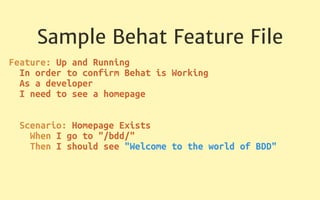
Sample Behat Feature File
Feature: Up and Running

In order to confirm Behat is Working

As a developer

I need to see a homepage


Scenario: Homepage Exists

When I go to "/bdd/"

Then I should see "Welcome to the world of BDD"

BDD gets all stakeholders to agree on what “done”
looks like before you write a single line of code
Behat
We implement BDD in PHP with a tool called
Behat
Behat is a free, open source tool designed for
BDD and PHP
behat.org
SpecBDD - aka, Testing Tongue Twisters
Specification Behavior Driven
Development
Before you write a line of code, you write a
specification for how that code should work
Focuses you on architectural decisions up-front
PHPSpec
Open Source tool for specification driven development
in PHP
www.phpspec.net
Why Use Behat and
PHPSpec?
These tools allow you to focus exclusively on
logic
Helps build functional testing coverage quickly
Guides planning and ensuring that all stakeholders are
in agreement
Why Not PHPUnit?
PHPSpec is opinionated - in every sense of the word
PHPSpec forces you to think differently and creates a
mindset that encourages usage
PHPSpec tests are much more readable
Read any of Marcello Duarte’s slides on testing
What About Performance?
Tests that take days to run won’t be used
PHPSpec is fast
Behat supports parallel execution
Behat and PHPSpec will be at least as fast as the
existing testing tools, and can be much faster
Enough Theory:

Let’s Build Something!
We’ll be building a basic time-off request app.
Visitors can specify their name and a reason
for their time off request.
Time off requests can be viewed, approved
and denied.
Intentionally keeping things simple, but you
can follow this pattern to add authentication,
roles, etc.
Want to follow along or view the sample
code?
Vagrant box:
https://github.com/joshuaswarren/bdd-box
Project code:
https://github.com/joshuaswarren/bdd
Setting up Our Project
Setup a folder for your project
Use composer to install Behat, phpspec & friends
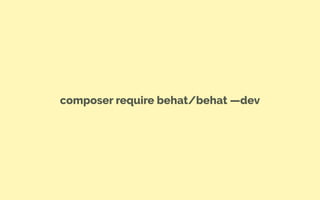
composer require behat/behat —dev
composer require behat/mink-goutte-driver —dev
composer require phpspec/phpspec —dev
We now have Behat and Phpspec installed
We also have Mink - an open source browser
emulator/controller
Mink Drivers
Goutte - headless, fast, no JS
Selenium2 - requires Selenium server, slower,
supports JS
Zombie - headless, fast, does support JS
We are using Goutte today because we don’t need
Javascript support
We’ll perform some basic configuration to let Behat
know to use Goutte
And we need to let phpspec know where our code
should go
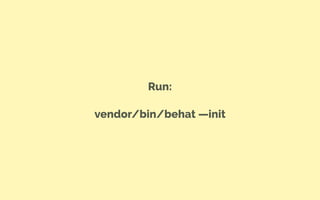
Run:
vendor/bin/behat —init
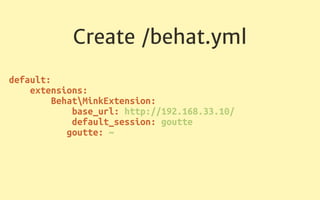
Create /behat.yml
default:

extensions:

BehatMinkExtension:

base_url: http://192.168.33.10/

default_session: goutte

goutte: ~

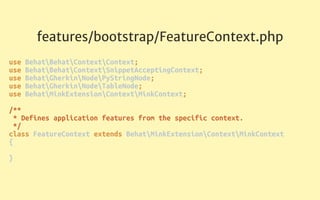
features/bootstrap/FeatureContext.php
use BehatBehatContextContext;

use BehatBehatContextSnippetAcceptingContext;

use BehatGherkinNodePyStringNode;

use BehatGherkinNodeTableNode;

use BehatMinkExtensionContextMinkContext;


/**

* Defines application features from the specific context.

*/

class FeatureContext extends BehatMinkExtensionContextMinkContext

{


}
Create /phpspec.yml
suites:

app_suites:

namespace: App

psr4_prefix: App

src_path: app

Features
features/UpAndRunning.feature
Feature: Up and Running

In order to confirm Behat is Working

As a developer

I need to see a homepage


Scenario: Homepage Exists

When I go to "/bdd/"

Then I should see "Welcome to the world of BDD"

Run:
bin/behat
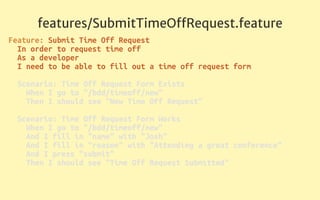
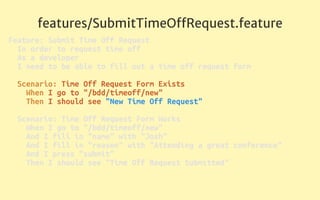
features/SubmitTimeOffRequest.feature
Feature: Submit Time Off Request

In order to request time off

As a developer

I need to be able to fill out a time off request form


Scenario: Time Off Request Form Exists

When I go to "/bdd/timeoff/new"

Then I should see "New Time Off Request"


Scenario: Time Off Request Form Works

When I go to "/bdd/timeoff/new"

And I fill in "name" with "Josh"

And I fill in "reason" with "Attending a great conference"

And I press "submit"

Then I should see "Time Off Request Submitted"

features/SubmitTimeOffRequest.feature
Feature: Submit Time Off Request

In order to request time off

As a developer

I need to be able to fill out a time off request form


Scenario: Time Off Request Form Exists

When I go to "/bdd/timeoff/new"

Then I should see "New Time Off Request"


Scenario: Time Off Request Form Works

When I go to "/bdd/timeoff/new"

And I fill in "name" with "Josh"

And I fill in "reason" with "Attending a great conference"

And I press "submit"

Then I should see "Time Off Request Submitted"

features/SubmitTimeOffRequest.feature
Feature: Submit Time Off Request

In order to request time off

As a developer

I need to be able to fill out a time off request form


Scenario: Time Off Request Form Exists

When I go to "/bdd/timeoff/new"

Then I should see "New Time Off Request"


Scenario: Time Off Request Form Works

When I go to "/bdd/timeoff/new"

And I fill in "name" with "Josh"

And I fill in "reason" with "Attending a great conference"

And I press "submit"

Then I should see "Time Off Request Submitted"

features/SubmitTimeOffRequest.feature
Feature: Submit Time Off Request

In order to request time off

As a developer

I need to be able to fill out a time off request form


Scenario: Time Off Request Form Exists

When I go to "/bdd/timeoff/new"

Then I should see "New Time Off Request"


Scenario: Time Off Request Form Works

When I go to "/bdd/timeoff/new"

And I fill in "name" with "Josh"

And I fill in "reason" with "Attending a great conference"

And I press "submit"

Then I should see "Time Off Request Submitted"

features/ProcessTimeOffRequest.feature
Feature: Process Time Off Request

In order to manage my team

As a manager

I need to be able to approve and deny time off requests


Scenario: Time Off Request Management View Exists

When I go to "/bdd/timeoff/manage"

Then I should see "Manage Time Off Requests"


Scenario: Time Off Request List

When I go to "/bdd/timeoff/manage"

And I press "View"

Then I should see "Pending Time Off Request Details"


Scenario: Approve Time Off Request

When I go to "/bdd/timeoff/manage"

And I press "View"

And I press "Approve"

Then I should see "Time Off Request Approved"


Scenario: Deny Time Off Request

When I go to "/bdd/timeoff/manage"

And I press "View"

And I press "Deny"

Then I should see "Time Off Request Denied"
features/ProcessTimeOffRequest.feature
Feature: Process Time Off Request

In order to manage my team

As a manager

I need to be able to approve and deny time off requests
features/ProcessTimeOffRequest.feature
Scenario: Time Off Request Management View Exists

When I go to "/bdd/timeoff/manage"

Then I should see "Manage Time Off Requests"


Scenario: Time Off Request List

When I go to "/bdd/timeoff/manage"

And I press "View"

Then I should see "Pending Time Off Request Details"
features/ProcessTimeOffRequest.feature
Scenario: Approve Time Off Request

When I go to "/bdd/timeoff/manage"

And I press "View"

And I press "Approve"

Then I should see "Time Off Request Approved"


Scenario: Deny Time Off Request

When I go to "/bdd/timeoff/manage"

And I press "View"

And I press "Deny"

Then I should see "Time Off Request Denied"
run behat: bin/behat
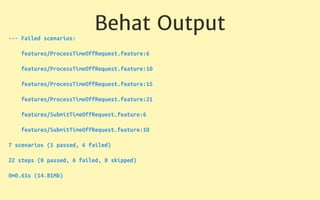
Behat Output
--- Failed scenarios:
features/ProcessTimeOffRequest.feature:6
features/ProcessTimeOffRequest.feature:10
features/ProcessTimeOffRequest.feature:15
features/ProcessTimeOffRequest.feature:21
features/SubmitTimeOffRequest.feature:6
features/SubmitTimeOffRequest.feature:10
7 scenarios (1 passed, 6 failed)
22 steps (8 passed, 6 failed, 8 skipped)
0m0.61s (14.81Mb)
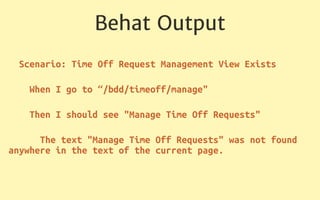
Behat Output
Scenario: Time Off Request Management View Exists
When I go to “/bdd/timeoff/manage"
Then I should see "Manage Time Off Requests"
The text "Manage Time Off Requests" was not found
anywhere in the text of the current page.
These failures show us that Behat is testing
our app properly, and now we just need to
write the application logic.
Specifications
Now we write specifications for how our
application should work.
These specifications should provide the logic
to deliver the results that Behat is testing for.
bin/phpspec describe AppTimeoff
PHPSpec generates a basic spec file for us
specTimeoffSpec.php
namespace specApp;


use PhpSpecObjectBehavior;

use ProphecyArgument;


class TimeoffSpec extends ObjectBehavior

{

function it_is_initializable()

{

$this->shouldHaveType('AppTimeoff');

}

}

This default spec tells PHPSpec to expect a
class named Timeoff.
Now we add a bit more to the file so PHPSpec
will understand what this class should do.
specTimeoffSpec.php
function it_creates_timeoff_requests() {

$this->create("Name", "reason")->shouldBeString();

}


function it_loads_all_timeoff_requests() {

$this->loadAll()->shouldBeArray();

}


function it_loads_a_timeoff_request() {

$this->load("uuid")->shouldBeArray();

}


function it_loads_pending_timeoff_requests() {

$this->loadPending()->shouldBeArray();

}


function it_approves_timeoff_requests() {

$this->approve("id")->shouldReturn(true);

}


function it_denies_timeoff_requests() {

$this->deny("id")->shouldReturn(true);

}
specTimeoffSpec.php
function it_creates_timeoff_requests() {

$this->create("Name", "reason")->shouldBeString();

}


function it_loads_all_timeoff_requests() {

$this->loadAll()->shouldBeArray();

}
specTimeoffSpec.php
function it_loads_a_timeoff_request() {

$this->load("uuid")->shouldBeArray();

}


function it_loads_pending_timeoff_requests() {

$this->loadPending()->shouldBeArray();

}

specTimeoffSpec.php
function it_approves_timeoff_requests() {

$this->approve("id")->shouldReturn(true);

}


function it_denies_timeoff_requests() {

$this->deny("id")->shouldReturn(true);

}
Now we run PHPSpec once more…
Phpspec output
10 ✔ is initializable
15 ! creates timeoff requests
method AppTimeoff::create not found.
19 ! loads all timeoff requests
method AppTimeoff::loadAll not found.
23 ! loads pending timeoff requests
method AppTimeoff::loadPending not found.
27 ! approves timeoff requests
method AppTimeoff::approve not found.
31 ! denies timeoff requests
method AppTimeoff::deny not found.
Lots of failures…
But wait a second - PHPSpec prompts us!
PHPSpec output
Do you want me to create `AppTimeoff::create()` for you?
[Y/n]
PHPSpec will create the class and the methods for
us!
This is very powerful with frameworks like Laravel and
Magento, which have PHPSpec plugins that help
PHPSpec know where class files should be located.
And now, the easy part…
Implementation
Implement logic in the new Timeoff class in
the locations directed by PHPSpec
Implement each function one at a time, running
phpspec after each one.
specTimeoffSpec.php
public function create($name, $reason)

{

$uuid1 = Uuid::uuid1();

$uuid = $uuid1->toString();

DB::table('requests')->insert([

'name' => $name,

'reason' => $reason,

'uuid' => $uuid,

]);

return $uuid;

}
specTimeoffSpec.php
public function load($uuid) {

$results = DB::select('select * from requests WHERE
uuid = ?', [$uuid]);

return $results;

}
specTimeoffSpec.php
public function loadAll()

{

$results = DB::select('select * from requests');

return $results;

}
specTimeoffSpec.php
public function loadPending()

{

$results = DB::select('select * from requests WHERE
reviewed = ?', [0]);

return $results;

}
specTimeoffSpec.php
public function approve($uuid)

{

DB::update('update requests set reviewed = 1,
approved = 1 where uuid = ?', [$uuid]);

return true;

}
specTimeoffSpec.php
public function deny($uuid)

{

DB::update('update requests set reviewed = 1,
approved = 0 where uuid = ?', [$uuid]);

return true;

}
phpspec should be returning all green
Move on to implementing the front-end
behavior
Using Lumen means our view/display logic is
very simple
appHttproute.php
$app->get('/bdd/', function() use ($app) {

return "Welcome to the world of BDD";

});
appHttproute.php
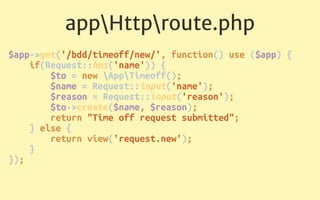
$app->get('/bdd/timeoff/new/', function() use ($app) {

if(Request::has('name')) {

$to = new AppTimeoff();

$name = Request::input('name');

$reason = Request::input('reason');

$to->create($name, $reason);

return "Time off request submitted";

} else {

return view('request.new');

}

});
appHttproute.php
$app->get('/bdd/timeoff/manage/', function() use ($app) {

$to = new AppTimeoff();

if(Request::has('uuid')) {

$uuid = Request::input('uuid');

if(Request::has('process')) {

$process = Request::input('process');

if($process == 'approve') {

$to->approve($uuid);

return "Time Off Request Approved";

} else {

if($process == 'deny') {

$to->deny($uuid);

return "Time Off Request Denied";

}

}

} else {

$request = $to->load($uuid);

return view('request.manageSpecific', ['request' => $request]);

}

} else {

$requests = $to->loadAll();

return view('request.manage', ['requests' => $requests]);

}
appHttproute.php
$app->get('/bdd/timeoff/manage/', function() use ($app) {

$to = new AppTimeoff();

if(Request::has('uuid')) {

$uuid = Request::input('uuid');

if(Request::has('process')) {

$process = Request::input('process');

if($process == 'approve') {

$to->approve($uuid);

return "Time Off Request Approved";

} else {

if($process == 'deny') {

$to->deny($uuid);

return "Time Off Request Denied";

}

}
…
appHttproute.php
…

} else {

$request = $to->load($uuid);

return view('request.manageSpecific',
['request' => $request]);

}
…
appHttproute.php
…

} else {

$requests = $to->loadAll();

return view('request.manage', ['requests' =>
$requests]);

}
Our views are located in resourcesviewsrequest and
are simple HTML forms
Once we’re done with the implementation, we
move on to…
Testing
Once we’re done, running phpspec run should
return green
Once phpspec returns green, run behat, which
should return green as well
We now know that our new feature is working
correctly without needing to open a web
browser
PHPSpec gives us confidence that the
application logic was implemented correctly.
Behat gives us confidence that the feature is
being displayed properly to users.
Running both as we refactor and add new
features will give us confidence we haven’t
broken an existing feature
Success!
Our purpose today was to get you hooked on
Behat & PHPSpec and show you how easy it is
to get started.
Behat and PHPSpec are both powerful tools
PHPSpec can be used at a very granular level
to ensure your application logic works
correctly
Advanced Behat & PHPSpec
I encourage you to learn more about Behat &
phpspec. Here’s a few areas to consider…
Parallel Execution
A few approaches to running Behat in parallel
to improve it’s performance. Start with:
shvetsgroup/ParallelRunner
Behat - Reusable Actions
“I should see”, “I go to” are just steps - you can
write your own steps.
Mocking & Prophesying
Mock objects are simulated objects that
mimic the behavior of real objects
Helpful to mock very complex objects, or
objects that you don’t want to call while
testing - i.e., APIs
Prophecy is a highly opinionated PHP mocking
framework by the Phpspec team
Take a look at the sample code on Github - I
mocked a Human Resource Management
System API
Mocking with Prophecy
$this->prophet = new ProphecyProphet;
$prophecy = $this->prophet->prophesize('AppHrmsApi');
$prophecy->getUser(Argument::type('string'))-
>willReturn('name');
$prophecy->decrement('name', Argument::type('integer'))-
>willReturn(true);
$dummyApi = $prophecy->reveal();
PhantomJS
Stick around - Michelle Sanver is up next at
3:30PM in this room to discuss Behat +
PhantomJS including automated screenshots
and screenshot comparision
Two Tasks For You
Next week, setup Behat and PHPSpec on one
of your projects and take it for a quick test by
implementing one short feature.
Keep In Touch!
• joind.in/13744
• @JoshuaSWarren
• JoshuaWarren.com

PHPSpec & Behat: Two Testing Tools That Write Code For You (#phptek edition)