The Mathematica®
Journal
Perimetric Complexity of
Binary Digital Images
Notes on Calculation and Relation to Visual
Complexity
Andrew B. Watson
Perimetric complexity is a measure of the complexity of binary
pictures. It is defined as the sum of inside and outside
perimeters of the foreground, squared, divided by the foreground
area, divided by 4 p. Difficulties arise when this definition is
applied to digital images composed of binary pixels. In this
article we identify these problems and propose solutions.
Perimetric complexity is often used as a measure of visual
complexity, in which case it should take into account the limited
resolution of the visual system. We propose a measure of visual
perimetric complexity that meets this requirement.
‡ Background
Perimetric complexity is a measure of the complexity of binary pictures. It is defined as
the sum of inside and outside perimeters of the foreground, squared, divided by the fore-
ground area, divided by 4 p. The concept of perimetric complexity was first introduced
(and called dispersion) by Attneave and Arnoult [1] in an effort to explain the apparent per-
ceptual complexity of visual shapes. In the field of image processing, the concept appears
as its inverse, compactness [2, 3, 4]. The concept was given new life (and a new name) in
2006 by Pelli et al., who showed that the efficiency of letter identification was nearly pro-
portional to perimetric complexity [5]. It has since become a popular metric in a variety of
shape analysis applications, including human letter identification [5, 6, 7], handwriting
recognition [8], evolution of graphical symbols [9], and design of graphical anti-spam tech-
nologies [10, 11, 12].
In this article we develop Mathematica functions to compute perimetric complexity of bi-
nary digital images and illustrate their application. The code is compatible with Version 8
of Mathematica.
The Mathematica Journal 14 © 2012 Wolfram Media, Inc.
Although the concept of perimetric complexity is clear when applied to continuous plane
shapes, complications arise when the concept is extended to binary digital images. We dis-
cuss these complications and suggest suitable solutions. We also introduce the concept of
visual perimetric complexity, which takes into account the blurring action of the human vi-
sual system.
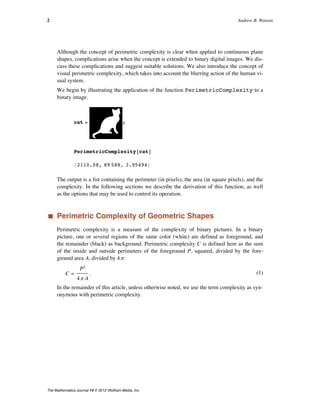
We begin by illustrating the application of the function PerimetricComplexity to a
binary image.
cat = ;
PerimetricComplexity@catD
82110.08, 89 588, 3.95494<
The output is a list containing the perimeter (in pixels), the area (in square pixels), and the
complexity. In the following sections we describe the derivation of this function, as well
as the options that may be used to control its operation.
‡ Perimetric Complexity of Geometric Shapes
Perimetric complexity is a measure of the complexity of binary pictures. In a binary
picture, one or several regions of the same color (white) are defined as foreground, and
the remainder (black) as background. Perimetric complexity C is defined here as the sum
of the inside and outside perimeters of the foreground P, squared, divided by the fore-
ground area A, divided by 4 p:
(1)
C =
P2
4 p A
.
In the remainder of this article, unless otherwise noted, we use the term complexity as syn-
onymous with perimetric complexity.
2 Andrew B. Watson
The Mathematica Journal 14 © 2012 Wolfram Media, Inc.
We begin with the example of a circular disk with unit radius.
Graphics@8White, Disk@D<, PlotRange Ø 2, Background Ø BlackD
Here the perimeter is 2 p and the area is p, so the complexity is
(2)
C =
H2 pL2
4 p p
= 1.
It can be shown that the disk is the shape with the lowest complexity. The normalizing con-
stant 4 p in the definition leads to a unit value for this most simple shape. As a conse-
quence, any other value of complexity is easily compared to that of the circular disk. Pelli
et al. [5] suggest that complexity is closely related to the number of visual features in a
shape. In that sense, we could say that the circular disk has only a single feature.
Our next example is a square with unit sides.
The perimeter here is 4, and the area is 1, so the perimetric complexity is
(3)
C =
42
4 p
=
4
p
º 1.27.
If we add a square hole in the center with side length 1/2, there is an interior perimeter as
well, as shown here.
Graphics@8
White, Rectangle@-81, 1< ê 2, 81, 1< ê 2D,
Black, Rectangle@-81, 1< ê 4, 81, 1< ê 4D<,
PlotRange Ø 1, Background Ø BlackD
Now the total perimeter is the sum of inner and outer perimeters and the area is the differ-
ence in areas of the squares, so
Perimetric Complexity of Binary Digital Images 3
The Mathematica Journal 14 © 2012 Wolfram Media, Inc.
Now the total perimeter is the sum of inner and outer perimeters and the area is the differ-
ence in areas of the squares, so
(4)
C =
H4 + 2L2
H1 - 1 ê 4L 4 p
=
12
p
º 3.82.
So according to this measure, the square with a hole is about three times as complex as the
square.
Some important observations about complexity are: (1) it is dimensionless; (2) it is inde-
pendent of scale or orientation; and (3) it is additive. By additive we mean that the
complexity of a pair of shapes, considered as a single shape, is equal to the sum of their
complexities computed separately.
‡ Perimetric Complexity of Plane Curves
Although it is beyond the scope of this article, we note for reference that if a shape is de-
fined by a closed parametric curve, its exact complexity can be obtained using calculus
methods [13]. Specifically, if over an interval a § t § b the functions xHtL and yHtL and
their derivatives x
°
HtL and y
°
HtL are continuous, then the curve described has a length
(5)
P = ‡
a
b
x
° 2
+ y
° 2
dt
and an area
(6)
A = -‡
a
b
y
°
x dt.
‡ Perimetric Complexity of Binary Digital Images
A digital image is defined here as a rectangular array of square pixels. A binary digital im-
age contains pixel values of 1 (white) and 0 (black) only. The foreground consists of the
white pixels.
The original definition of complexity relies upon the notion of a perimeter, which has no
unique analog in the context of digital images. However, two definitions of perimeter are
available, as described below.
4 Andrew B. Watson
The Mathematica Journal 14 © 2012 Wolfram Media, Inc.
· Using “PerimeterLength”
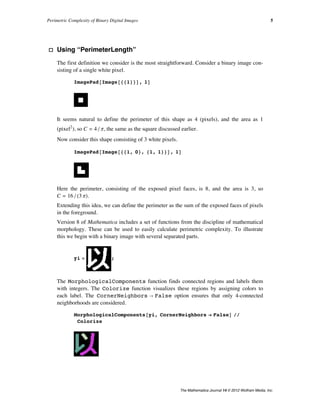
The first definition we consider is the most straightforward. Consider a binary image con-
sisting of a single white pixel.
ImagePad@Image@881<<D, 1D
It seems natural to define the perimeter of this shape as 4 (pixels), and the area as 1
(pixel2
), so C = 4 ê p, the same as the square discussed earlier.
Now consider this shape consisting of 3 white pixels.
ImagePad@Image@881, 0<, 81, 1<<D, 1D
Here the perimeter, consisting of the exposed pixel faces, is 8, and the area is 3, so
C = 16 ê H3 pL.
Extending this idea, we can define the perimeter as the sum of the exposed faces of pixels
in the foreground.
Version 8 of Mathematica includes a set of functions from the discipline of mathematical
morphology. These can be used to easily calculate perimetric complexity. To illustrate
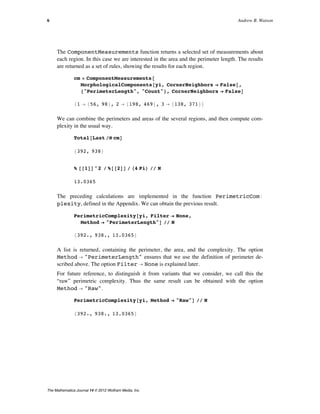
this we begin with a binary image with several separated parts.
yi = ;
The MorphologicalComponents function finds connected regions and labels them
with integers. The Colorize function visualizes these regions by assigning colors to
each label. The CornerNeighbors Ø False option ensures that only 4-connected
neighborhoods are considered.
MorphologicalComponents@yi, CornerNeighbors Ø FalseD êê
Colorize
The ComponentMeasurements function returns a selected set of measurements about
each region. In this case we are interested in the area and the perimeter length. The results
are returned as a set of rules, showing the results for each region.
Perimetric Complexity of Binary Digital Images 5
The Mathematica Journal 14 © 2012 Wolfram Media, Inc.
The ComponentMeasurements function returns a selected set of measurements about
each region. In this case we are interested in the area and the perimeter length. The results
are returned as a set of rules, showing the results for each region.
cm = ComponentMeasurements@
MorphologicalComponents@yi, CornerNeighbors Ø FalseD,
8"PerimeterLength", "Count"<, CornerNeighbors Ø FalseD
81 Ø 856, 98<, 2 Ø 8198, 469<, 3 Ø 8138, 371<<
We can combine the perimeters and areas of the several regions, and then compute com-
plexity in the usual way.
Total@Last êü cmD
8392, 938<
% @@1DD^2 ê %@@2DD ê H4 PiL êê N
13.0365
The preceding calculations are implemented in the function PerimetricComÖ
plexity, defined in the Appendix. We can obtain the previous result.
PerimetricComplexity@yi, Filter Ø None,
Method Ø "PerimeterLength"D êê N
8392., 938., 13.0365<
A list is returned, containing the perimeter, the area, and the complexity. The option
Method Ø "PerimeterLength" ensures that we use the definition of perimeter de-
scribed above. The option Filter Ø None is explained later.
For future reference, to distinguish it from variants that we consider, we call this the
“raw” perimetric complexity. Thus the same result can be obtained with the option
Method Ø "Raw".
PerimetricComplexity@yi, Method Ø "Raw"D êê N
8392., 938., 13.0365<
6 Andrew B. Watson
The Mathematica Journal 14 © 2012 Wolfram Media, Inc.
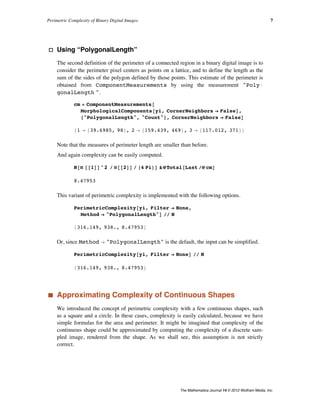
· Using “PolygonalLength”
The second definition of the perimeter of a connected region in a binary digital image is to
consider the perimeter pixel centers as points on a lattice, and to define the length as the
sum of the sides of the polygon defined by those points. This estimate of the perimeter is
obtained from ComponentMeasurements by using the measurement "PolyÖ
gonalLength ".
cm = ComponentMeasurements@
MorphologicalComponents@yi, CornerNeighbors Ø FalseD,
8"PolygonalLength", "Count"<, CornerNeighbors Ø FalseD
81 Ø 839.6985, 98<, 2 Ø 8159.439, 469<, 3 Ø 8117.012, 371<<
Note that the measures of perimeter length are smaller than before.
And again complexity can be easily computed.
N@Ò @@1DD^2 ê Ò@@2DD ê H4 PiLD &üTotal@Last êü cmD
8.47953
This variant of perimetric complexity is implemented with the following options.
PerimetricComplexity@yi, Filter Ø None,
Method Ø "PolygonalLength"D êê N
8316.149, 938., 8.47953<
Or, since Method Ø "PolygonalLength" is the default, the input can be simplified.
PerimetricComplexity@yi, Filter Ø NoneD êê N
8316.149, 938., 8.47953<
‡ Approximating Complexity of Continuous Shapes
We introduced the concept of perimetric complexity with a few continuous shapes, such
as a square and a circle. In these cases, complexity is easily calculated, because we have
simple formulas for the area and perimeter. It might be imagined that complexity of the
continuous shape could be approximated by computing the complexity of a discrete sam-
pled image, rendered from the shape. As we shall see, this assumption is not strictly
correct.
Perimetric Complexity of Binary Digital Images 7
The Mathematica Journal 14 © 2012 Wolfram Media, Inc.
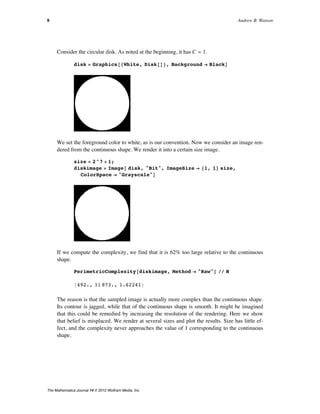
Consider the circular disk. As noted at the beginning, it has C = 1.
disk = Graphics@8White, Disk@D<, Background Ø BlackD
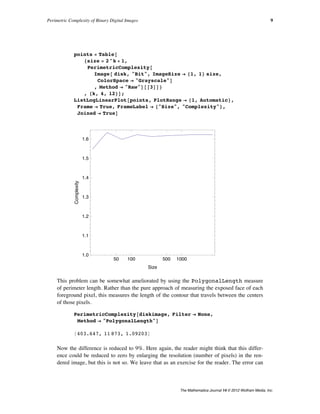
We set the foreground color to white, as is our convention. Now we consider an image ren-
dered from the continuous shape. We render it into a certain size image.
size = 2^7 + 1;
diskimage = Image@ disk, "Bit", ImageSize Ø 81, 1< size,
ColorSpace Ø "Grayscale"D
If we compute the complexity, we find that it is 62% too large relative to the continuous
shape.
PerimetricComplexity@diskimage, Method Ø "Raw"D êê N
8492., 11 873., 1.62241<
The reason is that the sampled image is actually more complex than the continuous shape.
Its contour is jagged, while that of the continuous shape is smooth. It might be imagined
that this could be remedied by increasing the resolution of the rendering. Here we show
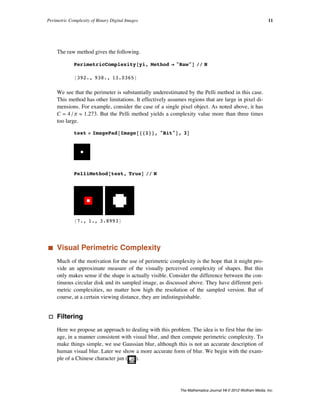
that belief is misplaced. We render at several sizes and plot the results. Size has little ef-
fect, and the complexity never approaches the value of 1 corresponding to the continuous
shape.
8 Andrew B. Watson
The Mathematica Journal 14 © 2012 Wolfram Media, Inc.
points = Table@
8size = 2^k + 1,
PerimetricComplexity@
Image@ disk, "Bit", ImageSize Ø 81, 1< size,
ColorSpace Ø "Grayscale"D
, Method Ø "Raw"D@@3DD<
, 8k, 4, 12<D;
ListLogLinearPlot@points, PlotRange Ø 81, Automatic<,
Frame Ø True, FrameLabel Ø 8"Size", "Complexity"<,
Joined Ø TrueD
50 100 500 1000
1.0
1.1
1.2
1.3
1.4
1.5
1.6
Size
Complexity
This problem can be somewhat ameliorated by using the PolygonalLength measure
of perimeter length. Rather than the pure approach of measuring the exposed face of each
foreground pixel, this measures the length of the contour that travels between the centers
of those pixels.
PerimetricComplexity@diskimage, Filter Ø None,
Method Ø "PolygonalLength"D
8403.647, 11 873, 1.09203<
Now the difference is reduced to 9%. Here again, the reader might think that this differ-
ence could be reduced to zero by enlarging the resolution (number of pixels) in the ren-
dered image, but this is not so. We leave that as an exercise for the reader. The error can
never be zero, because the path between pixel centers must always be vertical, horizontal,
or diagonal, so it can never smoothly follow the true circular contour. Put another way, it
has a higher fractal dimension than the circle, and thus greater length.
Perimetric Complexity of Binary Digital Images 9
The Mathematica Journal 14 © 2012 Wolfram Media, Inc.
Now the difference is reduced to 9%. Here again, the reader might think that this differ-
ence could be reduced to zero by enlarging the resolution (number of pixels) in the ren-
never be zero, because the path between pixel centers must always be vertical, horizontal,
or diagonal, so it can never smoothly follow the true circular contour. Put another way, it
has a higher fractal dimension than the circle, and thus greater length.
‡ Pelli Algorithm
Pelli et al. [2] proposed a method for computing complexity that we quote here in full:
The ink area is the number of 1’s. To measure the perimeter we first replace the
image by its outline. (We OR the image with translations of the original, shifted
by one pixel left; left and up; up; up and right; right; right and down; down; and
down and left; and then bit clear with the original image. This leaves a one-
pixel-thick outline.) It might seem enough to just count the 1’s in this outline im-
age, but the resulting “lengths” are not Euclidean: diagonal lines have “lengths”
equal to that of their base plus height. Instead we first thicken the outline. (We
OR the outline image with translations of the original outline, shifted by one
pixel left; up; right; and down.) This leaves a three-pixel-thick outline. We then
count the number of 1’s and divide by 3.
This method can be implemented using the Dilation function, as we show here. With
verbose ã True, it shows two images: the perimeter in red and the thickened perime-
ter. It returns the length of the perimeter, the area, and the complexity.
PelliMethod@image_, verbose_: FalseD := Module@
8tmp0, tmp1, tmp2, tmp3, perimeter, area, result<,
tmp0 = ImagePad@image, 2D;
tmp1 = Dilation@tmp0, BoxMatrix@1DD;
tmp2 = ImageSubtract@tmp1, tmp0D;
tmp3 = Dilation@tmp2, CrossMatrix@1DD;
perimeter = Total@ImageData@tmp3D, 2D ê 3;
area = Total@ImageData@tmp0D, 2D;
result = 8perimeter, area, perimeter^2 ê area ê H4 PiL<;
If@verbose, Column@8GraphicsRow@
8ColorCombine@8tmp1, tmp0, tmp0<D, tmp3<D, result<D,
resultD
D
We apply this to the three-component Chinese character.
PelliMethod@yi, TrueD êê N
8326.333, 938., 9.03463<
10 Andrew B. Watson
The Mathematica Journal 14 © 2012 Wolfram Media, Inc.
The raw method gives the following.
PerimetricComplexity@yi, Method Ø "Raw"D êê N
8392., 938., 13.0365<
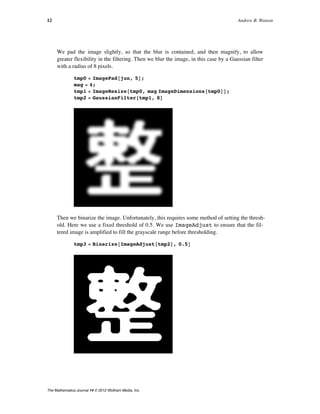
We see that the perimeter is substantially underestimated by the Pelli method in this case.
This method has other limitations. It effectively assumes regions that are large in pixel di-
mensions. For example, consider the case of a single pixel object. As noted above, it has
C = 4 ê p º 1.273. But the Pelli method yields a complexity value more than three times
too large.
test = ImagePad@Image@881<<, "Bit"D, 3D
PelliMethod@test, TrueD êê N
87., 1., 3.8993<
‡ Visual Perimetric Complexity
Much of the motivation for the use of perimetric complexity is the hope that it might pro-
vide an approximate measure of the visually perceived complexity of shapes. But this
only makes sense if the shape is actually visible. Consider the difference between the con-
tinuous circular disk and its sampled image, as discussed above. They have different peri-
metric complexities, no matter how high the resolution of the sampled version. But of
course, at a certain viewing distance, they are indistinguishable.
· Filtering
Here we propose an approach to dealing with this problem. The idea is to first blur the im-
age, in a manner consistent with visual blur, and then compute perimetric complexity. To
make things simple, we use Gaussian blur, although this is not an accurate description of
human visual blur. Later we show a more accurate form of blur. We begin with the exam-
ple of a Chinese character jun ( ).
We pad the image slightly, so that the blur is contained, and then magnify, to allow
greater flexibility in the filtering. Then we blur the image, in this case by a Gaussian filter
with a radius of 8 pixels.
Perimetric Complexity of Binary Digital Images 11
The Mathematica Journal 14 © 2012 Wolfram Media, Inc.
We pad the image slightly, so that the blur is contained, and then magnify, to allow
greater flexibility in the filtering. Then we blur the image, in this case by a Gaussian filter
with a radius of 8 pixels.
tmp0 = ImagePad@jun, 5D;
mag = 4;
tmp1 = ImageResize@tmp0, mag ImageDimensions@tmp0DD;
tmp2 = GaussianFilter@tmp1, 8D
Then we binarize the image. Unfortunately, this requires some method of setting the thresh-
old. Here we use a fixed threshold of 0.5. We use ImageAdjust to ensure that the fil-
tered image is amplified to fill the grayscale range before thresholding.
tmp3 = Binarize@ImageAdjust@tmp2D, 0.5D
12 Andrew B. Watson
The Mathematica Journal 14 © 2012 Wolfram Media, Inc.
And because we imagine that the image is viewed at such a distance that the pixels are not
resolved, we use the (default) PolygonalLength method.
PerimetricComplexity@tmp3, Filter Ø NoneD
81944.82, 24 044, 12.5182<
We can compare this to the unfiltered raw complexity.
PerimetricComplexity@jun, Method Ø "Raw"D êê N
8606., 1467., 19.9207<
The filtered version has substantially lower complexity, as we expect.
· Visual Filtering Using a Gaussian
For the filtering to approximate visual blur, it must be based on the size of the original im-
age and its distance from the viewer. Obviously, as the shape becomes smaller or farther
from the observer, its details are more blurred, less visible, and contribute less to the vi-
sual complexity.
The challenge is to determine the appropriate value of the Gaussian filter radius for a
given viewing distance. From measurements of visual sensitivity, we know that visual
Gaussian blur has a standard deviation of about B = 0.01549 degrees of visual angle [11].
But we need to convert this into a radius in pixels. Recall that the image may be magni-
fied by M before filtering. If we express the viewing distance V in terms of pixels (before
magnification), then the size of each pixel S (after magnification) is approximately
(7)
S =
57.3
MV
deg.
The constant 57.3 is an approximation to 1 ê arctanH1°L.
1. ê ArcTan@1 °D
57.3016
By default, the radius is twice the standard deviation. So the filter radius should be
(8)
R =
2 B
S
=
2 BMV
57.3
pixel.
Perimetric Complexity of Binary Digital Images 13
The Mathematica Journal 14 © 2012 Wolfram Media, Inc.
Consider an example. Suppose that our Chinese character image is displayed on a typical
computer screen with a resolution of 72 pixels/inch, and viewed at a distance of 48 inches.
V = 48 µ 72
3456
Recall the value of B.
B = 0.01549;
Suppose further that the magnification is 4.
M = 4;
Then we know R.
R = 2 B M V ê 57.3
7.47413
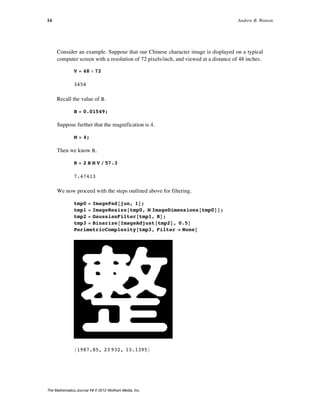
We now proceed with the steps outlined above for filtering.
tmp0 = ImagePad@jun, 1D;
tmp1 = ImageResize@tmp0, M ImageDimensions@tmp0DD;
tmp2 = GaussianFilter@tmp1, RD;
tmp3 = Binarize@ImageAdjust@tmp2D, 0.5D
PerimetricComplexity@tmp3, Filter Ø NoneD
81987.85, 23 932, 13.1395<
The preceding steps of padding, magnification, and filtering are built into the function
PerimetricComplexity, as shown below. With Verbose Ø True, the function
also shows the original, the filtered version, the binarized version, and the original (in red)
with the perimeter of the filtered version (in white within the original and aqua outside the
original).
14 Andrew B. Watson
The Mathematica Journal 14 © 2012 Wolfram Media, Inc.
The preceding steps of padding, magnification, and filtering are built into the function
PerimetricComplexity, as shown below. With Verbose Ø True, the function
also shows the original, the filtered version, the binarized version, and the original (in red)
with the perimeter of the filtered version (in white within the original and aqua outside the
original).
PerimetricComplexity@jun, Magnification Ø 4,
Filter Ø "Gaussian", ViewingDistance -> 48 µ 72,
Verbose Ø TrueD
81987.85, 23 932, 13.1395<
The Gaussian is parameterized by a scale in degrees of visual angle. The default value is
2.33/60 degrees. The user can experiment with different values via the option
GaussianScale.
· Accurate Visual Filtering with Sech
Visual blur is more accurately represented with filters other than a Gaussian. In one
simple form, the kernel is a sech (hyperbolic secant) function [14, 15]. This filter can be
selected with an option (Filter Ø "Sech", the default) in the function PerimeÖ
tricComplexity.
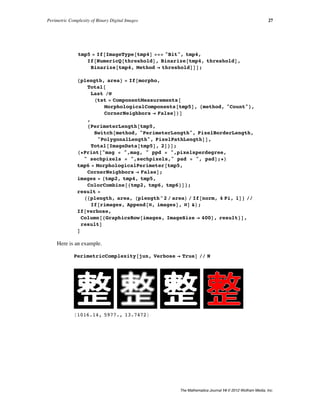
PerimetricComplexity@junD
81016.14, 5977, 13.7472<
The hyperbolic secant is parameterized by a scale in degrees of visual angle. The default
value is 2.16/60 degrees [14, 15]. The user can experiment with different values via the op-
tion SechScale.
· Accurate Visual Filtering with an Arbitrary Point Spread Function
In real human eyes, blur results not only from low-order aberrations such as defocus and
astigmatism, but also from higher-order aberrations. In this example, we use a blur
function defined by an array of values representing the filter kernel. This example is an
actual estimate of the point spread function for an individual human observer, as mea-
sured using a device called a wavefront aberrometer that includes both low-order and high-
order aberrations [16].
Perimetric Complexity of Binary Digital Images 15
The Mathematica Journal 14 © 2012 Wolfram Media, Inc.
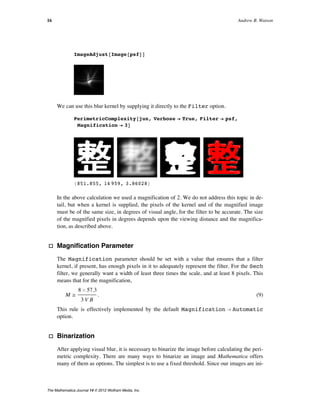
ImageAdjust@Image@psfDD
We can use this blur kernel by supplying it directly to the Filter option.
PerimetricComplexity@jun, Verbose Ø True, Filter Ø psf,
Magnification Ø 3D
8851.855, 14 959, 3.86028<
In the above calculation we used a magnification of 2. We do not address this topic in de-
tail, but when a kernel is supplied, the pixels of the kernel and of the magnified image
must be of the same size, in degrees of visual angle, for the filter to be accurate. The size
of the magnified pixels in degrees depends upon the viewing distance and the magnifica-
tion, as described above.
· Magnification Parameter
The Magnification parameter should be set with a value that ensures that a filter
kernel, if present, has enough pixels in it to adequately represent the filter. For the Sech
filter, we generally want a width of least three times the scale, and at least 8 pixels. This
means that for the magnification,
(9)
M ¥
8 µ 57.3
3 V B
.
This rule is effectively implemented by the default Magnification Ø Automatic
option.
· Binarization
After applying visual blur, it is necessary to binarize the image before calculating the peri-
metric complexity. There are many ways to binarize an image and Mathematica offers
many of them as options. The simplest is to use a fixed threshold. Since our images are ini-
tially defined as 0 or 1, a natural choice of threshold is 0.5. One drawback of this choice is
that as images become severely blurred, no pixels may remain that exceed the threshold.
From a perceptual point of view, the mean might appear a reasonable choice. As the
image blurs, all pixels revert towards the mean, but some always remain above the mean
until a uniform image is reached. A drawback of the mean is that it is influenced by the
area of the background. For this reason, we adopt the fixed value of 0.5 as the default
16 Andrew B. Watson
The Mathematica Journal 14 © 2012 Wolfram Media, Inc.
After applying visual blur, it is necessary to binarize the image before calculating the peri-
metric complexity. There are many ways to binarize an image and Mathematica offers
tially defined as 0 or 1, a natural choice of threshold is 0.5. One drawback of this choice is
that as images become severely blurred, no pixels may remain that exceed the threshold.
From a perceptual point of view, the mean might appear a reasonable choice. As the
image blurs, all pixels revert towards the mean, but some always remain above the mean
until a uniform image is reached. A drawback of the mean is that it is influenced by the
area of the background. For this reason, we adopt the fixed value of 0.5 as the default
threshold for binarization.
We should acknowledge that a more valid visual thresholding scheme might be devised
that better reflects our perceptual segregation of areas into light and dark. This is a topic
for future research.
It should also be acknowledged that for severely blurred images, considerable grayscale in-
formation remains that is lost in binarization. Thus we should question whether perimetric
complexity is an appropriate measure for such images.
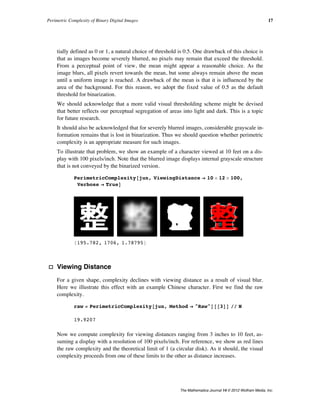
To illustrate that problem, we show an example of a character viewed at 10 feet on a dis-
play with 100 pixels/inch. Note that the blurred image displays internal grayscale structure
that is not conveyed by the binarized version.
PerimetricComplexity@jun, ViewingDistance Ø 10 µ 12 µ 100,
Verbose Ø TrueD
8195.782, 1706, 1.78795<
· Viewing Distance
For a given shape, complexity declines with viewing distance as a result of visual blur.
Here we illustrate this effect with an example Chinese character. First we find the raw
complexity.
raw = PerimetricComplexity@jun, Method Ø "Raw"D@@3DD êê N
19.9207
Now we compute complexity for viewing distances ranging from 3 inches to 10 feet, as-
suming a display with a resolution of 100 pixels/inch. For reference, we show as red lines
the raw complexity and the theoretical limit of 1 (a circular disk). As it should, the visual
complexity proceeds from one of these limits to the other as distance increases.
Perimetric Complexity of Binary Digital Images 17
The Mathematica Journal 14 © 2012 Wolfram Media, Inc.
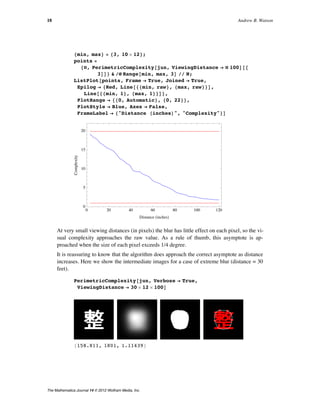
8min, max< = 83, 10 µ 12<;
points =
8Ò, PerimetricComplexity@jun, ViewingDistance Ø Ò 100D@@
3DD< & êü Range@min, max, 3D êê N;
ListPlot@points, Frame Ø True, Joined Ø True,
Epilog Ø 8Red, Line@88min, raw<, 8max, raw<<D,
Line@88min, 1<, 8max, 1<<D<,
PlotRange Ø 880, Automatic<, 80, 22<<,
PlotStyle Ø Blue, Axes Ø False,
FrameLabel Ø 8"Distance HinchesL", "Complexity"<D
0 20 40 60 80 100 120
0
5
10
15
20
Distance HinchesL
Complexity
At very small viewing distances (in pixels) the blur has little effect on each pixel, so the vi-
sual complexity approaches the raw value. As a rule of thumb, this asymptote is ap-
proached when the size of each pixel exceeds 1/4 degree.
It is reassuring to know that the algorithm does approach the correct asymptote as distance
increases. Here we show the intermediate images for a case of extreme blur (distance = 30
feet).
PerimetricComplexity@jun, Verbose Ø True,
ViewingDistance Ø 30 µ 12 µ 100D
8158.811, 1801, 1.11439<
18 Andrew B. Watson
The Mathematica Journal 14 © 2012 Wolfram Media, Inc.
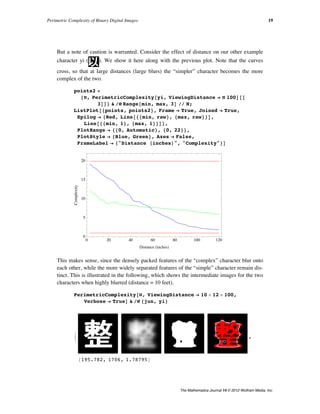
But a note of caution is warranted. Consider the effect of distance on our other example
character yi ( ). We show it here along with the previous plot. Note that the curves
cross, so that at large distances (large blurs) the “simpler” character becomes the more
complex of the two.
points2 =
8Ò, PerimetricComplexity@yi, ViewingDistance Ø Ò 100D@@
3DD< & êü Range@min, max, 3D êê N;
ListPlot@8points, points2<, Frame Ø True, Joined Ø True,
Epilog Ø 8Red, Line@88min, raw<, 8max, raw<<D,
Line@88min, 1<, 8max, 1<<D<,
PlotRange Ø 880, Automatic<, 80, 22<<,
PlotStyle Ø 8Blue, Green<, Axes Ø False,
FrameLabel Ø 8"Distance HinchesL", "Complexity"<D
0 20 40 60 80 100 120
0
5
10
15
20
Distance HinchesL
Complexity
This makes sense, since the densely packed features of the “complex” character blur onto
each other, while the more widely separated features of the “simple” character remain dis-
tinct. This is illustrated in the following, which shows the intermediate images for the two
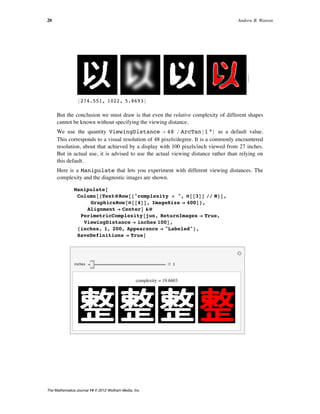
characters when highly blurred (distance = 10 feet).
PerimetricComplexity@Ò, ViewingDistance Ø 10 µ 12 µ 100,
Verbose Ø TrueD & êü 8jun, yi<
:
8195.782, 1706, 1.78795<
,
>
Perimetric Complexity of Binary Digital Images 19
The Mathematica Journal 14 © 2012 Wolfram Media, Inc.
8274.551, 1022, 5.8693<
>
But the conclusion we must draw is that even the relative complexity of different shapes
cannot be known without specifying the viewing distance.
We use the quantity ViewingDistance Ø 48 ê ArcTan@1 °D as a default value.
This corresponds to a visual resolution of 48 pixels/degree. It is a commonly encountered
resolution, about that achieved by a display with 100 pixels/inch viewed from 27 inches.
But in actual use, it is advised to use the actual viewing distance rather than relying on
this default.
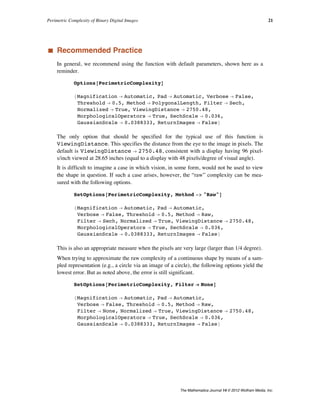
Here is a Manipulate that lets you experiment with different viewing distances. The
complexity and the diagnostic images are shown.
Manipulate@
Column@8TextüRow@8"complexity = ", Ò@@3DD êê N<D,
GraphicsRow@Ò@@4DD, ImageSize Ø 400D<,
Alignment Ø CenterD &ü
PerimetricComplexity@jun, ReturnImages Ø True,
ViewingDistance Ø inches 100D,
8inches, 1, 200, Appearance Ø "Labeled"<,
SaveDefinitions Ø TrueD
inches 1
complexity = 19.6603
20 Andrew B. Watson
The Mathematica Journal 14 © 2012 Wolfram Media, Inc.
‡ Recommended Practice
In general, we recommend using the function with default parameters, shown here as a
reminder.
Options@PerimetricComplexityD
8Magnification Ø Automatic, Pad Ø Automatic, Verbose Ø False,
Threshold Ø 0.5, Method Ø PolygonalLength, Filter Ø Sech,
Normalized Ø True, ViewingDistance Ø 2750.48,
MorphologicalOperators Ø True, SechScale Ø 0.036,
GaussianScale Ø 0.0388333, ReturnImages Ø False<
The only option that should be specified for the typical use of this function is
ViewingDistance. This specifies the distance from the eye to the image in pixels. The
default is ViewingDistance Ø 2750.48, consistent with a display having 96 pixel-
s/inch viewed at 28.65 inches (equal to a display with 48 pixels/degree of visual angle).
It is difficult to imagine a case in which vision, in some form, would not be used to view
the shape in question. If such a case arises, however, the “raw” complexity can be mea-
sured with the following options.
SetOptions@PerimetricComplexity, Method -> "Raw"D
8Magnification Ø Automatic, Pad Ø Automatic,
Verbose Ø False, Threshold Ø 0.5, Method Ø Raw,
Filter Ø Sech, Normalized Ø True, ViewingDistance Ø 2750.48,
MorphologicalOperators Ø True, SechScale Ø 0.036,
GaussianScale Ø 0.0388333, ReturnImages Ø False<
This is also an appropriate measure when the pixels are very large (larger than 1/4 degree).
When trying to approximate the raw complexity of a continuous shape by means of a sam-
pled representation (e.g., a circle via an image of a circle), the following options yield the
lowest error. But as noted above, the error is still significant.
SetOptions@PerimetricComplexity, Filter Ø NoneD
8Magnification Ø Automatic, Pad Ø Automatic,
Verbose Ø False, Threshold Ø 0.5, Method Ø Raw,
Filter Ø None, Normalized Ø True, ViewingDistance Ø 2750.48,
MorphologicalOperators Ø True, SechScale Ø 0.036,
GaussianScale Ø 0.0388333, ReturnImages Ø False<
Perimetric Complexity of Binary Digital Images 21
The Mathematica Journal 14 © 2012 Wolfram Media, Inc.
‡ Examples
We conclude with two examples of the application of PerimetricComplexity.
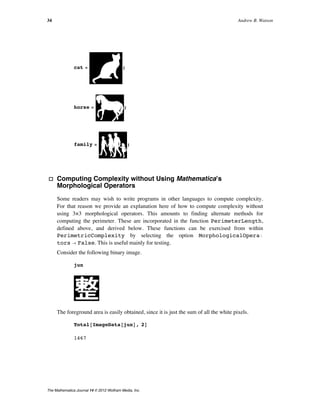
The first example is a set of three binary images. Below each image we print the
complexity.
pictures = 8cat, horse, family<;
Grid@
8pictures,
TextüStyle@NumberForm@Last@NüPerimetricComplexity@ÒDD,
3D, 14D & êü pictures<
, ItemSize Ø 10, Spacings Ø 2D
3.95 8.62 22.1
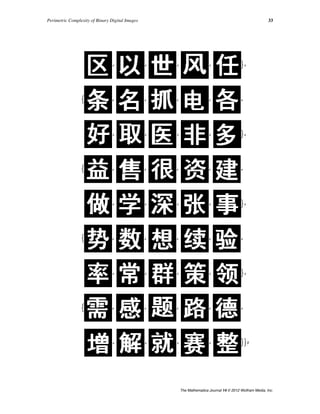
The second example is an array of characters. This array was created as part of an experi-
ment on the effect of complexity on visual acuity [6]. The first row is the Sloan letters, a
well-known set of letter acuity targets [5]. The remaining six rows are sets of Chinese char-
acters selected so as to be of equal complexity within a row, but increasing in complexity
from row to row [6]. The metric of complexity used for selection was different from that
developed in this article.
GraphicsGrid@chararrayD
22 Andrew B. Watson
The Mathematica Journal 14 © 2012 Wolfram Media, Inc.
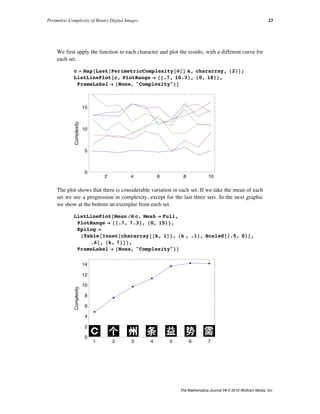
We first apply the function to each character and plot the results, with a different curve for
each set.
c = Map@Last@PerimetricComplexity@ÒDD &, chararray, 82<D;
ListLinePlot@c, PlotRange Ø 88.7, 10.3<, 80, 18<<,
FrameLabel Ø 8None, "Complexity"<D
2 4 6 8 10
0
5
10
15
Complexity
The plot shows that there is considerable variation in each set. If we take the mean of each
set we see a progression in complexity, except for the last three sets. In the next graphic
we show at the bottom an exemplar from each set.
ListLinePlot@Mean êü c, Mesh Ø Full,
PlotRange Ø 88.7, 7.3<, 80, 15<<,
Epilog Ø
8Table@Inset@chararray@@k, 1DD, 8k , .1<, Scaled@8.5, 0<D,
.6D, 8k, 7<D<,
FrameLabel Ø 8None, "Complexity"<D
1 2 3 4 5 6 7
0
2
4
6
8
10
12
14
Complexity
Perimetric Complexity of Binary Digital Images 23
The Mathematica Journal 14 © 2012 Wolfram Media, Inc.
‡ Conclusion
We have illustrated several different methods for computing the perimetric complexity of
binary digital images. These methods differ in how they compute the perimeter and in
whether the image is blurred and binarized before the complexity calculation. We have in-
troduced the concept of visual perimetric complexity and argued that in general it requires
blur for a sensible estimate. We have described several methods of implementing visual
blur.
The computed value of visual perimetric complexity depends somewhat upon details of
the calculation, such as the presumed magnitude and nature of visual blur, and the binariza-
tion threshold. In this regard, we have proposed a set of standard default settings and proce-
dures for calculation of visual perimetric complexity.
We have also made the observation that visual perimetric complexity cannot be estimated
without specifying the resolution of the display and the viewing distance. As a general
rule, the visual perimetric complexity approaches the raw complexity when the width of a
pixel exceeds 1/4 degree of visual angle.
‡ Appendix
· Functions
Here we define several functions based on the derivations presented above.
ü PerimetricComplexity
Options@PerimetricComplexityD =
8Magnification Ø Automatic, Pad Ø Automatic,
Verbose Ø False, Threshold Ø 0.5,
Method Ø "PolygonalLength", Filter Ø "Sech",
Normalized Ø True, ViewingDistance Ø 48 ê ArcTan@1. °D,
MorphologicalOperators Ø True, SechScale Ø 2.16 ê 60,
GaussianScale Ø 2.33 ê 60, ReturnImages Ø False<;
24 Andrew B. Watson
The Mathematica Journal 14 © 2012 Wolfram Media, Inc.
PerimetricComplexity::usage =
"PerimetricComplexity@image_,opts___RuleD computes
the perimetric complexity of a binary image.
Perimetric complexity is defined as the square
of the sum of inner and outer perimeters
divided by the foreground area, divided by
4p. By default, foreground pixels are white
H1L. The function returns a list: 8perimeter,
area, complexity<. Optionally, the image can
be filtered and thresholded before calculation
of complexity, to provide a better estimate
of the visual complexity of the image. Options
available are Pad Hwidth of padding to add
around imageL, Magnification Hfactor by which
to magnify each pixel before calulation of
complexityL, Method H"PerimeterLength",
"PolygonalLength", or "Raw", the method
used to compute the perimeterL, Threshold Ha
numerical threshold, or the method to use in
thresholding operations after filteringL, and
Filter HNone: no filter, "Gaussian" for
Gaussian filter, "Sech" for a hyperbolic
secant filter, or an array supplied directly
as the filter kernel. For the Gaussian and
the Sech, the size of the filter is determined
by the ViewingDistance optionL, ViewingDistance
Hin pixels, used to determine the radius of
Gaussian and Sech filtersL, MorphologicalOperators
Hwhether to use Mathematica's built-in
operatorsL, Normalized Hwhether to normalize
complexity by the value for a disk, 4pL. When
the Method->"Raw" option is used, the filter
is set to None.";
Perimetric Complexity of Binary Digital Images 25
The Mathematica Journal 14 © 2012 Wolfram Media, Inc.
PerimetricComplexity@image_, opts___RuleD := Module@
8tmp, tmp0, tmp1, tmp2, tmp3, tmp4, tmp5, plength,
area, mag, radius, pad, verbose, fdim, pc, norm,
threshold, method, filter, vdist, pixelsperdegree,
sechpixels, sechdegrees, morpho, sechscale, gscale,
anglescale, rimages, images, result<,
8mag, pad, verbose, threshold, method, filter, norm,
vdist, morpho, sechscale, gscale, rimages< =
8Magnification, Pad, Verbose, Threshold, Method,
Filter, Normalized, ViewingDistance,
MorphologicalOperators, SechScale, GaussianScale,
ReturnImages< ê. 8opts< ê.
Options@PerimetricComplexityD;
If@method === "Raw",
Hfilter = None; method = "PerimeterLength"LD;
anglescale = ArcTan@1. DegreeD;
If@mag === Automatic , mag = Switch@filter
, None, 1
, _?ListQ, 1
, "Gaussian", Ceiling@2. ê Hvdist anglescale gscaleLD
, "Sech", Ceiling@3. ê Hvdist anglescale sechscaleLD
DD;
pixelsperdegree = mag vdist anglescale;
sechpixels = Ceiling@pixelsperdegree 3 sechscaleD;
If@pad === Automatic,
pad = If@filter === None, 2,
Ceiling@pixelsperdegree sechscaleDDD;
If@EvenQ@sechpixelsD, sechpixels++D;
sechdegrees = sechpixels ê pixelsperdegree;
radius = 2 gscale pixelsperdegree ê Sqrt@2 PiD;
tmp0 = Binarize@imageD;
tmp1 =
If@mag > 1, ImageResize@tmp0, mag ImageDimensions@tmp0DD,
tmp0D;
tmp2 = ImagePad@tmp1, padD;
tmp4 = ImageAdjust ü Switch@filter
, None, tmp2
, _?ListQ, ImageConvolve@tmp2, filterD
, "Gaussian", GaussianFilter@tmp2, radiusD
, "Sech",
ImageConvolve@tmp2, SechKernel2D@sechpixels 81, 1<,
sechdegrees 81, 1<, sechscaleDD
D;
26 Andrew B. Watson
The Mathematica Journal 14 © 2012 Wolfram Media, Inc.
tmp5 = If@ImageType@tmp4D === "Bit", tmp4,
If@NumericQ@thresholdD, Binarize@tmp4, thresholdD,
Binarize@tmp4, Method Ø thresholdDDD;
8plength, area< = If@morpho,
Total@
Last êü
Htst = ComponentMeasurements@
MorphologicalComponents@tmp5D, 8method, "Count"<,
CornerNeighbors Ø FalseDLD
,
8PerimeterLength@tmp5,
Switch@method, "PerimeterLength", PixelBorderLength,
"PolygonalLength", PixelPathLengthDD,
Total@ImageData@tmp5D, 2D<D;
H*Print@"mag = ",mag, " ppd = ",pixelsperdegree,
" sechpixels = ",sechpixels," pad = ", padD;*L
tmp6 = MorphologicalPerimeter@tmp5,
CornerNeighbors Ø FalseD;
images = 8tmp2, tmp4, tmp5,
ColorCombine@8tmp2, tmp6, tmp6<D<;
result =
H8plength, area, Hplength^2 ê areaL ê If@norm, 4 Pi, 1D< êê
If@rimages, Append@Ò, imagesD, ÒD &L;
If@verbose,
Column@8GraphicsRow@images, ImageSize Ø 400D, result<D,
resultD
D
Here is an example.
PerimetricComplexity@jun, Verbose Ø TrueD êê N
81016.14, 5977., 13.7472<
Perimetric Complexity of Binary Digital Images 27
The Mathematica Journal 14 © 2012 Wolfram Media, Inc.
ü PerimeterLength
PerimeterLength::usage =
"PerimeterPathLength@image_,verbose_:FalseD Given
a binary image that represents a set of
perimeters, defined by connected white pixels,
compute the total length of the perimeters.
The function first locates all foreground
pixels. It then extracts the 3 x 3 neighborhood
of each, and using PixelPathLength, it computes
half the distance to each of the pixels' two
nearest foreground neighbors. The perimeter
is the sum of all these distances. If verbose
is true, it shows a tally of the neighborhoods
and their corresponding path lengths.";
PerimeterLength@image_, method_: PixelBorderLength,
verbose_: FalseD :=
Module@8perim, positions, neighborhoods, tally, result<,
perim = Perimeter@imageD;
positions = Position@ImageData@perimD, 1D;
neighborhoods =
ImageTake@Switch@method, PixelPathLength, perim,
PixelBorderLength, imageD,
Sequence üü Transpose@8Ò - 1, Ò + 1<DD & êü positions;
tally = Transpose@Tally@neighborhoodsDD;
result = Total@tally@@2DD Hmethod êü tally@@1DDLD;
If@verbose,
Column@8
Column@8
Row @8"pixels = ", Length@positionsD<D;
TableForm@Transpose@8tally@@1DD, tally@@2DD,
method êü tally@@1DD<DD
<D,
result
<D,
resultD
D
Here is an example.
test = ImagePad@Image@880, 1<, 81, 1<<, "Bit"D, 1D
28 Andrew B. Watson
The Mathematica Journal 14 © 2012 Wolfram Media, Inc.
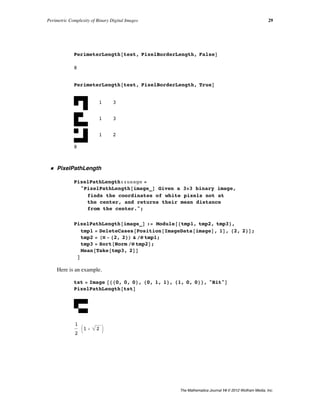
PerimeterLength@test, PixelBorderLength, FalseD
8
PerimeterLength@test, PixelBorderLength, TrueD
1 3
1 3
1 2
8
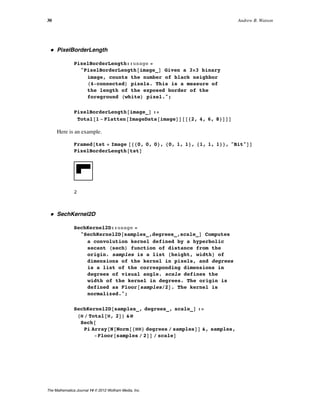
ü PixelPathLength
PixelPathLength::usage =
"PixelPathLength@image_D Given a 3µ3 binary image,
finds the coordinates of white pixels not at
the center, and returns their mean distance
from the center.";
PixelPathLength@image_D := Module@8tmp1, tmp2, tmp3<,
tmp1 = DeleteCases@Position@ImageData@imageD, 1D, 82, 2<D;
tmp2 = HÒ - 82, 2<L & êü tmp1;
tmp3 = Sort@Norm êü tmp2D;
Mean@Take@tmp3, 2DD
D
Here is an example.
tst = Image @880, 0, 0<, 80, 1, 1<, 81, 0, 0<<, "Bit"D
PixelPathLength@tstD
1
2
J1 + 2 N
Perimetric Complexity of Binary Digital Images 29
The Mathematica Journal 14 © 2012 Wolfram Media, Inc.
ü PixelBorderLength
PixelBorderLength::usage =
"PixelBorderLength@image_D Given a 3µ3 binary
image, counts the number of black neighbor
H4-connectedL pixels. This is a measure of
the length of the exposed border of the
foreground HwhiteL pixel.";
PixelBorderLength@image_D :=
Total@1 - Flatten@ImageData@imageDD@@82, 4, 6, 8<DDD
Here is an example.
Framed@tst = Image @880, 0, 0<, 80, 1, 1<, 81, 1, 1<<, "Bit"DD
PixelBorderLength@tstD
2
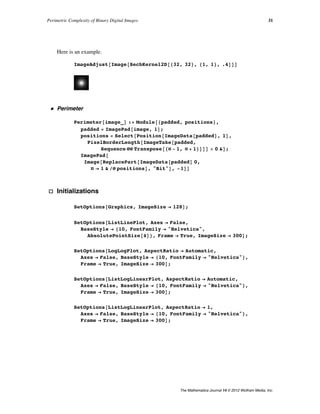
ü SechKernel2D
SechKernel2D::usage =
"SechKernel2D@samples_,degrees_,scale_D Computes
a convolution kernel defined by a hyperbolic
secant HsechL function of distance from the
origin. samples is a list 8height, width< of
dimensions of the kernel in pixels, and degrees
is a list of the corresponding dimensions in
degrees of visual angle. scale defines the
width of the kernel in degrees. The origin is
defined as Floor@samplesê2D. The kernel is
normalized.";
SechKernel2D@samples_, degrees_, scale_D :=
HÒ ê Total@Ò, 2DL &ü
Sech@
Pi Array@N@Norm@8ÒÒ< degrees ê samplesDD &, samples,
-Floor@samples ê 2DD ê scaleD
30 Andrew B. Watson
The Mathematica Journal 14 © 2012 Wolfram Media, Inc.
Here is an example.
ImageAdjust@Image@SechKernel2D@832, 32<, 81, 1<, .4DDD
ü Perimeter
Perimeter@image_D := Module@8padded, positions<,
padded = ImagePad@image, 1D;
positions = Select@Position@ImageData@paddedD, 1D,
PixelBorderLength@ImageTake@padded,
Sequence üü Transpose@8Ò - 1, Ò + 1<DDD > 0 &D;
ImagePad@
Image@ReplacePart@ImageData@paddedD 0,
Ò Ø 1 & êü positionsD, "Bit"D, -1DD
· Initializations
SetOptions@Graphics, ImageSize Ø 128D;
SetOptions@ListLinePlot, Axes Ø False,
BaseStyle Ø 810, FontFamily Ø "Helvetica",
AbsolutePointSize@4D<, Frame Ø True, ImageSize Ø 300D;
SetOptions@LogLogPlot, AspectRatio Ø Automatic,
Axes Ø False, BaseStyle Ø 810, FontFamily Ø "Helvetica"<,
Frame Ø True, ImageSize Ø 300D;
SetOptions@ListLogLinearPlot, AspectRatio Ø Automatic,
Axes Ø False, BaseStyle Ø 810, FontFamily Ø "Helvetica"<,
Frame Ø True, ImageSize Ø 300D;
SetOptions@ListLogLinearPlot, AspectRatio Ø 1,
Axes Ø False, BaseStyle Ø 810, FontFamily Ø "Helvetica"<,
Frame Ø True, ImageSize Ø 300D;
Perimetric Complexity of Binary Digital Images 31
The Mathematica Journal 14 © 2012 Wolfram Media, Inc.
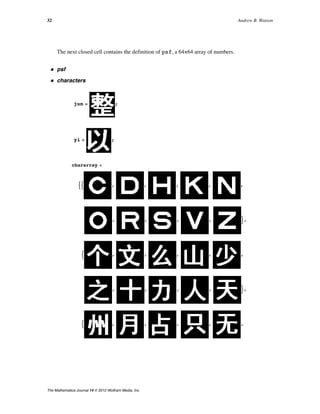
The next closed cell contains the definition of psf, a 64×64 array of numbers.
ü psf
ü characters
jun = ;
yi = ;
chararray =
:: , , , , ,
, , , , >,
: , , , , ,
, , , , >,
: , , , , ,
, , , , >,
32 Andrew B. Watson
The Mathematica Journal 14 © 2012 Wolfram Media, Inc.
, , , , >,
: , , , , ,
, , , , >,
: , , , , ,
, , , , >,
: , , , , ,
, , , , >,
: , , , , ,
, , , , >>;
Perimetric Complexity of Binary Digital Images 33
The Mathematica Journal 14 © 2012 Wolfram Media, Inc.
cat = ;
horse = ;
family = ;
· Computing Complexity without Using Mathematicaʼs
Morphological Operators
Some readers may wish to write programs in other languages to compute complexity.
For that reason we provide an explanation here of how to compute complexity without
using 3×3 morphological operators. This amounts to finding alternate methods for
computing the perimeter. These are incorporated in the function PerimeterLength,
defined above, and derived below. These functions can be exercised from within
PerimetricComplexity by selecting the option MorphologicalOperaÖ
tors Ø False. This is useful mainly for testing.
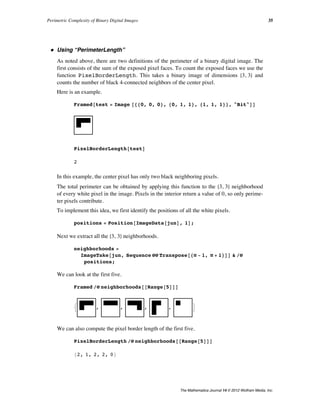
Consider the following binary image.
jun
The foreground area is easily obtained, since it is just the sum of all the white pixels.
Total@ImageData@junD, 2D
1467
34 Andrew B. Watson
The Mathematica Journal 14 © 2012 Wolfram Media, Inc.
ü Using “PerimeterLength”
As noted above, there are two definitions of the perimeter of a binary digital image. The
first consists of the sum of the exposed pixel faces. To count the exposed faces we use the
function PixelBorderLength. This takes a binary image of dimensions 83, 3< and
counts the number of black 4-connected neighbors of the center pixel.
Here is an example.
Framed@test = Image @880, 0, 0<, 80, 1, 1<, 81, 1, 1<<, "Bit"DD
PixelBorderLength@testD
2
In this example, the center pixel has only two black neighboring pixels.
The total perimeter can be obtained by applying this function to the 83, 3< neighborhood
of every white pixel in the image. Pixels in the interior return a value of 0, so only perime-
ter pixels contribute.
To implement this idea, we first identify the positions of all the white pixels.
positions = Position@ImageData@junD, 1D;
Next we extract all the 83, 3< neighborhoods.
neighborhoods =
ImageTake@jun, Sequence üü Transpose@8Ò - 1, Ò + 1<DD & êü
positions;
We can look at the first five.
Framed êü neighborhoods@@Range@5DDD
: , , , , >
We can also compute the pixel border length of the first five.
PixelBorderLength êü neighborhoods@@Range@5DDD
82, 1, 2, 2, 0<
In a large complex image, the same neighborhood might occur many times, so we perform
a tally.
Perimetric Complexity of Binary Digital Images 35
The Mathematica Journal 14 © 2012 Wolfram Media, Inc.
In a large complex image, the same neighborhood might occur many times, so we perform
a tally.
tally = Tally@neighborhoodsD;
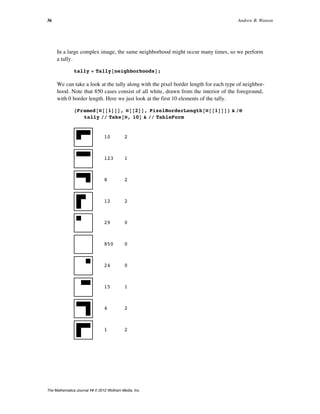
We can take a look at the tally along with the pixel border length for each type of neighbor-
hood. Note that 850 cases consist of all white, drawn from the interior of the foreground,
with 0 border length. Here we just look at the first 10 elements of the tally.
8Framed@Ò@@1DDD, Ò@@2DD, PixelBorderLength@Ò@@1DDD< & êü
tally êê Take@Ò, 10D & êê TableForm
10 2
123 1
8 2
12 2
29 0
850 0
24 0
15 1
4 2
1 2
36 Andrew B. Watson
The Mathematica Journal 14 © 2012 Wolfram Media, Inc.
The total perimeter length is the sum of all of the border lengths for all the collected neigh-
borhoods. We use the tallied neighborhoods, so that the pixel border length of each type
of neighborhood is computed only once.
Total@HÒ@@2DD PixelBorderLength@Ò@@1DDD & êü tallyLD
606
This is the complexity.
606^2 ê 1467 ê H4 PiL êê N
19.9207
ü Using “PolygonalLength”
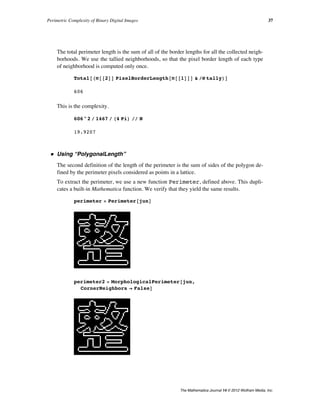
The second definition of the length of the perimeter is the sum of sides of the polygon de-
fined by the perimeter pixels considered as points in a lattice.
To extract the perimeter, we use a new function Perimeter, defined above. This dupli-
cates a built-in Mathematica function. We verify that they yield the same results.
perimeter = Perimeter@junD
perimeter2 = MorphologicalPerimeter@jun,
CornerNeighbors Ø FalseD
Perimetric Complexity of Binary Digital Images 37
The Mathematica Journal 14 © 2012 Wolfram Media, Inc.
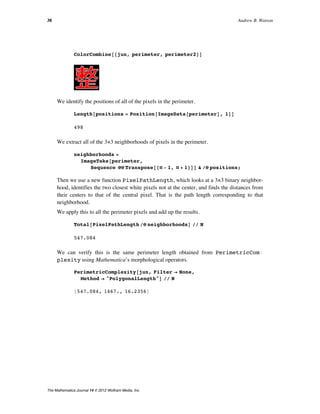
ColorCombine@8jun, perimeter, perimeter2<D
We identify the positions of all of the pixels in the perimeter.
Length@positions = Position@ImageData@perimeterD, 1DD
498
We extract all of the 3×3 neighborhoods of pixels in the perimeter.
neighborhoods =
ImageTake@perimeter,
Sequence üü Transpose@8Ò - 1, Ò + 1<DD & êü positions;
Then we use a new function PixelPathLength, which looks at a 3×3 binary neighbor-
hood, identifies the two closest white pixels not at the center, and finds the distances from
their centers to that of the central pixel. That is the path length corresponding to that
neighborhood.
We apply this to all the perimeter pixels and add up the results.
Total@PixelPathLength êü neighborhoodsD êê N
547.084
We can verify this is the same perimeter length obtained from PerimetricComÖ
plexity using Mathematica’s morphological operators.
PerimetricComplexity@jun, Filter Ø None,
Method Ø "PolygonalLength"D êê N
8547.084, 1467., 16.2356<
38 Andrew B. Watson
The Mathematica Journal 14 © 2012 Wolfram Media, Inc.
‡ Acknowledgments
I thank and blame Denis Pelli for introducing me to perimetric complexity [5]. I thank Dr.
Cong Yu for providing the Chinese character optotypes [6]. I thank Albert Ahumada and
Jeffrey Mulligan for useful discussions. I thank Larry Thibos for providing the wavefront
data [16]. This work was supported by NASA Space Human Factors Engineering WBS
466199.
‡ References
[1] F. Attneave and M. D. Arnoult, “The Quantitative Study of Shape and Pattern Perception,”
Psychological Bulletin, 53(6), 1956 pp. 452–471. psycnet.apa.org/journals/bul/53/6/452.
[2] P. V. Sankar and E. V. Krishnamurthy, “On the Compactness of Subsets of Digital Pictures,”
Computer Graphics and Image Processing, 8(1), 1978 pp. 136–143.
www.sciencedirect.com/science/article/pii/S0146664X78800215.
[3] S. Ullman, “The Visual Analysis of Shape and Form,” The Cognitive Neurosciences (M. S.
Gazzaniga, ed.), Cambridge, MA: MIT Press, 1995 pp. 339–350.
[4] R. Montero and E. Bribiesca, “State of the Art of Compactness and Circularity Measures,” In-
ternational Mathematical Forum, 4(27), 2009 pp. 1305–1335.
www.m-hikari.com/imf-password2009/25-28-2009/index.html.
[5] D. G. Pelli, C. W. Burns, B. Farell, and D. C. Moore-Page, “Feature Detection and Letter Iden-
tification,” Vision Research, 46(28), 2006 pp. 4646–4674.
www.psych.nyu.edu/pelli/pubs/pelli2006letters.pdf.
[6] J.-Y. Zhang, T. Zhang, F. Xue, L. Liu, and C. Yu, “Legibility Variations of Chinese Characters
and Implications for Visual Acuity Measurement in Chinese Reading Population,” Investiga-
tive Ophthalmology & Visual Science, 48(5), 2007 pp. 2383–2390.
www.iovs.org/content/48/5/2383.short.
[7] A. B. Watson and A. J. Ahumada, Jr., “Modeling Acuity for Optotypes Varying in Complexity,”
presentation given at The Association for Research in Vision and Ophthalmology Confer-
ence (ARVO 2010), Ft. Lauderdale, FL. abstracts.iovs.org//cgi/content/abstract/51/5/5174.
[8] A. Rusu and V. Govindaraju, “The Influence of Image Complexity on Handwriting Recogni-
tion,” in Proceediings of the Tenth International Workshop on Frontiers in Handwriting Recog-
nition (IWFHR 2006), La Baule (France). hal.inria.fr/inria-00112666/.
[9] S. Garrod, N. Fay, J. Lee, J. Oberlander, and T. MacLeod, “Foundations of Representation:
Where Might Graphical Symbol Systems Come From?,” Cognitive Science, 31(6), 2007 pp.
961–987. onlinelibrary.wiley.com/doi/10.1080/03640210701703659/abstract.
[10] M. Chew and H. Baird, “BaffleText: A Human Interactive Proof,” in Proceedings of the
IS&T/SPIE Document Recognition and Retrieval Conference X (DRR X), Santa Clara, CA,
2003 pp. 305-316. www.imaging.org/IST/store/epub.cfm?abstrid=22585.
[11] B. Biggio, G. Fumera, I. Pillai, and F. Roli, “Image Spam Filtering Using Visual Information,”
in Proceedings of the 14th International Conference on Image Analysis and Processing
(ICIAP 2007), Modena, Italy pp. 105–110.
ieeexplore.ieee.org/xpl/freeabs_all.jsp?arnumber=4362765.
Perimetric Complexity of Binary Digital Images 39
The Mathematica Journal 14 © 2012 Wolfram Media, Inc.
[12] G. Fumera, I. Pillai, F. Roli, and B. Biggio, “Image Spam Filtering Using Textual and Visual In-
formation,” in Proceedings of the MIT Spam Conference 2007, Cambridge, MA.
projects.csail.mit.edu/spamconf/SC2007/MIT_Spam_Conf _ 2007_Papers.tar.gz.
[13] R. Courant, Differential and Integral Calculus, Vol. 1, 2nd ed. (E. J. McShane, trans.), Lon-
don: Blackie & Son Limited, 1937.
[14] A. B. Watson and A. J. Ahumada, Jr., “A Standard Model for Foveal Detection of Spatial Con-
trast,” Journal of Vision, 5(9), 2005 pp. 717–740. journalofvision.org/5/9/6.
[15] A. B. Watson and A. J. Ahumada, “Blur Clarified: A Review and Synthesis of Blur Discrimina-
tion,” Journal of Vision, 11(5), 2011. journalofvision.org/11/5/10.
[16] L. N. Thibos, X. Hong, A. Bradley, and X. Cheng, “Statistical Variation of Aberration Struc-
ture and Image Quality in a Normal Population of Healthy Eyes,” Journal of the Optical Soci-
ety of America A: Optics, Image Science, and Vision, 19(12), 2002 pp. 2329–2348.
www.opticsinfobase.org/abstract.cfm?URI=josaa-19-12-2329.
A. B. Watson, “Perimetric Complexity of Binary Digital Images,” The Mathematica Journal, 2012.
dx.doi.org/doi:10.3888/tmj.14-5.
About the Author
Andrew B. Watson is the Senior Scientist for Vision Research at NASA. He is editor-in-
chief of the Journal of Vision (journalofvision.org). He is the author of over 150 scientific
papers and four patents. He is a Fellow of the Optical Society of America, the Association
for Research in Vision and Ophthalmology, and the Society for Information Display.
Andrew B. Watson
MS 262-2
NASA Ames Research Center
Moffett Field, CA 94035
andrew.b.watson@nasa.gov
40 Andrew B. Watson
The Mathematica Journal 14 © 2012 Wolfram Media, Inc.

Perimetric Complexity of Binary Digital Images

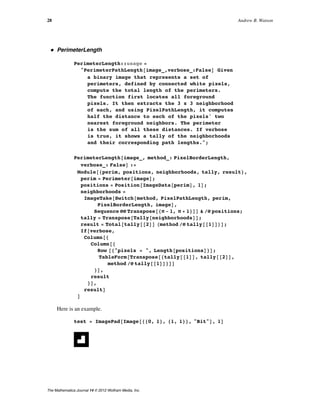
  • 1.
    The Mathematica® Journal Perimetric Complexityof Binary Digital Images Notes on Calculation and Relation to Visual Complexity Andrew B. Watson Perimetric complexity is a measure of the complexity of binary pictures. It is defined as the sum of inside and outside perimeters of the foreground, squared, divided by the foreground area, divided by 4 p. Difficulties arise when this definition is applied to digital images composed of binary pixels. In this article we identify these problems and propose solutions. Perimetric complexity is often used as a measure of visual complexity, in which case it should take into account the limited resolution of the visual system. We propose a measure of visual perimetric complexity that meets this requirement. ‡ Background Perimetric complexity is a measure of the complexity of binary pictures. It is defined as the sum of inside and outside perimeters of the foreground, squared, divided by the fore- ground area, divided by 4 p. The concept of perimetric complexity was first introduced (and called dispersion) by Attneave and Arnoult [1] in an effort to explain the apparent per- ceptual complexity of visual shapes. In the field of image processing, the concept appears as its inverse, compactness [2, 3, 4]. The concept was given new life (and a new name) in 2006 by Pelli et al., who showed that the efficiency of letter identification was nearly pro- portional to perimetric complexity [5]. It has since become a popular metric in a variety of shape analysis applications, including human letter identification [5, 6, 7], handwriting recognition [8], evolution of graphical symbols [9], and design of graphical anti-spam tech- nologies [10, 11, 12]. In this article we develop Mathematica functions to compute perimetric complexity of bi- nary digital images and illustrate their application. The code is compatible with Version 8 of Mathematica. The Mathematica Journal 14 © 2012 Wolfram Media, Inc.
  • 2.
    Although the conceptof perimetric complexity is clear when applied to continuous plane shapes, complications arise when the concept is extended to binary digital images. We dis- cuss these complications and suggest suitable solutions. We also introduce the concept of visual perimetric complexity, which takes into account the blurring action of the human vi- sual system. We begin by illustrating the application of the function PerimetricComplexity to a binary image. cat = ; PerimetricComplexity@catD 82110.08, 89 588, 3.95494< The output is a list containing the perimeter (in pixels), the area (in square pixels), and the complexity. In the following sections we describe the derivation of this function, as well as the options that may be used to control its operation. ‡ Perimetric Complexity of Geometric Shapes Perimetric complexity is a measure of the complexity of binary pictures. In a binary picture, one or several regions of the same color (white) are defined as foreground, and the remainder (black) as background. Perimetric complexity C is defined here as the sum of the inside and outside perimeters of the foreground P, squared, divided by the fore- ground area A, divided by 4 p: (1) C = P2 4 p A . In the remainder of this article, unless otherwise noted, we use the term complexity as syn- onymous with perimetric complexity. 2 Andrew B. Watson The Mathematica Journal 14 © 2012 Wolfram Media, Inc.
  • 3.
    We begin withthe example of a circular disk with unit radius. Graphics@8White, Disk@D<, PlotRange Ø 2, Background Ø BlackD Here the perimeter is 2 p and the area is p, so the complexity is (2) C = H2 pL2 4 p p = 1. It can be shown that the disk is the shape with the lowest complexity. The normalizing con- stant 4 p in the definition leads to a unit value for this most simple shape. As a conse- quence, any other value of complexity is easily compared to that of the circular disk. Pelli et al. [5] suggest that complexity is closely related to the number of visual features in a shape. In that sense, we could say that the circular disk has only a single feature. Our next example is a square with unit sides. The perimeter here is 4, and the area is 1, so the perimetric complexity is (3) C = 42 4 p = 4 p º 1.27. If we add a square hole in the center with side length 1/2, there is an interior perimeter as well, as shown here. Graphics@8 White, Rectangle@-81, 1< ê 2, 81, 1< ê 2D, Black, Rectangle@-81, 1< ê 4, 81, 1< ê 4D<, PlotRange Ø 1, Background Ø BlackD Now the total perimeter is the sum of inner and outer perimeters and the area is the differ- ence in areas of the squares, so Perimetric Complexity of Binary Digital Images 3 The Mathematica Journal 14 © 2012 Wolfram Media, Inc.
  • 4.
    Now the totalperimeter is the sum of inner and outer perimeters and the area is the differ- ence in areas of the squares, so (4) C = H4 + 2L2 H1 - 1 ê 4L 4 p = 12 p º 3.82. So according to this measure, the square with a hole is about three times as complex as the square. Some important observations about complexity are: (1) it is dimensionless; (2) it is inde- pendent of scale or orientation; and (3) it is additive. By additive we mean that the complexity of a pair of shapes, considered as a single shape, is equal to the sum of their complexities computed separately. ‡ Perimetric Complexity of Plane Curves Although it is beyond the scope of this article, we note for reference that if a shape is de- fined by a closed parametric curve, its exact complexity can be obtained using calculus methods [13]. Specifically, if over an interval a § t § b the functions xHtL and yHtL and their derivatives x ° HtL and y ° HtL are continuous, then the curve described has a length (5) P = ‡ a b x ° 2 + y ° 2 dt and an area (6) A = -‡ a b y ° x dt. ‡ Perimetric Complexity of Binary Digital Images A digital image is defined here as a rectangular array of square pixels. A binary digital im- age contains pixel values of 1 (white) and 0 (black) only. The foreground consists of the white pixels. The original definition of complexity relies upon the notion of a perimeter, which has no unique analog in the context of digital images. However, two definitions of perimeter are available, as described below. 4 Andrew B. Watson The Mathematica Journal 14 © 2012 Wolfram Media, Inc.
  • 5.
    · Using “PerimeterLength” Thefirst definition we consider is the most straightforward. Consider a binary image con- sisting of a single white pixel. ImagePad@Image@881<<D, 1D It seems natural to define the perimeter of this shape as 4 (pixels), and the area as 1 (pixel2 ), so C = 4 ê p, the same as the square discussed earlier. Now consider this shape consisting of 3 white pixels. ImagePad@Image@881, 0<, 81, 1<<D, 1D Here the perimeter, consisting of the exposed pixel faces, is 8, and the area is 3, so C = 16 ê H3 pL. Extending this idea, we can define the perimeter as the sum of the exposed faces of pixels in the foreground. Version 8 of Mathematica includes a set of functions from the discipline of mathematical morphology. These can be used to easily calculate perimetric complexity. To illustrate this we begin with a binary image with several separated parts. yi = ; The MorphologicalComponents function finds connected regions and labels them with integers. The Colorize function visualizes these regions by assigning colors to each label. The CornerNeighbors Ø False option ensures that only 4-connected neighborhoods are considered. MorphologicalComponents@yi, CornerNeighbors Ø FalseD êê Colorize The ComponentMeasurements function returns a selected set of measurements about each region. In this case we are interested in the area and the perimeter length. The results are returned as a set of rules, showing the results for each region. Perimetric Complexity of Binary Digital Images 5 The Mathematica Journal 14 © 2012 Wolfram Media, Inc.
  • 6.
    The ComponentMeasurements functionreturns a selected set of measurements about each region. In this case we are interested in the area and the perimeter length. The results are returned as a set of rules, showing the results for each region. cm = ComponentMeasurements@ MorphologicalComponents@yi, CornerNeighbors Ø FalseD, 8"PerimeterLength", "Count"<, CornerNeighbors Ø FalseD 81 Ø 856, 98<, 2 Ø 8198, 469<, 3 Ø 8138, 371<< We can combine the perimeters and areas of the several regions, and then compute com- plexity in the usual way. Total@Last êü cmD 8392, 938< % @@1DD^2 ê %@@2DD ê H4 PiL êê N 13.0365 The preceding calculations are implemented in the function PerimetricComÖ plexity, defined in the Appendix. We can obtain the previous result. PerimetricComplexity@yi, Filter Ø None, Method Ø "PerimeterLength"D êê N 8392., 938., 13.0365< A list is returned, containing the perimeter, the area, and the complexity. The option Method Ø "PerimeterLength" ensures that we use the definition of perimeter de- scribed above. The option Filter Ø None is explained later. For future reference, to distinguish it from variants that we consider, we call this the “raw” perimetric complexity. Thus the same result can be obtained with the option Method Ø "Raw". PerimetricComplexity@yi, Method Ø "Raw"D êê N 8392., 938., 13.0365< 6 Andrew B. Watson The Mathematica Journal 14 © 2012 Wolfram Media, Inc.
  • 7.
    · Using “PolygonalLength” Thesecond definition of the perimeter of a connected region in a binary digital image is to consider the perimeter pixel centers as points on a lattice, and to define the length as the sum of the sides of the polygon defined by those points. This estimate of the perimeter is obtained from ComponentMeasurements by using the measurement "PolyÖ gonalLength ". cm = ComponentMeasurements@ MorphologicalComponents@yi, CornerNeighbors Ø FalseD, 8"PolygonalLength", "Count"<, CornerNeighbors Ø FalseD 81 Ø 839.6985, 98<, 2 Ø 8159.439, 469<, 3 Ø 8117.012, 371<< Note that the measures of perimeter length are smaller than before. And again complexity can be easily computed. N@Ò @@1DD^2 ê Ò@@2DD ê H4 PiLD &üTotal@Last êü cmD 8.47953 This variant of perimetric complexity is implemented with the following options. PerimetricComplexity@yi, Filter Ø None, Method Ø "PolygonalLength"D êê N 8316.149, 938., 8.47953< Or, since Method Ø "PolygonalLength" is the default, the input can be simplified. PerimetricComplexity@yi, Filter Ø NoneD êê N 8316.149, 938., 8.47953< ‡ Approximating Complexity of Continuous Shapes We introduced the concept of perimetric complexity with a few continuous shapes, such as a square and a circle. In these cases, complexity is easily calculated, because we have simple formulas for the area and perimeter. It might be imagined that complexity of the continuous shape could be approximated by computing the complexity of a discrete sam- pled image, rendered from the shape. As we shall see, this assumption is not strictly correct. Perimetric Complexity of Binary Digital Images 7 The Mathematica Journal 14 © 2012 Wolfram Media, Inc.
  • 8.
    Consider the circulardisk. As noted at the beginning, it has C = 1. disk = Graphics@8White, Disk@D<, Background Ø BlackD We set the foreground color to white, as is our convention. Now we consider an image ren- dered from the continuous shape. We render it into a certain size image. size = 2^7 + 1; diskimage = Image@ disk, "Bit", ImageSize Ø 81, 1< size, ColorSpace Ø "Grayscale"D If we compute the complexity, we find that it is 62% too large relative to the continuous shape. PerimetricComplexity@diskimage, Method Ø "Raw"D êê N 8492., 11 873., 1.62241< The reason is that the sampled image is actually more complex than the continuous shape. Its contour is jagged, while that of the continuous shape is smooth. It might be imagined that this could be remedied by increasing the resolution of the rendering. Here we show that belief is misplaced. We render at several sizes and plot the results. Size has little ef- fect, and the complexity never approaches the value of 1 corresponding to the continuous shape. 8 Andrew B. Watson The Mathematica Journal 14 © 2012 Wolfram Media, Inc.
  • 9.
    points = Table@ 8size= 2^k + 1, PerimetricComplexity@ Image@ disk, "Bit", ImageSize Ø 81, 1< size, ColorSpace Ø "Grayscale"D , Method Ø "Raw"D@@3DD< , 8k, 4, 12<D; ListLogLinearPlot@points, PlotRange Ø 81, Automatic<, Frame Ø True, FrameLabel Ø 8"Size", "Complexity"<, Joined Ø TrueD 50 100 500 1000 1.0 1.1 1.2 1.3 1.4 1.5 1.6 Size Complexity This problem can be somewhat ameliorated by using the PolygonalLength measure of perimeter length. Rather than the pure approach of measuring the exposed face of each foreground pixel, this measures the length of the contour that travels between the centers of those pixels. PerimetricComplexity@diskimage, Filter Ø None, Method Ø "PolygonalLength"D 8403.647, 11 873, 1.09203< Now the difference is reduced to 9%. Here again, the reader might think that this differ- ence could be reduced to zero by enlarging the resolution (number of pixels) in the ren- dered image, but this is not so. We leave that as an exercise for the reader. The error can never be zero, because the path between pixel centers must always be vertical, horizontal, or diagonal, so it can never smoothly follow the true circular contour. Put another way, it has a higher fractal dimension than the circle, and thus greater length. Perimetric Complexity of Binary Digital Images 9 The Mathematica Journal 14 © 2012 Wolfram Media, Inc.
  • 10.
    Now the differenceis reduced to 9%. Here again, the reader might think that this differ- ence could be reduced to zero by enlarging the resolution (number of pixels) in the ren- never be zero, because the path between pixel centers must always be vertical, horizontal, or diagonal, so it can never smoothly follow the true circular contour. Put another way, it has a higher fractal dimension than the circle, and thus greater length. ‡ Pelli Algorithm Pelli et al. [2] proposed a method for computing complexity that we quote here in full: The ink area is the number of 1’s. To measure the perimeter we first replace the image by its outline. (We OR the image with translations of the original, shifted by one pixel left; left and up; up; up and right; right; right and down; down; and down and left; and then bit clear with the original image. This leaves a one- pixel-thick outline.) It might seem enough to just count the 1’s in this outline im- age, but the resulting “lengths” are not Euclidean: diagonal lines have “lengths” equal to that of their base plus height. Instead we first thicken the outline. (We OR the outline image with translations of the original outline, shifted by one pixel left; up; right; and down.) This leaves a three-pixel-thick outline. We then count the number of 1’s and divide by 3. This method can be implemented using the Dilation function, as we show here. With verbose ã True, it shows two images: the perimeter in red and the thickened perime- ter. It returns the length of the perimeter, the area, and the complexity. PelliMethod@image_, verbose_: FalseD := Module@ 8tmp0, tmp1, tmp2, tmp3, perimeter, area, result<, tmp0 = ImagePad@image, 2D; tmp1 = Dilation@tmp0, BoxMatrix@1DD; tmp2 = ImageSubtract@tmp1, tmp0D; tmp3 = Dilation@tmp2, CrossMatrix@1DD; perimeter = Total@ImageData@tmp3D, 2D ê 3; area = Total@ImageData@tmp0D, 2D; result = 8perimeter, area, perimeter^2 ê area ê H4 PiL<; If@verbose, Column@8GraphicsRow@ 8ColorCombine@8tmp1, tmp0, tmp0<D, tmp3<D, result<D, resultD D We apply this to the three-component Chinese character. PelliMethod@yi, TrueD êê N 8326.333, 938., 9.03463< 10 Andrew B. Watson The Mathematica Journal 14 © 2012 Wolfram Media, Inc.
  • 11.
    The raw methodgives the following. PerimetricComplexity@yi, Method Ø "Raw"D êê N 8392., 938., 13.0365< We see that the perimeter is substantially underestimated by the Pelli method in this case. This method has other limitations. It effectively assumes regions that are large in pixel di- mensions. For example, consider the case of a single pixel object. As noted above, it has C = 4 ê p º 1.273. But the Pelli method yields a complexity value more than three times too large. test = ImagePad@Image@881<<, "Bit"D, 3D PelliMethod@test, TrueD êê N 87., 1., 3.8993< ‡ Visual Perimetric Complexity Much of the motivation for the use of perimetric complexity is the hope that it might pro- vide an approximate measure of the visually perceived complexity of shapes. But this only makes sense if the shape is actually visible. Consider the difference between the con- tinuous circular disk and its sampled image, as discussed above. They have different peri- metric complexities, no matter how high the resolution of the sampled version. But of course, at a certain viewing distance, they are indistinguishable. · Filtering Here we propose an approach to dealing with this problem. The idea is to first blur the im- age, in a manner consistent with visual blur, and then compute perimetric complexity. To make things simple, we use Gaussian blur, although this is not an accurate description of human visual blur. Later we show a more accurate form of blur. We begin with the exam- ple of a Chinese character jun ( ). We pad the image slightly, so that the blur is contained, and then magnify, to allow greater flexibility in the filtering. Then we blur the image, in this case by a Gaussian filter with a radius of 8 pixels. Perimetric Complexity of Binary Digital Images 11 The Mathematica Journal 14 © 2012 Wolfram Media, Inc.
  • 12.
    We pad theimage slightly, so that the blur is contained, and then magnify, to allow greater flexibility in the filtering. Then we blur the image, in this case by a Gaussian filter with a radius of 8 pixels. tmp0 = ImagePad@jun, 5D; mag = 4; tmp1 = ImageResize@tmp0, mag ImageDimensions@tmp0DD; tmp2 = GaussianFilter@tmp1, 8D Then we binarize the image. Unfortunately, this requires some method of setting the thresh- old. Here we use a fixed threshold of 0.5. We use ImageAdjust to ensure that the fil- tered image is amplified to fill the grayscale range before thresholding. tmp3 = Binarize@ImageAdjust@tmp2D, 0.5D 12 Andrew B. Watson The Mathematica Journal 14 © 2012 Wolfram Media, Inc.
  • 13.
    And because weimagine that the image is viewed at such a distance that the pixels are not resolved, we use the (default) PolygonalLength method. PerimetricComplexity@tmp3, Filter Ø NoneD 81944.82, 24 044, 12.5182< We can compare this to the unfiltered raw complexity. PerimetricComplexity@jun, Method Ø "Raw"D êê N 8606., 1467., 19.9207< The filtered version has substantially lower complexity, as we expect. · Visual Filtering Using a Gaussian For the filtering to approximate visual blur, it must be based on the size of the original im- age and its distance from the viewer. Obviously, as the shape becomes smaller or farther from the observer, its details are more blurred, less visible, and contribute less to the vi- sual complexity. The challenge is to determine the appropriate value of the Gaussian filter radius for a given viewing distance. From measurements of visual sensitivity, we know that visual Gaussian blur has a standard deviation of about B = 0.01549 degrees of visual angle [11]. But we need to convert this into a radius in pixels. Recall that the image may be magni- fied by M before filtering. If we express the viewing distance V in terms of pixels (before magnification), then the size of each pixel S (after magnification) is approximately (7) S = 57.3 MV deg. The constant 57.3 is an approximation to 1 ê arctanH1°L. 1. ê ArcTan@1 °D 57.3016 By default, the radius is twice the standard deviation. So the filter radius should be (8) R = 2 B S = 2 BMV 57.3 pixel. Perimetric Complexity of Binary Digital Images 13 The Mathematica Journal 14 © 2012 Wolfram Media, Inc.
  • 14.
    Consider an example.Suppose that our Chinese character image is displayed on a typical computer screen with a resolution of 72 pixels/inch, and viewed at a distance of 48 inches. V = 48 µ 72 3456 Recall the value of B. B = 0.01549; Suppose further that the magnification is 4. M = 4; Then we know R. R = 2 B M V ê 57.3 7.47413 We now proceed with the steps outlined above for filtering. tmp0 = ImagePad@jun, 1D; tmp1 = ImageResize@tmp0, M ImageDimensions@tmp0DD; tmp2 = GaussianFilter@tmp1, RD; tmp3 = Binarize@ImageAdjust@tmp2D, 0.5D PerimetricComplexity@tmp3, Filter Ø NoneD 81987.85, 23 932, 13.1395< The preceding steps of padding, magnification, and filtering are built into the function PerimetricComplexity, as shown below. With Verbose Ø True, the function also shows the original, the filtered version, the binarized version, and the original (in red) with the perimeter of the filtered version (in white within the original and aqua outside the original). 14 Andrew B. Watson The Mathematica Journal 14 © 2012 Wolfram Media, Inc.
  • 15.
    The preceding stepsof padding, magnification, and filtering are built into the function PerimetricComplexity, as shown below. With Verbose Ø True, the function also shows the original, the filtered version, the binarized version, and the original (in red) with the perimeter of the filtered version (in white within the original and aqua outside the original). PerimetricComplexity@jun, Magnification Ø 4, Filter Ø "Gaussian", ViewingDistance -> 48 µ 72, Verbose Ø TrueD 81987.85, 23 932, 13.1395< The Gaussian is parameterized by a scale in degrees of visual angle. The default value is 2.33/60 degrees. The user can experiment with different values via the option GaussianScale. · Accurate Visual Filtering with Sech Visual blur is more accurately represented with filters other than a Gaussian. In one simple form, the kernel is a sech (hyperbolic secant) function [14, 15]. This filter can be selected with an option (Filter Ø "Sech", the default) in the function PerimeÖ tricComplexity. PerimetricComplexity@junD 81016.14, 5977, 13.7472< The hyperbolic secant is parameterized by a scale in degrees of visual angle. The default value is 2.16/60 degrees [14, 15]. The user can experiment with different values via the op- tion SechScale. · Accurate Visual Filtering with an Arbitrary Point Spread Function In real human eyes, blur results not only from low-order aberrations such as defocus and astigmatism, but also from higher-order aberrations. In this example, we use a blur function defined by an array of values representing the filter kernel. This example is an actual estimate of the point spread function for an individual human observer, as mea- sured using a device called a wavefront aberrometer that includes both low-order and high- order aberrations [16]. Perimetric Complexity of Binary Digital Images 15 The Mathematica Journal 14 © 2012 Wolfram Media, Inc.
  • 16.
    ImageAdjust@Image@psfDD We can usethis blur kernel by supplying it directly to the Filter option. PerimetricComplexity@jun, Verbose Ø True, Filter Ø psf, Magnification Ø 3D 8851.855, 14 959, 3.86028< In the above calculation we used a magnification of 2. We do not address this topic in de- tail, but when a kernel is supplied, the pixels of the kernel and of the magnified image must be of the same size, in degrees of visual angle, for the filter to be accurate. The size of the magnified pixels in degrees depends upon the viewing distance and the magnifica- tion, as described above. · Magnification Parameter The Magnification parameter should be set with a value that ensures that a filter kernel, if present, has enough pixels in it to adequately represent the filter. For the Sech filter, we generally want a width of least three times the scale, and at least 8 pixels. This means that for the magnification, (9) M ¥ 8 µ 57.3 3 V B . This rule is effectively implemented by the default Magnification Ø Automatic option. · Binarization After applying visual blur, it is necessary to binarize the image before calculating the peri- metric complexity. There are many ways to binarize an image and Mathematica offers many of them as options. The simplest is to use a fixed threshold. Since our images are ini- tially defined as 0 or 1, a natural choice of threshold is 0.5. One drawback of this choice is that as images become severely blurred, no pixels may remain that exceed the threshold. From a perceptual point of view, the mean might appear a reasonable choice. As the image blurs, all pixels revert towards the mean, but some always remain above the mean until a uniform image is reached. A drawback of the mean is that it is influenced by the area of the background. For this reason, we adopt the fixed value of 0.5 as the default 16 Andrew B. Watson The Mathematica Journal 14 © 2012 Wolfram Media, Inc.
  • 17.
    After applying visualblur, it is necessary to binarize the image before calculating the peri- metric complexity. There are many ways to binarize an image and Mathematica offers tially defined as 0 or 1, a natural choice of threshold is 0.5. One drawback of this choice is that as images become severely blurred, no pixels may remain that exceed the threshold. From a perceptual point of view, the mean might appear a reasonable choice. As the image blurs, all pixels revert towards the mean, but some always remain above the mean until a uniform image is reached. A drawback of the mean is that it is influenced by the area of the background. For this reason, we adopt the fixed value of 0.5 as the default threshold for binarization. We should acknowledge that a more valid visual thresholding scheme might be devised that better reflects our perceptual segregation of areas into light and dark. This is a topic for future research. It should also be acknowledged that for severely blurred images, considerable grayscale in- formation remains that is lost in binarization. Thus we should question whether perimetric complexity is an appropriate measure for such images. To illustrate that problem, we show an example of a character viewed at 10 feet on a dis- play with 100 pixels/inch. Note that the blurred image displays internal grayscale structure that is not conveyed by the binarized version. PerimetricComplexity@jun, ViewingDistance Ø 10 µ 12 µ 100, Verbose Ø TrueD 8195.782, 1706, 1.78795< · Viewing Distance For a given shape, complexity declines with viewing distance as a result of visual blur. Here we illustrate this effect with an example Chinese character. First we find the raw complexity. raw = PerimetricComplexity@jun, Method Ø "Raw"D@@3DD êê N 19.9207 Now we compute complexity for viewing distances ranging from 3 inches to 10 feet, as- suming a display with a resolution of 100 pixels/inch. For reference, we show as red lines the raw complexity and the theoretical limit of 1 (a circular disk). As it should, the visual complexity proceeds from one of these limits to the other as distance increases. Perimetric Complexity of Binary Digital Images 17 The Mathematica Journal 14 © 2012 Wolfram Media, Inc.
  • 18.
    8min, max< =83, 10 µ 12<; points = 8Ò, PerimetricComplexity@jun, ViewingDistance Ø Ò 100D@@ 3DD< & êü Range@min, max, 3D êê N; ListPlot@points, Frame Ø True, Joined Ø True, Epilog Ø 8Red, Line@88min, raw<, 8max, raw<<D, Line@88min, 1<, 8max, 1<<D<, PlotRange Ø 880, Automatic<, 80, 22<<, PlotStyle Ø Blue, Axes Ø False, FrameLabel Ø 8"Distance HinchesL", "Complexity"<D 0 20 40 60 80 100 120 0 5 10 15 20 Distance HinchesL Complexity At very small viewing distances (in pixels) the blur has little effect on each pixel, so the vi- sual complexity approaches the raw value. As a rule of thumb, this asymptote is ap- proached when the size of each pixel exceeds 1/4 degree. It is reassuring to know that the algorithm does approach the correct asymptote as distance increases. Here we show the intermediate images for a case of extreme blur (distance = 30 feet). PerimetricComplexity@jun, Verbose Ø True, ViewingDistance Ø 30 µ 12 µ 100D 8158.811, 1801, 1.11439< 18 Andrew B. Watson The Mathematica Journal 14 © 2012 Wolfram Media, Inc.
  • 19.
    But a noteof caution is warranted. Consider the effect of distance on our other example character yi ( ). We show it here along with the previous plot. Note that the curves cross, so that at large distances (large blurs) the “simpler” character becomes the more complex of the two. points2 = 8Ò, PerimetricComplexity@yi, ViewingDistance Ø Ò 100D@@ 3DD< & êü Range@min, max, 3D êê N; ListPlot@8points, points2<, Frame Ø True, Joined Ø True, Epilog Ø 8Red, Line@88min, raw<, 8max, raw<<D, Line@88min, 1<, 8max, 1<<D<, PlotRange Ø 880, Automatic<, 80, 22<<, PlotStyle Ø 8Blue, Green<, Axes Ø False, FrameLabel Ø 8"Distance HinchesL", "Complexity"<D 0 20 40 60 80 100 120 0 5 10 15 20 Distance HinchesL Complexity This makes sense, since the densely packed features of the “complex” character blur onto each other, while the more widely separated features of the “simple” character remain dis- tinct. This is illustrated in the following, which shows the intermediate images for the two characters when highly blurred (distance = 10 feet). PerimetricComplexity@Ò, ViewingDistance Ø 10 µ 12 µ 100, Verbose Ø TrueD & êü 8jun, yi< : 8195.782, 1706, 1.78795< , > Perimetric Complexity of Binary Digital Images 19 The Mathematica Journal 14 © 2012 Wolfram Media, Inc.
  • 20.
    8274.551, 1022, 5.8693< > Butthe conclusion we must draw is that even the relative complexity of different shapes cannot be known without specifying the viewing distance. We use the quantity ViewingDistance Ø 48 ê ArcTan@1 °D as a default value. This corresponds to a visual resolution of 48 pixels/degree. It is a commonly encountered resolution, about that achieved by a display with 100 pixels/inch viewed from 27 inches. But in actual use, it is advised to use the actual viewing distance rather than relying on this default. Here is a Manipulate that lets you experiment with different viewing distances. The complexity and the diagnostic images are shown. Manipulate@ Column@8TextüRow@8"complexity = ", Ò@@3DD êê N<D, GraphicsRow@Ò@@4DD, ImageSize Ø 400D<, Alignment Ø CenterD &ü PerimetricComplexity@jun, ReturnImages Ø True, ViewingDistance Ø inches 100D, 8inches, 1, 200, Appearance Ø "Labeled"<, SaveDefinitions Ø TrueD inches 1 complexity = 19.6603 20 Andrew B. Watson The Mathematica Journal 14 © 2012 Wolfram Media, Inc.
  • 21.
    ‡ Recommended Practice Ingeneral, we recommend using the function with default parameters, shown here as a reminder. Options@PerimetricComplexityD 8Magnification Ø Automatic, Pad Ø Automatic, Verbose Ø False, Threshold Ø 0.5, Method Ø PolygonalLength, Filter Ø Sech, Normalized Ø True, ViewingDistance Ø 2750.48, MorphologicalOperators Ø True, SechScale Ø 0.036, GaussianScale Ø 0.0388333, ReturnImages Ø False< The only option that should be specified for the typical use of this function is ViewingDistance. This specifies the distance from the eye to the image in pixels. The default is ViewingDistance Ø 2750.48, consistent with a display having 96 pixel- s/inch viewed at 28.65 inches (equal to a display with 48 pixels/degree of visual angle). It is difficult to imagine a case in which vision, in some form, would not be used to view the shape in question. If such a case arises, however, the “raw” complexity can be mea- sured with the following options. SetOptions@PerimetricComplexity, Method -> "Raw"D 8Magnification Ø Automatic, Pad Ø Automatic, Verbose Ø False, Threshold Ø 0.5, Method Ø Raw, Filter Ø Sech, Normalized Ø True, ViewingDistance Ø 2750.48, MorphologicalOperators Ø True, SechScale Ø 0.036, GaussianScale Ø 0.0388333, ReturnImages Ø False< This is also an appropriate measure when the pixels are very large (larger than 1/4 degree). When trying to approximate the raw complexity of a continuous shape by means of a sam- pled representation (e.g., a circle via an image of a circle), the following options yield the lowest error. But as noted above, the error is still significant. SetOptions@PerimetricComplexity, Filter Ø NoneD 8Magnification Ø Automatic, Pad Ø Automatic, Verbose Ø False, Threshold Ø 0.5, Method Ø Raw, Filter Ø None, Normalized Ø True, ViewingDistance Ø 2750.48, MorphologicalOperators Ø True, SechScale Ø 0.036, GaussianScale Ø 0.0388333, ReturnImages Ø False< Perimetric Complexity of Binary Digital Images 21 The Mathematica Journal 14 © 2012 Wolfram Media, Inc.
  • 22.
    ‡ Examples We concludewith two examples of the application of PerimetricComplexity. The first example is a set of three binary images. Below each image we print the complexity. pictures = 8cat, horse, family<; Grid@ 8pictures, TextüStyle@NumberForm@Last@NüPerimetricComplexity@ÒDD, 3D, 14D & êü pictures< , ItemSize Ø 10, Spacings Ø 2D 3.95 8.62 22.1 The second example is an array of characters. This array was created as part of an experi- ment on the effect of complexity on visual acuity [6]. The first row is the Sloan letters, a well-known set of letter acuity targets [5]. The remaining six rows are sets of Chinese char- acters selected so as to be of equal complexity within a row, but increasing in complexity from row to row [6]. The metric of complexity used for selection was different from that developed in this article. GraphicsGrid@chararrayD 22 Andrew B. Watson The Mathematica Journal 14 © 2012 Wolfram Media, Inc.
  • 23.
    We first applythe function to each character and plot the results, with a different curve for each set. c = Map@Last@PerimetricComplexity@ÒDD &, chararray, 82<D; ListLinePlot@c, PlotRange Ø 88.7, 10.3<, 80, 18<<, FrameLabel Ø 8None, "Complexity"<D 2 4 6 8 10 0 5 10 15 Complexity The plot shows that there is considerable variation in each set. If we take the mean of each set we see a progression in complexity, except for the last three sets. In the next graphic we show at the bottom an exemplar from each set. ListLinePlot@Mean êü c, Mesh Ø Full, PlotRange Ø 88.7, 7.3<, 80, 15<<, Epilog Ø 8Table@Inset@chararray@@k, 1DD, 8k , .1<, Scaled@8.5, 0<D, .6D, 8k, 7<D<, FrameLabel Ø 8None, "Complexity"<D 1 2 3 4 5 6 7 0 2 4 6 8 10 12 14 Complexity Perimetric Complexity of Binary Digital Images 23 The Mathematica Journal 14 © 2012 Wolfram Media, Inc.
  • 24.
    ‡ Conclusion We haveillustrated several different methods for computing the perimetric complexity of binary digital images. These methods differ in how they compute the perimeter and in whether the image is blurred and binarized before the complexity calculation. We have in- troduced the concept of visual perimetric complexity and argued that in general it requires blur for a sensible estimate. We have described several methods of implementing visual blur. The computed value of visual perimetric complexity depends somewhat upon details of the calculation, such as the presumed magnitude and nature of visual blur, and the binariza- tion threshold. In this regard, we have proposed a set of standard default settings and proce- dures for calculation of visual perimetric complexity. We have also made the observation that visual perimetric complexity cannot be estimated without specifying the resolution of the display and the viewing distance. As a general rule, the visual perimetric complexity approaches the raw complexity when the width of a pixel exceeds 1/4 degree of visual angle. ‡ Appendix · Functions Here we define several functions based on the derivations presented above. ü PerimetricComplexity Options@PerimetricComplexityD = 8Magnification Ø Automatic, Pad Ø Automatic, Verbose Ø False, Threshold Ø 0.5, Method Ø "PolygonalLength", Filter Ø "Sech", Normalized Ø True, ViewingDistance Ø 48 ê ArcTan@1. °D, MorphologicalOperators Ø True, SechScale Ø 2.16 ê 60, GaussianScale Ø 2.33 ê 60, ReturnImages Ø False<; 24 Andrew B. Watson The Mathematica Journal 14 © 2012 Wolfram Media, Inc.
  • 25.
    PerimetricComplexity::usage = "PerimetricComplexity@image_,opts___RuleD computes theperimetric complexity of a binary image. Perimetric complexity is defined as the square of the sum of inner and outer perimeters divided by the foreground area, divided by 4p. By default, foreground pixels are white H1L. The function returns a list: 8perimeter, area, complexity<. Optionally, the image can be filtered and thresholded before calculation of complexity, to provide a better estimate of the visual complexity of the image. Options available are Pad Hwidth of padding to add around imageL, Magnification Hfactor by which to magnify each pixel before calulation of complexityL, Method H"PerimeterLength", "PolygonalLength", or "Raw", the method used to compute the perimeterL, Threshold Ha numerical threshold, or the method to use in thresholding operations after filteringL, and Filter HNone: no filter, "Gaussian" for Gaussian filter, "Sech" for a hyperbolic secant filter, or an array supplied directly as the filter kernel. For the Gaussian and the Sech, the size of the filter is determined by the ViewingDistance optionL, ViewingDistance Hin pixels, used to determine the radius of Gaussian and Sech filtersL, MorphologicalOperators Hwhether to use Mathematica's built-in operatorsL, Normalized Hwhether to normalize complexity by the value for a disk, 4pL. When the Method->"Raw" option is used, the filter is set to None."; Perimetric Complexity of Binary Digital Images 25 The Mathematica Journal 14 © 2012 Wolfram Media, Inc.
  • 26.
    PerimetricComplexity@image_, opts___RuleD :=Module@ 8tmp, tmp0, tmp1, tmp2, tmp3, tmp4, tmp5, plength, area, mag, radius, pad, verbose, fdim, pc, norm, threshold, method, filter, vdist, pixelsperdegree, sechpixels, sechdegrees, morpho, sechscale, gscale, anglescale, rimages, images, result<, 8mag, pad, verbose, threshold, method, filter, norm, vdist, morpho, sechscale, gscale, rimages< = 8Magnification, Pad, Verbose, Threshold, Method, Filter, Normalized, ViewingDistance, MorphologicalOperators, SechScale, GaussianScale, ReturnImages< ê. 8opts< ê. Options@PerimetricComplexityD; If@method === "Raw", Hfilter = None; method = "PerimeterLength"LD; anglescale = ArcTan@1. DegreeD; If@mag === Automatic , mag = Switch@filter , None, 1 , _?ListQ, 1 , "Gaussian", Ceiling@2. ê Hvdist anglescale gscaleLD , "Sech", Ceiling@3. ê Hvdist anglescale sechscaleLD DD; pixelsperdegree = mag vdist anglescale; sechpixels = Ceiling@pixelsperdegree 3 sechscaleD; If@pad === Automatic, pad = If@filter === None, 2, Ceiling@pixelsperdegree sechscaleDDD; If@EvenQ@sechpixelsD, sechpixels++D; sechdegrees = sechpixels ê pixelsperdegree; radius = 2 gscale pixelsperdegree ê Sqrt@2 PiD; tmp0 = Binarize@imageD; tmp1 = If@mag > 1, ImageResize@tmp0, mag ImageDimensions@tmp0DD, tmp0D; tmp2 = ImagePad@tmp1, padD; tmp4 = ImageAdjust ü Switch@filter , None, tmp2 , _?ListQ, ImageConvolve@tmp2, filterD , "Gaussian", GaussianFilter@tmp2, radiusD , "Sech", ImageConvolve@tmp2, SechKernel2D@sechpixels 81, 1<, sechdegrees 81, 1<, sechscaleDD D; 26 Andrew B. Watson The Mathematica Journal 14 © 2012 Wolfram Media, Inc.
  • 27.
    tmp5 = If@ImageType@tmp4D=== "Bit", tmp4, If@NumericQ@thresholdD, Binarize@tmp4, thresholdD, Binarize@tmp4, Method Ø thresholdDDD; 8plength, area< = If@morpho, Total@ Last êü Htst = ComponentMeasurements@ MorphologicalComponents@tmp5D, 8method, "Count"<, CornerNeighbors Ø FalseDLD , 8PerimeterLength@tmp5, Switch@method, "PerimeterLength", PixelBorderLength, "PolygonalLength", PixelPathLengthDD, Total@ImageData@tmp5D, 2D<D; H*Print@"mag = ",mag, " ppd = ",pixelsperdegree, " sechpixels = ",sechpixels," pad = ", padD;*L tmp6 = MorphologicalPerimeter@tmp5, CornerNeighbors Ø FalseD; images = 8tmp2, tmp4, tmp5, ColorCombine@8tmp2, tmp6, tmp6<D<; result = H8plength, area, Hplength^2 ê areaL ê If@norm, 4 Pi, 1D< êê If@rimages, Append@Ò, imagesD, ÒD &L; If@verbose, Column@8GraphicsRow@images, ImageSize Ø 400D, result<D, resultD D Here is an example. PerimetricComplexity@jun, Verbose Ø TrueD êê N 81016.14, 5977., 13.7472< Perimetric Complexity of Binary Digital Images 27 The Mathematica Journal 14 © 2012 Wolfram Media, Inc.
  • 28.
    ü PerimeterLength PerimeterLength::usage = "PerimeterPathLength@image_,verbose_:FalseDGiven a binary image that represents a set of perimeters, defined by connected white pixels, compute the total length of the perimeters. The function first locates all foreground pixels. It then extracts the 3 x 3 neighborhood of each, and using PixelPathLength, it computes half the distance to each of the pixels' two nearest foreground neighbors. The perimeter is the sum of all these distances. If verbose is true, it shows a tally of the neighborhoods and their corresponding path lengths."; PerimeterLength@image_, method_: PixelBorderLength, verbose_: FalseD := Module@8perim, positions, neighborhoods, tally, result<, perim = Perimeter@imageD; positions = Position@ImageData@perimD, 1D; neighborhoods = ImageTake@Switch@method, PixelPathLength, perim, PixelBorderLength, imageD, Sequence üü Transpose@8Ò - 1, Ò + 1<DD & êü positions; tally = Transpose@Tally@neighborhoodsDD; result = Total@tally@@2DD Hmethod êü tally@@1DDLD; If@verbose, Column@8 Column@8 Row @8"pixels = ", Length@positionsD<D; TableForm@Transpose@8tally@@1DD, tally@@2DD, method êü tally@@1DD<DD <D, result <D, resultD D Here is an example. test = ImagePad@Image@880, 1<, 81, 1<<, "Bit"D, 1D 28 Andrew B. Watson The Mathematica Journal 14 © 2012 Wolfram Media, Inc.
  • 29.
    PerimeterLength@test, PixelBorderLength, FalseD 8 PerimeterLength@test,PixelBorderLength, TrueD 1 3 1 3 1 2 8 ü PixelPathLength PixelPathLength::usage = "PixelPathLength@image_D Given a 3µ3 binary image, finds the coordinates of white pixels not at the center, and returns their mean distance from the center."; PixelPathLength@image_D := Module@8tmp1, tmp2, tmp3<, tmp1 = DeleteCases@Position@ImageData@imageD, 1D, 82, 2<D; tmp2 = HÒ - 82, 2<L & êü tmp1; tmp3 = Sort@Norm êü tmp2D; Mean@Take@tmp3, 2DD D Here is an example. tst = Image @880, 0, 0<, 80, 1, 1<, 81, 0, 0<<, "Bit"D PixelPathLength@tstD 1 2 J1 + 2 N Perimetric Complexity of Binary Digital Images 29 The Mathematica Journal 14 © 2012 Wolfram Media, Inc.
  • 30.
    ü PixelBorderLength PixelBorderLength::usage = "PixelBorderLength@image_DGiven a 3µ3 binary image, counts the number of black neighbor H4-connectedL pixels. This is a measure of the length of the exposed border of the foreground HwhiteL pixel."; PixelBorderLength@image_D := Total@1 - Flatten@ImageData@imageDD@@82, 4, 6, 8<DDD Here is an example. Framed@tst = Image @880, 0, 0<, 80, 1, 1<, 81, 1, 1<<, "Bit"DD PixelBorderLength@tstD 2 ü SechKernel2D SechKernel2D::usage = "SechKernel2D@samples_,degrees_,scale_D Computes a convolution kernel defined by a hyperbolic secant HsechL function of distance from the origin. samples is a list 8height, width< of dimensions of the kernel in pixels, and degrees is a list of the corresponding dimensions in degrees of visual angle. scale defines the width of the kernel in degrees. The origin is defined as Floor@samplesê2D. The kernel is normalized."; SechKernel2D@samples_, degrees_, scale_D := HÒ ê Total@Ò, 2DL &ü Sech@ Pi Array@N@Norm@8ÒÒ< degrees ê samplesDD &, samples, -Floor@samples ê 2DD ê scaleD 30 Andrew B. Watson The Mathematica Journal 14 © 2012 Wolfram Media, Inc.
  • 31.
    Here is anexample. ImageAdjust@Image@SechKernel2D@832, 32<, 81, 1<, .4DDD ü Perimeter Perimeter@image_D := Module@8padded, positions<, padded = ImagePad@image, 1D; positions = Select@Position@ImageData@paddedD, 1D, PixelBorderLength@ImageTake@padded, Sequence üü Transpose@8Ò - 1, Ò + 1<DDD > 0 &D; ImagePad@ Image@ReplacePart@ImageData@paddedD 0, Ò Ø 1 & êü positionsD, "Bit"D, -1DD · Initializations SetOptions@Graphics, ImageSize Ø 128D; SetOptions@ListLinePlot, Axes Ø False, BaseStyle Ø 810, FontFamily Ø "Helvetica", AbsolutePointSize@4D<, Frame Ø True, ImageSize Ø 300D; SetOptions@LogLogPlot, AspectRatio Ø Automatic, Axes Ø False, BaseStyle Ø 810, FontFamily Ø "Helvetica"<, Frame Ø True, ImageSize Ø 300D; SetOptions@ListLogLinearPlot, AspectRatio Ø Automatic, Axes Ø False, BaseStyle Ø 810, FontFamily Ø "Helvetica"<, Frame Ø True, ImageSize Ø 300D; SetOptions@ListLogLinearPlot, AspectRatio Ø 1, Axes Ø False, BaseStyle Ø 810, FontFamily Ø "Helvetica"<, Frame Ø True, ImageSize Ø 300D; Perimetric Complexity of Binary Digital Images 31 The Mathematica Journal 14 © 2012 Wolfram Media, Inc.
  • 32.
    The next closedcell contains the definition of psf, a 64×64 array of numbers. ü psf ü characters jun = ; yi = ; chararray = :: , , , , , , , , , >, : , , , , , , , , , >, : , , , , , , , , , >, 32 Andrew B. Watson The Mathematica Journal 14 © 2012 Wolfram Media, Inc.
  • 33.
    , , ,, >, : , , , , , , , , , >, : , , , , , , , , , >, : , , , , , , , , , >, : , , , , , , , , , >>; Perimetric Complexity of Binary Digital Images 33 The Mathematica Journal 14 © 2012 Wolfram Media, Inc.
  • 34.
    cat = ; horse= ; family = ; · Computing Complexity without Using Mathematicaʼs Morphological Operators Some readers may wish to write programs in other languages to compute complexity. For that reason we provide an explanation here of how to compute complexity without using 3×3 morphological operators. This amounts to finding alternate methods for computing the perimeter. These are incorporated in the function PerimeterLength, defined above, and derived below. These functions can be exercised from within PerimetricComplexity by selecting the option MorphologicalOperaÖ tors Ø False. This is useful mainly for testing. Consider the following binary image. jun The foreground area is easily obtained, since it is just the sum of all the white pixels. Total@ImageData@junD, 2D 1467 34 Andrew B. Watson The Mathematica Journal 14 © 2012 Wolfram Media, Inc.
  • 35.
    ü Using “PerimeterLength” Asnoted above, there are two definitions of the perimeter of a binary digital image. The first consists of the sum of the exposed pixel faces. To count the exposed faces we use the function PixelBorderLength. This takes a binary image of dimensions 83, 3< and counts the number of black 4-connected neighbors of the center pixel. Here is an example. Framed@test = Image @880, 0, 0<, 80, 1, 1<, 81, 1, 1<<, "Bit"DD PixelBorderLength@testD 2 In this example, the center pixel has only two black neighboring pixels. The total perimeter can be obtained by applying this function to the 83, 3< neighborhood of every white pixel in the image. Pixels in the interior return a value of 0, so only perime- ter pixels contribute. To implement this idea, we first identify the positions of all the white pixels. positions = Position@ImageData@junD, 1D; Next we extract all the 83, 3< neighborhoods. neighborhoods = ImageTake@jun, Sequence üü Transpose@8Ò - 1, Ò + 1<DD & êü positions; We can look at the first five. Framed êü neighborhoods@@Range@5DDD : , , , , > We can also compute the pixel border length of the first five. PixelBorderLength êü neighborhoods@@Range@5DDD 82, 1, 2, 2, 0< In a large complex image, the same neighborhood might occur many times, so we perform a tally. Perimetric Complexity of Binary Digital Images 35 The Mathematica Journal 14 © 2012 Wolfram Media, Inc.
  • 36.
    In a largecomplex image, the same neighborhood might occur many times, so we perform a tally. tally = Tally@neighborhoodsD; We can take a look at the tally along with the pixel border length for each type of neighbor- hood. Note that 850 cases consist of all white, drawn from the interior of the foreground, with 0 border length. Here we just look at the first 10 elements of the tally. 8Framed@Ò@@1DDD, Ò@@2DD, PixelBorderLength@Ò@@1DDD< & êü tally êê Take@Ò, 10D & êê TableForm 10 2 123 1 8 2 12 2 29 0 850 0 24 0 15 1 4 2 1 2 36 Andrew B. Watson The Mathematica Journal 14 © 2012 Wolfram Media, Inc.
  • 37.
    The total perimeterlength is the sum of all of the border lengths for all the collected neigh- borhoods. We use the tallied neighborhoods, so that the pixel border length of each type of neighborhood is computed only once. Total@HÒ@@2DD PixelBorderLength@Ò@@1DDD & êü tallyLD 606 This is the complexity. 606^2 ê 1467 ê H4 PiL êê N 19.9207 ü Using “PolygonalLength” The second definition of the length of the perimeter is the sum of sides of the polygon de- fined by the perimeter pixels considered as points in a lattice. To extract the perimeter, we use a new function Perimeter, defined above. This dupli- cates a built-in Mathematica function. We verify that they yield the same results. perimeter = Perimeter@junD perimeter2 = MorphologicalPerimeter@jun, CornerNeighbors Ø FalseD Perimetric Complexity of Binary Digital Images 37 The Mathematica Journal 14 © 2012 Wolfram Media, Inc.
  • 38.
    ColorCombine@8jun, perimeter, perimeter2<D Weidentify the positions of all of the pixels in the perimeter. Length@positions = Position@ImageData@perimeterD, 1DD 498 We extract all of the 3×3 neighborhoods of pixels in the perimeter. neighborhoods = ImageTake@perimeter, Sequence üü Transpose@8Ò - 1, Ò + 1<DD & êü positions; Then we use a new function PixelPathLength, which looks at a 3×3 binary neighbor- hood, identifies the two closest white pixels not at the center, and finds the distances from their centers to that of the central pixel. That is the path length corresponding to that neighborhood. We apply this to all the perimeter pixels and add up the results. Total@PixelPathLength êü neighborhoodsD êê N 547.084 We can verify this is the same perimeter length obtained from PerimetricComÖ plexity using Mathematica’s morphological operators. PerimetricComplexity@jun, Filter Ø None, Method Ø "PolygonalLength"D êê N 8547.084, 1467., 16.2356< 38 Andrew B. Watson The Mathematica Journal 14 © 2012 Wolfram Media, Inc.
  • 39.
    ‡ Acknowledgments I thankand blame Denis Pelli for introducing me to perimetric complexity [5]. I thank Dr. Cong Yu for providing the Chinese character optotypes [6]. I thank Albert Ahumada and Jeffrey Mulligan for useful discussions. I thank Larry Thibos for providing the wavefront data [16]. This work was supported by NASA Space Human Factors Engineering WBS 466199. ‡ References [1] F. Attneave and M. D. Arnoult, “The Quantitative Study of Shape and Pattern Perception,” Psychological Bulletin, 53(6), 1956 pp. 452–471. psycnet.apa.org/journals/bul/53/6/452. [2] P. V. Sankar and E. V. Krishnamurthy, “On the Compactness of Subsets of Digital Pictures,” Computer Graphics and Image Processing, 8(1), 1978 pp. 136–143. www.sciencedirect.com/science/article/pii/S0146664X78800215. [3] S. Ullman, “The Visual Analysis of Shape and Form,” The Cognitive Neurosciences (M. S. Gazzaniga, ed.), Cambridge, MA: MIT Press, 1995 pp. 339–350. [4] R. Montero and E. Bribiesca, “State of the Art of Compactness and Circularity Measures,” In- ternational Mathematical Forum, 4(27), 2009 pp. 1305–1335. www.m-hikari.com/imf-password2009/25-28-2009/index.html. [5] D. G. Pelli, C. W. Burns, B. Farell, and D. C. Moore-Page, “Feature Detection and Letter Iden- tification,” Vision Research, 46(28), 2006 pp. 4646–4674. www.psych.nyu.edu/pelli/pubs/pelli2006letters.pdf. [6] J.-Y. Zhang, T. Zhang, F. Xue, L. Liu, and C. Yu, “Legibility Variations of Chinese Characters and Implications for Visual Acuity Measurement in Chinese Reading Population,” Investiga- tive Ophthalmology & Visual Science, 48(5), 2007 pp. 2383–2390. www.iovs.org/content/48/5/2383.short. [7] A. B. Watson and A. J. Ahumada, Jr., “Modeling Acuity for Optotypes Varying in Complexity,” presentation given at The Association for Research in Vision and Ophthalmology Confer- ence (ARVO 2010), Ft. Lauderdale, FL. abstracts.iovs.org//cgi/content/abstract/51/5/5174. [8] A. Rusu and V. Govindaraju, “The Influence of Image Complexity on Handwriting Recogni- tion,” in Proceediings of the Tenth International Workshop on Frontiers in Handwriting Recog- nition (IWFHR 2006), La Baule (France). hal.inria.fr/inria-00112666/. [9] S. Garrod, N. Fay, J. Lee, J. Oberlander, and T. MacLeod, “Foundations of Representation: Where Might Graphical Symbol Systems Come From?,” Cognitive Science, 31(6), 2007 pp. 961–987. onlinelibrary.wiley.com/doi/10.1080/03640210701703659/abstract. [10] M. Chew and H. Baird, “BaffleText: A Human Interactive Proof,” in Proceedings of the IS&T/SPIE Document Recognition and Retrieval Conference X (DRR X), Santa Clara, CA, 2003 pp. 305-316. www.imaging.org/IST/store/epub.cfm?abstrid=22585. [11] B. Biggio, G. Fumera, I. Pillai, and F. Roli, “Image Spam Filtering Using Visual Information,” in Proceedings of the 14th International Conference on Image Analysis and Processing (ICIAP 2007), Modena, Italy pp. 105–110. ieeexplore.ieee.org/xpl/freeabs_all.jsp?arnumber=4362765. Perimetric Complexity of Binary Digital Images 39 The Mathematica Journal 14 © 2012 Wolfram Media, Inc.
  • 40.
    [12] G. Fumera,I. Pillai, F. Roli, and B. Biggio, “Image Spam Filtering Using Textual and Visual In- formation,” in Proceedings of the MIT Spam Conference 2007, Cambridge, MA. projects.csail.mit.edu/spamconf/SC2007/MIT_Spam_Conf _ 2007_Papers.tar.gz. [13] R. Courant, Differential and Integral Calculus, Vol. 1, 2nd ed. (E. J. McShane, trans.), Lon- don: Blackie & Son Limited, 1937. [14] A. B. Watson and A. J. Ahumada, Jr., “A Standard Model for Foveal Detection of Spatial Con- trast,” Journal of Vision, 5(9), 2005 pp. 717–740. journalofvision.org/5/9/6. [15] A. B. Watson and A. J. Ahumada, “Blur Clarified: A Review and Synthesis of Blur Discrimina- tion,” Journal of Vision, 11(5), 2011. journalofvision.org/11/5/10. [16] L. N. Thibos, X. Hong, A. Bradley, and X. Cheng, “Statistical Variation of Aberration Struc- ture and Image Quality in a Normal Population of Healthy Eyes,” Journal of the Optical Soci- ety of America A: Optics, Image Science, and Vision, 19(12), 2002 pp. 2329–2348. www.opticsinfobase.org/abstract.cfm?URI=josaa-19-12-2329. A. B. Watson, “Perimetric Complexity of Binary Digital Images,” The Mathematica Journal, 2012. dx.doi.org/doi:10.3888/tmj.14-5. About the Author Andrew B. Watson is the Senior Scientist for Vision Research at NASA. He is editor-in- chief of the Journal of Vision (journalofvision.org). He is the author of over 150 scientific papers and four patents. He is a Fellow of the Optical Society of America, the Association for Research in Vision and Ophthalmology, and the Society for Information Display. Andrew B. Watson MS 262-2 NASA Ames Research Center Moffett Field, CA 94035 andrew.b.watson@nasa.gov 40 Andrew B. Watson The Mathematica Journal 14 © 2012 Wolfram Media, Inc.