© SecurActive 2013
WHAT’S NEW IN VERSION
2.15?
© SecurActive 2013 2
PERFORMANCE VISION VERSION 2.15
Http Application Performance
BCNWorkflow
Network Analysis
Configuration & Usability
© SecurActive 2013 3
HTTP APPLICATION PERFORMANCE
© SecurActive 2013 4
HTTP APPLICATION PERFORMANCE
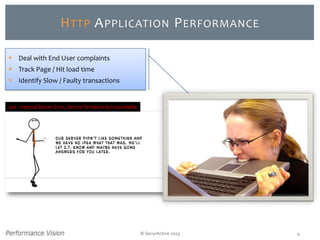
500 - Internal Server Error,ServiceTemporarilyUnavailable
 Deal with End User complaints
 Track Page / Hit load time
 Identify Slow / Faulty transactions
© SecurActive 2013
HTTP
APPLICATION
PERFORMANCE
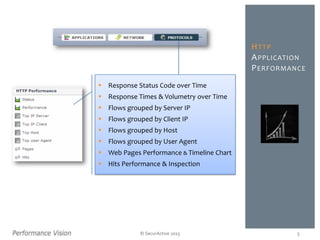
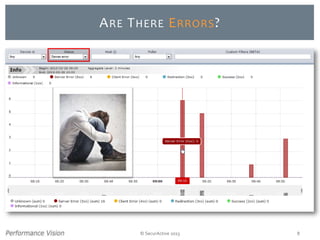
 Response Status Code over Time
 Response Times & Volumetry over Time
 Flows grouped by Server IP
 Flows grouped by Client IP
 Flows grouped by Host
 Flows grouped by User Agent
 Web Pages Performance & Timeline Chart
 Hits Performance & Inspection
5
© SecurActive 2013 6
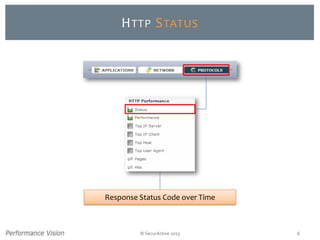
HTTP STATUS
Response Status Code over Time
© SecurActive 2013 7
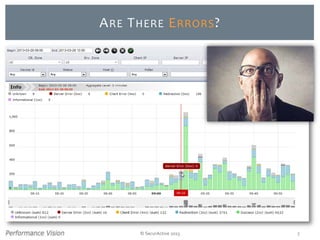
ARE THERE ERRORS?
© SecurActive 2013 8
ARE THERE ERRORS?
© SecurActive 2013 9
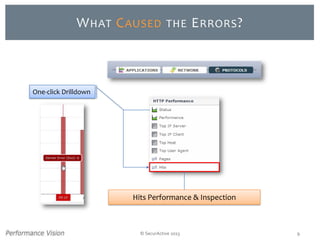
WHAT CAUSED THE ERRORS?
Hits Performance & Inspection
One-click Drilldown
© SecurActive 2013 10
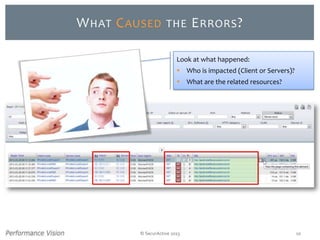
WHAT CAUSED THE ERRORS?
Look at what happened:
 Who is impacted (Client or Servers)?
 What are the related resources?
© SecurActive 2013 11
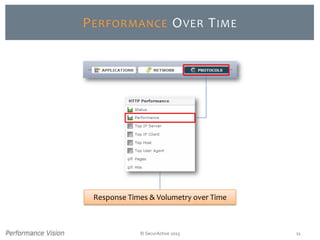
PERFORMANCE OVER TIME
Response Times & Volumetry over Time
© SecurActive 2013 12
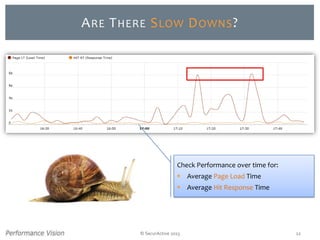
ARE THERE SLOW DOWNS?
Check Performance over time for:
 Average Page Load Time
 Average Hit Response Time
© SecurActive 2013 13
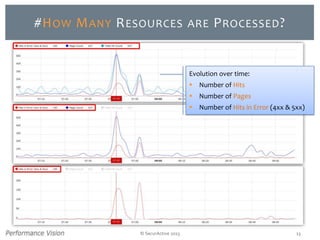
#HOW MANY RESOURCES ARE PROCESSED?
Evolution over time:
 Number of Hits
 Number of Pages
 Number of Hits in Error (4xx & 5xx)
© SecurActive 2013 14
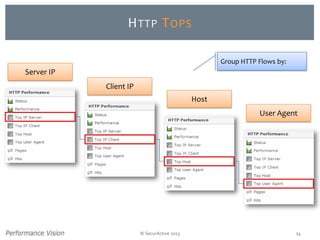
HTTP TOPS
Server IP
Client IP
Host
User Agent
Group HTTP Flows by:
© SecurActive 2013 15
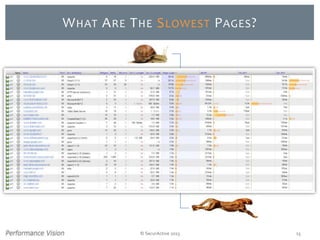
WHAT ARE THE SLOWEST PAGES?
© SecurActive 2013 16
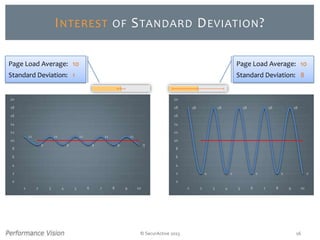
INTEREST OF STANDARD DEVIATION?
11
9
11
9
11
9
11
9
11
9
0
2
4
6
8
10
12
14
16
18
20
1 2 3 4 5 6 7 8 9 10
18
2
18
2
18
2
18
2
18
2
0
2
4
6
8
10
12
14
16
18
20
1 2 3 4 5 6 7 8 9 10
Page Load Average: 10
Standard Deviation: 1
Page Load Average: 10
Standard Deviation: 8
© SecurActive 2013 17
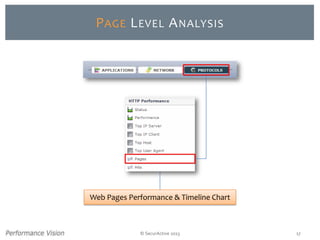
PAGE LEVEL ANALYSIS
Web Pages Performance & Timeline Chart
© SecurActive 2013 18
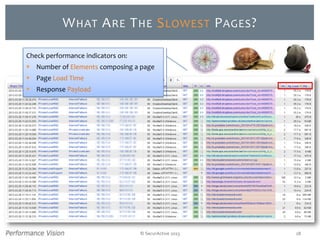
WHAT ARE THE SLOWEST PAGES?
Check performance indicators on:
 Number of Elements composing a page
 Page Load Time
 Response Payload
© SecurActive 2013 19
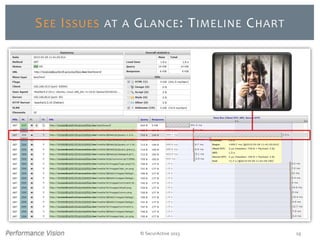
SEE ISSUES AT A GLANCE: TIMELINE CHART
© SecurActive 2013
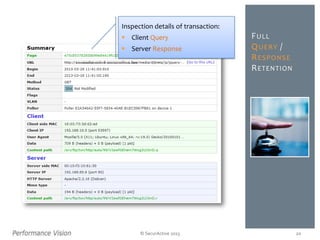
FULL
QUERY /
RESPONSE
RETENTION
Inspection details of transaction:
 Client Query
 Server Response
20
© SecurActive 2013
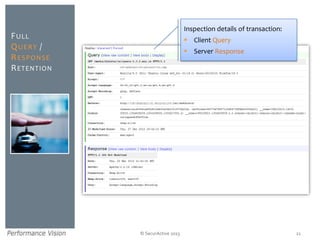
FULL
QUERY /
RESPONSE
RETENTION
Inspection details of transaction:
 Client Query
 Server Response
21
© SecurActive 2013 22
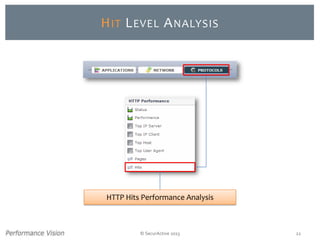
HIT LEVEL ANALYSIS
HTTP Hits Performance Analysis
© SecurActive 2013 23
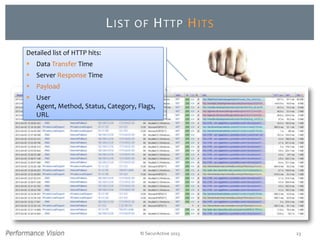
LIST OF HTTP HITS
Detailed list of HTTP hits:
 Data Transfer Time
 Server Response Time
 Payload
 User
Agent, Method, Status, Category, Flags,
URL
© SecurActive 2013 24
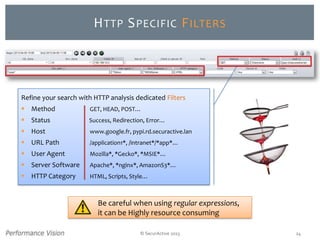
HTTP SPECIFIC FILTERS
Refine your search with HTTP analysis dedicated Filters
 Method GET, HEAD, POST…
 Status Success, Redirection, Error…
 Host www.google.fr, pypi.rd.securactive.lan
 URL Path /application1*, /intranet*/*app*…
 User Agent Mozilla*, *Gecko*, *MSIE*…
 Server Software Apache*, *nginx*, AmazonS3*…
 HTTP Category HTML, Scripts, Style…
Be careful when using regular expressions,
it can be Highly resource consuming
© SecurActive 2013 25
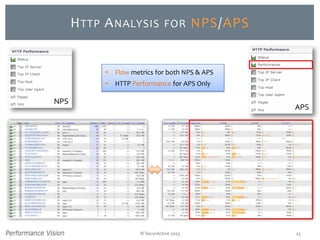
HTTP ANALYSIS FOR NPS/APS
NPS
APS
 Flow metrics for both NPS & APS
 HTTP Performance for APS Only
© SecurActive 2013 26
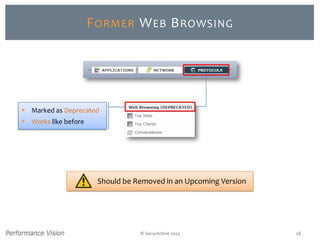
FORMER WEB BROWSING
 Marked as Deprecated
 Works like before
Should be Removed in an Upcoming Version
© SecurActive 2013 27
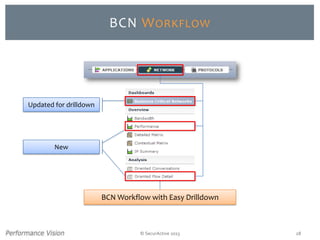
BCN WORKFLOW
Updated for drilldown
New
© SecurActive 2013 28
BCN WORKFLOW
BCN Workflow with Easy Drilldown
© SecurActive 2013 29
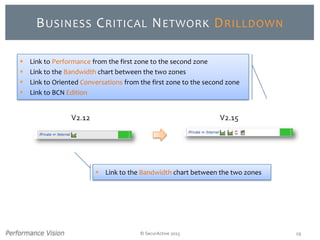
BUSINESS CRITICAL NETWORK DRILLDOWN
V2.12 V2.15
 Link to Performance from the first zone to the second zone
 Link to the Bandwidth chart between the two zones
 Link to Oriented Conversations from the first zone to the second zone
 Link to BCN Edition
 Link to the Bandwidth chart between the two zones
© SecurActive 2013 30
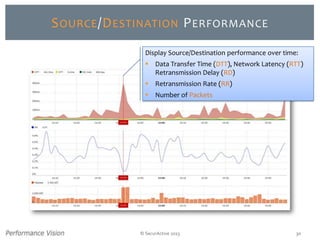
SOURCE/DESTINATION PERFORMANCE
Display Source/Destination performance over time:
 Data Transfer Time (DTT), Network Latency (RTT)
Retransmission Delay (RD)
 Retransmission Rate (RR)
 Number of Packets
© SecurActive 2013 31
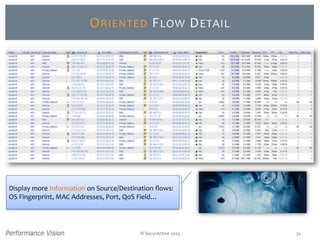
ORIENTED FLOW DETAIL
Display more Information on Source/Destination flows:
OS Fingerprint, MAC Addresses, Port, QoS Field…
© SecurActive 2013 32
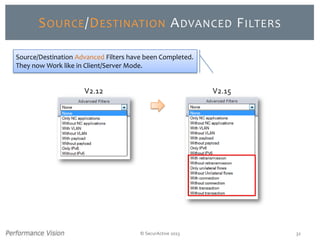
SOURCE/DESTINATION ADVANCED FILTERS
V2.12 V2.15
Source/Destination Advanced Filters have been Completed.
They now Work like in Client/Server Mode.
© SecurActive 2013 33
NETWORK ANALYSIS
© SecurActive 2013 34
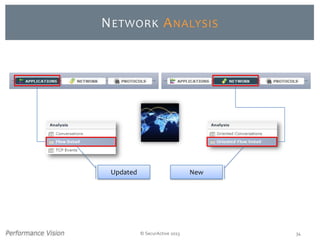
NETWORK ANALYSIS
NewUpdated
© SecurActive 2013
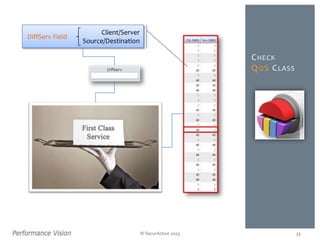
CHECK
QOS CLASS
35
DiffServ Field
Client/Server
Source/Destination
© SecurActive 2013 36
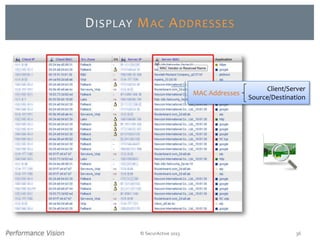
DISPLAY MAC ADDRESSES
MAC Addresses
Client/Server
Source/Destination
© SecurActive 2013 37
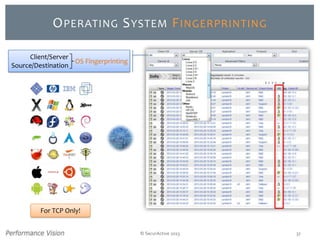
OPERATING SYSTEM FINGERPRINTING
OS Fingerprinting
Client/Server
Source/Destination
For TCP Only!
© SecurActive 2013 38
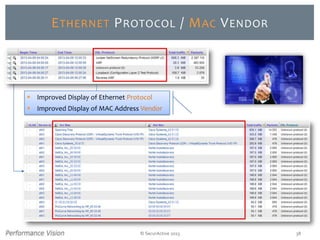
ETHERNET PROTOCOL / MAC VENDOR
 Improved Display of Ethernet Protocol
 Improved Display of MAC Address Vendor
© SecurActive 2013 39
CONFIGURATION & USABILITY
© SecurActive 2013 40
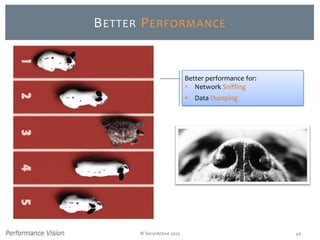
BETTER PERFORMANCE
Better performance for:
 Network Sniffing
 Data Dumping
© SecurActive 2013 41
IMPROVED SRT & DTT COMPUTATION
In presence of lost TCP segments,
more accurate:
 Server Response Time (SRT)
 Data Transfer Time (DTT)
© SecurActive 2013 42
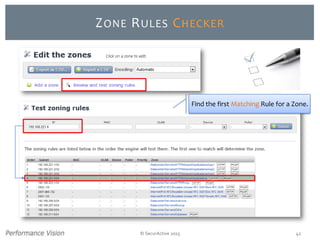
ZONE RULES CHECKER
Find the first Matching Rule for a Zone.
© SecurActive 2013 43
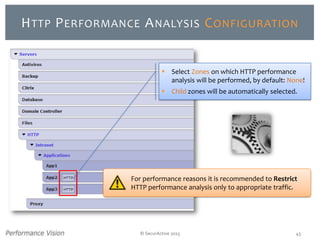
HTTP PERFORMANCE ANALYSIS CONFIGURATION
For performance reasons it is recommended to Restrict
HTTP performance analysis only to appropriate traffic.
 Select Zones on which HTTP performance
analysis will be performed, by default: None!
 Child zones will be automatically selected.
© SecurActive 2013 44
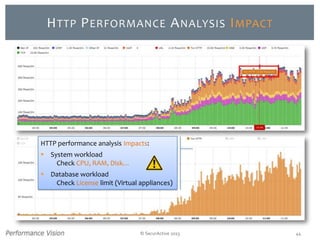
HTTP PERFORMANCE ANALYSIS IMPACT
HTTP performance analysis Impacts:
 System workload
Check CPU, RAM, Disk…
 Database workload
Check License limit (Virtual appliances)
© SecurActive 2013
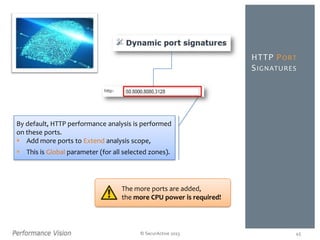
HTTP PORT
SIGNATURES
45
By default, HTTP performance analysis is performed
on these ports.
 Add more ports to Extend analysis scope,
 This is Global parameter (for all selected zones).
The more ports are added,
the more CPU power is required!
© SecurActive 2013 46
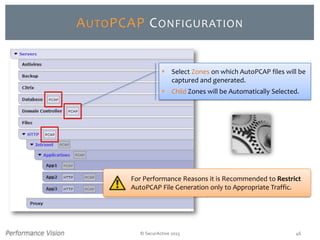
AUTOPCAP CONFIGURATION
For Performance Reasons it is Recommended to Restrict
AutoPCAP File Generation only to Appropriate Traffic.
 Select Zones on which AutoPCAP files will be
captured and generated.
 Child Zones will be Automatically Selected.
© SecurActive 2013 47
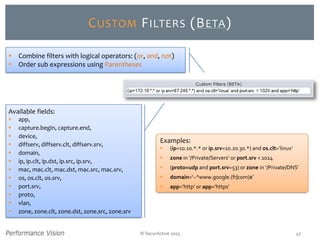
CUSTOM FILTERS (BETA)
Available fields:
 app,
 capture.begin, capture.end,
 device,
 diffserv, diffserv.clt, diffserv.srv,
 domain,
 ip, ip.clt, ip.dst, ip.src, ip.srv,
 mac, mac.clt, mac.dst, mac.src, mac.srv,
 os, os.clt, os.srv,
 port.srv,
 proto,
 vlan,
 zone, zone.clt, zone.dst, zone.src, zone.srv
 Combine filters with logical operators: (or, and, not)
 Order sub expressions using Parentheses
Examples:
 (ip=10.10.*.* or ip.srv=10.20.30.*) and os.clt=‘linux’
 zone in ‘/Private/Servers’ or port.srv < 1024
 (proto=udp and port.srv=53) or zone in ‘/Private/DNS’
 domain=‘~^www.google.(fr|com)$’
 app=’http’ or app=’https’
© SecurActive 2013 48
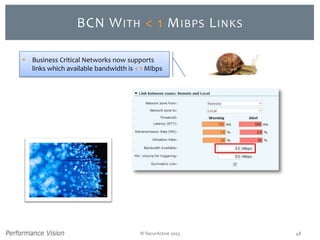
BCN WITH < 1 MIBPS LINKS
 Business Critical Networks now supports
links which available bandwidth is < 1 Mibps
© SecurActive 2013 49
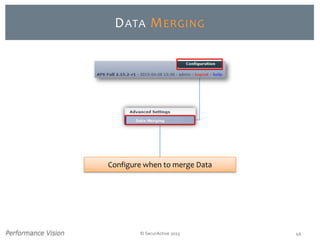
DATA MERGING
Configure when to merge Data
© SecurActive 2013
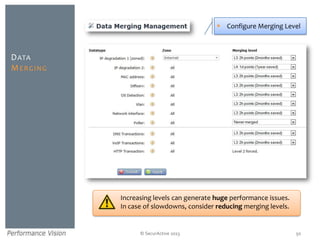
DATA
MERGING
50
Increasing levels can generate huge performance issues.
In case of slowdowns, consider reducing merging levels.
 Configure Merging Level
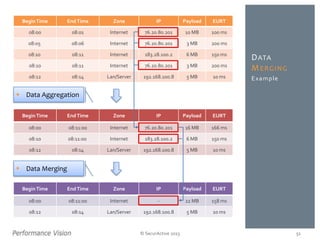
BeginTime EndTime Zone IP Payload EURT
08:00 08:01 Internet 76.20.80.201 10 MB 100 ms
08:05 08:06 Internet 76.20.80.201 3 MB 200 ms
08:10 08:11 Internet 183.28.100.2 6 MB 150 ms
08:10 08:11 Internet 76.20.80.201 3 MB 200 ms
08:12 08:14 Lan/Server 192.168.100.8 5 MB 10 ms Example
© SecurActive 2013
DATA
MERGING
51
BeginTime EndTime Zone IP Payload EURT
08:00 08:11:00 Internet 76.20.80.201 16 MB 166 ms
08:10 08:11:00 Internet 183.28.100.2 6 MB 150 ms
08:12 08:14 Lan/Server 192.168.100.8 5 MB 10 ms
BeginTime EndTime Zone IP Payload EURT
08:00 08:11:00 Internet - 22 MB 158 ms
08:12 08:14 Lan/Server 192.168.100.8 5 MB 10 ms
 Data Aggregation
 Data Merging
© SecurActive 2013 52
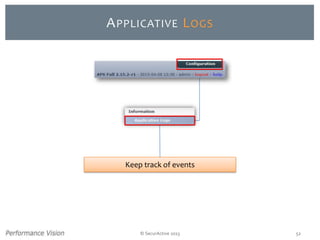
APPLICATIVE LOGS
Keep track of events
© SecurActive 2013 53
APPLICATIVE LOGS
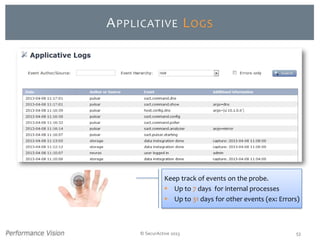
Keep track of events on the probe.
 Up to 7 days for internal processes
 Up to 31 days for other events (ex: Errors)
© SecurActive 2013 54
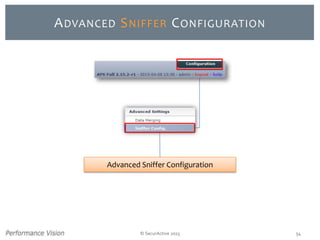
ADVANCED SNIFFER CONFIGURATION
Advanced Sniffer Configuration
© SecurActive 2013 55
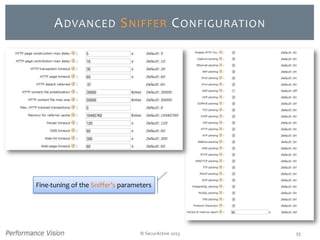
ADVANCED SNIFFER CONFIGURATION
Fine-tuning of the Sniffer’s parameters
© SecurActive 2013
SET
THE MTU
OF A POLLER
56
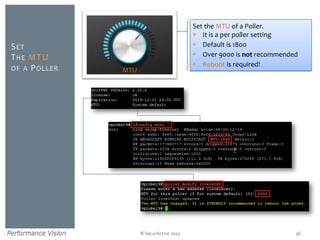
Set the MTU of a Poller.
 It is a per poller setting
 Default is 1800
 Over 9000 is not recommended
 Reboot is required!
MTU
© SecurActive 2013
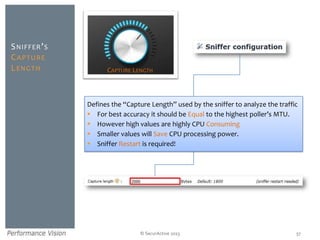
SNIFFER’S
CAPTURE
LENGTH
57
Defines the “Capture Length” used by the sniffer to analyze the traffic
 For best accuracy it should be Equal to the highest poller’s MTU.
 However high values are highly CPU Consuming
 Smaller values will Save CPU processing power.
 Sniffer Restart is required!
CAPTURE LENGTH
© SecurActive 2013 58
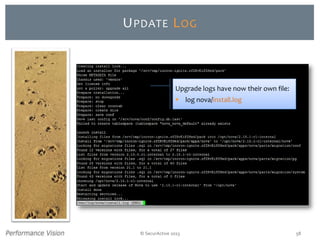
UPDATE LOG
Upgrade logs have now their own file:
 log nova/install.log
© SecurActive 2013 59
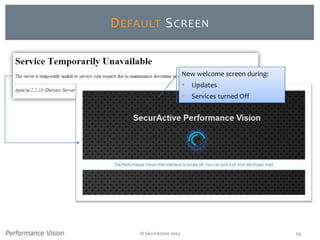
DEFAULT SCREEN
New welcome screen during:
 Updates
 Services turned Off
© SecurActive 2013
 Version 2.15
 User Guide
 Release Notes
DOCUMENTATION
UPDATE
60
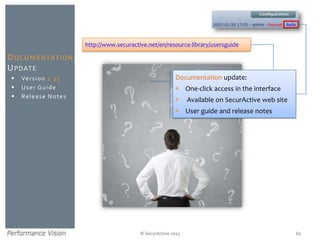
Documentation update:
 One-click access in the interface
 Available on SecurActive web site
 User guide and release notes
http://www.securactive.net/en/resource-library/usersguide
© SecurActive 2013 61
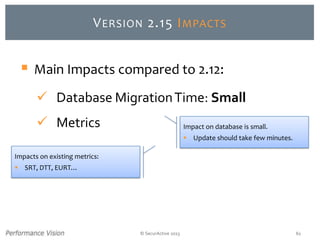
VERSION 2.15 IMPACTS
Impacts on existing metrics:
 SRT, DTT, EURT…
 Main Impacts compared to 2.12:
 Database MigrationTime: Small
 Metrics Impact on database is small.
 Update should take few minutes.
© SecurActive 2013 62
REBOOT AFTER UPDATE
After the update is completed
© SecurActive 2013 63
YOU’RE READY TO GO, ENJOY!
What’s New
in Version
2.15?
© SecurActive 2013
THANK YOU!
64
For any Question
sales@securactive.net
support@securactive.net
Follow Us on
@SecurActivePV
www.securactive.net
blog.securactive.net

Performance vision Version 2.15 news

  • 1.
    © SecurActive 2013 WHAT’SNEW IN VERSION 2.15?
  • 2.
    © SecurActive 20132 PERFORMANCE VISION VERSION 2.15 Http Application Performance BCNWorkflow Network Analysis Configuration & Usability
  • 3.
    © SecurActive 20133 HTTP APPLICATION PERFORMANCE
  • 4.
    © SecurActive 20134 HTTP APPLICATION PERFORMANCE 500 - Internal Server Error,ServiceTemporarilyUnavailable  Deal with End User complaints  Track Page / Hit load time  Identify Slow / Faulty transactions
  • 5.
    © SecurActive 2013 HTTP APPLICATION PERFORMANCE Response Status Code over Time  Response Times & Volumetry over Time  Flows grouped by Server IP  Flows grouped by Client IP  Flows grouped by Host  Flows grouped by User Agent  Web Pages Performance & Timeline Chart  Hits Performance & Inspection 5
  • 6.
    © SecurActive 20136 HTTP STATUS Response Status Code over Time
  • 7.
    © SecurActive 20137 ARE THERE ERRORS?
  • 8.
    © SecurActive 20138 ARE THERE ERRORS?
  • 9.
    © SecurActive 20139 WHAT CAUSED THE ERRORS? Hits Performance & Inspection One-click Drilldown
  • 10.
    © SecurActive 201310 WHAT CAUSED THE ERRORS? Look at what happened:  Who is impacted (Client or Servers)?  What are the related resources?
  • 11.
    © SecurActive 201311 PERFORMANCE OVER TIME Response Times & Volumetry over Time
  • 12.
    © SecurActive 201312 ARE THERE SLOW DOWNS? Check Performance over time for:  Average Page Load Time  Average Hit Response Time
  • 13.
    © SecurActive 201313 #HOW MANY RESOURCES ARE PROCESSED? Evolution over time:  Number of Hits  Number of Pages  Number of Hits in Error (4xx & 5xx)
  • 14.
    © SecurActive 201314 HTTP TOPS Server IP Client IP Host User Agent Group HTTP Flows by:
  • 15.
    © SecurActive 201315 WHAT ARE THE SLOWEST PAGES?
  • 16.
    © SecurActive 201316 INTEREST OF STANDARD DEVIATION? 11 9 11 9 11 9 11 9 11 9 0 2 4 6 8 10 12 14 16 18 20 1 2 3 4 5 6 7 8 9 10 18 2 18 2 18 2 18 2 18 2 0 2 4 6 8 10 12 14 16 18 20 1 2 3 4 5 6 7 8 9 10 Page Load Average: 10 Standard Deviation: 1 Page Load Average: 10 Standard Deviation: 8
  • 17.
    © SecurActive 201317 PAGE LEVEL ANALYSIS Web Pages Performance & Timeline Chart
  • 18.
    © SecurActive 201318 WHAT ARE THE SLOWEST PAGES? Check performance indicators on:  Number of Elements composing a page  Page Load Time  Response Payload
  • 19.
    © SecurActive 201319 SEE ISSUES AT A GLANCE: TIMELINE CHART
  • 20.
    © SecurActive 2013 FULL QUERY/ RESPONSE RETENTION Inspection details of transaction:  Client Query  Server Response 20
  • 21.
    © SecurActive 2013 FULL QUERY/ RESPONSE RETENTION Inspection details of transaction:  Client Query  Server Response 21
  • 22.
    © SecurActive 201322 HIT LEVEL ANALYSIS HTTP Hits Performance Analysis
  • 23.
    © SecurActive 201323 LIST OF HTTP HITS Detailed list of HTTP hits:  Data Transfer Time  Server Response Time  Payload  User Agent, Method, Status, Category, Flags, URL
  • 24.
    © SecurActive 201324 HTTP SPECIFIC FILTERS Refine your search with HTTP analysis dedicated Filters  Method GET, HEAD, POST…  Status Success, Redirection, Error…  Host www.google.fr, pypi.rd.securactive.lan  URL Path /application1*, /intranet*/*app*…  User Agent Mozilla*, *Gecko*, *MSIE*…  Server Software Apache*, *nginx*, AmazonS3*…  HTTP Category HTML, Scripts, Style… Be careful when using regular expressions, it can be Highly resource consuming
  • 25.
    © SecurActive 201325 HTTP ANALYSIS FOR NPS/APS NPS APS  Flow metrics for both NPS & APS  HTTP Performance for APS Only
  • 26.
    © SecurActive 201326 FORMER WEB BROWSING  Marked as Deprecated  Works like before Should be Removed in an Upcoming Version
  • 27.
    © SecurActive 201327 BCN WORKFLOW
  • 28.
    Updated for drilldown New ©SecurActive 2013 28 BCN WORKFLOW BCN Workflow with Easy Drilldown
  • 29.
    © SecurActive 201329 BUSINESS CRITICAL NETWORK DRILLDOWN V2.12 V2.15  Link to Performance from the first zone to the second zone  Link to the Bandwidth chart between the two zones  Link to Oriented Conversations from the first zone to the second zone  Link to BCN Edition  Link to the Bandwidth chart between the two zones
  • 30.
    © SecurActive 201330 SOURCE/DESTINATION PERFORMANCE Display Source/Destination performance over time:  Data Transfer Time (DTT), Network Latency (RTT) Retransmission Delay (RD)  Retransmission Rate (RR)  Number of Packets
  • 31.
    © SecurActive 201331 ORIENTED FLOW DETAIL Display more Information on Source/Destination flows: OS Fingerprint, MAC Addresses, Port, QoS Field…
  • 32.
    © SecurActive 201332 SOURCE/DESTINATION ADVANCED FILTERS V2.12 V2.15 Source/Destination Advanced Filters have been Completed. They now Work like in Client/Server Mode.
  • 33.
    © SecurActive 201333 NETWORK ANALYSIS
  • 34.
    © SecurActive 201334 NETWORK ANALYSIS NewUpdated
  • 35.
    © SecurActive 2013 CHECK QOSCLASS 35 DiffServ Field Client/Server Source/Destination
  • 36.
    © SecurActive 201336 DISPLAY MAC ADDRESSES MAC Addresses Client/Server Source/Destination
  • 37.
    © SecurActive 201337 OPERATING SYSTEM FINGERPRINTING OS Fingerprinting Client/Server Source/Destination For TCP Only!
  • 38.
    © SecurActive 201338 ETHERNET PROTOCOL / MAC VENDOR  Improved Display of Ethernet Protocol  Improved Display of MAC Address Vendor
  • 39.
    © SecurActive 201339 CONFIGURATION & USABILITY
  • 40.
    © SecurActive 201340 BETTER PERFORMANCE Better performance for:  Network Sniffing  Data Dumping
  • 41.
    © SecurActive 201341 IMPROVED SRT & DTT COMPUTATION In presence of lost TCP segments, more accurate:  Server Response Time (SRT)  Data Transfer Time (DTT)
  • 42.
    © SecurActive 201342 ZONE RULES CHECKER Find the first Matching Rule for a Zone.
  • 43.
    © SecurActive 201343 HTTP PERFORMANCE ANALYSIS CONFIGURATION For performance reasons it is recommended to Restrict HTTP performance analysis only to appropriate traffic.  Select Zones on which HTTP performance analysis will be performed, by default: None!  Child zones will be automatically selected.
  • 44.
    © SecurActive 201344 HTTP PERFORMANCE ANALYSIS IMPACT HTTP performance analysis Impacts:  System workload Check CPU, RAM, Disk…  Database workload Check License limit (Virtual appliances)
  • 45.
    © SecurActive 2013 HTTPPORT SIGNATURES 45 By default, HTTP performance analysis is performed on these ports.  Add more ports to Extend analysis scope,  This is Global parameter (for all selected zones). The more ports are added, the more CPU power is required!
  • 46.
    © SecurActive 201346 AUTOPCAP CONFIGURATION For Performance Reasons it is Recommended to Restrict AutoPCAP File Generation only to Appropriate Traffic.  Select Zones on which AutoPCAP files will be captured and generated.  Child Zones will be Automatically Selected.
  • 47.
    © SecurActive 201347 CUSTOM FILTERS (BETA) Available fields:  app,  capture.begin, capture.end,  device,  diffserv, diffserv.clt, diffserv.srv,  domain,  ip, ip.clt, ip.dst, ip.src, ip.srv,  mac, mac.clt, mac.dst, mac.src, mac.srv,  os, os.clt, os.srv,  port.srv,  proto,  vlan,  zone, zone.clt, zone.dst, zone.src, zone.srv  Combine filters with logical operators: (or, and, not)  Order sub expressions using Parentheses Examples:  (ip=10.10.*.* or ip.srv=10.20.30.*) and os.clt=‘linux’  zone in ‘/Private/Servers’ or port.srv < 1024  (proto=udp and port.srv=53) or zone in ‘/Private/DNS’  domain=‘~^www.google.(fr|com)$’  app=’http’ or app=’https’
  • 48.
    © SecurActive 201348 BCN WITH < 1 MIBPS LINKS  Business Critical Networks now supports links which available bandwidth is < 1 Mibps
  • 49.
    © SecurActive 201349 DATA MERGING Configure when to merge Data
  • 50.
    © SecurActive 2013 DATA MERGING 50 Increasinglevels can generate huge performance issues. In case of slowdowns, consider reducing merging levels.  Configure Merging Level
  • 51.
    BeginTime EndTime ZoneIP Payload EURT 08:00 08:01 Internet 76.20.80.201 10 MB 100 ms 08:05 08:06 Internet 76.20.80.201 3 MB 200 ms 08:10 08:11 Internet 183.28.100.2 6 MB 150 ms 08:10 08:11 Internet 76.20.80.201 3 MB 200 ms 08:12 08:14 Lan/Server 192.168.100.8 5 MB 10 ms Example © SecurActive 2013 DATA MERGING 51 BeginTime EndTime Zone IP Payload EURT 08:00 08:11:00 Internet 76.20.80.201 16 MB 166 ms 08:10 08:11:00 Internet 183.28.100.2 6 MB 150 ms 08:12 08:14 Lan/Server 192.168.100.8 5 MB 10 ms BeginTime EndTime Zone IP Payload EURT 08:00 08:11:00 Internet - 22 MB 158 ms 08:12 08:14 Lan/Server 192.168.100.8 5 MB 10 ms  Data Aggregation  Data Merging
  • 52.
    © SecurActive 201352 APPLICATIVE LOGS Keep track of events
  • 53.
    © SecurActive 201353 APPLICATIVE LOGS Keep track of events on the probe.  Up to 7 days for internal processes  Up to 31 days for other events (ex: Errors)
  • 54.
    © SecurActive 201354 ADVANCED SNIFFER CONFIGURATION Advanced Sniffer Configuration
  • 55.
    © SecurActive 201355 ADVANCED SNIFFER CONFIGURATION Fine-tuning of the Sniffer’s parameters
  • 56.
    © SecurActive 2013 SET THEMTU OF A POLLER 56 Set the MTU of a Poller.  It is a per poller setting  Default is 1800  Over 9000 is not recommended  Reboot is required! MTU
  • 57.
    © SecurActive 2013 SNIFFER’S CAPTURE LENGTH 57 Definesthe “Capture Length” used by the sniffer to analyze the traffic  For best accuracy it should be Equal to the highest poller’s MTU.  However high values are highly CPU Consuming  Smaller values will Save CPU processing power.  Sniffer Restart is required! CAPTURE LENGTH
  • 58.
    © SecurActive 201358 UPDATE LOG Upgrade logs have now their own file:  log nova/install.log
  • 59.
    © SecurActive 201359 DEFAULT SCREEN New welcome screen during:  Updates  Services turned Off
  • 60.
    © SecurActive 2013 Version 2.15  User Guide  Release Notes DOCUMENTATION UPDATE 60 Documentation update:  One-click access in the interface  Available on SecurActive web site  User guide and release notes http://www.securactive.net/en/resource-library/usersguide
  • 61.
    © SecurActive 201361 VERSION 2.15 IMPACTS Impacts on existing metrics:  SRT, DTT, EURT…  Main Impacts compared to 2.12:  Database MigrationTime: Small  Metrics Impact on database is small.  Update should take few minutes.
  • 62.
    © SecurActive 201362 REBOOT AFTER UPDATE After the update is completed
  • 63.
    © SecurActive 201363 YOU’RE READY TO GO, ENJOY!
  • 64.
    What’s New in Version 2.15? ©SecurActive 2013 THANK YOU! 64 For any Question sales@securactive.net support@securactive.net Follow Us on @SecurActivePV www.securactive.net blog.securactive.net