P.E.P.S 3.0 www.pepssoftware.com [email_address] Tel: 770.664.6559 Ver 3.1 Copyright © 2000-2010 pepssoftware.com.  All Rights Reserved.
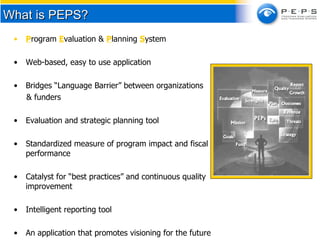
What is PEPS? P rogram  E valuation &  P lanning  S ystem Web-based, easy to use application Bridges “Language Barrier” between organizations  & funders Evaluation and strategic planning tool Standardized measure of program impact and fiscal performance Catalyst for “best practices” and continuous quality improvement Intelligent reporting tool  An application that promotes visioning for the future
Clients, funders and regulatory bodies are demanding more accountability than ever before.  Creates a competitive advantage with funders and clients.  Maximizes the potential of attaining outcomes and achieving impact. Requires planning for long term sustainability. Why PEPS?
Standardized planning and tracking of programs and initiatives  Reinforces strategic/business planning  Promotes diversification of funding sources  Increases accountability Promotes best practices/thought leadership  Valuable planning tools for inexperienced and seasoned managers  Facilitates action on correct yet difficult decisions  Identifies earned income potential  Complies with continuous program quality improvement ("CQI/PQI") initiatives  Establishes common measures between funders and organizations Benefits
“ This tool can help improve communications about performance between grantmakers and grant seeking nonprofits.”  - Professor, Andrew Young School of Non-Profit    Management at Georgia State Key Benefit
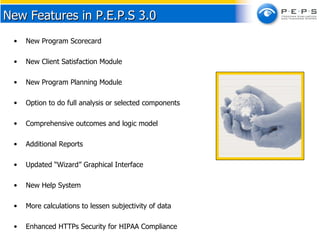
New Program Scorecard New Client Satisfaction Module New Program Planning Module Option to do full analysis or selected components Comprehensive outcomes and logic model Additional Reports Updated “Wizard” Graphical Interface New Help System More calculations to lessen subjectivity of data Enhanced HTTPs Security for HIPAA Compliance New Features in P.E.P.S 3.0
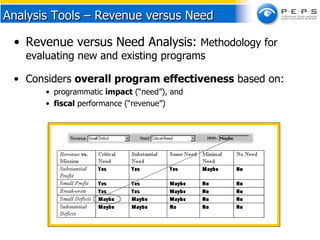
Revenue versus Need Analysis:  Methodology for evaluating new and existing programs  Considers  overall program effectiveness  based on: programmatic  impact  (“need”), and  fiscal  performance (“revenue”) Analysis Tools – Revenue versus Need
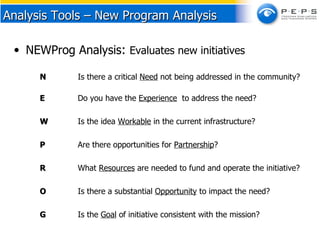
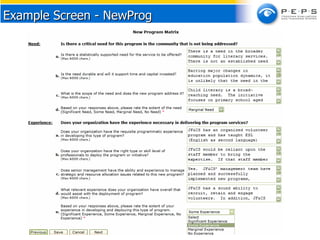
NEWProg Analysis :  Evaluates new initiatives N Is there a critical  Need  not being addressed in the community?  E   Do you have the  Experience   to address the need? W   Is the idea  Workable  in the current infrastructure? P Are there opportunities for  Partnership ? R What  Resources  are needed to fund and operate the initiative? O Is there a substantial  Opportunity  to impact the need? G Is the  Goal  of initiative consistent with the mission? Analysis Tools – New Program Analysis
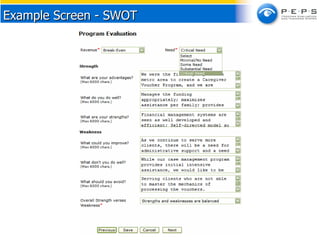
SWOT Analysis:  Evaluation tool for existing programs S Strengths W   Weaknesses O     Opportunities T Threats Analysis Tools – S.W.O.T.
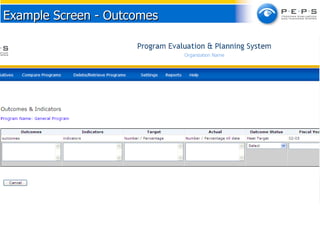
Outcome Tracker:  Tool for tracking  and documenting progress on  indicators and outcomes Analysis Tools – Outcome Tracker
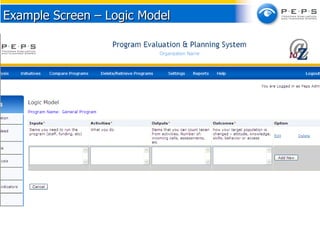
Analysis Tools - Logic Model Logic Model Analysis Provides a snapshot of a program which assists in program planning Enables the user to add:  Inputs   - Items needed to run the program e.g. staff, funding, etc. Activities   – What you do. Outputs   –  Activities that can be counted e.g. Number of: incoming calls, assessments, etc Outcomes  – how your target population has changed  in attitude, knowledge, skills, behavior etc.
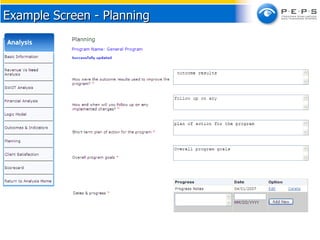
Planning  This section gathers the following data related to program planning and improvement: How were the outcome results used to improve the program? How and when will you follow-up on implemented changes? Updates (Date & Progress) Short term plan of action for the program Overall program goals Analysis Tools
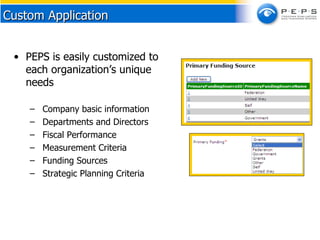
PEPS is easily customized to each organization’s unique needs  Company basic information Departments and Directors Fiscal Performance  Measurement Criteria Funding Sources Strategic Planning Criteria Custom Application
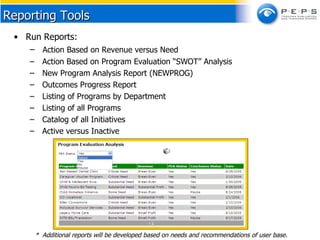
Run Reports: Action Based on Revenue versus Need Action Based on Program Evaluation “SWOT” Analysis New Program Analysis Report (NEWPROG) Outcomes Progress Report  Listing of Programs by Department Listing of all Programs Catalog of all Initiatives Active versus Inactive Reporting Tools *  Additional reports will be developed based on needs and recommendations of user base.
PEPs is a valuable tool, but it is only a component of the planning & evaluation process.  JF&CS will train users to maximize the potential of PEPS. Create a program planning committee to evaluate new and existing programs Update data on an ongoing basis, at least annually Standardize the budgeting process with PEPS reports Use as a planning tool for directors and work teams Track implementation of strategic plan with PEPS Demonstrate active program management to funders and donors Elicit perceptions of staff with multiple reports for the same program Uncover trends in the data over time Use to evaluate whether or not to pursue a grant or new program Use PEPS to maintain accountability with your board Suggested Uses
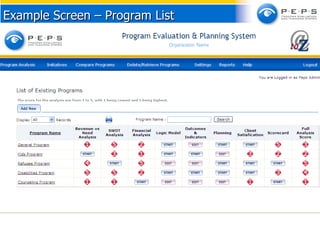
Example Screen – Program List
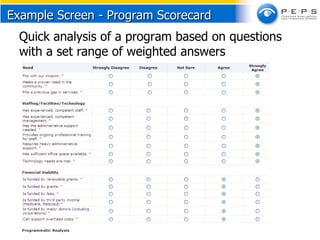
Program Scorecard   Quick analysis of a program based on questions with a set range of weighted answers  Example Screen - Program Scorecard
Example Screen - SWOT
Example Screen - NewProg
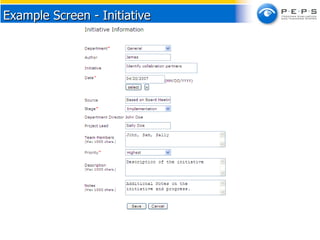
Example Screen - Initiative
Example Screen – Logic Model
Example Screen - Outcomes
Example Screen - Planning
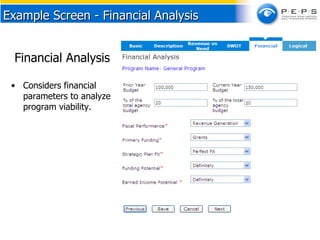
Example Screen - Financial Analysis Financial Analysis  Considers financial parameters to analyze program viability.
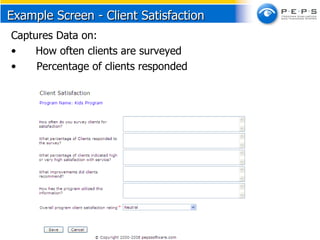
Example Screen - Client Satisfaction  Captures Data on:  How often clients are surveyed Percentage of clients responded
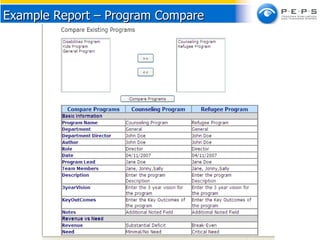
Example Report – Program Compare
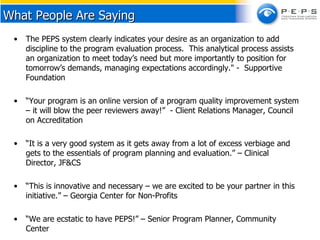
The PEPS system clearly indicates your desire as an organization to add discipline to the program evaluation process.  This analytical process assists an organization to meet today’s need but more importantly to position for tomorrow’s demands, managing expectations accordingly." -  Supportive Foundation  “ Your program is an online version of a program quality improvement system – it will blow the peer reviewers away!”  - Client Relations Manager, Council on Accreditation “ It is a very good system as it gets away from a lot of excess verbiage and gets to the essentials of program planning and evaluation.” – Clinical Director, JF&CS “ This is innovative and necessary – we are excited to be your partner in this initiative.” – Georgia Center for Non-Profits “ We are ecstatic to have PEPS!” – Senior Program Planner, Community Center What People Are Saying
Copyright © 2000-2010 Pepssoftware.com.  All Rights Reserved. Web site:  http://www.pepssoftware.com For more information:  [email_address] Telephone: 770.664.6559

Program Evaluation & Planning System

  • 1.
    P.E.P.S 3.0 www.pepssoftware.com[email_address] Tel: 770.664.6559 Ver 3.1 Copyright © 2000-2010 pepssoftware.com. All Rights Reserved.
  • 2.
    What is PEPS?P rogram E valuation & P lanning S ystem Web-based, easy to use application Bridges “Language Barrier” between organizations & funders Evaluation and strategic planning tool Standardized measure of program impact and fiscal performance Catalyst for “best practices” and continuous quality improvement Intelligent reporting tool An application that promotes visioning for the future
  • 3.
    Clients, funders andregulatory bodies are demanding more accountability than ever before. Creates a competitive advantage with funders and clients. Maximizes the potential of attaining outcomes and achieving impact. Requires planning for long term sustainability. Why PEPS?
  • 4.
    Standardized planning andtracking of programs and initiatives Reinforces strategic/business planning Promotes diversification of funding sources Increases accountability Promotes best practices/thought leadership Valuable planning tools for inexperienced and seasoned managers Facilitates action on correct yet difficult decisions Identifies earned income potential Complies with continuous program quality improvement ("CQI/PQI") initiatives Establishes common measures between funders and organizations Benefits
  • 5.
    “ This toolcan help improve communications about performance between grantmakers and grant seeking nonprofits.” - Professor, Andrew Young School of Non-Profit Management at Georgia State Key Benefit
  • 6.
    New Program ScorecardNew Client Satisfaction Module New Program Planning Module Option to do full analysis or selected components Comprehensive outcomes and logic model Additional Reports Updated “Wizard” Graphical Interface New Help System More calculations to lessen subjectivity of data Enhanced HTTPs Security for HIPAA Compliance New Features in P.E.P.S 3.0
  • 7.
    Revenue versus NeedAnalysis: Methodology for evaluating new and existing programs Considers overall program effectiveness based on: programmatic impact (“need”), and fiscal performance (“revenue”) Analysis Tools – Revenue versus Need
  • 8.
    NEWProg Analysis : Evaluates new initiatives N Is there a critical Need not being addressed in the community? E Do you have the Experience to address the need? W Is the idea Workable in the current infrastructure? P Are there opportunities for Partnership ? R What Resources are needed to fund and operate the initiative? O Is there a substantial Opportunity to impact the need? G Is the Goal of initiative consistent with the mission? Analysis Tools – New Program Analysis
  • 9.
    SWOT Analysis: Evaluation tool for existing programs S Strengths W Weaknesses O Opportunities T Threats Analysis Tools – S.W.O.T.
  • 10.
    Outcome Tracker: Tool for tracking and documenting progress on indicators and outcomes Analysis Tools – Outcome Tracker
  • 11.
    Analysis Tools -Logic Model Logic Model Analysis Provides a snapshot of a program which assists in program planning Enables the user to add: Inputs - Items needed to run the program e.g. staff, funding, etc. Activities – What you do. Outputs – Activities that can be counted e.g. Number of: incoming calls, assessments, etc Outcomes – how your target population has changed in attitude, knowledge, skills, behavior etc.
  • 12.
    Planning Thissection gathers the following data related to program planning and improvement: How were the outcome results used to improve the program? How and when will you follow-up on implemented changes? Updates (Date & Progress) Short term plan of action for the program Overall program goals Analysis Tools
  • 13.
    PEPS is easilycustomized to each organization’s unique needs Company basic information Departments and Directors Fiscal Performance Measurement Criteria Funding Sources Strategic Planning Criteria Custom Application
  • 14.
    Run Reports: ActionBased on Revenue versus Need Action Based on Program Evaluation “SWOT” Analysis New Program Analysis Report (NEWPROG) Outcomes Progress Report Listing of Programs by Department Listing of all Programs Catalog of all Initiatives Active versus Inactive Reporting Tools * Additional reports will be developed based on needs and recommendations of user base.
  • 15.
    PEPs is avaluable tool, but it is only a component of the planning & evaluation process. JF&CS will train users to maximize the potential of PEPS. Create a program planning committee to evaluate new and existing programs Update data on an ongoing basis, at least annually Standardize the budgeting process with PEPS reports Use as a planning tool for directors and work teams Track implementation of strategic plan with PEPS Demonstrate active program management to funders and donors Elicit perceptions of staff with multiple reports for the same program Uncover trends in the data over time Use to evaluate whether or not to pursue a grant or new program Use PEPS to maintain accountability with your board Suggested Uses
  • 16.
    Example Screen –Program List
  • 17.
    Program Scorecard Quick analysis of a program based on questions with a set range of weighted answers Example Screen - Program Scorecard
  • 18.
  • 19.
  • 20.
    Example Screen -Initiative
  • 21.
    Example Screen –Logic Model
  • 22.
  • 23.
  • 24.
    Example Screen -Financial Analysis Financial Analysis Considers financial parameters to analyze program viability.
  • 25.
    Example Screen -Client Satisfaction Captures Data on: How often clients are surveyed Percentage of clients responded
  • 26.
    Example Report –Program Compare
  • 27.
    The PEPS systemclearly indicates your desire as an organization to add discipline to the program evaluation process. This analytical process assists an organization to meet today’s need but more importantly to position for tomorrow’s demands, managing expectations accordingly." - Supportive Foundation “ Your program is an online version of a program quality improvement system – it will blow the peer reviewers away!”  - Client Relations Manager, Council on Accreditation “ It is a very good system as it gets away from a lot of excess verbiage and gets to the essentials of program planning and evaluation.” – Clinical Director, JF&CS “ This is innovative and necessary – we are excited to be your partner in this initiative.” – Georgia Center for Non-Profits “ We are ecstatic to have PEPS!” – Senior Program Planner, Community Center What People Are Saying
  • 28.
    Copyright © 2000-2010Pepssoftware.com. All Rights Reserved. Web site: http://www.pepssoftware.com For more information: [email_address] Telephone: 770.664.6559

Editor's Notes

  • #15 RICK: The Goals; The Why. Clients, funders, and regulatory bodies are demanding more accountability than ever before. Our programs face increased competition for funding and clients. The Agency must maximize the potential of each program individually, and the Agency as a whole. To do this, each program must achieve its expected outcomes. The Board was finding it increasingly difficult to keep track of the progress of the Agency’s numerous programs against their stated goals. (WHAT WE NEEDED)