PAVONE nsfTools
PAVONE Tools

 PAVONE nsfSync
    synchronizes your data across applications

  PAVONE nsfWatch
    controls data and escalate automatically


 Immediate ROI                                   Add value for all
 Install once, save                              Line-of-Business
 in development                                  applications!
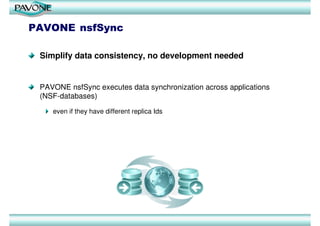
PAVONE nsfSync

 Simplify data consistency, no development needed


 PAVONE nsfSync executes data synchronization across applications
 (NSF-databases)

    even if they have different replica Ids
PAVONE nsfSync

Simplify managing data consistency
PAVONE nsfSync efficiently manages data consistency with Sync
Activities

   Managing multiple Sync-Activities

   Prioritizing Sync-Activities
   Toggling Sync-Activities from active to inactive
   Controlling execution times of Sync-Activities
PAVONE nsfSync

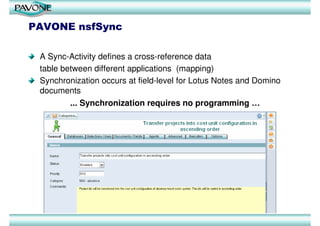
 A Sync-Activity defines a cross-reference data
 table between different applications (mapping)
 Synchronization occurs at field-level for Lotus Notes and Domino
 documents
         ... Synchronization requires no programming …
PAVONE nsfSync – Target Users


Benefits for Administrators

  Fast and secure data synchronization
     without touching the design of applications, no designer access
     needed


  Efficient and easy consistency management
     with sets of Sync-Activities, prioritizing, toggling from active to
     inactive, controlling of execution times
PAVONE nsfSync


Benefits for Developers
  Be more productive by replacing recurring programming effort for
  data-sync code with easy to use mapping definitions
  Replace setup time for data-sync handling and scheduling across
  different applications with easy to use configurations
  Use nsfSync's powerful protocol and logging abilities
  Execute the typical extensive testing effort in data-sync scenarios fast
  and reliable
  Adapt quickly to specification changes
PAVONE nsfSync


Benefits for Controllers and Line of Business Managers
  Simple data collection and assembly from different applications
  Versatile data aggregation for diverse reporting needs without
  necessity (and budget) for development of new applications
  Providing data on-demand to reporting applications for projects, sales,
  CRM, SCM, finance, accounting, etc.
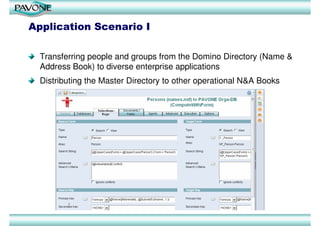
Application Scenario I

  Transferring people and groups from the Domino Directory (Name &
  Address Book) to diverse enterprise applications
  Distributing the Master Directory to other operational N&A Books
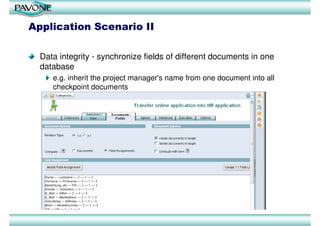
Application Scenario II

  Data integrity - synchronize fields of different documents in one
  database
     e.g. inherit the project manager's name from one document into all
     checkpoint documents
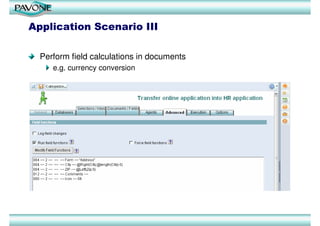
Application Scenario III

  Perform field calculations in documents
     e.g. currency conversion
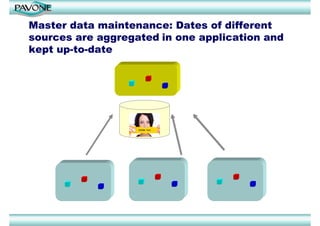
Master data maintenance: Dates of different
sources are aggregated in one application and
kept up-to-date
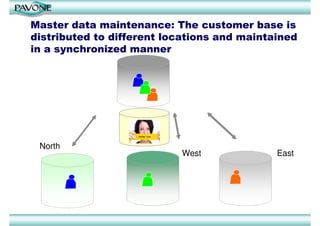
Master data maintenance: The customer base is
distributed to different locations and maintained
in a synchronized manner


 North
                           West              East
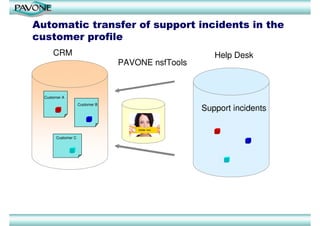
Automatic transfer of support incidents in the
customer profile
      CRM                                             Help Desk
                                 PAVONE nsfTools


  Customer A
                    Customer B
                                                   Support incidents


       Customer C
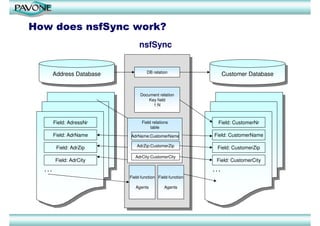
How does nsfSync work?
                                 nsfSync


                                     DB relation
        Address Database
         Address Database                                         Customer Database
                                                                   Customer Database


                                 Document relation
                                     Key field
                                       1:N


        Field: AdressNr           Field relations             Field: CustomerNr
                                       table
        Field: AdrName      AdrName:CustomerName            Field: CustomerName

         Field: AdrZip         AdrZip:CustomerZip            Field: CustomerZip
                               AdrCity:CustomerCity
        Field: AdrCity                                       Field: CustomerCity
  ...                                                       ...
                            Field-function Field-function

                               Agents         Agents
Features I: General

  Fast deployment and customization
  Platform independent
  Runs on client and/or server
  Needs no programming, no design access for sync'ed applications
  Highly customizable
  Field-level synchronization of documents
  Activity model for individual configuration of all sync tasks
  Create, update or delete corresponding documents in databases even
  if they have different replica Ids
  Fast execution times due to efficient LotusScript code
  Logging of synchronization activities
Features II: Field level

  Supports all field types
  Synchronization of RichText fields (byte-comparison)
  Detect and updates changes in multiple fields
  Log changes into a field of target database
  Log-field maintenance
  Append updates to fields in target database
  Executing field functions in source and target database
  Extended field functions: document properties, field properties,
  attachment insertion, DocLink insertion
  Unlimited number of field functions per activity in source and in target
  database
Features III: Activities, Agents, SQL, Interfaces

  Running agents in source and target database
  Manual sync or server scheduled sync
  One-time execution of single activities
  Combined keys and computed keys
  N:1- many-to-one synchronization
  SQL enabled (read data from SQL source, ODBC source, and file
  system)
  Unlimited number of agent calls per activity for modeling of complex
  application logic
  Categorization of activities
  Event handler for inclusion of customer code
  - e.g. key calculation, post-processing of documents
PAVONE nsfWatch

PAVONE nsfWatch monitors and supervises line-of-business information
and data across Lotus Notes applications
  Application vendor independent
  Simple to configure
  Requires no programming
  Field-based monitoring
  Escalation
Application Scenario I

  Monitoring project management check points
     when a task is delayed
     automatic escalation and notification to project managers
  Monitoring information and data collection
    E.g. track entering of checklists, which have to be filled in by
    different people and have a critical due date
Application Scenario II

  Workflow execution monitoring
     E.g. notification when and at which task a process is behind schedule
  Data mining and data composition for reports
     E.g. making a sales offer by drawing data from different documents of
     project databases, meeting records, and contract logs
  Tracking sales status
     E.g. monitoring sales offers, offer status, changes, etc.
  CRM tracking
     E.g. notifications for sales follow-up, customer birthday, service agreement
     expirations.
  Tracking outstanding items
Application Scenario III

  Reports about replication conflicts
  Reports about overdue timesheets
  Reports about specified agent errors
  Tracking of new customer registrations on the website
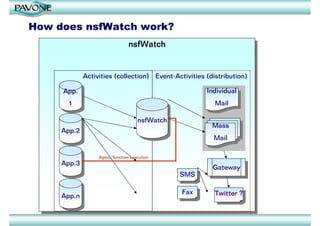
How does nsfWatch work?
                                 nsfWatch
                                  nsfWatch


              Activities (collection) Event-Activities (distribution)

     App.
      App.                                              Individual
                                                         Individual
       11                                                  Mail
                                                            Mail

                                     nsfWatch
                                      nsfWatch           Mass
                                                         Mass
     App.2
      App.2
                                                         Mail
                                                          Mail

                   Agent/function execution
     App.3
      App.3                                              Gateway
                                                         Gateway
                                                 SMS
                                                  SMS

                                                 Fax
                                                  Fax     Twitter ??
     App.n
      App.n                                                Twitter
Features I: General

  Fast deployment and customization
  Runs on client and/or server
  Fast execution times due to efficient LotusScript code
  Platform independent
  Needs no programming, no design access for monitored applications
  Activity model for flexible and individual configuration of all monitoring
  tasks
  Event documents for flexible collection and processing of monitoring
  information
  Easy access to monitored documents via doc-link inclusion in event
  documents
  Easy access to referenced data by copying data fields of monitored
  documents in event documents
Features II: Notification and control

  Dissemination of collected event data to fixed recipient list or variable
  recipient lists according to fields of monitored documents
  Options for single notification mails or aggregated newsletter style
  Options for customized notification mail forms
  Sorting of events in newsletter style notifications
  Flexible repetition of notifications by “Event Lifetime” concept
  Event management with time-tables
  Execution of field functions in monitored/source databases
  Running agents in monitored/source databases
  Logging of user actions
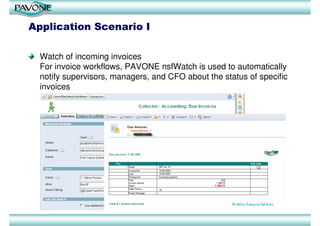
Application Scenario I

  Watch of incoming invoices
  For invoice workflows, PAVONE nsfWatch is used to automatically
  notify supervisors, managers, and CFO about the status of specific
  invoices
Application Scenario II

  nsfWatch TimeSheets including SAP integration

     Notification of employees and managers about uncompleted and/or
     unauthorized TimeSheets at the end of the month,
     by ...
         straightforward data acquisition in PAVONE TimeSheet database
         automatic periodical import of corresponding projects and cost centers
         from SAP
         automatic transformation of pending SAP transactions into nsfWatch
         activities
Contact

   PAVONE Ltd, UK              PAVONE AG
   School House, Hackforth     Technologiepark 9
   BEDALE, N. Yorks. DL8       33100 Paderborn
   1PE                         Germany
   United Kingdom              Phone: +49 5251 3102-0
   Phone: +44 1748 811527      Fax: +49 5251 3102-99
   E-Mail: info@pavone.com     E-Mail: info@pavone.de
   PAVONE Inc.                 PAVONE GmbH
   915 SE 35th Avenue, #206    Schickardstraße 60
   Portland, OR 97214
   USA                         71034 Böblingen
   Phone: +1.503.754.3144      Germany
   E-Mail: info@pavone.com     Phone.: +49 7031 4997-10
                               Fax: +49 7031 4997-97
                               E-Mail: info@pavone.de

  For more information please visit:
  http://www.pavone.com
  http://www.pavonelive.com

Synchronizating data across IBM Lotus Notes applications

  • 1.
  • 2.
    PAVONE Tools PAVONEnsfSync synchronizes your data across applications PAVONE nsfWatch controls data and escalate automatically Immediate ROI Add value for all Install once, save Line-of-Business in development applications!
  • 3.
    PAVONE nsfSync Simplifydata consistency, no development needed PAVONE nsfSync executes data synchronization across applications (NSF-databases) even if they have different replica Ids
  • 4.
    PAVONE nsfSync Simplify managingdata consistency PAVONE nsfSync efficiently manages data consistency with Sync Activities Managing multiple Sync-Activities Prioritizing Sync-Activities Toggling Sync-Activities from active to inactive Controlling execution times of Sync-Activities
  • 5.
    PAVONE nsfSync ASync-Activity defines a cross-reference data table between different applications (mapping) Synchronization occurs at field-level for Lotus Notes and Domino documents ... Synchronization requires no programming …
  • 6.
    PAVONE nsfSync –Target Users Benefits for Administrators Fast and secure data synchronization without touching the design of applications, no designer access needed Efficient and easy consistency management with sets of Sync-Activities, prioritizing, toggling from active to inactive, controlling of execution times
  • 7.
    PAVONE nsfSync Benefits forDevelopers Be more productive by replacing recurring programming effort for data-sync code with easy to use mapping definitions Replace setup time for data-sync handling and scheduling across different applications with easy to use configurations Use nsfSync's powerful protocol and logging abilities Execute the typical extensive testing effort in data-sync scenarios fast and reliable Adapt quickly to specification changes
  • 8.
    PAVONE nsfSync Benefits forControllers and Line of Business Managers Simple data collection and assembly from different applications Versatile data aggregation for diverse reporting needs without necessity (and budget) for development of new applications Providing data on-demand to reporting applications for projects, sales, CRM, SCM, finance, accounting, etc.
  • 9.
    Application Scenario I Transferring people and groups from the Domino Directory (Name & Address Book) to diverse enterprise applications Distributing the Master Directory to other operational N&A Books
  • 10.
    Application Scenario II Data integrity - synchronize fields of different documents in one database e.g. inherit the project manager's name from one document into all checkpoint documents
  • 11.
    Application Scenario III Perform field calculations in documents e.g. currency conversion
  • 12.
    Master data maintenance:Dates of different sources are aggregated in one application and kept up-to-date
  • 13.
    Master data maintenance:The customer base is distributed to different locations and maintained in a synchronized manner North West East
  • 14.
    Automatic transfer ofsupport incidents in the customer profile CRM Help Desk PAVONE nsfTools Customer A Customer B Support incidents Customer C
  • 15.
    How does nsfSyncwork? nsfSync DB relation Address Database Address Database Customer Database Customer Database Document relation Key field 1:N Field: AdressNr Field relations Field: CustomerNr table Field: AdrName AdrName:CustomerName Field: CustomerName Field: AdrZip AdrZip:CustomerZip Field: CustomerZip AdrCity:CustomerCity Field: AdrCity Field: CustomerCity ... ... Field-function Field-function Agents Agents
  • 16.
    Features I: General Fast deployment and customization Platform independent Runs on client and/or server Needs no programming, no design access for sync'ed applications Highly customizable Field-level synchronization of documents Activity model for individual configuration of all sync tasks Create, update or delete corresponding documents in databases even if they have different replica Ids Fast execution times due to efficient LotusScript code Logging of synchronization activities
  • 17.
    Features II: Fieldlevel Supports all field types Synchronization of RichText fields (byte-comparison) Detect and updates changes in multiple fields Log changes into a field of target database Log-field maintenance Append updates to fields in target database Executing field functions in source and target database Extended field functions: document properties, field properties, attachment insertion, DocLink insertion Unlimited number of field functions per activity in source and in target database
  • 18.
    Features III: Activities,Agents, SQL, Interfaces Running agents in source and target database Manual sync or server scheduled sync One-time execution of single activities Combined keys and computed keys N:1- many-to-one synchronization SQL enabled (read data from SQL source, ODBC source, and file system) Unlimited number of agent calls per activity for modeling of complex application logic Categorization of activities Event handler for inclusion of customer code - e.g. key calculation, post-processing of documents
  • 19.
    PAVONE nsfWatch PAVONE nsfWatchmonitors and supervises line-of-business information and data across Lotus Notes applications Application vendor independent Simple to configure Requires no programming Field-based monitoring Escalation
  • 20.
    Application Scenario I Monitoring project management check points when a task is delayed automatic escalation and notification to project managers Monitoring information and data collection E.g. track entering of checklists, which have to be filled in by different people and have a critical due date
  • 21.
    Application Scenario II Workflow execution monitoring E.g. notification when and at which task a process is behind schedule Data mining and data composition for reports E.g. making a sales offer by drawing data from different documents of project databases, meeting records, and contract logs Tracking sales status E.g. monitoring sales offers, offer status, changes, etc. CRM tracking E.g. notifications for sales follow-up, customer birthday, service agreement expirations. Tracking outstanding items
  • 22.
    Application Scenario III Reports about replication conflicts Reports about overdue timesheets Reports about specified agent errors Tracking of new customer registrations on the website
  • 23.
    How does nsfWatchwork? nsfWatch nsfWatch Activities (collection) Event-Activities (distribution) App. App. Individual Individual 11 Mail Mail nsfWatch nsfWatch Mass Mass App.2 App.2 Mail Mail Agent/function execution App.3 App.3 Gateway Gateway SMS SMS Fax Fax Twitter ?? App.n App.n Twitter
  • 24.
    Features I: General Fast deployment and customization Runs on client and/or server Fast execution times due to efficient LotusScript code Platform independent Needs no programming, no design access for monitored applications Activity model for flexible and individual configuration of all monitoring tasks Event documents for flexible collection and processing of monitoring information Easy access to monitored documents via doc-link inclusion in event documents Easy access to referenced data by copying data fields of monitored documents in event documents
  • 25.
    Features II: Notificationand control Dissemination of collected event data to fixed recipient list or variable recipient lists according to fields of monitored documents Options for single notification mails or aggregated newsletter style Options for customized notification mail forms Sorting of events in newsletter style notifications Flexible repetition of notifications by “Event Lifetime” concept Event management with time-tables Execution of field functions in monitored/source databases Running agents in monitored/source databases Logging of user actions
  • 26.
    Application Scenario I Watch of incoming invoices For invoice workflows, PAVONE nsfWatch is used to automatically notify supervisors, managers, and CFO about the status of specific invoices
  • 27.
    Application Scenario II nsfWatch TimeSheets including SAP integration Notification of employees and managers about uncompleted and/or unauthorized TimeSheets at the end of the month, by ... straightforward data acquisition in PAVONE TimeSheet database automatic periodical import of corresponding projects and cost centers from SAP automatic transformation of pending SAP transactions into nsfWatch activities
  • 28.
    Contact PAVONE Ltd, UK PAVONE AG School House, Hackforth Technologiepark 9 BEDALE, N. Yorks. DL8 33100 Paderborn 1PE Germany United Kingdom Phone: +49 5251 3102-0 Phone: +44 1748 811527 Fax: +49 5251 3102-99 E-Mail: info@pavone.com E-Mail: info@pavone.de PAVONE Inc. PAVONE GmbH 915 SE 35th Avenue, #206 Schickardstraße 60 Portland, OR 97214 USA 71034 Böblingen Phone: +1.503.754.3144 Germany E-Mail: info@pavone.com Phone.: +49 7031 4997-10 Fax: +49 7031 4997-97 E-Mail: info@pavone.de For more information please visit: http://www.pavone.com http://www.pavonelive.com