
Enterprise Atom/RSS Information
distribution with IBM Lotus Notes/Domino


Going Beyond Information
Topics
 What is Atom/RSS?

 RSS Reader

 Enterprise RSS

 Benefits to Individual Users and Organizations

 Conclusion and Outlook

 About PAVONE AG

 Questions
What is Atom/RSS?
 RSS is a short term for „Really Simple Syndication“

 Atom (Syndication Format) is a further development of RSS.

 Enables access to web contents from a variety of sources:
    News sites
    Online publications
    Discussion forums, Blogs


 Provided by feeds (channels)

 Example sites offer Atom and/or RSS services:
    vowe.net, edbrill.com (Blogs)
    cnn.com, computerwoche.de (News Provider)
    pavone.com (Company Information)
Atom/RSS Formats
 Atom and RSS is based on XML

 Available formats:
   RSS 0.91 (published in 2000)
   RSS 1.0 (published in 2000)
   RSS 2.0 (published in 2002)
   Atom (published in 2005)

 Formats to exchange feeds (channels): OPML

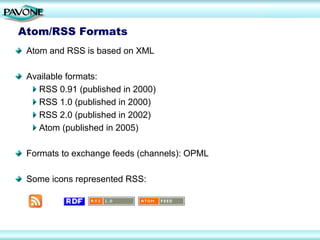
 Some icons represented RSS:
RSS Readers
 RSS Readers read contents of feeds and display information to the
 user

 Many RSS Readers are available:
    Google Reader
    NewsGator Online, FeedDemon
    Feed Reader integrated in IBM Lotus Notes 8.x
    PAVONE NewsReader
    Integrated in browsers (e. g. Microsoft Internet Explorer, Firefox)
    Integrated in Microsoft Outlook


 Content:
    Text
    Websites
    Podcasts (audio, video)
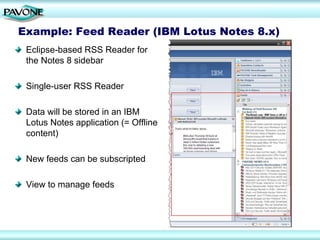
Example: Feed Reader (IBM Lotus Notes 8.x)
 Eclipse-based RSS Reader for
 the Notes 8 sidebar

 Single-user RSS Reader

 Data will be stored in an IBM
 Lotus Notes application (= Offline
 content)

 New feeds can be subscripted

 View to manage feeds
Example: PAVONE NewsReader 9
 IBM Lotus Notes/Domino-based RSS Reader


 First released in 2004


 Manual and automatic collection of news items from
 websites or from IBM Lotus Notes/Domino applications


 Multitude of functions to administrate channels and news


 Filters and email notification


 Local installation or server installation


 Central administration of channels and access control
Example: PAVONE NewsReader 9
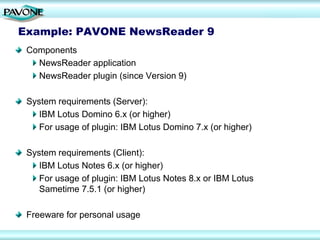
 Components
   NewsReader application
   NewsReader plugin (since Version 9)

 System requirements (Server):
    IBM Lotus Domino 6.x (or higher)
    For usage of plugin: IBM Lotus Domino 7.x (or higher)

 System requirements (Client):
    IBM Lotus Notes 6.x (or higher)
    For usage of plugin: IBM Lotus Notes 8.x or IBM Lotus
    Sametime 7.5.1 (or higher)

 Freeware for personal usage
Example: PAVONE NewsReader 9
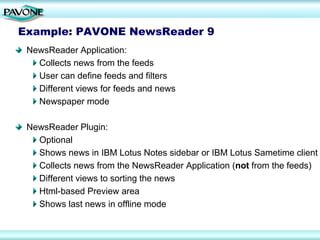
 NewsReader Application:
   Collects news from the feeds
   User can define feeds and filters
   Different views for feeds and news
   Newspaper mode

 NewsReader Plugin:
   Optional
   Shows news in IBM Lotus Notes sidebar or IBM Lotus Sametime client
   Collects news from the NewsReader Application (not from the feeds)
   Different views to sorting the news
   Html-based Preview area
   Shows last news in offline mode
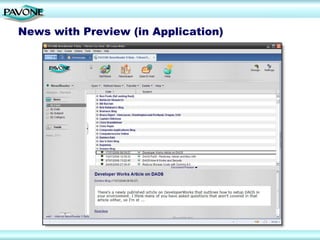
News with Preview (in Application)
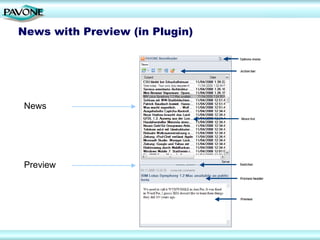
News with Preview (in Plugin)


News


Preview
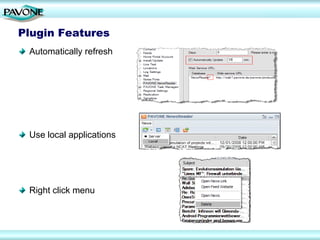
Plugin Features
 Automatically refresh


 Use local applications


 Right click menu
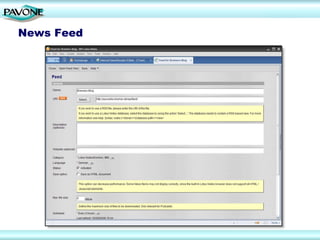
News Feed
Features
 Reads RSS- or Atom-based contents
 Scheduled retrieval
 Administration of feeds (channels)
 Categorization of news and feeds
 Display of news summaries
 Search functions
 Import and export of OPML files
 Access to individual channels can be restricted
 Retrieves HTML pages
 Retrieves podcasts
 Filtering of news by using keywords
 Automatic email notification
 Deletion marks
 More than 20 Events for programmable add-ons
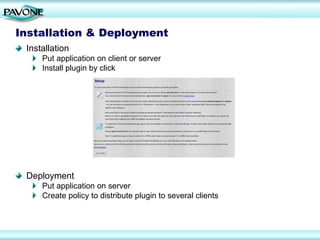
Installation & Deployment
 Installation
     Put application on client or server
     Install plugin by click


 Deployment
     Put application on server
     Create policy to distribute plugin to several clients
Enterprise RSS
 Company-wide approach to use RSS technology to distribute
 information in the company


 Reduce overall bandwidth usage


 Reduce e-mail volume through information distribution with RSS


 Reduce time spent searching for information


 Improve employee collaboration and knowledge sharing


 Central administration of feeds and access
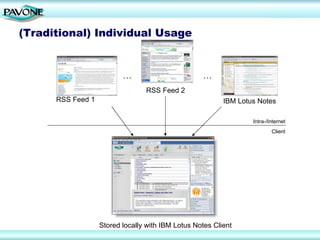
(Traditional) Individual Usage


                          …                        …
                                 RSS Feed 2
      RSS Feed 1                                          IBM Lotus Notes

                                                                  Intra-/Internet
                                                                          Client


                   Stored locally with IBM Lotus Notes Client
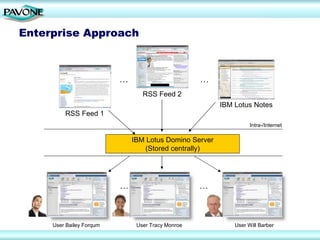
Enterprise Approach


                          …                        …
                                 RSS Feed 2
                                                        IBM Lotus Notes
         RSS Feed 1
                                                                  Intra-/Internet

                              IBM Lotus Domino Server
                                 (Stored centrally)


                          …                        …


     User Bailey Forqum        User Tracy Monroe            User Will Barber
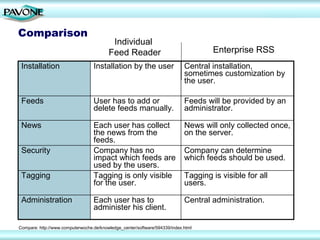
Comparison
                                          Individual
                                         Feed Reader                                Enterprise RSS
 Installation                     Installation by the user                  Central installation,
                                                                            sometimes customization by
                                                                            the user.

 Feeds                            User has to add or                        Feeds will be provided by an
                                  delete feeds manually.                    administrator.

 News                             Each user has collect                     News will only collected once,
                                  the news from the                         on the server.
                                  feeds.
 Security                         Company has no                            Company can determine
                                  impact which feeds are                    which feeds should be used.
                                  used by the users.
 Tagging                          Tagging is only visible                   Tagging is visible for all
                                  for the user.                             users.

 Administration                   Each user has to                          Central administration.
                                  administer his client.

Compare: http://www.computerwoche.de/knowledge_center/software/594339/index.html
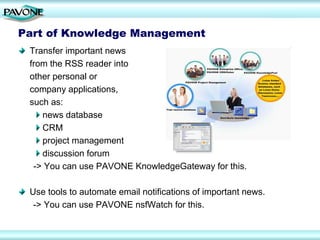
Part of Knowledge Management
 Transfer important news
 from the RSS reader into
 other personal or
 company applications,
 such as:
    news database
    CRM
    project management
    discussion forum
  -> You can use PAVONE KnowledgeGateway for this.

 Use tools to automate email notifications of important news.
  -> You can use PAVONE nsfWatch for this.
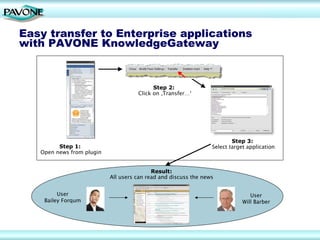
Easy transfer to Enterprise applications
with PAVONE KnowledgeGateway


                                           Step 2:
                                     Click on ‚Transfer…‘


                                                                         Step 3:
         Step 1:                                                 Select target application
   Open news from plugin


                                           Result:
                           All users can read and discuss the news


         User                                                                   User
    Bailey Forqum                                                            Will Barber
Benefits
 Complete integration within IBM Lotus Notes client reduces learning
 curve
 Internal feeds lead to greater transparency and greater exchange
 of ideas
 Time savings through reduced search effort
 Central administration of feeds and access
 Reduced extranet network traffic through server installation
 Control over the distribution of information and news
 News can be replicated and read offline
 User-friendly plugin for an IBM Lotus Notes client or
 IBM Sametime client
Conclusion & Outlook
 RSS readers are becoming a corporate standard

 Integrate your RSS reader into the knowledge management
 of your company

 PAVONE NewsReader is available as an OEM solution
 (Interface to the NewsGator Enterprise Server)

 Additional information:
 http://www.pavone.com/newsreader_en
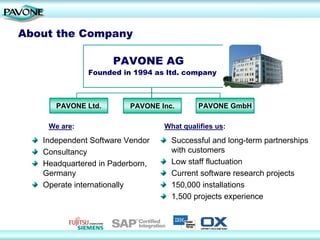
About the Company

                    PAVONE AG
              Founded in 1994 as ltd. company


      PAVONE Ltd.        PAVONE Inc.       PAVONE GmbH

    We are:                      What qualifies us:

   Independent Software Vendor     Successful and long-term partnerships
   Consultancy                     with customers
   Headquartered in Paderborn,     Low staff fluctuation
   Germany                         Current software research projects
   Operate internationally         150,000 installations
                                   1,500 projects experience
Contact
  PAVONE Ltd, UK               PAVONE AG
  School House, Hackforth      Technologiepark 9
  BEDALE, N. Yorks. DL8        33100 Paderborn
  1PE                          Germany
  United Kingdom               Phone: +49 5251 3102-0
  Phone: +44 1748 811527       Fax: +49 5251 3102-99
  E-Mail: info@pavone.com      E-Mail: info@pavone.de

  PAVONE Inc.                  PAVONE GmbH
  915 SE 35th Avenue, #206     Schickardstraße 60
  Portland, OR 97214
  USA                          71034 Böblingen
  Phone: +1.503.754.3144       Germany
  E-Mail: info@pavone.com      Phone.: +49 7031 4997-10
                               Fax: +49 7031 4997-97
                               E-Mail: info@pavone.de

  For more information please visit:
  http://www.pavone.com
  http://www.pavonelive.com

RSS Reader: Complete integration within IBM Lotus Notes client

  • 1.
    Enterprise Atom/RSS Information distributionwith IBM Lotus Notes/Domino Going Beyond Information
  • 2.
    Topics What isAtom/RSS? RSS Reader Enterprise RSS Benefits to Individual Users and Organizations Conclusion and Outlook About PAVONE AG Questions
  • 3.
    What is Atom/RSS? RSS is a short term for „Really Simple Syndication“ Atom (Syndication Format) is a further development of RSS. Enables access to web contents from a variety of sources: News sites Online publications Discussion forums, Blogs Provided by feeds (channels) Example sites offer Atom and/or RSS services: vowe.net, edbrill.com (Blogs) cnn.com, computerwoche.de (News Provider) pavone.com (Company Information)
  • 4.
    Atom/RSS Formats Atomand RSS is based on XML Available formats: RSS 0.91 (published in 2000) RSS 1.0 (published in 2000) RSS 2.0 (published in 2002) Atom (published in 2005) Formats to exchange feeds (channels): OPML Some icons represented RSS:
  • 5.
    RSS Readers RSSReaders read contents of feeds and display information to the user Many RSS Readers are available: Google Reader NewsGator Online, FeedDemon Feed Reader integrated in IBM Lotus Notes 8.x PAVONE NewsReader Integrated in browsers (e. g. Microsoft Internet Explorer, Firefox) Integrated in Microsoft Outlook Content: Text Websites Podcasts (audio, video)
  • 6.
    Example: Feed Reader(IBM Lotus Notes 8.x) Eclipse-based RSS Reader for the Notes 8 sidebar Single-user RSS Reader Data will be stored in an IBM Lotus Notes application (= Offline content) New feeds can be subscripted View to manage feeds
  • 7.
    Example: PAVONE NewsReader9 IBM Lotus Notes/Domino-based RSS Reader First released in 2004 Manual and automatic collection of news items from websites or from IBM Lotus Notes/Domino applications Multitude of functions to administrate channels and news Filters and email notification Local installation or server installation Central administration of channels and access control
  • 8.
    Example: PAVONE NewsReader9 Components NewsReader application NewsReader plugin (since Version 9) System requirements (Server): IBM Lotus Domino 6.x (or higher) For usage of plugin: IBM Lotus Domino 7.x (or higher) System requirements (Client): IBM Lotus Notes 6.x (or higher) For usage of plugin: IBM Lotus Notes 8.x or IBM Lotus Sametime 7.5.1 (or higher) Freeware for personal usage
  • 9.
    Example: PAVONE NewsReader9 NewsReader Application: Collects news from the feeds User can define feeds and filters Different views for feeds and news Newspaper mode NewsReader Plugin: Optional Shows news in IBM Lotus Notes sidebar or IBM Lotus Sametime client Collects news from the NewsReader Application (not from the feeds) Different views to sorting the news Html-based Preview area Shows last news in offline mode
  • 10.
    News with Preview(in Application)
  • 11.
    News with Preview(in Plugin) News Preview
  • 12.
    Plugin Features Automaticallyrefresh Use local applications Right click menu
  • 13.
  • 14.
    Features Reads RSS-or Atom-based contents Scheduled retrieval Administration of feeds (channels) Categorization of news and feeds Display of news summaries Search functions Import and export of OPML files Access to individual channels can be restricted Retrieves HTML pages Retrieves podcasts Filtering of news by using keywords Automatic email notification Deletion marks More than 20 Events for programmable add-ons
  • 15.
    Installation & Deployment Installation Put application on client or server Install plugin by click Deployment Put application on server Create policy to distribute plugin to several clients
  • 16.
    Enterprise RSS Company-wideapproach to use RSS technology to distribute information in the company Reduce overall bandwidth usage Reduce e-mail volume through information distribution with RSS Reduce time spent searching for information Improve employee collaboration and knowledge sharing Central administration of feeds and access
  • 17.
    (Traditional) Individual Usage … … RSS Feed 2 RSS Feed 1 IBM Lotus Notes Intra-/Internet Client Stored locally with IBM Lotus Notes Client
  • 18.
    Enterprise Approach … … RSS Feed 2 IBM Lotus Notes RSS Feed 1 Intra-/Internet IBM Lotus Domino Server (Stored centrally) … … User Bailey Forqum User Tracy Monroe User Will Barber
  • 19.
    Comparison Individual Feed Reader Enterprise RSS Installation Installation by the user Central installation, sometimes customization by the user. Feeds User has to add or Feeds will be provided by an delete feeds manually. administrator. News Each user has collect News will only collected once, the news from the on the server. feeds. Security Company has no Company can determine impact which feeds are which feeds should be used. used by the users. Tagging Tagging is only visible Tagging is visible for all for the user. users. Administration Each user has to Central administration. administer his client. Compare: http://www.computerwoche.de/knowledge_center/software/594339/index.html
  • 20.
    Part of KnowledgeManagement Transfer important news from the RSS reader into other personal or company applications, such as: news database CRM project management discussion forum -> You can use PAVONE KnowledgeGateway for this. Use tools to automate email notifications of important news. -> You can use PAVONE nsfWatch for this.
  • 21.
    Easy transfer toEnterprise applications with PAVONE KnowledgeGateway Step 2: Click on ‚Transfer…‘ Step 3: Step 1: Select target application Open news from plugin Result: All users can read and discuss the news User User Bailey Forqum Will Barber
  • 22.
    Benefits Complete integrationwithin IBM Lotus Notes client reduces learning curve Internal feeds lead to greater transparency and greater exchange of ideas Time savings through reduced search effort Central administration of feeds and access Reduced extranet network traffic through server installation Control over the distribution of information and news News can be replicated and read offline User-friendly plugin for an IBM Lotus Notes client or IBM Sametime client
  • 23.
    Conclusion & Outlook RSS readers are becoming a corporate standard Integrate your RSS reader into the knowledge management of your company PAVONE NewsReader is available as an OEM solution (Interface to the NewsGator Enterprise Server) Additional information: http://www.pavone.com/newsreader_en
  • 24.
    About the Company PAVONE AG Founded in 1994 as ltd. company PAVONE Ltd. PAVONE Inc. PAVONE GmbH We are: What qualifies us: Independent Software Vendor Successful and long-term partnerships Consultancy with customers Headquartered in Paderborn, Low staff fluctuation Germany Current software research projects Operate internationally 150,000 installations 1,500 projects experience
  • 25.
    Contact PAVONELtd, UK PAVONE AG School House, Hackforth Technologiepark 9 BEDALE, N. Yorks. DL8 33100 Paderborn 1PE Germany United Kingdom Phone: +49 5251 3102-0 Phone: +44 1748 811527 Fax: +49 5251 3102-99 E-Mail: info@pavone.com E-Mail: info@pavone.de PAVONE Inc. PAVONE GmbH 915 SE 35th Avenue, #206 Schickardstraße 60 Portland, OR 97214 USA 71034 Böblingen Phone: +1.503.754.3144 Germany E-Mail: info@pavone.com Phone.: +49 7031 4997-10 Fax: +49 7031 4997-97 E-Mail: info@pavone.de For more information please visit: http://www.pavone.com http://www.pavonelive.com