PAVONE OfficeGateway


PAVONE OfficeGateway Turns Office Productivity
   Tools into True Collaborative Applications
Agenda


 What is PAVONE OfficeGateway?

 Why PAVONE OfficeGateway?

 How does it work?

 Application Scenario

 Demo

 Summary

 Q&A
What is PAVONE OfficeGateway?

 Interface between Lotus Notes and Office Productivity Tools:
    Microsoft Office
    OpenOffice
    Lotus Symphony
    Lotus SmartSuite

 Based on COM Technology (Component Object Model)

 Smoothly integrate and save Office
 Files in Notes Documents
 (no OLE-Objects in Lotus Notes)

 Bi-directional exchange of data between
 Notes Documents and Office Files

 Support and Manage Templates
How does it work?

 PAVONE OfficeGateway lets you directly work with Microsoft Office
 out of your Notes application.

 After the first easy embedding of Microsoft Office files in Notes they
 become an integral part of documents in your Notes database.

 (Re-) Editing is just a click away in your document.

 Same integration process with other Office Productivity Tools
How does it work?

 PAVONE OfficeGateway lets you directly work with Microsoft Office
 out of your Notes application.

 After the first easy embedding of Microsoft Office files in Notes they
 become an integral part of documents in your Notes database.

 (Re-) Editing is just a click away in your document.

 Same integration process with other Office Productivity Tools
How does it work?

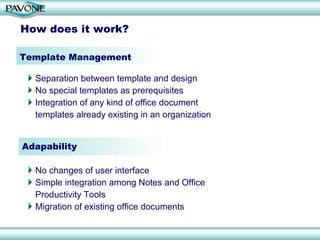
Template Management

  Separation between template and design
  No special templates as prerequisites
  Integration of any kind of office document
  templates already existing in an organization


Adapability

  No changes of user interface
  Simple integration among Notes and Office
  Productivity Tools
  Migration of existing office documents
How does it work?

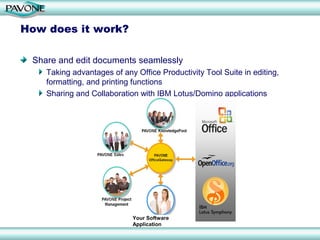
 Share and edit documents seamlessly
    Taking advantages of any Office Productivity Tool Suite in editing,
    formatting, and printing functions
    Sharing and Collaboration with IBM Lotus/Domino applications


                            Your Software
                            Application
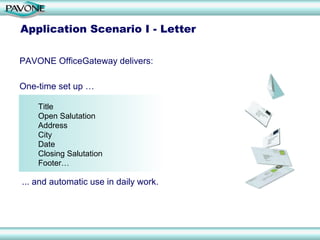
Application Scenario I - Letter

PAVONE OfficeGateway delivers:

One-time set up …

    Title
    Open Salutation
    Address
    City
    Date
    Closing Salutation
    Footer…

... and automatic use in daily work.
Application Scenario II – Mail Merge

  Scenario:
     For Marketing and Sales Campaigns, Surveys, News Letters,
     Holiday Greeting cards, mail distribution to different customers,
     suppliers, employees is easy to handle
  Individual fields:
      Fields like addresses, opening phrases, and salutations are
      assigned individually

  General fields:
    Fields like date, location, and subject titles are handled as
    general text-markers
Application Senario III – Address lists as Tables

  Notes Application –> Microsoft Excel table

     User data from Notes Applications are transferred into an MS Excel table.
     Additional information is included, e.g. author, creation date, etc.


     Names can be assigned to cells in MS Excel. In the associated template
     rules for data transfer including modifications can be defined.


  Same functionalities with Calc in OpenOffice or Lotus Symphony
Application Scenario IV – Data Analysis

  For data editing and presentation (e.g. including graphics) Microsoft
  Excel is used

  PAVONE Office Gateway remembers the respective data entry fields
  for re-editing and continuous use
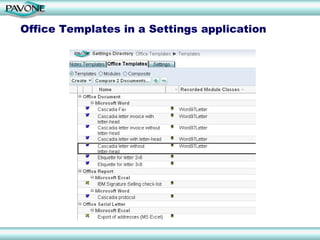
Office Templates in a Settings application
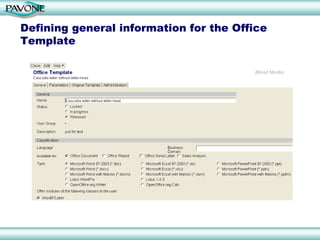
Defining general information for the Office
Template
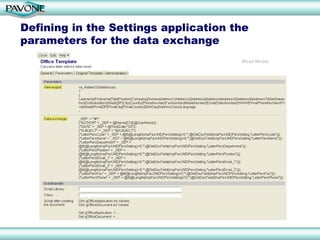
Defining in the Settings application the
parameters for the data exchange
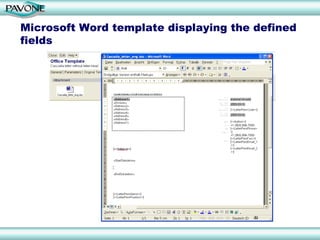
Microsoft Word template displaying the defined
fields
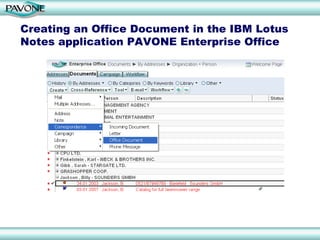
Creating an Office Document in the IBM Lotus
Notes application PAVONE Enterprise Office
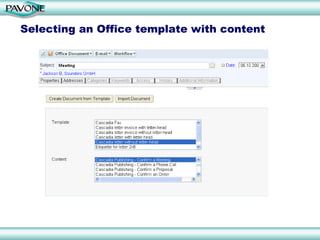
Selecting an Office template with content
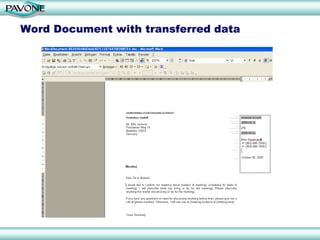
Word Document with transferred data
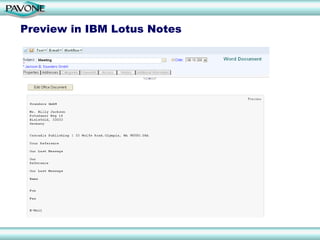
Preview in IBM Lotus Notes
Summary

   Productivity gains
       Integration of Office Productivity Tools (Microsoft Office, OpenOffice, IBM Lotus
       Symphony) with collaboration solutions
   Value-add
      Enabling of Data Aggregation and Data Analysis from IBM Lotus applications to
      office documents, presentations or spreadsheets
   Security
      Bringing tried and tested Lotus Notes Security to office tools and documents, e.g.
      financial reports, risk analyses, meeting protocols, confidential documents
   Easy migration
      Bringing functionality, employee skills and document content of office tools to a real
      collaboration environment for team access, collaboration and content sharing

   Integrated application with all PAVONE’s products and solutions

PAVONE OfficeGateway Turns Office Productivity Tools into True Collaborative
Applications.
Q&A


      Important Websites:
      http://www.pavone.com
      http://www.pavonelive.com
Contact
  PAVONE Ltd, UK              PAVONE AG
  School House, Hackforth     Technologiepark 9
  BEDALE, N. Yorks. DL8       33100 Paderborn
  1PE                         Germany
  United Kingdom              Phone: +49 5251 3102-0
  Phone: +44 1748 811527      Fax: +49 5251 3102-99
  E-Mail: info@pavone.com     E-Mail: info@pavone.de
  PAVONE Inc.                 PAVONE GmbH
  915 SE 35th Avenue, #206    Schickardstraße 60
  Portland, OR 97214
  USA                         71034 Böblingen
  Phone: +1.503.754.3144      Germany
  E-Mail: info@pavone.com     Phone.: +49 7031 4997-10
                              Fax: +49 7031 4997-97
                              E-Mail: info@pavone.de

  For more information please visit:
  http://www.pavone.com
  http://www.pavonelive.com

Interface between IBM Lotus Notes and Office Suites

  • 1.
    PAVONE OfficeGateway PAVONE OfficeGatewayTurns Office Productivity Tools into True Collaborative Applications
  • 2.
    Agenda What isPAVONE OfficeGateway? Why PAVONE OfficeGateway? How does it work? Application Scenario Demo Summary Q&A
  • 3.
    What is PAVONEOfficeGateway? Interface between Lotus Notes and Office Productivity Tools: Microsoft Office OpenOffice Lotus Symphony Lotus SmartSuite Based on COM Technology (Component Object Model) Smoothly integrate and save Office Files in Notes Documents (no OLE-Objects in Lotus Notes) Bi-directional exchange of data between Notes Documents and Office Files Support and Manage Templates
  • 4.
    How does itwork? PAVONE OfficeGateway lets you directly work with Microsoft Office out of your Notes application. After the first easy embedding of Microsoft Office files in Notes they become an integral part of documents in your Notes database. (Re-) Editing is just a click away in your document. Same integration process with other Office Productivity Tools
  • 5.
    How does itwork? PAVONE OfficeGateway lets you directly work with Microsoft Office out of your Notes application. After the first easy embedding of Microsoft Office files in Notes they become an integral part of documents in your Notes database. (Re-) Editing is just a click away in your document. Same integration process with other Office Productivity Tools
  • 6.
    How does itwork? Template Management Separation between template and design No special templates as prerequisites Integration of any kind of office document templates already existing in an organization Adapability No changes of user interface Simple integration among Notes and Office Productivity Tools Migration of existing office documents
  • 7.
    How does itwork? Share and edit documents seamlessly Taking advantages of any Office Productivity Tool Suite in editing, formatting, and printing functions Sharing and Collaboration with IBM Lotus/Domino applications Your Software Application
  • 8.
    Application Scenario I- Letter PAVONE OfficeGateway delivers: One-time set up … Title Open Salutation Address City Date Closing Salutation Footer… ... and automatic use in daily work.
  • 9.
    Application Scenario II– Mail Merge Scenario: For Marketing and Sales Campaigns, Surveys, News Letters, Holiday Greeting cards, mail distribution to different customers, suppliers, employees is easy to handle Individual fields: Fields like addresses, opening phrases, and salutations are assigned individually General fields: Fields like date, location, and subject titles are handled as general text-markers
  • 10.
    Application Senario III– Address lists as Tables Notes Application –> Microsoft Excel table User data from Notes Applications are transferred into an MS Excel table. Additional information is included, e.g. author, creation date, etc. Names can be assigned to cells in MS Excel. In the associated template rules for data transfer including modifications can be defined. Same functionalities with Calc in OpenOffice or Lotus Symphony
  • 11.
    Application Scenario IV– Data Analysis For data editing and presentation (e.g. including graphics) Microsoft Excel is used PAVONE Office Gateway remembers the respective data entry fields for re-editing and continuous use
  • 12.
    Office Templates ina Settings application
  • 13.
    Defining general informationfor the Office Template
  • 14.
    Defining in theSettings application the parameters for the data exchange
  • 15.
    Microsoft Word templatedisplaying the defined fields
  • 16.
    Creating an OfficeDocument in the IBM Lotus Notes application PAVONE Enterprise Office
  • 17.
    Selecting an Officetemplate with content
  • 18.
    Word Document withtransferred data
  • 19.
    Preview in IBMLotus Notes
  • 20.
    Summary Productivity gains Integration of Office Productivity Tools (Microsoft Office, OpenOffice, IBM Lotus Symphony) with collaboration solutions Value-add Enabling of Data Aggregation and Data Analysis from IBM Lotus applications to office documents, presentations or spreadsheets Security Bringing tried and tested Lotus Notes Security to office tools and documents, e.g. financial reports, risk analyses, meeting protocols, confidential documents Easy migration Bringing functionality, employee skills and document content of office tools to a real collaboration environment for team access, collaboration and content sharing Integrated application with all PAVONE’s products and solutions PAVONE OfficeGateway Turns Office Productivity Tools into True Collaborative Applications.
  • 21.
    Q&A Important Websites: http://www.pavone.com http://www.pavonelive.com
  • 22.
    Contact PAVONELtd, UK PAVONE AG School House, Hackforth Technologiepark 9 BEDALE, N. Yorks. DL8 33100 Paderborn 1PE Germany United Kingdom Phone: +49 5251 3102-0 Phone: +44 1748 811527 Fax: +49 5251 3102-99 E-Mail: info@pavone.com E-Mail: info@pavone.de PAVONE Inc. PAVONE GmbH 915 SE 35th Avenue, #206 Schickardstraße 60 Portland, OR 97214 USA 71034 Böblingen Phone: +1.503.754.3144 Germany E-Mail: info@pavone.com Phone.: +49 7031 4997-10 Fax: +49 7031 4997-97 E-Mail: info@pavone.de For more information please visit: http://www.pavone.com http://www.pavonelive.com