Exploring E-Learning: 1st October

Aims:
•   Review our e-competencies and set goals.
•   Explore : What is effective e-learning pedagogy?


Successful if…
•   motivated by ICT, gained practical ideas for integration, set
    goals for term 4 and beyond.
•   shared understanding about what quality teaching with ICT
    looks like.
Manage electronic communication effectively to
            strengthen learning relationships.

Check and respond to electronic communications at least twice per weekday including
                             first thing in the morning.
                 Flagging, filing, attachments, setting up groups…
Establish and maintain a meaningful web presence that
            reflects your class learning programme.

Set-up and make regular posts (minimum of 2 per term) to a class blog, wiki or learning cave.
This online presence will provide opportunities for students to revisit learning, access further
                 learning and involve whanau and other learning partners.
Facilitate a student centred approach to on-going,
     authentic teaching and learning about cyber safety.
Teachers familiarizing themselves with the resources available in the education section of
           netsafe and integrate selected resources into classroom learning.
Use online resources to further integrate Maori tikanga into
               learning and teaching programmes.


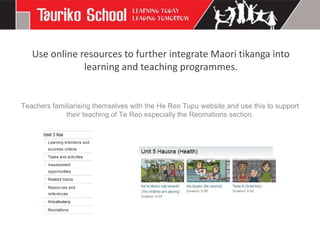
Teachers familiarising themselves with the He Reo Tupu website and use this to support
             their teaching of Te Reo especially the Reomations section.
Extend your personal professional learning by participating in
                  relevant online environments.
Familiarizing yourself with the Enabling E-Learning website. and community discussions of
interest within the Virtual Learning Network. Joining an online professional learning group
             and/or subscribing to at least one online newsletter or RSS feed…
Lead an aspect of learning through the use of ICT.

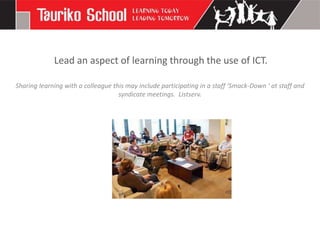
Sharing learning with a colleague this may include participating in a staff ‘Smack-Down ' at staff and
                                    syndicate meetings. Listserv.
Enhance planning for learning by using ICT to share ideas,
              collaborate and co-construct.
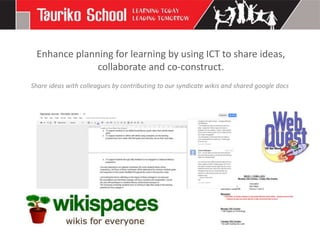
Share ideas with colleagues by contributing to our syndicate wikis and shared google docs
Apply your understanding of effective pedagogy including
        classroom management to ensure purposeful and
              challenging use of ICT within learning.
Create a snapshot of learning using the teaching as inquiry framework to share how the decisions
                           you made have impacted student learning.
   Discuss your use of ICT and its impact as part of ‘teaching as inquiry’ appraisal discussions.
Discuss, give examples of how the effective pedagogy statement in the Tauriko School curriculum
                  document relates to the use of ICT in your teaching practice.
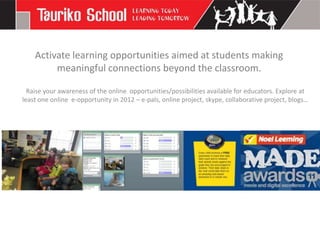
Activate learning opportunities aimed at students making
         meaningful connections beyond the classroom.

  Raise your awareness of the online opportunities/possibilities available for educators. Explore at
least one online e-opportunity in 2012 – e-pals, online project, skype, collaborative project, blogs…
Activate opportunities for students to share, learn and lead using
                              ICT’s.
                      Facilitation of a culture and systems that allow students to:
                         • be ICT experts within and beyond their classroom
                                             • learn by doing
                               • share their learning locally and globally
  •   develop a breadth and depth of knowledge and understanding on how technology can be used to
                                            support their learning.
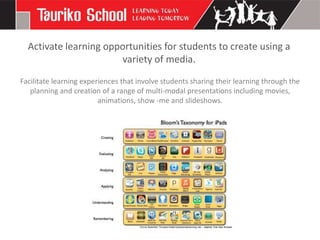
Activate learning opportunities for students to create using a
                       variety of media.
Facilitate learning experiences that involve students sharing their learning through the
   planning and creation of a range of multi-modal presentations including movies,
                         animations, show -me and slideshows.
Use ICT as a hook to respond to individuals’ passions,
                   interests and needs.

Responding and activating student interests through the use of carefully selected
          websites, tools, programmes and media (cameras, videos).
Use online resources to extend our understanding of learning
                  in a bicultural context..


 Increase your knowledge of key resources that can support teachers to reflect the
value base and beliefs of Maori students in their teaching and learning programmes.
Use the school SMS and other online tools to support data
collection, management, analysis and to inform learning and
                        teaching.


Access etap independently, successfully generate required class lists and pupil details.
 Enter data and use information to formulate student reports and update individual
                                      profiles.

Part1 ecompetencies

  • 1.
    Exploring E-Learning: 1stOctober Aims: • Review our e-competencies and set goals. • Explore : What is effective e-learning pedagogy? Successful if… • motivated by ICT, gained practical ideas for integration, set goals for term 4 and beyond. • shared understanding about what quality teaching with ICT looks like.
  • 2.
    Manage electronic communicationeffectively to strengthen learning relationships. Check and respond to electronic communications at least twice per weekday including first thing in the morning. Flagging, filing, attachments, setting up groups…
  • 3.
    Establish and maintaina meaningful web presence that reflects your class learning programme. Set-up and make regular posts (minimum of 2 per term) to a class blog, wiki or learning cave. This online presence will provide opportunities for students to revisit learning, access further learning and involve whanau and other learning partners.
  • 4.
    Facilitate a studentcentred approach to on-going, authentic teaching and learning about cyber safety. Teachers familiarizing themselves with the resources available in the education section of netsafe and integrate selected resources into classroom learning.
  • 5.
    Use online resourcesto further integrate Maori tikanga into learning and teaching programmes. Teachers familiarising themselves with the He Reo Tupu website and use this to support their teaching of Te Reo especially the Reomations section.
  • 6.
    Extend your personalprofessional learning by participating in relevant online environments. Familiarizing yourself with the Enabling E-Learning website. and community discussions of interest within the Virtual Learning Network. Joining an online professional learning group and/or subscribing to at least one online newsletter or RSS feed…
  • 7.
    Lead an aspectof learning through the use of ICT. Sharing learning with a colleague this may include participating in a staff ‘Smack-Down ' at staff and syndicate meetings. Listserv.
  • 8.
    Enhance planning forlearning by using ICT to share ideas, collaborate and co-construct. Share ideas with colleagues by contributing to our syndicate wikis and shared google docs
  • 9.
    Apply your understandingof effective pedagogy including classroom management to ensure purposeful and challenging use of ICT within learning. Create a snapshot of learning using the teaching as inquiry framework to share how the decisions you made have impacted student learning. Discuss your use of ICT and its impact as part of ‘teaching as inquiry’ appraisal discussions. Discuss, give examples of how the effective pedagogy statement in the Tauriko School curriculum document relates to the use of ICT in your teaching practice.
  • 10.
    Activate learning opportunitiesaimed at students making meaningful connections beyond the classroom. Raise your awareness of the online opportunities/possibilities available for educators. Explore at least one online e-opportunity in 2012 – e-pals, online project, skype, collaborative project, blogs…
  • 11.
    Activate opportunities forstudents to share, learn and lead using ICT’s. Facilitation of a culture and systems that allow students to: • be ICT experts within and beyond their classroom • learn by doing • share their learning locally and globally • develop a breadth and depth of knowledge and understanding on how technology can be used to support their learning.
  • 12.
    Activate learning opportunitiesfor students to create using a variety of media. Facilitate learning experiences that involve students sharing their learning through the planning and creation of a range of multi-modal presentations including movies, animations, show -me and slideshows.
  • 13.
    Use ICT asa hook to respond to individuals’ passions, interests and needs. Responding and activating student interests through the use of carefully selected websites, tools, programmes and media (cameras, videos).
  • 14.
    Use online resourcesto extend our understanding of learning in a bicultural context.. Increase your knowledge of key resources that can support teachers to reflect the value base and beliefs of Maori students in their teaching and learning programmes.
  • 15.
    Use the schoolSMS and other online tools to support data collection, management, analysis and to inform learning and teaching. Access etap independently, successfully generate required class lists and pupil details. Enter data and use information to formulate student reports and update individual profiles.

Editor's Notes

  • #2 Parent group.Starring emails,Adding attachmentsSetting up groups
  • #3 Parent group.Starring emails,Adding attachmentsSetting up groups
  • #4 Links sets, lng caves, blogs , wikis, google apps, embedding of web 2.0, google sites, uploading to our school websiteBlended learning: For elearning to enhance powerful learning opportunities by providing engaging, accessible and authentic learning experiences for the 21st century learner.We believe that “blended learning” , a combination of traditional and elearning practices, will best meet the needs of our learners.
  • #5 The focus of cybersafety has expanded beyond policies and procedures to include discussion, action, and teachable moments in the classroom. Students need to build skills and knowledge to effectively manage cyber challenges themselves, and become confident and successful digital citizens-Our school values- integrity, respect, excellence, innovation- Year 5/6 syndicate has been trialling superclub plus – cyber safety badges..
  • #7 Pull vs. push. Newsletter, webinars, blog subscriptionsCurriculum you leadArea of interestTki communities have newslettersJill- email – science guyIct and english listserv
  • #8 Ipad group – everyone has ledBloggers – Jo, Lisa, NatalieVideos Wikis - annaGoogle sitesMathelectics- personalising that –
  • #9 Resourceful, webquestsGoogle docsAnna – wiki expertUse of webquestsWeek aheadNewsletterLesley = UFB
  • #10 Share formative assessment – google dashboard- me
  • #11 CompetitionsVirtual worlds for educationOnline gamesGlobal CollaborationsSocial NetworksSites to Learn at your own paceCreative challengesVln mathsScientist visit sitesSkype
  • #12 Vln mathsScientist visit sitesSkypeJunior – senior mentorsCompetitionsGlobal projects – rm 12BYODProgressionsUse of ipads
  • #13 Show mesAnimotos – sports campWriters – create movies
  • #14 Show mesAnimotos – sports campWriters – create movies
  • #15 Show mesAnimotos – sports campWriters – create movies
  • #16 Getting used to this – I have forgotten how to put running record info in.Attendance, reports..