ers4500 802.1x application on MS2003 Version  3 Alp IŞIK Netas NTS Engineer [email_address]
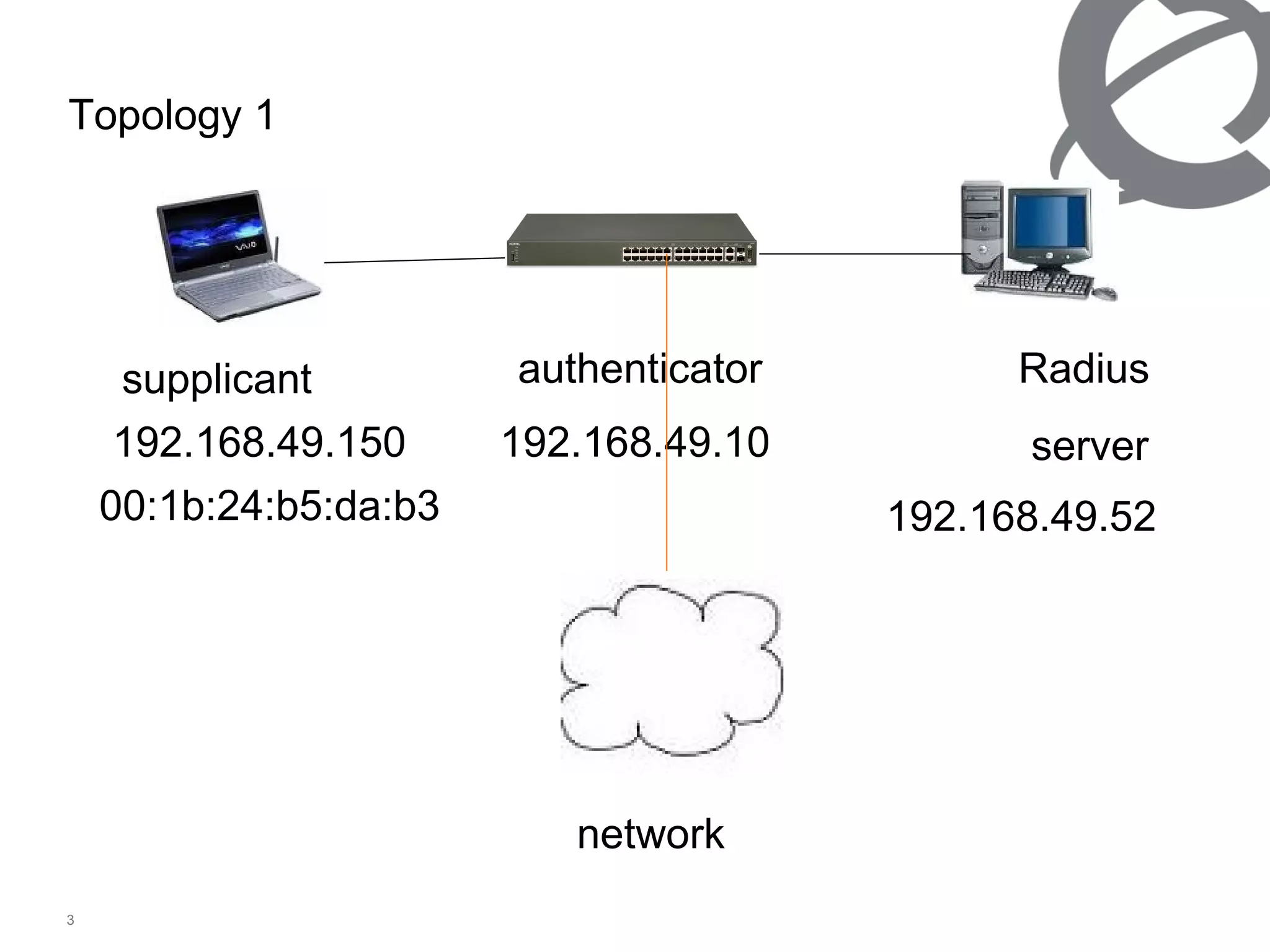
Topology 1 supplicant authenticator Radius  server 192.168.49.10 192.168.49.150 192.168.49.52 00:1b:24:b5:da:b3 network
Eap 2) Neap (non-eap) Authentication types that ers’s support
802.1X provides port-based authentication, which involves communications between a supplicant, authenticator, and authentication server. Port refers to a single point of attachment to the LAN infrastructure. The supplicant is often software on a client device, such as a laptop; the authenticator is a network device, such as an ethernet switch or wireless access point; and the authentication server is typically a host running software supporting the  RADIUS  and EAP protocols. EAP Authentication concept 1/2
EAP Authentication concept 2/2 The authenticator acts like a security guard to a protected network. The supplicant (i.e., client device) is not allowed access through the authenticator to the protected side of the network until the supplicant’s identity has been validated and authorized. An analogy to this is providing a valid passport at an airport before being allowed to pass through security to the terminal. With 802.1X port-based authentication,  the supplicant provides credentials, such as user name / password or digital certificate, to the authenticator, and the authenticator forwards the credentials to the authentication server for verification .  If the credentials are valid (in the authentication server database), the supplicant (client device) is allowed to access resources located on the protected side of the network.
Neap Authentication concept Neap is developed, cause eap does not useful for the dummy user or some user device, and still authentication security is neccesary. Neap uses to authenticate the user’s mac address, ip address, port number of the authenticator. It can either use only mac, ip address or the combinastion of the above.
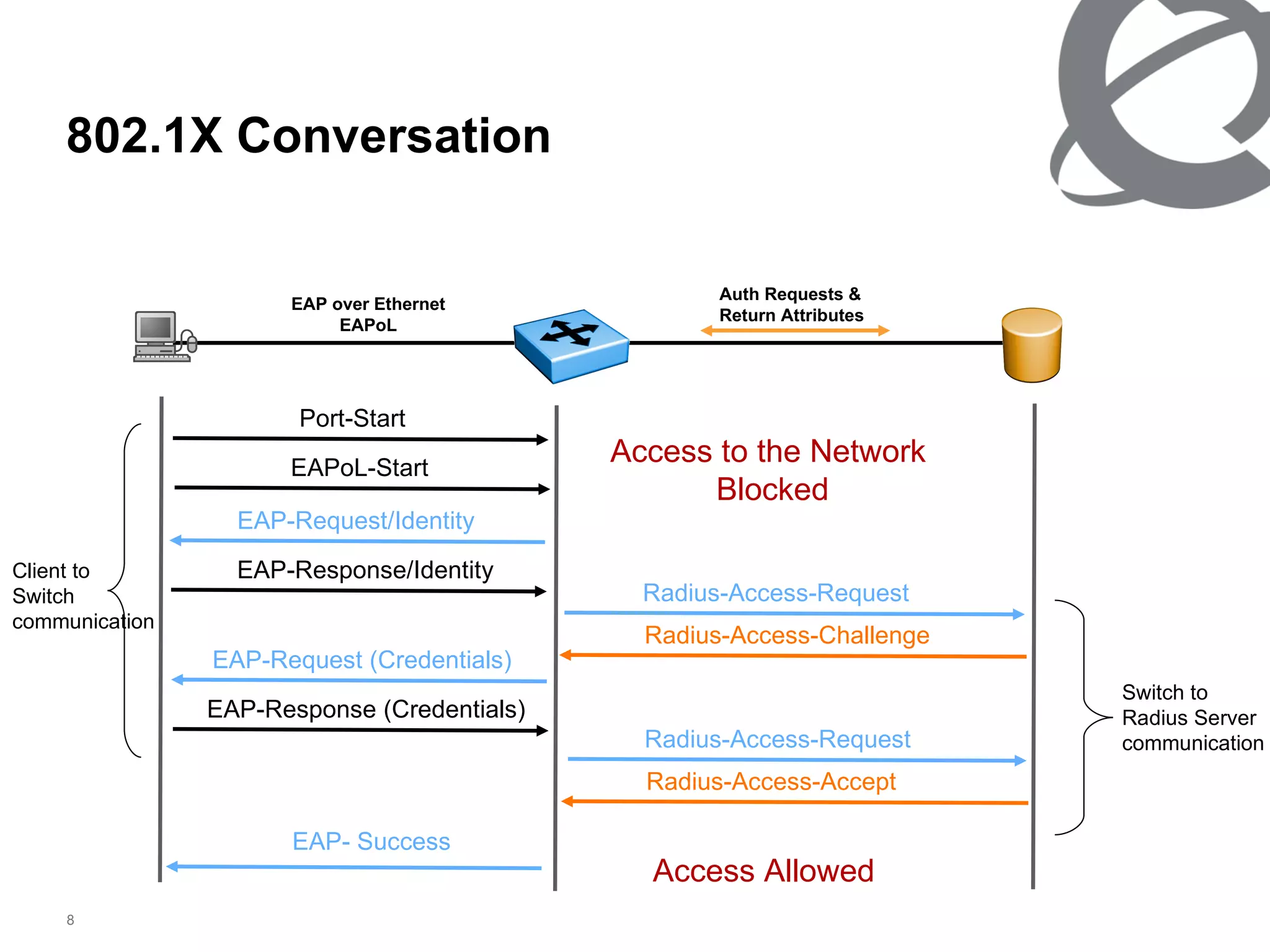
802.1X Conversation RADIUS Server (Authentication Server) Ethernet Switch  (RADIUS Client) PC_Client  (EAP Client/Supplicant) EAP over Ethernet EAPoL Auth Requests & Return Attributes Port-Start EAPoL-Start EAP-Request/Identity EAP-Response/Identity Radius-Access-Request Radius-Access-Challenge EAP-Request (Credentials) EAP-Response (Credentials) Radius-Access-Request Radius-Access-Accept EAP- Success Access to the Network  Blocked Access Allowed Switch to  Radius Server  communication Client to  Switch communication
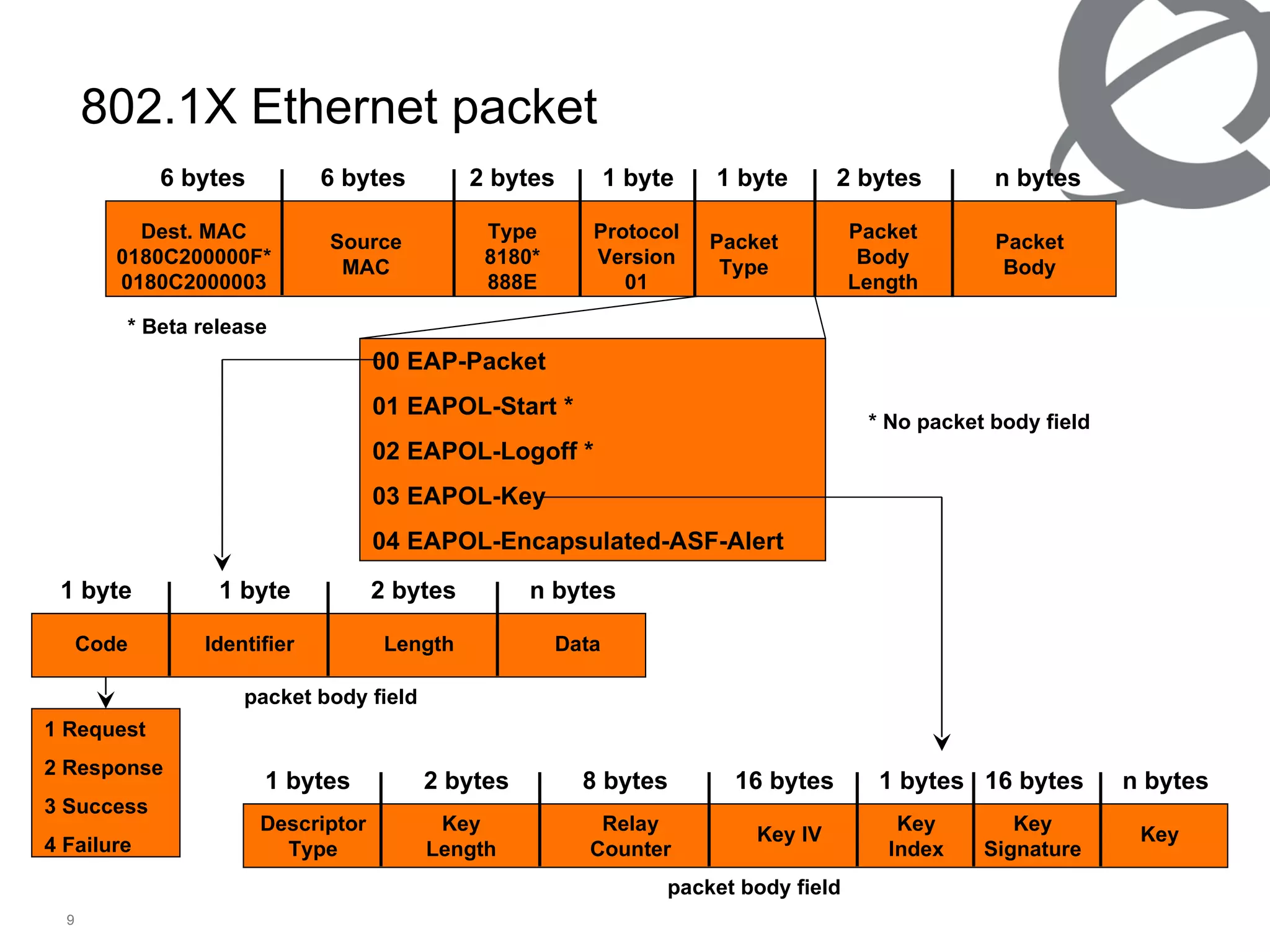
802.1 X Ethernet packet Dest .  MAC 0180C200000F* 0180C2000003 Type 8180* 888E Protocol Version 01 Packet Type 6 bytes 6 bytes 2  bytes 1  byte Source MAC 1  byte Packet Body Length 2  bytes Packet Body n  bytes 00  EAP-Packet 01  EAPOL-Start  * 02  EAPOL-Logoff  * 03  EAPOL-Ke y 04  EAPOL-Encapsulated-ASF-Aler t Descriptor Type Key Length Relay Counter Key IV 1  bytes 2  bytes 8  bytes 16  bytes Key Index Key Signature Key 1  bytes n  bytes 16  bytes * No packet body field packet body field packet body field * Beta release Code Identifier Length Data 1  byte 1  byte 2  bytes n  bytes 1 Request 2 Response 3 Success 4 Failure
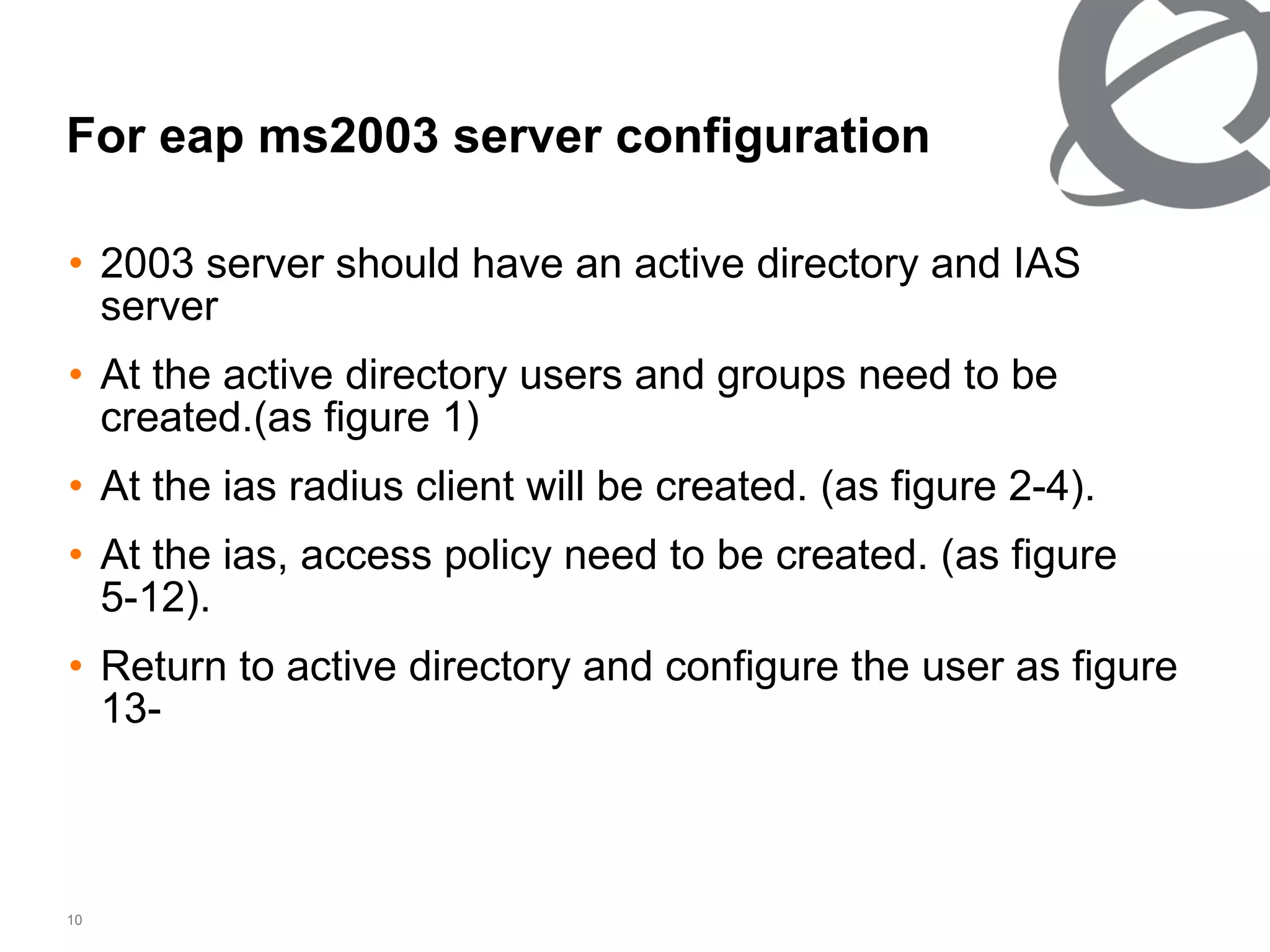
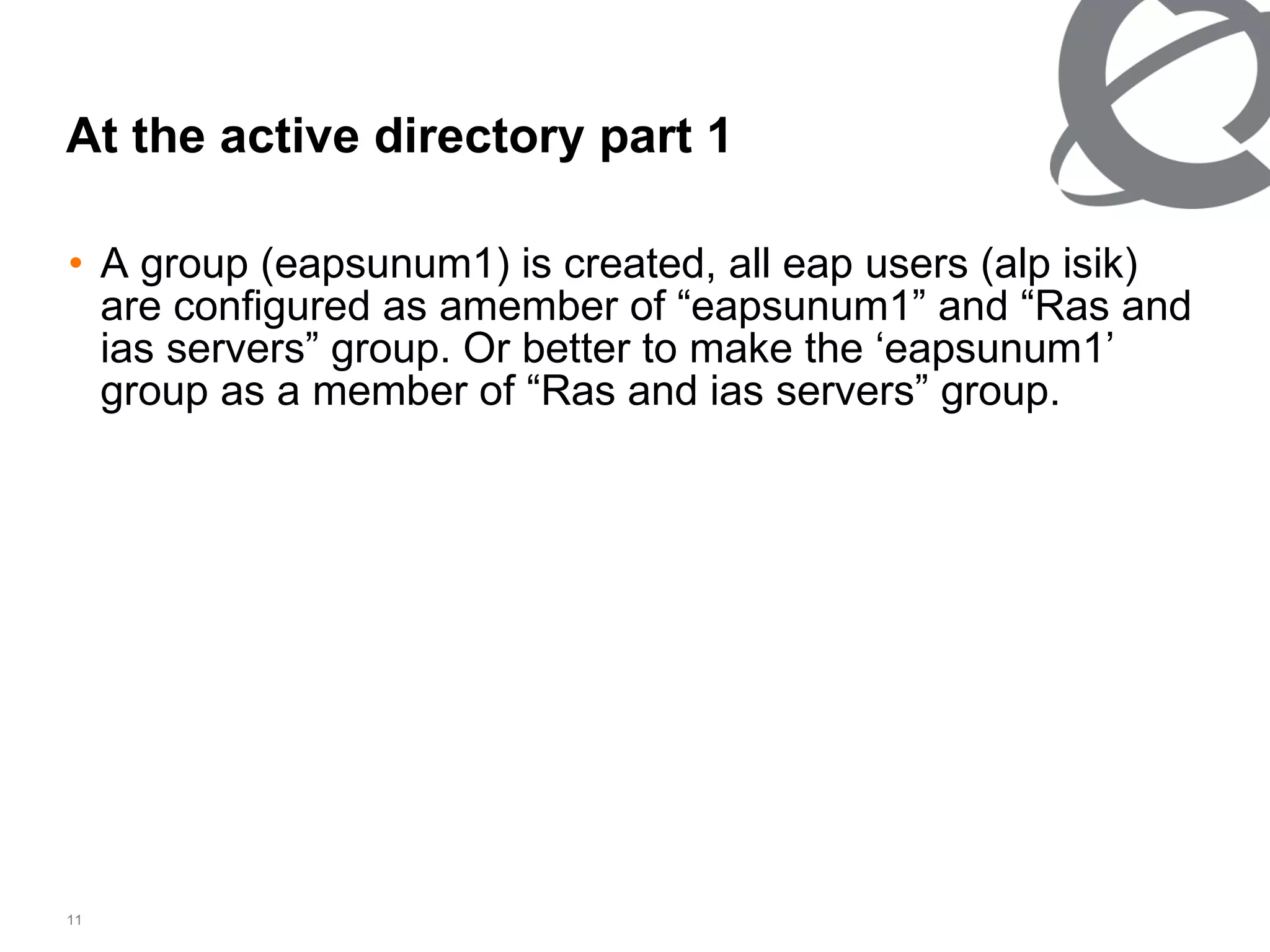
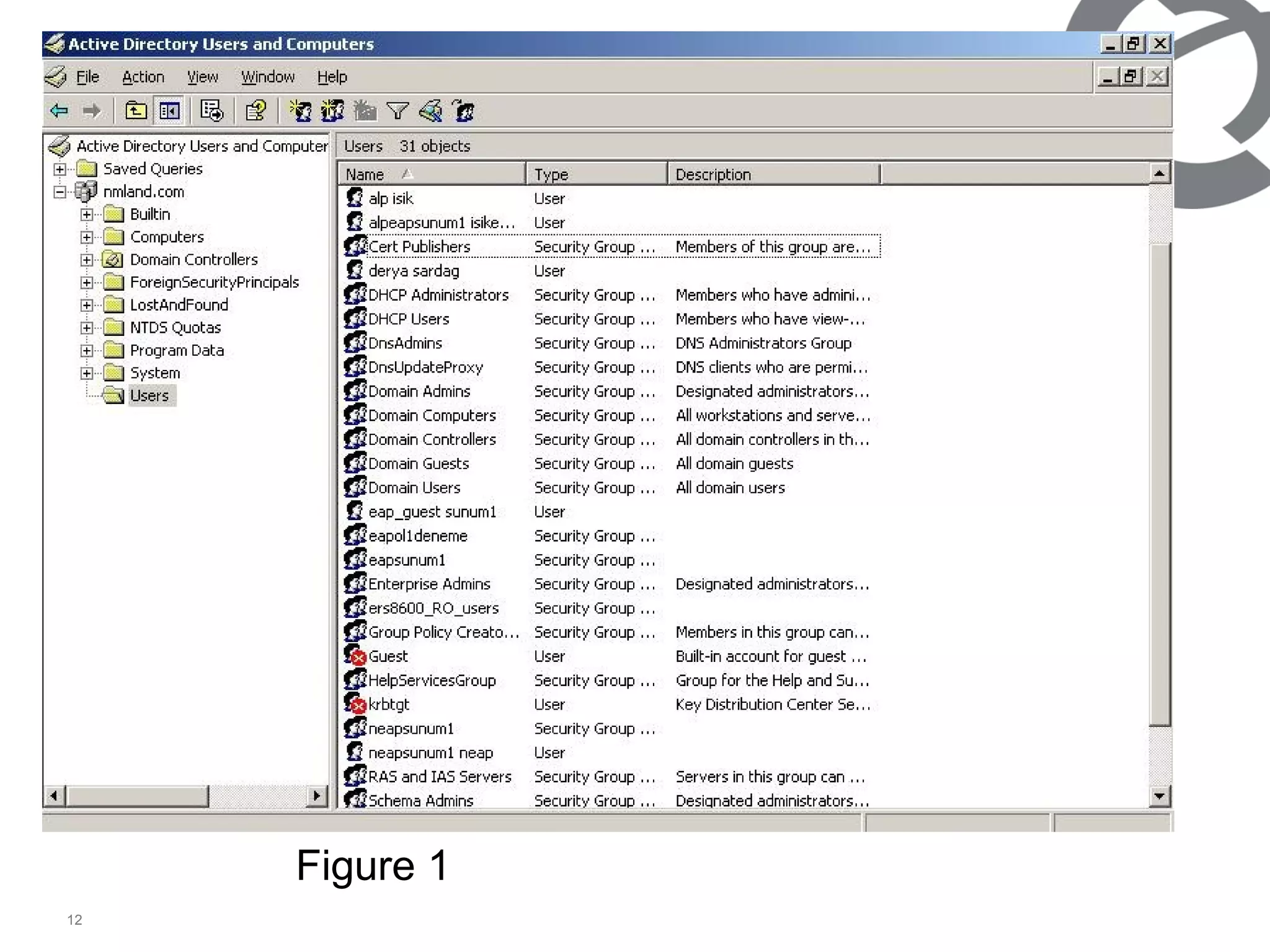
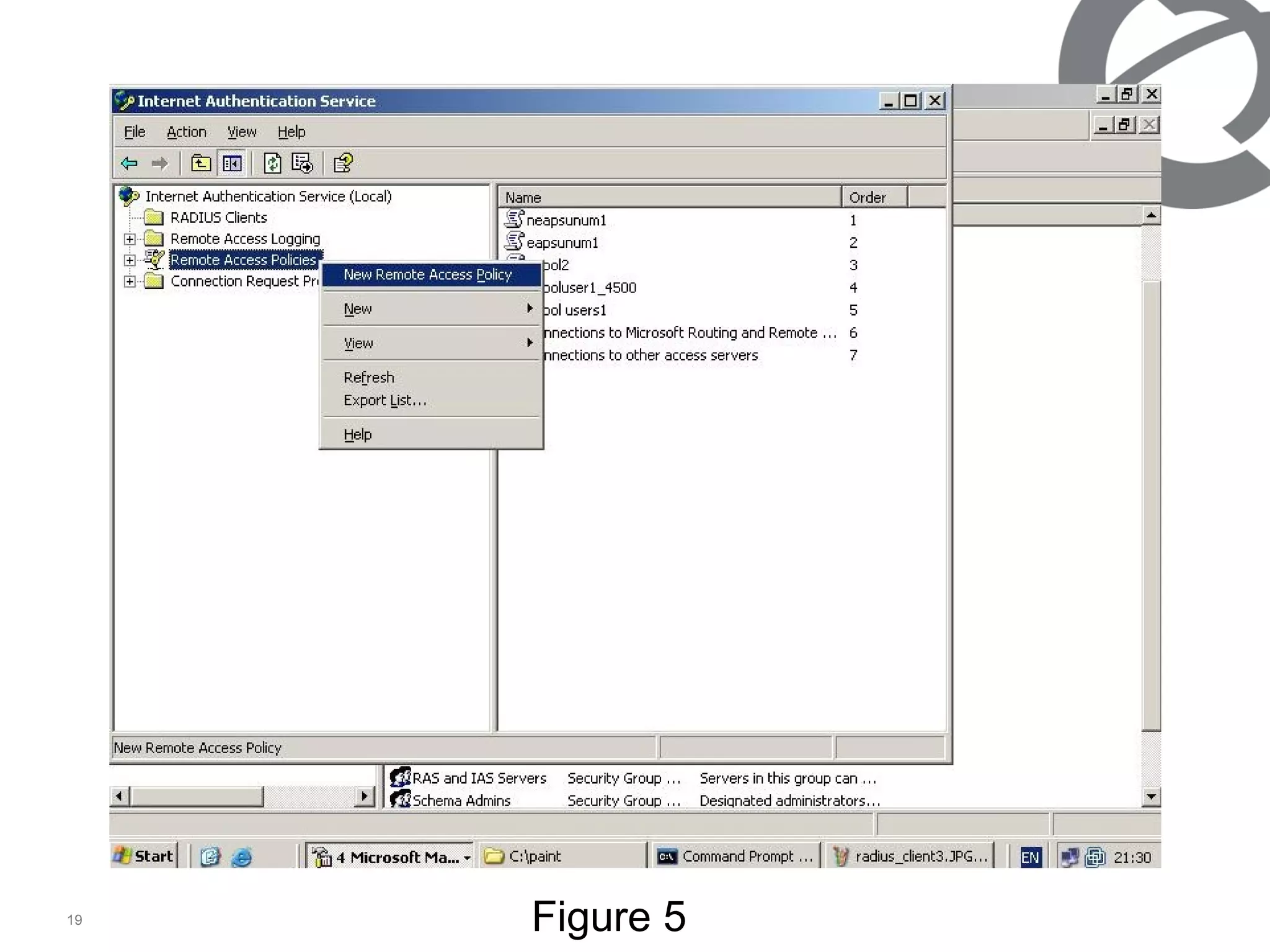
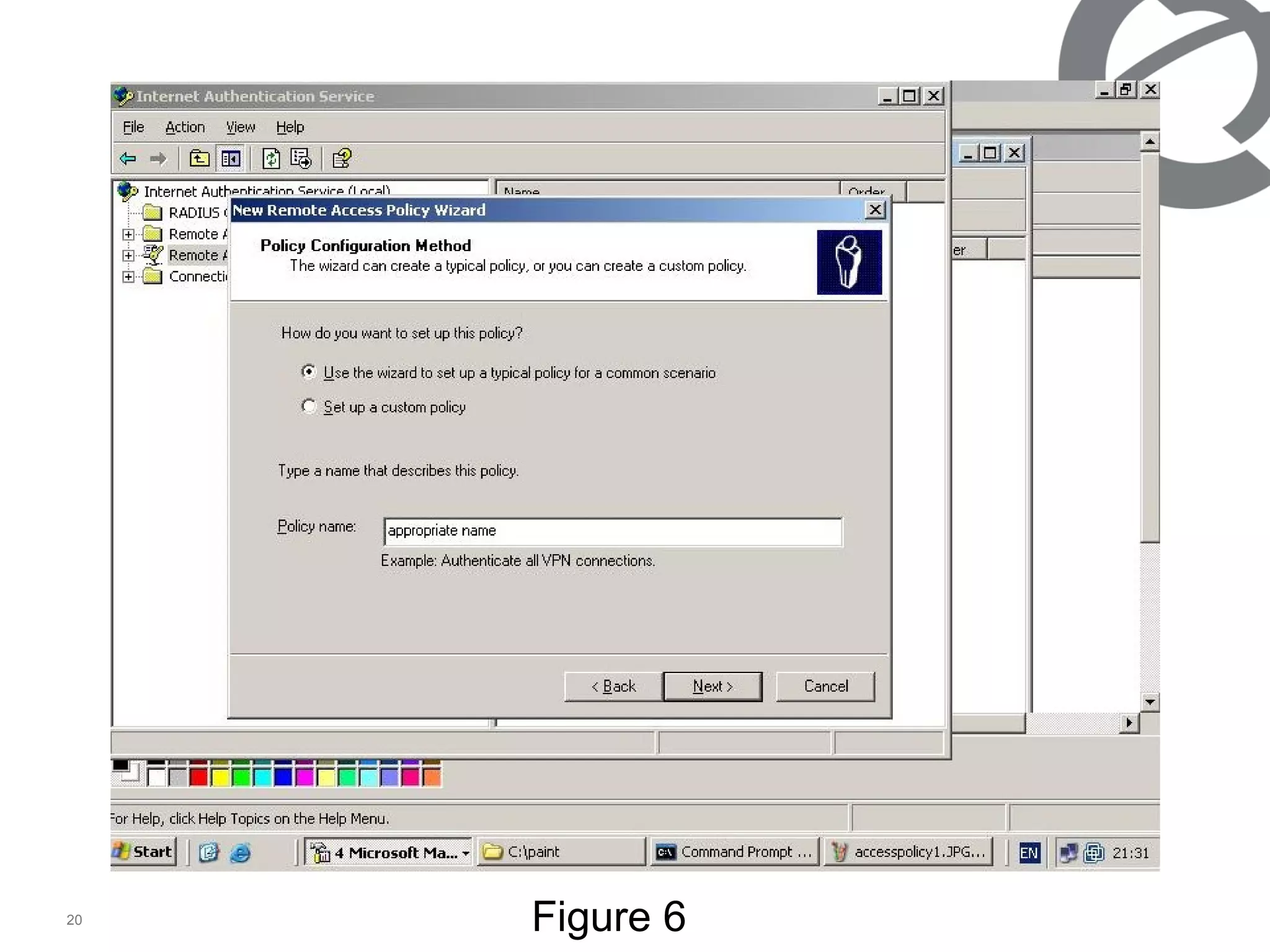
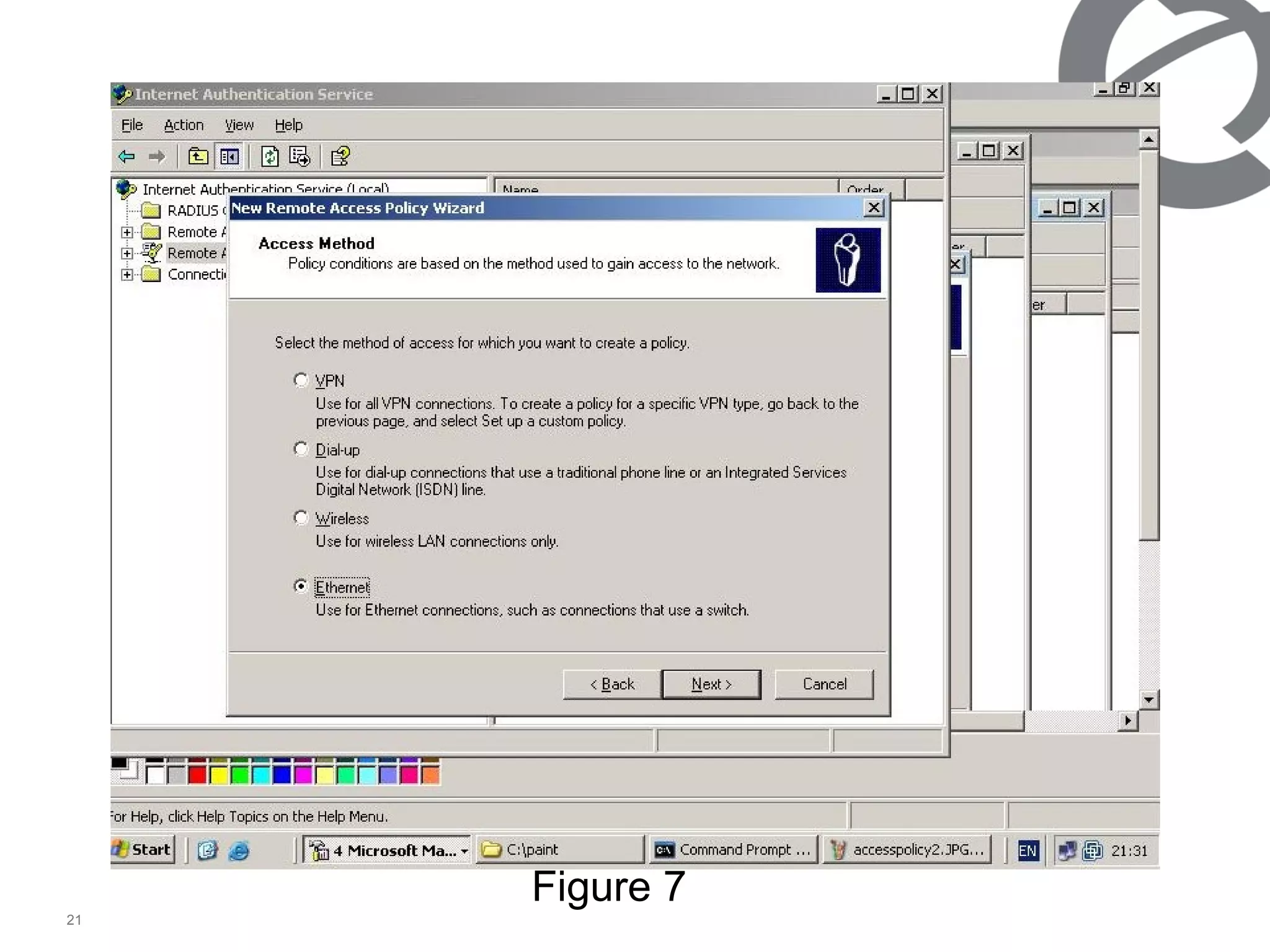
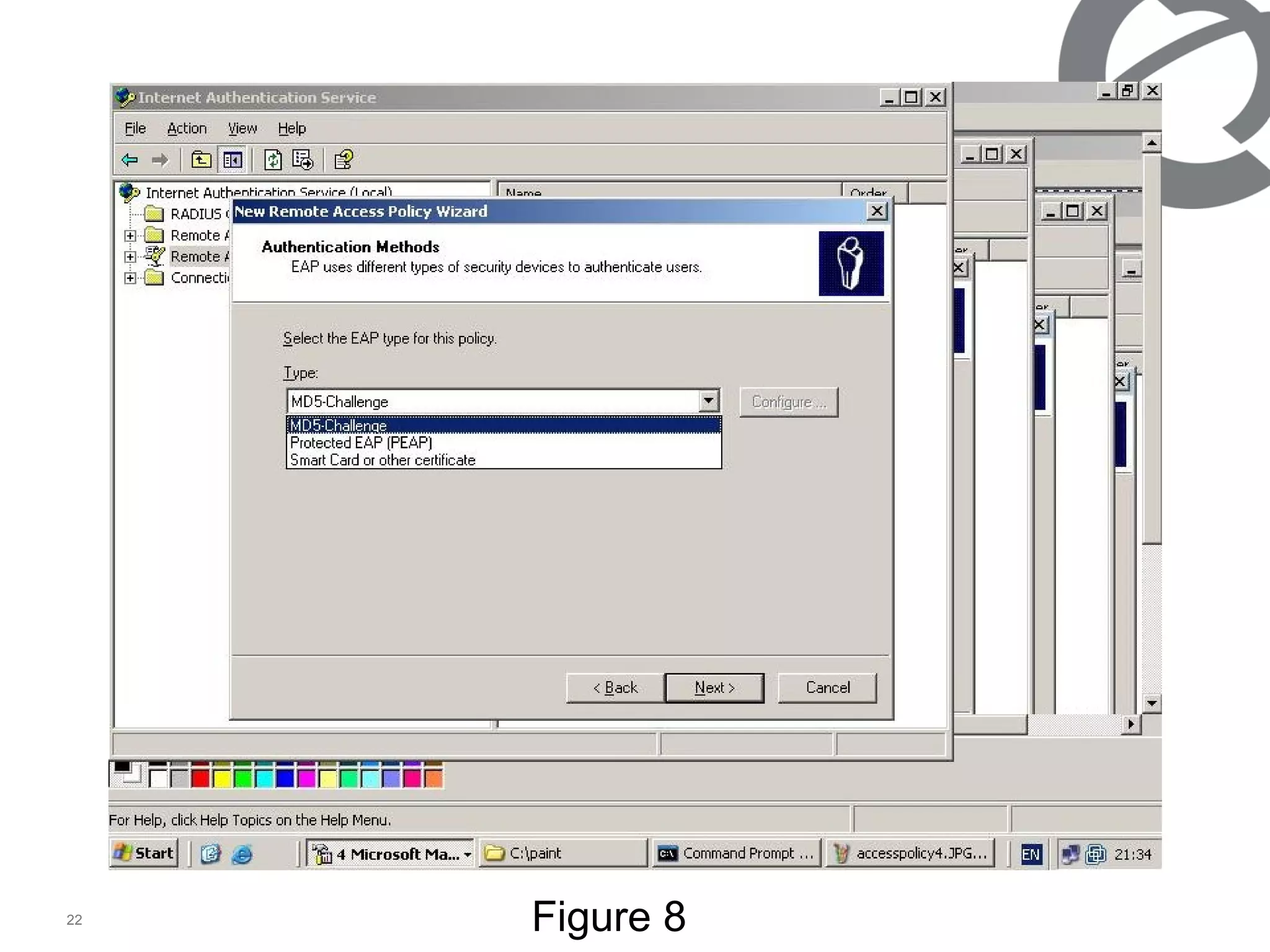
For eap ms2003 server configuration 2003 server should have an active directory and IAS server At the active directory users and groups need to be created. (as figure 1) At the ias radius client will be created.   (as figure 2-4). At the ias, access policy need to be created.   (as figure 5-12). Return to active directory and configure the user as figure 13-
At the active directory part 1 A group (eapsunum1) is created, all eap users (alp isik) are configured as amember of “eapsunum1” and “Ras and ias servers” group. Or better to make the ‘eapsunum1’ group as a member of “Ras and ias servers” group.
Figure 1
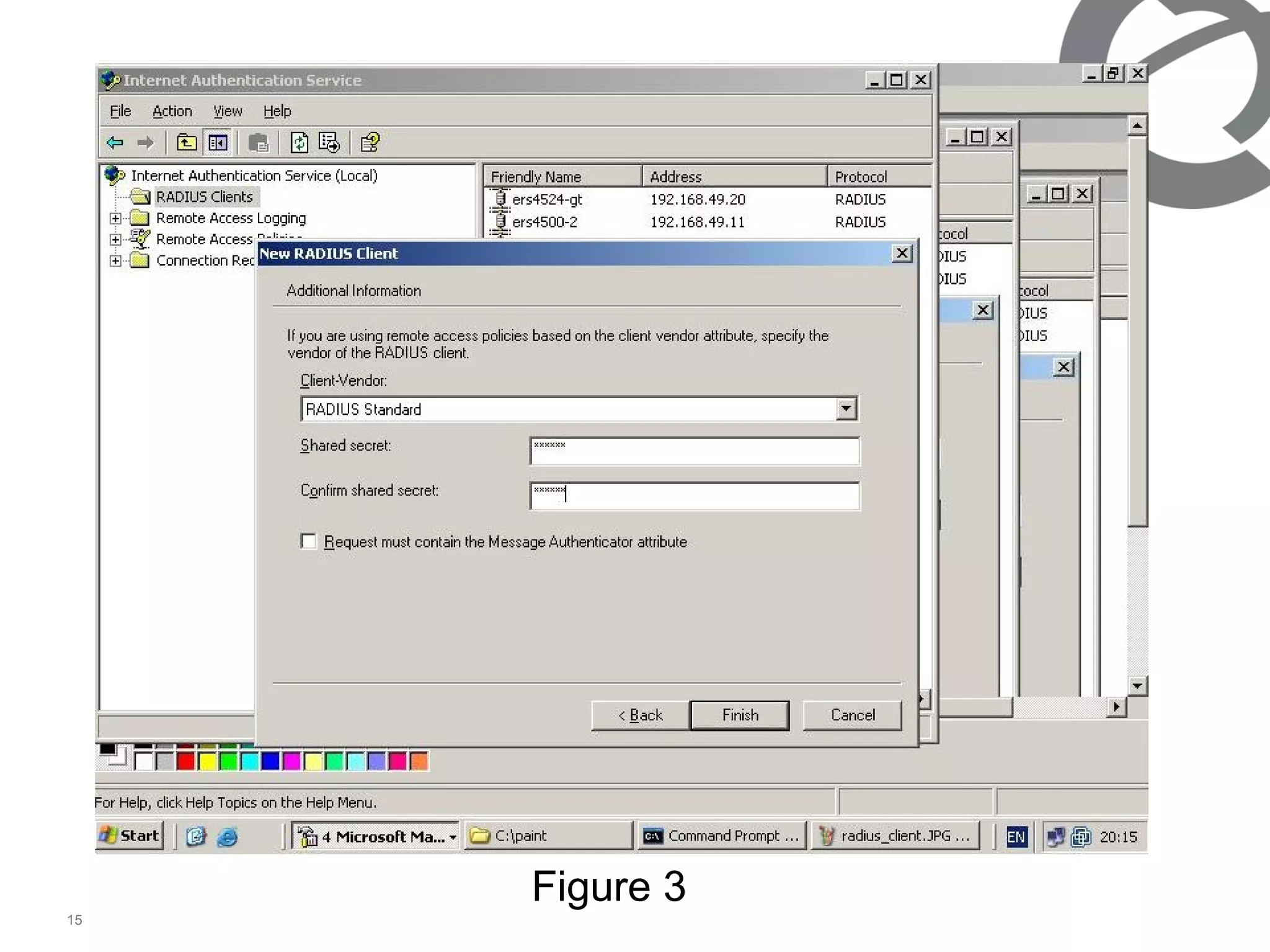
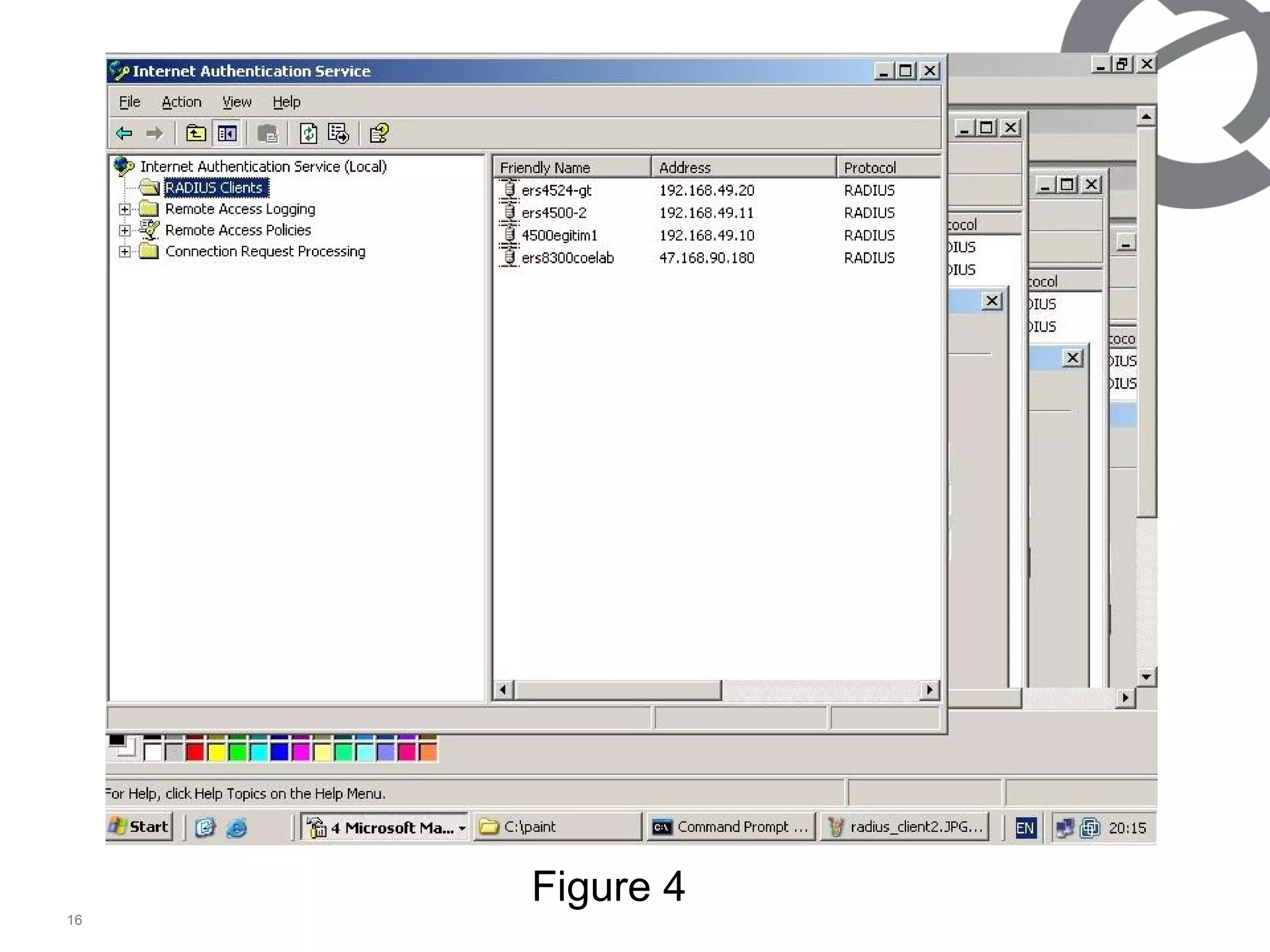
At the ias server For radius client shared secret need to be same as the authenticator.(ers4500) After radius client created can be checked as figure 4.
Figure 2
Figure 3
Figure 4
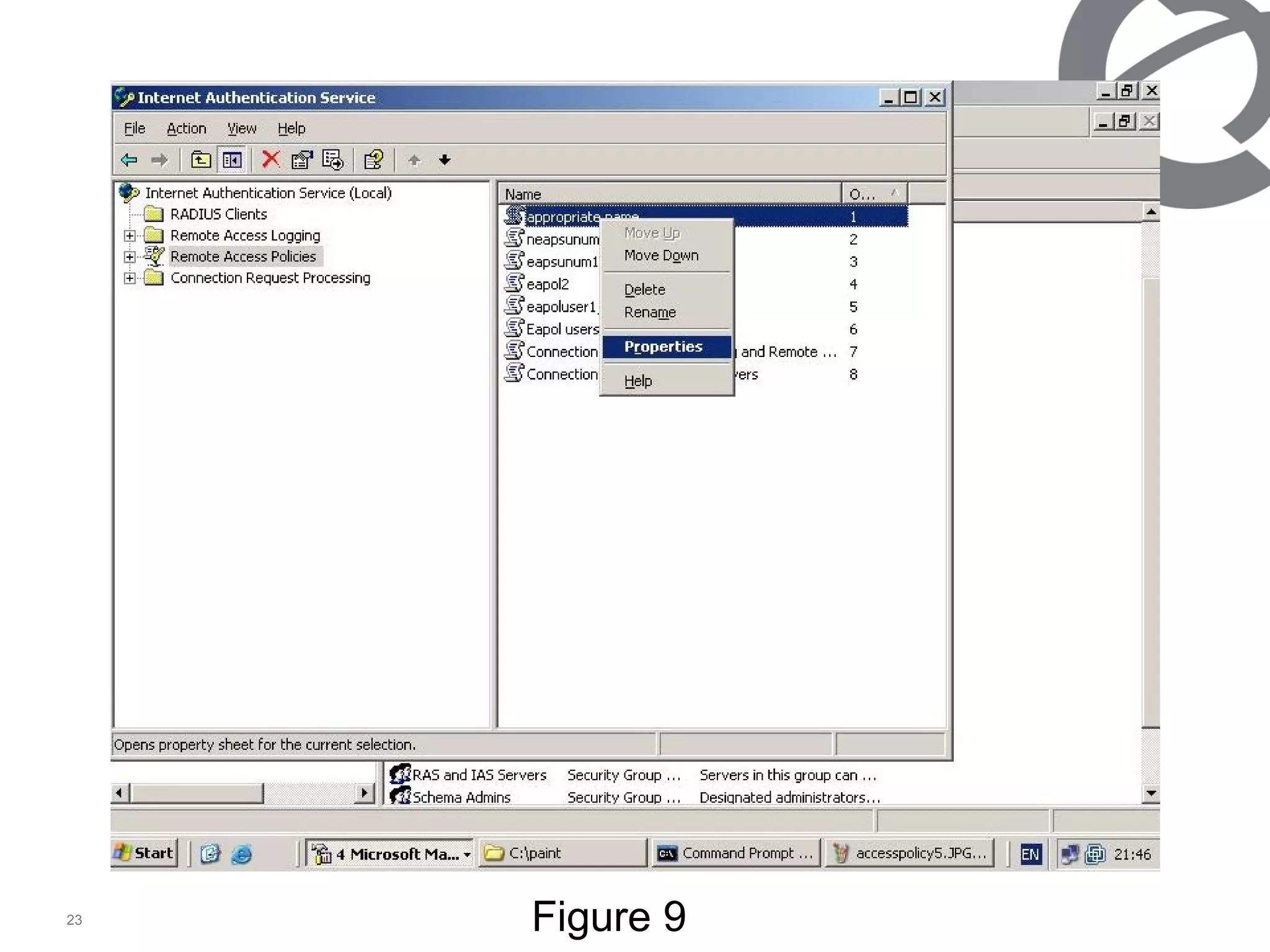
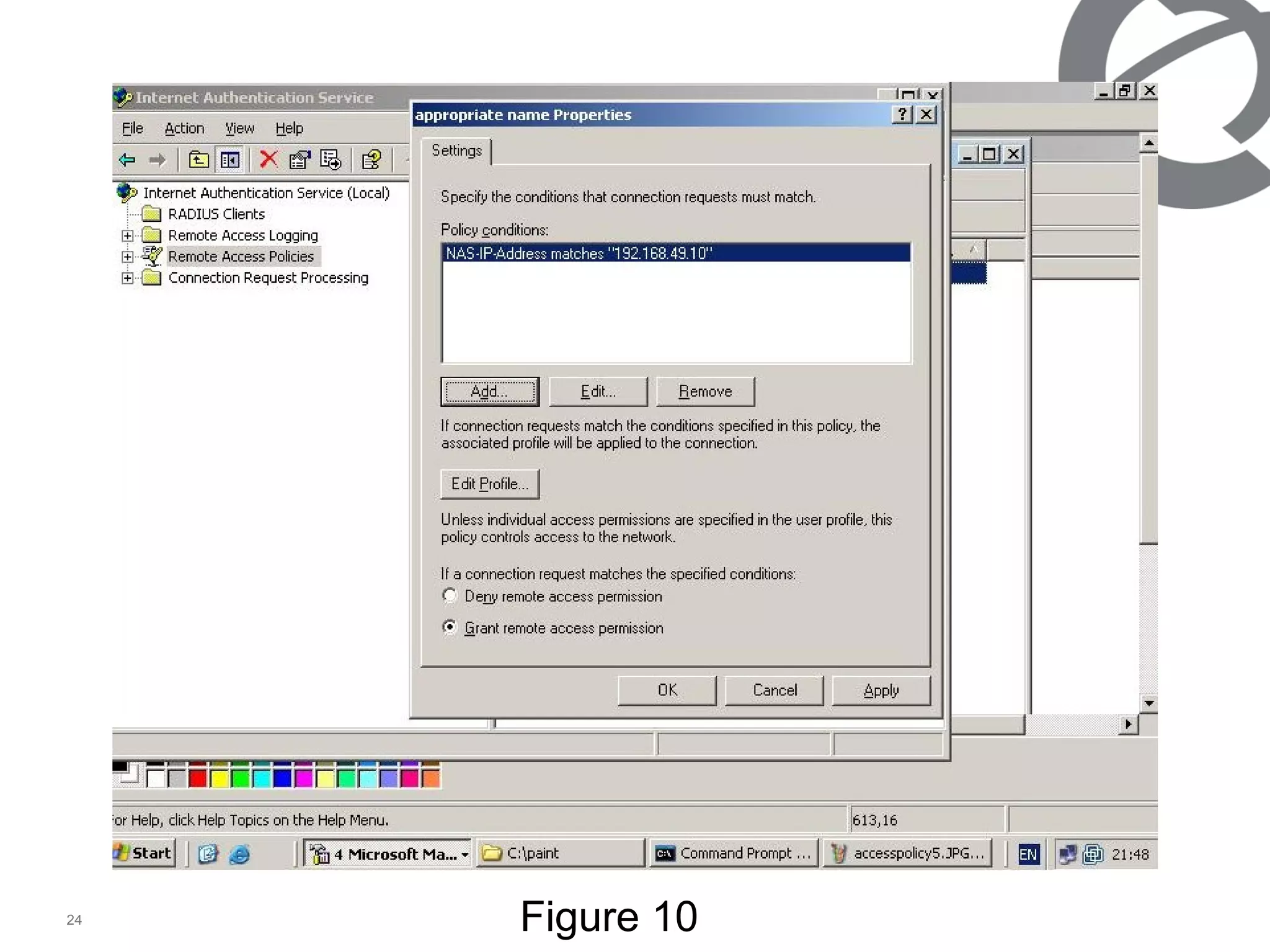
At the IAS access policy 1/2 For the access method we have chosen Ethernet. For the authentication method we have chosen md5, any other method could be chosen. (figure 8) On the created access policy, right click and properties   (figure 9) By default some policy’s will come, delete unneccesary policy’s and implement which matches your criteria.(at the example figure 10, we have implemented nas (authenticator switch) ip addr. Matches giving ers4500’s ip) and check that if the grant remote access permission is selected.
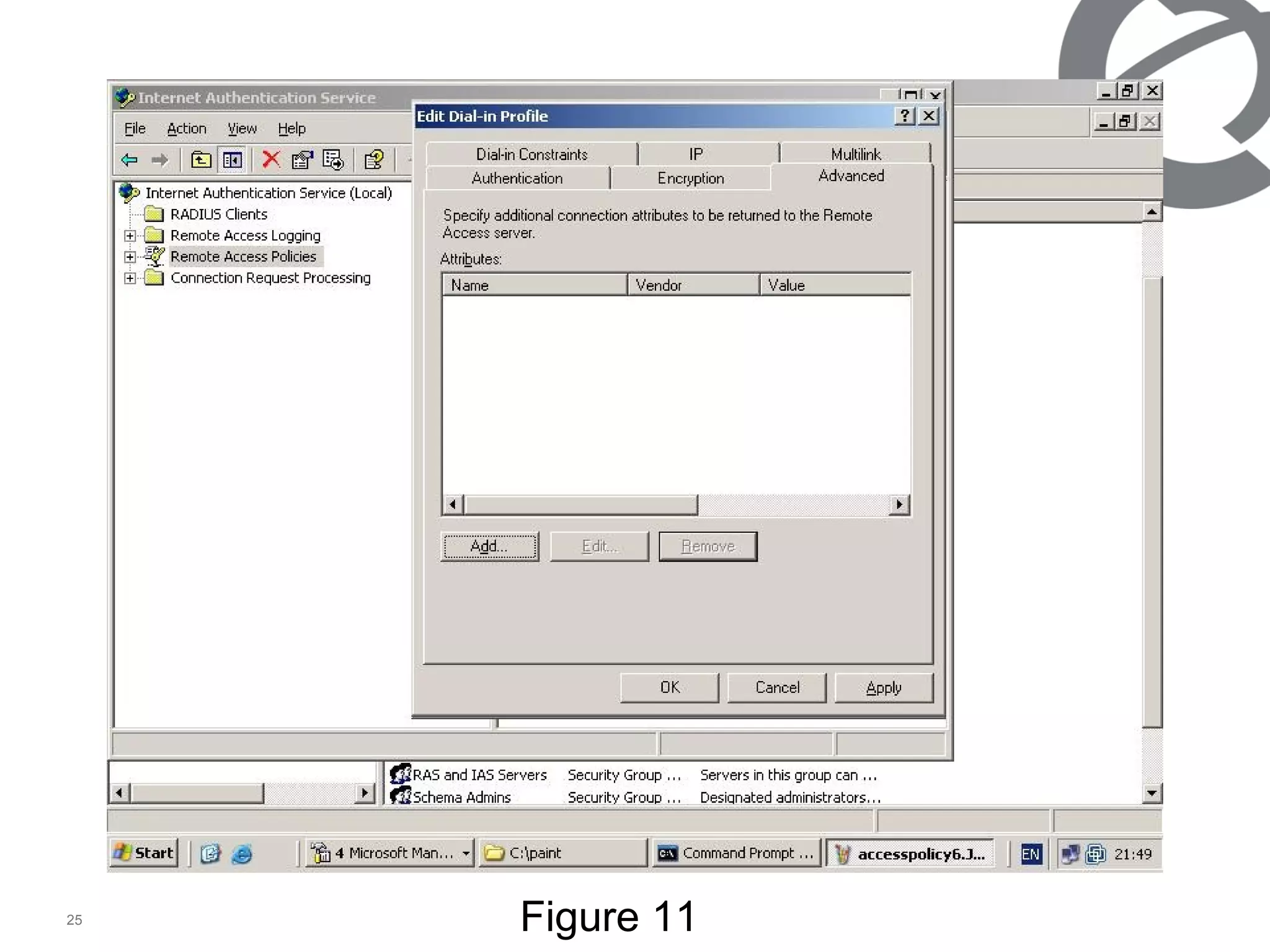
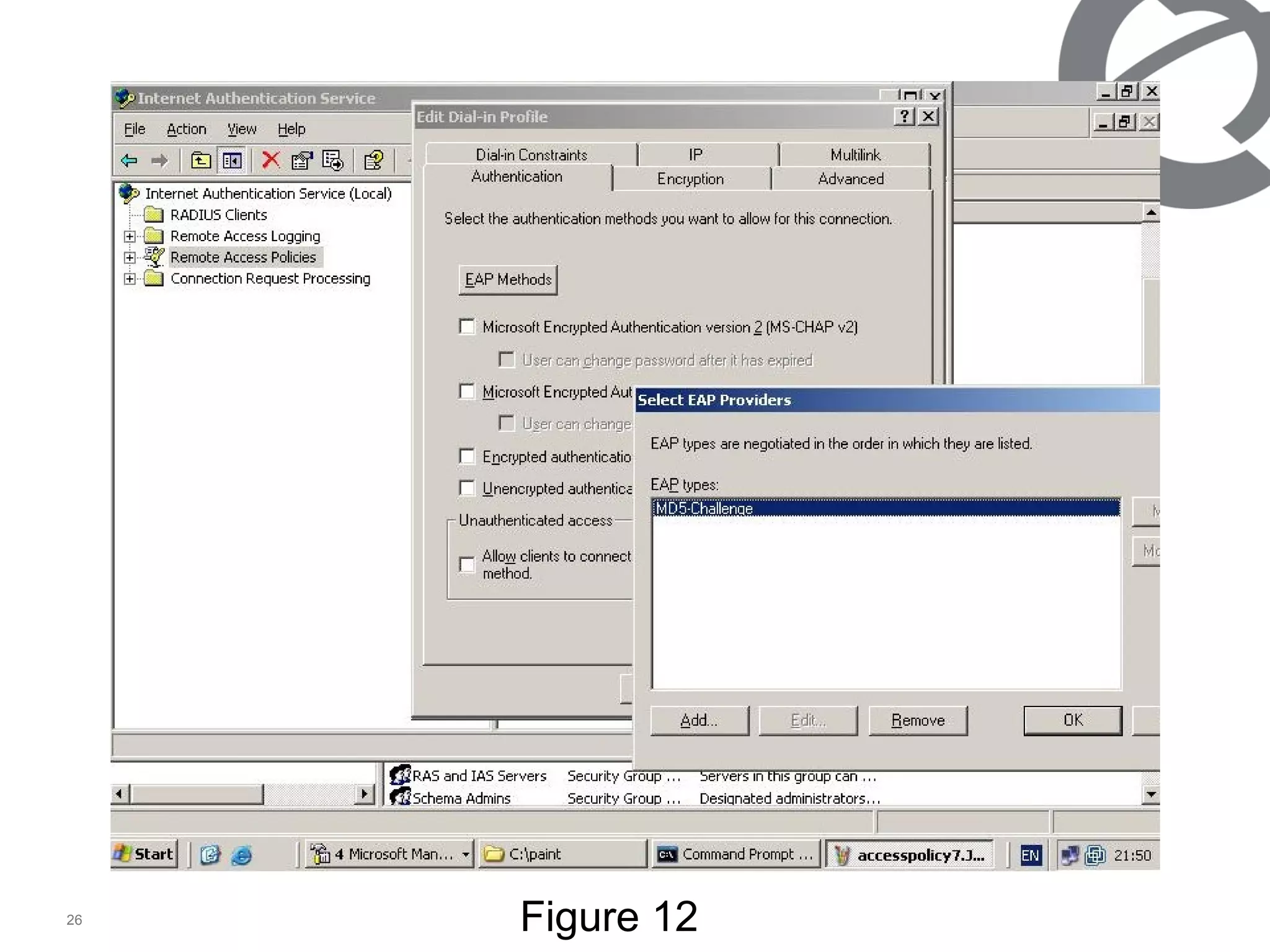
At the advanced tab (figure 11) we did not want to send anything to user/switch, for easy sample. Removed the attribution.  At the authentication tab (figure 12) noting we have chosen but checked the eap method. (md5) At the IAS access policy 2/2
Figure 5
Figure 6
Figure 7
Figure 8
Figure 9
Figure 10
Figure 11
Figure 12
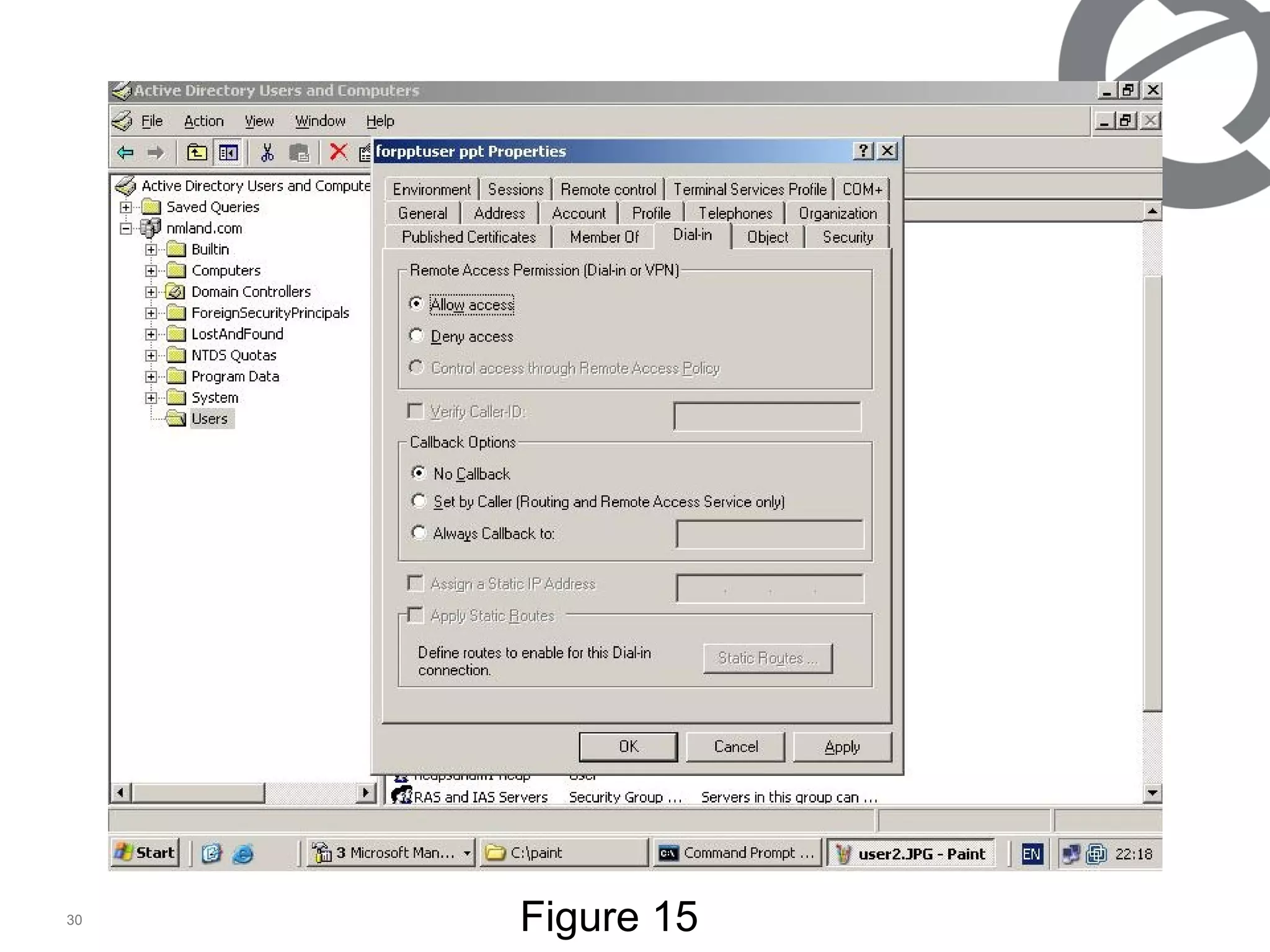
We have returned to active directory to configure user properties. At the account tab chosen password never expires and store password using reversible encryption. At the member of tab added to eapsunum1 and ras & ias server. At the dial-in tab we allowed the access.  At the active directory part 2
Figure 13
Figure 14
Figure 15
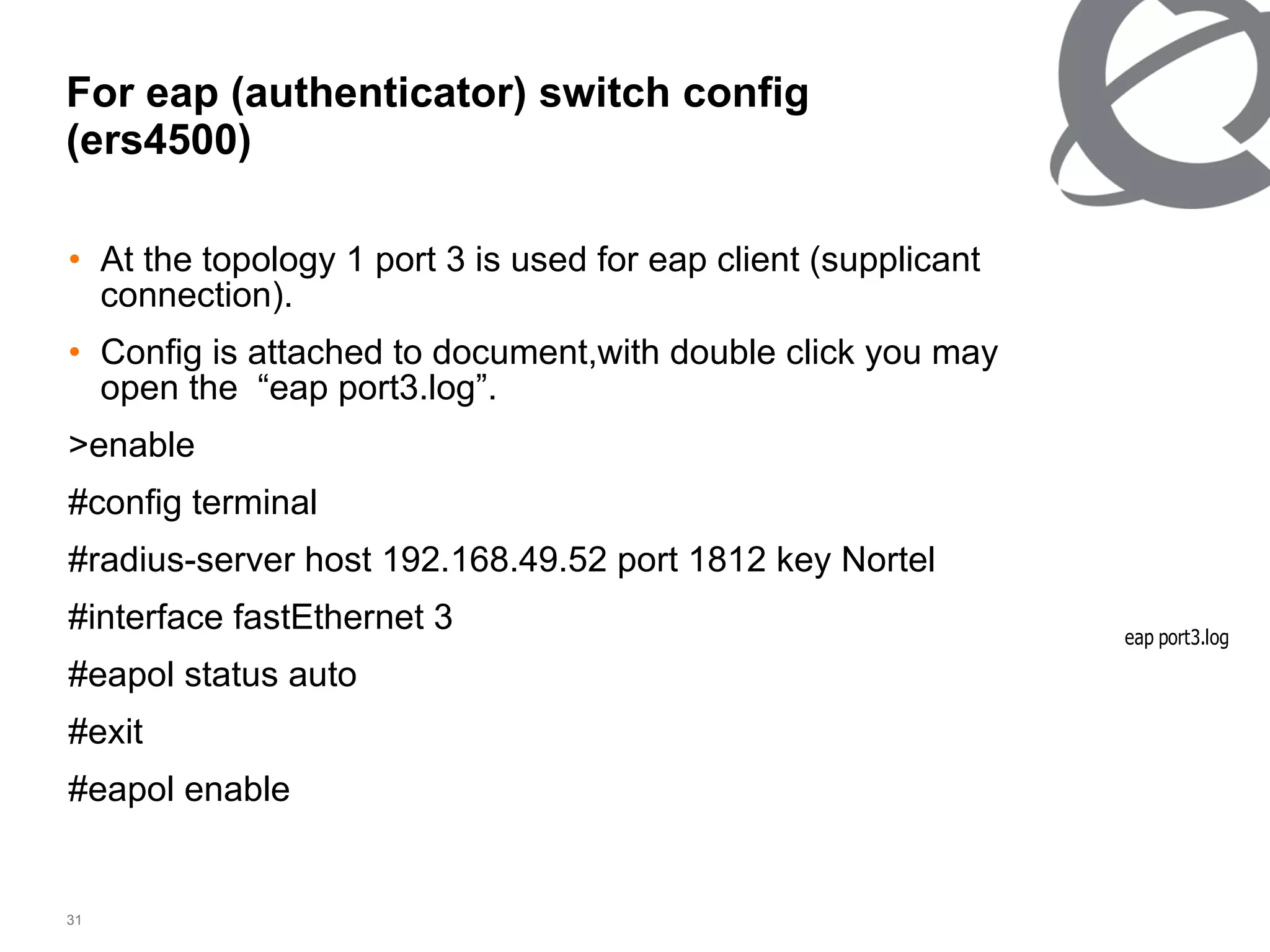
For eap (authenticator) switch config (ers4500) At the topology 1 port 3 is used for eap client (supplicant connection). Config is attached to document,with double click you may open the  “eap port3.log”. >enable #config terminal #radius-server host 192.168.49.52 port 1812 key Nortel #interface fastEthernet 3 #eapol status auto #exit #eapol enable
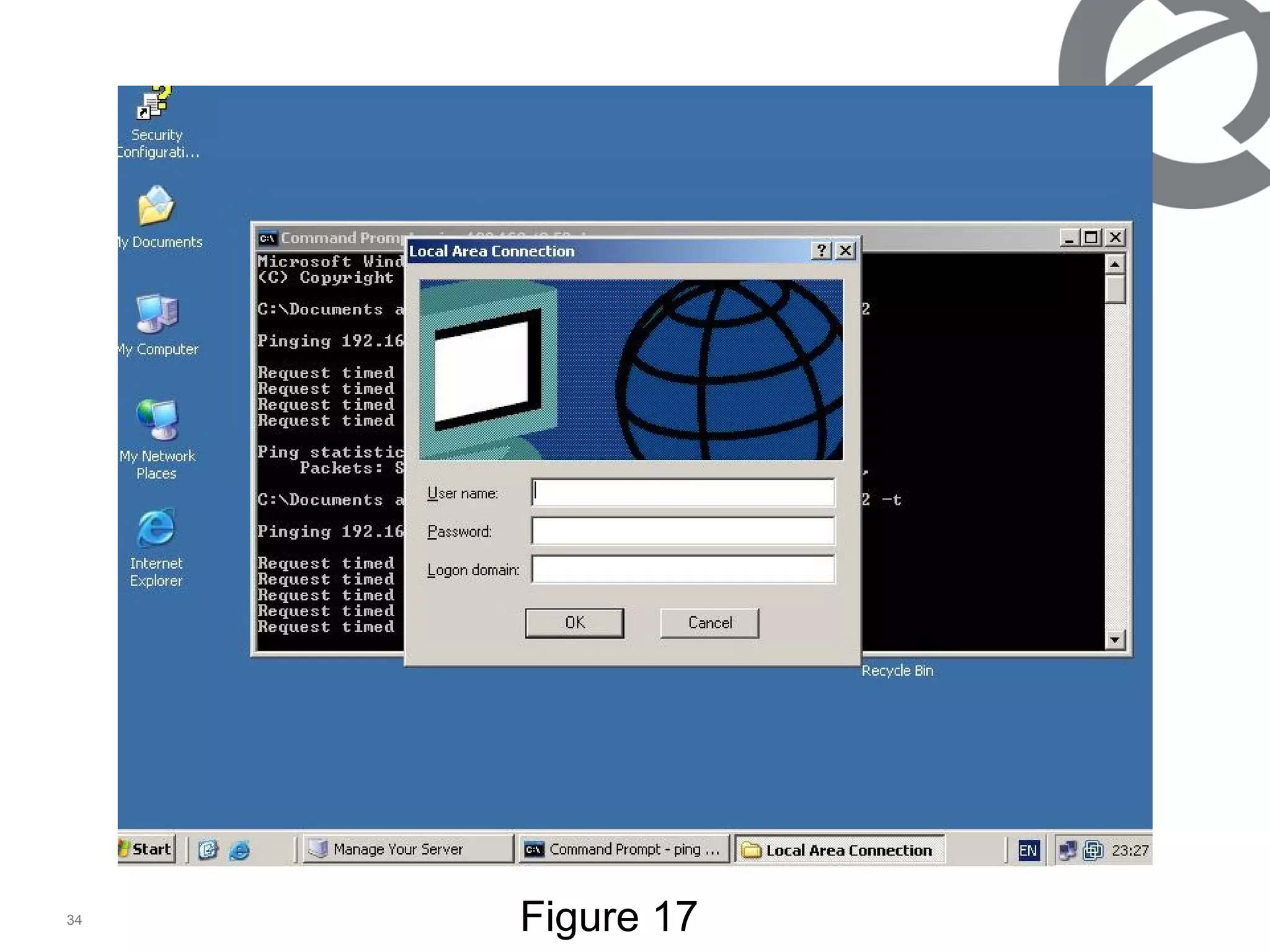
At the supplicant   /   user First you need to open authentication from local area connection properties, by default there is no authentication tab, from pc start, run, type services.msc, and start Wired AutoConfig. Then authentication tab will be appeared, at there click the 802.1x and choose your authentication as md5 or else. Over the local area connection a box will appear as figure 16. After click on it  wıth the user name and password, and logon domain. Access will be provided. (which was criated at the active directory, logon domain is the active directory name) figure 17.
Figure 1 6
Figure 1 7
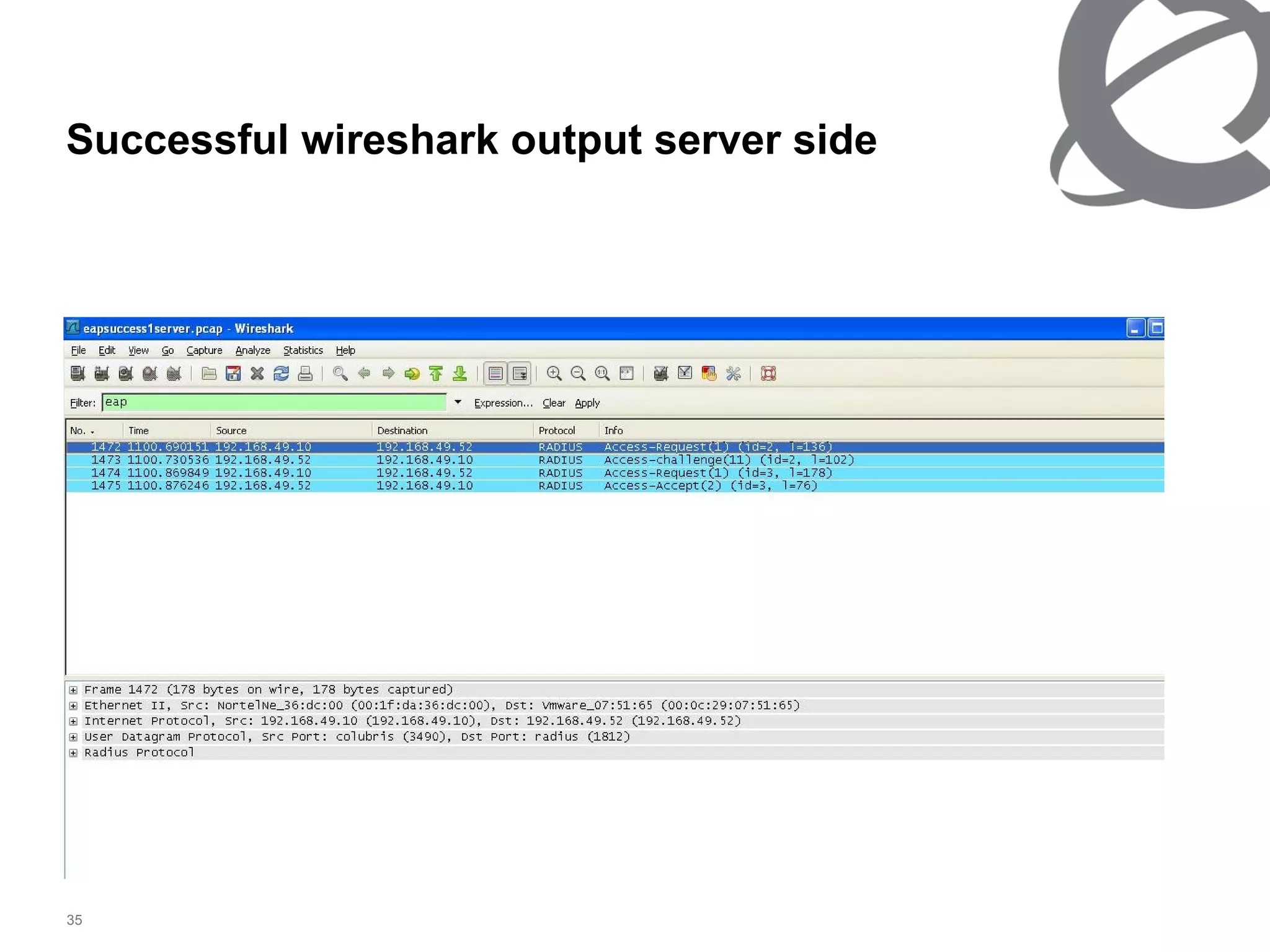
Successful wireshark output server side
Successful wireshark output  user  side
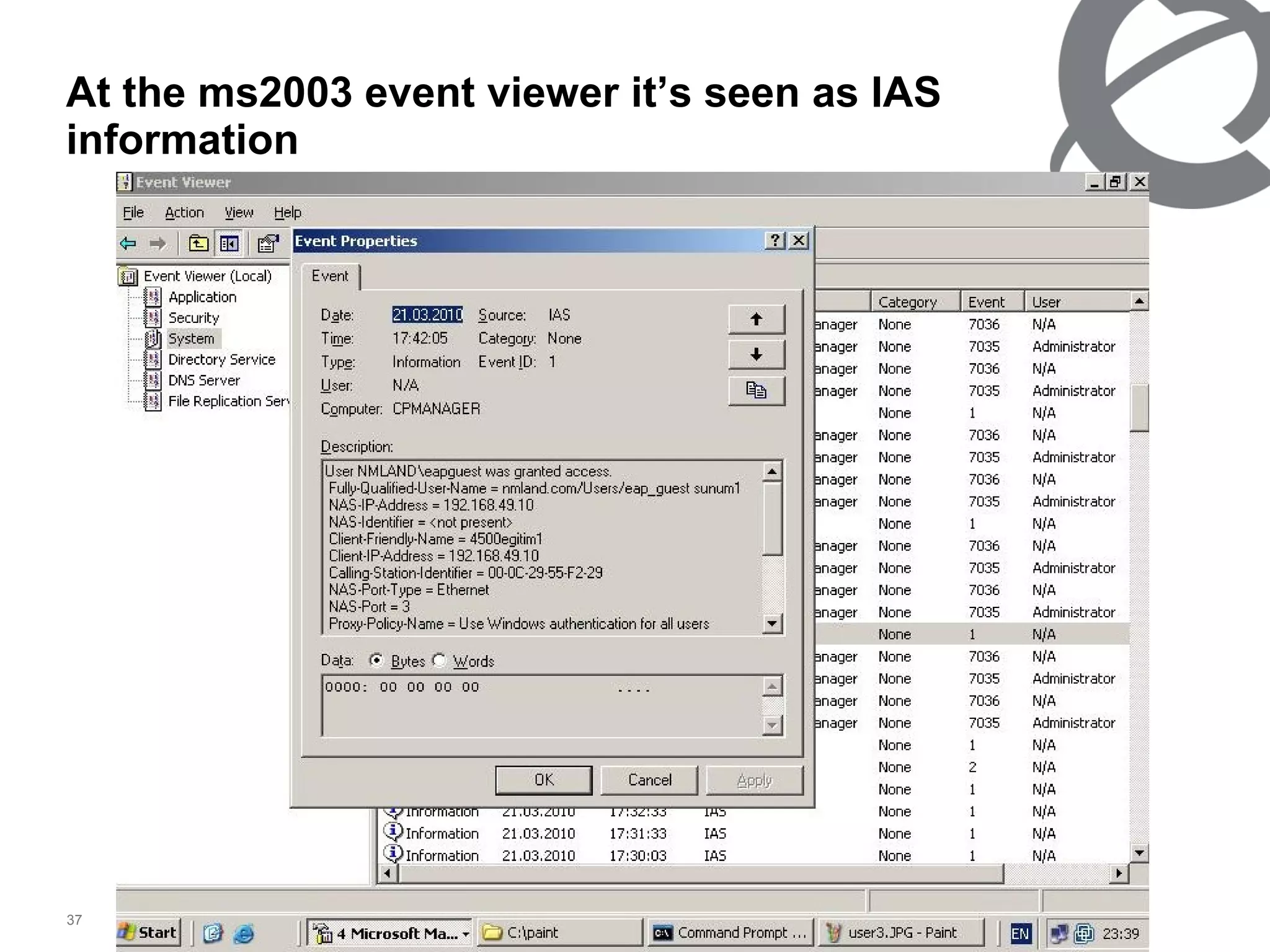
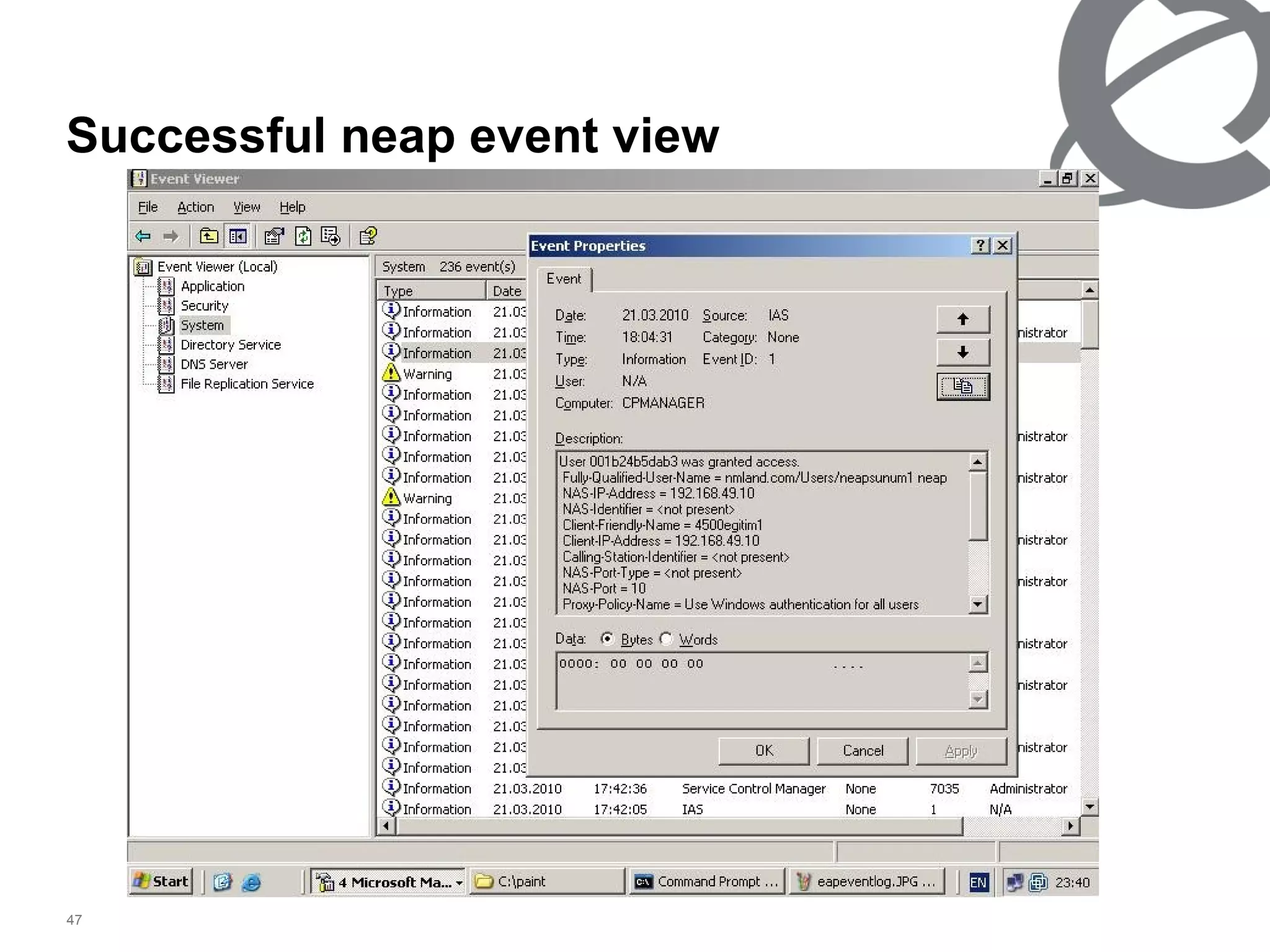
At the ms2003 event viewer it’s seen as IAS information
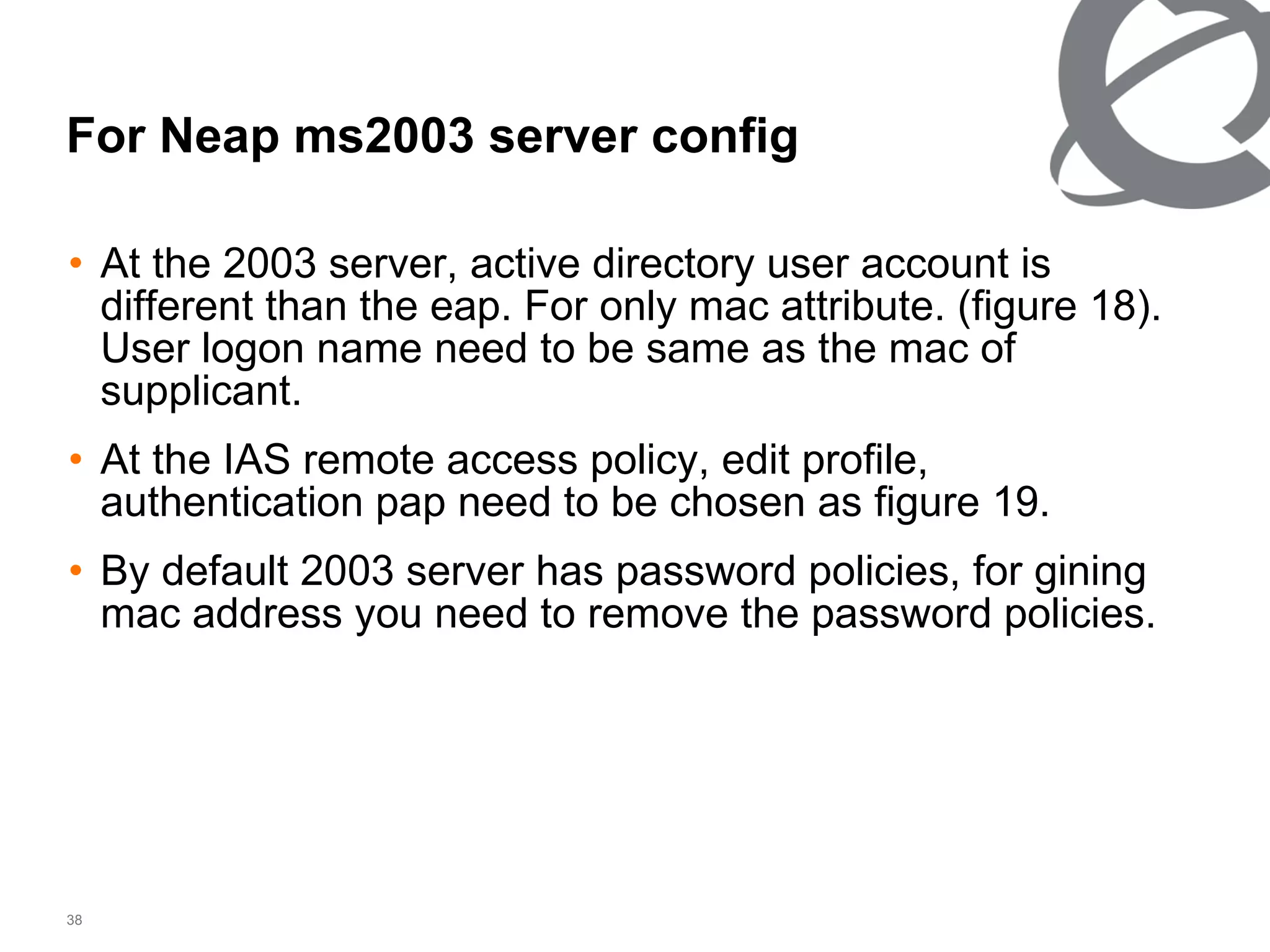
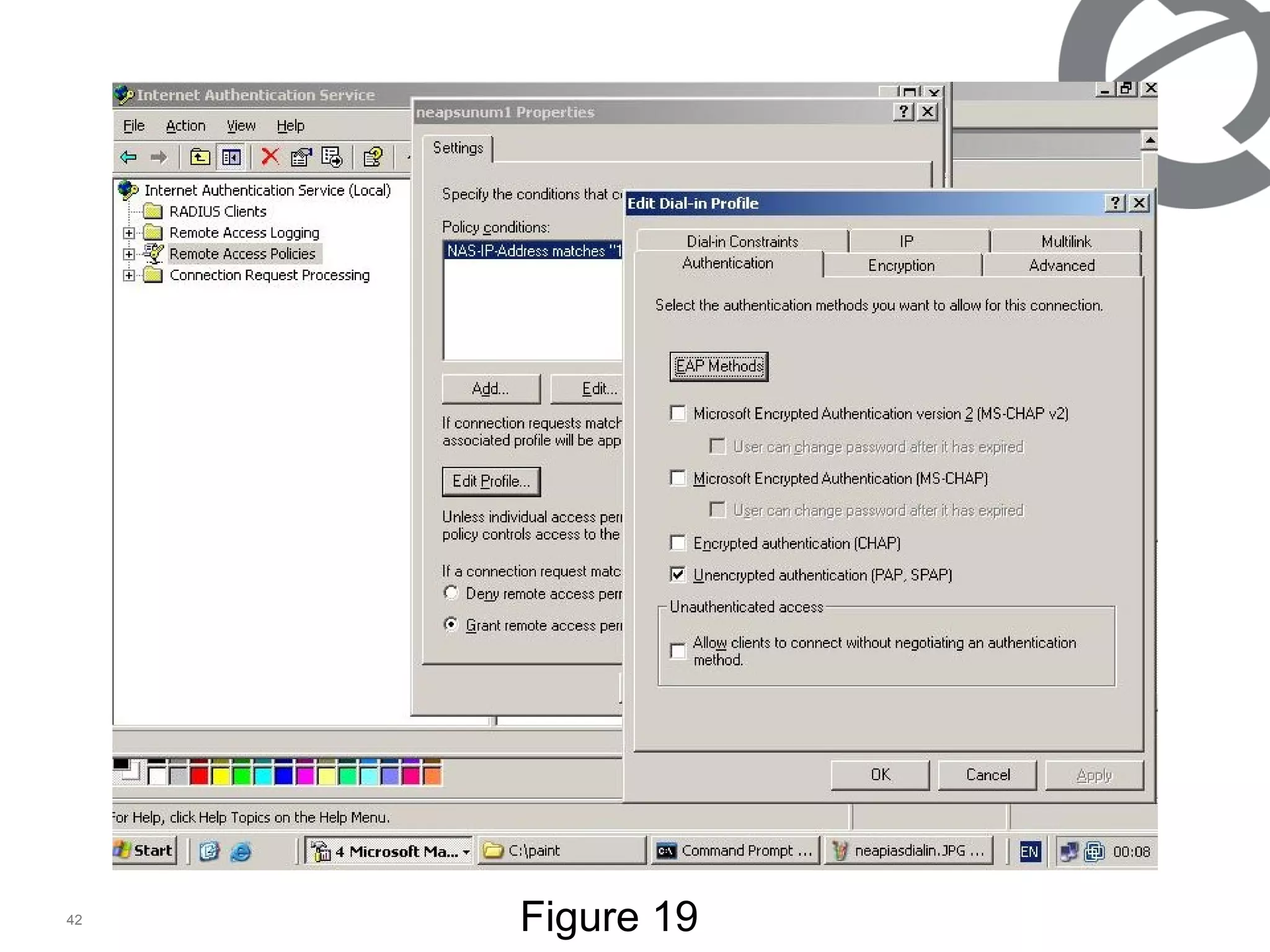
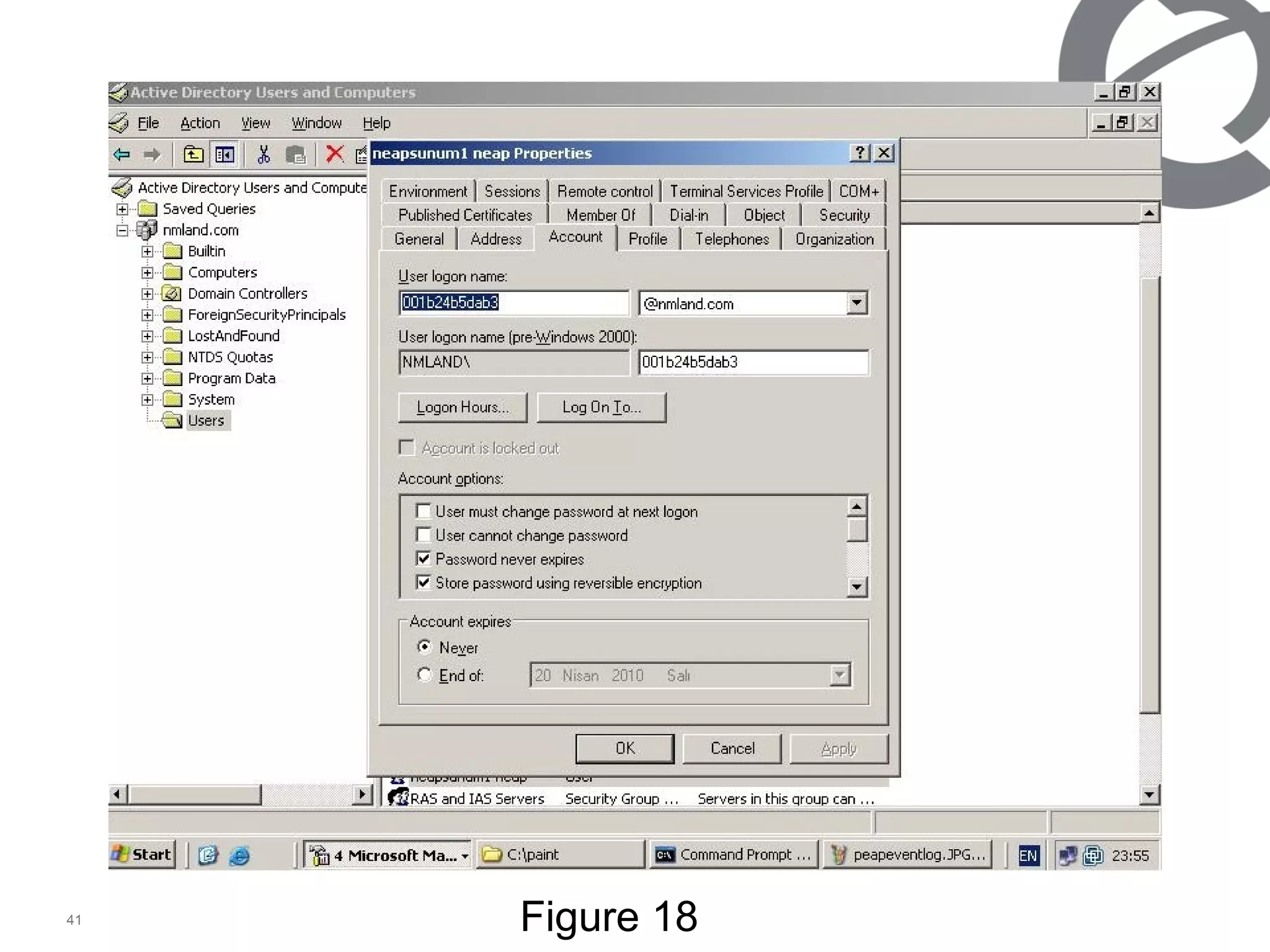
For Neap ms2003 server config  At the 2003 server, active directory user account is different than the eap. For only mac attribute. (figure 18). User logon name need to be same as the mac of supplicant. At the IAS remote access policy, edit profile, authentication pap need to be chosen as figure 19. By default 2003 server has password policies, for gining mac address you need to remove the password policies.
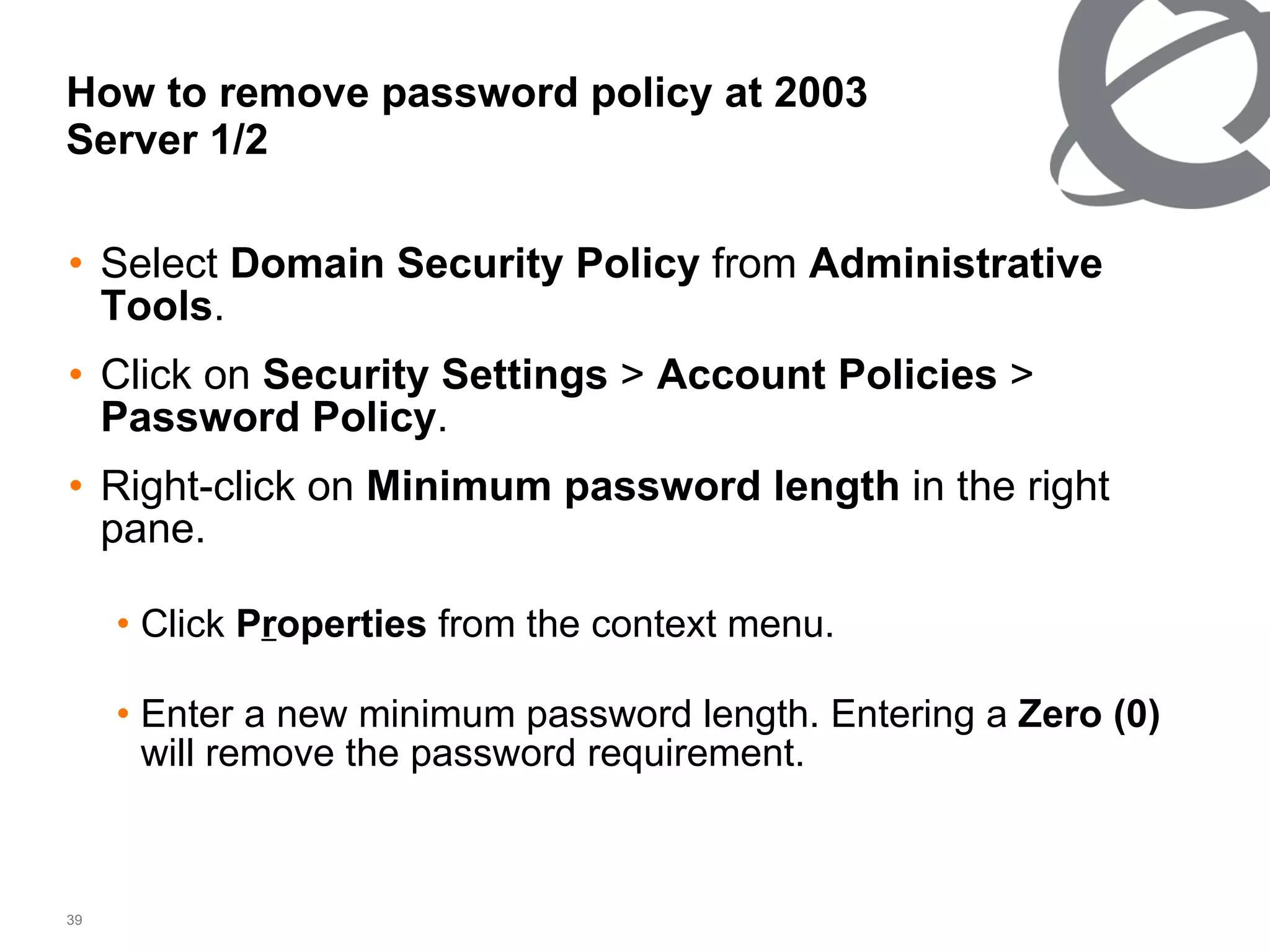
How to remove password policy at 2003 Server 1/2 Select  Domain Security Policy  from  Administrative Tools .  Click on  Security Settings  >  Account Policies  >  Password Policy .  Right-click on  Minimum password length  in the right pane. Click  P r operties  from the context menu. Enter a new minimum password length. Entering a  Zero (0)  will remove the password requirement.
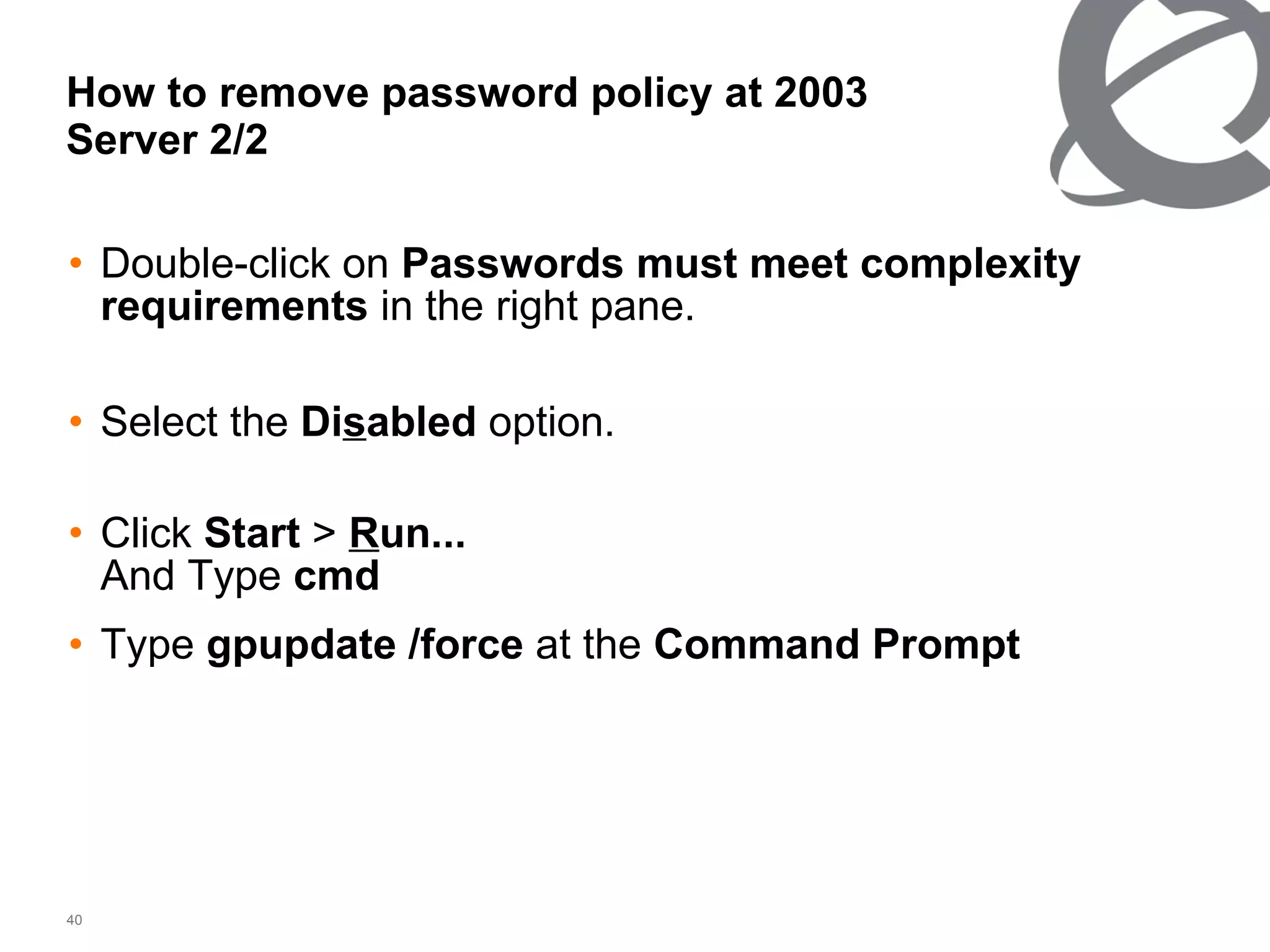
How to remove password policy at 2003 Server 2/2 Double-click on  Passwords must meet complexity requirements  in the right pane. Select the  Di s abled  option. Click  Start  >  R un... And Type  cmd   Type  gpupdate /force  at the  Command Prompt
Figure 18
Figure 19
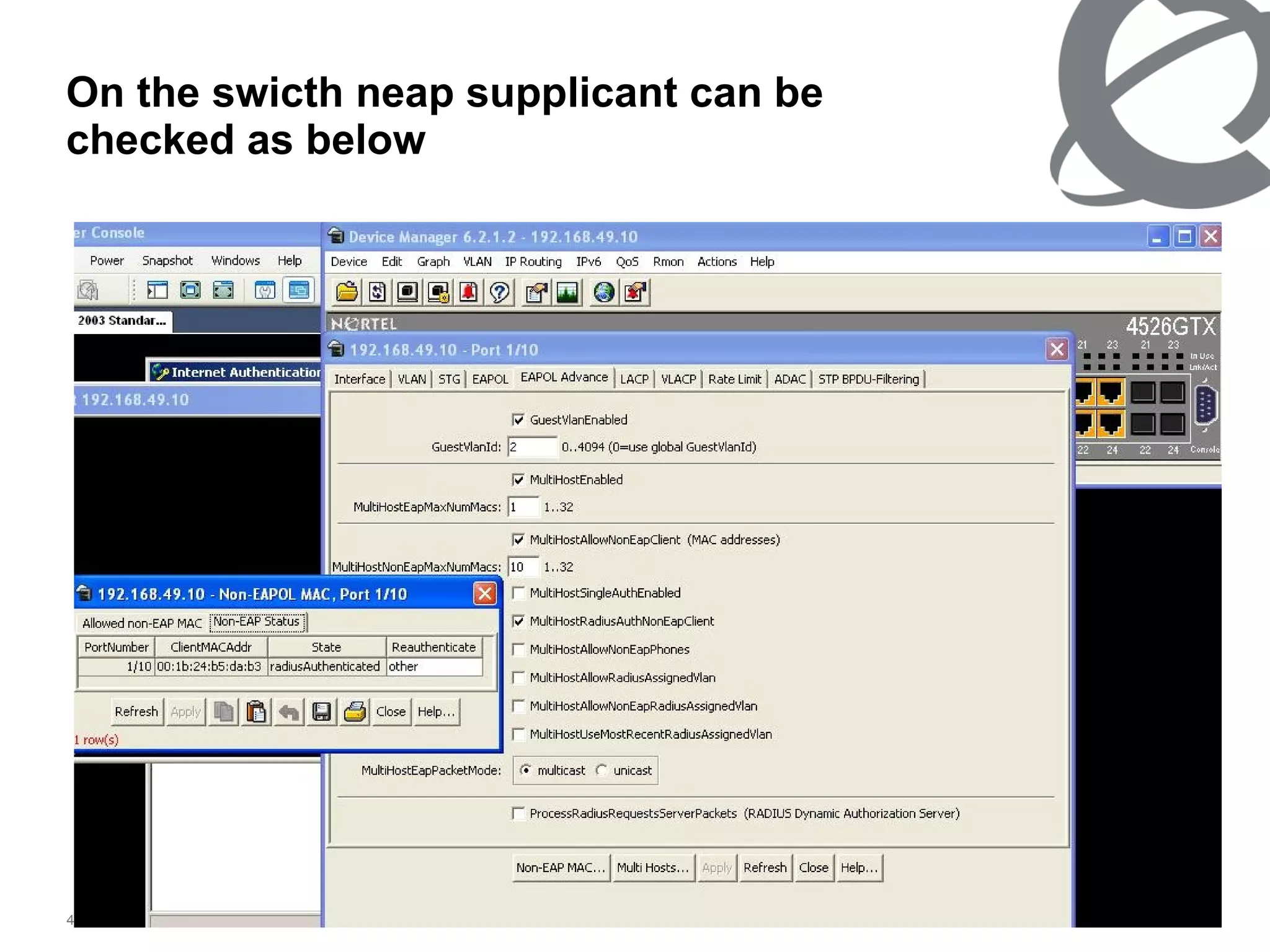
For neap at the authenticator switch ers4500  1/3 At the topology 1, port 10 is used for the neap supplicant For the switch configuration you may use the attached neapport10.log by duble click.
For neap at the authenticator switch ers4500  2/3 >enable #config terminal #radius-server host 192.168.49.52 port 1812 key Nortel #interface fastEthernet 3 #eapol status auto #exit #eapol enable #interface fastEthernet 10 #eapol status auto #eapol multihost allow-non-eap-enable # eap multihost non-eap-mac-max 10 #eapol multihost radius-non-eap-enable #eapol multihost enable #exit
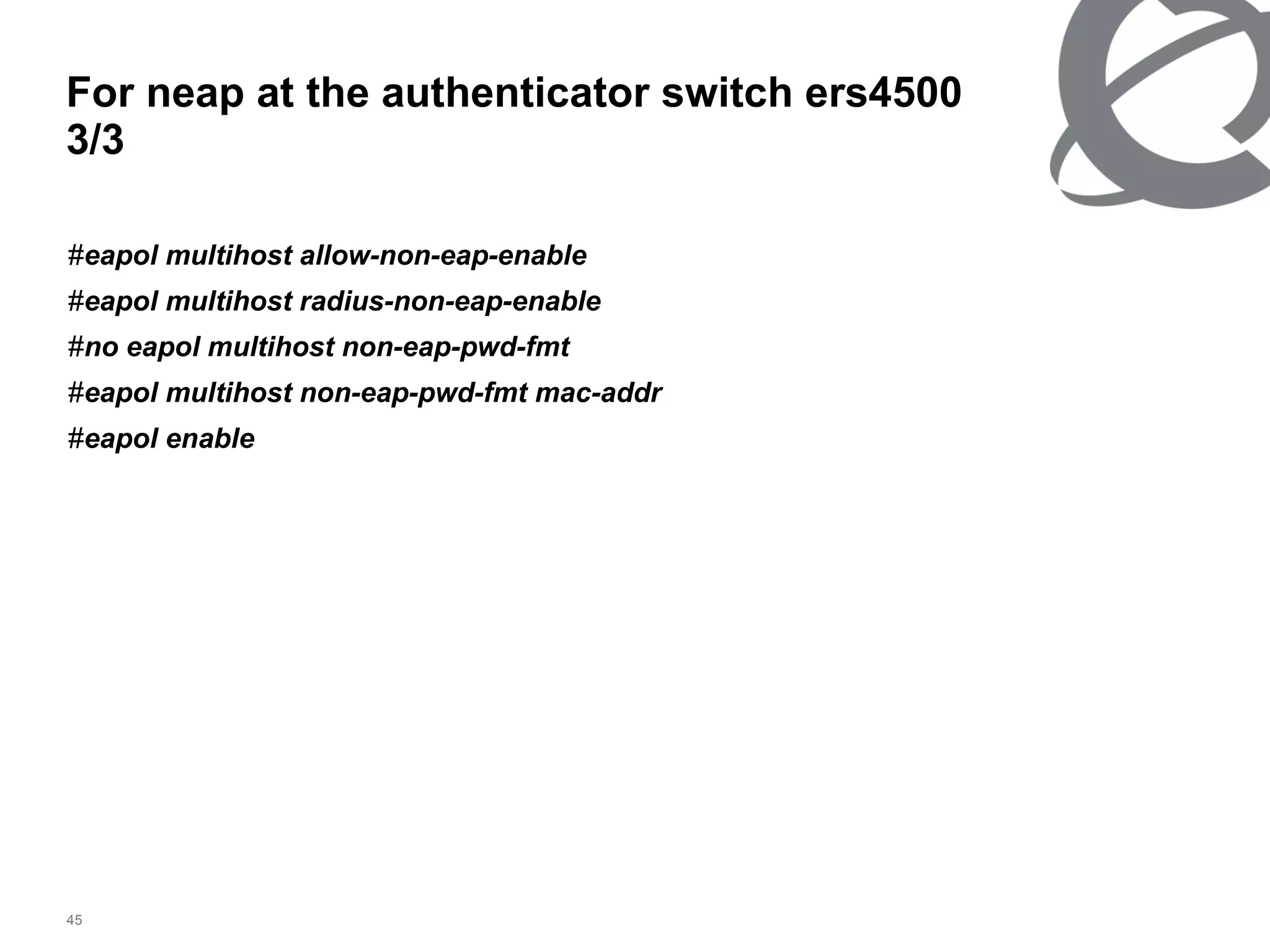
For neap at the authenticator switch ers4500  3/3 # eapol multihost allow-non-eap-enable # eapol multihost radius-non-eap-enable # no eapol multihost non-eap-pwd-fmt # eapol multihost non-eap-pwd-fmt mac-addr # eapol enable
For neap at the user/supplicant At the user noting to be done as soon as port is connected if the mac/ip/port is macth with the server config, user will get the traffic.
Successful neap event view
On the swicth neap supplicant can be checked as below
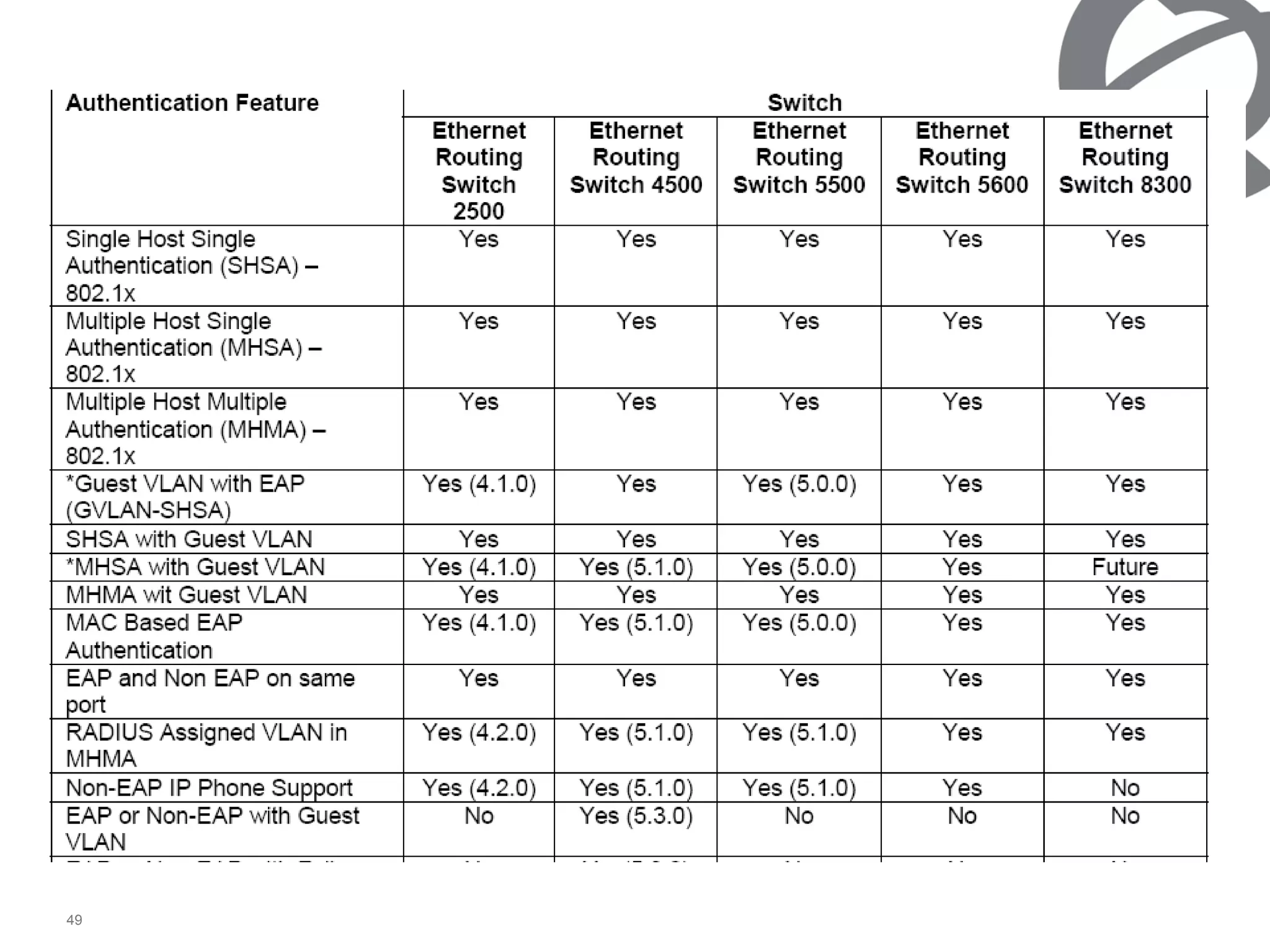
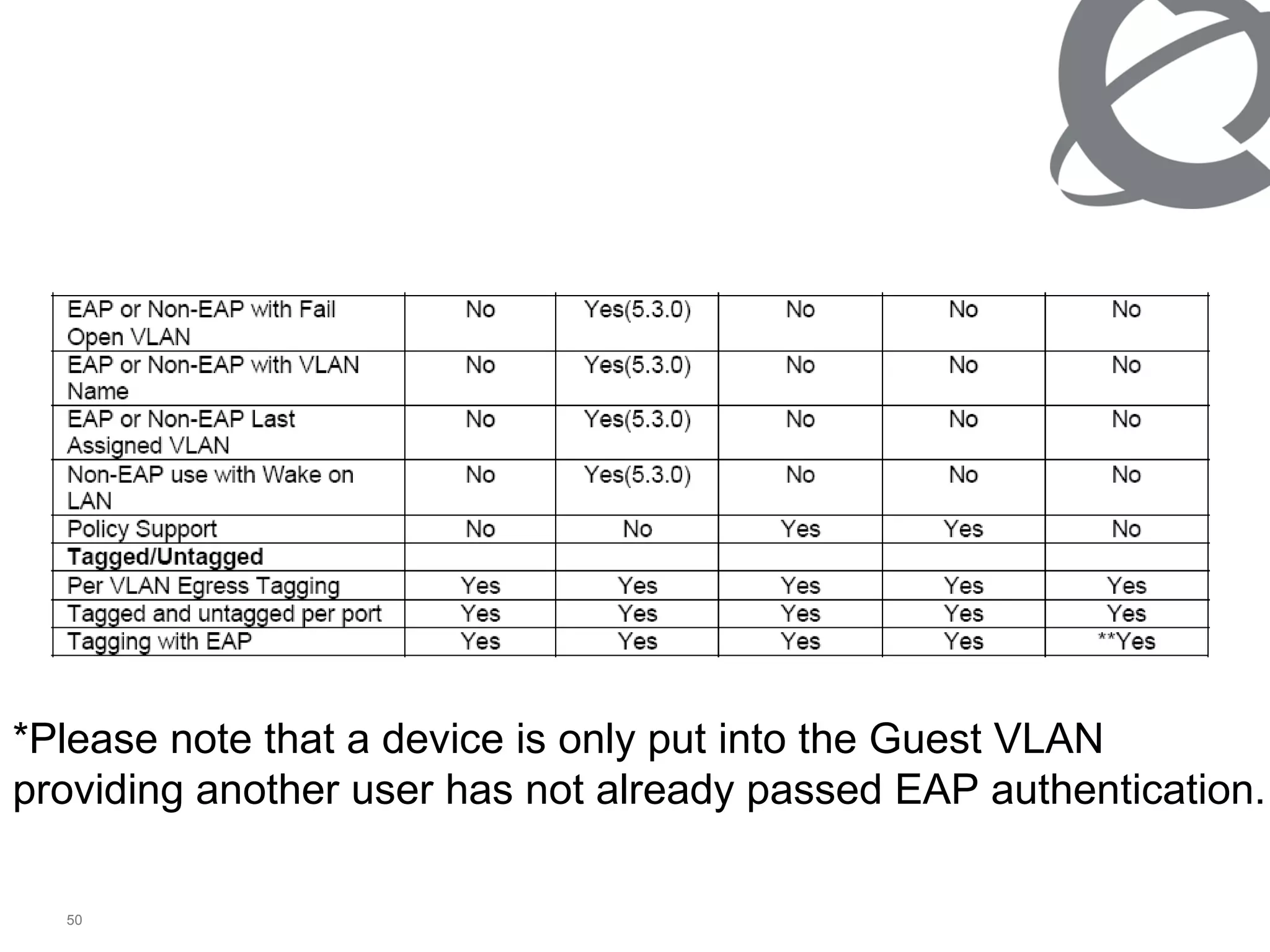
Authentication Feature  Ethernet Routing Switch 2500  Ethernet Routing Switch 4500  Ethernet Routing Switch 5500  Ethernet Routing Switch 5600  Ethernet Routing Switch 8300  Single Host Single Authentication (SHSA) – 802.1x  Yes  Yes  Yes  Yes  Yes  Multiple Host Single Authentication (MHSA) – 802.1x  Yes  Yes  Yes  Yes  Yes  Multiple Host Multiple Authentication (MHMA) – 802.1x  Yes  Yes  Yes  Yes  Yes  *Guest VLAN with EAP (GVLAN-SHSA)  Yes (4.1.0)  Yes  Yes (5.0.0)  Yes  Yes  SHSA with Guest VLAN  Yes  Yes  Yes  Yes  Yes  *MHSA with Guest VLAN  Yes (4.1.0)  Yes (5.1.0)  Yes (5.0.0)  Yes  Future  MHMA wit Guest VLAN  Yes  Yes  Yes  Yes  Yes  MAC Based EAP Authentication  Yes (4.1.0)  Yes (5.1.0)  Yes (5.0.0)  Yes  Yes  EAP and Non EAP on same port  Yes  Yes  Yes  Yes  Yes  RADIUS Assigned VLAN in MHMA  Yes (4.2.0)  Yes (5.1.0)  Yes (5.1.0)  Yes  Yes  Non-EAP IP Phone Support  Yes (4.2.0)  Yes (5.1.0)  Yes (5.1.0)  Yes  No  EAP or Non-EAP with Guest VLAN  No  Yes (5.3.0)  No  No  No  EAP or Non-EAP with Fail Open VLAN  No  Yes(5.3.0)  No  No  No  EAP or Non-EAP with VLAN Name  No  Yes(5.3.0)  No  No  No  EAP or Non-EAP Last Assigned VLAN  No  Yes(5.3.0)  No  No  No  Non-EAP use with Wake on LAN  No  Yes(5.3.0)  No  No  No  Policy Support  No  No  Yes  Yes  No  Tagged/Untagged  Per VLAN Egress Tagging  Yes  Yes  Yes  Yes  Yes  Tagged and untagged per port  Yes  Yes  Yes  Yes  Yes  Tagging with EAP  Yes  Yes  Yes  Yes  **Yes
*Please note that a device is only put into the Guest VLAN providing another user has not already passed EAP authentication.
ERS4500 implementations / features 1/ 11 RADIUS password fallback With the RADIUS password fallback feature, the user can log on to the switch or stack by using the local password if the RADIUS server is unavailable or unreachable for authentication.
EAPOL dynamic VLAN assignment If EAPOL-based security is enabled on an authorized port, the EAPOL feature dynamically changes the port VLAN configuration and assigns a new VLAN. The new VLAN configuration values apply according to previously stored parameters in the Authentication server. The following VLAN configuration values are affected: •  port membership •  PVID •  port priority ERS4500 implementations / features 2/ 11
Single Host with Single Authentication (SHSA) Multiple Host with Multiple Authentication (MHMA) Multiple Host with Single Authentication (MHSA) ERS4500 implementations / features 3/ 11
Single Host with Single Authentication and Guest VLAN With EAPOL SHSA Single Host with Single Authentication (the simplest EAPOL port operating mode), you can connect only one client on each port that is configured for EAPOL-based security. If you attempt to add additional clients to a port, that port state changes to Unauthorized. You can configure a guest VLAN for non-authenticated users to access the port. Any active VLAN can be a guest VLAN. The following rules apply for SHSA: •  When the port is EAP enabled —  If Guest VLAN is enabled, the port is placed on a Guest VLAN. PVID of the port = Guest VLAN ID ERS4500 implementations / features 4/ 11
Guest Vlan When an authentication failure occurs, a port is placed back in the Guest VLAN. ATTENTION EAP enabled port is not moved to guest-vlan, if guest vlan and original vlan are associated with different STGs. EAP port does not forward traffic in guest vlan or original VLAN, if EAP authentication succeeds packets are transmitted properly in the original VLAN. ERS4500 implementations / features 5/ 11
After the switch accesses the RADIUS server and authentication succeeds, the ports move to the Guest VLAN, or to configured VLANs, and age to allow the authentication of all incoming MAC addresses on the port. If there is at least one authenticated MAC address on the port, it blocks all other unauthenticated MAC addresses on the port. ERS4500 implementations / features 6/ 11
802.1X or non-EAP with Fail Open VLAN 802.1X or non-EAP with Fail Open VLAN provides network connectivity when the switch cannot connect to the RADIUS server. Every three minutes, the switch verifies whether the RADIUS servers are reachable. If the switch cannot connect to the primary and secondary RADIUS servers, then after a specified number of attempts to restore connectivity, the switch declares the RADIUS servers unreachable. All authenticated devices move into the configured Fail Open VLAN, when the switch declares the RADIUS servers unreachable. This prevents the clients from being disconnected when the reauthentication timer expires and provides the devices some form of network connectivity. ERS4500 implementations / features  7 / 11
MHMA (Multiple Host with Multiple Authentication) Each user must complete EAP authentication before the port allows traffic from the corresponding MAC address. Only traffic from the authorized hosts is allowed on that port. Transmitting EAPOL packets Only unicast packets are sent to a specific port so that the packets reach the correct destination. After the first successful authentication, only EAPOL packets and data from the authenticated MAC addresses are allowed on a particular port. ERS4500 implementations / features  8/11
A port remains on the Guest VLAN when no authenticated hosts exist on it. Until the first authenticated host, both EAP and non EAP clients are allowed on the port. RADIUS VLAN assignment is enabled for ports in MHMA mode. Upon successful RADIUS authentication, the port gets a VLAN value in a RADIUS attribute with EAP success. The port is added and the PVID is set to the first such VLAN value from the RADIUS server. Reauthenticate Now, when enabled, causes all sessions on the port to reauthenticate. ERS4500 implementations / features  9 / 11
802.1X or non-EAP Last Assigned RADIUS VLAN The 802.1X or non-EAP Last Assigned RADIUS VLAN functionality allows you to configure the switch such that the last received RADIUS VLAN assignment is always honoured on a port. In the previous release, if you enable the use-radius-assigned-vlan option, then only the first valid RADIUS-assigned VLAN (by EAP or non-EAP authentication) on that port is honoured. The subsequent RADIUS VLAN assignments are ignored for any user on that port. The last RADIUS-assigned VLAN (either EAP or non-EAP) determines the VLAN membership and PVID replacing any previous RADIUS-assigned VLAN values for that port. ERS4500 implementations / features  10 / 11
ATTENTION If a PC client is assigned to a VLAN based on a previous RADIUS Assigned VLAN, when the client goes into sleep or hibernation mode it reverts to either the default port-based VLAN or Guest VLAN configured for that port. So, the WoL Magic Packet must be sent to the default VLAN or Guest VLAN. ERS4500 implementations / features  11 / 11
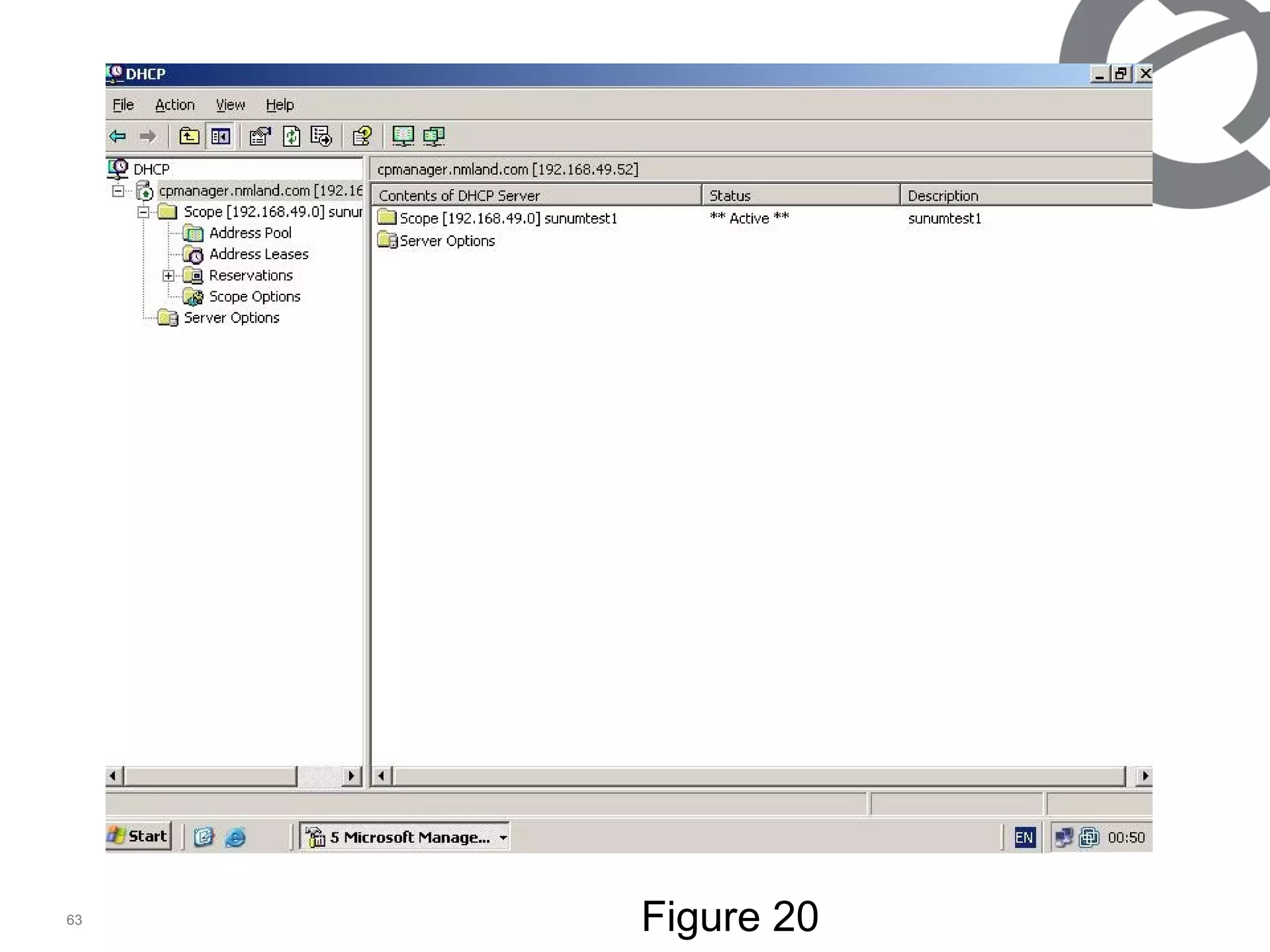
For eap/neap with guest vlan  We need to open dhcp at ms 2003 to give ip to authenticated vlan users. (figure 20) We need to configure dhcp relay at the ers4500  It will provide us for authenticate user gets ip from dhcp and  non-authenticate user to use guest vlan.
Figure 20
Ers 4500 dhcp relay commands ip dhcp-relay ip dhcp-relay fwd-path <next hope ip> <server ip> enable ip dhcp-relay fwd-path <next hope ip> <server ip> mode bootp-dhcp
Duble click to packege to see eap-radius resources
Thanks

802.1x

  • 1.
  • 2.
    ers4500 802.1x applicationon MS2003 Version 3 Alp IŞIK Netas NTS Engineer [email_address]
  • 3.
    Topology 1 supplicantauthenticator Radius server 192.168.49.10 192.168.49.150 192.168.49.52 00:1b:24:b5:da:b3 network
  • 4.
    Eap 2) Neap(non-eap) Authentication types that ers’s support
  • 5.
    802.1X provides port-basedauthentication, which involves communications between a supplicant, authenticator, and authentication server. Port refers to a single point of attachment to the LAN infrastructure. The supplicant is often software on a client device, such as a laptop; the authenticator is a network device, such as an ethernet switch or wireless access point; and the authentication server is typically a host running software supporting the RADIUS and EAP protocols. EAP Authentication concept 1/2
  • 6.
    EAP Authentication concept2/2 The authenticator acts like a security guard to a protected network. The supplicant (i.e., client device) is not allowed access through the authenticator to the protected side of the network until the supplicant’s identity has been validated and authorized. An analogy to this is providing a valid passport at an airport before being allowed to pass through security to the terminal. With 802.1X port-based authentication, the supplicant provides credentials, such as user name / password or digital certificate, to the authenticator, and the authenticator forwards the credentials to the authentication server for verification . If the credentials are valid (in the authentication server database), the supplicant (client device) is allowed to access resources located on the protected side of the network.
  • 7.
    Neap Authentication conceptNeap is developed, cause eap does not useful for the dummy user or some user device, and still authentication security is neccesary. Neap uses to authenticate the user’s mac address, ip address, port number of the authenticator. It can either use only mac, ip address or the combinastion of the above.
  • 8.
    802.1X Conversation RADIUSServer (Authentication Server) Ethernet Switch (RADIUS Client) PC_Client (EAP Client/Supplicant) EAP over Ethernet EAPoL Auth Requests & Return Attributes Port-Start EAPoL-Start EAP-Request/Identity EAP-Response/Identity Radius-Access-Request Radius-Access-Challenge EAP-Request (Credentials) EAP-Response (Credentials) Radius-Access-Request Radius-Access-Accept EAP- Success Access to the Network Blocked Access Allowed Switch to Radius Server communication Client to Switch communication
  • 9.
    802.1 X Ethernetpacket Dest . MAC 0180C200000F* 0180C2000003 Type 8180* 888E Protocol Version 01 Packet Type 6 bytes 6 bytes 2 bytes 1 byte Source MAC 1 byte Packet Body Length 2 bytes Packet Body n bytes 00 EAP-Packet 01 EAPOL-Start * 02 EAPOL-Logoff * 03 EAPOL-Ke y 04 EAPOL-Encapsulated-ASF-Aler t Descriptor Type Key Length Relay Counter Key IV 1 bytes 2 bytes 8 bytes 16 bytes Key Index Key Signature Key 1 bytes n bytes 16 bytes * No packet body field packet body field packet body field * Beta release Code Identifier Length Data 1 byte 1 byte 2 bytes n bytes 1 Request 2 Response 3 Success 4 Failure
  • 10.
    For eap ms2003server configuration 2003 server should have an active directory and IAS server At the active directory users and groups need to be created. (as figure 1) At the ias radius client will be created. (as figure 2-4). At the ias, access policy need to be created. (as figure 5-12). Return to active directory and configure the user as figure 13-
  • 11.
    At the activedirectory part 1 A group (eapsunum1) is created, all eap users (alp isik) are configured as amember of “eapsunum1” and “Ras and ias servers” group. Or better to make the ‘eapsunum1’ group as a member of “Ras and ias servers” group.
  • 12.
  • 13.
    At the iasserver For radius client shared secret need to be same as the authenticator.(ers4500) After radius client created can be checked as figure 4.
  • 14.
  • 15.
  • 16.
  • 17.
    At the IASaccess policy 1/2 For the access method we have chosen Ethernet. For the authentication method we have chosen md5, any other method could be chosen. (figure 8) On the created access policy, right click and properties (figure 9) By default some policy’s will come, delete unneccesary policy’s and implement which matches your criteria.(at the example figure 10, we have implemented nas (authenticator switch) ip addr. Matches giving ers4500’s ip) and check that if the grant remote access permission is selected.
  • 18.
    At the advancedtab (figure 11) we did not want to send anything to user/switch, for easy sample. Removed the attribution. At the authentication tab (figure 12) noting we have chosen but checked the eap method. (md5) At the IAS access policy 2/2
  • 19.
  • 20.
  • 21.
  • 22.
  • 23.
  • 24.
  • 25.
  • 26.
  • 27.
    We have returnedto active directory to configure user properties. At the account tab chosen password never expires and store password using reversible encryption. At the member of tab added to eapsunum1 and ras & ias server. At the dial-in tab we allowed the access. At the active directory part 2
  • 28.
  • 29.
  • 30.
  • 31.
    For eap (authenticator)switch config (ers4500) At the topology 1 port 3 is used for eap client (supplicant connection). Config is attached to document,with double click you may open the “eap port3.log”. >enable #config terminal #radius-server host 192.168.49.52 port 1812 key Nortel #interface fastEthernet 3 #eapol status auto #exit #eapol enable
  • 32.
    At the supplicant / user First you need to open authentication from local area connection properties, by default there is no authentication tab, from pc start, run, type services.msc, and start Wired AutoConfig. Then authentication tab will be appeared, at there click the 802.1x and choose your authentication as md5 or else. Over the local area connection a box will appear as figure 16. After click on it wıth the user name and password, and logon domain. Access will be provided. (which was criated at the active directory, logon domain is the active directory name) figure 17.
  • 33.
  • 34.
  • 35.
  • 36.
  • 37.
    At the ms2003event viewer it’s seen as IAS information
  • 38.
    For Neap ms2003server config At the 2003 server, active directory user account is different than the eap. For only mac attribute. (figure 18). User logon name need to be same as the mac of supplicant. At the IAS remote access policy, edit profile, authentication pap need to be chosen as figure 19. By default 2003 server has password policies, for gining mac address you need to remove the password policies.
  • 39.
    How to removepassword policy at 2003 Server 1/2 Select Domain Security Policy from Administrative Tools . Click on Security Settings > Account Policies > Password Policy . Right-click on Minimum password length in the right pane. Click P r operties from the context menu. Enter a new minimum password length. Entering a Zero (0) will remove the password requirement.
  • 40.
    How to removepassword policy at 2003 Server 2/2 Double-click on Passwords must meet complexity requirements in the right pane. Select the Di s abled option. Click Start > R un... And Type cmd Type gpupdate /force at the Command Prompt
  • 41.
  • 42.
  • 43.
    For neap atthe authenticator switch ers4500 1/3 At the topology 1, port 10 is used for the neap supplicant For the switch configuration you may use the attached neapport10.log by duble click.
  • 44.
    For neap atthe authenticator switch ers4500 2/3 >enable #config terminal #radius-server host 192.168.49.52 port 1812 key Nortel #interface fastEthernet 3 #eapol status auto #exit #eapol enable #interface fastEthernet 10 #eapol status auto #eapol multihost allow-non-eap-enable # eap multihost non-eap-mac-max 10 #eapol multihost radius-non-eap-enable #eapol multihost enable #exit
  • 45.
    For neap atthe authenticator switch ers4500 3/3 # eapol multihost allow-non-eap-enable # eapol multihost radius-non-eap-enable # no eapol multihost non-eap-pwd-fmt # eapol multihost non-eap-pwd-fmt mac-addr # eapol enable
  • 46.
    For neap atthe user/supplicant At the user noting to be done as soon as port is connected if the mac/ip/port is macth with the server config, user will get the traffic.
  • 47.
  • 48.
    On the swicthneap supplicant can be checked as below
  • 49.
    Authentication Feature Ethernet Routing Switch 2500 Ethernet Routing Switch 4500 Ethernet Routing Switch 5500 Ethernet Routing Switch 5600 Ethernet Routing Switch 8300 Single Host Single Authentication (SHSA) – 802.1x Yes Yes Yes Yes Yes Multiple Host Single Authentication (MHSA) – 802.1x Yes Yes Yes Yes Yes Multiple Host Multiple Authentication (MHMA) – 802.1x Yes Yes Yes Yes Yes *Guest VLAN with EAP (GVLAN-SHSA) Yes (4.1.0) Yes Yes (5.0.0) Yes Yes SHSA with Guest VLAN Yes Yes Yes Yes Yes *MHSA with Guest VLAN Yes (4.1.0) Yes (5.1.0) Yes (5.0.0) Yes Future MHMA wit Guest VLAN Yes Yes Yes Yes Yes MAC Based EAP Authentication Yes (4.1.0) Yes (5.1.0) Yes (5.0.0) Yes Yes EAP and Non EAP on same port Yes Yes Yes Yes Yes RADIUS Assigned VLAN in MHMA Yes (4.2.0) Yes (5.1.0) Yes (5.1.0) Yes Yes Non-EAP IP Phone Support Yes (4.2.0) Yes (5.1.0) Yes (5.1.0) Yes No EAP or Non-EAP with Guest VLAN No Yes (5.3.0) No No No EAP or Non-EAP with Fail Open VLAN No Yes(5.3.0) No No No EAP or Non-EAP with VLAN Name No Yes(5.3.0) No No No EAP or Non-EAP Last Assigned VLAN No Yes(5.3.0) No No No Non-EAP use with Wake on LAN No Yes(5.3.0) No No No Policy Support No No Yes Yes No Tagged/Untagged Per VLAN Egress Tagging Yes Yes Yes Yes Yes Tagged and untagged per port Yes Yes Yes Yes Yes Tagging with EAP Yes Yes Yes Yes **Yes
  • 50.
    *Please note thata device is only put into the Guest VLAN providing another user has not already passed EAP authentication.
  • 51.
    ERS4500 implementations /features 1/ 11 RADIUS password fallback With the RADIUS password fallback feature, the user can log on to the switch or stack by using the local password if the RADIUS server is unavailable or unreachable for authentication.
  • 52.
    EAPOL dynamic VLANassignment If EAPOL-based security is enabled on an authorized port, the EAPOL feature dynamically changes the port VLAN configuration and assigns a new VLAN. The new VLAN configuration values apply according to previously stored parameters in the Authentication server. The following VLAN configuration values are affected: • port membership • PVID • port priority ERS4500 implementations / features 2/ 11
  • 53.
    Single Host withSingle Authentication (SHSA) Multiple Host with Multiple Authentication (MHMA) Multiple Host with Single Authentication (MHSA) ERS4500 implementations / features 3/ 11
  • 54.
    Single Host withSingle Authentication and Guest VLAN With EAPOL SHSA Single Host with Single Authentication (the simplest EAPOL port operating mode), you can connect only one client on each port that is configured for EAPOL-based security. If you attempt to add additional clients to a port, that port state changes to Unauthorized. You can configure a guest VLAN for non-authenticated users to access the port. Any active VLAN can be a guest VLAN. The following rules apply for SHSA: • When the port is EAP enabled — If Guest VLAN is enabled, the port is placed on a Guest VLAN. PVID of the port = Guest VLAN ID ERS4500 implementations / features 4/ 11
  • 55.
    Guest Vlan Whenan authentication failure occurs, a port is placed back in the Guest VLAN. ATTENTION EAP enabled port is not moved to guest-vlan, if guest vlan and original vlan are associated with different STGs. EAP port does not forward traffic in guest vlan or original VLAN, if EAP authentication succeeds packets are transmitted properly in the original VLAN. ERS4500 implementations / features 5/ 11
  • 56.
    After the switchaccesses the RADIUS server and authentication succeeds, the ports move to the Guest VLAN, or to configured VLANs, and age to allow the authentication of all incoming MAC addresses on the port. If there is at least one authenticated MAC address on the port, it blocks all other unauthenticated MAC addresses on the port. ERS4500 implementations / features 6/ 11
  • 57.
    802.1X or non-EAPwith Fail Open VLAN 802.1X or non-EAP with Fail Open VLAN provides network connectivity when the switch cannot connect to the RADIUS server. Every three minutes, the switch verifies whether the RADIUS servers are reachable. If the switch cannot connect to the primary and secondary RADIUS servers, then after a specified number of attempts to restore connectivity, the switch declares the RADIUS servers unreachable. All authenticated devices move into the configured Fail Open VLAN, when the switch declares the RADIUS servers unreachable. This prevents the clients from being disconnected when the reauthentication timer expires and provides the devices some form of network connectivity. ERS4500 implementations / features 7 / 11
  • 58.
    MHMA (Multiple Hostwith Multiple Authentication) Each user must complete EAP authentication before the port allows traffic from the corresponding MAC address. Only traffic from the authorized hosts is allowed on that port. Transmitting EAPOL packets Only unicast packets are sent to a specific port so that the packets reach the correct destination. After the first successful authentication, only EAPOL packets and data from the authenticated MAC addresses are allowed on a particular port. ERS4500 implementations / features 8/11
  • 59.
    A port remainson the Guest VLAN when no authenticated hosts exist on it. Until the first authenticated host, both EAP and non EAP clients are allowed on the port. RADIUS VLAN assignment is enabled for ports in MHMA mode. Upon successful RADIUS authentication, the port gets a VLAN value in a RADIUS attribute with EAP success. The port is added and the PVID is set to the first such VLAN value from the RADIUS server. Reauthenticate Now, when enabled, causes all sessions on the port to reauthenticate. ERS4500 implementations / features 9 / 11
  • 60.
    802.1X or non-EAPLast Assigned RADIUS VLAN The 802.1X or non-EAP Last Assigned RADIUS VLAN functionality allows you to configure the switch such that the last received RADIUS VLAN assignment is always honoured on a port. In the previous release, if you enable the use-radius-assigned-vlan option, then only the first valid RADIUS-assigned VLAN (by EAP or non-EAP authentication) on that port is honoured. The subsequent RADIUS VLAN assignments are ignored for any user on that port. The last RADIUS-assigned VLAN (either EAP or non-EAP) determines the VLAN membership and PVID replacing any previous RADIUS-assigned VLAN values for that port. ERS4500 implementations / features 10 / 11
  • 61.
    ATTENTION If aPC client is assigned to a VLAN based on a previous RADIUS Assigned VLAN, when the client goes into sleep or hibernation mode it reverts to either the default port-based VLAN or Guest VLAN configured for that port. So, the WoL Magic Packet must be sent to the default VLAN or Guest VLAN. ERS4500 implementations / features 11 / 11
  • 62.
    For eap/neap withguest vlan We need to open dhcp at ms 2003 to give ip to authenticated vlan users. (figure 20) We need to configure dhcp relay at the ers4500 It will provide us for authenticate user gets ip from dhcp and non-authenticate user to use guest vlan.
  • 63.
  • 64.
    Ers 4500 dhcprelay commands ip dhcp-relay ip dhcp-relay fwd-path <next hope ip> <server ip> enable ip dhcp-relay fwd-path <next hope ip> <server ip> mode bootp-dhcp
  • 65.
    Duble click topackege to see eap-radius resources
  • 66.