INTRODUCTION
MODULE 1
By Prof.Vinit Raut
OVERVIEW OF COMPUTER
ARCHITECTURE &
ORGANIZATION
By Prof.Vinit Raut
Detailed Content
 Introduction of Computer Organization and
Architecture
 Basic organization of computer
 Block level description of the functional units
.
By Prof.Vinit Raut
Computer Architecture
 Computer Architecture refers to those attributes of a system
visible to a programmer OR those attributes of a system that
have a direct impact on the logical execution of a program.
 It is concerned with structure and behaviour of computer as
seen by theY user.
 Examples:
 the instruction set
 the number of bits used to represent various data types
 memory addressing techniques
By Prof.Vinit Raut
Computer Organization
 Computer Organization refers to the operational units and
their interconnections that realize the architectural
specifications.
 It is concerned with the way the hardware are connected
together to form the computer system.
 Examples of organizational attributes includes those
hardware details that are transparent to the programmer:
 control signals
 interfaces between computer and peripherals
 the memory technology being used
By Prof.Vinit Raut
Differentiate between computer architecture and
computer organization
 Computer architecture is the science and art of selecting and
interconnecting hardware components to create a computer.
 Computer architecture comes before computer organization.
 Its like building the design and architecture of house takes
maximum time and then organization is building house by
bricks or by latest technology keeping the basic layout and
architecture of house in mind.
 For example, the fact that a multiply instruction is available
is a computer architecture issue. How that multiply is
implemented is a computer organization issue.
By Prof.Vinit Raut
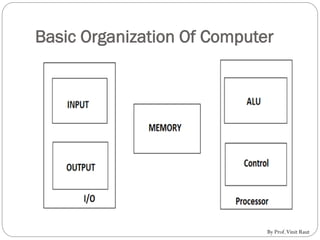
Basic Organization Of Computer
By Prof.Vinit Raut
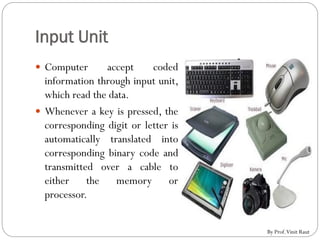
Input Unit
 Computer accept coded
information through input unit,
which read the data.
 Whenever a key is pressed, the
corresponding digit or letter is
automatically translated into
corresponding binary code and
transmitted over a cable to
either the memory or
processor.
By Prof.Vinit Raut
Memory Unit
 The function of a memory unit is to store programs and data.
 There are two classes of storage:
1. Primary storage:
 A fast memory that operates at electronic speeds.
 Program must be stored in a memory while they are being
executed .
 Example: ROM and RAM
2. Secondary storage:
 External or auxiliary memory.
 As compared to primary or main memory, secondary memory has
much larger capacity to store the data.
 Cost wise it is cheaper but it is not as fast as the Primary memory.
Computer thus takes more time to retrieve data from secondary
storage devices.
 Ex: Hard Disk, Floppy disk, CD-ROM, Magnetic tapes.
By Prof.Vinit Raut
Arithmetic And Logical Unit(ALU)
 Any arithmetic or logical operation is initiated by bringing
the required operands into processor where the operation is
performed by theALU.
 These operands are stored in high speed elements called
registers.
 Each register can store one word of data.
By Prof.Vinit Raut
Output Unit
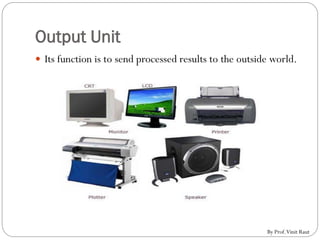
 Its function is to send processed results to the outside world.
By Prof.Vinit Raut
Control Unit
 The control unit is a component of a computer's Central
processing unit (CPU) which directs operation of the
processor.
 It controls communication and co-ordination between
input/output devices.
 It reads and interprets instructions and determines the
sequence for processing the data.
 It directs the operation of the other units by providing timing
and control signals. All computer resources are managed by
the CU (Control Unit).
By Prof.Vinit Raut
Stored program concept:
 The stored-program concept was introduced by the
mathematician John Von Neumann, who was a consultant on
the ENIAC project.
 In stored-program concept, computer program and data
reside in memory together. Thus computer could gets its
instruction by reading them from memory, and a program
could be set or altered by setting the values of a portion of
memory.
By Prof.Vinit Raut

Overview of Computer Architecture and Organization

  • 1.
  • 2.
    OVERVIEW OF COMPUTER ARCHITECTURE& ORGANIZATION By Prof.Vinit Raut
  • 3.
    Detailed Content  Introductionof Computer Organization and Architecture  Basic organization of computer  Block level description of the functional units . By Prof.Vinit Raut
  • 4.
    Computer Architecture  ComputerArchitecture refers to those attributes of a system visible to a programmer OR those attributes of a system that have a direct impact on the logical execution of a program.  It is concerned with structure and behaviour of computer as seen by theY user.  Examples:  the instruction set  the number of bits used to represent various data types  memory addressing techniques By Prof.Vinit Raut
  • 5.
    Computer Organization  ComputerOrganization refers to the operational units and their interconnections that realize the architectural specifications.  It is concerned with the way the hardware are connected together to form the computer system.  Examples of organizational attributes includes those hardware details that are transparent to the programmer:  control signals  interfaces between computer and peripherals  the memory technology being used By Prof.Vinit Raut
  • 6.
    Differentiate between computerarchitecture and computer organization  Computer architecture is the science and art of selecting and interconnecting hardware components to create a computer.  Computer architecture comes before computer organization.  Its like building the design and architecture of house takes maximum time and then organization is building house by bricks or by latest technology keeping the basic layout and architecture of house in mind.  For example, the fact that a multiply instruction is available is a computer architecture issue. How that multiply is implemented is a computer organization issue. By Prof.Vinit Raut
  • 7.
    Basic Organization OfComputer By Prof.Vinit Raut
  • 8.
    Input Unit  Computeraccept coded information through input unit, which read the data.  Whenever a key is pressed, the corresponding digit or letter is automatically translated into corresponding binary code and transmitted over a cable to either the memory or processor. By Prof.Vinit Raut
  • 9.
    Memory Unit  Thefunction of a memory unit is to store programs and data.  There are two classes of storage: 1. Primary storage:  A fast memory that operates at electronic speeds.  Program must be stored in a memory while they are being executed .  Example: ROM and RAM 2. Secondary storage:  External or auxiliary memory.  As compared to primary or main memory, secondary memory has much larger capacity to store the data.  Cost wise it is cheaper but it is not as fast as the Primary memory. Computer thus takes more time to retrieve data from secondary storage devices.  Ex: Hard Disk, Floppy disk, CD-ROM, Magnetic tapes. By Prof.Vinit Raut
  • 10.
    Arithmetic And LogicalUnit(ALU)  Any arithmetic or logical operation is initiated by bringing the required operands into processor where the operation is performed by theALU.  These operands are stored in high speed elements called registers.  Each register can store one word of data. By Prof.Vinit Raut
  • 11.
    Output Unit  Itsfunction is to send processed results to the outside world. By Prof.Vinit Raut
  • 12.
    Control Unit  Thecontrol unit is a component of a computer's Central processing unit (CPU) which directs operation of the processor.  It controls communication and co-ordination between input/output devices.  It reads and interprets instructions and determines the sequence for processing the data.  It directs the operation of the other units by providing timing and control signals. All computer resources are managed by the CU (Control Unit). By Prof.Vinit Raut
  • 13.
    Stored program concept: The stored-program concept was introduced by the mathematician John Von Neumann, who was a consultant on the ENIAC project.  In stored-program concept, computer program and data reside in memory together. Thus computer could gets its instruction by reading them from memory, and a program could be set or altered by setting the values of a portion of memory. By Prof.Vinit Raut