Multiplatform UX Patterns
Simona Cremonesi, Rosanna Bivona
Summary
❖ User Experience (UX) definitions
❖ Navigation Patterns
❖ Antipatterns
❖ Dark Patterns
What is UX?
UX stands for User eXperience
Everyone knows what it is, yet the definition doesn’t
come out easily!
- It is subjective!
3
The definition
by the book
“a person's perceptions and
responses that result from the use
or anticipated use of a product,
system or service”
ISO 9241-210
4
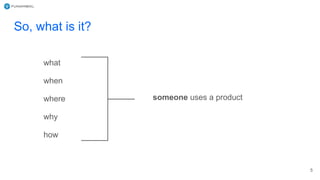
So, what is it?
what
when
where
why
how
someone uses a product
5
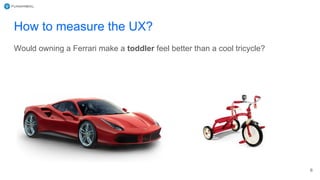
How to measure the UX?
6
Would owning a Ferrari make a toddler feel better than a cool tricycle?
“Everything has a user
experience. Our job is not to
create the user experience. It
is our job to make it good.”
7
-- Joel Marsh, in “UX Crash course”
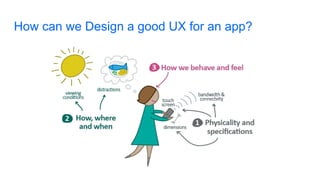
How can we Design a good UX for an app?
What elements?
● Anatomy of the mobile app
○ how to organize the content?
“A design pattern is a repeatable solution to a software
engineering problem”
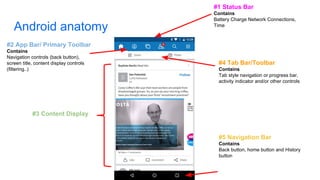
Android anatomy
#1 Status Bar
Contains
Battery Charge Network Connections,
Time
#2 App Bar/ Primary Toolbar
Contains
Navigation controls (back button),
screen title, content display controls
(filtering..)
#3 Content Display
#4 Tab Bar/Toolbar
Contains
Tab style navigation or progress bar,
activity indicator and/or other controls
#5 Navigation Bar
Contains
Back button, home button and History
button
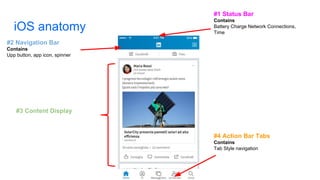
iOS anatomy
#1 Status Bar
Contains
Battery Charge Network Connections,
Time
#3 Content Display
#2 Navigation Bar
Contains
Upp button, app icon, spinner
#4 Action Bar Tabs
Contains
Tab Style navigation
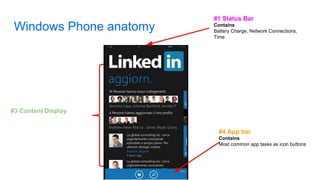
Windows Phone anatomy
#1 Status Bar
Contains
Battery Charge, Network Connections,
Time
#3 Content Display
#4 App bar
Contains
Most common app tasks as icon buttons
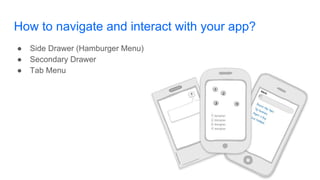
How to navigate and interact with your app?
● Side Drawer (Hamburger Menu)
● Secondary Drawer
● Tab Menu
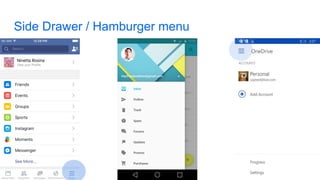
Side Drawer / Hamburger menu
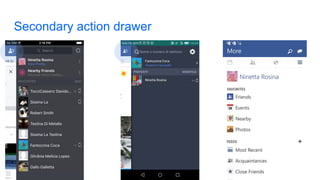
Secondary action drawer
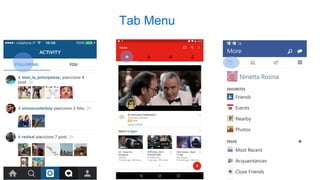
Tab Menu
Browse control patterns
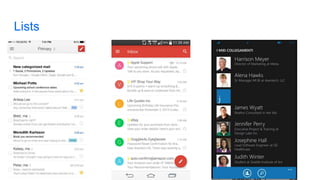
❖ Lists
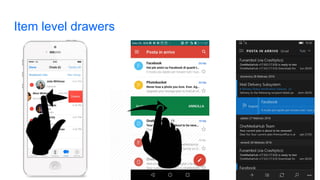
➢ Item level drawers
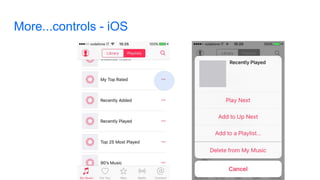
➢ more control
❖ Grids or Gallery
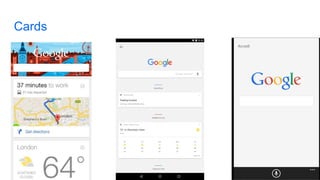
❖ Cards
❖ Carousels
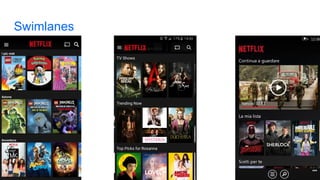
❖ Swimlanes
Lists
Item level drawers
More...controls - iOS
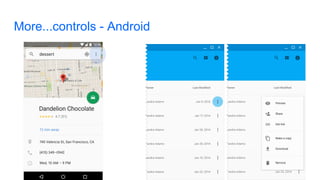
More...controls - Android
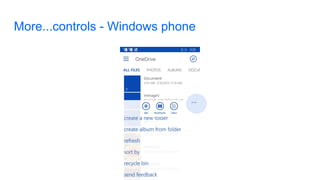
More...controls - Windows phone
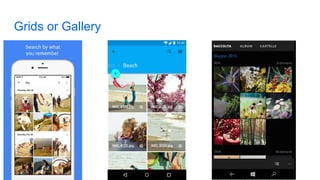
Grids or Gallery
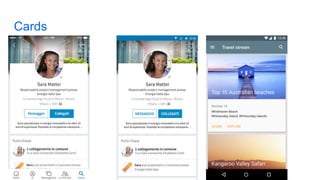
Cards
Cards
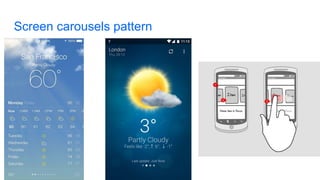
Screen carousels pattern
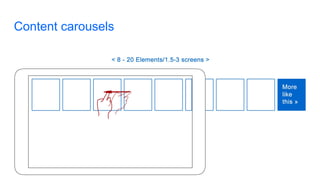
Content carousels
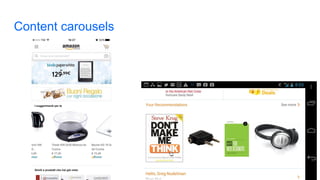
Content carousels
Swimlanes
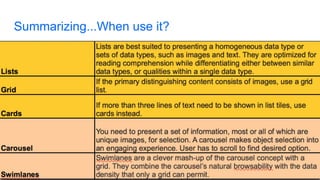
Summarizing...When use it?
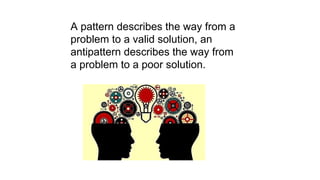
A pattern describes the way from a
problem to a valid solution, an
antipattern describes the way from
a problem to a poor solution.
Antipatterns
“An antipattern is something that
looks like a good idea, but which
backfires badly when applied.”
Jim Coplien
Antipatterns: where is the value
Antipatterns during first run of the app
❖ Splash screen
❖ Force user to register
❖ Ask too much information during signup
❖ Username as only way to register/login
❖ Insert the password twice
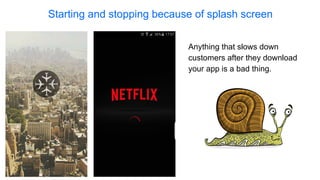
Starting and stopping because of splash screen
Anything that slows down
customers after they download
your app is a bad thing.
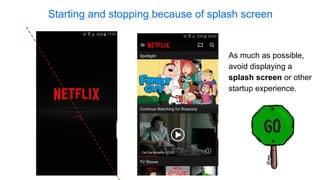
Starting and stopping because of splash screen
As much as possible,
avoid displaying a
splash screen or other
startup experience.
Forcing registration without offering value
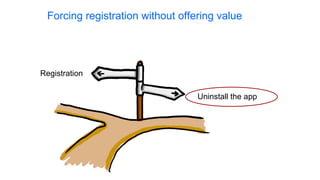
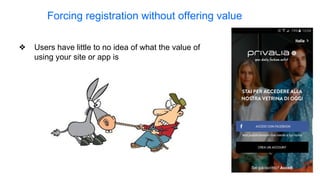
❖ Users have little to no idea of what the value of
using your site or app is
Registration
Uninstall the app
Forcing registration without offering value
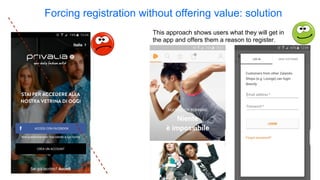
This approach shows users what they will get in
the app and offers them a reason to register.
Forcing registration without offering value: solution
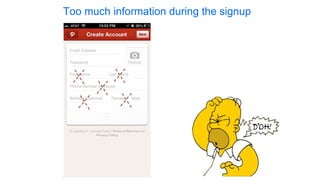
Too much information during the signup
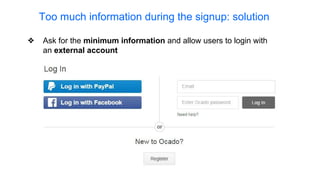
❖ Ask for the minimum information and allow users to login with
an external account
Too much information during the signup: solution
❖ Since usernames have to be unique, users end
up registering with a new username that they are
never going to remember
Username as only way to complete the registration
❖ Users have many different usernames for
various websites
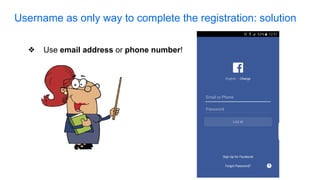
❖ Use email address or phone number!
Username as only way to complete the registration: solution
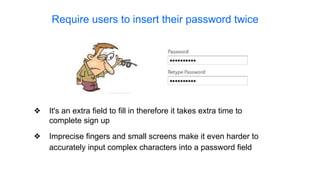
❖ Imprecise fingers and small screens make it even harder to
accurately input complex characters into a password field
❖ It's an extra field to fill in therefore it takes extra time to
complete sign up
Require users to insert their password twice
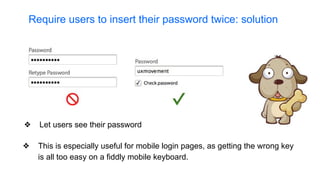
❖ Let users see their password
❖ This is especially useful for mobile login pages, as getting the wrong key
is all too easy on a fiddly mobile keyboard.
Require users to insert their password twice: solution
Antipatterns navigating through the app
❖ Hover and Cover antipattern
❖ Hamburger menu navigation
❖ Hamburger menu position
❖ Door slam
❖ Confirmation messages
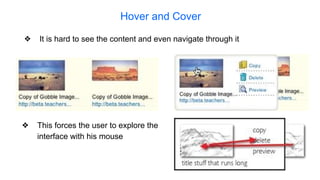
Hover and Cover
❖ It is hard to see the content and even navigate through it
❖ This forces the user to explore the
interface with his mouse
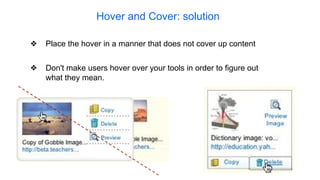
Hover and Cover: solution
❖ Don't make users hover over your tools in order to figure out
what they mean.
❖ Place the hover in a manner that does not cover up content
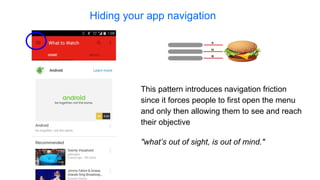
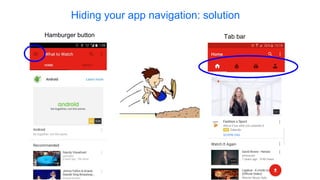
Hiding your app navigation
"what’s out of sight, is out of mind."
This pattern introduces navigation friction
since it forces people to first open the menu
and only then allowing them to see and reach
their objective
Hamburger button Tab bar
Hiding your app navigation: solution
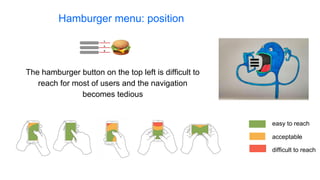
Hamburger menu: position
The hamburger button on the top left is difficult to
reach for most of users and the navigation
becomes tedious
easy to reach
difficult to reach
acceptable
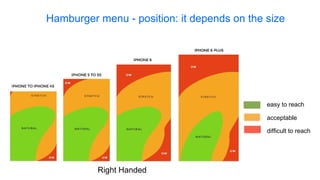
easy to reach
difficult to reach
acceptable
Hamburger menu - position: it depends on the size
Right Handed
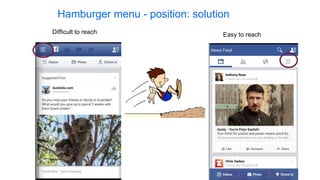
Hamburger menu - position: solution
Difficult to reach Easy to reach
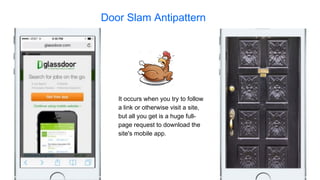
Door Slam Antipattern
It occurs when you try to follow
a link or otherwise visit a site,
but all you get is a huge full-
page request to download the
site's mobile app.
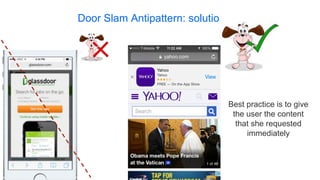
Door Slam Antipattern: solution
Best practice is to give
the user the content
that she requested
immediately
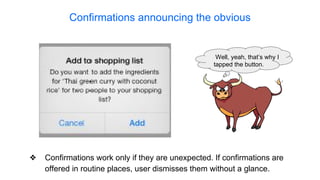
Confirmations announcing the obvious
❖ Confirmations work only if they are unexpected. If confirmations are
offered in routine places, user dismisses them without a glance.
Well, yeah, that’s why I
tapped the button.
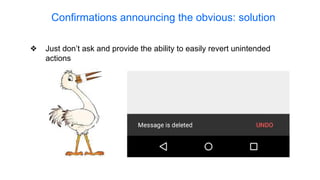
Confirmations announcing the obvious: solution
❖ Just don’t ask and provide the ability to easily revert unintended
actions
UI Antipatterns
❖ “Click here” antipattern
❖ Clickable elements which are not recognizable
❖ Elements which seem clickable even if they are not
❖ Icons, icons everywhere
❖ Low contrast
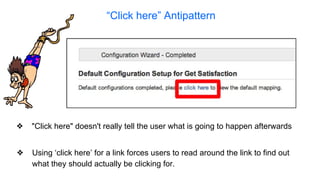
“Click here” Antipattern
❖ Using ‘click here’ for a link forces users to read around the link to find out
what they should actually be clicking for.
❖ "Click here" doesn't really tell the user what is going to happen afterwards
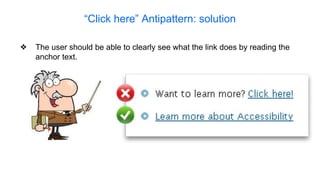
“Click here” Antipattern: solution
❖ The user should be able to clearly see what the link does by reading the
anchor text.
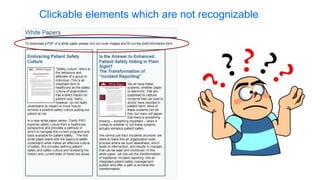
Clickable elements which are not recognizable
Elements which seem clickable even if they are not
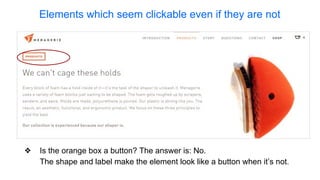
❖ Is the orange box a button? The answer is: No.
The shape and label make the element look like a button when it’s not.
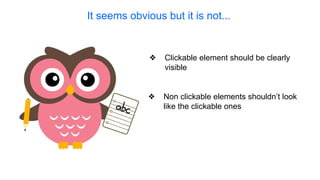
❖ Non clickable elements shouldn’t look
like the clickable ones
❖ Clickable element should be clearly
visible
It seems obvious but it is not...
Icons, icons everywhere
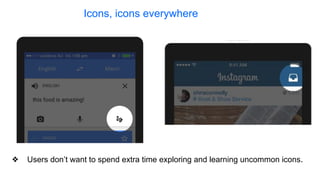
❖ Users don’t want to spend extra time exploring and learning uncommon icons.
Icons, icons everywhere: solution
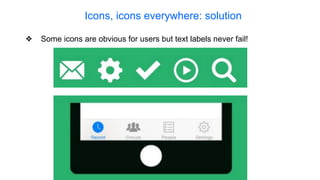
❖ Some icons are obvious for users but text labels never fail!
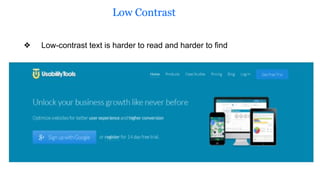
❖ Low-contrast text is harder to read and harder to find
Low Contrast
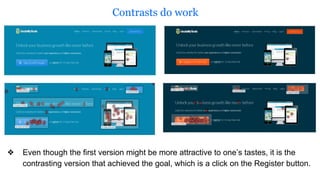
Contrasts do work
❖ Even though the first version might be more attractive to one’s tastes, it is the
contrasting version that achieved the goal, which is a click on the Register button.
Dark Patterns
Dark Patterns are User Interfaces
that are designed to trick people.
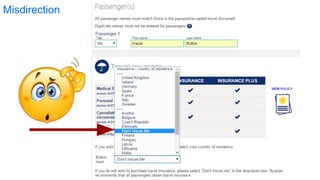
Misdirection
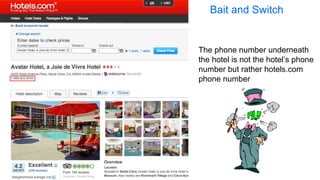
The phone number underneath
the hotel is not the hotel’s phone
number but rather hotels.com
phone number
Bait and Switch
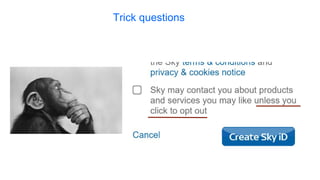
Trick questions
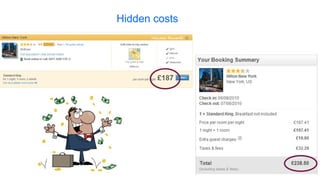
Hidden costs
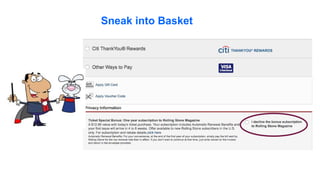
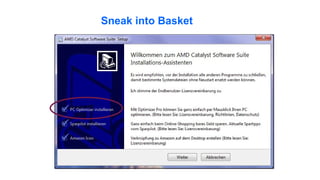
Sneak into Basket
Sneak into Basket
- Antipatterns - https://sourcemaking.com/antipatterns
- iOS Human Interface Guidelines https://developer.apple.
com/library/ios/documentation/UserExperience/Conceptual/MobileHIG/StartingStoppin
g.html
- 10 tips for a better login page and process http://www.uxforthemasses.com/login-page/
- Are you sure? How to write effective confirmations http://www.uxdesignedge.
com/2010/06/are-you-sure-how-to-write-effective-confirmations/
- Beyond Blue Links: Making Clickable Elements Recognizable https://www.nngroup.
com/articles/clickable-elements/
- Mobile UX antipatterns - http://www.slideshare.net/kollinz/misused-mobile-ux-patterns
- UX Antipatterns: Hidden Traps in Sites and Apps http://www.lauradhamilton.com/ux-
antipatterns-hidden-traps-sites-apps
- http://darkpatterns.org/
- UI patterns: http://ui-patterns.com
- How to create an app for ios, Android and Windows Phone: http://www.pcmag.com/article2/0,
2817,2476480,00.asp
- Book “Mobile Design Pattern Gallery, 2nd Edition” Theresa Neil
- Book “About Face - The Essentials of Interaction Design” Alan Cooper, Robert Reimann, David
Cronin, Christopher Noessel
- Design Library for Windows Phone: https://msdn.microsoft.com/en-
us/library/windows/apps/hh202915(v=vs.105).aspx
- Android Design Guideline:
- https://www.google.com/design/spec/layout/structure.html
- https://www.google.com/design/spec/components/lists.html
- https://www.google.com/design/spec/components/cards.html
- https://www.google.com/design/spec/components/grid-lists.html#grid-lists-behavior
- https://www.google.com/design/spec/patterns/navigation.html
- iOS Guideline: https://designcode.io/iosdesign-guidelines
- Hamburger Menu:
- https://medium.com/2015-in-writing/your-problem-goes-beyond-hamburgers-e0aae6a1576#.
dz51vvt70
- The Hamburger Menu Doesn't Work - Deep Design
- Why and How to Avoid Hamburger Menus - Louie A ...
- A Tale of Two Platforms: Designing for Both Android and iOS: http://webdesign.tutsplus.
com/articles/a-tale-of-two-platforms-designing-for-both-android-and-ios--cms-23616
- Nozioni di base sulla progettazione di una Universal Windows Platform app (UWP): https://dev.
windows.com/it-it/design/design-basics
- Carousel Pattern: http://4ourth.com/wiki/Carousel
- Design Patterns: http://ui-patterns.com/patterns
- Design inspiration for your Android app: http://www.android-app-patterns.com/site?page=1
- Google Design: https://design.google.com
- Android UI Patterns: http://www.androiduipatterns.com
- A Definitive Guide To The Android Carousel Design Pattern: https://www.smashingmagazine.
com/2013/02/android-carousel-design-pattern/
- Android Patterns: http://unitid.nl/androidpatterns/

Overall presentation multiplatform_ux_patterns

  • 1.
    Multiplatform UX Patterns SimonaCremonesi, Rosanna Bivona
  • 2.
    Summary ❖ User Experience(UX) definitions ❖ Navigation Patterns ❖ Antipatterns ❖ Dark Patterns
  • 3.
    What is UX? UXstands for User eXperience Everyone knows what it is, yet the definition doesn’t come out easily! - It is subjective! 3
  • 4.
    The definition by thebook “a person's perceptions and responses that result from the use or anticipated use of a product, system or service” ISO 9241-210 4
  • 5.
    So, what isit? what when where why how someone uses a product 5
  • 6.
    How to measurethe UX? 6 Would owning a Ferrari make a toddler feel better than a cool tricycle?
  • 7.
    “Everything has auser experience. Our job is not to create the user experience. It is our job to make it good.” 7 -- Joel Marsh, in “UX Crash course”
  • 8.
    How can weDesign a good UX for an app?
  • 10.
    What elements? ● Anatomyof the mobile app ○ how to organize the content? “A design pattern is a repeatable solution to a software engineering problem”
  • 11.
    Android anatomy #1 StatusBar Contains Battery Charge Network Connections, Time #2 App Bar/ Primary Toolbar Contains Navigation controls (back button), screen title, content display controls (filtering..) #3 Content Display #4 Tab Bar/Toolbar Contains Tab style navigation or progress bar, activity indicator and/or other controls #5 Navigation Bar Contains Back button, home button and History button
  • 12.
    iOS anatomy #1 StatusBar Contains Battery Charge Network Connections, Time #3 Content Display #2 Navigation Bar Contains Upp button, app icon, spinner #4 Action Bar Tabs Contains Tab Style navigation
  • 13.
    Windows Phone anatomy #1Status Bar Contains Battery Charge, Network Connections, Time #3 Content Display #4 App bar Contains Most common app tasks as icon buttons
  • 14.
    How to navigateand interact with your app? ● Side Drawer (Hamburger Menu) ● Secondary Drawer ● Tab Menu
  • 15.
    Side Drawer /Hamburger menu
  • 16.
  • 17.
  • 18.
    Browse control patterns ❖Lists ➢ Item level drawers ➢ more control ❖ Grids or Gallery ❖ Cards ❖ Carousels ❖ Swimlanes
  • 19.
  • 20.
  • 21.
  • 22.
  • 23.
  • 24.
  • 25.
  • 26.
  • 27.
  • 28.
  • 29.
  • 30.
  • 31.
  • 32.
    A pattern describesthe way from a problem to a valid solution, an antipattern describes the way from a problem to a poor solution.
  • 33.
    Antipatterns “An antipattern issomething that looks like a good idea, but which backfires badly when applied.” Jim Coplien
  • 34.
  • 35.
    Antipatterns during firstrun of the app ❖ Splash screen ❖ Force user to register ❖ Ask too much information during signup ❖ Username as only way to register/login ❖ Insert the password twice
  • 36.
    Starting and stoppingbecause of splash screen Anything that slows down customers after they download your app is a bad thing.
  • 37.
    Starting and stoppingbecause of splash screen As much as possible, avoid displaying a splash screen or other startup experience.
  • 38.
    Forcing registration withoutoffering value ❖ Users have little to no idea of what the value of using your site or app is
  • 39.
    Registration Uninstall the app Forcingregistration without offering value
  • 40.
    This approach showsusers what they will get in the app and offers them a reason to register. Forcing registration without offering value: solution
  • 41.
    Too much informationduring the signup
  • 42.
    ❖ Ask forthe minimum information and allow users to login with an external account Too much information during the signup: solution
  • 43.
    ❖ Since usernameshave to be unique, users end up registering with a new username that they are never going to remember Username as only way to complete the registration ❖ Users have many different usernames for various websites
  • 44.
    ❖ Use emailaddress or phone number! Username as only way to complete the registration: solution
  • 45.
    ❖ Imprecise fingersand small screens make it even harder to accurately input complex characters into a password field ❖ It's an extra field to fill in therefore it takes extra time to complete sign up Require users to insert their password twice
  • 46.
    ❖ Let userssee their password ❖ This is especially useful for mobile login pages, as getting the wrong key is all too easy on a fiddly mobile keyboard. Require users to insert their password twice: solution
  • 47.
    Antipatterns navigating throughthe app ❖ Hover and Cover antipattern ❖ Hamburger menu navigation ❖ Hamburger menu position ❖ Door slam ❖ Confirmation messages
  • 48.
    Hover and Cover ❖It is hard to see the content and even navigate through it ❖ This forces the user to explore the interface with his mouse
  • 49.
    Hover and Cover:solution ❖ Don't make users hover over your tools in order to figure out what they mean. ❖ Place the hover in a manner that does not cover up content
  • 50.
    Hiding your appnavigation "what’s out of sight, is out of mind." This pattern introduces navigation friction since it forces people to first open the menu and only then allowing them to see and reach their objective
  • 51.
    Hamburger button Tabbar Hiding your app navigation: solution
  • 52.
    Hamburger menu: position Thehamburger button on the top left is difficult to reach for most of users and the navigation becomes tedious easy to reach difficult to reach acceptable
  • 53.
    easy to reach difficultto reach acceptable Hamburger menu - position: it depends on the size Right Handed
  • 54.
    Hamburger menu -position: solution Difficult to reach Easy to reach
  • 55.
    Door Slam Antipattern Itoccurs when you try to follow a link or otherwise visit a site, but all you get is a huge full- page request to download the site's mobile app.
  • 56.
    Door Slam Antipattern:solution Best practice is to give the user the content that she requested immediately
  • 57.
    Confirmations announcing theobvious ❖ Confirmations work only if they are unexpected. If confirmations are offered in routine places, user dismisses them without a glance. Well, yeah, that’s why I tapped the button.
  • 58.
    Confirmations announcing theobvious: solution ❖ Just don’t ask and provide the ability to easily revert unintended actions
  • 59.
    UI Antipatterns ❖ “Clickhere” antipattern ❖ Clickable elements which are not recognizable ❖ Elements which seem clickable even if they are not ❖ Icons, icons everywhere ❖ Low contrast
  • 60.
    “Click here” Antipattern ❖Using ‘click here’ for a link forces users to read around the link to find out what they should actually be clicking for. ❖ "Click here" doesn't really tell the user what is going to happen afterwards
  • 61.
    “Click here” Antipattern:solution ❖ The user should be able to clearly see what the link does by reading the anchor text.
  • 62.
    Clickable elements whichare not recognizable
  • 63.
    Elements which seemclickable even if they are not ❖ Is the orange box a button? The answer is: No. The shape and label make the element look like a button when it’s not.
  • 64.
    ❖ Non clickableelements shouldn’t look like the clickable ones ❖ Clickable element should be clearly visible It seems obvious but it is not...
  • 65.
    Icons, icons everywhere ❖Users don’t want to spend extra time exploring and learning uncommon icons.
  • 66.
    Icons, icons everywhere:solution ❖ Some icons are obvious for users but text labels never fail!
  • 67.
    ❖ Low-contrast textis harder to read and harder to find Low Contrast
  • 68.
    Contrasts do work ❖Even though the first version might be more attractive to one’s tastes, it is the contrasting version that achieved the goal, which is a click on the Register button.
  • 69.
  • 70.
    Dark Patterns areUser Interfaces that are designed to trick people.
  • 71.
  • 72.
    The phone numberunderneath the hotel is not the hotel’s phone number but rather hotels.com phone number Bait and Switch
  • 73.
  • 74.
  • 75.
  • 76.
  • 78.
    - Antipatterns -https://sourcemaking.com/antipatterns - iOS Human Interface Guidelines https://developer.apple. com/library/ios/documentation/UserExperience/Conceptual/MobileHIG/StartingStoppin g.html - 10 tips for a better login page and process http://www.uxforthemasses.com/login-page/ - Are you sure? How to write effective confirmations http://www.uxdesignedge. com/2010/06/are-you-sure-how-to-write-effective-confirmations/ - Beyond Blue Links: Making Clickable Elements Recognizable https://www.nngroup. com/articles/clickable-elements/ - Mobile UX antipatterns - http://www.slideshare.net/kollinz/misused-mobile-ux-patterns - UX Antipatterns: Hidden Traps in Sites and Apps http://www.lauradhamilton.com/ux- antipatterns-hidden-traps-sites-apps - http://darkpatterns.org/
  • 79.
    - UI patterns:http://ui-patterns.com - How to create an app for ios, Android and Windows Phone: http://www.pcmag.com/article2/0, 2817,2476480,00.asp - Book “Mobile Design Pattern Gallery, 2nd Edition” Theresa Neil - Book “About Face - The Essentials of Interaction Design” Alan Cooper, Robert Reimann, David Cronin, Christopher Noessel - Design Library for Windows Phone: https://msdn.microsoft.com/en- us/library/windows/apps/hh202915(v=vs.105).aspx - Android Design Guideline: - https://www.google.com/design/spec/layout/structure.html - https://www.google.com/design/spec/components/lists.html - https://www.google.com/design/spec/components/cards.html - https://www.google.com/design/spec/components/grid-lists.html#grid-lists-behavior - https://www.google.com/design/spec/patterns/navigation.html - iOS Guideline: https://designcode.io/iosdesign-guidelines
  • 80.
    - Hamburger Menu: -https://medium.com/2015-in-writing/your-problem-goes-beyond-hamburgers-e0aae6a1576#. dz51vvt70 - The Hamburger Menu Doesn't Work - Deep Design - Why and How to Avoid Hamburger Menus - Louie A ... - A Tale of Two Platforms: Designing for Both Android and iOS: http://webdesign.tutsplus. com/articles/a-tale-of-two-platforms-designing-for-both-android-and-ios--cms-23616 - Nozioni di base sulla progettazione di una Universal Windows Platform app (UWP): https://dev. windows.com/it-it/design/design-basics - Carousel Pattern: http://4ourth.com/wiki/Carousel - Design Patterns: http://ui-patterns.com/patterns - Design inspiration for your Android app: http://www.android-app-patterns.com/site?page=1 - Google Design: https://design.google.com - Android UI Patterns: http://www.androiduipatterns.com - A Definitive Guide To The Android Carousel Design Pattern: https://www.smashingmagazine. com/2013/02/android-carousel-design-pattern/ - Android Patterns: http://unitid.nl/androidpatterns/