INTRO: OS QUERY
A Basic Dive in with OS Query (https://osquery.io)
Outline
Lesson 1.
Introduction to OS Query
Lesson 2.
OS Query at a glance
Lesson 3.
Deploying OS query
Lesson 4.
Running some basic commands
Lesson 5.
Kolide (?) maybe for fleet
management.
What is osquery?
osquery is an open source tool created by Facebook for
querying various information about the state of your
machines. This includes information like:
• Running processes
• Kernel modules loaded
• Active user accounts
• Active network connections
And much more!
osquery allows you to craft your system queries using SQL
statements, making it easy to use by security engineers that
are already familiar with SQL
osquery at a glance
Features
Osquery is a framework we’ve used to create a few products
and tools. Osquery’s modular codebase allows us to take
advantage of existing concepts in new and interesting ways.
We’re releasing several tools as a part of the open source release
and we have more planned. We’re also looking forward to
seeing how the community uses the codebase to create even
more interesting tools.
Interactive query console
The interactive query console, osqueryi, gives you an SQL
interface to try out new queries and explore your operating
system. With the power of SQL and dozens of useful tables
built-in, osqueryi is an invaluable tool when diagnosing a
systems operations problem, troubleshooting a performance
issue, etc.
Deploying OSQUERY!
osquery is agent software that must run directly
on your endpoints (e.g., your OSX installation,
Windows System or Linux servers). osquery will
require root or system privileges to get a lot of
detailed system information, although it is
possible to glean some information when not ran
as 'root'. For more information, see the official
deployment guide.
• Install on Mac
• Install on Linux
• Install on Windows
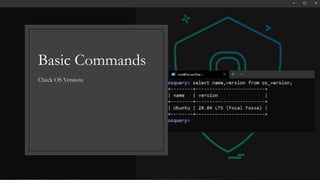
Check OS Versions
Basic Commands
Basic 1: Shell history
Running this query periodically and diffing against older results can yield whether or not a new kernel module has
loaded: kernel modules can be checked against a whitelist/blacklist and any changes can be scrutinized for rootkits.
#Shell History
Query: select * from shell_history;
#user Shell
Query: select * from users;
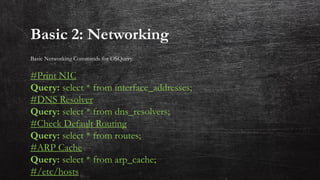
Basic 2: Networking
Basic Networking Commands for OSQuery.
#Print NIC
Query: select * from interface_addresses;
#DNS Resolver
Query: select * from dns_resolvers;
#Check Default Routing
Query: select * from routes;
#ARP Cache
Query: select * from arp_cache;
#/etc/hosts
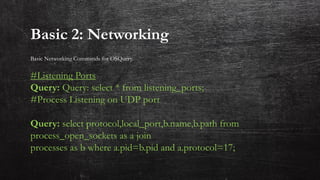
Basic 2: Networking
Basic Networking Commands for OSQuery.
#Listening Ports
Query: Query: select * from listening_ports;
#Process Listening on UDP port
Query: select protocol,local_port,b.name,b.path from
process_open_sockets as a join
processes as b where a.pid=b.pid and a.protocol=17;
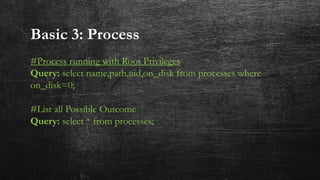
Basic 3: Process
#Process running with Root Privileges
Query: select name,path,uid,on_disk from processes where
on_disk=0;
#List all Possible Outcome
Query: select * from processes;
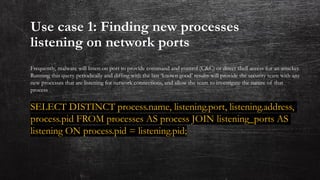
Use case 1: Finding new processes
listening on network ports
Frequently, malware will listen on port to provide command and control (C&C) or direct shell access for an attacker.
Running this query periodically and diffing with the last ‘known good’ results will provide the security team with any
new processes that are listening for network connections, and allow the team to investigate the nature of that
process
SELECT DISTINCT process.name, listening.port, listening.address,
process.pid FROM processes AS process JOIN listening_ports AS
listening ON process.pid = listening.pid;
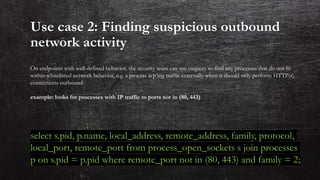
Use case 2: Finding suspicious outbound
network activity
On endpoints with well-defined behavior, the security team can use osquery to find any processes that do not fit
within whitelisted network behavior, e.g. a process scp’ing traffic externally when it should only perform HTTP(s)
connections outbound
example: looks for processes with IP traffic to ports not in (80, 443)
select s.pid, p.name, local_address, remote_address, family, protocol,
local_port, remote_port from process_open_sockets s join processes
p on s.pid = p.pid where remote_port not in (80, 443) and family = 2;
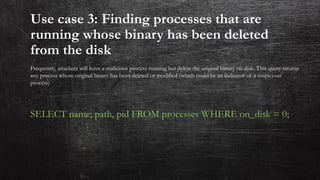
Use case 3: Finding processes that are
running whose binary has been deleted
from the disk
Frequently, attackers will leave a malicious process running but delete the original binary on disk. This query returns
any process whose original binary has been deleted or modified (which could be an indicator of a suspicious
process)
SELECT name, path, pid FROM processes WHERE on_disk = 0;
Use case 4:Finding new kernel modules
that have loaded
Running this query periodically and diffing against older results can yield whether or not a new kernel module has
loaded: kernel modules can be checked against a whitelist/blacklist and any changes can be scrutinized for rootkits.
select name from kernel_modules;
Credit:
Attack Defense
Say Hello:
◦ OS Query : Schema
◦ Rapid 7: Blog post
◦ Attack Defense : Online Labs
References:
Tweet: @anir0y
LinkedIn : Anir0y
Mail : animeshroy@live.com

Osquery

  • 1.
    INTRO: OS QUERY ABasic Dive in with OS Query (https://osquery.io)
  • 3.
    Outline Lesson 1. Introduction toOS Query Lesson 2. OS Query at a glance Lesson 3. Deploying OS query Lesson 4. Running some basic commands Lesson 5. Kolide (?) maybe for fleet management.
  • 4.
    What is osquery? osqueryis an open source tool created by Facebook for querying various information about the state of your machines. This includes information like: • Running processes • Kernel modules loaded • Active user accounts • Active network connections And much more! osquery allows you to craft your system queries using SQL statements, making it easy to use by security engineers that are already familiar with SQL
  • 5.
    osquery at aglance Features Osquery is a framework we’ve used to create a few products and tools. Osquery’s modular codebase allows us to take advantage of existing concepts in new and interesting ways. We’re releasing several tools as a part of the open source release and we have more planned. We’re also looking forward to seeing how the community uses the codebase to create even more interesting tools. Interactive query console The interactive query console, osqueryi, gives you an SQL interface to try out new queries and explore your operating system. With the power of SQL and dozens of useful tables built-in, osqueryi is an invaluable tool when diagnosing a systems operations problem, troubleshooting a performance issue, etc.
  • 6.
    Deploying OSQUERY! osquery isagent software that must run directly on your endpoints (e.g., your OSX installation, Windows System or Linux servers). osquery will require root or system privileges to get a lot of detailed system information, although it is possible to glean some information when not ran as 'root'. For more information, see the official deployment guide. • Install on Mac • Install on Linux • Install on Windows
  • 7.
  • 8.
    Basic 1: Shellhistory Running this query periodically and diffing against older results can yield whether or not a new kernel module has loaded: kernel modules can be checked against a whitelist/blacklist and any changes can be scrutinized for rootkits. #Shell History Query: select * from shell_history; #user Shell Query: select * from users;
  • 9.
    Basic 2: Networking BasicNetworking Commands for OSQuery. #Print NIC Query: select * from interface_addresses; #DNS Resolver Query: select * from dns_resolvers; #Check Default Routing Query: select * from routes; #ARP Cache Query: select * from arp_cache; #/etc/hosts
  • 10.
    Basic 2: Networking BasicNetworking Commands for OSQuery. #Listening Ports Query: Query: select * from listening_ports; #Process Listening on UDP port Query: select protocol,local_port,b.name,b.path from process_open_sockets as a join processes as b where a.pid=b.pid and a.protocol=17;
  • 11.
    Basic 3: Process #Processrunning with Root Privileges Query: select name,path,uid,on_disk from processes where on_disk=0; #List all Possible Outcome Query: select * from processes;
  • 12.
    Use case 1:Finding new processes listening on network ports Frequently, malware will listen on port to provide command and control (C&C) or direct shell access for an attacker. Running this query periodically and diffing with the last ‘known good’ results will provide the security team with any new processes that are listening for network connections, and allow the team to investigate the nature of that process SELECT DISTINCT process.name, listening.port, listening.address, process.pid FROM processes AS process JOIN listening_ports AS listening ON process.pid = listening.pid;
  • 13.
    Use case 2:Finding suspicious outbound network activity On endpoints with well-defined behavior, the security team can use osquery to find any processes that do not fit within whitelisted network behavior, e.g. a process scp’ing traffic externally when it should only perform HTTP(s) connections outbound example: looks for processes with IP traffic to ports not in (80, 443) select s.pid, p.name, local_address, remote_address, family, protocol, local_port, remote_port from process_open_sockets s join processes p on s.pid = p.pid where remote_port not in (80, 443) and family = 2;
  • 14.
    Use case 3:Finding processes that are running whose binary has been deleted from the disk Frequently, attackers will leave a malicious process running but delete the original binary on disk. This query returns any process whose original binary has been deleted or modified (which could be an indicator of a suspicious process) SELECT name, path, pid FROM processes WHERE on_disk = 0;
  • 15.
    Use case 4:Findingnew kernel modules that have loaded Running this query periodically and diffing against older results can yield whether or not a new kernel module has loaded: kernel modules can be checked against a whitelist/blacklist and any changes can be scrutinized for rootkits. select name from kernel_modules;
  • 16.
  • 17.
    Say Hello: ◦ OSQuery : Schema ◦ Rapid 7: Blog post ◦ Attack Defense : Online Labs References: Tweet: @anir0y LinkedIn : Anir0y Mail : animeshroy@live.com