Department of CSE-Data Science
Contents
Background
Demand paging
Copy-on-write
Page replacement
Allocation of frames
Thrashing
3.
Department of CSE-Data Science
Introduction
Goal of memory-management strategies: keep many processes in main memory to allow
multi-programming
Problem: Entire processes must be in memory before they can execute
Virtual memory is a technique that allows the execution of processes that are not completely
in memory.
Advantages
‣ programs can be larger than physical memory.
‣ virtual memory abstracts main memory into an extremely large, uniform array of
storage, separating logical memory as viewed by the user from physical memory.
‣ Frees programmers from the concerns of memory-storage limitations.
‣ Allows processes to share files easily and to implement shared memory.
‣ Provides an efficient mechanism for process creation.
4.
Department of CSE-Data Science
Background
The requirement that instructions must be in physical memory to be executed seems both necessary
and reasonable; but it is also unfortunate, since it limits the size of a program to the size of physical
memory.
In fact, an examination of real programs shows us that, in many cases, the entire program is not
needed. For instance, consider the following:
‣ Programs often have code to handle unusual error conditions. Since these errors seldom, if
ever, occur in practice, this code is almost never executed.
‣ Arrays, lists, and tables are often allocated more memory than they actually need. An array
may be declared 100 by 100 elements, even though it is seldom larger than 10 by 10 elements.
‣ An assembler symbol table may have room for 3,000 symbols, although the average program
has less than 200 symbols.
Even in those cases where the entire program is needed, it may not all be needed at the same time.
5.
Department of CSE-Data Science
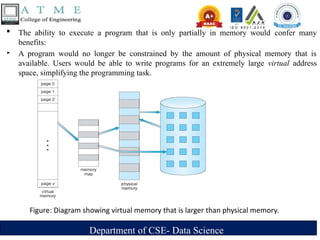
The ability to execute a program that is only partially in memory would confer many
benefits:
‣ A program would no longer be constrained by the amount of physical memory that is
available. Users would be able to write programs for an extremely large virtual address
space, simplifying the programming task.
Figure: Diagram showing virtual memory that is larger than physical memory.
6.
Department of CSE-Data Science
‣ Because each user program could take less physical memory, more programs could be run at the
same time, with a corresponding increase in CPU utilization and throughput but with no increase
in response time or turnaround time.
‣ Less I/O would be needed to load or swap user programs into memory, so each user program
would run faster.
Thus, running a program that is not entirely in memory would benefit both the system and the user.
Virtual Memory involves the separation of logical memory as perceived by users from physical
memory.
This separation allows an extremely large virtual memory to be provided for programmers when
only a smaller physical memory is available.
Virtual memory makes the task of programming much easier, because the programmer no longer
needs to worry about the amount of physical memory available; she can concentrate instead on the
problem to be programmed.
7.
Department of CSE-Data Science
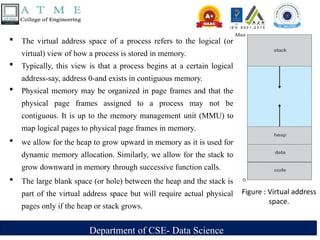
The virtual address space of a process refers to the logical (or
virtual) view of how a process is stored in memory.
Typically, this view is that a process begins at a certain logical
address-say, address 0-and exists in contiguous memory.
Physical memory may be organized in page frames and that the
physical page frames assigned to a process may not be
contiguous. It is up to the memory management unit (MMU) to
map logical pages to physical page frames in memory.
we allow for the heap to grow upward in memory as it is used for
dynamic memory allocation. Similarly, we allow for the stack to
grow downward in memory through successive function calls.
The large blank space (or hole) between the heap and the stack is
part of the virtual address space but will require actual physical
pages only if the heap or stack grows.
Figure : Virtual address
space.
8.
Department of CSE-Data Science
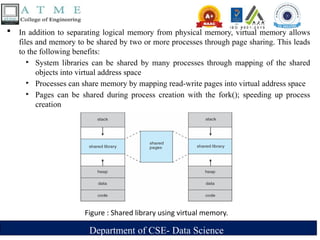
In addition to separating logical memory from physical memory, virtual memory allows
files and memory to be shared by two or more processes through page sharing. This leads
to the following benefits:
‣ System libraries can be shared by many processes through mapping of the shared
objects into virtual address space
‣ Processes can share memory by mapping read-write pages into virtual address space
‣ Pages can be shared during process creation with the fork(); speeding up process
creation
Figure : Shared library using virtual memory.
9.
Department of CSE-Data Science
Demand Paging
Consider how an executable program might be loaded from disk into memory.
One option is to load the entire program in physical memory at program execution time.
Loading the entire program into memory results in loading the executable code for all
options, regardless of whether an option is ultimately selected by the user or not.
An alternative strategy is to load pages only as they are needed. This technique is known
as demand paging and is commonly used in virtual memory systems.
With demand-paged virtual memory, pages are only loaded when they are demanded
during program execution; pages that are never accessed are thus never loaded into
physical memory.
10.
Department of CSE-Data Science
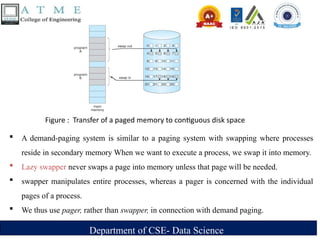
A demand-paging system is similar to a paging system with swapping where processes
reside in secondary memory When we want to execute a process, we swap it into memory.
Lazy swapper never swaps a page into memory unless that page will be needed.
swapper manipulates entire processes, whereas a pager is concerned with the individual
pages of a process.
We thus use pager, rather than swapper, in connection with demand paging.
Figure : Transfer of a paged memory to contiguous disk space
11.
Department of CSE-Data Science
Basic Concepts
When swapping in a process, the pager guesses which pages will be used before swapping
it out again
The pager brings in only those needed pages into memory. Thus, decreases swap time and
amount of needed physical memory
There is a need for hardware support to distinguish between the pages that are in memory
and the pages that are on the disk.
The valid -invalid bit scheme can be used for this purpose.
‣ when this bit is set to "valid/' the associated page is both legal and in memory.
‣ If the bit is set to "invalid/' the page either is not valid or is valid but is currently on
the disk.
12.
Department of CSE-Data Science
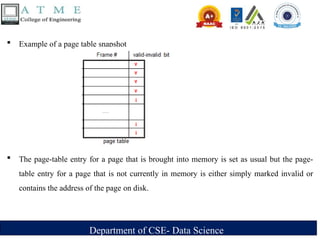
Example of a page table snapshot
The page-table entry for a page that is brought into memory is set as usual but the page-
table entry for a page that is not currently in memory is either simply marked invalid or
contains the address of the page on disk.
13.
Department of CSE-Data Science
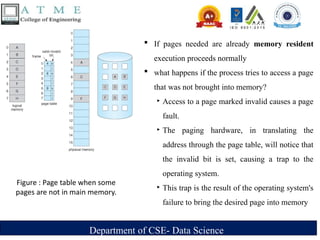
Figure : Page table when some
pages are not in main memory.
If pages needed are already memory resident
execution proceeds normally
what happens if the process tries to access a page
that was not brought into memory?
‣ Access to a page marked invalid causes a page
fault.
‣ The paging hardware, in translating the
address through the page table, will notice that
the invalid bit is set, causing a trap to the
operating system.
‣ This trap is the result of the operating system's
failure to bring the desired page into memory
14.
Department of CSE-Data Science
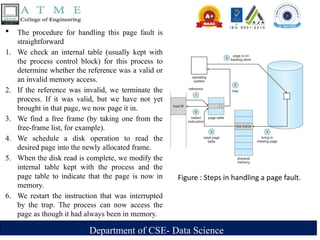
The procedure for handling this page fault is
straightforward
1. We check an internal table (usually kept with
the process control block) for this process to
determine whether the reference was a valid or
an invalid memory access.
2. If the reference was invalid, we terminate the
process. If it was valid, but we have not yet
brought in that page, we now page it in.
3. We find a free frame (by taking one from the
free-frame list, for example).
4. We schedule a disk operation to read the
desired page into the newly allocated frame.
5. When the disk read is complete, we modify the
internal table kept with the process and the
page table to indicate that the page is now in
memory.
6. We restart the instruction that was interrupted
by the trap. The process can now access the
page as though it had always been in memory.
Figure : Steps in handling a page fault.
15.
Department of CSE-Data Science
In the extreme case, we can start executing a process with no pages in memory.
When the operating system sets the instruction pointer to the first instruction of the
process, which is on a non-memory-resident page, the process immediately faults for the
page.
After this page is brought into memory, the process continues to execute, faulting as
necessary until every page that it needs is in memory.
At that it can execute with no more faults. This scheme is pure demand paging never
bring a page into memory until it is required.
16.
Department of CSE-Data Science
The hardware to support demand paging is the same as the hardware for paging and
swapping:
‣ Page table. This table has the ability to mark an entry invalid through a valid -invalid
bit or a special value of protection bits.
‣ Secondary memory. This memory holds those pages that are not present in main
memory. The secondary memory is usually a high-speed disk. It is known as the swap
device, and the section of disk used for this purpose is known as swap space
17.
Department of CSE-Data Science
A crucial requirement for demand paging is the ability to restart any instruction after a page
fault.
Because we save the state (registers, condition code, instruction counter) of the interrupted
process when the page fault occurs, we must be able to restart the process in exactly the
same place and state, except that the desired page is now in memory and is accessible.
In most cases, this requirement is easy to meet.
A page fault may occur at any memory reference.
If the page fault occurs on the instruction fetch, we can restart by fetching the instruction
again.
If a page fault occurs while we are fetching an operand, we must fetch and decode the
instruction again and then fetch the operand.
18.
Department of CSE-Data Science
As a worst-case example, consider a three-address instruction such as ADD the content of
A to B, placing the result in C. These are the steps to execute this instruction:
1. Fetch and decode the instruction (ADD).
2. Fetch A
3. Fetch B.
4. Add A and B.
5. Store the sum in C.
If we fault when we try to store in C (because C is in a page not currently in memory), we
will have to get the desired page, bring it in, correct the page table, and restart the
instruction.
The restart will require fetching the instruction again, decoding it again, fetching the two
operands again, and then adding again.
However, there is not much repeated work and the repetition is necessary only when a page
fault occurs.
19.
Department of CSE-Data Science
The major difficulty arises when one instruction may modify several different locations.
For example, consider the IBM System 360/370 MVC (move character) instruction, which can
move up to 256 bytes from one location to another (possibly overlapping) location.
If either block (source or destination) straddles a page boundary, a page fault might occur after
the move is partially done.
In addition, if the source and destination blocks overlap, the source block may have been
modified, in which case we cannot simply restart the instruction.
This problem can be solved in two different ways.
1. The microcode computes and attempts to access both ends of both blocks. If a page fault is
going to occur it will happen at this step, before anything is modified. The move can then
take place; we know that no page fault can occur, since all the relevant pages are in memory.
2. The other solution uses temporary registers to hold the values of overwritten locations. If
there is a page fault, all the old values are written back into memory before the trap occurs.
This action restores memory to its state before the instruction was started, so that the
instruction can be repeated
20.
Department of CSE-Data Science
Performance of Demand Paging
let's compute the effective access time for a demand-paged memory.
‣ For most computer systems, the memory-access time, denoted ma, ranges from 10 to 200
nanoseconds.
‣ As long as we have no page faults, the effective access time is equal to the memory access time.
‣ If a page fault occurs, we must first read the relevant page from disk and then access the desired
word
Let p be the probability of a page fault 0 p 1
– if p = 0 no page faults
– if p = 1, every reference is a fault
Effective Access Time (EAT)= (1 - p) x ma + p x page fault time.
21.
Department of CSE-Data Science
To compute the effective access time, we must know how much time is needed to service a
page fault. A page fault causes the following sequence to occur:
1.Trap to the operating system.
2.Save the user registers and process state.
3.Determine that the interrupt was a page fault.
4.Check that the page reference was legal and determine the location of the page on the
disk
5. Issue a read from the disk to a free frame:
a. Wait in a queue for this device until the read request is serviced.
b. Wait for the device seek and/ or latency time.
c. Begin the transfer of the page to a free frame.
6. While waiting, allocate the CPU to some other user (CPU scheduling, optional).
22.
Department of CSE-Data Science
7. Receive an interrupt from the disk I/0 subsystem (I/0 completed).
8. Save the registers and process state for the other user (if step 6 is executed).
9. Determine that the interrupt was from the disk
10. Correct the page table and other tables to show that the desired page is now in
memory.
11. Wait for the CPU to be allocated to this process again.
12. Restore the user registers, process state, and new page table, and then resume the
interrupted instruction.
In any case, we are faced with three major components of the page-fault service time:
1. Service the page-fault interrupt.
2. Read in the page.
3. Restart the process.
23.
Department of CSE-Data Science
Example
Memory access time = 200 nanoseconds; between 10 to 200ns in most computers
Average page-fault service time = 8 milliseconds
EAT = [ (1 – p) × (200 nanoseconds) ] + [ p × (8 milliseconds) ]
= [ (1 – p) × 200 ] + [ p × 8,000,000 ] nanoseconds
= 200 + 7,999,800p nanoseconds; thus, EAT is directly proportional to p
If one access out of 1,000 causes a page fault, then
EAT = 8,199.8 nanoseconds = 8.2 microseconds.
This is a slowdown by a factor of 40!!; Because of demand paging
If want performance degradation < 10 percent
220 > 200 + 7,999,800 × p 20 > 7,999,800 × p
Thus, we must have p < .0000025
That is, to keep slowdown due to demand paging
p < one page fault in every 399,990 memory accesses
24.
Department of CSE-Data Science
Copy-on-Write
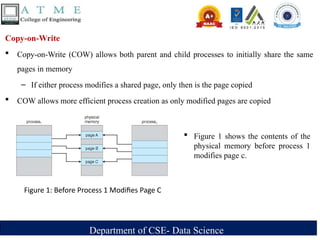
Copy-on-Write (COW) allows both parent and child processes to initially share the same
pages in memory
– If either process modifies a shared page, only then is the page copied
COW allows more efficient process creation as only modified pages are copied
Figure 1: Before Process 1 Modifies Page C
Figure 1 shows the contents of the
physical memory before process 1
modifies page c.
25.
Department of CSE-Data Science
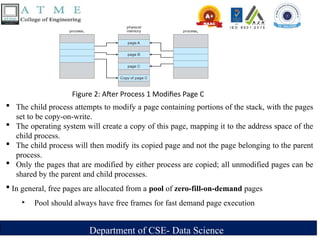
Figure 2: After Process 1 Modifies Page C
The child process attempts to modify a page containing portions of the stack, with the pages
set to be copy-on-write.
The operating system will create a copy of this page, mapping it to the address space of the
child process.
The child process will then modify its copied page and not the page belonging to the parent
process.
Only the pages that are modified by either process are copied; all unmodified pages can be
shared by the parent and child processes.
In general, free pages are allocated from a pool of zero-fill-on-demand pages
‣ Pool should always have free frames for fast demand page execution
26.
Department of CSE-Data Science
What Happens if There is no Free Frame?
Many pages need to be loaded but not enough free frames available
‣ Memory is being used up by process pages; both, user and kernel processes
‣ Also memory is in demand from the kernel, I/O buffers, etc
How much memory to allocate to I/O buffers, kernel, processes, … , etc
‣ Solution: Page replacement; when paging in pages of a process but no free frames
Find currently un-used frame to free it; Page it out and page in process page
‣ Replacing the un-used memory page with the new page
Performance – want an algorithm which will result in minimum number of page
faults
27.
Department of CSE-Data Science
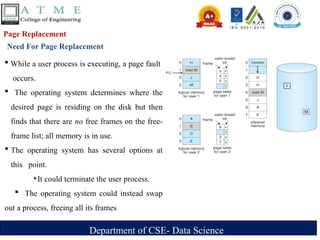
Page Replacement
Need For Page Replacement
While a user process is executing, a page fault
occurs.
The operating system determines where the
desired page is residing on the disk but then
finds that there are no free frames on the free-
frame list; all memory is in use.
The operating system has several options at
this point.
‣It could terminate the user process.
The operating system could instead swap
out a process, freeing all its frames
28.
Department of CSE-Data Science
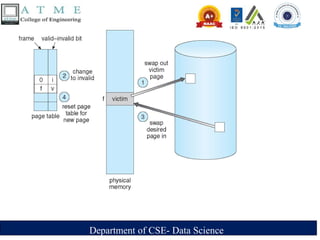
Basic Page Replacement
1. Find the location of the desired page on the disk.
2. Find a free frame:
a. If there is a free frame, use it.
b. If there is no free frame, use a page-replacement algorithm to select
c. Write the victim frame to the disk; change the page and frame tables accordingly.
3. Read the desired page into the newly freed frame; change the page and frame tables.
4. Restart the user process.
Notice that, if no frames are free, two page transfers (one out and one in) are required. This
situation effectively doubles the page-fault service time and increases the effective access
time accordingly.
Department of CSE-Data Science
We can reduce this overhead by using a modify bit (or dirty bit)
‣ When this scheme is used, each page or frame has a modify bit associated with it in the
hardware.
‣ The modify bit for a page is set by the hardware whenever any word or byte in the page is
written into, indicating that the page has been modified.
‣ When we select a page for replacement, we examine its modify bit.
- If the bit is set, we know that the page has been modified since it was read in from
the disk. In this case, we must write the page to the disk.
- If the modify bit is not set, however, the page has not been modified since it was read
into memory. In this case, we need not write the memory page to the disk: it is
already there.
This scheme can significantly reduce the time required to service a page fault, since it reduces I/O
time by one-half if the page has not been modified.
31.
Department of CSE-Data Science
Page replacement is basic to demand paging.
With no demand paging, user addresses are mapped into physical addresses, so the two sets of
addresses can be different. All the pages of a process still must be in physical memory,
With demand paging, the size of the logical address space is no longer constrained by physical
memory.
If we have a user process of twenty pages, we can execute it in ten frames simply by using demand
paging and using a replacement algorithm to find a free frame whenever necessary.
Two major demand-paging problems : frame allocation and page replacement
‣ Frame-allocation algorithm determines
- How many frames to allocate to each process
- Which frames to replace; when page replacement is required
‣ Page-replacement algorithm
- We want an algorithm which yields the lowest page-fault rate
32.
Department of CSE-Data Science
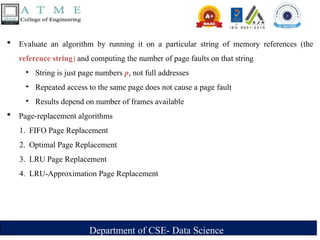
Evaluate an algorithm by running it on a particular string of memory references (the
reference string) and computing the number of page faults on that string
‣ String is just page numbers p, not full addresses
‣ Repeated access to the same page does not cause a page fault
‣ Results depend on number of frames available
Page-replacement algorithms
1. FIFO Page Replacement
2. Optimal Page Replacement
3. LRU Page Replacement
4. LRU-Approximation Page Replacement
33.
Department of CSE-Data Science
1. FIFO Page Replacement
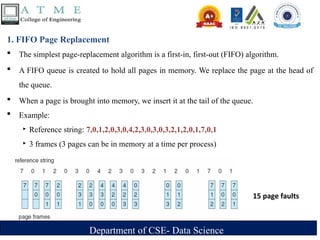
The simplest page-replacement algorithm is a first-in, first-out (FIFO) algorithm.
A FIFO queue is created to hold all pages in memory. We replace the page at the head of
the queue.
When a page is brought into memory, we insert it at the tail of the queue.
Example:
‣ Reference string: 7,0,1,2,0,3,0,4,2,3,0,3,0,3,2,1,2,0,1,7,0,1
‣ 3 frames (3 pages can be in memory at a time per process)
15 page faults
34.
Department of CSE-Data Science
Optimal Page Replacement(ORR) Algorithm
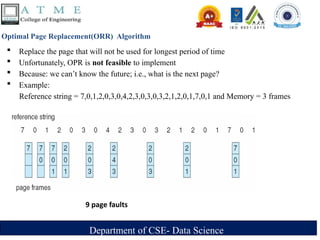
Replace the page that will not be used for longest period of time
Unfortunately, OPR is not feasible to implement
Because: we can’t know the future; i.e., what is the next page?
Example:
Reference string = 7,0,1,2,0,3,0,4,2,3,0,3,0,3,2,1,2,0,1,7,0,1 and Memory = 3 frames
9 page faults
35.
Department of CSE-Data Science
Least Recently Used (LRU) Algorithm
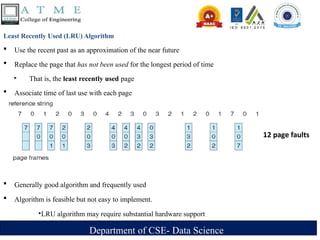
Use the recent past as an approximation of the near future
Replace the page that has not been used for the longest period of time
‣ That is, the least recently used page
Associate time of last use with each page
Generally good algorithm and frequently used
Algorithm is feasible but not easy to implement.
‣LRU algorithm may require substantial hardware support
12 page faults
36.
Department of CSE-Data Science
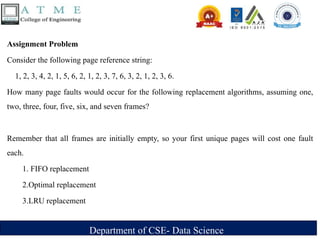
Assignment Problem
Consider the following page reference string:
1, 2, 3, 4, 2, 1, 5, 6, 2, 1, 2, 3, 7, 6, 3, 2, 1, 2, 3, 6.
How many page faults would occur for the following replacement algorithms, assuming one,
two, three, four, five, six, and seven frames?
Remember that all frames are initially empty, so your first unique pages will cost one fault
each.
1. FIFO replacement
2.Optimal replacement
3.LRU replacement
37.
Department of CSE-Data Science
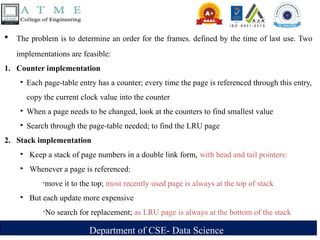
The problem is to determine an order for the frames. defined by the time of last use. Two
implementations are feasible:
1. Counter implementation
‣ Each page-table entry has a counter; every time the page is referenced through this entry,
copy the current clock value into the counter
‣ When a page needs to be changed, look at the counters to find smallest value
‣ Search through the page-table needed; to find the LRU page
2. Stack implementation
‣ Keep a stack of page numbers in a double link form, with head and tail pointers:
‣ Whenever a page is referenced:
-move it to the top; most recently used page is always at the top of stack
‣ But each update more expensive
-No search for replacement; as LRU page is always at the bottom of the stack
38.
Department of CSE-Data Science
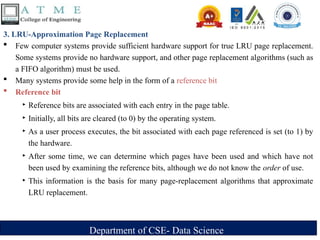
3. LRU-Approximation Page Replacement
Few computer systems provide sufficient hardware support for true LRU page replacement.
Some systems provide no hardware support, and other page replacement algorithms (such as
a FIFO algorithm) must be used.
Many systems provide some help in the form of a reference bit
Reference bit
‣ Reference bits are associated with each entry in the page table.
‣ Initially, all bits are cleared (to 0) by the operating system.
‣ As a user process executes, the bit associated with each page referenced is set (to 1) by
the hardware.
‣ After some time, we can determine which pages have been used and which have not
been used by examining the reference bits, although we do not know the order of use.
‣ This information is the basis for many page-replacement algorithms that approximate
LRU replacement.
39.
Department of CSE-Data Science
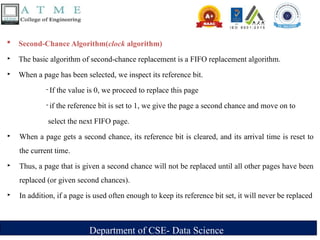
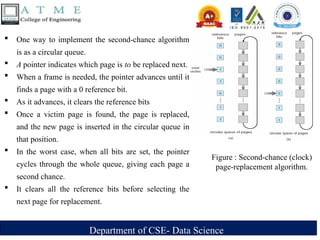
Second-Chance Algorithm(clock algorithm)
‣ The basic algorithm of second-chance replacement is a FIFO replacement algorithm.
‣ When a page has been selected, we inspect its reference bit.
- If the value is 0, we proceed to replace this page
- if the reference bit is set to 1, we give the page a second chance and move on to
select the next FIFO page.
‣ When a page gets a second chance, its reference bit is cleared, and its arrival time is reset to
the current time.
‣ Thus, a page that is given a second chance will not be replaced until all other pages have been
replaced (or given second chances).
‣ In addition, if a page is used often enough to keep its reference bit set, it will never be replaced
40.
Department of CSE-Data Science
One way to implement the second-chance algorithm
is as a circular queue.
A pointer indicates which page is to be replaced next.
When a frame is needed, the pointer advances until it
finds a page with a 0 reference bit.
As it advances, it clears the reference bits
Once a victim page is found, the page is replaced,
and the new page is inserted in the circular queue in
that position.
In the worst case, when all bits are set, the pointer
cycles through the whole queue, giving each page a
second chance.
It clears all the reference bits before selecting the
next page for replacement.
Figure : Second-chance (clock)
page-replacement algorithm.
41.
Department of CSE-Data Science
Enhanced Second-Chance Algorithm
Improve algorithm by using reference bit and modify bit
Take ordered pair (reference, modify)
1.(0, 0) neither recently used not modified – best page to replace
2.(0, 1) not recently used but modified – not quite as good, must write out before
replacement
3.(1, 0) recently used but clean – probably will be used again soon
4.(1, 1) recently used and modified – probably will be used again soon and need to write
out before replacement
When page replacement called for, use the clock scheme but use the four classes replace
page in lowest non-empty class
Might need to search circular queue several times
42.
Department of CSE-Data Science
Counting-Based Page Replacement Algorithms
Keep a counter of the number of references that have been made to each page
Lease Frequently Used (LFU) Algorithm: replaces the page with the smallest count
- An actively used page should have a large count value
- But... Pages may be heavily used initially and never used again
Most Frequently Used (MFU) Algorithm: based on the argument that the page with the
smallest count was probably just brought in and has yet to be used
43.
Department of CSE-Data Science
Page-Buffering Algorithms
Keep a pool of free frames, always
– Then frame available when needed, not found at fault time
– Read page into free frame and select victim to evict and add to free pool
– When convenient, evict victim
Possibly, keep list of modified pages
– When backing store otherwise idle, write pages there and set to non-dirty
Possibly, keep free frame contents intact and note what is in them
– If referenced again before reused, no need to load contents again from disk
– Generally useful to reduce penalty if wrong victim frame selected
44.
Department of CSE-Data Science
Applications and Page Replacement
All of these algorithms have OS guessing about future page access
Some applications have better knowledge – i.e. databases
Memory intensive applications can cause double buffering
– OS keeps copy of page in memory as I/O buffer
– Application keeps page in memory for its own work
Operating system can given direct access to the disk, getting out of the way of the
applications
– Raw disk mode
Bypasses buffering, locking, etc
45.
Department of CSE-Data Science
Allocation of Frames
Each process needs be allocated a minimum number of frames
Number of page-faults increases as the # of allocated frames decreases
The minimum number of frames is defined by the computer architecture
Example: IBM 370 – references 6 pages to handle SS MOVE instruction:
– instruction is 6 bytes, might span 2 pages
– 2 pages to handle from
– 2 pages to handle to
Two major allocation schemes
1.fixed allocation
2.priority allocation
46.
Department of CSE-Data Science
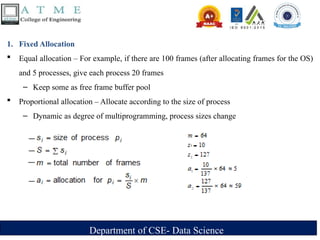
1. Fixed Allocation
Equal allocation – For example, if there are 100 frames (after allocating frames for the OS)
and 5 processes, give each process 20 frames
– Keep some as free frame buffer pool
Proportional allocation – Allocate according to the size of process
– Dynamic as degree of multiprogramming, process sizes change
47.
Department of CSE-Data Science
2. Priority Allocation
Use a proportional allocation scheme using priorities rather than size
‣ Ratio of frames depends on the priorities of processes, or, on a combination of
both their priorities and their sizes
‣ We may want to allocate more frames to a high-priority process, in order to
speed up its execution, to the detriment of low-priority processes
In this case, the replacement algorithm is modified to consider process’s priorities
If high-priority process Pi generates a page fault,
‣ select for replacement one of its frames
‣ select for replacement a frame from a process with lower priority number
48.
Department of CSE-Data Science
Global vs. Local Allocation
Global replacement – allows a process to select a replacement frame from the set
of all frames; that is, one process can take a frame from another
‣ But then process execution time can vary greatly
‣ But greater throughput so more common
Local replacement – requires that a process selects from only its own set of
allocated frames
‣ More consistent per-process performance
‣ But possibly underutilized memory
49.
Department of CSE-Data Science
Non-Uniform Memory Access
So far we have assume that all main memory is accessed equally
Many systems are NUMA – speed of access to memory varies
‣ Consider system boards containing CPUs and memory, interconnected over a system bus or a high-
speed network
Optimal performance comes from allocating memory frames “as close as possible to” the CPU on
which the process or thread is running or scheduled
‣ And modifying the scheduler to schedule the thread on the same system board when possible; thus,
taking NUMA into account
‣ Thread issues solved by Solaris by creating lgroups; that is, latency groups
Each lgroup gathers together close CPUs and memories
Tries to schedule all threads of a process and allocate all memory of a process within an lgroup
– If not possible, then pick a nearby lgroup
50.
Department of CSE-Data Science
Thrashing
If a process does not have “enough” pages, the page-fault rate is very high
‣Page fault to get page
‣Replace existing frame
‣But quickly need replaced frame back
‣ This leads to:
→ Low CPU utilization
→ Operating system thinking that it needs to increase the degree of multiprogramming
→ Another process added to the system
Thrashing ≡ a process is busy swapping pages in and out
A process is thrashing if it is spending more time paging than executing.
51.
Department of CSE-Data Science
Cause of Thrashing
The operating system monitors CPU utilization. If CPU utilization is too low, it increases
the degree of multiprogramming by introducing a new process to the system.
A global page-replacement algorithm is used; it replaces pages without regard to the process
to which they belong.
Now suppose that a process enters a new phase in its execution and needs more frames. It
starts faulting and taking frames away from other processes.
These processes need those pages, however, and so they also fault, taking frames from other
processes
As processes wait for the paging device, CPU utilization decreases.
The CPU scheduler sees the decreasing CPU utilization and increases the degree of
multiprogramming as a result.
The new process tries to get started by taking frames from running processes, causing more
page faults and a longer queue for the paging device.
As a result, CPU utilization drops even further, and the CPU scheduler tries to increase the
degree of multiprogramming even more.
Thrashing has occurred, and system throughput plunges.
52.
Department of CSE-Data Science
We can limit the effects of thrashing by using a local replacement of (or priority
replacement) algorithms.
With local replacement, if one process starts thrashing, it cannot steal frames from another
process and cause the latter to thrash as well.
To prevent Thrashing, we must provide a process with as many frames as it needs. But how
do we know how many frames it "needs"?
There are several techniques.
The working-set strategy starts by looking at how many frames a process is actually using.
This approach defines the locality of process execution
The locality model states that, as a process executes, it moves from locality to locality.
A locality is a set of pages that are actively used together
53.
Department of CSE-Data Science
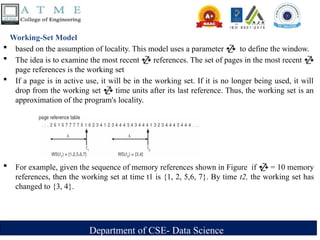
Working-Set Model
based on the assumption of locality. This model uses a parameter to define the window.
The idea is to examine the most recent references. The set of pages in the most recent
page references is the working set
If a page is in active use, it will be in the working set. If it is no longer being used, it will
drop from the working set time units after its last reference. Thus, the working set is an
approximation of the program's locality.
For example, given the sequence of memory references shown in Figure if = 10 memory
references, then the working set at time t1 is {1, 2, 5,6, 7}. By time t2, the working set has
changed to {3, 4}.
54.
Department of CSE-Data Science
The accuracy of the working set depends on the selection of . If is too small, it will
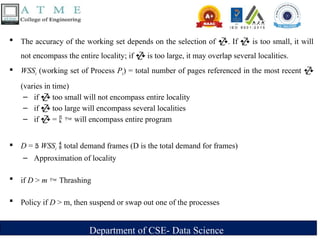
not encompass the entire locality; if is too large, it may overlap several localities.
WSSi (working set of Process Pi) = total number of pages referenced in the most recent
(varies in time)
– if too small will not encompass entire locality
– if too large will encompass several localities
– if = will encompass entire program
D = WSSi total demand frames (D is the total demand for frames)
– Approximation of locality
if D > m Thrashing
Policy if D > m, then suspend or swap out one of the processes
55.
Department of CSE-Data Science
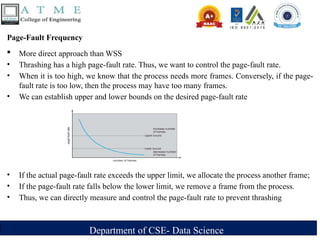
Page-Fault Frequency
More direct approach than WSS
• Thrashing has a high page-fault rate. Thus, we want to control the page-fault rate.
• When it is too high, we know that the process needs more frames. Conversely, if the page-
fault rate is too low, then the process may have too many frames.
• We can establish upper and lower bounds on the desired page-fault rate
• If the actual page-fault rate exceeds the upper limit, we allocate the process another frame;
• If the page-fault rate falls below the lower limit, we remove a frame from the process.
• Thus, we can directly measure and control the page-fault rate to prevent thrashing

![Department of CSE- Data Science
Example
Memory access time = 200 nanoseconds; between 10 to 200ns in most computers
Average page-fault service time = 8 milliseconds
EAT = [ (1 – p) × (200 nanoseconds) ] + [ p × (8 milliseconds) ]
= [ (1 – p) × 200 ] + [ p × 8,000,000 ] nanoseconds
= 200 + 7,999,800p nanoseconds; thus, EAT is directly proportional to p
If one access out of 1,000 causes a page fault, then
EAT = 8,199.8 nanoseconds = 8.2 microseconds.
This is a slowdown by a factor of 40!!; Because of demand paging
If want performance degradation < 10 percent
220 > 200 + 7,999,800 × p 20 > 7,999,800 × p
Thus, we must have p < .0000025
That is, to keep slowdown due to demand paging
p < one page fault in every 399,990 memory accesses](https://image.slidesharecdn.com/module4virtualmemorymanagement-250216134737-49040b53/85/Os-Module-4_Virtual-Memory-Management-pptx-23-320.jpg)