Orienteering Mapping Fieldwork
Using a GPS Watch
This works for me. It might work for you.
Orienteering fieldwork using a tablet
connected to a gps receiver in the field
certainly has its advantages and is
popular with all the best mappers.
I have not had success with that method
so I am using a GPS watch to record my
tracks and plot information quickly and
as accurately as ‘the other method’.
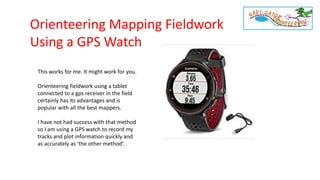
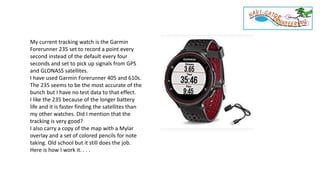
My current tracking watch is the Garmin
Forerunner 235 set to record a point every
second instead of the default every four
seconds and set to pick up signals from GPS
and GLONASS satellites.
I have used Garmin Forerunner 405 and 610s.
The 235 seems to be the most accurate of the
bunch but I have no test data to that effect.
I like the 235 because of the longer battery
life and it is faster finding the satellites than
my other watches. Did I mention that the
tracking is very good?
I also carry a copy of the map with a Mylar
overlay and a set of colored pencils for note
taking. Old school but it still does the job.
Here is how I work it. . . .
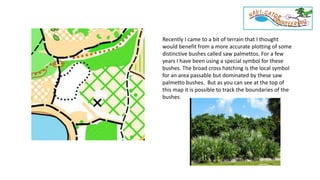
Recently I came to a bit of terrain that I thought
would benefit from a more accurate plotting of some
distinctive bushes called saw palmettos. For a few
years I have been using a special symbol for these
bushes. The broad cross hatching is the local symbol
for an area passable but dominated by these saw
palmetto bushes. But as you can see at the top of
this map it is possible to track the boundaries of the
bushes.
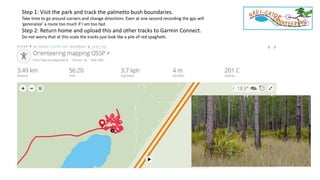
Step 1: Visit the park and track the palmetto bush boundaries.
Take time to go around corners and change directions. Even at one second recording the gps will
‘generalize’ a route too much if I am too fast.
Step 2: Return home and upload this and other tracks to Garmin Connect.
Do not worry that at this scale the tracks just look like a pile of red spaghetti.
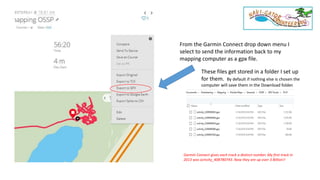
From the Garmin Connect drop down menu I
select to send the information back to my
mapping computer as a gpx file.
These files get stored in a folder I set up
for them. By default if nothing else is chosen the
computer will save them in the Download folder.
Garmin Connect gives each track a distinct number. My first track in
2013 was activity_408780743. Now they are up over 3 Billion!!
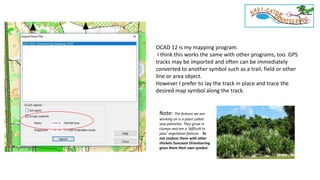
OCAD 12 is my mapping program.
I think this works the same with other programs, too. GPS
tracks may be imported and often can be immediately
converted to another symbol such as a trail, field or other
line or area object.
However I prefer to lay the track in place and trace the
desired map symbol along the track.
Note: The feature we are
working on is a plant called
saw palmetto. They grow in
clumps and are a ‘difficult to
pass’ vegetation feature. To
not confuse them with other
thickets Suncoast Orienteering
gives them their own symbol.
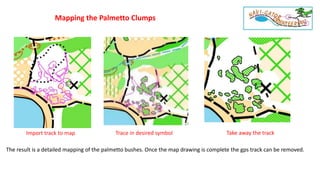
Import track to map Trace in desired symbol Take away the track
Mapping the Palmetto Clumps
The result is a detailed mapping of the palmetto bushes. Once the map drawing is complete the gps track can be removed.
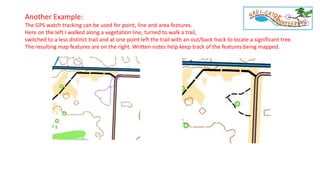
Another Example:
The GPS watch tracking can be used for point, line and area features.
Here on the left I walked along a vegetation line, turned to walk a trail,
switched to a less distinct trail and at one point left the trail with an out/back track to locate a significant tree.
The resulting map features are on the right. Written notes help keep track of the features being mapped.
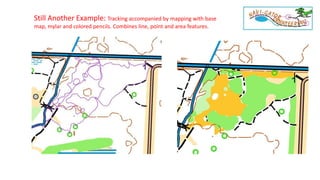
Still Another Example: Tracking accompanied by mapping with base
map, mylar and colored pencils. Combines line, point and area features.
• Track the activity on a GPS watch
• Take notes of what is being tracked
• Upload track to Garmin Connect or another
service
• Download the track as a gpx file to a computer
• Import the track to the mapping program. If the
map is geo-referenced the track will fall in
place. If the map is not geo-referenced the
track can be dragged and dropped in to place.
In the latter case it is best to have clearly
identified start and finish points for your track.
• Trace in the desired detail from the track.
• A single purpose track or portions of the track,
such as of a trail or a field boundary, can be
directly converted to the OCAD symbol.
Review
Gord Hunter
Suncoast Orienteering

Orienteering Mapping Using a GPS Watch

  • 1.
    Orienteering Mapping Fieldwork Usinga GPS Watch This works for me. It might work for you. Orienteering fieldwork using a tablet connected to a gps receiver in the field certainly has its advantages and is popular with all the best mappers. I have not had success with that method so I am using a GPS watch to record my tracks and plot information quickly and as accurately as ‘the other method’.
  • 2.
    My current trackingwatch is the Garmin Forerunner 235 set to record a point every second instead of the default every four seconds and set to pick up signals from GPS and GLONASS satellites. I have used Garmin Forerunner 405 and 610s. The 235 seems to be the most accurate of the bunch but I have no test data to that effect. I like the 235 because of the longer battery life and it is faster finding the satellites than my other watches. Did I mention that the tracking is very good? I also carry a copy of the map with a Mylar overlay and a set of colored pencils for note taking. Old school but it still does the job. Here is how I work it. . . .
  • 3.
    Recently I cameto a bit of terrain that I thought would benefit from a more accurate plotting of some distinctive bushes called saw palmettos. For a few years I have been using a special symbol for these bushes. The broad cross hatching is the local symbol for an area passable but dominated by these saw palmetto bushes. But as you can see at the top of this map it is possible to track the boundaries of the bushes.
  • 4.
    Step 1: Visitthe park and track the palmetto bush boundaries. Take time to go around corners and change directions. Even at one second recording the gps will ‘generalize’ a route too much if I am too fast. Step 2: Return home and upload this and other tracks to Garmin Connect. Do not worry that at this scale the tracks just look like a pile of red spaghetti.
  • 5.
    From the GarminConnect drop down menu I select to send the information back to my mapping computer as a gpx file. These files get stored in a folder I set up for them. By default if nothing else is chosen the computer will save them in the Download folder. Garmin Connect gives each track a distinct number. My first track in 2013 was activity_408780743. Now they are up over 3 Billion!!
  • 6.
    OCAD 12 ismy mapping program. I think this works the same with other programs, too. GPS tracks may be imported and often can be immediately converted to another symbol such as a trail, field or other line or area object. However I prefer to lay the track in place and trace the desired map symbol along the track. Note: The feature we are working on is a plant called saw palmetto. They grow in clumps and are a ‘difficult to pass’ vegetation feature. To not confuse them with other thickets Suncoast Orienteering gives them their own symbol.
  • 7.
    Import track tomap Trace in desired symbol Take away the track Mapping the Palmetto Clumps The result is a detailed mapping of the palmetto bushes. Once the map drawing is complete the gps track can be removed.
  • 8.
    Another Example: The GPSwatch tracking can be used for point, line and area features. Here on the left I walked along a vegetation line, turned to walk a trail, switched to a less distinct trail and at one point left the trail with an out/back track to locate a significant tree. The resulting map features are on the right. Written notes help keep track of the features being mapped.
  • 9.
    Still Another Example:Tracking accompanied by mapping with base map, mylar and colored pencils. Combines line, point and area features.
  • 10.
    • Track theactivity on a GPS watch • Take notes of what is being tracked • Upload track to Garmin Connect or another service • Download the track as a gpx file to a computer • Import the track to the mapping program. If the map is geo-referenced the track will fall in place. If the map is not geo-referenced the track can be dragged and dropped in to place. In the latter case it is best to have clearly identified start and finish points for your track. • Trace in the desired detail from the track. • A single purpose track or portions of the track, such as of a trail or a field boundary, can be directly converted to the OCAD symbol. Review Gord Hunter Suncoast Orienteering