Orchestrating
Linux Containers
Flavio Castelli
Engineering Manager
fcastelli@suse.com
New development challenges
●
Release early, release often
●
Be flexible: react to changes quickly
●
Adoption of micro services architectures
●
Different cloud providers
●
Higher complexity of cloud environments
●
Hybrid cloud deployments
●
Application super portability
2
Let’s talk about
application containers...
3
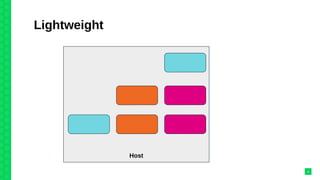
Lightweight
4
Host
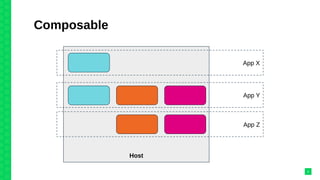
Composable
5
Host
App X
App Y
App Z
Getting serious...
6
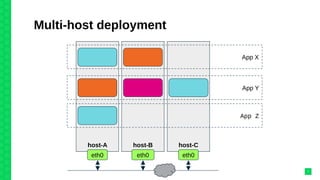
Multi-host deployment
7
host-A host-B host-C
App X
App Y
App Z
eth0 eth0 eth0
Some of the challenges
●
Decide where to run each container
●
Monitor nodes and containers
●
Recover from failures
●
Service discovery
●
Expose services to external consumers
●
Handle secrets (eg: credentials, certificates, keys,…)
●
Handle data persistence
8
Container orchestration
engines
9
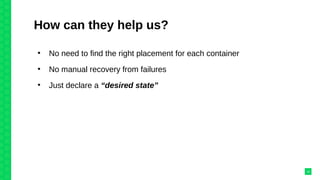
How can they help us?
●
No need to find the right placement for each container
●
No manual recovery from failures
●
Just declare a “desired state”
10
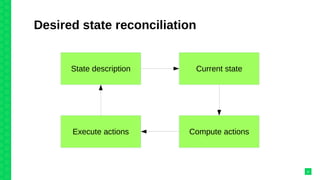
Desired state reconciliation
11
State description Current state
Compute actionsExecute actions
Manage applications,
not machines
12
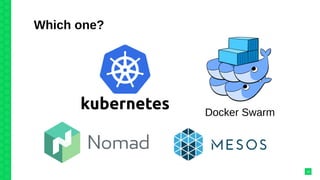
Which one?
13
Docker Swarm
Kubernetes
●
Created by Google, now part of CNCF
●
Solid design
●
Big and active community
●
Opinionated solution, has an answer to most questions
14
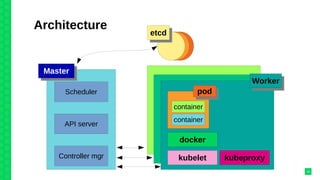
Architecture
15
Scheduler
API server
Controller mgr
MasterMaster
etcdetcd
podpod
container
container
docker
kubelet kubeproxy
WorkerWorker
A concrete example
16
A simple web application
●
Guestbook application
●
Mongodb as database
●
Both running inside of dedicated containers
17
Self-healing
18
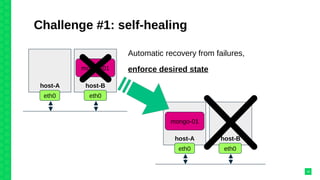
Challenge #1: self-healing
19
host-A host-B
mongo-01
eth0 eth0
Automatic recovery from failures,
enforce desired state
host-A host-B
eth0 eth0
mongo-01
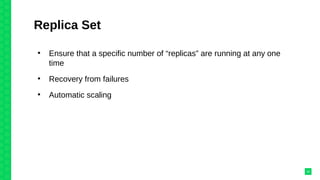
Replica Set
●
Ensure that a specific number of “replicas” are running at any one
time
●
Recovery from failures
●
Automatic scaling
20
Service discovery
21
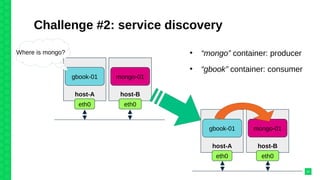
Challenge #2: service discovery
22
host-A host-B
gbook-01 mongo-01
eth0 eth0
Where is mongo?
host-A host-B
gbook-01 mongo-01
eth0 eth0
●
“mongo” container: producer
●
“gbook” container: consumer
Use DNS
●
Not a good solution:
– Containers can die/be moved somewhere more often
– Return DNS responses with a short TTL → more load on the
server
– Some clients ignore TTL → old entries are cached
Note well:
●
Docker < 1.11: updates /etc/hosts dynamically
●
Docker >= 1.11: integrates a DNS server
23
Key-value store
●
Rely on a key-value store (etcd, consul, zookeeper)
●
Producer register itself: IP, port #
●
Orchestration engine handles this data to the consumer
●
At run time either:
– Change your application to read data straight from the k/v
– Rely on some helper that exposes the values via environment file
or configuration file
24
Handing changes &
multiple choices
25
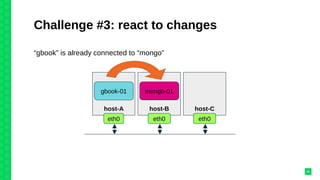
Challenge #3: react to changes
26
host-A host-B
gbook-01 mongo-01
eth0 eth0
host-C
eth0
“gbook” is already connected to “mongo”
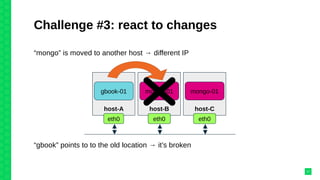
Challenge #3: react to changes
27
host-A host-B
gbook-01 mongo-01
eth0 eth0
host-C
mongo-01
eth0
“gbook” points to to the old location → it’s broken
“mongo” is moved to another host → different IP
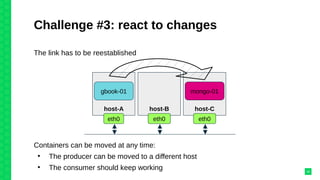
Challenge #3: react to changes
28
The link has to be reestablished
host-A host-B
gbook-01
eth0 eth0
host-C
mongo-01
eth0
Containers can be moved at any time:
●
The producer can be moved to a different host
●
The consumer should keep working
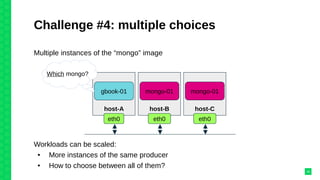
Challenge #4: multiple choices
29
Multiple instances of the “mongo” image
host-A host-B
gbook-01 mongo-01
eth0 eth0
host-C
mongo-01
eth0
Which mongo?
Workloads can be scaled:
● More instances of the same producer
● How to choose between all of them?
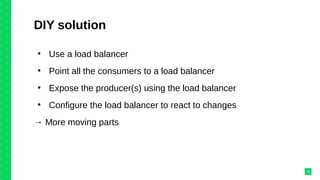
DIY solution
●
Use a load balancer
●
Point all the consumers to a load balancer
●
Expose the producer(s) using the load balancer
●
Configure the load balancer to react to changes
→ More moving parts
30
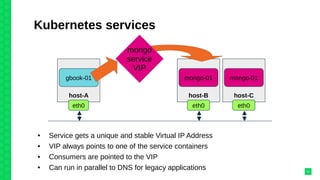
Kubernetes services
31
host-B
mongo-01
eth0
host-C
mongo-01
eth0
host-A
gbook-01
eth0
mongo
service
VIP
● Service gets a unique and stable Virtual IP Address
● VIP always points to one of the service containers
● Consumers are pointed to the VIP
● Can run in parallel to DNS for legacy applications
Ingress traffic
32
Challenge #5: publish applications
●
Your production application is running inside of a container
cluster
●
How to route customers’ requests to these containers?
●
How to react to changes (containers moved, scaling,…)?
33
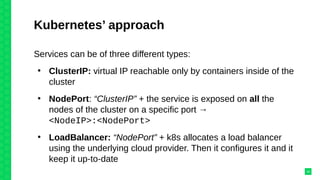
Kubernetes’ approach
Services can be of three different types:
●
ClusterIP: virtual IP reachable only by containers inside of the
cluster
●
NodePort: “ClusterIP” + the service is exposed on all the
nodes of the cluster on a specific port →
<NodeIP>:<NodePort>
●
LoadBalancer: “NodePort” + k8s allocates a load balancer
using the underlying cloud provider. Then it configures it and it
keep it up-to-date
34
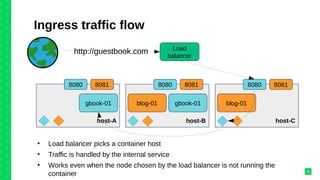
Ingress traffic flow
35
Load
balancer
http://guestbook.com
host-B
gbook-01
8081
blog-01
8080
host-A
gbook-01
80818080
host-C
8081
blog-01
8080
●
Load balancer picks a container host
●
Traffic is handled by the internal service
●
Works even when the node chosen by the load balancer is not running the
container
Data persistence
36
Challenge #6: stateful containers
●
Not all applications can offload data somewhere else
●
Some data should survive container death/relocation
37
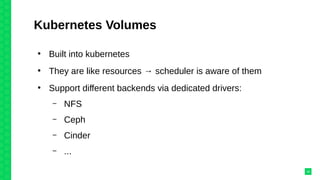
Kubernetes Volumes
●
Built into kubernetes
●
They are like resources → scheduler is aware of them
●
Support different backends via dedicated drivers:
– NFS
– Ceph
– Cinder
– ...
38
Demo
39
Questions?
40
Orchestrating Linux Containers

Orchestrating Linux Containers