WSO2 Kubernetes Reference
Architecture
Imesh Gunaratne, WSO2
November, 2017
Agenda
● An Introduction to Containers
● An Introduction to Kubernetes
○ Kubernetes Architecture
○ Kubernetes Components
● WSO2 Reference Architecture for Kubernetes
○ Container Orchestration
○ Service Discovery
○ Cluster Discovery
○ Runtime Artifact Synchronization
○ Configuration Management
○ Autoscaling
Agenda Cont.
● Security
○ Security Best Practices
○ Container Security
○ Pod Security Policies
● Deployment Process
○ WSO2 Update Manager (WUM)
○ Kubernetes Resource Deployment
● Rolling Out Updates
○ Kubernetes Rollout
○ Blue/Green Deployment
● Monitoring The Deployment
● WSO2 Kubernetes Resources
An Introduction to Containers
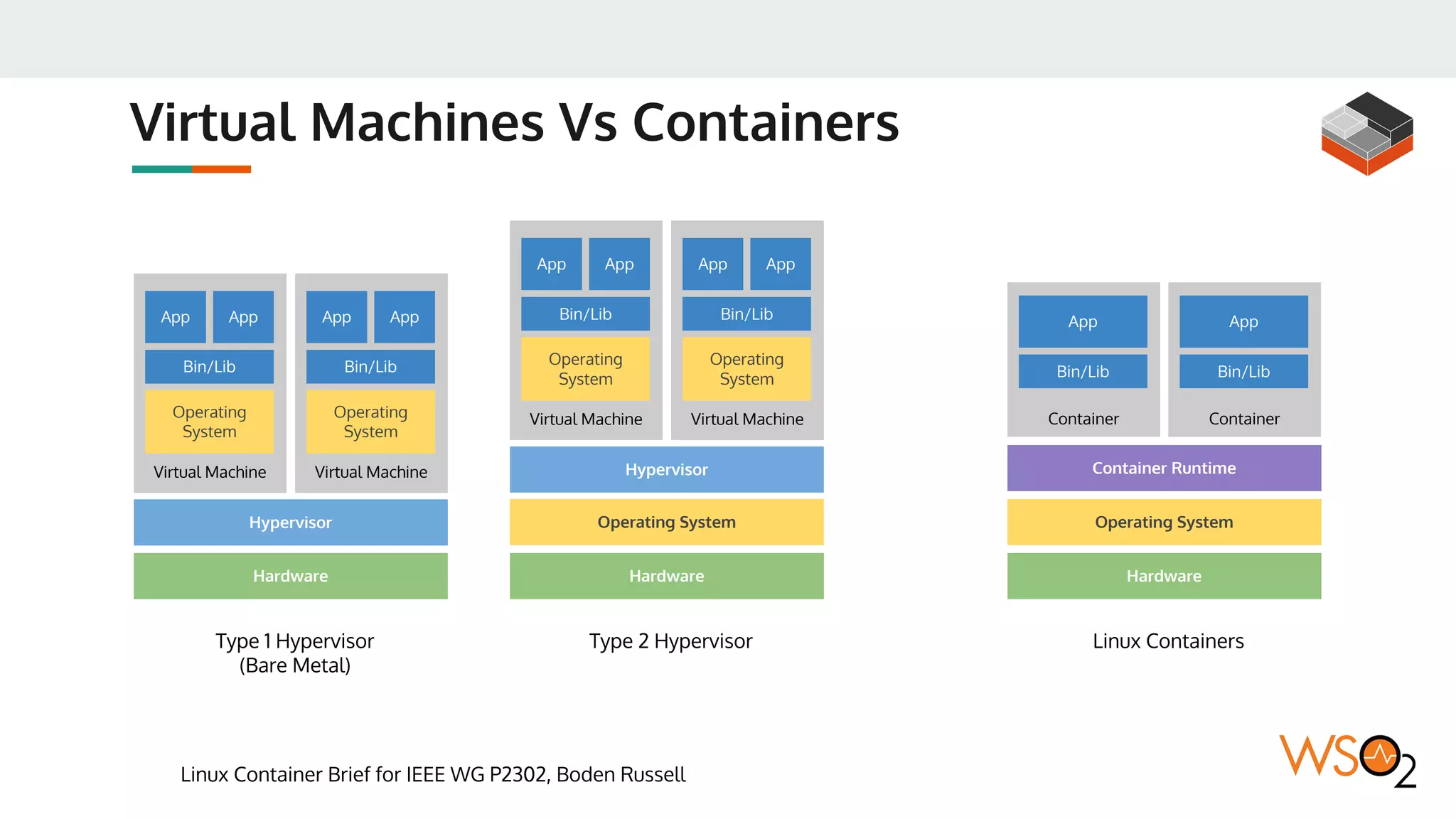
Virtual Machines Vs Containers
Linux Container Brief for IEEE WG P2302, Boden Russell
Hardware
Hypervisor
Virtual Machine
Operating
System
Bin/Lib
App App
Virtual Machine
Operating
System
Bin/Lib
App App
Hardware
Operating System
Hypervisor
Virtual Machine
Operating
System
Bin/Lib
App App
Virtual Machine
Operating
System
Bin/Lib
App App
Type 1 Hypervisor
(Bare Metal)
Type 2 Hypervisor
Hardware
Operating System
Linux Containers
Container
Bin/Lib
App
Container
Bin/Lib
App
Container Runtime
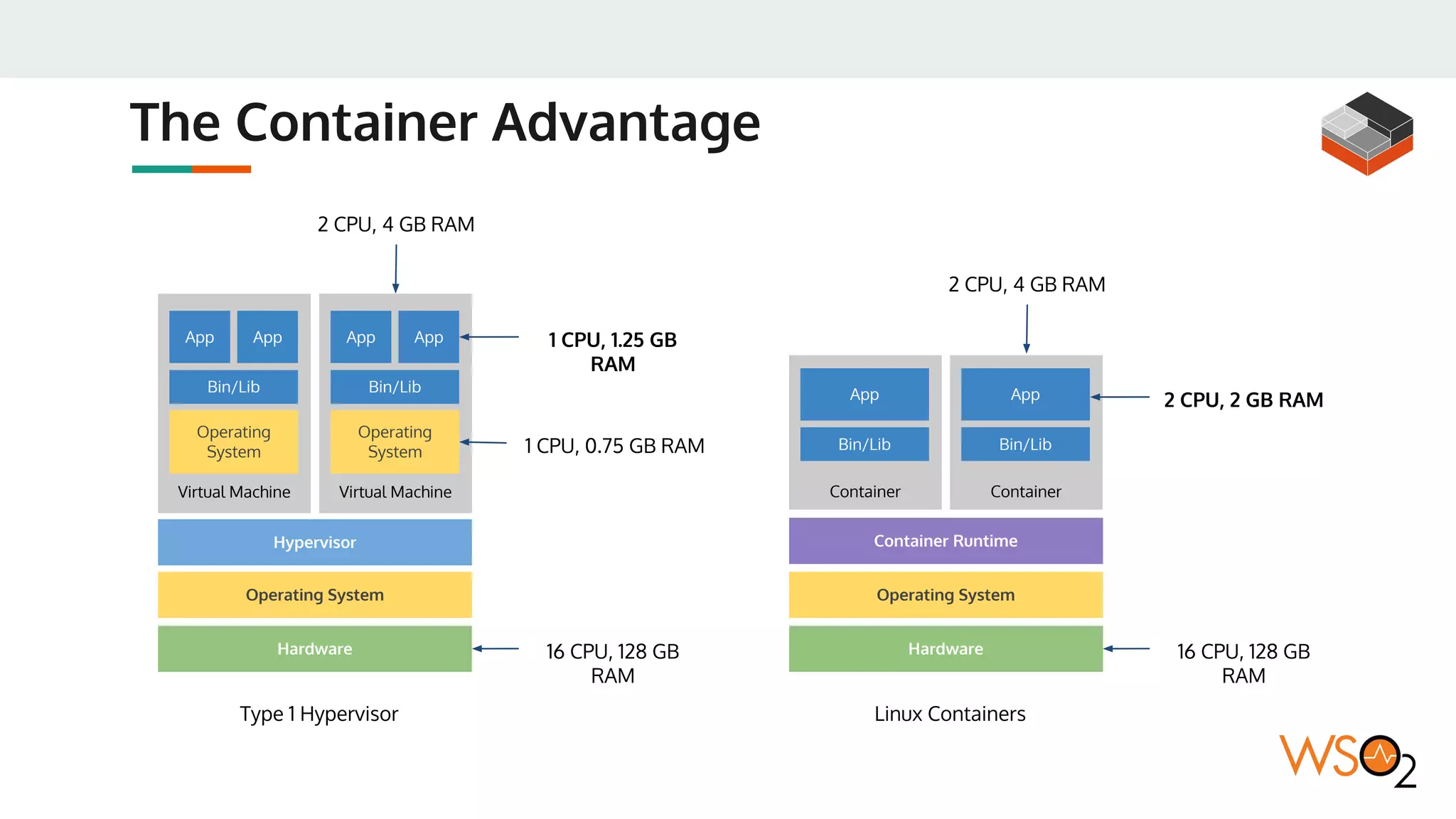
The Container Advantage
Hardware
Hypervisor
Virtual Machine
Operating
System
Bin/Lib
App App
Virtual Machine
Operating
System
Bin/Lib
App App
Type 1 Hypervisor
Hardware
Operating System
Linux Containers
Container
Bin/Lib
App
Container
Bin/Lib
App
16 CPU, 128 GB
RAM
2 CPU, 4 GB RAM
1 CPU, 1.25 GB
RAM
1 CPU, 0.75 GB RAM
16 CPU, 128 GB
RAM
2 CPU, 4 GB RAM
2 CPU, 2 GB RAM
Container Runtime
Operating System
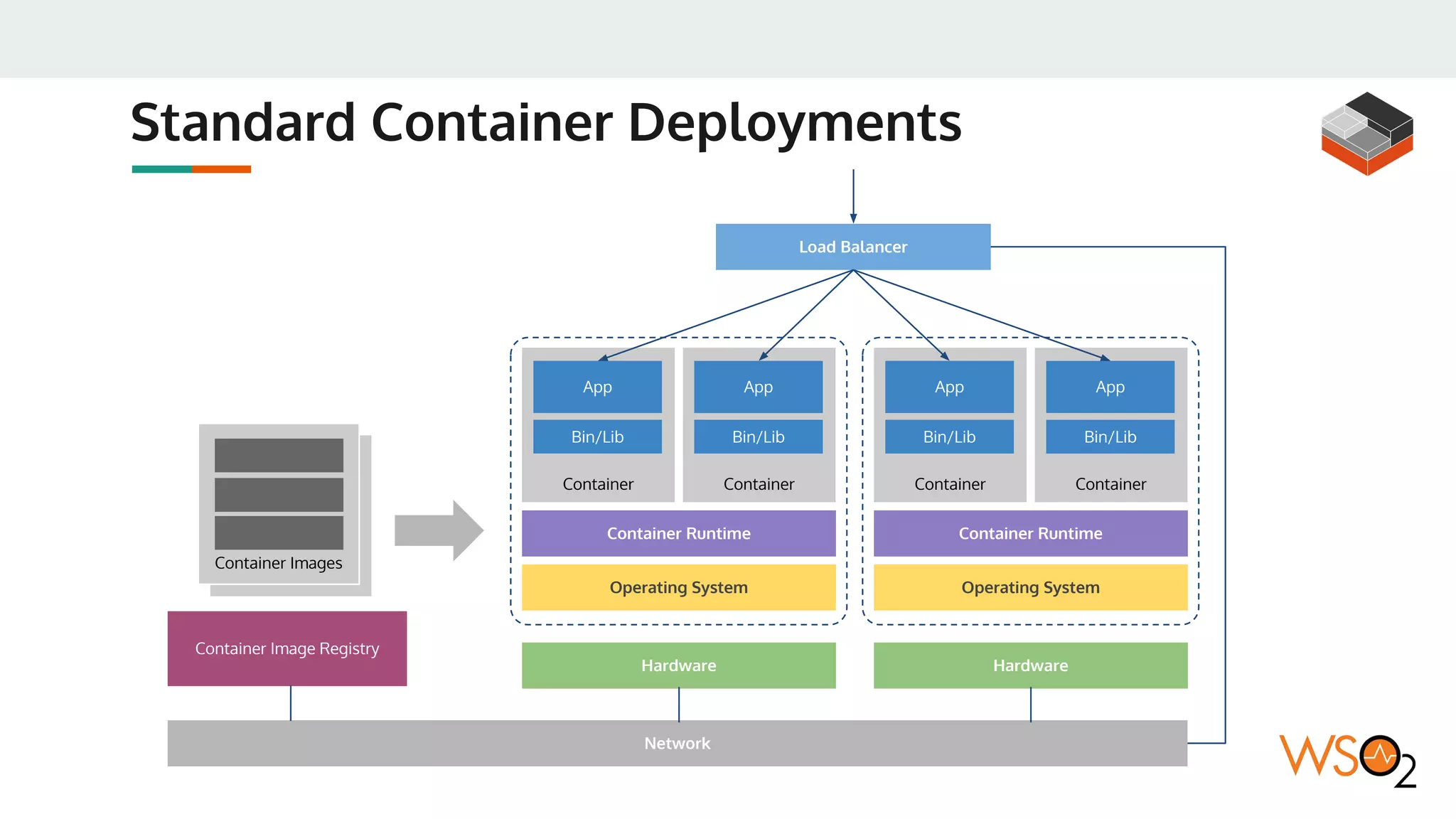
Standard Container Deployments
Container Image
Container Images
Hardware
Operating System
Container
Bin/Lib
App
Container
Bin/Lib
App
Container Runtime
Container Image Registry
Operating System
Container
Bin/Lib
App
Container
Bin/Lib
App
Container Runtime
Load Balancer
Hardware
Network
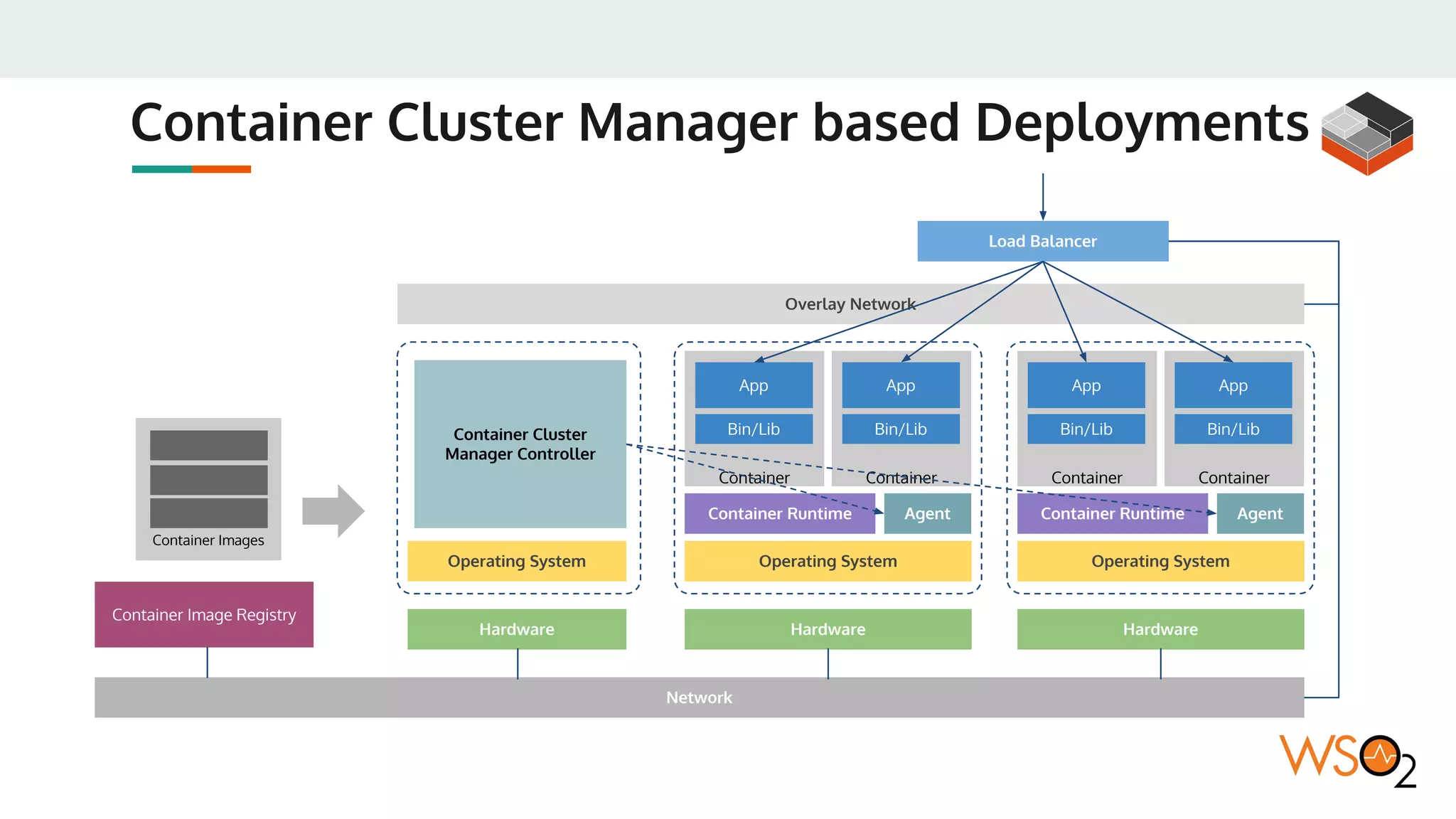
Container Cluster Manager based Deployments
Overlay Network
Container Images
Hardware
Operating System
Container
Bin/Lib
App
Container
Bin/Lib
App
Container Runtime
Container Image Registry
Operating System
Container
Bin/Lib
App
Container
Bin/Lib
App
Load Balancer
Hardware
Network
Hardware
Operating System
Container Cluster
Manager Controller
Agent Container Runtime Agent
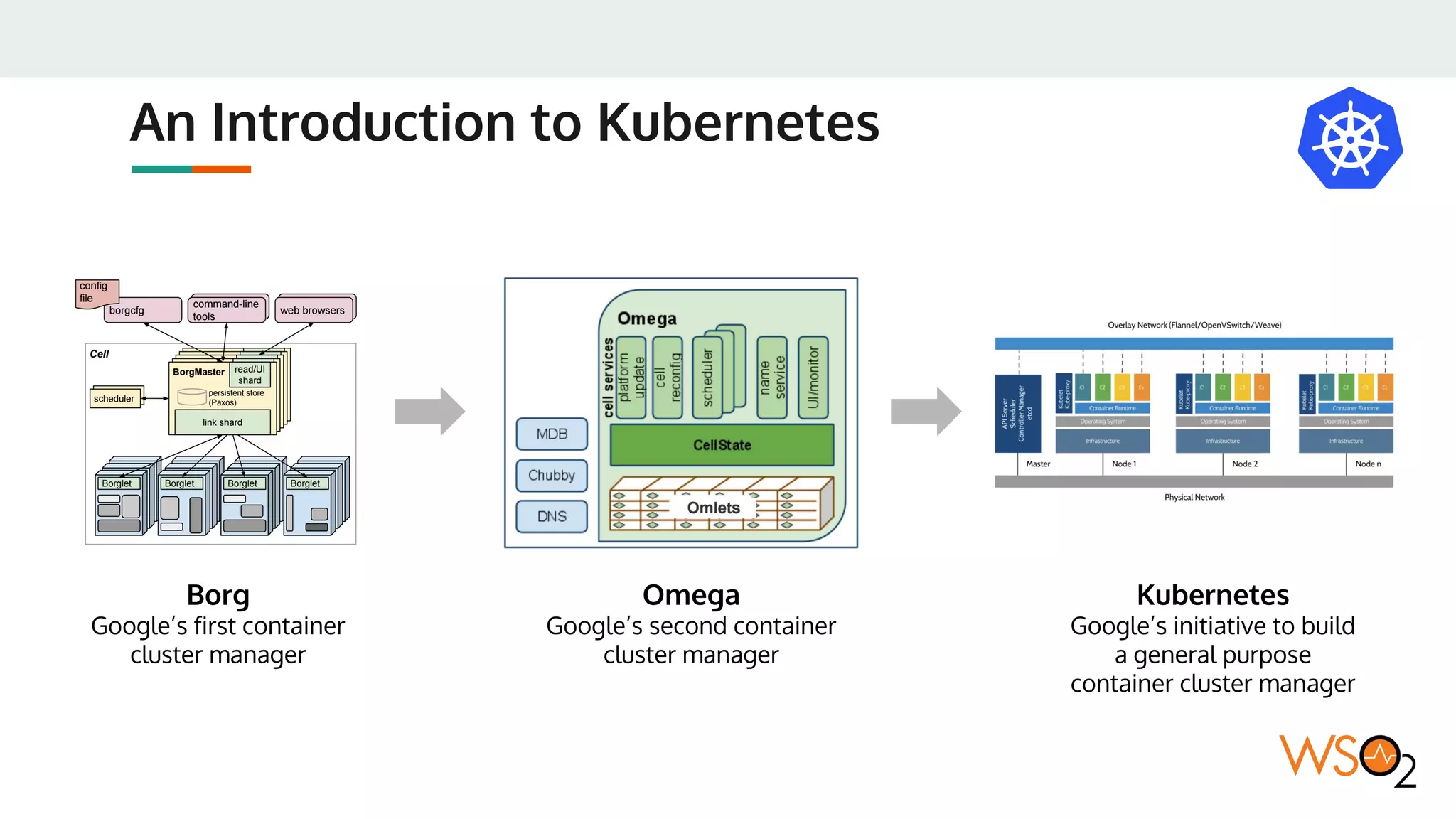
An Introduction to Kubernetes
Borg
Google’s first container
cluster manager
Omega
Google’s second container
cluster manager
Kubernetes
Google’s initiative to build
a general purpose
container cluster manager
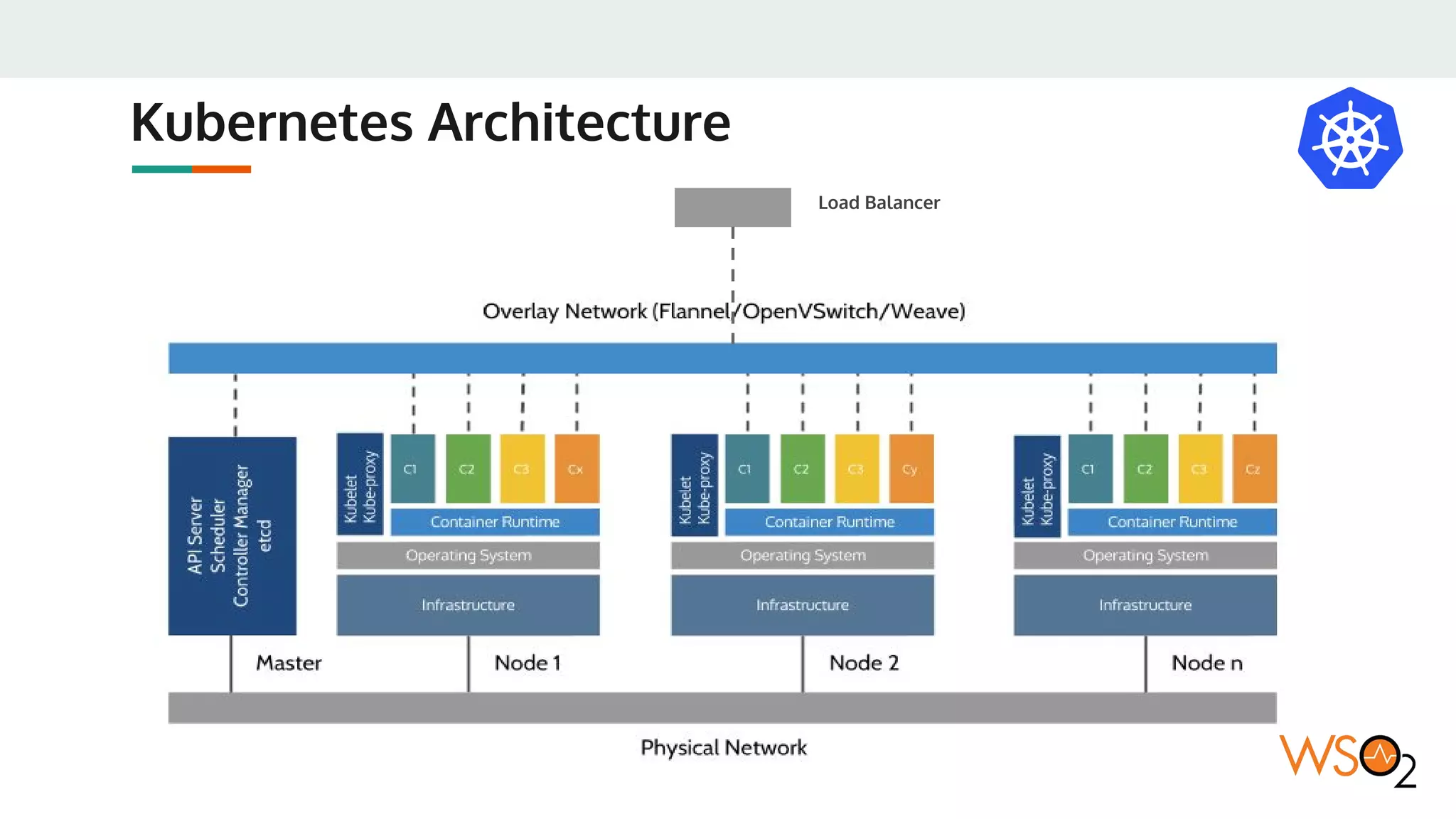
Kubernetes Architecture
Load Balancer
kube-apiserver
● kube-apiserver exposes the Kubernetes API. It is the front-end for the
Kubernetes control plane. It is designed to scale horizontally – that
is, it scales by deploying more instances.
https://kubernetes.io/docs/concepts/overview/components/
etcd
● etcd is used as Kubernetes’ backing store. All cluster data is stored
here. Always have a backup plan for etcd’s data for your Kubernetes
cluster.
https://kubernetes.io/docs/concepts/overview/components/
kube-controller-manager
● kube-controller-manager runs controllers, which are the background
threads that handle routine tasks in the cluster. Logically, each
controller is a separate process, but to reduce complexity, they are
all compiled into a single binary and run in a single process.
● These controllers include:
○ Node Controller: Responsible for noticing and responding when nodes go down.
○ Replication Controller: Responsible for maintaining the correct number of pods
for every replication controller object in the system.
○ Endpoints Controller: Populates the Endpoints object (that is, joins Services &
Pods).
○ Service Account & Token Controllers: Create default accounts and API access
tokens for new namespaces.
https://kubernetes.io/docs/concepts/overview/components/
cloud-controller-manager
● cloud-controller-manager runs controllers that interact with the
underlying cloud providers. The cloud-controller-manager binary is
an alpha feature introduced in Kubernetes release 1.6.
● Extension points:
○ Node Controller: For checking the cloud provider to determine if a node has been
deleted in the cloud after it stops responding
○ Route Controller: For setting up routes in the underlying cloud infrastructure
○ Service Controller: For creating, updating and deleting cloud provider load
balancers
○ Volume Controller: For creating, attaching, and mounting volumes, and
interacting with the cloud provider to orchestrate volumes
https://kubernetes.io/docs/concepts/overview/components/
kube-scheduler
● kube-scheduler watches newly created pods that have no node
assigned, and selects a node for them to run on.
https://kubernetes.io/docs/concepts/overview/components/
DNS
● While the other addons are not strictly required, all Kubernetes
clusters should have cluster DNS, as many examples rely on it.
● Cluster DNS is a DNS server, in addition to the other DNS server(s) in
your environment, which serves DNS records for Kubernetes
services.
● Containers started by Kubernetes automatically include this DNS
server in their DNS searches.
https://kubernetes.io/docs/concepts/overview/components/
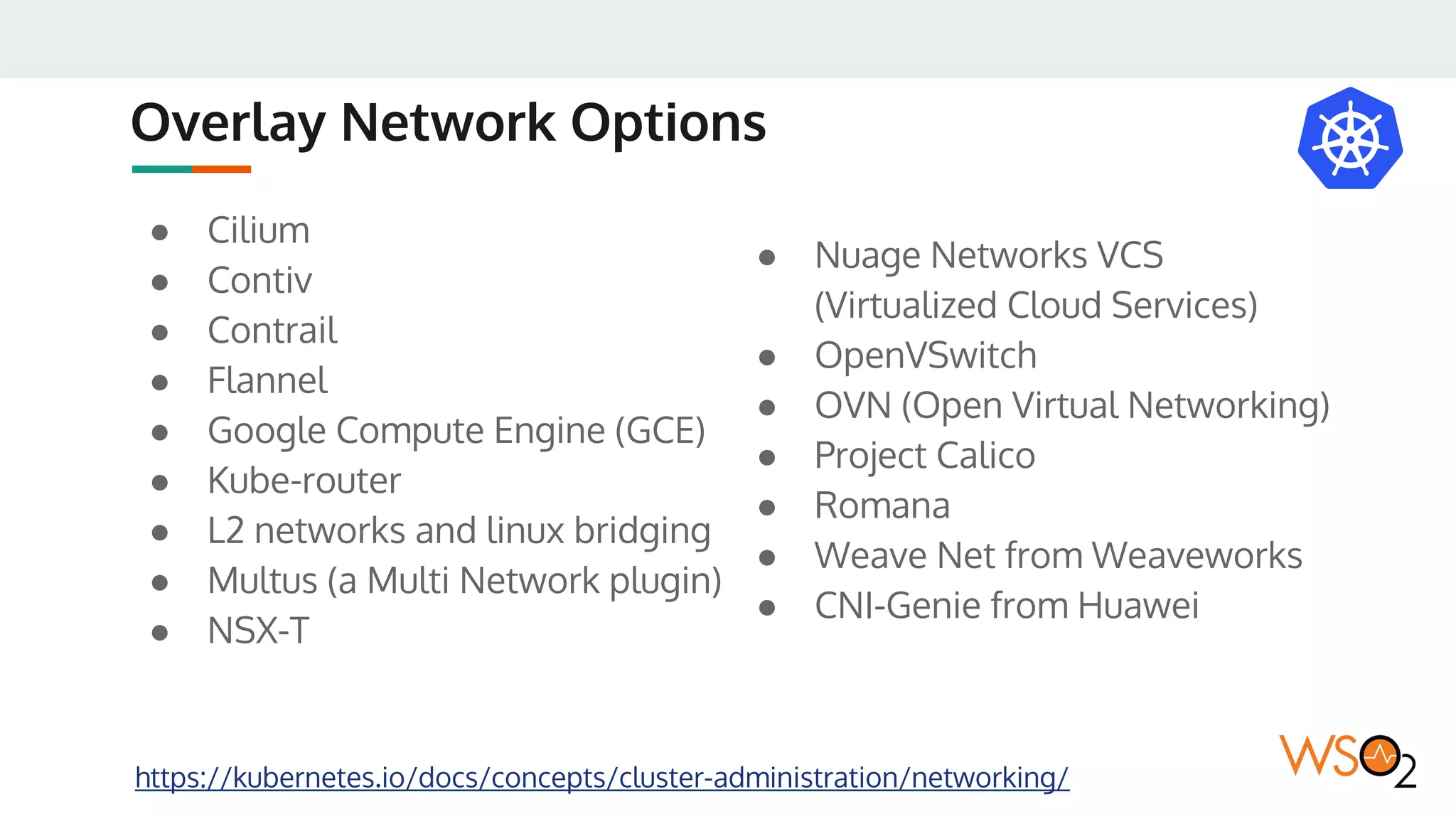
Overlay Network Options
https://kubernetes.io/docs/concepts/cluster-administration/networking/
● Cilium
● Contiv
● Contrail
● Flannel
● Google Compute Engine (GCE)
● Kube-router
● L2 networks and linux bridging
● Multus (a Multi Network plugin)
● NSX-T
● Nuage Networks VCS
(Virtualized Cloud Services)
● OpenVSwitch
● OVN (Open Virtual Networking)
● Project Calico
● Romana
● Weave Net from Weaveworks
● CNI-Genie from Huawei
WSO2 Reference Architecture
for Kubernetes
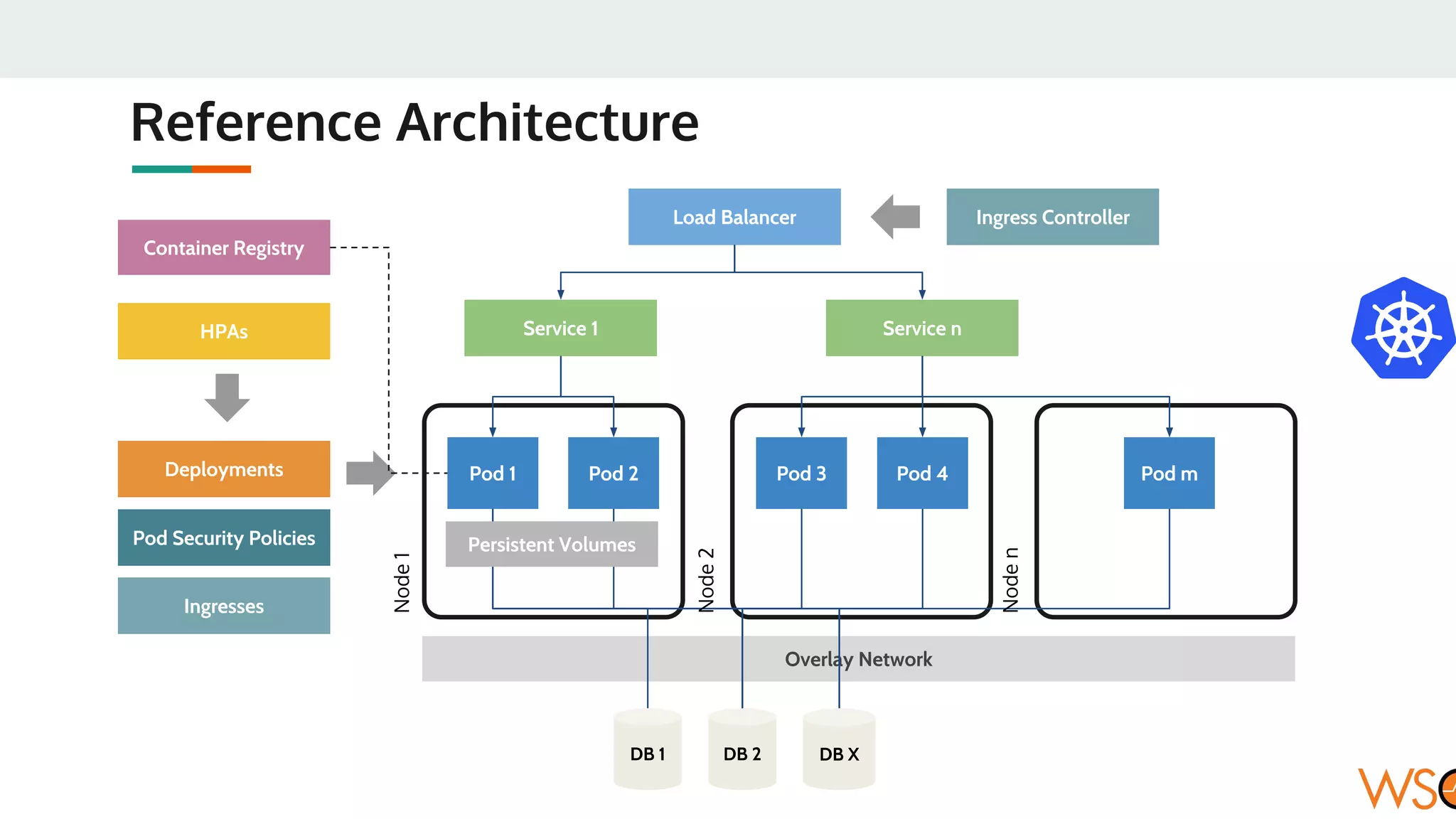
Reference Architecture
Overlay Network
Pod 1 Pod 2
Service 1
Pod 3 Pod 4 Pod m
Service n
Deployments
Load Balancer
DB 1 DB 2 DB X
Persistent Volumes
HPAs
Pod Security Policies
Ingresses
Container Registry
Node1
Node2
Noden
Ingress Controller
WSO2 Docker Images
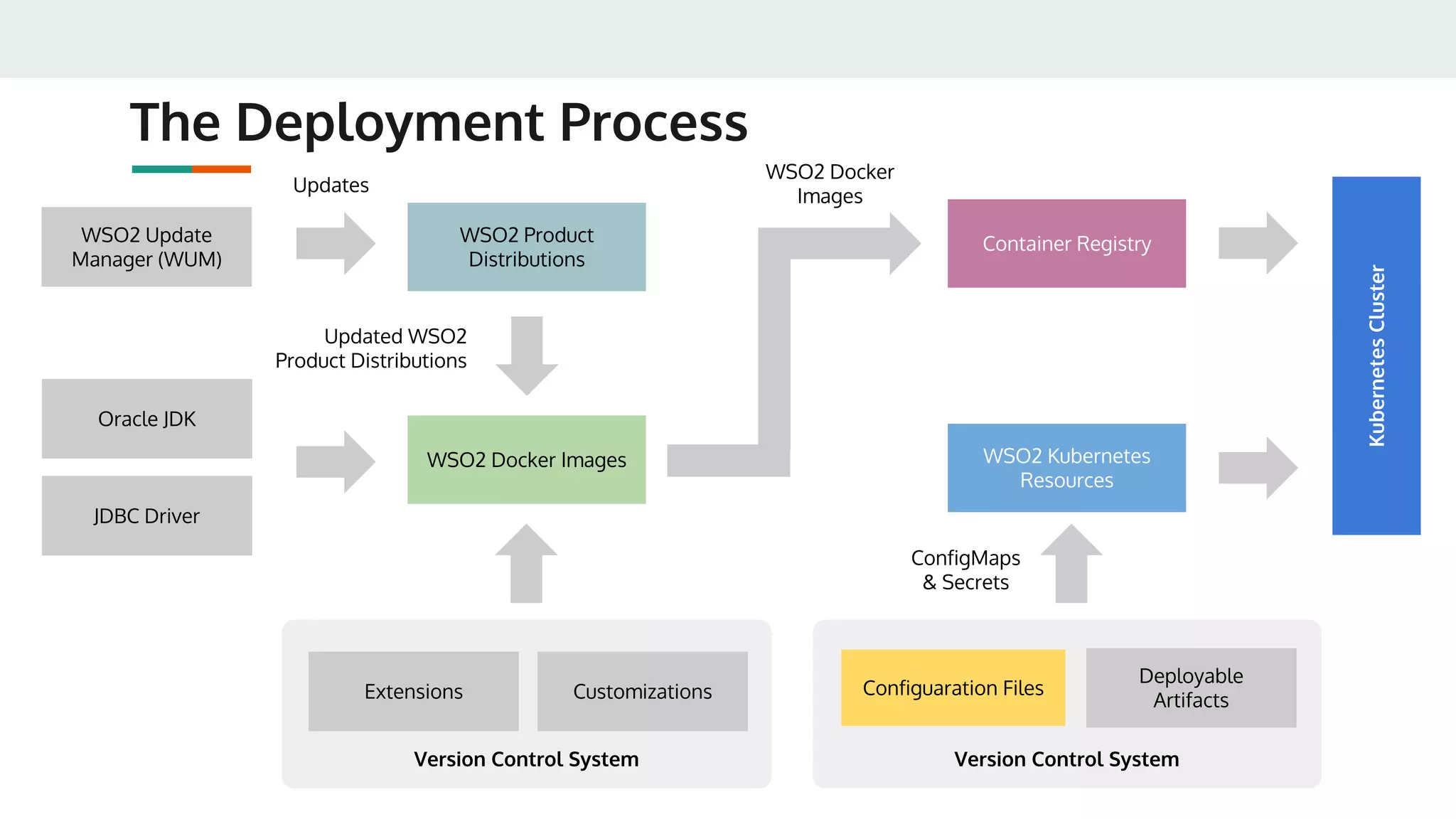
● WSO2 Docker images are built using standard Dockerfiles
● Default base image used is Ubuntu Server LTS
● Will only include:
○ Oracle JDK 1.8
○ JDBC Driver
○ Latest product distribution
○ Extensions, and Customizations
● Will not include:
○ Configurations (Passed via ConfigMaps)
○ Credentials (Passed via Secrets)
○ Deployable Artifacts (Passed via ConfigMaps)
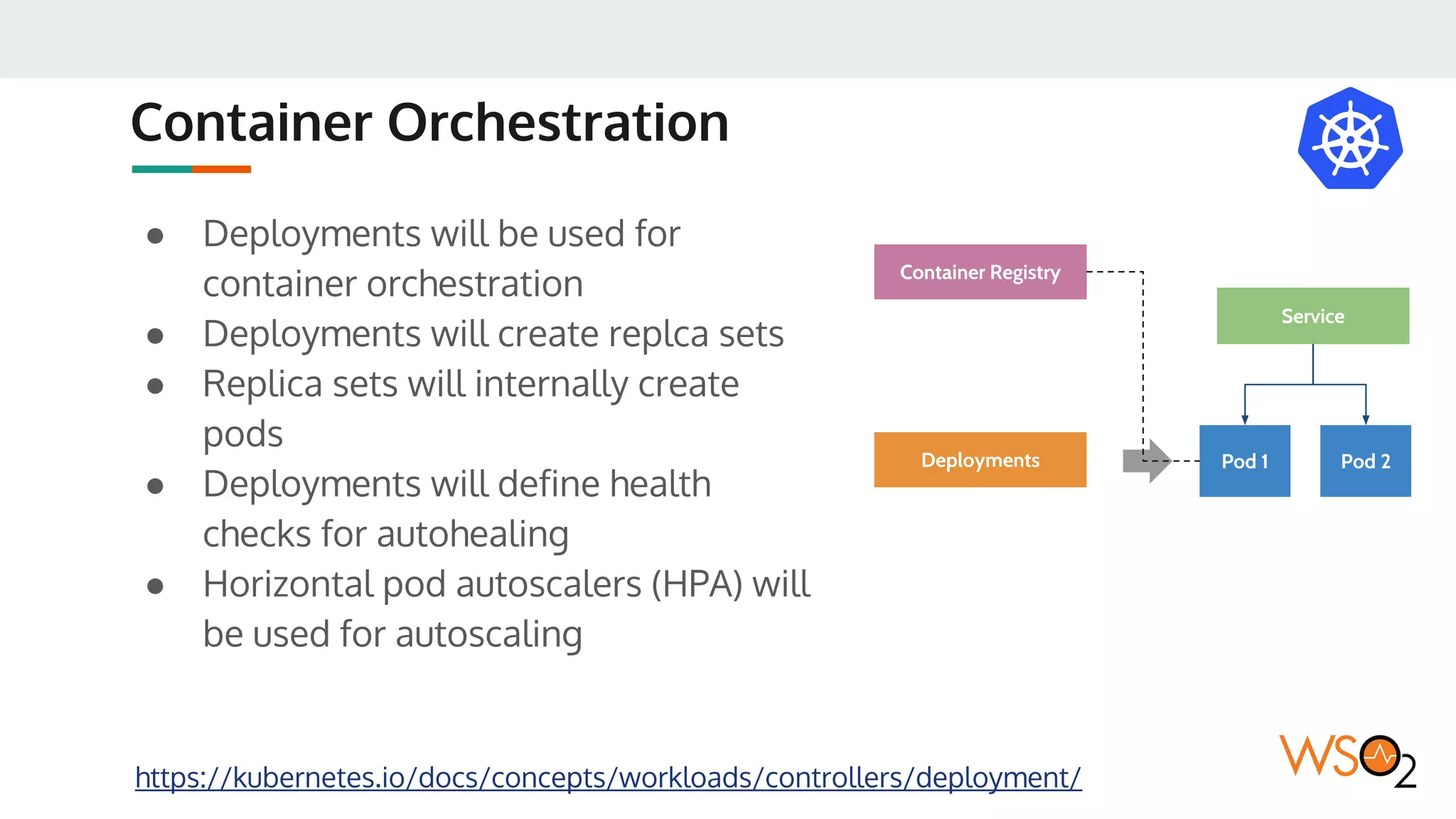
Container Orchestration
● Deployments will be used for
container orchestration
● Deployments will create replca sets
● Replica sets will internally create
pods
● Deployments will define health
checks for autohealing
● Horizontal pod autoscalers (HPA) will
be used for autoscaling
https://kubernetes.io/docs/concepts/workloads/controllers/deployment/
Pod 1 Pod 2
Service
Deployments
Container Registry
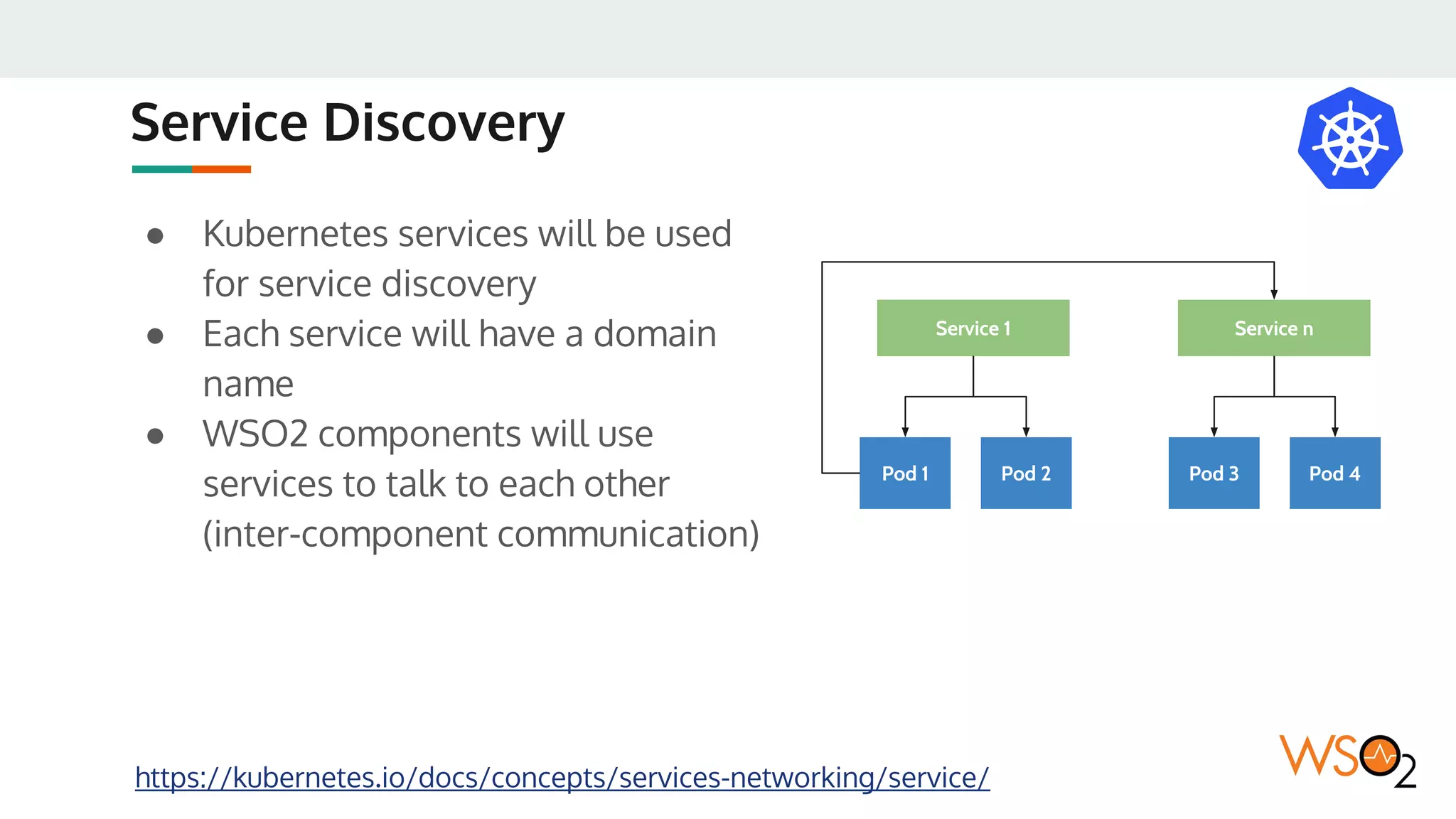
Service Discovery
● Kubernetes services will be used
for service discovery
● Each service will have a domain
name
● WSO2 components will use
services to talk to each other
(inter-component communication)
https://kubernetes.io/docs/concepts/services-networking/service/
Pod 1 Pod 2
Service 1
Pod 3 Pod 4
Service n
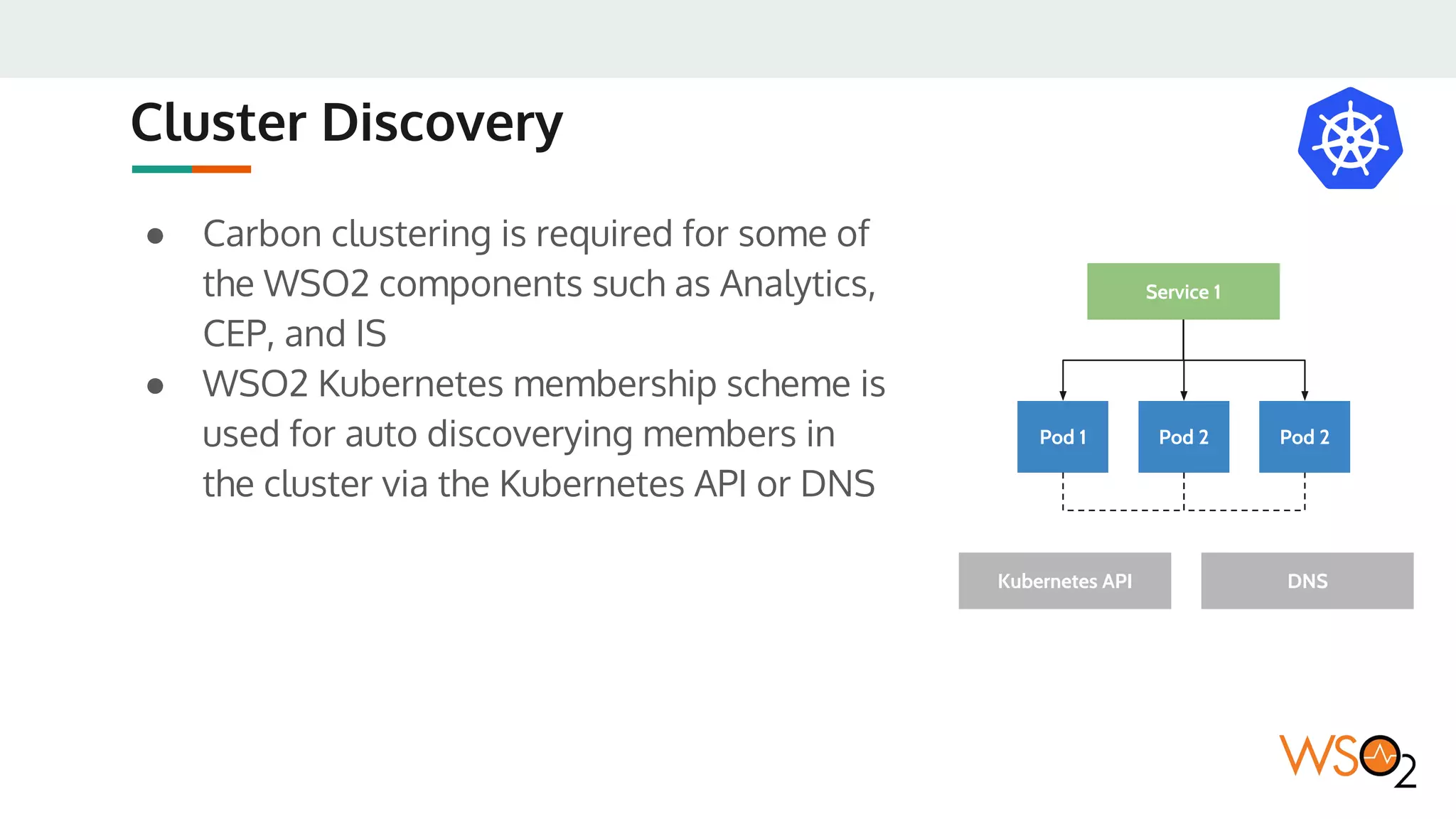
Cluster Discovery
● Carbon clustering is required for some of
the WSO2 components such as Analytics,
CEP, and IS
● WSO2 Kubernetes membership scheme is
used for auto discoverying members in
the cluster via the Kubernetes API or DNS
Pod 1 Pod 2
Service 1
Pod 2
Kubernetes API DNS
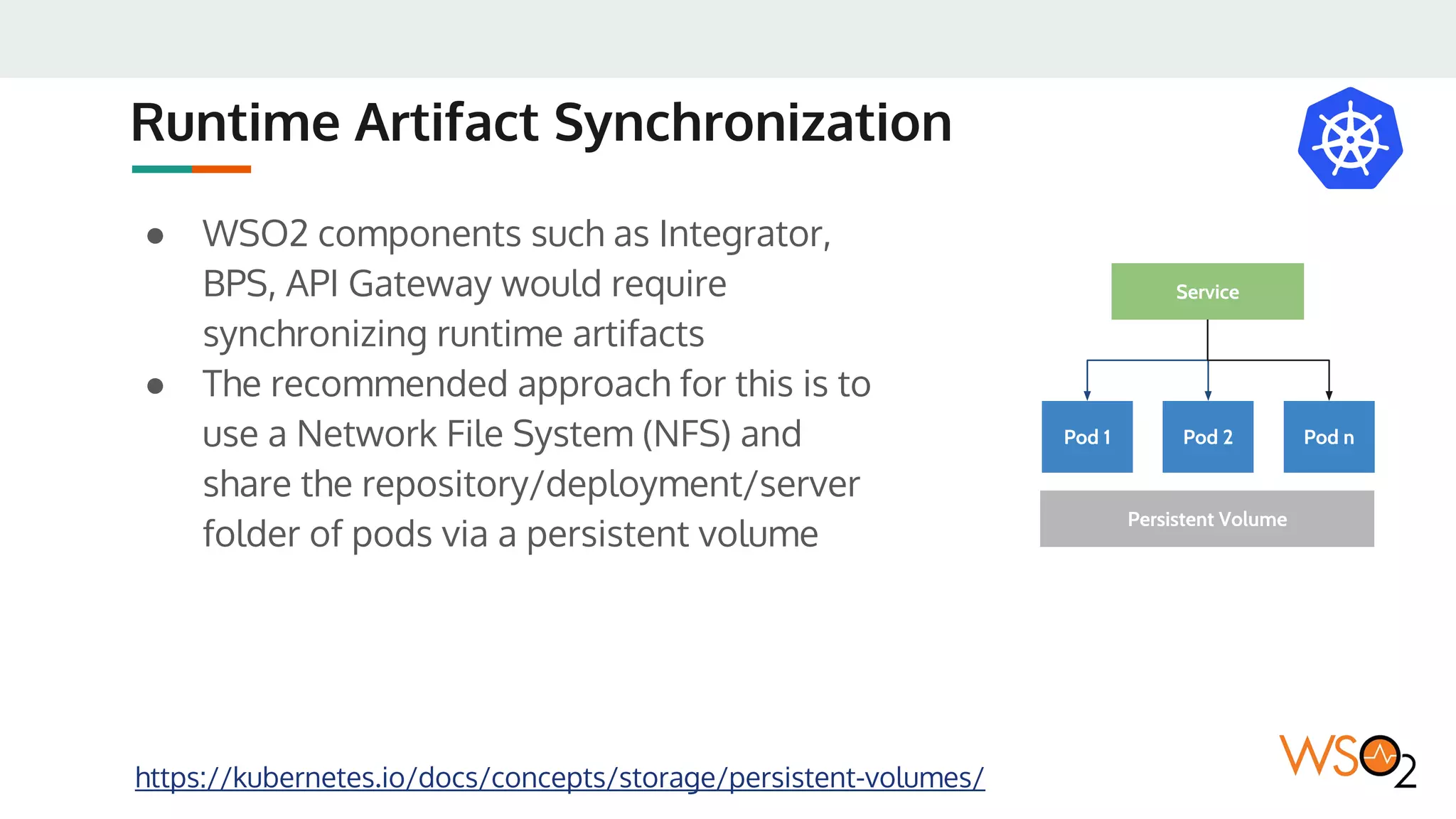
Runtime Artifact Synchronization
● WSO2 components such as Integrator,
BPS, API Gateway would require
synchronizing runtime artifacts
● The recommended approach for this is to
use a Network File System (NFS) and
share the repository/deployment/server
folder of pods via a persistent volume
https://kubernetes.io/docs/concepts/storage/persistent-volumes/
Pod 1 Pod 2
Service
Persistent Volume
Pod n
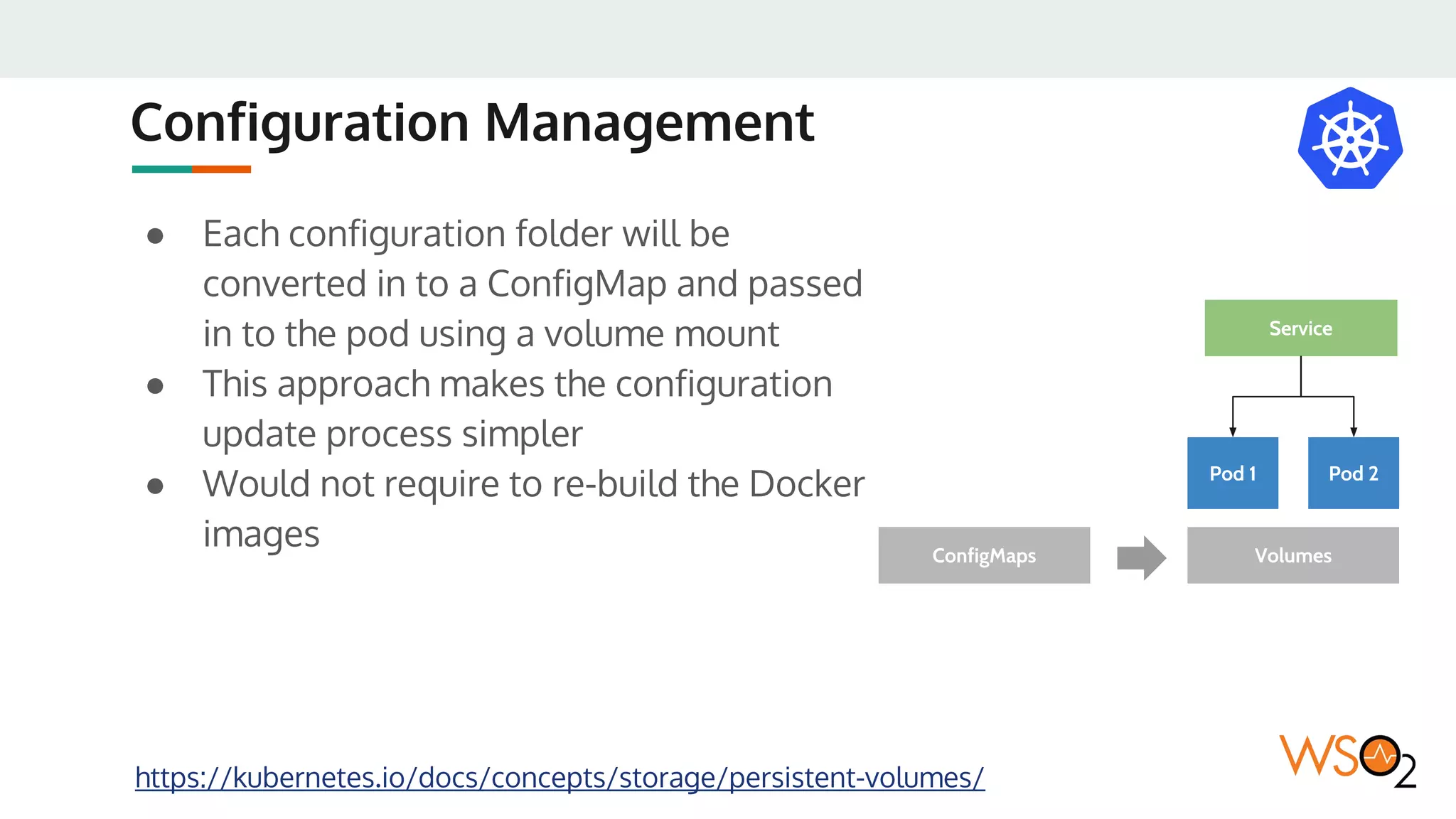
Configuration Management
● Each configuration folder will be
converted in to a ConfigMap and passed
in to the pod using a volume mount
● This approach makes the configuration
update process simpler
● Would not require to re-build the Docker
images
https://kubernetes.io/docs/concepts/storage/persistent-volumes/
Pod 1 Pod 2
Service
VolumesConfigMaps
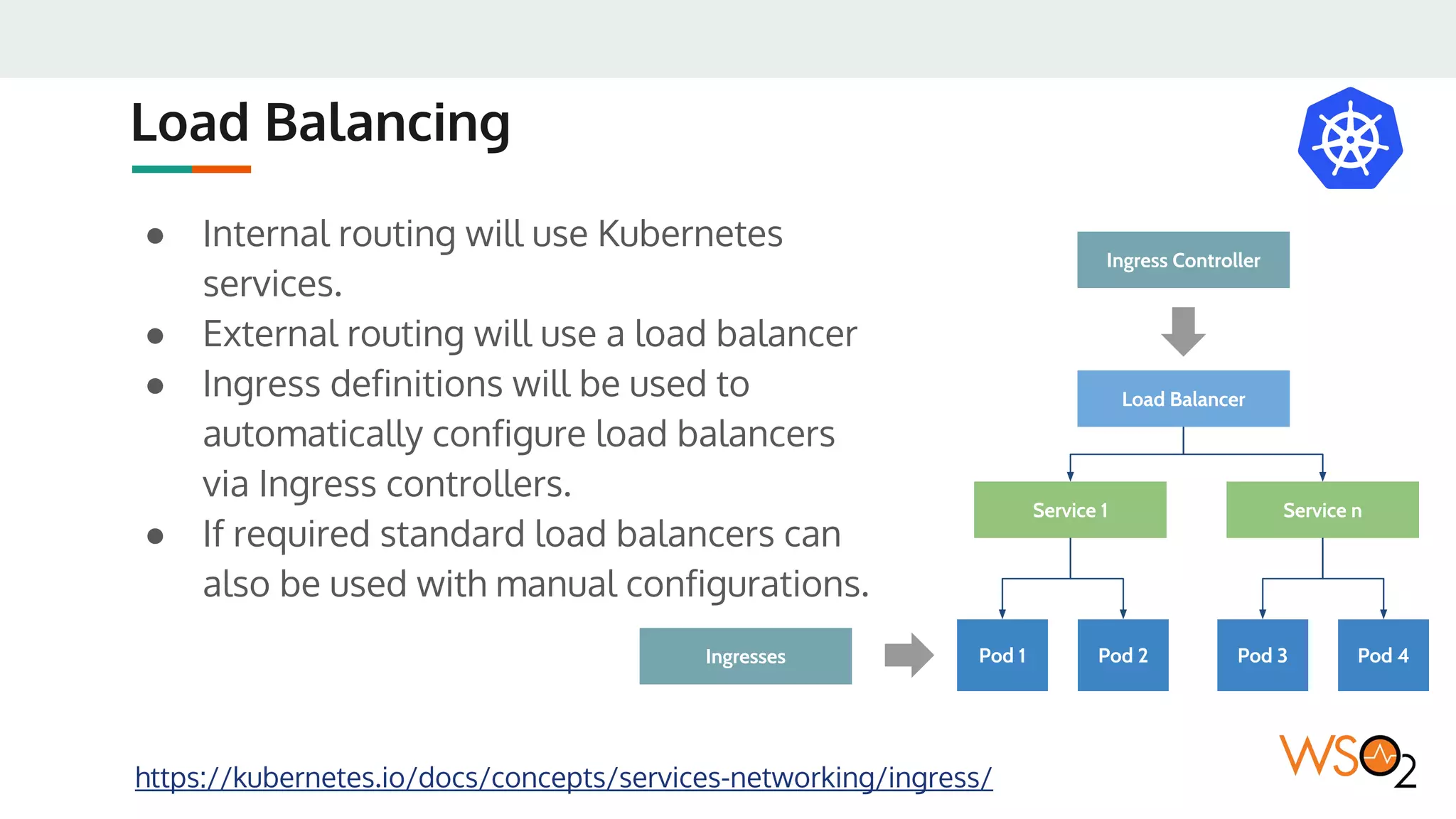
Load Balancing
● Internal routing will use Kubernetes
services.
● External routing will use a load balancer
● Ingress definitions will be used to
automatically configure load balancers
via Ingress controllers.
● If required standard load balancers can
also be used with manual configurations.
https://kubernetes.io/docs/concepts/services-networking/ingress/
Pod 1 Pod 2
Service 1
Pod 3 Pod 4
Service n
Load Balancer
Ingresses
Ingress Controller
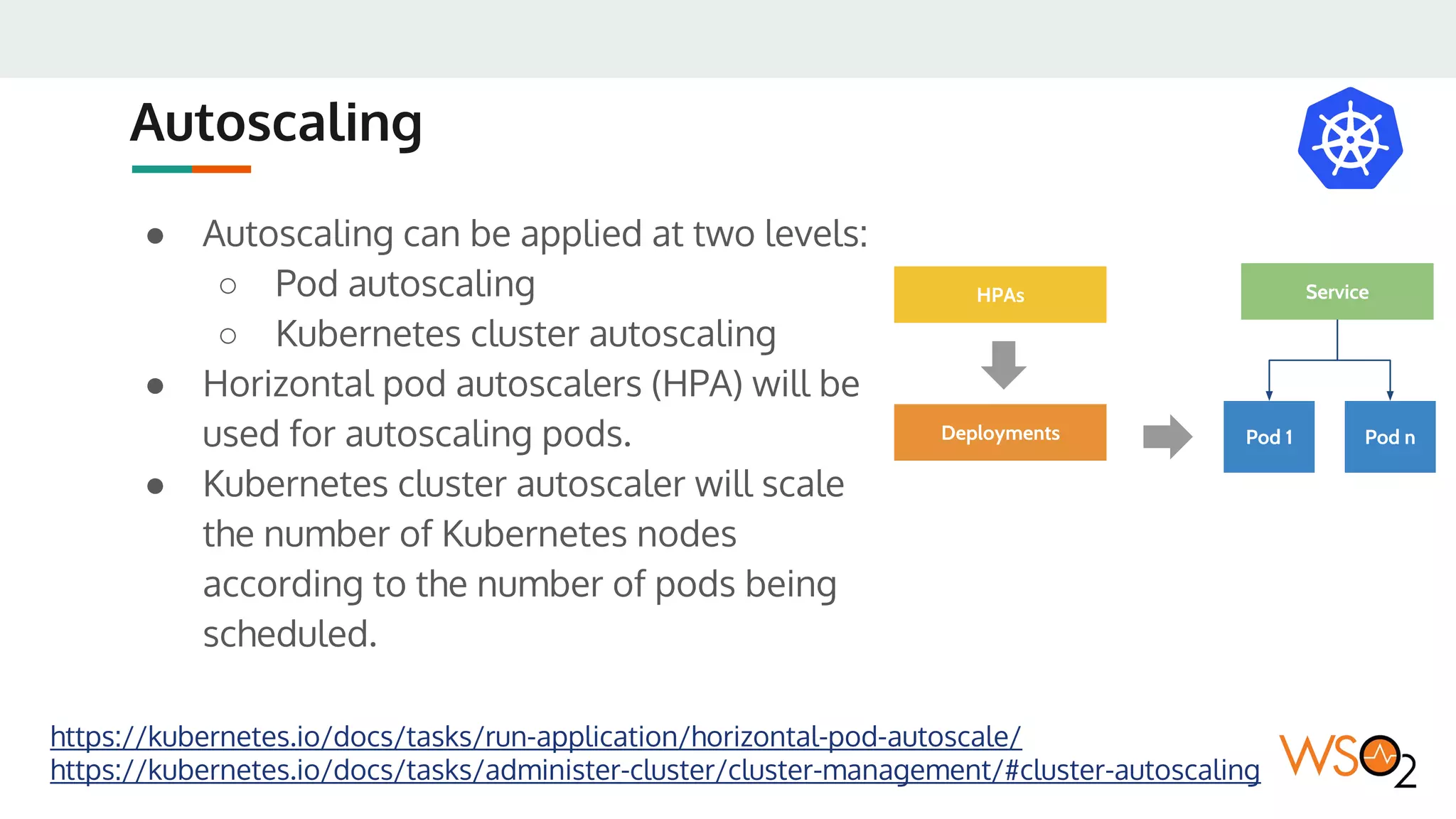
Autoscaling
● Autoscaling can be applied at two levels:
○ Pod autoscaling
○ Kubernetes cluster autoscaling
● Horizontal pod autoscalers (HPA) will be
used for autoscaling pods.
● Kubernetes cluster autoscaler will scale
the number of Kubernetes nodes
according to the number of pods being
scheduled.
https://kubernetes.io/docs/tasks/run-application/horizontal-pod-autoscale/
https://kubernetes.io/docs/tasks/administer-cluster/cluster-management/#cluster-autoscaling
Pod 1 Pod n
Service
Deployments
HPAs
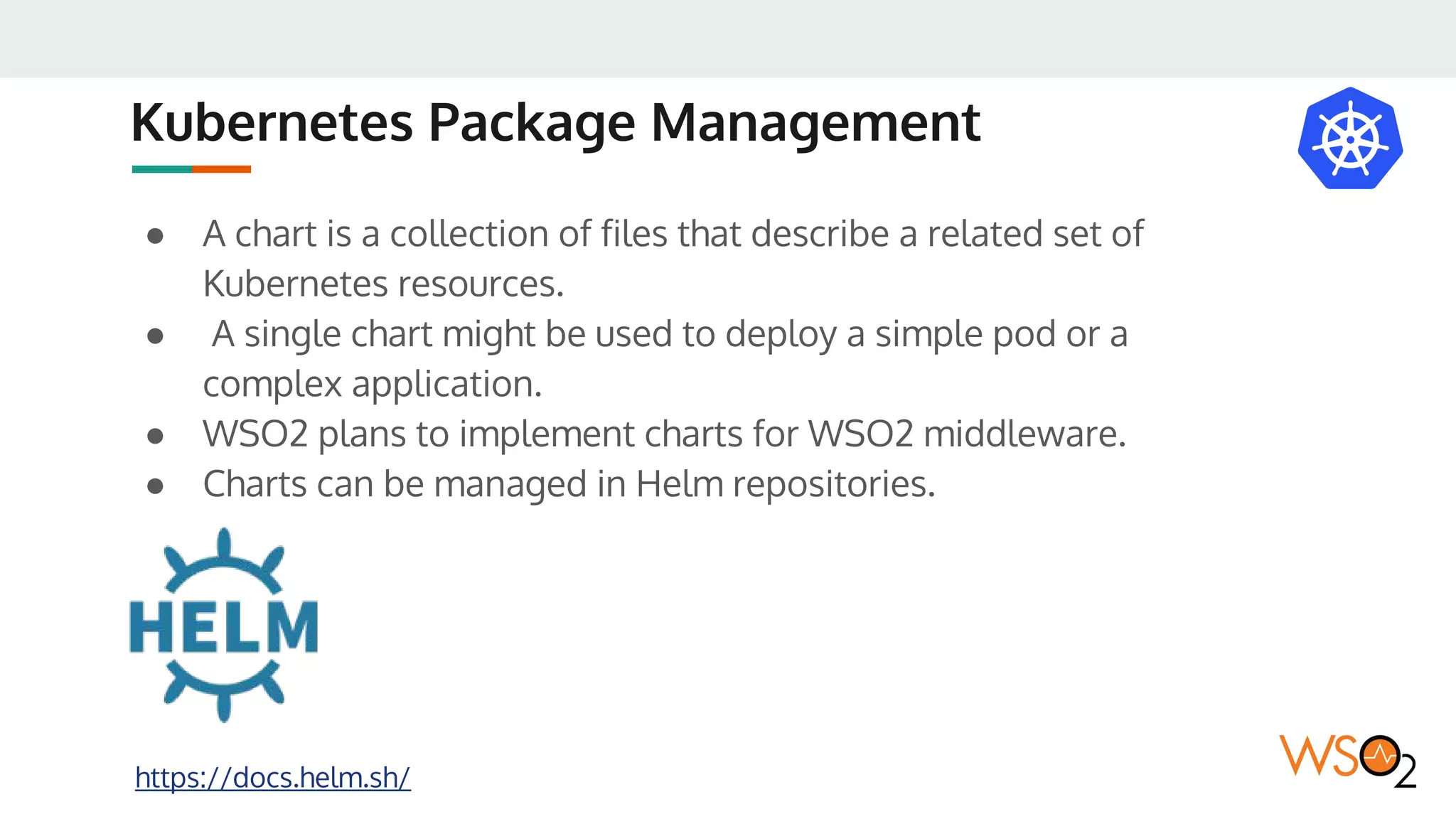
Kubernetes Package Management
https://docs.helm.sh/
● A chart is a collection of files that describe a related set of
Kubernetes resources.
● A single chart might be used to deploy a simple pod or a
complex application.
● WSO2 plans to implement charts for WSO2 middleware.
● Charts can be managed in Helm repositories.
Security
Security Best Practices
● Ensure container images are free of vulnerabilities
○ Implement continuous security vulnerability scanning
○ Regularly apply security updates
● Ensure that only authorized images are used in your environment
● Limit direct access to kubernetes nodes
● Create administrative boundaries between resources (using
namespaces)
● Define resource quota for pods
● Implement network segmentation when necessary (using network
policies)
● Log everything
http://blog.kubernetes.io/2016/08/security-best-practices-kubernetes-deployment.html
Container Security
● WSO2 containers use a nonroot user for starting the server
processes
● The WSO2 server filesystem will only have required levels of
persmissions in each directory
● Permissions to volume mounts will be granted via Pod
Security Policies
Pod Security Policies
● A Pod Security Policy is a cluster-level resource that controls
the actions that a pod can perform and what it has the ability
to access.
https://kubernetes.io/docs/concepts/policy/pod-security-policy/
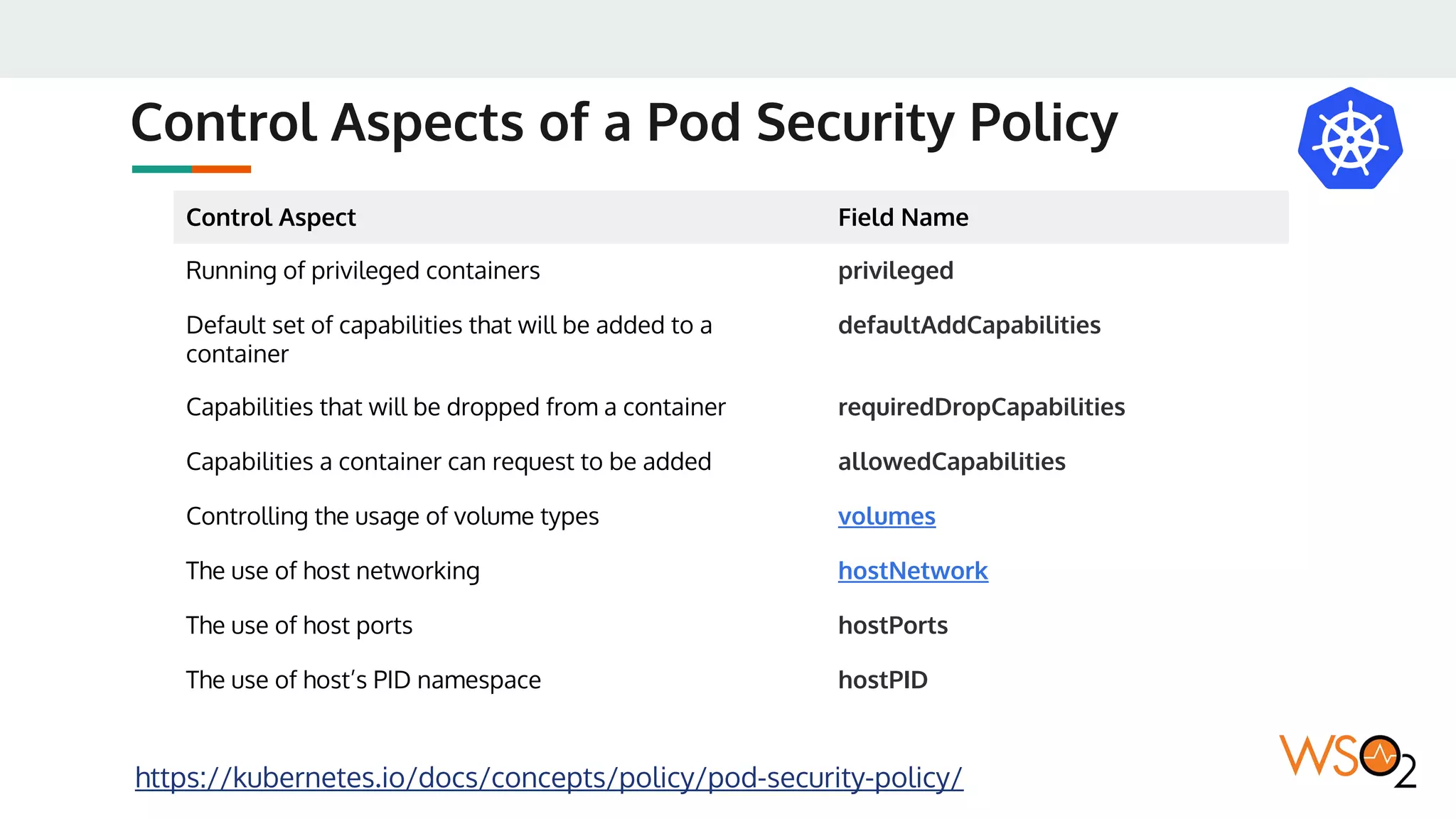
Control Aspects of a Pod Security Policy
https://kubernetes.io/docs/concepts/policy/pod-security-policy/
Control Aspect Field Name
Running of privileged containers privileged
Default set of capabilities that will be added to a
container
defaultAddCapabilities
Capabilities that will be dropped from a container requiredDropCapabilities
Capabilities a container can request to be added allowedCapabilities
Controlling the usage of volume types volumes
The use of host networking hostNetwork
The use of host ports hostPorts
The use of host’s PID namespace hostPID
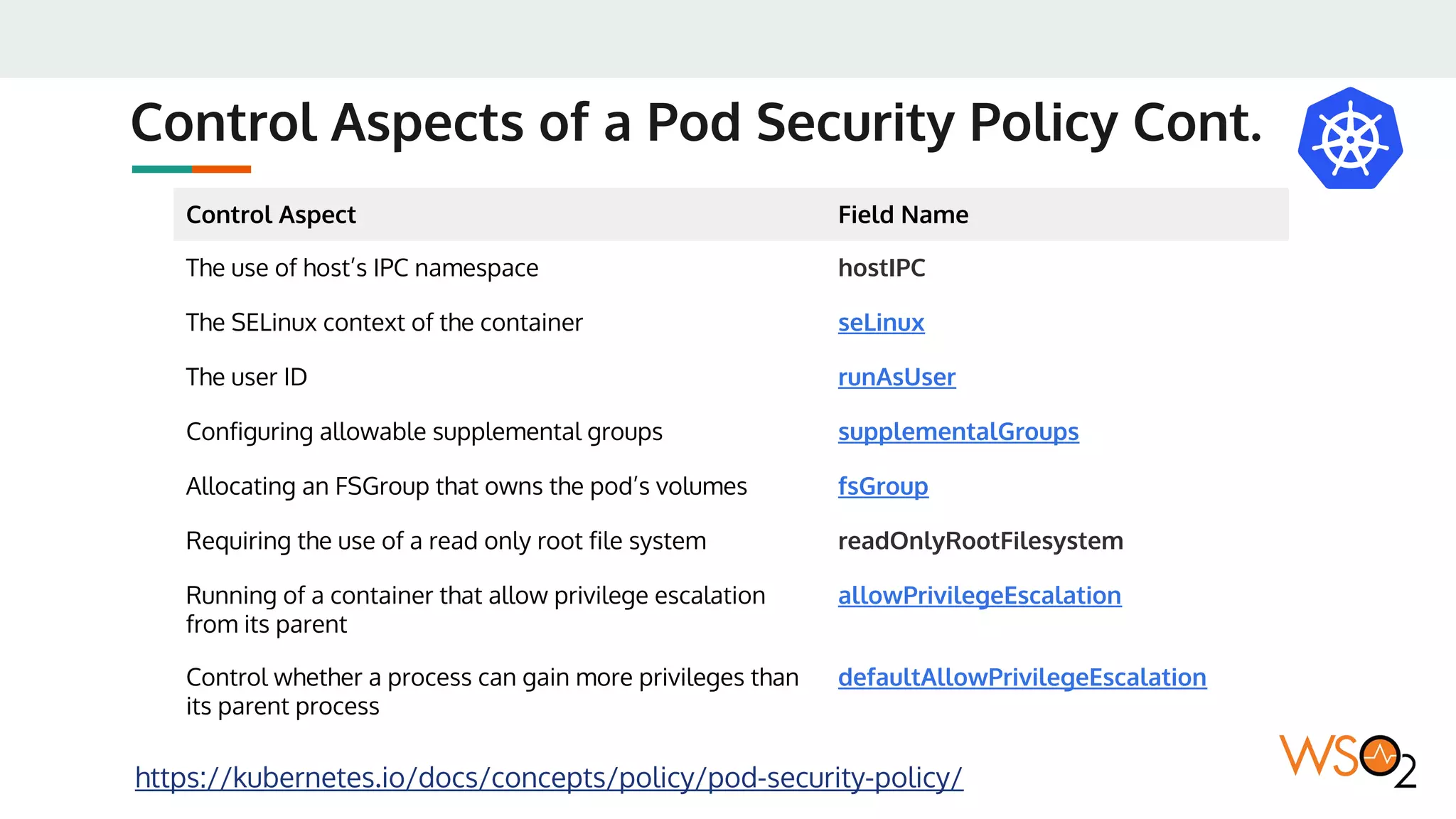
Control Aspects of a Pod Security Policy Cont.
https://kubernetes.io/docs/concepts/policy/pod-security-policy/
Control Aspect Field Name
The use of host’s IPC namespace hostIPC
The SELinux context of the container seLinux
The user ID runAsUser
Configuring allowable supplemental groups supplementalGroups
Allocating an FSGroup that owns the pod’s volumes fsGroup
Requiring the use of a read only root file system readOnlyRootFilesystem
Running of a container that allow privilege escalation
from its parent
allowPrivilegeEscalation
Control whether a process can gain more privileges than
its parent process
defaultAllowPrivilegeEscalation
The Deployment Process
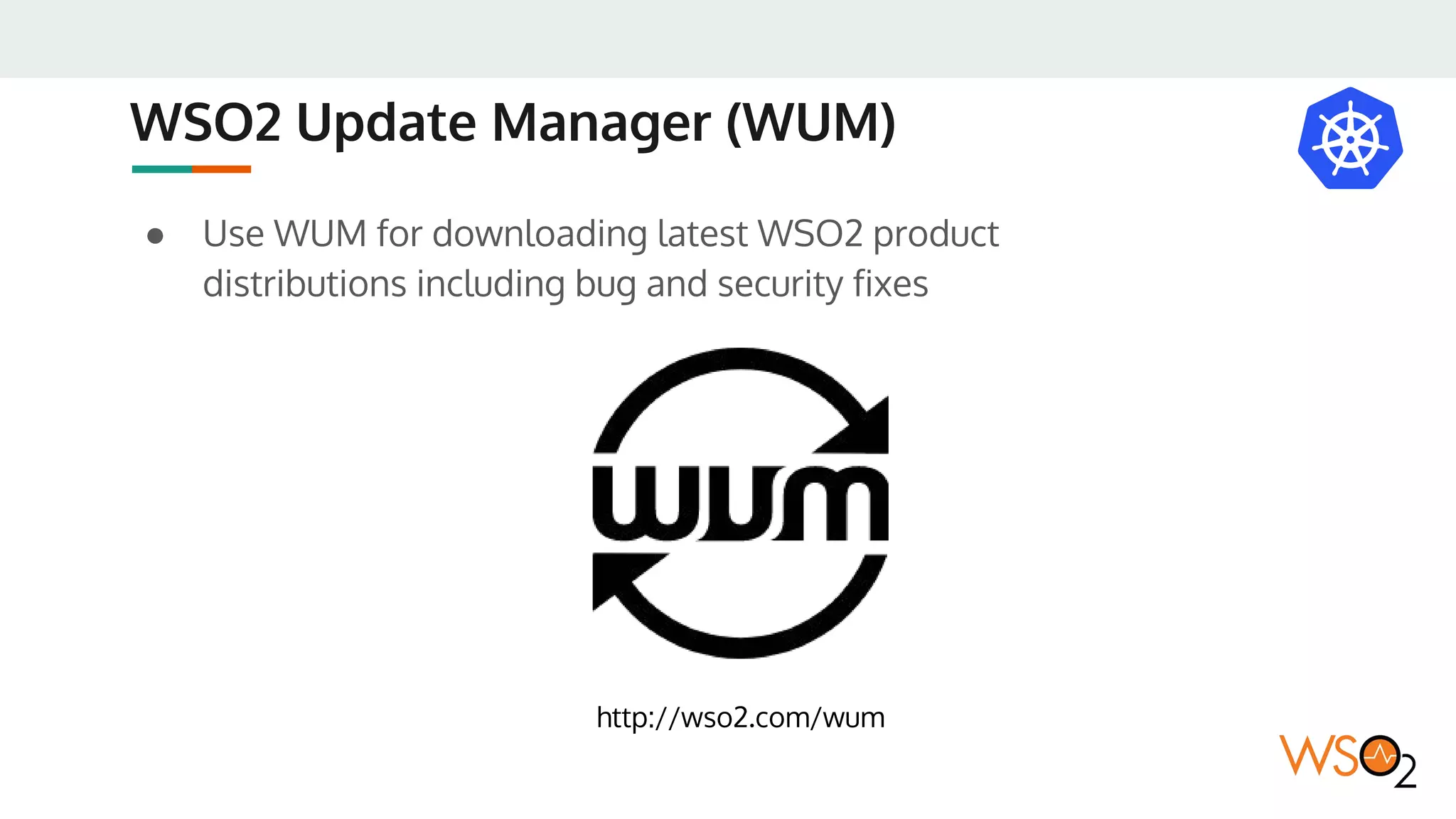
WSO2 Update Manager (WUM)
● Use WUM for downloading latest WSO2 product
distributions including bug and security fixes
http://wso2.com/wum
The Deployment Process
WSO2 Product
Distributions
WSO2 Docker Images
Version Control System Version Control System
Configuaration Files
Deployable
Artifacts
WSO2 Update
Manager (WUM)
Extensions
Updates
Updated WSO2
Product Distributions
Customizations
Oracle JDK
JDBC Driver
Container Registry
ConfigMaps
& Secrets
WSO2 Kubernetes
Resources
KubernetesCluster
WSO2 Docker
Images
Rolling Out Updates
Rolling Out Updates
● Execute a Kubernetes rollout for:
○ WSO2 product updates
○ WSO2 resource updates
○ Or WSO2 configuration changes which are backward
compatible
● If the changes are not backward compatible:
○ Execute a blue/green deployment
https://kubernetes.io/docs/concepts/workloads/controllers/deployment/
#rolling-update-deployment
Monitoring the Deployment
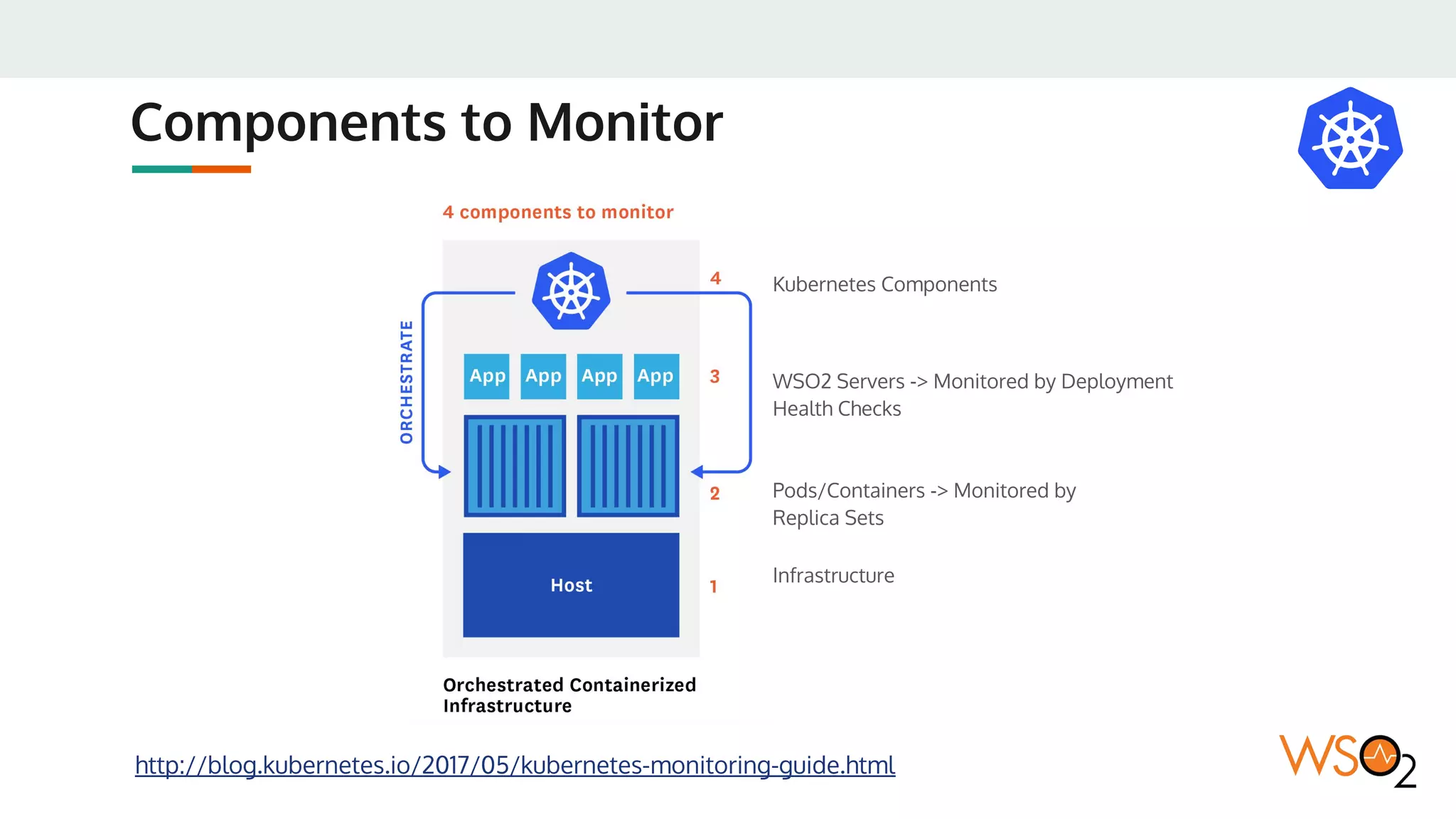
Components to Monitor
http://blog.kubernetes.io/2017/05/kubernetes-monitoring-guide.html
Infrastructure
Pods/Containers -> Monitored by
Replica Sets
WSO2 Servers -> Monitored by Deployment
Health Checks
Kubernetes Components
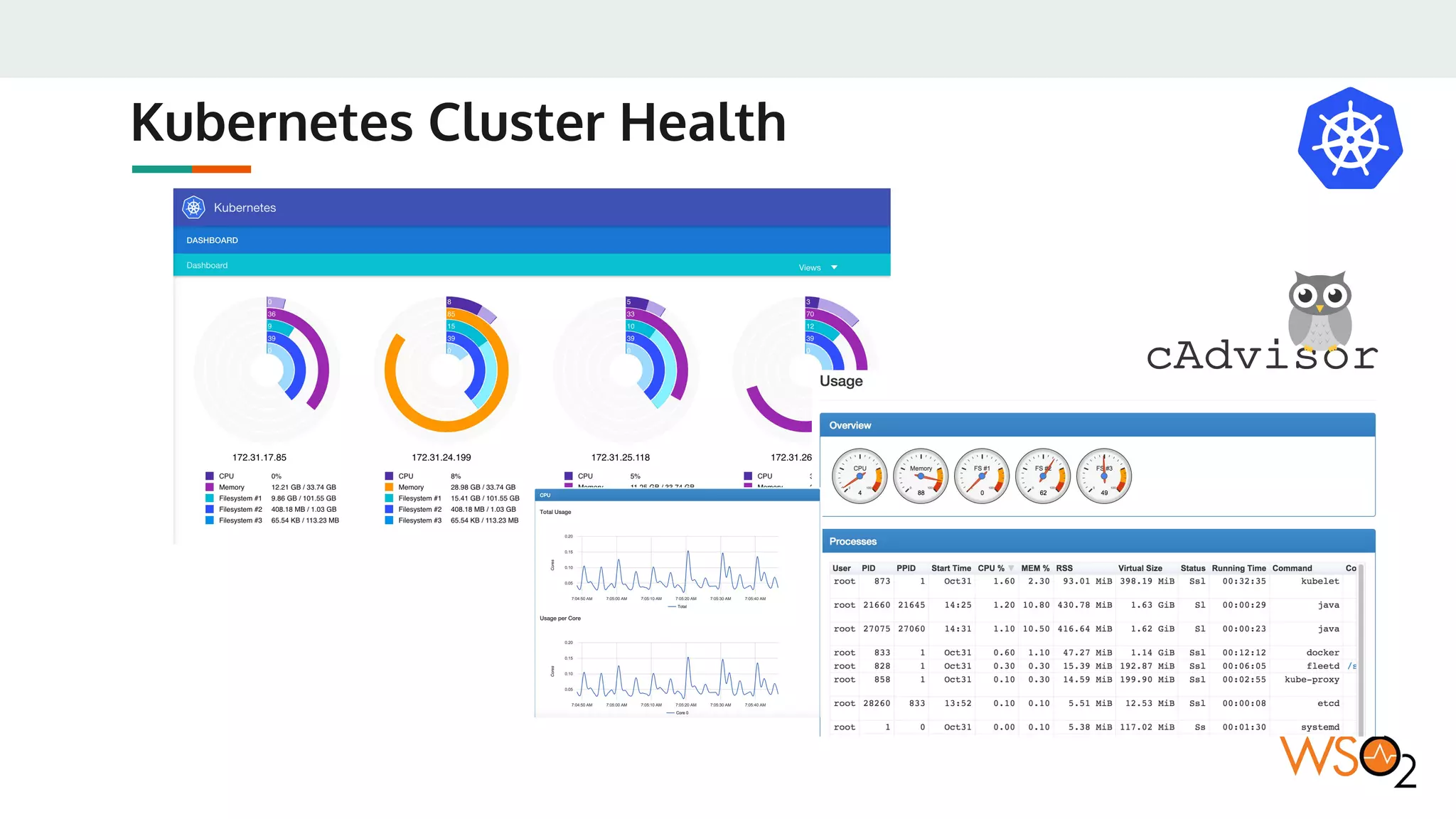
Kubernetes Cluster Health
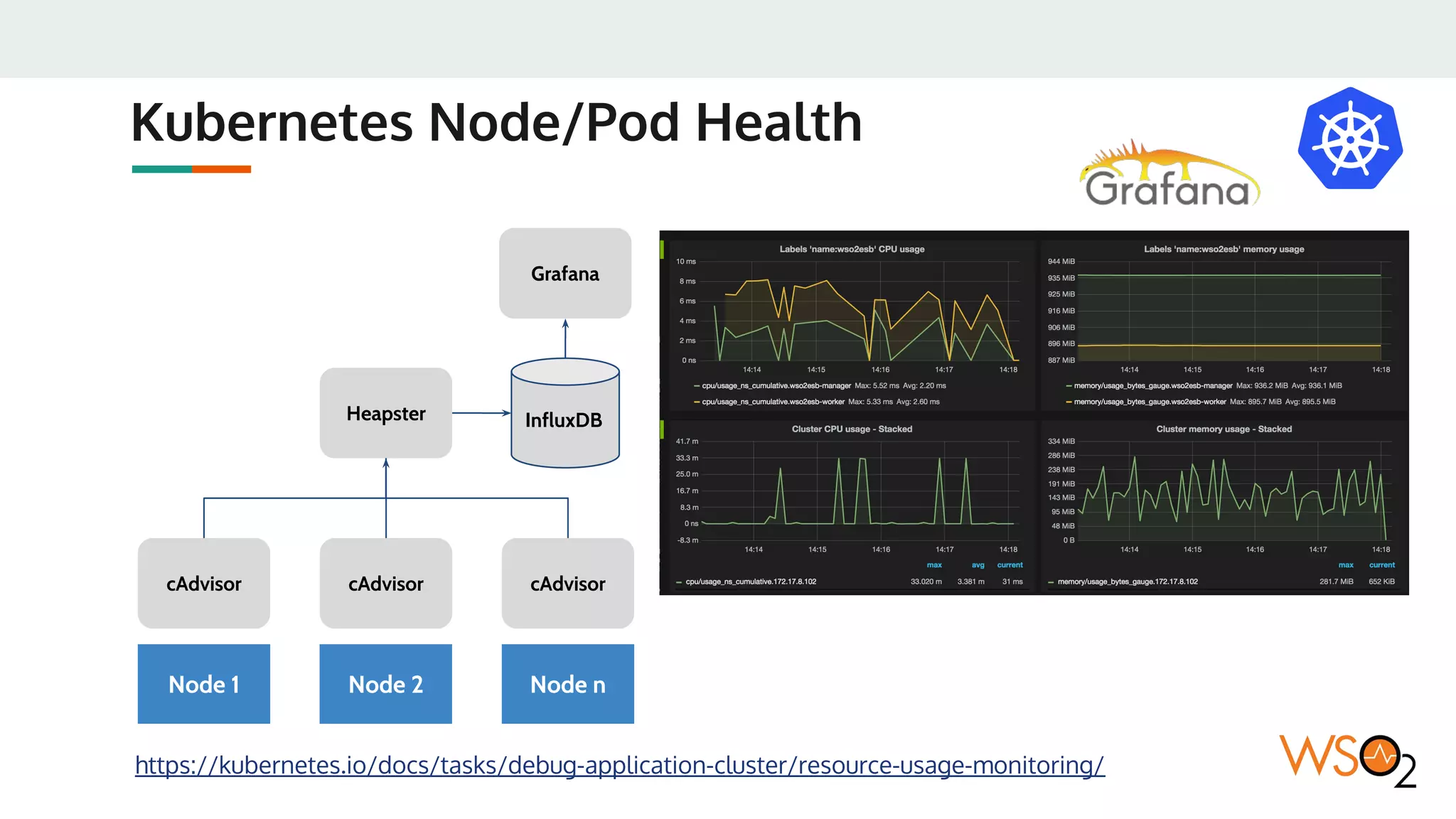
Kubernetes Node/Pod Health
https://kubernetes.io/docs/tasks/debug-application-cluster/resource-usage-monitoring/
cAdvisorcAdvisor
Node 1
cAdvisor
Heapster
Node 2 Node n
Grafana
InfluxDB
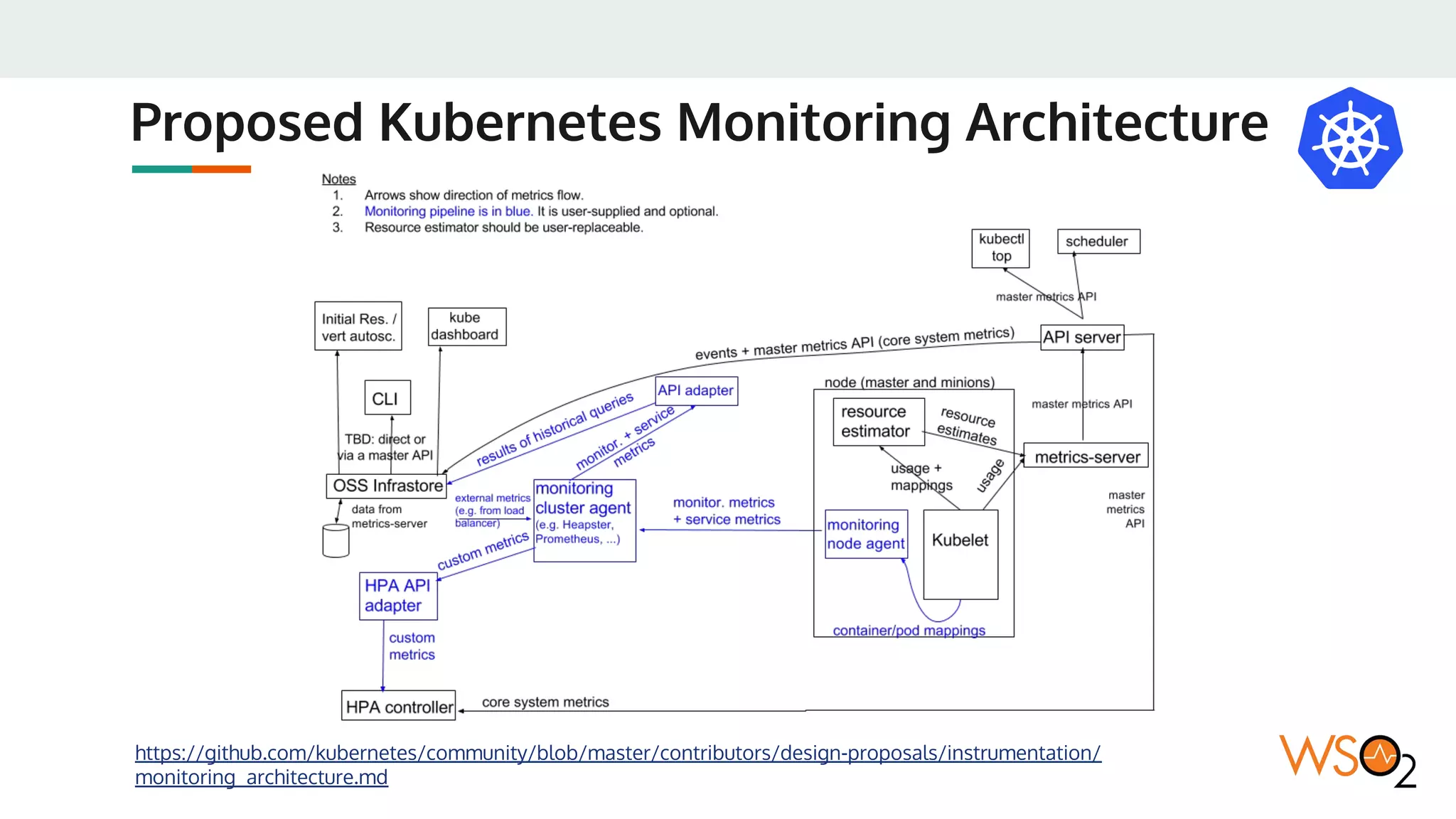
Proposed Kubernetes Monitoring Architecture
https://github.com/kubernetes/community/blob/master/contributors/design-proposals/instrumentation/
monitoring_architecture.md
WSO2 Kubernetes Resources
Currently available:
● https://github.com/wso2/kubernetes-common/
● https://github.com/wso2/kubernetes-apim/
● https://github.com/wso2/kubernetes-ei/
In progress:
● https://github.com/wso2/kubernetes-is/
● https://github.com/wso2/kubernetes-das/
● https://github.com/wso2/kubernetes-iot/
Questions & Feedback

WSO2 Kubernetes Reference Architecture - Nov 2017

  • 1.
    WSO2 Kubernetes Reference Architecture ImeshGunaratne, WSO2 November, 2017
  • 2.
    Agenda ● An Introductionto Containers ● An Introduction to Kubernetes ○ Kubernetes Architecture ○ Kubernetes Components ● WSO2 Reference Architecture for Kubernetes ○ Container Orchestration ○ Service Discovery ○ Cluster Discovery ○ Runtime Artifact Synchronization ○ Configuration Management ○ Autoscaling
  • 3.
    Agenda Cont. ● Security ○Security Best Practices ○ Container Security ○ Pod Security Policies ● Deployment Process ○ WSO2 Update Manager (WUM) ○ Kubernetes Resource Deployment ● Rolling Out Updates ○ Kubernetes Rollout ○ Blue/Green Deployment ● Monitoring The Deployment ● WSO2 Kubernetes Resources
  • 4.
  • 5.
    Virtual Machines VsContainers Linux Container Brief for IEEE WG P2302, Boden Russell Hardware Hypervisor Virtual Machine Operating System Bin/Lib App App Virtual Machine Operating System Bin/Lib App App Hardware Operating System Hypervisor Virtual Machine Operating System Bin/Lib App App Virtual Machine Operating System Bin/Lib App App Type 1 Hypervisor (Bare Metal) Type 2 Hypervisor Hardware Operating System Linux Containers Container Bin/Lib App Container Bin/Lib App Container Runtime
  • 6.
    The Container Advantage Hardware Hypervisor VirtualMachine Operating System Bin/Lib App App Virtual Machine Operating System Bin/Lib App App Type 1 Hypervisor Hardware Operating System Linux Containers Container Bin/Lib App Container Bin/Lib App 16 CPU, 128 GB RAM 2 CPU, 4 GB RAM 1 CPU, 1.25 GB RAM 1 CPU, 0.75 GB RAM 16 CPU, 128 GB RAM 2 CPU, 4 GB RAM 2 CPU, 2 GB RAM Container Runtime Operating System
  • 7.
    Standard Container Deployments ContainerImage Container Images Hardware Operating System Container Bin/Lib App Container Bin/Lib App Container Runtime Container Image Registry Operating System Container Bin/Lib App Container Bin/Lib App Container Runtime Load Balancer Hardware Network
  • 8.
    Container Cluster Managerbased Deployments Overlay Network Container Images Hardware Operating System Container Bin/Lib App Container Bin/Lib App Container Runtime Container Image Registry Operating System Container Bin/Lib App Container Bin/Lib App Load Balancer Hardware Network Hardware Operating System Container Cluster Manager Controller Agent Container Runtime Agent
  • 9.
  • 10.
    An Introduction toKubernetes Borg Google’s first container cluster manager Omega Google’s second container cluster manager Kubernetes Google’s initiative to build a general purpose container cluster manager
  • 11.
  • 12.
    kube-apiserver ● kube-apiserver exposesthe Kubernetes API. It is the front-end for the Kubernetes control plane. It is designed to scale horizontally – that is, it scales by deploying more instances. https://kubernetes.io/docs/concepts/overview/components/
  • 13.
    etcd ● etcd isused as Kubernetes’ backing store. All cluster data is stored here. Always have a backup plan for etcd’s data for your Kubernetes cluster. https://kubernetes.io/docs/concepts/overview/components/
  • 14.
    kube-controller-manager ● kube-controller-manager runscontrollers, which are the background threads that handle routine tasks in the cluster. Logically, each controller is a separate process, but to reduce complexity, they are all compiled into a single binary and run in a single process. ● These controllers include: ○ Node Controller: Responsible for noticing and responding when nodes go down. ○ Replication Controller: Responsible for maintaining the correct number of pods for every replication controller object in the system. ○ Endpoints Controller: Populates the Endpoints object (that is, joins Services & Pods). ○ Service Account & Token Controllers: Create default accounts and API access tokens for new namespaces. https://kubernetes.io/docs/concepts/overview/components/
  • 15.
    cloud-controller-manager ● cloud-controller-manager runscontrollers that interact with the underlying cloud providers. The cloud-controller-manager binary is an alpha feature introduced in Kubernetes release 1.6. ● Extension points: ○ Node Controller: For checking the cloud provider to determine if a node has been deleted in the cloud after it stops responding ○ Route Controller: For setting up routes in the underlying cloud infrastructure ○ Service Controller: For creating, updating and deleting cloud provider load balancers ○ Volume Controller: For creating, attaching, and mounting volumes, and interacting with the cloud provider to orchestrate volumes https://kubernetes.io/docs/concepts/overview/components/
  • 16.
    kube-scheduler ● kube-scheduler watchesnewly created pods that have no node assigned, and selects a node for them to run on. https://kubernetes.io/docs/concepts/overview/components/
  • 17.
    DNS ● While theother addons are not strictly required, all Kubernetes clusters should have cluster DNS, as many examples rely on it. ● Cluster DNS is a DNS server, in addition to the other DNS server(s) in your environment, which serves DNS records for Kubernetes services. ● Containers started by Kubernetes automatically include this DNS server in their DNS searches. https://kubernetes.io/docs/concepts/overview/components/
  • 18.
    Overlay Network Options https://kubernetes.io/docs/concepts/cluster-administration/networking/ ●Cilium ● Contiv ● Contrail ● Flannel ● Google Compute Engine (GCE) ● Kube-router ● L2 networks and linux bridging ● Multus (a Multi Network plugin) ● NSX-T ● Nuage Networks VCS (Virtualized Cloud Services) ● OpenVSwitch ● OVN (Open Virtual Networking) ● Project Calico ● Romana ● Weave Net from Weaveworks ● CNI-Genie from Huawei
  • 19.
  • 20.
    Reference Architecture Overlay Network Pod1 Pod 2 Service 1 Pod 3 Pod 4 Pod m Service n Deployments Load Balancer DB 1 DB 2 DB X Persistent Volumes HPAs Pod Security Policies Ingresses Container Registry Node1 Node2 Noden Ingress Controller
  • 21.
    WSO2 Docker Images ●WSO2 Docker images are built using standard Dockerfiles ● Default base image used is Ubuntu Server LTS ● Will only include: ○ Oracle JDK 1.8 ○ JDBC Driver ○ Latest product distribution ○ Extensions, and Customizations ● Will not include: ○ Configurations (Passed via ConfigMaps) ○ Credentials (Passed via Secrets) ○ Deployable Artifacts (Passed via ConfigMaps)
  • 22.
    Container Orchestration ● Deploymentswill be used for container orchestration ● Deployments will create replca sets ● Replica sets will internally create pods ● Deployments will define health checks for autohealing ● Horizontal pod autoscalers (HPA) will be used for autoscaling https://kubernetes.io/docs/concepts/workloads/controllers/deployment/ Pod 1 Pod 2 Service Deployments Container Registry
  • 23.
    Service Discovery ● Kubernetesservices will be used for service discovery ● Each service will have a domain name ● WSO2 components will use services to talk to each other (inter-component communication) https://kubernetes.io/docs/concepts/services-networking/service/ Pod 1 Pod 2 Service 1 Pod 3 Pod 4 Service n
  • 24.
    Cluster Discovery ● Carbonclustering is required for some of the WSO2 components such as Analytics, CEP, and IS ● WSO2 Kubernetes membership scheme is used for auto discoverying members in the cluster via the Kubernetes API or DNS Pod 1 Pod 2 Service 1 Pod 2 Kubernetes API DNS
  • 25.
    Runtime Artifact Synchronization ●WSO2 components such as Integrator, BPS, API Gateway would require synchronizing runtime artifacts ● The recommended approach for this is to use a Network File System (NFS) and share the repository/deployment/server folder of pods via a persistent volume https://kubernetes.io/docs/concepts/storage/persistent-volumes/ Pod 1 Pod 2 Service Persistent Volume Pod n
  • 26.
    Configuration Management ● Eachconfiguration folder will be converted in to a ConfigMap and passed in to the pod using a volume mount ● This approach makes the configuration update process simpler ● Would not require to re-build the Docker images https://kubernetes.io/docs/concepts/storage/persistent-volumes/ Pod 1 Pod 2 Service VolumesConfigMaps
  • 27.
    Load Balancing ● Internalrouting will use Kubernetes services. ● External routing will use a load balancer ● Ingress definitions will be used to automatically configure load balancers via Ingress controllers. ● If required standard load balancers can also be used with manual configurations. https://kubernetes.io/docs/concepts/services-networking/ingress/ Pod 1 Pod 2 Service 1 Pod 3 Pod 4 Service n Load Balancer Ingresses Ingress Controller
  • 28.
    Autoscaling ● Autoscaling canbe applied at two levels: ○ Pod autoscaling ○ Kubernetes cluster autoscaling ● Horizontal pod autoscalers (HPA) will be used for autoscaling pods. ● Kubernetes cluster autoscaler will scale the number of Kubernetes nodes according to the number of pods being scheduled. https://kubernetes.io/docs/tasks/run-application/horizontal-pod-autoscale/ https://kubernetes.io/docs/tasks/administer-cluster/cluster-management/#cluster-autoscaling Pod 1 Pod n Service Deployments HPAs
  • 29.
    Kubernetes Package Management https://docs.helm.sh/ ●A chart is a collection of files that describe a related set of Kubernetes resources. ● A single chart might be used to deploy a simple pod or a complex application. ● WSO2 plans to implement charts for WSO2 middleware. ● Charts can be managed in Helm repositories.
  • 30.
  • 31.
    Security Best Practices ●Ensure container images are free of vulnerabilities ○ Implement continuous security vulnerability scanning ○ Regularly apply security updates ● Ensure that only authorized images are used in your environment ● Limit direct access to kubernetes nodes ● Create administrative boundaries between resources (using namespaces) ● Define resource quota for pods ● Implement network segmentation when necessary (using network policies) ● Log everything http://blog.kubernetes.io/2016/08/security-best-practices-kubernetes-deployment.html
  • 32.
    Container Security ● WSO2containers use a nonroot user for starting the server processes ● The WSO2 server filesystem will only have required levels of persmissions in each directory ● Permissions to volume mounts will be granted via Pod Security Policies
  • 33.
    Pod Security Policies ●A Pod Security Policy is a cluster-level resource that controls the actions that a pod can perform and what it has the ability to access. https://kubernetes.io/docs/concepts/policy/pod-security-policy/
  • 34.
    Control Aspects ofa Pod Security Policy https://kubernetes.io/docs/concepts/policy/pod-security-policy/ Control Aspect Field Name Running of privileged containers privileged Default set of capabilities that will be added to a container defaultAddCapabilities Capabilities that will be dropped from a container requiredDropCapabilities Capabilities a container can request to be added allowedCapabilities Controlling the usage of volume types volumes The use of host networking hostNetwork The use of host ports hostPorts The use of host’s PID namespace hostPID
  • 35.
    Control Aspects ofa Pod Security Policy Cont. https://kubernetes.io/docs/concepts/policy/pod-security-policy/ Control Aspect Field Name The use of host’s IPC namespace hostIPC The SELinux context of the container seLinux The user ID runAsUser Configuring allowable supplemental groups supplementalGroups Allocating an FSGroup that owns the pod’s volumes fsGroup Requiring the use of a read only root file system readOnlyRootFilesystem Running of a container that allow privilege escalation from its parent allowPrivilegeEscalation Control whether a process can gain more privileges than its parent process defaultAllowPrivilegeEscalation
  • 36.
  • 37.
    WSO2 Update Manager(WUM) ● Use WUM for downloading latest WSO2 product distributions including bug and security fixes http://wso2.com/wum
  • 38.
    The Deployment Process WSO2Product Distributions WSO2 Docker Images Version Control System Version Control System Configuaration Files Deployable Artifacts WSO2 Update Manager (WUM) Extensions Updates Updated WSO2 Product Distributions Customizations Oracle JDK JDBC Driver Container Registry ConfigMaps & Secrets WSO2 Kubernetes Resources KubernetesCluster WSO2 Docker Images
  • 39.
  • 40.
    Rolling Out Updates ●Execute a Kubernetes rollout for: ○ WSO2 product updates ○ WSO2 resource updates ○ Or WSO2 configuration changes which are backward compatible ● If the changes are not backward compatible: ○ Execute a blue/green deployment https://kubernetes.io/docs/concepts/workloads/controllers/deployment/ #rolling-update-deployment
  • 41.
  • 42.
    Components to Monitor http://blog.kubernetes.io/2017/05/kubernetes-monitoring-guide.html Infrastructure Pods/Containers-> Monitored by Replica Sets WSO2 Servers -> Monitored by Deployment Health Checks Kubernetes Components
  • 43.
  • 44.
  • 45.
    Proposed Kubernetes MonitoringArchitecture https://github.com/kubernetes/community/blob/master/contributors/design-proposals/instrumentation/ monitoring_architecture.md
  • 46.
  • 47.
    WSO2 Kubernetes Resources Currentlyavailable: ● https://github.com/wso2/kubernetes-common/ ● https://github.com/wso2/kubernetes-apim/ ● https://github.com/wso2/kubernetes-ei/ In progress: ● https://github.com/wso2/kubernetes-is/ ● https://github.com/wso2/kubernetes-das/ ● https://github.com/wso2/kubernetes-iot/
  • 48.