Oracle Performance Tuning

Eric Geng
2/24/2011
Agenda

• Oracle Basics
• Performance Tuning Methods
• SQL Tuning
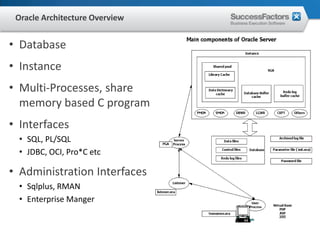
Oracle Architecture Overview


• Database
• Instance
• Multi-Processes, share
  memory based C program
• Interfaces
  • SQL, PL/SQL
  • JDBC, OCI, Pro*C etc

• Administration Interfaces
  • Sqlplus, RMAN
  • Enterprise Manger
Processes

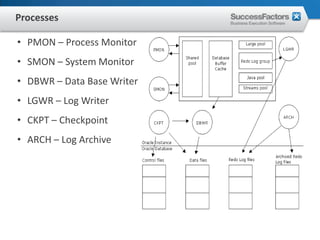
• PMON – Process Monitor
• SMON – System Monitor
• DBWR – Data Base Writer
• LGWR – Log Writer
• CKPT – Checkpoint
• ARCH – Log Archive
Wait Event
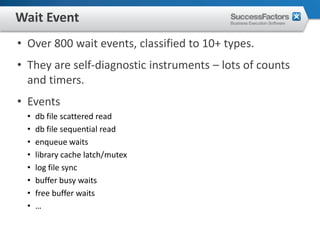
• Over 800 wait events, classified to 10+ types.
• They are self-diagnostic instruments – lots of counts
  and timers.
• Events
  •   db file scattered read
  •   db file sequential read
  •   enqueue waits
  •   library cache latch/mutex
  •   log file sync
  •   buffer busy waits
  •   free buffer waits
  •   …
Dynamic Views
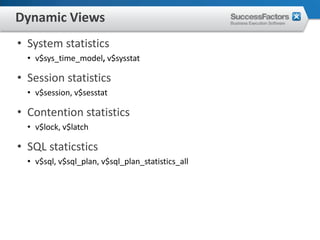
• System statistics
  • v$sys_time_model, v$sysstat

• Session statistics
  • v$session, v$sesstat

• Contention statistics
  • v$lock, v$latch

• SQL staticstics
  • v$sql, v$sql_plan, v$sql_plan_statistics_all
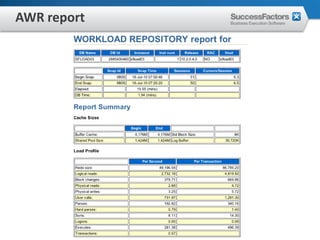
Statspack/AWR
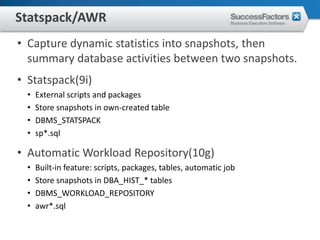
• Capture dynamic statistics into snapshots, then
  summary database activities between two snapshots.
• Statspack(9i)
  •   External scripts and packages
  •   Store snapshots in own-created table
  •   DBMS_STATSPACK
  •   sp*.sql

• Automatic Workload Repository(10g)
  •   Built-in feature: scripts, packages, tables, automatic job
  •   Store snapshots in DBA_HIST_* tables
  •   DBMS_WORKLOAD_REPOSITORY
  •   awr*.sql
AWR report
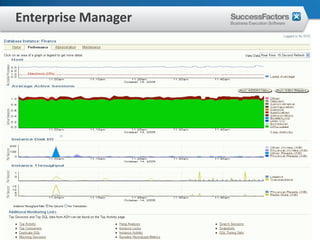
Enterprise Manager
• ASH
 • Sampling in seconds, support real-time Performance view in OEM
 • Store in SGA, v$active_session_history
 • Can also generate reports

• ADDM
 • Automatic Database Diagnostic Monitor
 • Identify issues and give recommendations from snapshots

• SQL Tuning Advisor
 • Create sql profile for sql statement

• SQL Access Advisor
 • Advice on index etc for sql statement
Enterprise Manager
Top SQL
• Elapsed time
• Parse time
• Executions
• Buffer gets
• Physical reads
Basic terminology
• Anoptimizeris the part of the RDBMS responsible for
  determining the most efficient way for a SQL
  statement to access data
• An execution plan is the complete sequence of
  operations required to resolve a SQL statement (the
  combination of access paths and join methods). The
  in-memory structure of a execution plan also can be
  called a cursor.
• A join method determines how two tables will be
  joined together (only two tables can be joined
  together at a time)
Hard parse
• Syntax analysis
  • Analyze "text" of SQL query
  • Detect syntax errors
  • Create internal query representation

• Semantic Checking
  • Validate SQL statement
  • View analysis
  • Incorporate constraints, triggers, etc.

• Query Optimization
  • Modify query to improve performance (Query Rewrite)
  • Choose the most efficient "access plan" (Query Optimization)

• Plan Generation
Optimizer
• Optimizer mode
 • RULE, CHOOSE, FIRST_ROWS, ALL_ROWS

• RULE is not supported
• Cost Based Optimizer
 • Highly depends on statistics

• Init parameters can affect the CBO
 •   optimizer_mode
 •   optimizer_index_cost_adj
 •   optimizer_index_cache
 •   data_block_multiple_read_count
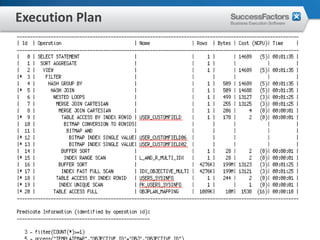
Execution Plan
• Explain plan for <query>
  • Select * from table(dbms_xplan.display);

• dbms_xplan.display
• dbms_xplan.display_cursor
• dbms_xplan.display_awr
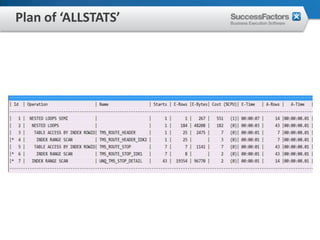
• Query with /*+ gather_plan_statistics */
  • more details in v$sql_plan_statistics_all
  • dbms_xplan.display_cursor(null, null, ‘ALLSTAT LAST’)
  • useful to find out wrong estimation by optimizer
Execution Plan
Plan of ‘ALLSTATS’
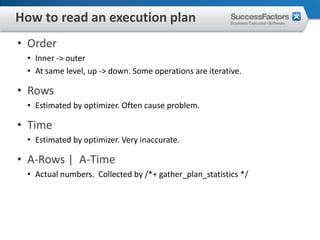
How to read an execution plan
• Order
 • Inner -> outer
 • At same level, up -> down. Some operations are iterative.

• Rows
 • Estimated by optimizer. Often cause problem.

• Time
 • Estimated by optimizer. Very inaccurate.

• A-Rows | A-Time
 • Actual numbers. Collected by /*+ gather_plan_statistics */
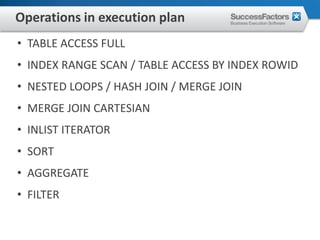
Operations in execution plan
• TABLE ACCESS FULL
• INDEX RANGE SCAN / TABLE ACCESS BY INDEX ROWID
• NESTED LOOPS / HASH JOIN / MERGE JOIN
• MERGE JOIN CARTESIAN
• INLIST ITERATOR
• SORT
• AGGREGATE
• FILTER
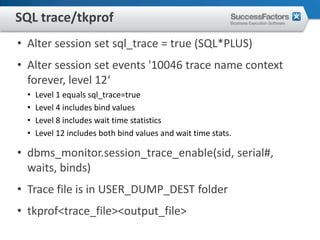
SQL trace/tkprof
• Alter session set sql_trace = true (SQL*PLUS)
• Alter session set events '10046 trace name context
  forever, level 12‘
  •   Level 1 equals sql_trace=true
  •   Level 4 includes bind values
  •   Level 8 includes wait time statistics
  •   Level 12 includes both bind values and wait time stats.

• dbms_monitor.session_trace_enable(sid, serial#,
  waits, binds)
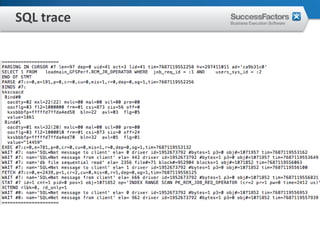
• Trace file is in USER_DUMP_DEST folder
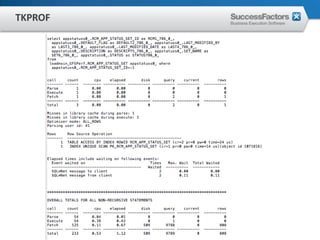
• tkprof<trace_file><output_file>
SQL trace
TKPROF
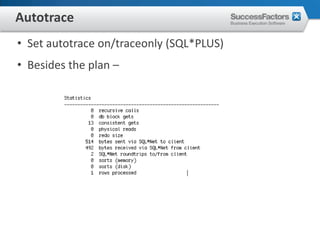
Autotrace
• Set autotrace on/traceonly (SQL*PLUS)
• Besides the plan –
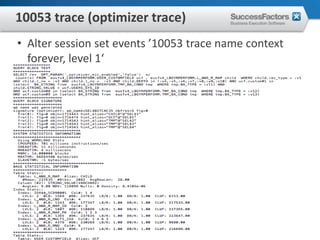
10053 trace (optimizer trace)
• Alter session set events ’10053 trace name context
  forever, level 1‘
SQL Tuning
• Common rules
 • Filter as early as possible and as much as possible
 • Join order is more significant than join method

• Methods
 •   Statistics
 •   Hints (sql profile / outline)
 •   Rewrite
 •   Index
 •   Schema
Statistics
• DBMS_STATS.GATHER_XXX_STATS
  • analyze table xxx compute/estimate statistics is deprecated
  • GATHER_STATS_JOB

• USER_TABLES
  • NUM_ROWS, BLOCKS, AVG_ROW_LEN

• USER_TAB_COL_STATISTICS
  • NUM_DISTINCT, NUM_NULLS, NUM_BUCKETS, DENSITY

• USER_INDEXES
  • NUM_ROWS, DISTINCT_KEYS, LEAF_BLOCKS, CLUSTERING_FACTOR,
    BLEVEL, AVG_LEAF_BLOCKS_PER_KEY

• USER_HISTOGRAM
  • ENDPOINT_NUMBER, ENDPOINT_VALUE
Hint /*+ */
• Join order
  • ORDERED, LEADING

• Join method
  • USE_NL, USE_HASH, USE_MERGE, STAR

• Query transformation
  • USE_CONCAT, NO_EXPAND, UNNEST, PUSH_SUBQ

• Index
  • INDEX, INDEX_JOIN, INDEX_COMBINE

• Stats
  • DYNAMIC_SAMPLING, CADINALITY, SELECTIVITY

• Sql Profile is a set of hints fundamentally
SQL rewrite
• In / exists
• Not in / not exists
• Correlated / non-correlated
• Join / SubQuery
Challenges for stable plan
• Volatile data
• Screw data / histograms / bind value peeking
• Data correlation
Application Tuning
• Avoid unnecessary query
 • Check logics
 • Cache

• Avoid to fetch too many rows
 • Pagination

• Avoid complex query
 • Material views
 • Denormalize

• Optimize locking
• Optimize indexes
OLTP applications
• Use connection pool
• Use bind variables (CURSOR_SHARING=FORCE?)
• Prefer OPTIMIZER_MODE=FIRST_ROW
• Enforce pagination
• Caution with any query which join too many tables
• Caution with any Full Table Scan or Fast Full Index Scan
  on large table
• Caution with any Sort, Aggregation, Hash Join, Merge
  Join, especially Merge Join Cartesian on large sets
Links
• oracle-l@freelists.org
• https://groups.google.com/forum/?pli=1#!forum/com
  p.databases.oracle.server
• http://tahiti.oracle.com/
• http://www.oaktable.net/
• http://blogs.oracle.com/optimizer/
• http://blog.tanelpoder.com/
• http://jonathanlewis.wordpress.com/
• http://kevinclosson.wordpress.com/
• http://structureddata.org/
• http://www.eygle.com/
Q&A


      Q&A

Oracle performance tuning_sfsf

  • 1.
  • 2.
    Agenda • Oracle Basics •Performance Tuning Methods • SQL Tuning
  • 3.
    Oracle Architecture Overview •Database • Instance • Multi-Processes, share memory based C program • Interfaces • SQL, PL/SQL • JDBC, OCI, Pro*C etc • Administration Interfaces • Sqlplus, RMAN • Enterprise Manger
  • 4.
    Processes • PMON –Process Monitor • SMON – System Monitor • DBWR – Data Base Writer • LGWR – Log Writer • CKPT – Checkpoint • ARCH – Log Archive
  • 5.
    Wait Event • Over800 wait events, classified to 10+ types. • They are self-diagnostic instruments – lots of counts and timers. • Events • db file scattered read • db file sequential read • enqueue waits • library cache latch/mutex • log file sync • buffer busy waits • free buffer waits • …
  • 6.
    Dynamic Views • Systemstatistics • v$sys_time_model, v$sysstat • Session statistics • v$session, v$sesstat • Contention statistics • v$lock, v$latch • SQL staticstics • v$sql, v$sql_plan, v$sql_plan_statistics_all
  • 7.
    Statspack/AWR • Capture dynamicstatistics into snapshots, then summary database activities between two snapshots. • Statspack(9i) • External scripts and packages • Store snapshots in own-created table • DBMS_STATSPACK • sp*.sql • Automatic Workload Repository(10g) • Built-in feature: scripts, packages, tables, automatic job • Store snapshots in DBA_HIST_* tables • DBMS_WORKLOAD_REPOSITORY • awr*.sql
  • 8.
  • 9.
    Enterprise Manager • ASH • Sampling in seconds, support real-time Performance view in OEM • Store in SGA, v$active_session_history • Can also generate reports • ADDM • Automatic Database Diagnostic Monitor • Identify issues and give recommendations from snapshots • SQL Tuning Advisor • Create sql profile for sql statement • SQL Access Advisor • Advice on index etc for sql statement
  • 10.
  • 11.
    Top SQL • Elapsedtime • Parse time • Executions • Buffer gets • Physical reads
  • 12.
    Basic terminology • Anoptimizeristhe part of the RDBMS responsible for determining the most efficient way for a SQL statement to access data • An execution plan is the complete sequence of operations required to resolve a SQL statement (the combination of access paths and join methods). The in-memory structure of a execution plan also can be called a cursor. • A join method determines how two tables will be joined together (only two tables can be joined together at a time)
  • 13.
    Hard parse • Syntaxanalysis • Analyze "text" of SQL query • Detect syntax errors • Create internal query representation • Semantic Checking • Validate SQL statement • View analysis • Incorporate constraints, triggers, etc. • Query Optimization • Modify query to improve performance (Query Rewrite) • Choose the most efficient "access plan" (Query Optimization) • Plan Generation
  • 14.
    Optimizer • Optimizer mode • RULE, CHOOSE, FIRST_ROWS, ALL_ROWS • RULE is not supported • Cost Based Optimizer • Highly depends on statistics • Init parameters can affect the CBO • optimizer_mode • optimizer_index_cost_adj • optimizer_index_cache • data_block_multiple_read_count
  • 15.
    Execution Plan • Explainplan for <query> • Select * from table(dbms_xplan.display); • dbms_xplan.display • dbms_xplan.display_cursor • dbms_xplan.display_awr • Query with /*+ gather_plan_statistics */ • more details in v$sql_plan_statistics_all • dbms_xplan.display_cursor(null, null, ‘ALLSTAT LAST’) • useful to find out wrong estimation by optimizer
  • 16.
  • 17.
  • 18.
    How to readan execution plan • Order • Inner -> outer • At same level, up -> down. Some operations are iterative. • Rows • Estimated by optimizer. Often cause problem. • Time • Estimated by optimizer. Very inaccurate. • A-Rows | A-Time • Actual numbers. Collected by /*+ gather_plan_statistics */
  • 19.
    Operations in executionplan • TABLE ACCESS FULL • INDEX RANGE SCAN / TABLE ACCESS BY INDEX ROWID • NESTED LOOPS / HASH JOIN / MERGE JOIN • MERGE JOIN CARTESIAN • INLIST ITERATOR • SORT • AGGREGATE • FILTER
  • 20.
    SQL trace/tkprof • Altersession set sql_trace = true (SQL*PLUS) • Alter session set events '10046 trace name context forever, level 12‘ • Level 1 equals sql_trace=true • Level 4 includes bind values • Level 8 includes wait time statistics • Level 12 includes both bind values and wait time stats. • dbms_monitor.session_trace_enable(sid, serial#, waits, binds) • Trace file is in USER_DUMP_DEST folder • tkprof<trace_file><output_file>
  • 21.
  • 22.
  • 23.
    Autotrace • Set autotraceon/traceonly (SQL*PLUS) • Besides the plan –
  • 24.
    10053 trace (optimizertrace) • Alter session set events ’10053 trace name context forever, level 1‘
  • 25.
    SQL Tuning • Commonrules • Filter as early as possible and as much as possible • Join order is more significant than join method • Methods • Statistics • Hints (sql profile / outline) • Rewrite • Index • Schema
  • 26.
    Statistics • DBMS_STATS.GATHER_XXX_STATS • analyze table xxx compute/estimate statistics is deprecated • GATHER_STATS_JOB • USER_TABLES • NUM_ROWS, BLOCKS, AVG_ROW_LEN • USER_TAB_COL_STATISTICS • NUM_DISTINCT, NUM_NULLS, NUM_BUCKETS, DENSITY • USER_INDEXES • NUM_ROWS, DISTINCT_KEYS, LEAF_BLOCKS, CLUSTERING_FACTOR, BLEVEL, AVG_LEAF_BLOCKS_PER_KEY • USER_HISTOGRAM • ENDPOINT_NUMBER, ENDPOINT_VALUE
  • 27.
    Hint /*+ */ •Join order • ORDERED, LEADING • Join method • USE_NL, USE_HASH, USE_MERGE, STAR • Query transformation • USE_CONCAT, NO_EXPAND, UNNEST, PUSH_SUBQ • Index • INDEX, INDEX_JOIN, INDEX_COMBINE • Stats • DYNAMIC_SAMPLING, CADINALITY, SELECTIVITY • Sql Profile is a set of hints fundamentally
  • 28.
    SQL rewrite • In/ exists • Not in / not exists • Correlated / non-correlated • Join / SubQuery
  • 29.
    Challenges for stableplan • Volatile data • Screw data / histograms / bind value peeking • Data correlation
  • 30.
    Application Tuning • Avoidunnecessary query • Check logics • Cache • Avoid to fetch too many rows • Pagination • Avoid complex query • Material views • Denormalize • Optimize locking • Optimize indexes
  • 31.
    OLTP applications • Useconnection pool • Use bind variables (CURSOR_SHARING=FORCE?) • Prefer OPTIMIZER_MODE=FIRST_ROW • Enforce pagination • Caution with any query which join too many tables • Caution with any Full Table Scan or Fast Full Index Scan on large table • Caution with any Sort, Aggregation, Hash Join, Merge Join, especially Merge Join Cartesian on large sets
  • 32.
    Links • oracle-l@freelists.org • https://groups.google.com/forum/?pli=1#!forum/com p.databases.oracle.server • http://tahiti.oracle.com/ • http://www.oaktable.net/ • http://blogs.oracle.com/optimizer/ • http://blog.tanelpoder.com/ • http://jonathanlewis.wordpress.com/ • http://kevinclosson.wordpress.com/ • http://structureddata.org/ • http://www.eygle.com/
  • 33.
    Q&A Q&A