SQL Server Query Tuning Tips
Get it Right the First Time
Dean Richards
Lead DBA, Confio Software
2/12/2013 1
2/12/2013 Confidential - Internal Use Only 2
Who Am I?
• 20+ Years in Oracle & SQL Server
– DBA and Developer
• Lead DBA for Confio Software
– DeanRichards@confio.com
– Makers of Ignite8 Response Time Analysis Tools
– http://www.ignitefree.com – only free RTA Tool
• Specialize in Performance Tuning
2/12/2013 3
• Introduction
• Which Query Should I Tune?
• Query Plans
• SQL Diagramming
– Who registered yesterday for Tuning Class
– Check order status
Agenda
2/12/2013 Confidential - Internal Use Only 4
• Most Applications
– Read and Write data to/from database
– Simple manipulation of data
– Deal with smaller amounts of data
• Most Databases
– Examine larger amounts of data, return a little
– Inefficiencies quickly become bottleneck
• Why do SQL tuning?
– Tuning SQL - “Gives the most bang for your buck”
– Changes to SQL are Safer
– ~85% of performance issues are SQL related
Why Query Focused
2/12/2013 Confidential - Internal Use Only 5
Who Should Tune
• Developers?
– Developing applications is very difficult
– Typically focused on functionality
– Not much time left to tune SQL
– Do not get enough practice
– SQL runs differently in Production than Dev/Test
• DBA?
– Do not know the code like developers do
– Focus on “Keep the Lights On”
– Very complex environment
• Need a team approach - DevOps
– But also need someone to lead the effort
2/12/2013 Confidential - Internal Use Only 6
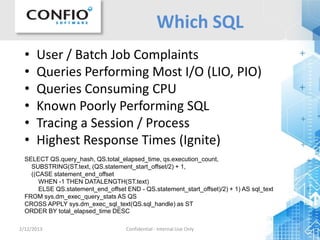
Which SQL
• User / Batch Job Complaints
• Queries Performing Most I/O (LIO, PIO)
• Queries Consuming CPU
• Known Poorly Performing SQL
• Tracing a Session / Process
• Highest Response Times (Ignite)
SELECT QS.query_hash, QS.total_elapsed_time, qs.execution_count,
SUBSTRING(ST.text, (QS.statement_start_offset/2) + 1,
((CASE statement_end_offset
WHEN -1 THEN DATALENGTH(ST.text)
ELSE QS.statement_end_offset END - QS.statement_start_offset)/2) + 1) AS sql_text
FROM sys.dm_exec_query_stats AS QS
CROSS APPLY sys.dm_exec_sql_text(QS.sql_handle) as ST
ORDER BY total_elapsed_time DESC
2/12/2013 Confidential - Internal Use Only 7
SQL Wait States
 Understand the total time a Query spends in Database
 Measure time while Query executes
 SQL Server helps by providing Wait Types
Focus on Response Time
2/12/2013 Confidential - Internal Use Only 8
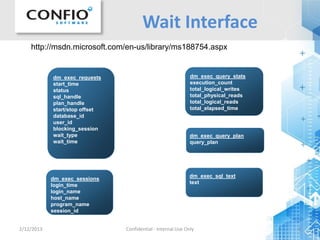
Wait Interface
dm_exec_sql_text
text
dm_exec_sessions
login_time
login_name
host_name
program_name
session_id
dm_exec_query_stats
execution_count
total_logical_writes
total_physical_reads
total_logical_reads
total_elapsed_time
dm_exec_requests
start_time
status
sql_handle
plan_handle
start/stop offset
database_id
user_id
blocking_session
wait_type
wait_time
dm_exec_query_plan
query_plan
http://msdn.microsoft.com/en-us/library/ms188754.aspx
2/12/2013 Confidential - Internal Use Only 9
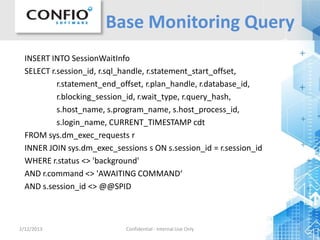
Base Monitoring Query
INSERT INTO SessionWaitInfo
SELECT r.session_id, r.sql_handle, r.statement_start_offset,
r.statement_end_offset, r.plan_handle, r.database_id,
r.blocking_session_id, r.wait_type, r.query_hash,
s.host_name, s.program_name, s.host_process_id,
s.login_name, CURRENT_TIMESTAMP cdt
FROM sys.dm_exec_requests r
INNER JOIN sys.dm_exec_sessions s ON s.session_id = r.session_id
WHERE r.status <> 'background'
AND r.command <> 'AWAITING COMMAND‘
AND s.session_id <> @@SPID
2/12/2013 Confidential - Internal Use Only 10
RTA - Proactive
2/12/2013 11
RTA - Firefighting
2/12/2013 12
RTA - Correlation
2/12/2013 Confidential - Internal Use Only 13
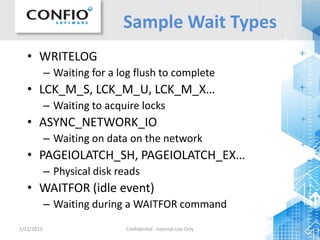
Sample Wait Types
• WRITELOG
– Waiting for a log flush to complete
• LCK_M_S, LCK_M_U, LCK_M_X…
– Waiting to acquire locks
• ASYNC_NETWORK_IO
– Waiting on data on the network
• PAGEIOLATCH_SH, PAGEIOLATCH_EX…
– Physical disk reads
• WAITFOR (idle event)
– Waiting during a WAITFOR command
2/12/2013 Confidential - Internal Use Only 14
Tracing
• Tracing with waits gathers very good data
• Can be High Overhead – especially via Profiler
• Use Server-Side Tracing
– sp_trace_create – create the trace definition
– sp_trace_setevent – add events to trace
– sp_trace_setfilter – apply filters to trace
– sp_trace_setstatus – start/stop the trace
• Use Profiler to Create Initial Trace
– Use File > Script Trace to Get Script
• Cumbersome to review data
• Set trace file sizes appropriately
2/12/2013 Confidential - Internal Use Only 15
Summary of RTA
• Using Response Time Analysis (RTA) Ensures
you work on the Correct Problem
• Shows Exactly Why Performance is Suffering
• Helps Prioritize Problems
• Do Not Rely Exclusively on Health Stats (CPU
Utilization, Disk IO, Cache Hit Ratio)
• Data Collection
– DMVs – build it yourself
– Tracing – know how to process trace data
– Tools – Ensure they use Wait Time and Health
2/12/2013 Confidential - Internal Use Only 16
Why is SQL Slow - Plans
• SQL Server Management Studio
– Estimated Execution Plan - can be wrong
– Actual Execution Plan – must execute query, can be
dangerous in production and also wrong in test
• SQL Server Profiler Tracing
– Event to collect: Performance : Showplan All
– Works when you know a problem will occur
• DM_EXEC_QUERY_PLAN(@handle,@s,@e)
– Real execution plan of executed query
2/12/2013 Confidential - Internal Use Only 17
DM_EXEC_QUERY_PLAN
2/12/2013 Confidential - Internal Use Only 18
Case Studies
• SQL Diagramming
– Who registered yesterday for Tuning Class
– Check order status
2/12/2013 Confidential - Internal Use Only 19
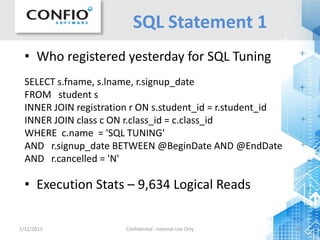
SQL Statement 1
• Who registered yesterday for SQL Tuning
SELECT s.fname, s.lname, r.signup_date
FROM student s
INNER JOIN registration r ON s.student_id = r.student_id
INNER JOIN class c ON r.class_id = c.class_id
WHERE c.name = 'SQL TUNING'
AND r.signup_date BETWEEN @BeginDate AND @EndDate
AND r.cancelled = 'N'
• Execution Stats – 9,634 Logical Reads
2/12/2013 Confidential - Internal Use Only 20
Database Diagram
2/12/2013 Confidential - Internal Use Only 21
Execution Plan
Recommendation from SSMS
CREATE NONCLUSTERED INDEX [<Name of Missing Index>]
ON [dbo].[registration] ([cancelled],[signup_date])
INCLUDE ([student_id],[class_id])
2/12/2013 Confidential - Internal Use Only 22
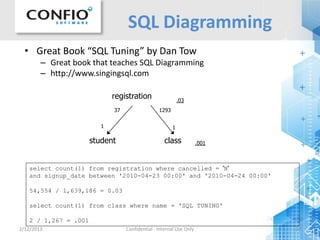
SQL Diagramming
registration
student class
37
1
1293
1
.03
.001
select count(1) from registration where cancelled = 'N'
and signup_date between '2010-04-23 00:00' and '2010-04-24 00:00'
54,554 / 1,639,186 = 0.03
select count(1) from class where name = 'SQL TUNING'
2 / 1,267 = .001
• Great Book “SQL Tuning” by Dan Tow
– Great book that teaches SQL Diagramming
– http://www.singingsql.com
2/12/2013 Confidential - Internal Use Only 23
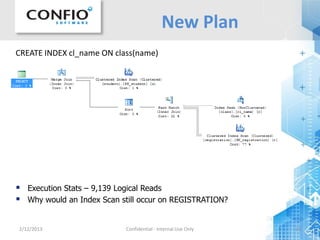
New Plan
CREATE INDEX cl_name ON class(name)
 Execution Stats – 9,139 Logical Reads
 Why would an Index Scan still occur on REGISTRATION?
2/12/2013 Confidential - Internal Use Only 24
Database Diagram
2/12/2013 Confidential - Internal Use Only 25
New Plan
CREATE INDEX reg_alt ON registration(class_id)
 Execution Stats – 621 Logical Reads
2/12/2013 Confidential - Internal Use Only 26
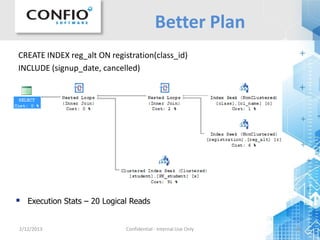
Better Plan
CREATE INDEX reg_alt ON registration(class_id)
INCLUDE (signup_date, cancelled)
 Execution Stats – 20 Logical Reads
2/12/2013 Confidential - Internal Use Only 27
SSMS Plan
CREATE INDEX reg_can ON registration(cancelled, signup_date)
INCLUDE (class_id, student_id)
 Execution Stats – 595 Logical Reads
CREATE NONCLUSTERED INDEX [<Name of Missing Index>]
ON [dbo].[registration] ([class_id],[cancelled],[signup_date])
INCLUDE ([student_id])
2/12/2013 Confidential - Internal Use Only 28
SQL Statement 2
• Lookup order status for caller
SELECT o.OrderID, c.LastName, p.ProductID, p.Description,
sd.ActualShipDate, sd.ShipStatus, sd.ExpectedShipDate
FROM [Order] o
INNER JOIN Item i ON i.OrderID = o.OrderID
INNER JOIN Customer c ON c.CustomerID = o.CustomerID
INNER JOIN ShipmentDetails sd ON sd.ShipmentID = i.ShipmentID
LEFT OUTER JOIN Product p ON p.ProductID = i.ProductID
LEFT OUTER JOIN Address a ON a.AddressID = sd.AddressID
WHERE c.LastName LIKE ISNULL(@LastName,'') + '%'
--AND c.FirstName LIKE ISNULL(@FirstName,'') + '%'
AND o.OrderDate >= DATEADD(day, -30, CURRENT_TIMESTAMP)
AND sd.ShipStatus <> 'C'
• Execution Stats – 10,159 Logical Reads
2/12/2013 Confidential - Internal Use Only 29
Database Diagram
2/12/2013 Confidential - Internal Use Only 30
Plan
2/12/2013 Confidential - Internal Use Only 31
SQL Diagramming
o .08
.03
SELECT COUNT(1)*1.0/(SELECT COUNT(1) FROM Customer) FROM Customer
WHERE LastName LIKE 'SMI%'
.03
SELECT COUNT(1)*1.0/(SELECT COUNT(1) FROM [Order]) FROM [Order]
WHERE OrderDate >= DATEADD(day, -30, CURRENT_TIMESTAMP)
.08
SELECT COUNT(1)*1.0/(SELECT COUNT(1) FROM [Order]) FROM [Order]
WHERE OrderStatus <> 'C'
.005
-- Combined
.005
i c
psd
a
.005
2/12/2013 Confidential - Internal Use Only 32
Data Skew
• Only 0.5% of rows are <> ‘C’
• How about changing the query?
– AND o.OrderStatus = 'I'
• Add an Index on ShipStatus
SELECT OrderStatus, COUNT(1)
FROM [Order]
GROUP BY OrderStatus
2/12/2013 Confidential - Internal Use Only 33
New Plan
CREATE INDEX IX2_OrderStatus ON [Order] (OrderStatus)
INCLUDE (OrderID,CustomerID)
Execution Stats – 3,052 Logical Reads
2/12/2013 Confidential - Internal Use Only 34
Takeaway Points
• Tuning Queries gives more “bang for the buck”
• Make sure you are tuning the correct query
• Use Wait Types and Response Time Analysis
– Locking problems may not be a Query Tuning issue
– Wait types tell you where to start
• Use “Real Execution Plans”
– Get plan_handle from DM_EXEC_REQUESTS
– Pass plan_handle to DM_EXEC_QUERY_PLAN()
• SQL Diagramming - “Get it right the First Time”
– Query Tuner Tools can mislead you
Q&A
Thank you for attending.
More questions?
Contact Dean at
DeanRichards@confio.com
Download free trial of Ignite at
http//www.confio.com
2/12/2013 35

SQL Server Query Tuning Tips - Get it Right the First Time

  • 1.
    SQL Server QueryTuning Tips Get it Right the First Time Dean Richards Lead DBA, Confio Software 2/12/2013 1
  • 2.
    2/12/2013 Confidential -Internal Use Only 2 Who Am I? • 20+ Years in Oracle & SQL Server – DBA and Developer • Lead DBA for Confio Software – DeanRichards@confio.com – Makers of Ignite8 Response Time Analysis Tools – http://www.ignitefree.com – only free RTA Tool • Specialize in Performance Tuning
  • 3.
    2/12/2013 3 • Introduction •Which Query Should I Tune? • Query Plans • SQL Diagramming – Who registered yesterday for Tuning Class – Check order status Agenda
  • 4.
    2/12/2013 Confidential -Internal Use Only 4 • Most Applications – Read and Write data to/from database – Simple manipulation of data – Deal with smaller amounts of data • Most Databases – Examine larger amounts of data, return a little – Inefficiencies quickly become bottleneck • Why do SQL tuning? – Tuning SQL - “Gives the most bang for your buck” – Changes to SQL are Safer – ~85% of performance issues are SQL related Why Query Focused
  • 5.
    2/12/2013 Confidential -Internal Use Only 5 Who Should Tune • Developers? – Developing applications is very difficult – Typically focused on functionality – Not much time left to tune SQL – Do not get enough practice – SQL runs differently in Production than Dev/Test • DBA? – Do not know the code like developers do – Focus on “Keep the Lights On” – Very complex environment • Need a team approach - DevOps – But also need someone to lead the effort
  • 6.
    2/12/2013 Confidential -Internal Use Only 6 Which SQL • User / Batch Job Complaints • Queries Performing Most I/O (LIO, PIO) • Queries Consuming CPU • Known Poorly Performing SQL • Tracing a Session / Process • Highest Response Times (Ignite) SELECT QS.query_hash, QS.total_elapsed_time, qs.execution_count, SUBSTRING(ST.text, (QS.statement_start_offset/2) + 1, ((CASE statement_end_offset WHEN -1 THEN DATALENGTH(ST.text) ELSE QS.statement_end_offset END - QS.statement_start_offset)/2) + 1) AS sql_text FROM sys.dm_exec_query_stats AS QS CROSS APPLY sys.dm_exec_sql_text(QS.sql_handle) as ST ORDER BY total_elapsed_time DESC
  • 7.
    2/12/2013 Confidential -Internal Use Only 7 SQL Wait States  Understand the total time a Query spends in Database  Measure time while Query executes  SQL Server helps by providing Wait Types Focus on Response Time
  • 8.
    2/12/2013 Confidential -Internal Use Only 8 Wait Interface dm_exec_sql_text text dm_exec_sessions login_time login_name host_name program_name session_id dm_exec_query_stats execution_count total_logical_writes total_physical_reads total_logical_reads total_elapsed_time dm_exec_requests start_time status sql_handle plan_handle start/stop offset database_id user_id blocking_session wait_type wait_time dm_exec_query_plan query_plan http://msdn.microsoft.com/en-us/library/ms188754.aspx
  • 9.
    2/12/2013 Confidential -Internal Use Only 9 Base Monitoring Query INSERT INTO SessionWaitInfo SELECT r.session_id, r.sql_handle, r.statement_start_offset, r.statement_end_offset, r.plan_handle, r.database_id, r.blocking_session_id, r.wait_type, r.query_hash, s.host_name, s.program_name, s.host_process_id, s.login_name, CURRENT_TIMESTAMP cdt FROM sys.dm_exec_requests r INNER JOIN sys.dm_exec_sessions s ON s.session_id = r.session_id WHERE r.status <> 'background' AND r.command <> 'AWAITING COMMAND‘ AND s.session_id <> @@SPID
  • 10.
    2/12/2013 Confidential -Internal Use Only 10 RTA - Proactive
  • 11.
    2/12/2013 11 RTA -Firefighting
  • 12.
    2/12/2013 12 RTA -Correlation
  • 13.
    2/12/2013 Confidential -Internal Use Only 13 Sample Wait Types • WRITELOG – Waiting for a log flush to complete • LCK_M_S, LCK_M_U, LCK_M_X… – Waiting to acquire locks • ASYNC_NETWORK_IO – Waiting on data on the network • PAGEIOLATCH_SH, PAGEIOLATCH_EX… – Physical disk reads • WAITFOR (idle event) – Waiting during a WAITFOR command
  • 14.
    2/12/2013 Confidential -Internal Use Only 14 Tracing • Tracing with waits gathers very good data • Can be High Overhead – especially via Profiler • Use Server-Side Tracing – sp_trace_create – create the trace definition – sp_trace_setevent – add events to trace – sp_trace_setfilter – apply filters to trace – sp_trace_setstatus – start/stop the trace • Use Profiler to Create Initial Trace – Use File > Script Trace to Get Script • Cumbersome to review data • Set trace file sizes appropriately
  • 15.
    2/12/2013 Confidential -Internal Use Only 15 Summary of RTA • Using Response Time Analysis (RTA) Ensures you work on the Correct Problem • Shows Exactly Why Performance is Suffering • Helps Prioritize Problems • Do Not Rely Exclusively on Health Stats (CPU Utilization, Disk IO, Cache Hit Ratio) • Data Collection – DMVs – build it yourself – Tracing – know how to process trace data – Tools – Ensure they use Wait Time and Health
  • 16.
    2/12/2013 Confidential -Internal Use Only 16 Why is SQL Slow - Plans • SQL Server Management Studio – Estimated Execution Plan - can be wrong – Actual Execution Plan – must execute query, can be dangerous in production and also wrong in test • SQL Server Profiler Tracing – Event to collect: Performance : Showplan All – Works when you know a problem will occur • DM_EXEC_QUERY_PLAN(@handle,@s,@e) – Real execution plan of executed query
  • 17.
    2/12/2013 Confidential -Internal Use Only 17 DM_EXEC_QUERY_PLAN
  • 18.
    2/12/2013 Confidential -Internal Use Only 18 Case Studies • SQL Diagramming – Who registered yesterday for Tuning Class – Check order status
  • 19.
    2/12/2013 Confidential -Internal Use Only 19 SQL Statement 1 • Who registered yesterday for SQL Tuning SELECT s.fname, s.lname, r.signup_date FROM student s INNER JOIN registration r ON s.student_id = r.student_id INNER JOIN class c ON r.class_id = c.class_id WHERE c.name = 'SQL TUNING' AND r.signup_date BETWEEN @BeginDate AND @EndDate AND r.cancelled = 'N' • Execution Stats – 9,634 Logical Reads
  • 20.
    2/12/2013 Confidential -Internal Use Only 20 Database Diagram
  • 21.
    2/12/2013 Confidential -Internal Use Only 21 Execution Plan Recommendation from SSMS CREATE NONCLUSTERED INDEX [<Name of Missing Index>] ON [dbo].[registration] ([cancelled],[signup_date]) INCLUDE ([student_id],[class_id])
  • 22.
    2/12/2013 Confidential -Internal Use Only 22 SQL Diagramming registration student class 37 1 1293 1 .03 .001 select count(1) from registration where cancelled = 'N' and signup_date between '2010-04-23 00:00' and '2010-04-24 00:00' 54,554 / 1,639,186 = 0.03 select count(1) from class where name = 'SQL TUNING' 2 / 1,267 = .001 • Great Book “SQL Tuning” by Dan Tow – Great book that teaches SQL Diagramming – http://www.singingsql.com
  • 23.
    2/12/2013 Confidential -Internal Use Only 23 New Plan CREATE INDEX cl_name ON class(name)  Execution Stats – 9,139 Logical Reads  Why would an Index Scan still occur on REGISTRATION?
  • 24.
    2/12/2013 Confidential -Internal Use Only 24 Database Diagram
  • 25.
    2/12/2013 Confidential -Internal Use Only 25 New Plan CREATE INDEX reg_alt ON registration(class_id)  Execution Stats – 621 Logical Reads
  • 26.
    2/12/2013 Confidential -Internal Use Only 26 Better Plan CREATE INDEX reg_alt ON registration(class_id) INCLUDE (signup_date, cancelled)  Execution Stats – 20 Logical Reads
  • 27.
    2/12/2013 Confidential -Internal Use Only 27 SSMS Plan CREATE INDEX reg_can ON registration(cancelled, signup_date) INCLUDE (class_id, student_id)  Execution Stats – 595 Logical Reads CREATE NONCLUSTERED INDEX [<Name of Missing Index>] ON [dbo].[registration] ([class_id],[cancelled],[signup_date]) INCLUDE ([student_id])
  • 28.
    2/12/2013 Confidential -Internal Use Only 28 SQL Statement 2 • Lookup order status for caller SELECT o.OrderID, c.LastName, p.ProductID, p.Description, sd.ActualShipDate, sd.ShipStatus, sd.ExpectedShipDate FROM [Order] o INNER JOIN Item i ON i.OrderID = o.OrderID INNER JOIN Customer c ON c.CustomerID = o.CustomerID INNER JOIN ShipmentDetails sd ON sd.ShipmentID = i.ShipmentID LEFT OUTER JOIN Product p ON p.ProductID = i.ProductID LEFT OUTER JOIN Address a ON a.AddressID = sd.AddressID WHERE c.LastName LIKE ISNULL(@LastName,'') + '%' --AND c.FirstName LIKE ISNULL(@FirstName,'') + '%' AND o.OrderDate >= DATEADD(day, -30, CURRENT_TIMESTAMP) AND sd.ShipStatus <> 'C' • Execution Stats – 10,159 Logical Reads
  • 29.
    2/12/2013 Confidential -Internal Use Only 29 Database Diagram
  • 30.
    2/12/2013 Confidential -Internal Use Only 30 Plan
  • 31.
    2/12/2013 Confidential -Internal Use Only 31 SQL Diagramming o .08 .03 SELECT COUNT(1)*1.0/(SELECT COUNT(1) FROM Customer) FROM Customer WHERE LastName LIKE 'SMI%' .03 SELECT COUNT(1)*1.0/(SELECT COUNT(1) FROM [Order]) FROM [Order] WHERE OrderDate >= DATEADD(day, -30, CURRENT_TIMESTAMP) .08 SELECT COUNT(1)*1.0/(SELECT COUNT(1) FROM [Order]) FROM [Order] WHERE OrderStatus <> 'C' .005 -- Combined .005 i c psd a .005
  • 32.
    2/12/2013 Confidential -Internal Use Only 32 Data Skew • Only 0.5% of rows are <> ‘C’ • How about changing the query? – AND o.OrderStatus = 'I' • Add an Index on ShipStatus SELECT OrderStatus, COUNT(1) FROM [Order] GROUP BY OrderStatus
  • 33.
    2/12/2013 Confidential -Internal Use Only 33 New Plan CREATE INDEX IX2_OrderStatus ON [Order] (OrderStatus) INCLUDE (OrderID,CustomerID) Execution Stats – 3,052 Logical Reads
  • 34.
    2/12/2013 Confidential -Internal Use Only 34 Takeaway Points • Tuning Queries gives more “bang for the buck” • Make sure you are tuning the correct query • Use Wait Types and Response Time Analysis – Locking problems may not be a Query Tuning issue – Wait types tell you where to start • Use “Real Execution Plans” – Get plan_handle from DM_EXEC_REQUESTS – Pass plan_handle to DM_EXEC_QUERY_PLAN() • SQL Diagramming - “Get it right the First Time” – Query Tuner Tools can mislead you
  • 35.
    Q&A Thank you forattending. More questions? Contact Dean at DeanRichards@confio.com Download free trial of Ignite at http//www.confio.com 2/12/2013 35