


MemSQL 201: Advanced Tips & Tricks
Alec Powell, Solutions Engineer, MemSQL
January 2018
alec@memsql.com
Webinar Agenda
Rowstore vs Columnstore
Data Ingestion
Data Sharding & Query Tuning
Memory & Workload Management
Rowstore vs Columnstore
Making the most of MemSQL’s two
storage models
Streaming Database
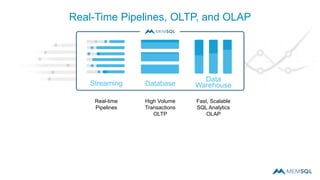
Real-Time Pipelines, OLTP, and OLAP
Real-time
Pipelines
High Volume
Transactions
OLTP
Fast, Scalable
SQL Analytics
OLAP
Data
Warehouse
Streaming Database
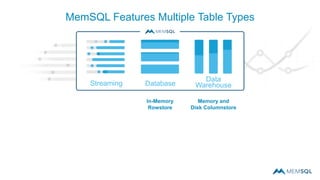
MemSQL Features Multiple Table Types
Memory and
Disk Columnstore
In-Memory
Rowstore
Data
Warehouse
Streaming Database
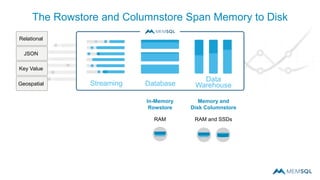
The Rowstore and Columnstore Span Memory to Disk
Memory and
Disk Columnstore
RAM and SSDs
In-Memory
Rowstore
RAM
Relational
JSON
Key Value
Geospatial
Data
Warehouse
Streaming Database
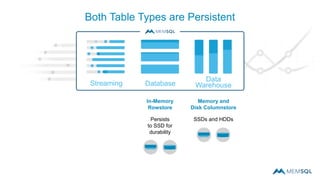
Both Table Types are Persistent
Memory and
Disk Columnstore
SSDs and HDDs
In-Memory
Rowstore
Persists
to SSD for
durability
Data
Warehouse
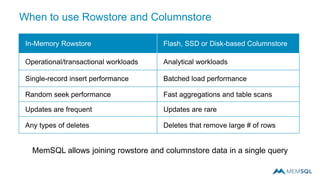
In-Memory Rowstore Flash, SSD or Disk-based Columnstore
Operational/transactional workloads Analytical workloads
Single-record insert performance Batched load performance
Random seek performance Fast aggregations and table scans
Updates are frequent Updates are rare
Any types of deletes Deletes that remove large # of rows
MemSQL allows joining rowstore and columnstore data in a single query
When to use Rowstore and Columnstore
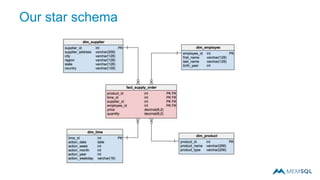
Our star schema
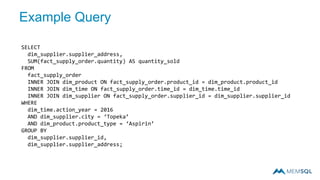
Example Query
SELECT
dim_supplier.supplier_address,
SUM(fact_supply_order.quantity) AS quantity_sold
FROM
fact_supply_order
INNER JOIN dim_product ON fact_supply_order.product_id = dim_product.product_id
INNER JOIN dim_time ON fact_supply_order.time_id = dim_time.time_id
INNER JOIN dim_supplier ON fact_supply_order.supplier_id = dim_supplier.supplier_id
WHERE
dim_time.action_year = 2016
AND dim_supplier.city = ‘Topeka’
AND dim_product.product_type = ‘Aspirin’
GROUP BY
dim_supplier.supplier_id,
dim_supplier.supplier_address;
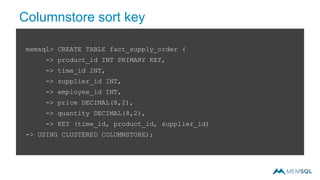
Columnstore sort key
memsql> CREATE TABLE fact_supply_order (
-> product_id INT PRIMARY KEY,
-> time_id INT,
-> supplier_id INT,
-> employee_id INT,
-> price DECIMAL(8,2),
-> quantity DECIMAL(8,2),
-> KEY (time_id, product_id, supplier_id)
-> USING CLUSTERED COLUMNSTORE);
Data Ingestion
Real-time data loading with
MemSQL Pipelines
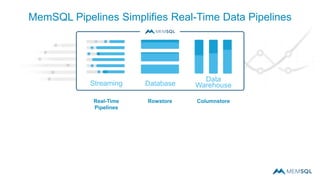
Streaming Database
Real-Time
Pipelines
MemSQL Pipelines Simplifies Real-Time Data Pipelines
ColumnstoreRowstore
Data
Warehouse
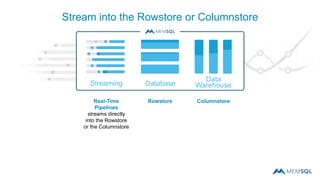
Streaming Database
Stream into the Rowstore or Columnstore
Real-Time
Pipelines
streams directly
into the Rowstore
or the Columnstore
ColumnstoreRowstore
Data
Warehouse
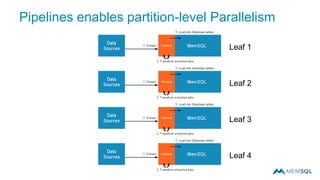
Pipelines enables partition-level Parallelism
Leaf 1
Leaf 2
Leaf 3
Leaf 4
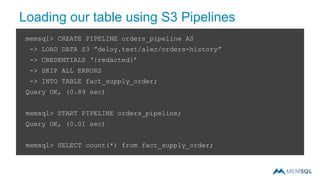
Loading our table using S3 Pipelines
memsql> CREATE PIPELINE orders_pipeline AS
-> LOAD DATA S3 ”deloy.test/alec/orders-history”
-> CREDENTIALS ‘{redacted}’
-> SKIP ALL ERRORS
-> INTO TABLE fact_supply_order;
Query OK, (0.89 sec)
memsql> START PIPELINE orders_pipeline;
Query OK, (0.01 sec)
memsql> SELECT count(*) from fact_supply_order;
Sharding & Query Tuning
Understanding the distributed
system
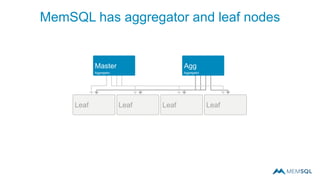
MemSQL has aggregator and leaf nodes
LeafLeafLeafLeaf
Agg
Aggregator
Master
Aggregator
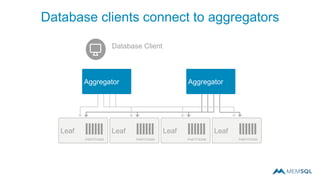
Database clients connect to aggregators
AggregatorAggregator
LeafLeafLeafLeaf
PARTITIONS PARTITIONS PARTITIONS PARTITIONS
Database Client
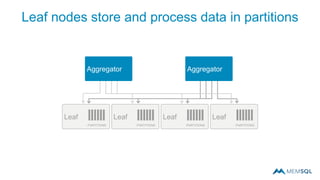
Leaf nodes store and process data in partitions
AggregatorAggregator
LeafLeafLeafLeaf
PARTITIONS PARTITIONS PARTITIONS PARTITIONS
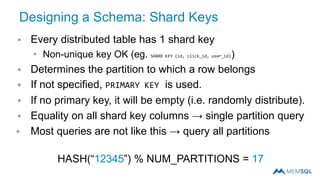
Designing a Schema: Shard Keys
 Every distributed table has 1 shard key
• Non-unique key OK (eg. SHARD KEY (id, click_id, user_id))
 Determines the partition to which a row belongs
 If not specified, PRIMARY KEY is used.
 If no primary key, it will be empty (i.e. randomly distribute).
 Equality on all shard key columns → single partition query
 Most queries are not like this → query all partitions
HASH(“12345”) % NUM_PARTITIONS = 17
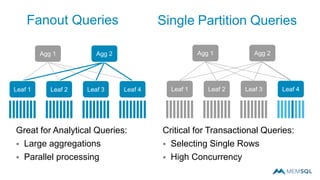
Great for Analytical Queries:
 Large aggregations
 Parallel processing
Critical for Transactional Queries:
 Selecting Single Rows
 High Concurrency
Fanout Queries
Agg 1 Agg 2
Leaf 1 Leaf 2 Leaf 3 Leaf 4
Agg 1 Agg 2
Leaf 1 Leaf 2 Leaf 3 Leaf 4
Single Partition Queries
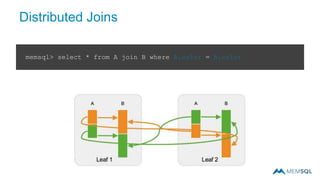
Distributed Joins
memsql> select * from A join B where A.color = B.color
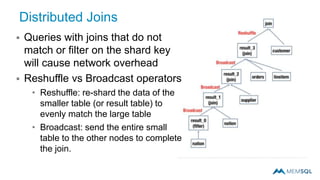
Distributed Joins
 Queries with joins that do not
match or filter on the shard key
will cause network overhead
 Reshuffle vs Broadcast operators
• Reshuffle: re-shard the data of the
smaller table (or result table) to
evenly match the large table
• Broadcast: send the entire small
table to the other nodes to complete
the join.
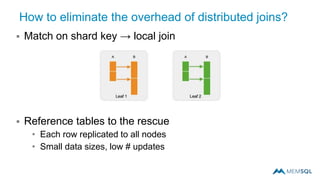
How to eliminate the overhead of distributed joins?
 Match on shard key → local join
 Reference tables to the rescue
• Each row replicated to all nodes
• Small data sizes, low # updates
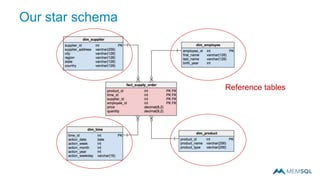
Our star schema
Reference tables
Query tuning: EXPLAIN and PROFILE
 EXPLAIN
• Prints the MemSQL optimizer’s query plan.
• All MemSQL operators for the query are here:
 TableScan, IndexSeek, HashJoin, Repartition, Broadcast, etc.
 PROFILE
• Runs the query based on plan, timing each execution step
• SHOW PROFILE;
 Prints output of query plan execution statistics (memory usage,
execution time, rows scanned, segments skipped)
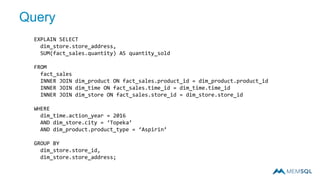
Query
EXPLAIN SELECT
dim_store.store_address,
SUM(fact_sales.quantity) AS quantity_sold
FROM
fact_sales
INNER JOIN dim_product ON fact_sales.product_id = dim_product.product_id
INNER JOIN dim_time ON fact_sales.time_id = dim_time.time_id
INNER JOIN dim_store ON fact_sales.store_id = dim_store.store_id
WHERE
dim_time.action_year = 2016
AND dim_store.city = ‘Topeka’
AND dim_product.product_type = ‘Aspirin’
GROUP BY
dim_store.store_id,
dim_store.store_address;
ANALYZE and OPTIMIZE
 ANALYZE TABLE
• Calculates table statistics
• Recommended after significant increase/refresh of data
 OPTIMIZE TABLE [FULL | FLUSH]
• FULL: Sorts based on primary key (optimal index scans)
• FLUSH (Columnstore only): Flushes in-memory segment to disk
 Recommended periodically after large loads
Memory & Workload Management
Monitoring your MemSQL
Deployment
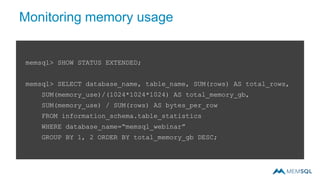
Monitoring memory usage
memsql> SHOW STATUS EXTENDED;
memsql> SELECT database_name, table_name, SUM(rows) AS total_rows,
SUM(memory_use)/(1024*1024*1024) AS total_memory_gb,
SUM(memory_use) / SUM(rows) AS bytes_per_row
FROM information_schema.table_statistics
WHERE database_name=“memsql_webinar”
GROUP BY 1, 2 ORDER BY total_memory_gb DESC;
33
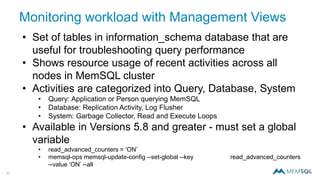
Monitoring workload with Management Views
• Set of tables in information_schema database that are
useful for troubleshooting query performance
• Shows resource usage of recent activities across all
nodes in MemSQL cluster
• Activities are categorized into Query, Database, System
• Query: Application or Person querying MemSQL
• Database: Replication Activity, Log Flusher
• System: Garbage Collector, Read and Execute Loops
• Available in Versions 5.8 and greater - must set a global
variable
• read_advanced_counters = ‘ON’
• memsql-ops memsql-update-config --set-global --key read_advanced_counters
--value ‘ON’ --all
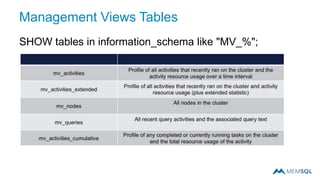
Management Views Tables
SHOW tables in information_schema like "MV_%";
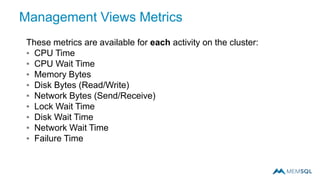
Management Views Metrics
These metrics are available for each activity on the cluster:
▪ CPU Time
▪ CPU Wait Time
▪ Memory Bytes
▪ Disk Bytes (Read/Write)
▪ Network Bytes (Send/Receive)
▪ Lock Wait Time
▪ Disk Wait Time
▪ Network Wait Time
▪ Failure Time
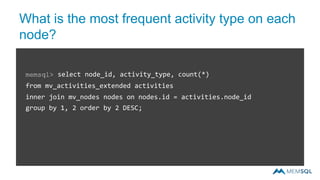
What is the most frequent activity type on each
node?
memsql> select node_id, activity_type, count(*)
from mv_activities_extended activities
inner join mv_nodes nodes on nodes.id = activities.node_id
group by 1, 2 order by 2 DESC;
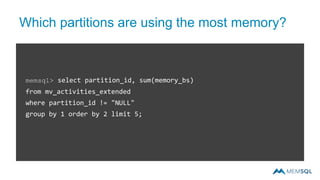
Which partitions are using the most memory?
memsql> select partition_id, sum(memory_bs)
from mv_activities_extended
where partition_id != "NULL"
group by 1 order by 2 limit 5;
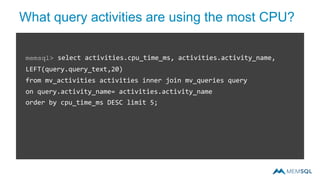
What query activities are using the most CPU?
memsql> select activities.cpu_time_ms, activities.activity_name,
LEFT(query.query_text,20)
from mv_activities activities inner join mv_queries query
on query.activity_name= activities.activity_name
order by cpu_time_ms DESC limit 5;
Thank you
memsql.com
Any other questions?
MemSQL Tech Office Hours
1/31 9am–5pm (PST)
https://calendly.com/alec-
powell/30min/01-31-2018
MemSQL 201: Advanced Tips and Tricks Webcast

MemSQL 201: Advanced Tips and Tricks Webcast

  • 1.
    MemSQL 201: AdvancedTips & Tricks Alec Powell, Solutions Engineer, MemSQL January 2018 alec@memsql.com
  • 2.
    Webinar Agenda Rowstore vsColumnstore Data Ingestion Data Sharding & Query Tuning Memory & Workload Management
  • 3.
    Rowstore vs Columnstore Makingthe most of MemSQL’s two storage models
  • 4.
    Streaming Database Real-Time Pipelines,OLTP, and OLAP Real-time Pipelines High Volume Transactions OLTP Fast, Scalable SQL Analytics OLAP Data Warehouse
  • 5.
    Streaming Database MemSQL FeaturesMultiple Table Types Memory and Disk Columnstore In-Memory Rowstore Data Warehouse
  • 6.
    Streaming Database The Rowstoreand Columnstore Span Memory to Disk Memory and Disk Columnstore RAM and SSDs In-Memory Rowstore RAM Relational JSON Key Value Geospatial Data Warehouse
  • 7.
    Streaming Database Both TableTypes are Persistent Memory and Disk Columnstore SSDs and HDDs In-Memory Rowstore Persists to SSD for durability Data Warehouse
  • 8.
    In-Memory Rowstore Flash,SSD or Disk-based Columnstore Operational/transactional workloads Analytical workloads Single-record insert performance Batched load performance Random seek performance Fast aggregations and table scans Updates are frequent Updates are rare Any types of deletes Deletes that remove large # of rows MemSQL allows joining rowstore and columnstore data in a single query When to use Rowstore and Columnstore
  • 9.
  • 10.
    Example Query SELECT dim_supplier.supplier_address, SUM(fact_supply_order.quantity) ASquantity_sold FROM fact_supply_order INNER JOIN dim_product ON fact_supply_order.product_id = dim_product.product_id INNER JOIN dim_time ON fact_supply_order.time_id = dim_time.time_id INNER JOIN dim_supplier ON fact_supply_order.supplier_id = dim_supplier.supplier_id WHERE dim_time.action_year = 2016 AND dim_supplier.city = ‘Topeka’ AND dim_product.product_type = ‘Aspirin’ GROUP BY dim_supplier.supplier_id, dim_supplier.supplier_address;
  • 11.
    Columnstore sort key memsql>CREATE TABLE fact_supply_order ( -> product_id INT PRIMARY KEY, -> time_id INT, -> supplier_id INT, -> employee_id INT, -> price DECIMAL(8,2), -> quantity DECIMAL(8,2), -> KEY (time_id, product_id, supplier_id) -> USING CLUSTERED COLUMNSTORE);
  • 13.
    Data Ingestion Real-time dataloading with MemSQL Pipelines
  • 14.
    Streaming Database Real-Time Pipelines MemSQL PipelinesSimplifies Real-Time Data Pipelines ColumnstoreRowstore Data Warehouse
  • 15.
    Streaming Database Stream intothe Rowstore or Columnstore Real-Time Pipelines streams directly into the Rowstore or the Columnstore ColumnstoreRowstore Data Warehouse
  • 16.
    Pipelines enables partition-levelParallelism Leaf 1 Leaf 2 Leaf 3 Leaf 4
  • 17.
    Loading our tableusing S3 Pipelines memsql> CREATE PIPELINE orders_pipeline AS -> LOAD DATA S3 ”deloy.test/alec/orders-history” -> CREDENTIALS ‘{redacted}’ -> SKIP ALL ERRORS -> INTO TABLE fact_supply_order; Query OK, (0.89 sec) memsql> START PIPELINE orders_pipeline; Query OK, (0.01 sec) memsql> SELECT count(*) from fact_supply_order;
  • 18.
    Sharding & QueryTuning Understanding the distributed system
  • 19.
    MemSQL has aggregatorand leaf nodes LeafLeafLeafLeaf Agg Aggregator Master Aggregator
  • 20.
    Database clients connectto aggregators AggregatorAggregator LeafLeafLeafLeaf PARTITIONS PARTITIONS PARTITIONS PARTITIONS Database Client
  • 21.
    Leaf nodes storeand process data in partitions AggregatorAggregator LeafLeafLeafLeaf PARTITIONS PARTITIONS PARTITIONS PARTITIONS
  • 22.
    Designing a Schema:Shard Keys  Every distributed table has 1 shard key • Non-unique key OK (eg. SHARD KEY (id, click_id, user_id))  Determines the partition to which a row belongs  If not specified, PRIMARY KEY is used.  If no primary key, it will be empty (i.e. randomly distribute).  Equality on all shard key columns → single partition query  Most queries are not like this → query all partitions HASH(“12345”) % NUM_PARTITIONS = 17
  • 23.
    Great for AnalyticalQueries:  Large aggregations  Parallel processing Critical for Transactional Queries:  Selecting Single Rows  High Concurrency Fanout Queries Agg 1 Agg 2 Leaf 1 Leaf 2 Leaf 3 Leaf 4 Agg 1 Agg 2 Leaf 1 Leaf 2 Leaf 3 Leaf 4 Single Partition Queries
  • 24.
    Distributed Joins memsql> select* from A join B where A.color = B.color
  • 25.
    Distributed Joins  Querieswith joins that do not match or filter on the shard key will cause network overhead  Reshuffle vs Broadcast operators • Reshuffle: re-shard the data of the smaller table (or result table) to evenly match the large table • Broadcast: send the entire small table to the other nodes to complete the join.
  • 26.
    How to eliminatethe overhead of distributed joins?  Match on shard key → local join  Reference tables to the rescue • Each row replicated to all nodes • Small data sizes, low # updates
  • 27.
  • 28.
    Query tuning: EXPLAINand PROFILE  EXPLAIN • Prints the MemSQL optimizer’s query plan. • All MemSQL operators for the query are here:  TableScan, IndexSeek, HashJoin, Repartition, Broadcast, etc.  PROFILE • Runs the query based on plan, timing each execution step • SHOW PROFILE;  Prints output of query plan execution statistics (memory usage, execution time, rows scanned, segments skipped)
  • 29.
    Query EXPLAIN SELECT dim_store.store_address, SUM(fact_sales.quantity) ASquantity_sold FROM fact_sales INNER JOIN dim_product ON fact_sales.product_id = dim_product.product_id INNER JOIN dim_time ON fact_sales.time_id = dim_time.time_id INNER JOIN dim_store ON fact_sales.store_id = dim_store.store_id WHERE dim_time.action_year = 2016 AND dim_store.city = ‘Topeka’ AND dim_product.product_type = ‘Aspirin’ GROUP BY dim_store.store_id, dim_store.store_address;
  • 30.
    ANALYZE and OPTIMIZE ANALYZE TABLE • Calculates table statistics • Recommended after significant increase/refresh of data  OPTIMIZE TABLE [FULL | FLUSH] • FULL: Sorts based on primary key (optimal index scans) • FLUSH (Columnstore only): Flushes in-memory segment to disk  Recommended periodically after large loads
  • 31.
    Memory & WorkloadManagement Monitoring your MemSQL Deployment
  • 32.
    Monitoring memory usage memsql>SHOW STATUS EXTENDED; memsql> SELECT database_name, table_name, SUM(rows) AS total_rows, SUM(memory_use)/(1024*1024*1024) AS total_memory_gb, SUM(memory_use) / SUM(rows) AS bytes_per_row FROM information_schema.table_statistics WHERE database_name=“memsql_webinar” GROUP BY 1, 2 ORDER BY total_memory_gb DESC;
  • 33.
    33 Monitoring workload withManagement Views • Set of tables in information_schema database that are useful for troubleshooting query performance • Shows resource usage of recent activities across all nodes in MemSQL cluster • Activities are categorized into Query, Database, System • Query: Application or Person querying MemSQL • Database: Replication Activity, Log Flusher • System: Garbage Collector, Read and Execute Loops • Available in Versions 5.8 and greater - must set a global variable • read_advanced_counters = ‘ON’ • memsql-ops memsql-update-config --set-global --key read_advanced_counters --value ‘ON’ --all
  • 34.
    Management Views Tables SHOWtables in information_schema like "MV_%";
  • 35.
    Management Views Metrics Thesemetrics are available for each activity on the cluster: ▪ CPU Time ▪ CPU Wait Time ▪ Memory Bytes ▪ Disk Bytes (Read/Write) ▪ Network Bytes (Send/Receive) ▪ Lock Wait Time ▪ Disk Wait Time ▪ Network Wait Time ▪ Failure Time
  • 36.
    What is themost frequent activity type on each node? memsql> select node_id, activity_type, count(*) from mv_activities_extended activities inner join mv_nodes nodes on nodes.id = activities.node_id group by 1, 2 order by 2 DESC;
  • 37.
    Which partitions areusing the most memory? memsql> select partition_id, sum(memory_bs) from mv_activities_extended where partition_id != "NULL" group by 1 order by 2 limit 5;
  • 38.
    What query activitiesare using the most CPU? memsql> select activities.cpu_time_ms, activities.activity_name, LEFT(query.query_text,20) from mv_activities activities inner join mv_queries query on query.activity_name= activities.activity_name order by cpu_time_ms DESC limit 5;
  • 39.
  • 40.
    Any other questions? MemSQLTech Office Hours 1/31 9am–5pm (PST) https://calendly.com/alec- powell/30min/01-31-2018