Oracle EBS R12.1 eAM
Entreprise Asset Management
Performing Asset Setup Tasks

Cédric Beltrame, PMP - 2014
Oracle is a registered trademark of Oracle Corporation and/or its affiliates
1
Agenda
•
•

This module covers the required setup tasks to use Oracle Enterprise Asset Management.
In addition, this module covers many of the core transactions and business processes you
may perform while using Oracle Enterprise Asset Management.
Upon completion of this module, you will be able to:
–
–
–
–
–
–
–
–
–
–
–
–
–
–
–
–
–
–
–
–

Set up Oracle Enterprise Asset Management.
Perform other asset setup tasks.
Use the Activity Workbench.
Perform other EAM setup transactions.
Set up non-stock direct items.
Set up preventive maintenance.
Set up work order billing.
Use eAM work management.
Use eAM work order planning.
Perform preventive maintenance transactions.
Use eAM Planning and Scheduling.
Use eAM Cost Management.
Generate eAM cost variance reports.
Enable direct item procurement for eAM work orders.
Use eAM Contractor Services.
Use eAM Project Manufacturing.
Use self-service transactions.
Use the Maintenance User Workbench.
Perform Maintenance Super User transactions.
Use stores.
2
Performing Asset Setup Tasks
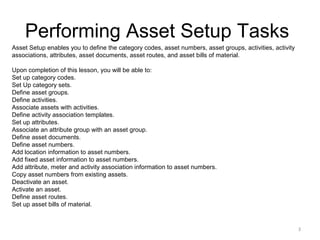
Asset Setup enables you to define the category codes, asset numbers, asset groups, activities, activity
associations, attributes, asset documents, asset routes, and asset bills of material.
Upon completion of this lesson, you will be able to:
Set up category codes.
Set Up category sets.
Define asset groups.
Define activities.
Associate assets with activities.
Define activity association templates.
Set up attributes.
Associate an attribute group with an asset group.
Define asset documents.
Define asset numbers.
Add location information to asset numbers.
Add fixed asset information to asset numbers.
Add attribute, meter and activity association information to asset numbers.
Copy asset numbers from existing assets.
Deactivate an asset.
Activate an asset.
Define asset routes.
Set up asset bills of material.

3
Setting Up Category Codes
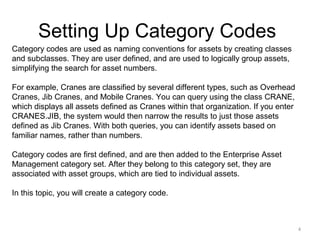
Category codes are used as naming conventions for assets by creating classes
and subclasses. They are user defined, and are used to logically group assets,
simplifying the search for asset numbers.
For example, Cranes are classified by several different types, such as Overhead
Cranes, Jib Cranes, and Mobile Cranes. You can query using the class CRANE,
which displays all assets defined as Cranes within that organization. If you enter
CRANES.JIB, the system would then narrow the results to just those assets
defined as Jib Cranes. With both queries, you can identify assets based on
familiar names, rather than numbers.
Category codes are first defined, and are then added to the Enterprise Asset
Management category set. After they belong to this category set, they are
associated with asset groups, which are tied to individual assets.
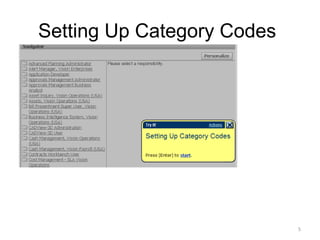
In this topic, you will create a category code.

4
Setting Up Category Codes

5
Setting Up Category Codes

6
Setting Up Category Codes

7
Setting Up Category Codes

8
Setting Up Category Codes

9
Setting Up Category Codes

10
Setting Up Category Codes

11
Setting Up Category Codes

12
Setting Up Category Codes

13
Setting Up Category Codes

14
Setting Up Category Codes

15
Setting Up Category Codes

16
Performing Asset Setup Tasks
Asset Setup enables you to define the category codes, asset numbers, asset groups, activities, activity
associations, attributes, asset documents, asset routes, and asset bills of material.
Upon completion of this lesson, you will be able to:
Set up category codes.
Set Up category sets.
Define asset groups.
Define activities.
Associate assets with activities.
Define activity association templates.
Set up attributes.
Associate an attribute group with an asset group.
Define asset documents.
Define asset numbers.
Add location information to asset numbers.
Add fixed asset information to asset numbers.
Add attribute, meter and activity association information to asset numbers.
Copy asset numbers from existing assets.
Deactivate an asset.
Activate an asset.
Define asset routes.
Set up asset bills of material.

17
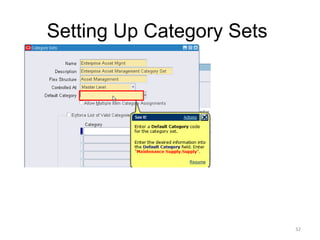
Setting Up Category Sets
Category sets enables you to associate Category Codes (TRUCK.FRKLFT)
with an asset group. You have to first define the item category relationship
using the Category Sets menu option.
In this topic, you will create a category set.

18
Setting Up Category Sets

19
Setting Up Category Sets

20
Setting Up Category Sets

21
Setting Up Category Sets

22
Setting Up Category Sets

23
Setting Up Category Sets

24
Setting Up Category Sets

25
Setting Up Category Sets

26
Setting Up Category Sets

27
Setting Up Category Sets

28
Setting Up Category Sets

29
Setting Up Category Sets

30
Setting Up Category Sets

31
Setting Up Category Sets

32
Setting Up Category Sets

33
Setting Up Category Sets

34
Setting Up Category Sets

35
Setting Up Category Sets

36
Setting Up Category Sets

37
Performing Asset Setup Tasks
Asset Setup enables you to define the category codes, asset numbers, asset groups, activities, activity
associations, attributes, asset documents, asset routes, and asset bills of material.
Upon completion of this lesson, you will be able to:
Set up category codes.
Set Up category sets.
Define asset groups.
Define activities.
Associate assets with activities.
Define activity association templates.
Set up attributes.
Associate an attribute group with an asset group.
Define asset documents.
Define asset numbers.
Add location information to asset numbers.
Add fixed asset information to asset numbers.
Add attribute, meter and activity association information to asset numbers.
Copy asset numbers from existing assets.
Deactivate an asset.
Activate an asset.
Define asset routes.
Set up asset bills of material.

38
Defining Asset Groups
During implementation, Asset Group (Asset Group or
Rebuildable Item) names should be established. Asset groups
represent groups of assets that are virtually identical.
Generally, an asset group is defined for each manufacturer
and model number combination (make, model, and year).
If you have assets in your organization that are virtually
identical (for example, the same manufacturer and model),
consider creating an
asset group for those assets.
The Asset Groups page does not support electronic
signatures. If you create an asset group, the record does not
contain your electronic signature.
In this topic, you will define an asset group.
39
Defining Asset Groups

40
Defining Asset Groups

41
Defining Asset Groups

42
Defining Asset Groups

43
Defining Asset Groups

44
Defining Asset Groups

45
Defining Asset Groups

46
Defining Asset Groups

47
Defining Asset Groups

48
Defining Asset Groups

49
Defining Asset Groups

50
Defining Asset Groups

51
Defining Asset Groups

52
Defining Asset Groups

53
Performing Asset Setup Tasks
Asset Setup enables you to define the category codes, asset numbers, asset groups, activities, activity
associations, attributes, asset documents, asset routes, and asset bills of material.
Upon completion of this lesson, you will be able to:
Set up category codes.
Set Up category sets.
Define asset groups.
Define activities.
Associate assets with activities.
Define activity association templates.
Set up attributes.
Associate an attribute group with an asset group.
Define asset documents.
Define asset numbers.
Add location information to asset numbers.
Add fixed asset information to asset numbers.
Add attribute, meter and activity association information to asset numbers.
Copy asset numbers from existing assets.
Deactivate an asset.
Activate an asset.
Define asset routes.
Set up asset bills of material.

54
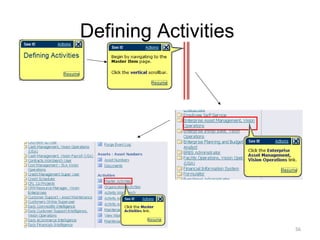
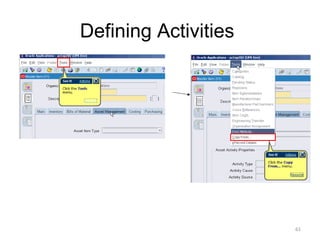
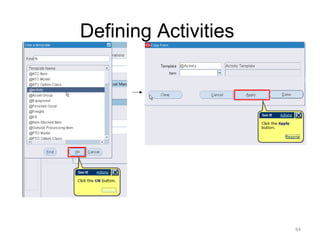
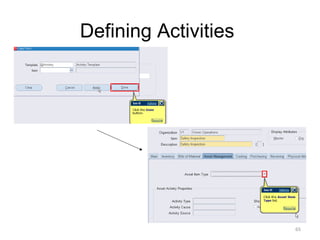
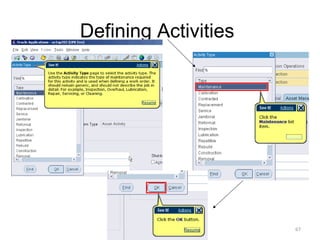
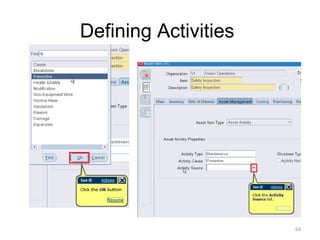
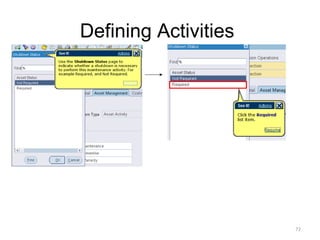
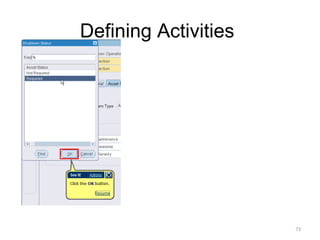
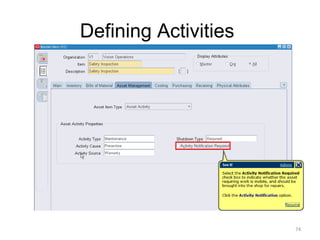
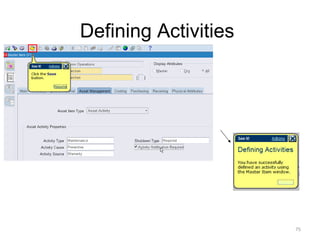
Defining Activities
Activities provide you with a standard template of jobs, which are applied to work
orders, such as routine or preventive maintenance. After these activity templates
are created, they are associated with one or more asset numbers or rebuildables.
They are also associated to a maintenance BOM and activity routing, containing
the materials and resources needed for operations, respectively. When work
orders are created for assets associated to the activity, the material and resources
associated with the current activity automatically copy to the work orders created.
There are three methods you can use to create an activity:
Within the Master Activity (Master Item) window
Using the Activity Workbench
Within maintenance work order
In this topic, you will define an activity using the Master Item window.

55
Defining Activities

56
Defining Activities

57
Defining Activities

58
Defining Activities

59
Defining Activities

60
Defining Activities

61
Defining Activities

62
Defining Activities

63
Defining Activities

64
Defining Activities

65
Defining Activities

66
Defining Activities

67
Defining Activities

68
Defining Activities

69
Defining Activities

70
Defining Activities

71
Defining Activities

72
Defining Activities

73
Defining Activities

74
Defining Activities

75
Performing Asset Setup Tasks
Asset Setup enables you to define the category codes, asset numbers, asset groups, activities, activity
associations, attributes, asset documents, asset routes, and asset bills of material.
Upon completion of this lesson, you will be able to:
Set up category codes.
Set Up category sets.
Define asset groups.
Define activities.
Associate assets with activities.
Define activity association templates.
Set up attributes.
Associate an attribute group with an asset group.
Define asset documents.
Define asset numbers.
Add location information to asset numbers.
Add fixed asset information to asset numbers.
Add attribute, meter and activity association information to asset numbers.
Copy asset numbers from existing assets.
Deactivate an asset.
Activate an asset.
Define asset routes.
Set up asset bills of material.

76
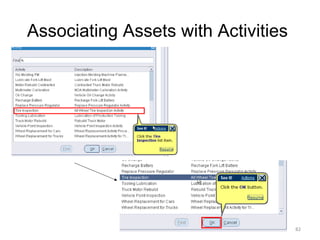
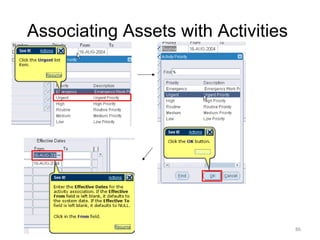
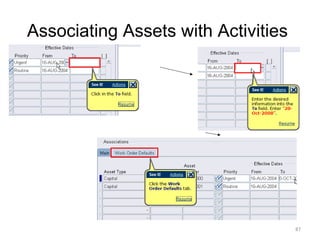
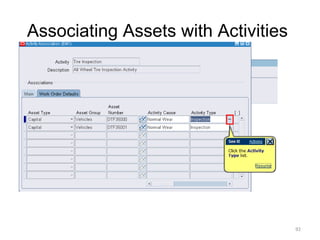
Associating Assets with Activities
After you have defined the asset groups, assets, and activities, you can
associate the activities with assets and rebuildables. However, you can
streamline the creation of activities and associations using an Activity
Association Template.
Assets are associated with activities before entering the activity into a
preventive maintenance schedule.
In this topic, you will associate an asset with an activity.

77
Associating Assets with Activities

78
Associating Assets with Activities

79
Associating Assets with Activities

80
Associating Assets with Activities

81
Associating Assets with Activities

82
Associating Assets with Activities

83
Associating Assets with Activities

84
Associating Assets with Activities

85
Associating Assets with Activities

86
Associating Assets with Activities

87
Associating Assets with Activities

88
Associating Assets with Activities

89
Associating Assets with Activities

90
Associating Assets with Activities

91
Associating Assets with Activities

92
Associating Assets with Activities

93
Associating Assets with Activities

94
Performing Asset Setup Tasks
Asset Setup enables you to define the category codes, asset numbers, asset groups, activities, activity
associations, attributes, asset documents, asset routes, and asset bills of material.
Upon completion of this lesson, you will be able to:
Set up category codes.
Set Up category sets.
Define asset groups.
Define activities.
Associate assets with activities.
Define activity association templates.
Set up attributes.
Associate an attribute group with an asset group.
Define asset documents.
Define asset numbers.
Add location information to asset numbers.
Add fixed asset information to asset numbers.
Add attribute, meter and activity association information to asset numbers.
Copy asset numbers from existing assets.
Deactivate an asset.
Activate an asset.
Define asset routes.
Set up asset bills of material.

95
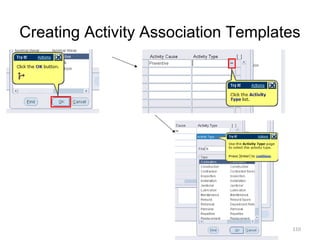
Creating Activity Association Templates
Activities provide you with a standard template of jobs, which are applied to work
orders, such as routine or preventive maintenance. After these activity templates
are created, they are associated with one or more asset numbers or rebuildables.
They are also associated to a maintenance BOM, and activity routing containing
the materials and resources needed for operations, respectively. When work
orders are created for assets associated to the activity, the material and
resources associated with the current activity are automatically copied to the work
orders.
You can streamline the creation of activity associations using an activity
association template. For example, when you create an asset group, and then
asset numbers within that group, you do not need to utilize the Association page
to associate those asset numbers with an activity. If you create an activity
association template, the activity that you associate with the current asset
number's asset group automatically determines the activity that is associated with
the current asset number.
In this topic, you will create an activity association template.
96
Creating Activity Association Templates

97
Creating Activity Association Templates

98
Creating Activity Association Templates

99
Creating Activity Association Templates

100
Creating Activity Association Templates

101
Creating Activity Association Templates

102
Creating Activity Association Templates

103
Creating Activity Association Templates

104
Creating Activity Association Templates

105
Creating Activity Association Templates

106
Creating Activity Association Templates

107
Creating Activity Association Templates

108
Creating Activity Association Templates

109
Creating Activity Association Templates

110
Creating Activity Association Templates

111
Creating Activity Association Templates

112
Creating Activity Association Templates

113
Creating Activity Association Templates

114
Creating Activity Association Templates

115
Creating Activity Association Templates

116
Creating Activity Association Templates

117
Creating Activity Association Templates

118
To be continued…

119

Oracle ebs r12eam part2

  • 1.
    Oracle EBS R12.1eAM Entreprise Asset Management Performing Asset Setup Tasks Cédric Beltrame, PMP - 2014 Oracle is a registered trademark of Oracle Corporation and/or its affiliates 1
  • 2.
    Agenda • • This module coversthe required setup tasks to use Oracle Enterprise Asset Management. In addition, this module covers many of the core transactions and business processes you may perform while using Oracle Enterprise Asset Management. Upon completion of this module, you will be able to: – – – – – – – – – – – – – – – – – – – – Set up Oracle Enterprise Asset Management. Perform other asset setup tasks. Use the Activity Workbench. Perform other EAM setup transactions. Set up non-stock direct items. Set up preventive maintenance. Set up work order billing. Use eAM work management. Use eAM work order planning. Perform preventive maintenance transactions. Use eAM Planning and Scheduling. Use eAM Cost Management. Generate eAM cost variance reports. Enable direct item procurement for eAM work orders. Use eAM Contractor Services. Use eAM Project Manufacturing. Use self-service transactions. Use the Maintenance User Workbench. Perform Maintenance Super User transactions. Use stores. 2
  • 3.
    Performing Asset SetupTasks Asset Setup enables you to define the category codes, asset numbers, asset groups, activities, activity associations, attributes, asset documents, asset routes, and asset bills of material. Upon completion of this lesson, you will be able to: Set up category codes. Set Up category sets. Define asset groups. Define activities. Associate assets with activities. Define activity association templates. Set up attributes. Associate an attribute group with an asset group. Define asset documents. Define asset numbers. Add location information to asset numbers. Add fixed asset information to asset numbers. Add attribute, meter and activity association information to asset numbers. Copy asset numbers from existing assets. Deactivate an asset. Activate an asset. Define asset routes. Set up asset bills of material. 3
  • 4.
    Setting Up CategoryCodes Category codes are used as naming conventions for assets by creating classes and subclasses. They are user defined, and are used to logically group assets, simplifying the search for asset numbers. For example, Cranes are classified by several different types, such as Overhead Cranes, Jib Cranes, and Mobile Cranes. You can query using the class CRANE, which displays all assets defined as Cranes within that organization. If you enter CRANES.JIB, the system would then narrow the results to just those assets defined as Jib Cranes. With both queries, you can identify assets based on familiar names, rather than numbers. Category codes are first defined, and are then added to the Enterprise Asset Management category set. After they belong to this category set, they are associated with asset groups, which are tied to individual assets. In this topic, you will create a category code. 4
  • 5.
  • 6.
  • 7.
  • 8.
  • 9.
  • 10.
  • 11.
  • 12.
  • 13.
  • 14.
  • 15.
  • 16.
  • 17.
    Performing Asset SetupTasks Asset Setup enables you to define the category codes, asset numbers, asset groups, activities, activity associations, attributes, asset documents, asset routes, and asset bills of material. Upon completion of this lesson, you will be able to: Set up category codes. Set Up category sets. Define asset groups. Define activities. Associate assets with activities. Define activity association templates. Set up attributes. Associate an attribute group with an asset group. Define asset documents. Define asset numbers. Add location information to asset numbers. Add fixed asset information to asset numbers. Add attribute, meter and activity association information to asset numbers. Copy asset numbers from existing assets. Deactivate an asset. Activate an asset. Define asset routes. Set up asset bills of material. 17
  • 18.
    Setting Up CategorySets Category sets enables you to associate Category Codes (TRUCK.FRKLFT) with an asset group. You have to first define the item category relationship using the Category Sets menu option. In this topic, you will create a category set. 18
  • 19.
  • 20.
  • 21.
  • 22.
  • 23.
  • 24.
  • 25.
  • 26.
  • 27.
  • 28.
  • 29.
  • 30.
  • 31.
  • 32.
  • 33.
  • 34.
  • 35.
  • 36.
  • 37.
  • 38.
    Performing Asset SetupTasks Asset Setup enables you to define the category codes, asset numbers, asset groups, activities, activity associations, attributes, asset documents, asset routes, and asset bills of material. Upon completion of this lesson, you will be able to: Set up category codes. Set Up category sets. Define asset groups. Define activities. Associate assets with activities. Define activity association templates. Set up attributes. Associate an attribute group with an asset group. Define asset documents. Define asset numbers. Add location information to asset numbers. Add fixed asset information to asset numbers. Add attribute, meter and activity association information to asset numbers. Copy asset numbers from existing assets. Deactivate an asset. Activate an asset. Define asset routes. Set up asset bills of material. 38
  • 39.
    Defining Asset Groups Duringimplementation, Asset Group (Asset Group or Rebuildable Item) names should be established. Asset groups represent groups of assets that are virtually identical. Generally, an asset group is defined for each manufacturer and model number combination (make, model, and year). If you have assets in your organization that are virtually identical (for example, the same manufacturer and model), consider creating an asset group for those assets. The Asset Groups page does not support electronic signatures. If you create an asset group, the record does not contain your electronic signature. In this topic, you will define an asset group. 39
  • 40.
  • 41.
  • 42.
  • 43.
  • 44.
  • 45.
  • 46.
  • 47.
  • 48.
  • 49.
  • 50.
  • 51.
  • 52.
  • 53.
  • 54.
    Performing Asset SetupTasks Asset Setup enables you to define the category codes, asset numbers, asset groups, activities, activity associations, attributes, asset documents, asset routes, and asset bills of material. Upon completion of this lesson, you will be able to: Set up category codes. Set Up category sets. Define asset groups. Define activities. Associate assets with activities. Define activity association templates. Set up attributes. Associate an attribute group with an asset group. Define asset documents. Define asset numbers. Add location information to asset numbers. Add fixed asset information to asset numbers. Add attribute, meter and activity association information to asset numbers. Copy asset numbers from existing assets. Deactivate an asset. Activate an asset. Define asset routes. Set up asset bills of material. 54
  • 55.
    Defining Activities Activities provideyou with a standard template of jobs, which are applied to work orders, such as routine or preventive maintenance. After these activity templates are created, they are associated with one or more asset numbers or rebuildables. They are also associated to a maintenance BOM and activity routing, containing the materials and resources needed for operations, respectively. When work orders are created for assets associated to the activity, the material and resources associated with the current activity automatically copy to the work orders created. There are three methods you can use to create an activity: Within the Master Activity (Master Item) window Using the Activity Workbench Within maintenance work order In this topic, you will define an activity using the Master Item window. 55
  • 56.
  • 57.
  • 58.
  • 59.
  • 60.
  • 61.
  • 62.
  • 63.
  • 64.
  • 65.
  • 66.
  • 67.
  • 68.
  • 69.
  • 70.
  • 71.
  • 72.
  • 73.
  • 74.
  • 75.
  • 76.
    Performing Asset SetupTasks Asset Setup enables you to define the category codes, asset numbers, asset groups, activities, activity associations, attributes, asset documents, asset routes, and asset bills of material. Upon completion of this lesson, you will be able to: Set up category codes. Set Up category sets. Define asset groups. Define activities. Associate assets with activities. Define activity association templates. Set up attributes. Associate an attribute group with an asset group. Define asset documents. Define asset numbers. Add location information to asset numbers. Add fixed asset information to asset numbers. Add attribute, meter and activity association information to asset numbers. Copy asset numbers from existing assets. Deactivate an asset. Activate an asset. Define asset routes. Set up asset bills of material. 76
  • 77.
    Associating Assets withActivities After you have defined the asset groups, assets, and activities, you can associate the activities with assets and rebuildables. However, you can streamline the creation of activities and associations using an Activity Association Template. Assets are associated with activities before entering the activity into a preventive maintenance schedule. In this topic, you will associate an asset with an activity. 77
  • 78.
  • 79.
  • 80.
  • 81.
  • 82.
  • 83.
  • 84.
  • 85.
  • 86.
  • 87.
  • 88.
  • 89.
  • 90.
  • 91.
  • 92.
  • 93.
  • 94.
  • 95.
    Performing Asset SetupTasks Asset Setup enables you to define the category codes, asset numbers, asset groups, activities, activity associations, attributes, asset documents, asset routes, and asset bills of material. Upon completion of this lesson, you will be able to: Set up category codes. Set Up category sets. Define asset groups. Define activities. Associate assets with activities. Define activity association templates. Set up attributes. Associate an attribute group with an asset group. Define asset documents. Define asset numbers. Add location information to asset numbers. Add fixed asset information to asset numbers. Add attribute, meter and activity association information to asset numbers. Copy asset numbers from existing assets. Deactivate an asset. Activate an asset. Define asset routes. Set up asset bills of material. 95
  • 96.
    Creating Activity AssociationTemplates Activities provide you with a standard template of jobs, which are applied to work orders, such as routine or preventive maintenance. After these activity templates are created, they are associated with one or more asset numbers or rebuildables. They are also associated to a maintenance BOM, and activity routing containing the materials and resources needed for operations, respectively. When work orders are created for assets associated to the activity, the material and resources associated with the current activity are automatically copied to the work orders. You can streamline the creation of activity associations using an activity association template. For example, when you create an asset group, and then asset numbers within that group, you do not need to utilize the Association page to associate those asset numbers with an activity. If you create an activity association template, the activity that you associate with the current asset number's asset group automatically determines the activity that is associated with the current asset number. In this topic, you will create an activity association template. 96
  • 97.
  • 98.
  • 99.
  • 100.
  • 101.
  • 102.
  • 103.
  • 104.
  • 105.
  • 106.
  • 107.
  • 108.
  • 109.
  • 110.
  • 111.
  • 112.
  • 113.
  • 114.
  • 115.
  • 116.
  • 117.
  • 118.
  • 119.