CI1131 ICT Lecture Introduction to Operating Systems (2): the GNU/Linux BASH shell
Working in BASH Command line – faster than GUI autocompletion; shortcuts with 'alias' Some basic navigational commands: pwd, ls [-lag], cd, pushd, popd, dirs, history, whoami, ... Some basic file management commands: cp, mv, rm, mkdir, rmdir, chown, chmod, ... Creating and reading files with basic shell commands echo, cat, more, ... Editing files with VIM, Emacs, Kate, ...
BASH basics Some basic BASH navigational commands. navigate to /usr/share/wallpapers cd /usr/share/wallpapers and display your current directory pwd list  all  files in this directory ls -a display a ‘long’ listing of all files in this directory ls -la
BASH basics Learning some basic BASH commands (2) list all files in this directory that begin with letters ‘a’, ‘b’, ‘c’, or ‘d’ ls [a-d]* list all files in this directory that begin with letters ‘a’, ‘e’, ‘s’, or ‘t’ ls [aest]* give a ‘long’ listing of all files in your home directory (without navigating there!) ls -la ~
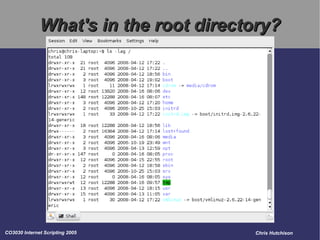
What's in the root directory?
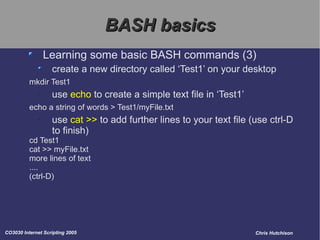
BASH basics Learning some basic BASH commands (3) create a new directory called ‘Test1’ on your desktop mkdir Test1 use  echo  to create a simple text file in ‘Test1’ echo a string of words > Test1/myFile.txt use  cat >>  to add further lines to your text file (use ctrl-D to finish) cd Test1 cat >> myFile.txt more lines of text .... (ctrl-D)
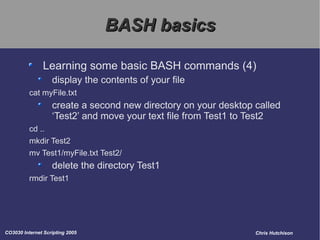
BASH basics Learning some basic BASH commands (4) display the contents of your file cat myFile.txt create a second new directory on your desktop called ‘Test2’ and move your text file from Test1 to Test2 cd .. mkdir Test2 mv Test1/myFile.txt Test2/ delete the directory Test1 rmdir Test1
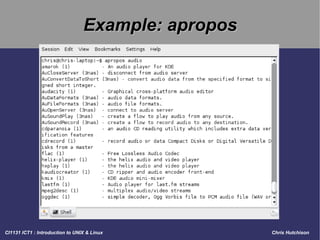
Example: apropos
Example: show processes [1]
Example: show processes [2]
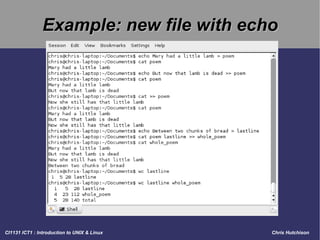
Example: new file with echo
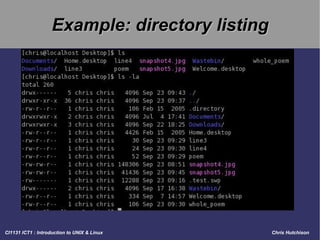
Example: directory listing
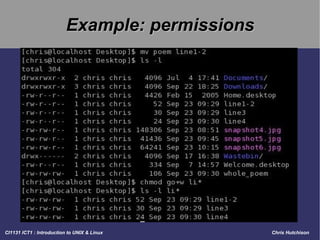
Example: permissions
BASH basics What BASH built-ins are enabled? enable -a What are your environment variables? set What aliases are already pre-defined for you? alias 13 th  March 1643 fell on which week day? cal 3 1643
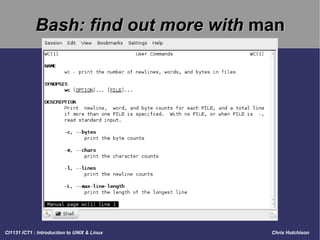
Bash: find out more with  man
Some BASH references The Linux Terminal - a Beginners’ Bash http://linux.org.mt/article/terminal Bash Guide for Beginners http://www.tldp.org/LDP/Bash-Beginners-Guide/html/ Linux Shell Scripting Tutorial http://www.freeos.com/guides/lsst/ Bash Reference Manual http://www.gnu.org/software/bash/manual/bashref.html

Operating Systems 2

  • 1.
    CI1131 ICT LectureIntroduction to Operating Systems (2): the GNU/Linux BASH shell
  • 2.
    Working in BASHCommand line – faster than GUI autocompletion; shortcuts with 'alias' Some basic navigational commands: pwd, ls [-lag], cd, pushd, popd, dirs, history, whoami, ... Some basic file management commands: cp, mv, rm, mkdir, rmdir, chown, chmod, ... Creating and reading files with basic shell commands echo, cat, more, ... Editing files with VIM, Emacs, Kate, ...
  • 3.
    BASH basics Somebasic BASH navigational commands. navigate to /usr/share/wallpapers cd /usr/share/wallpapers and display your current directory pwd list all files in this directory ls -a display a ‘long’ listing of all files in this directory ls -la
  • 4.
    BASH basics Learningsome basic BASH commands (2) list all files in this directory that begin with letters ‘a’, ‘b’, ‘c’, or ‘d’ ls [a-d]* list all files in this directory that begin with letters ‘a’, ‘e’, ‘s’, or ‘t’ ls [aest]* give a ‘long’ listing of all files in your home directory (without navigating there!) ls -la ~
  • 5.
    What's in theroot directory?
  • 6.
    BASH basics Learningsome basic BASH commands (3) create a new directory called ‘Test1’ on your desktop mkdir Test1 use echo to create a simple text file in ‘Test1’ echo a string of words > Test1/myFile.txt use cat >> to add further lines to your text file (use ctrl-D to finish) cd Test1 cat >> myFile.txt more lines of text .... (ctrl-D)
  • 7.
    BASH basics Learningsome basic BASH commands (4) display the contents of your file cat myFile.txt create a second new directory on your desktop called ‘Test2’ and move your text file from Test1 to Test2 cd .. mkdir Test2 mv Test1/myFile.txt Test2/ delete the directory Test1 rmdir Test1
  • 8.
  • 9.
  • 10.
  • 11.
  • 12.
  • 13.
  • 14.
    BASH basics WhatBASH built-ins are enabled? enable -a What are your environment variables? set What aliases are already pre-defined for you? alias 13 th March 1643 fell on which week day? cal 3 1643
  • 15.
    Bash: find outmore with man
  • 16.
    Some BASH referencesThe Linux Terminal - a Beginners’ Bash http://linux.org.mt/article/terminal Bash Guide for Beginners http://www.tldp.org/LDP/Bash-Beginners-Guide/html/ Linux Shell Scripting Tutorial http://www.freeos.com/guides/lsst/ Bash Reference Manual http://www.gnu.org/software/bash/manual/bashref.html