
OpenStack® Summit Austin 2016OpenStack® Summit Austin 2016
Sadasiva Pillalamarri
Rama Krishna Bhupathi
Configure, Debug and Install OpenStack Trove
2
Agenda
– What is OpenStack Trove?
– Trove Architecture
– Installation
– Configuration
– Debugging
– Questions
3
What is Trove?
Trove Mission Statement :
To provide scalable and reliable Cloud Database as a Service provisioning
functionality for both relational and non-relational database engines, and to
continue to improve its fully-featured and extensible open source framework.
4
5
Trove exposes RESTful public API and stores it’s persistent data in and
infrastructure database
6
Trove
public
API
Infrastructure
Database
Trove API Services
-- Exposes a Standard Contract, provides RESTful API
-- when receives the request, it authenticates the requester using one of the
configured authentication mechanism
7
Trove Task Manager
– Listens on message queue ( requester posts message to the task manager )
– Task Manager executes these requests by invoking the appropriate routines
– /etc/trove/trove-taskmanager.conf ( entry points )
– Handles operations such as : instances creation, deletion, interactions with
other services like nova, cinder and swift
8
Trove Conductor Service
– Receives updates various types of status updates from guest agent… some
cases updating the trove infrastructure database
– Listens to messaging queue for specific topics… guest agent heart beats and
backup status.
– /etc/trove/trove-conductor.conf
9
Trove Strategies
Strategies are design construct within Trove that allows developers to extend
Trove by supporting new implementations
10
Trove Extensions
– Trove supports some database-specific Operations ( called extensions )
– These includes commands like :
– Database-list, database-create, database-delete, user-list, user-create, user-grant-
access and user-show-access
11
Custom Flavors
– Flavors are a template for the Virtual Machine: provides basic hardware
configuration information
– Flavors can be customized
– Amount of memory, disk space, number of virtual cpu, swap size, is_public, and etc.
12
Backup and Restore
– Implements a framework… datastores can implement mechanism to take a
backup
– Trove does not perform Backup, datastore does
– Can launch a new instance from the backup
– Backup can be incremental
– /etc/trove/trove-guestagent.conf ( backup configurations )
13
Replication
– Provides framework, does not perform replication
– Can configure and establishes the replication
– Maintains information to help it identify the members in the replication set
– Performs operations like failover if required
Ex: trove create <name of the instance> m2-mirror 2 –size 2 –replica <source-instance >
14
Configuration Groups
– During the launch of a guest instance, the Task manager renders a
configuration file and provides to the guest
– Configuration group let user to set configuration options in bulk.
– A configuration group contains a comma-separated list of key-value pairs. Each
pair consists of a configuration option and its value.
– A configuration group can be attached to the database instance
15
Configuration groups
– Ex: trove list - get the instance id
– trove configuration-list - get the configuration group id
– Trove configuration-attach <instance ID, configuration_group_id>
– configuration group
– NAME. The name you want to use for this group.
– VALUES. The list of key-value pairs.
– DATASTORE_NAME. The name of the associated data store.
16
Supported DataStores continues ……..
–MySQL, MongoDB, Redis ( single Instance + Cluster )
–Apache Cassandra
–Couchbase, Percona
–PostgreSQL, Redis ,Maria DB
17
Installation
– We will install Trove integrated with devstack
– Start off with a brand new Virtual Machine (VM).
– Install Ubuntu 14.04
– Follow the instruction here:
– http://docs.openstack.org/developer/trove/dev/install.html
– Follow the instructions all the way thru
18
Installation…
– Make configuration changes to your machine as outlined in the document
– Clone the trove repository.
– git clone https://git.openstack.org/openstack/trove-integration.git
– The above will download the required scripts for Trove and Devstack
– Depending on your configuration make changes to the trove repo.
19
Installation….
Some suggestions in configuration before you install:
– Make sure you set the proxies correctly (in case you are required to go thru
proxies)
– if git protocol does not work for you, change it to https
– Go to ~/trove-integration/scripts. Edit redstack.rc
– Change GIT_BASE=${GIT_BASE:-git://git.openstack.org}
– To GIT_BASE=${GIT_BASE:-https://git.openstack.org}
20
Installation….
Run ./redstack install
– This brings up trove (tr-api tr-tmgr tr-cond) and initializes the trove database.
21
Installation….
– Kick start the build/test-init/build-image commands. Add mysql as a parameter
to set build and add the mysql guest image.
– redstack kick-start myql
22
Installation….
– What if you run into errors ?
– Fix the errors' (may need to change file/directory permissions etc)
– Go to devstack directory and
– run ./unstack.sh
– run ./clean.sh
– Proceed with rerunning your previous command.
23
Validation
Make sure the Trove installation is successful
– Access the devstack directory (cd ~devstack)
– Run source openrc admin admin 3de4922d8b6ac5a1aad9
– The password should be in the redstack.rc
– Run trove list
24
Validation…
Make sure the Trove installation is successful
– Make sure the trove endpoints are created.
– openstack catalog list and make sure trove endpoints are listed.
25
Validation…
Let us create a database instance.
– trove create myinstance 2 --size 2
26
Validation…
Check the status of your database instance.
– trove show 85a05fde-39f2-4870-970a-762a3204c814
27
Validation…
Let us create a database and a user to connect to.
– trove database-create 85a05fde-39f2-4870-970a-762a3204c814
myfirstdatabase
– trove user-create 85a05fde-39f2-4870-970a-762a3204c814 demo password --
databases myfirstdatabase
28
Validation…
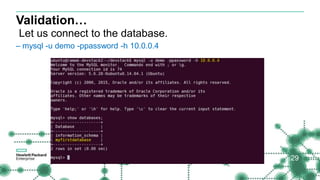
Let us connect to the database.
– mysql -u demo -ppassword -h 10.0.0.4
29
Configuration
– trove-conductor.conf
– the configuration for the Trove conductor service.
– trove.conf
– the general configuration for the Trove API service.
– trove-taskmanager.conf
– the configuration options for the Trove Task Manager service.
– trove-guestagent.conf
– Not used by the host. This is passed on to the guest image.
30
Choosing Neutron for Trove
– By default devstack configures the system using Nova Networking.
– If you want to use Neutron instead of Nova, the following changes are needed
in the local.conf
– ENABLED_SERVICES+=,neutron,q-svc,q-agt,q-dhcp,q-l3,q-meta
– disable_service n-net
31
Debugging and Troubleshooting
– Access Log files on the trove controller node
– cd /opt/stack/logs
– tr-api.log
– tr-tmgr.log
– tr-cond.log
– Run your trove commands with –debug option
32
Debugging and Troubleshooting…
Access the logs on the controller node.
33
Debugging and Troubleshooting…
– You can also access the logs in the guest node
– ssh 10.0.0.4
– Access /var/log/trove
– Check for error messages in the trove-guestagent.log
– Errors before launching the guest agent are in /var/log/upstart/trove-guest.log
34
Debugging and Troubleshooting…
35
Debugging and Troubleshooting…
36
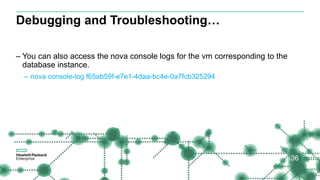
– You can also access the nova console logs for the vm corresponding to the
database instance.
– nova console-log f65ab59f-e7e1-4daa-bc4e-0a7fcb325294
More Information
37
https://wiki.openstack.org/wiki/Trove
Questions?
38
Rama Krishna (ramakris@hpe.com)
Sadasiva P (sadasiva@hpe.com)
Thank you
39

Configure, Debug and Install OpenStack Trove

  • 1.
    OpenStack® Summit Austin2016OpenStack® Summit Austin 2016 Sadasiva Pillalamarri Rama Krishna Bhupathi
  • 2.
    Configure, Debug andInstall OpenStack Trove 2
  • 3.
    Agenda – What isOpenStack Trove? – Trove Architecture – Installation – Configuration – Debugging – Questions 3
  • 4.
    What is Trove? TroveMission Statement : To provide scalable and reliable Cloud Database as a Service provisioning functionality for both relational and non-relational database engines, and to continue to improve its fully-featured and extensible open source framework. 4
  • 5.
  • 6.
    Trove exposes RESTfulpublic API and stores it’s persistent data in and infrastructure database 6 Trove public API Infrastructure Database
  • 7.
    Trove API Services --Exposes a Standard Contract, provides RESTful API -- when receives the request, it authenticates the requester using one of the configured authentication mechanism 7
  • 8.
    Trove Task Manager –Listens on message queue ( requester posts message to the task manager ) – Task Manager executes these requests by invoking the appropriate routines – /etc/trove/trove-taskmanager.conf ( entry points ) – Handles operations such as : instances creation, deletion, interactions with other services like nova, cinder and swift 8
  • 9.
    Trove Conductor Service –Receives updates various types of status updates from guest agent… some cases updating the trove infrastructure database – Listens to messaging queue for specific topics… guest agent heart beats and backup status. – /etc/trove/trove-conductor.conf 9
  • 10.
    Trove Strategies Strategies aredesign construct within Trove that allows developers to extend Trove by supporting new implementations 10
  • 11.
    Trove Extensions – Trovesupports some database-specific Operations ( called extensions ) – These includes commands like : – Database-list, database-create, database-delete, user-list, user-create, user-grant- access and user-show-access 11
  • 12.
    Custom Flavors – Flavorsare a template for the Virtual Machine: provides basic hardware configuration information – Flavors can be customized – Amount of memory, disk space, number of virtual cpu, swap size, is_public, and etc. 12
  • 13.
    Backup and Restore –Implements a framework… datastores can implement mechanism to take a backup – Trove does not perform Backup, datastore does – Can launch a new instance from the backup – Backup can be incremental – /etc/trove/trove-guestagent.conf ( backup configurations ) 13
  • 14.
    Replication – Provides framework,does not perform replication – Can configure and establishes the replication – Maintains information to help it identify the members in the replication set – Performs operations like failover if required Ex: trove create <name of the instance> m2-mirror 2 –size 2 –replica <source-instance > 14
  • 15.
    Configuration Groups – Duringthe launch of a guest instance, the Task manager renders a configuration file and provides to the guest – Configuration group let user to set configuration options in bulk. – A configuration group contains a comma-separated list of key-value pairs. Each pair consists of a configuration option and its value. – A configuration group can be attached to the database instance 15
  • 16.
    Configuration groups – Ex:trove list - get the instance id – trove configuration-list - get the configuration group id – Trove configuration-attach <instance ID, configuration_group_id> – configuration group – NAME. The name you want to use for this group. – VALUES. The list of key-value pairs. – DATASTORE_NAME. The name of the associated data store. 16
  • 17.
    Supported DataStores continues…….. –MySQL, MongoDB, Redis ( single Instance + Cluster ) –Apache Cassandra –Couchbase, Percona –PostgreSQL, Redis ,Maria DB 17
  • 18.
    Installation – We willinstall Trove integrated with devstack – Start off with a brand new Virtual Machine (VM). – Install Ubuntu 14.04 – Follow the instruction here: – http://docs.openstack.org/developer/trove/dev/install.html – Follow the instructions all the way thru 18
  • 19.
    Installation… – Make configurationchanges to your machine as outlined in the document – Clone the trove repository. – git clone https://git.openstack.org/openstack/trove-integration.git – The above will download the required scripts for Trove and Devstack – Depending on your configuration make changes to the trove repo. 19
  • 20.
    Installation…. Some suggestions inconfiguration before you install: – Make sure you set the proxies correctly (in case you are required to go thru proxies) – if git protocol does not work for you, change it to https – Go to ~/trove-integration/scripts. Edit redstack.rc – Change GIT_BASE=${GIT_BASE:-git://git.openstack.org} – To GIT_BASE=${GIT_BASE:-https://git.openstack.org} 20
  • 21.
    Installation…. Run ./redstack install –This brings up trove (tr-api tr-tmgr tr-cond) and initializes the trove database. 21
  • 22.
    Installation…. – Kick startthe build/test-init/build-image commands. Add mysql as a parameter to set build and add the mysql guest image. – redstack kick-start myql 22
  • 23.
    Installation…. – What ifyou run into errors ? – Fix the errors' (may need to change file/directory permissions etc) – Go to devstack directory and – run ./unstack.sh – run ./clean.sh – Proceed with rerunning your previous command. 23
  • 24.
    Validation Make sure theTrove installation is successful – Access the devstack directory (cd ~devstack) – Run source openrc admin admin 3de4922d8b6ac5a1aad9 – The password should be in the redstack.rc – Run trove list 24
  • 25.
    Validation… Make sure theTrove installation is successful – Make sure the trove endpoints are created. – openstack catalog list and make sure trove endpoints are listed. 25
  • 26.
    Validation… Let us createa database instance. – trove create myinstance 2 --size 2 26
  • 27.
    Validation… Check the statusof your database instance. – trove show 85a05fde-39f2-4870-970a-762a3204c814 27
  • 28.
    Validation… Let us createa database and a user to connect to. – trove database-create 85a05fde-39f2-4870-970a-762a3204c814 myfirstdatabase – trove user-create 85a05fde-39f2-4870-970a-762a3204c814 demo password -- databases myfirstdatabase 28
  • 29.
    Validation… Let us connectto the database. – mysql -u demo -ppassword -h 10.0.0.4 29
  • 30.
    Configuration – trove-conductor.conf – theconfiguration for the Trove conductor service. – trove.conf – the general configuration for the Trove API service. – trove-taskmanager.conf – the configuration options for the Trove Task Manager service. – trove-guestagent.conf – Not used by the host. This is passed on to the guest image. 30
  • 31.
    Choosing Neutron forTrove – By default devstack configures the system using Nova Networking. – If you want to use Neutron instead of Nova, the following changes are needed in the local.conf – ENABLED_SERVICES+=,neutron,q-svc,q-agt,q-dhcp,q-l3,q-meta – disable_service n-net 31
  • 32.
    Debugging and Troubleshooting –Access Log files on the trove controller node – cd /opt/stack/logs – tr-api.log – tr-tmgr.log – tr-cond.log – Run your trove commands with –debug option 32
  • 33.
    Debugging and Troubleshooting… Accessthe logs on the controller node. 33
  • 34.
    Debugging and Troubleshooting… –You can also access the logs in the guest node – ssh 10.0.0.4 – Access /var/log/trove – Check for error messages in the trove-guestagent.log – Errors before launching the guest agent are in /var/log/upstart/trove-guest.log 34
  • 35.
  • 36.
    Debugging and Troubleshooting… 36 –You can also access the nova console logs for the vm corresponding to the database instance. – nova console-log f65ab59f-e7e1-4daa-bc4e-0a7fcb325294
  • 37.
  • 38.
  • 39.

Editor's Notes

  • #5 Scalable as the application grows, meets the application needs If there are any failures, recovery from the failures Provisioning functionality : does not get into data layer. Once trove is provisioned mysql directly talks with application, does not come in the middle. Like vending machine, Multible databases, relational – non-relational
  • #6 How do you promote guest image Why cinder & swift Why can’t we back-up with cinder What is messaging bus, who consumes the messages Role of Task Manager What all the services that trove uses / consumes Authentication Networking Trove Consist of multiple services, Trove API, Trove Conductor, Trove Task Manager Trove-api – exposes trove Restfull API Request goes to trove api- gets the response back from Trove API , communicates internally over a message bus. Trove provides a framework to to build a databases. Conductor Task-manager Trove not the database Trove helps to orchestrate the database, provision the database Trove will help you to replicate, mysql does the replicatie the database Data is stored by database, mysql, Clear contract between trove and database Other components that trove depends-on Uses glance to load database images Uses cinder to create volumes Uses swift to back-up Uses keystone for identity Nova , neutron for networking Nova for computing How does Guest images communicate with rabbit ? Trove instances have two interfaces, Private management network, typically talks to a trove specific network. Sends messages Once the request comes to API, trove talks to tas manager through messaing bus, which is usually rabbitmq, the task manager looks at mysql - Guest image is up and running.
  • #7 Inf