


Charles Eckel, Cisco DevNet
Red Hat Summit and DevNation, June 27-30, 2016
Getting Started With
OpenStack
eckelcu@cisco.com
• What is OpenStack?
• Containerized Deployment Using Kolla
• Install and operate on your laptop
• Additional resources
Agenda
What is OpenStack?
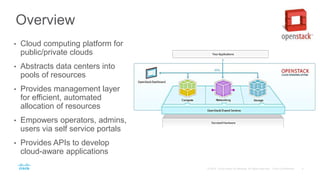
Overview
• Cloud computing platform for
public/private clouds
• Abstracts data centers into
pools of resources
• Provides management layer
for efficient, automated
allocation of resources
• Empowers operators, admins,
users via self service portals
• Provides APIs to develop
cloud-aware applications
The OpenStack Community
• Over 25,000 developers
• Over 500 companies
• Over 20 million lines of code
• Designed and developed in an
open collaborative fashion
• Releases every six months
• Most recent “Mitaka” release:
• 2,300 developers contributed
• 345 companies involved
• 34,000 merged patch sets
OpenStack Adoption Drivers
• APIs, APIs, APIs
• Speed
• Flexibility
• Cost
• Programmatic workflows
• Open and broadly interoperable
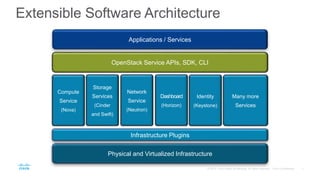
Extensible Software Architecture
Applications / Services
Physical and Virtualized Infrastructure
OpenStack Service APIs, SDK, CLI
Infrastructure Plugins
Compute
Service
(Nova)
Storage
Services
(Cinder
and Swift)
Network
Service
(Neutron)
Many more
Services
Dashboard
(Horizon)
Identity
(Keystone)
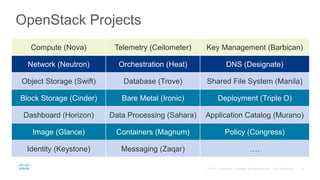
OpenStack Projects
Compute (Nova) Telemetry (Ceilometer) Key Management (Barbican)
Network (Neutron) Orchestration (Heat) DNS (Designate)
Object Storage (Swift) Database (Trove) Shared File System (Manila)
Block Storage (Cinder) Bare Metal (Ironic) Deployment (Triple O)
Dashboard (Horizon) Data Processing (Sahara) Application Catalog (Murano)
Image (Glance) Containers (Magnum) Policy (Congress)
Identity (Keystone) Messaging (Zaqar) ….
Containerized Deployment
Using Kolla
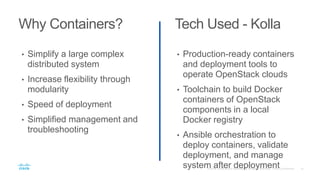
Why Containers? Tech Used - Kolla
• Simplify a large complex
distributed system
• Increase flexibility through
modularity
• Speed of deployment
• Simplified management and
troubleshooting
• Production-ready containers
and deployment tools to
operate OpenStack clouds
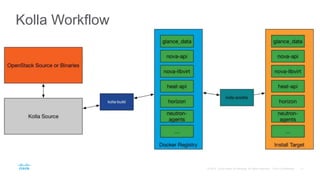
• Toolchain to build Docker
containers of OpenStack
components in a local
Docker registry
• Ansible orchestration to
deploy containers, validate
deployment, and manage
system after deployment
Kolla Workflow
Learning Lab Demo:
Running OpenStack On
Your Laptop
• Available for download from the Cisco DevNet Learning Labs
• Runs a VirtualBox Linux VM
• Inside that Linux VM, runs OpenStack deployed using containers
• Can customize and redeploy if interested in developing OpenStack
• Provides a local OpenStack cloud you can interact with as a
developer / operator
Containerized VM Deployment
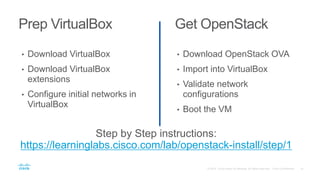
Prep VirtualBox Get OpenStack
• Download VirtualBox
extensions
• Configure initial networks in
VirtualBox
• Download OpenStack OVA
• Import into VirtualBox
• Validate network
configurations
• Boot the VM
Step by Step instructions:
https://learninglabs.cisco.com/lab/openstack-install/step/1
On With The Show!
Additional resources
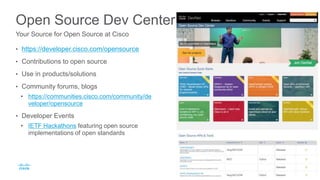
Open Source Dev Center
• https://developer.cisco.com/opensource
• Contributions to open source
• Use in products/solutions
• Community forums, blogs
• https://communities.cisco.com/community/de
veloper/opensource
• Developer Events
• IETF Hackathons featuring open source
implementations of open standards
Your Source for Open Source at Cisco
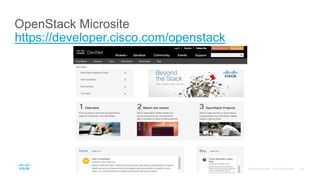
OpenStack Microsite
https://developer.cisco.com/openstack
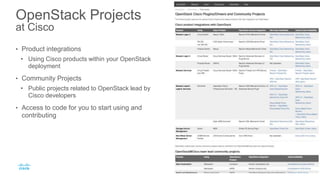
OpenStack Projects
at Cisco
• Product integrations
• Using Cisco products within your OpenStack
deployment
• Community Projects
• Public projects related to OpenStack lead by
Cisco developers
• Access to code for you to start using and
contributing
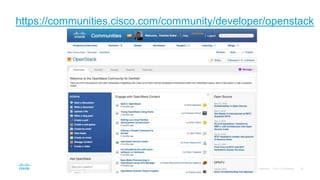
https://communities.cisco.com/community/developer/openstack
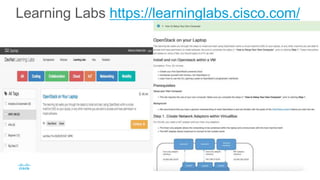
Learning Labs https://learninglabs.cisco.com/
Thank you
Getting Started with OpenStack, Red Hat Summit 2016

Getting Started with OpenStack, Red Hat Summit 2016

  • 1.
    Charles Eckel, CiscoDevNet Red Hat Summit and DevNation, June 27-30, 2016 Getting Started With OpenStack eckelcu@cisco.com
  • 2.
    • What isOpenStack? • Containerized Deployment Using Kolla • Install and operate on your laptop • Additional resources Agenda
  • 3.
  • 4.
    Overview • Cloud computingplatform for public/private clouds • Abstracts data centers into pools of resources • Provides management layer for efficient, automated allocation of resources • Empowers operators, admins, users via self service portals • Provides APIs to develop cloud-aware applications
  • 5.
    The OpenStack Community •Over 25,000 developers • Over 500 companies • Over 20 million lines of code • Designed and developed in an open collaborative fashion • Releases every six months • Most recent “Mitaka” release: • 2,300 developers contributed • 345 companies involved • 34,000 merged patch sets
  • 6.
    OpenStack Adoption Drivers •APIs, APIs, APIs • Speed • Flexibility • Cost • Programmatic workflows • Open and broadly interoperable
  • 7.
    Extensible Software Architecture Applications/ Services Physical and Virtualized Infrastructure OpenStack Service APIs, SDK, CLI Infrastructure Plugins Compute Service (Nova) Storage Services (Cinder and Swift) Network Service (Neutron) Many more Services Dashboard (Horizon) Identity (Keystone)
  • 8.
    OpenStack Projects Compute (Nova)Telemetry (Ceilometer) Key Management (Barbican) Network (Neutron) Orchestration (Heat) DNS (Designate) Object Storage (Swift) Database (Trove) Shared File System (Manila) Block Storage (Cinder) Bare Metal (Ironic) Deployment (Triple O) Dashboard (Horizon) Data Processing (Sahara) Application Catalog (Murano) Image (Glance) Containers (Magnum) Policy (Congress) Identity (Keystone) Messaging (Zaqar) ….
  • 9.
  • 10.
    Why Containers? TechUsed - Kolla • Simplify a large complex distributed system • Increase flexibility through modularity • Speed of deployment • Simplified management and troubleshooting • Production-ready containers and deployment tools to operate OpenStack clouds • Toolchain to build Docker containers of OpenStack components in a local Docker registry • Ansible orchestration to deploy containers, validate deployment, and manage system after deployment
  • 11.
  • 12.
    Learning Lab Demo: RunningOpenStack On Your Laptop
  • 13.
    • Available fordownload from the Cisco DevNet Learning Labs • Runs a VirtualBox Linux VM • Inside that Linux VM, runs OpenStack deployed using containers • Can customize and redeploy if interested in developing OpenStack • Provides a local OpenStack cloud you can interact with as a developer / operator Containerized VM Deployment
  • 14.
    Prep VirtualBox GetOpenStack • Download VirtualBox • Download VirtualBox extensions • Configure initial networks in VirtualBox • Download OpenStack OVA • Import into VirtualBox • Validate network configurations • Boot the VM Step by Step instructions: https://learninglabs.cisco.com/lab/openstack-install/step/1
  • 15.
  • 16.
  • 17.
    Open Source DevCenter • https://developer.cisco.com/opensource • Contributions to open source • Use in products/solutions • Community forums, blogs • https://communities.cisco.com/community/de veloper/opensource • Developer Events • IETF Hackathons featuring open source implementations of open standards Your Source for Open Source at Cisco
  • 18.
  • 19.
    OpenStack Projects at Cisco •Product integrations • Using Cisco products within your OpenStack deployment • Community Projects • Public projects related to OpenStack lead by Cisco developers • Access to code for you to start using and contributing
  • 20.
  • 21.
  • 22.

Editor's Notes

  • #15 VM credentials Username: osdev Password: Cisco!Devnet nova boot --flavor m1.tiny --image cirros --nic net-name=private_network cli_vm OpenStack Credentials: Domain: default Username: admin Password: password