ONOS SDN Controller
소스코드 분석 및 SDN 응용개발
Mobile Convergence Lab, Computer Engineering,
Kyung Hee University
Sangyun Han
Email : sangyun0628@khu.ac.kr
SDN/NFV 이론, 실습, 최신동향
[ONOS 다중 인스턴스 설치 및 테스트]
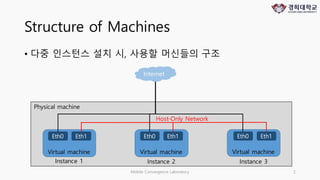
Structure of Machines
• 다중 인스턴스 설치 시, 사용할 머신들의 구조
Mobile Convergence Laboratory 2
Internet
Physical machine
Virtual machine Virtual machine Virtual machine
Instance 1 Instance 2 Instance 3
Eth0 Eth1 Eth0 Eth1 Eth0 Eth1
Host-Only Network
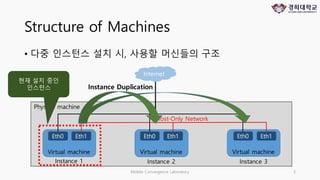
Structure of Machines
• 다중 인스턴스 설치 시, 사용할 머신들의 구조
Mobile Convergence Laboratory 3
Internet
Physical machine
Virtual machine Virtual machine Virtual machine
Instance 1 Instance 2 Instance 3
Eth0 Eth1 Eth0 Eth1 Eth0 Eth1
Host-Only Network
현재 설치 중인
인스턴스 Instance Duplication
Configure
1. Change linux user authority
2. Install openssh-server
Mobile Convergence Laboratory 4
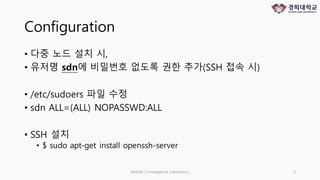
Configuration
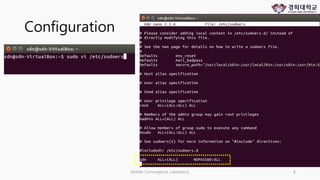
• 다중 노드 설치 시,
• 유저명 sdn에 비밀번호 없도록 권한 추가(SSH 접속 시)
• /etc/sudoers 파일 수정
• sdn ALL=(ALL) NOPASSWD:ALL
• SSH 설치
• $ sudo apt-get install openssh-server
Mobile Convergence Laboratory 5
Configuration
Mobile Convergence Laboratory 6
ONOS - Install multi instance
1. Getting ONOS
2. Installing ONOS
3. Start ONOS
Mobile Convergence Laboratory 7
https://wiki.onosproject.org/display/ONOS/Installing+and+Running+ONOS
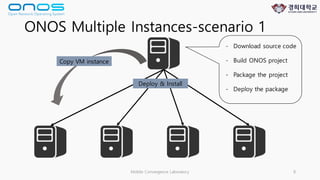
ONOS Multiple Instances-scenario 1
Mobile Convergence Laboratory 8
- Download source code
- Build ONOS project
- Package the project
- Deploy the package
Deploy & Install
Copy VM instance
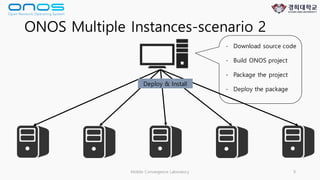
ONOS Multiple Instances-scenario 2
Mobile Convergence Laboratory 9
- Download source code
- Build ONOS project
- Package the project
- Deploy the package
Deploy & Install
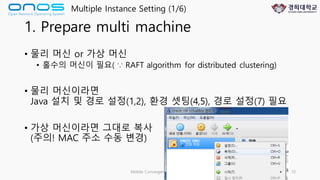
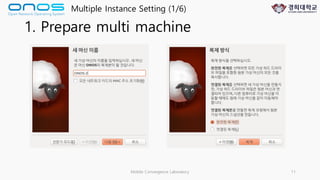
1. Prepare multi machine
• 물리 머신 or 가상 머신
• 홀수의 머신이 필요( ∵ RAFT algorithm for distributed clustering)
• 물리 머신이라면
Java 설치 및 경로 설정(1,2), 환경 셋팅(4,5), 경로 설정(7) 필요
• 가상 머신이라면 그대로 복사
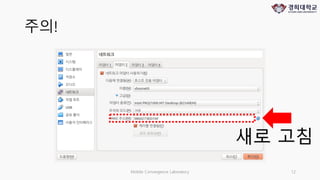
(주의! MAC 주소 수동 변경)
Mobile Convergence Laboratory 10
Multiple Instance Setting (1/6)
1. Prepare multi machine
Mobile Convergence Laboratory 11
Multiple Instance Setting (1/6)
주의!
Mobile Convergence Laboratory 12
새로 고침
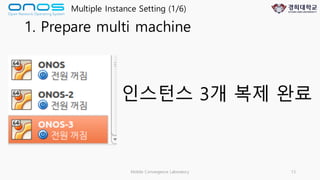
1. Prepare multi machine
Mobile Convergence Laboratory 13
Multiple Instance Setting (1/6)
인스턴스 3개 복제 완료
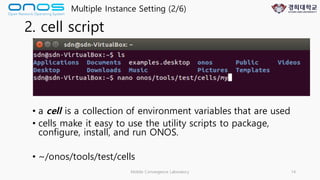
2. cell script
Mobile Convergence Laboratory 14
Multiple Instance Setting (2/6)
• a cell is a collection of environment variables that are used
• cells make it easy to use the utility scripts to package,
configure, install, and run ONOS.
• ~/onos/tools/test/cells
2. cell script
Mobile Convergence Laboratory 15
Multiple Instance Setting (2/6)
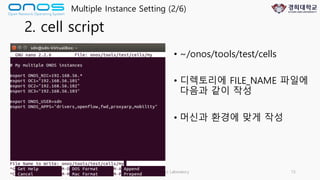
• ~/onos/tools/test/cells
• 디렉토리에 FILE_NAME 파일에
다음과 같이 작성
• 머신과 환경에 맞게 작성
3. Define control plane
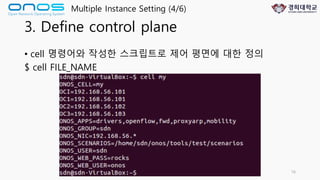
• cell 명령어와 작성한 스크립트로 제어 평면에 대한 정의
$ cell FILE_NAME
Mobile Convergence Laboratory 16
Multiple Instance Setting (4/6)
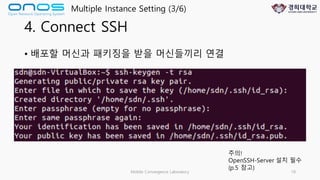
4. Connect SSH
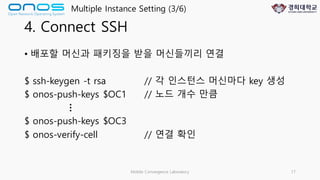
• 배포할 머신과 패키징을 받을 머신들끼리 연결
$ ssh-keygen -t rsa // 각 인스턴스 머신마다 key 생성
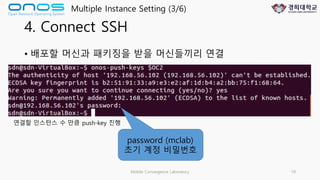
$ onos-push-keys $OC1 // 노드 개수 만큼
$ onos-push-keys $OC3
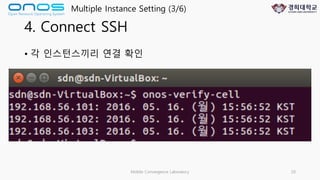
$ onos-verify-cell // 연결 확인
Mobile Convergence Laboratory 17
Multiple Instance Setting (3/6)
…
4. Connect SSH
• 배포할 머신과 패키징을 받을 머신들끼리 연결
Mobile Convergence Laboratory 18
Multiple Instance Setting (3/6)
주의!
OpenSSH-Server 설치 필수
(p.5 참고)
4. Connect SSH
• 배포할 머신과 패키징을 받을 머신들끼리 연결
Mobile Convergence Laboratory 19
Multiple Instance Setting (3/6)
연결할 인스턴스 수 만큼 push-key 진행
password (mclab)
초기 계정 비밀번호
4. Connect SSH
• 각 인스턴스끼리 연결 확인
Mobile Convergence Laboratory 20
Multiple Instance Setting (3/6)
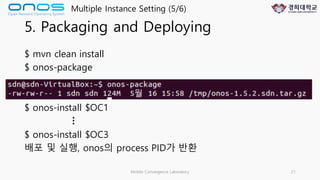
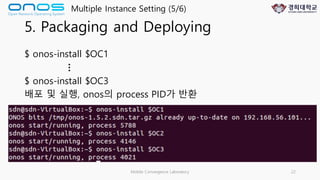
5. Packaging and Deploying
$ mvn clean install
$ onos-package
$ onos-install $OC1
$ onos-install $OC3
배포 및 실행, onos의 process PID가 반환
Mobile Convergence Laboratory 21
Multiple Instance Setting (5/6)
…
5. Packaging and Deploying
$ onos-install $OC1
$ onos-install $OC3
배포 및 실행, onos의 process PID가 반환
Mobile Convergence Laboratory 22
Multiple Instance Setting (5/6)
…
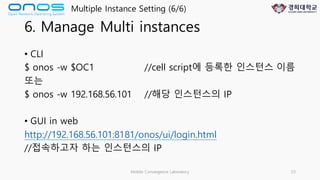
6. Manage Multi instances
• CLI
$ onos -w $OC1 //cell script에 등록한 인스턴스 이름
또는
$ onos -w 192.168.56.101 //해당 인스턴스의 IP
• GUI in web
http://192.168.56.101:8181/onos/ui/login.html
//접속하고자 하는 인스턴스의 IP
Mobile Convergence Laboratory 23
Multiple Instance Setting (6/6)
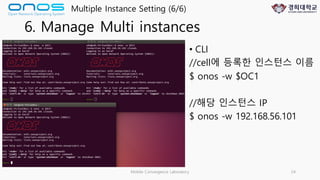
6. Manage Multi instances
• CLI
//cell에 등록한 인스턴스 이름
$ onos -w $OC1
//해당 인스턴스 IP
$ onos -w 192.168.56.101
Mobile Convergence Laboratory 24
Multiple Instance Setting (6/6)
Mobile Convergence Laboratory 25
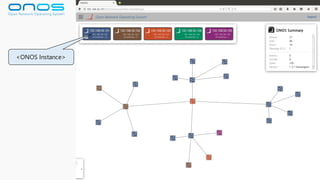
<ONOS Instance>
ONOS command
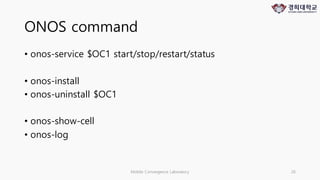
• onos-service $OC1 start/stop/restart/status
• onos-install
• onos-uninstall $OC1
• onos-show-cell
• onos-log
Mobile Convergence Laboratory 26
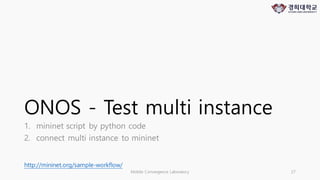
ONOS - Test multi instance
1. mininet script by python code
2. connect multi instance to mininet
Mobile Convergence Laboratory 27
http://mininet.org/sample-workflow/
mininet depth & fanout
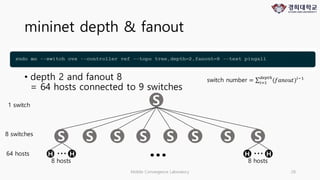
• depth 2 and fanout 8
= 64 hosts connected to 9 switches
Mobile Convergence Laboratory 28
S
S SS S SS SS
H H…
8 hosts
H H…
8 hosts
…64 hosts
8 switches
1 switch
switch number = ∑ (𝑓𝑎𝑛𝑜𝑢𝑡)+,-./012
+3-
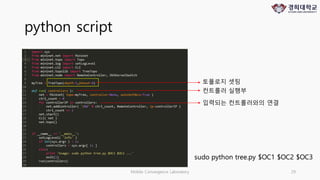
python script
Mobile Convergence Laboratory 29
입력되는 컨트롤러와의 연결
sudo python tree.py $OC1 $OC2 $OC3
컨트롤러 실행부
토폴로지 셋팅
tree.py code
import sys
from mininet.net import Mininet
from mininet.topo import Topo
from mininet.log import setLogLevel
from mininet.cli import CLI
from mininet.topolib import TreeTopo
from mininet.node import RemoteController, OVSKernelSwitch
myTree = TreeTopo(depth=3,fanout=4)
def run( controllers ):
net = Mininet( topo=myTree, controller=None, autoSetMacs=True )
ctrl_count = 0
for controllerIP in controllers:
net.addController( 'c%d' % ctrl_count, RemoteController, ip=controllerIP )
ctrl_count += 1
net.start()
CLI( net )
net.topo()
if __name__ == '__main__':
setLogLevel( 'info' )
if len(sys.argv ) > 1:
controllers = sys.argv[ 1: ]
else:
print 'Usage: sudo python tree.py '
exit(1)
run(controllers)
Mobile Convergence Laboratory 30
for copy & paste
Mobile Convergence Laboratory 31

ONOS - multiple instance setting(Distributed SDN Controller)

  • 1.
    ONOS SDN Controller 소스코드분석 및 SDN 응용개발 Mobile Convergence Lab, Computer Engineering, Kyung Hee University Sangyun Han Email : sangyun0628@khu.ac.kr SDN/NFV 이론, 실습, 최신동향 [ONOS 다중 인스턴스 설치 및 테스트]
  • 2.
    Structure of Machines •다중 인스턴스 설치 시, 사용할 머신들의 구조 Mobile Convergence Laboratory 2 Internet Physical machine Virtual machine Virtual machine Virtual machine Instance 1 Instance 2 Instance 3 Eth0 Eth1 Eth0 Eth1 Eth0 Eth1 Host-Only Network
  • 3.
    Structure of Machines •다중 인스턴스 설치 시, 사용할 머신들의 구조 Mobile Convergence Laboratory 3 Internet Physical machine Virtual machine Virtual machine Virtual machine Instance 1 Instance 2 Instance 3 Eth0 Eth1 Eth0 Eth1 Eth0 Eth1 Host-Only Network 현재 설치 중인 인스턴스 Instance Duplication
  • 4.
    Configure 1. Change linuxuser authority 2. Install openssh-server Mobile Convergence Laboratory 4
  • 5.
    Configuration • 다중 노드설치 시, • 유저명 sdn에 비밀번호 없도록 권한 추가(SSH 접속 시) • /etc/sudoers 파일 수정 • sdn ALL=(ALL) NOPASSWD:ALL • SSH 설치 • $ sudo apt-get install openssh-server Mobile Convergence Laboratory 5
  • 6.
  • 7.
    ONOS - Installmulti instance 1. Getting ONOS 2. Installing ONOS 3. Start ONOS Mobile Convergence Laboratory 7 https://wiki.onosproject.org/display/ONOS/Installing+and+Running+ONOS
  • 8.
    ONOS Multiple Instances-scenario1 Mobile Convergence Laboratory 8 - Download source code - Build ONOS project - Package the project - Deploy the package Deploy & Install Copy VM instance
  • 9.
    ONOS Multiple Instances-scenario2 Mobile Convergence Laboratory 9 - Download source code - Build ONOS project - Package the project - Deploy the package Deploy & Install
  • 10.
    1. Prepare multimachine • 물리 머신 or 가상 머신 • 홀수의 머신이 필요( ∵ RAFT algorithm for distributed clustering) • 물리 머신이라면 Java 설치 및 경로 설정(1,2), 환경 셋팅(4,5), 경로 설정(7) 필요 • 가상 머신이라면 그대로 복사 (주의! MAC 주소 수동 변경) Mobile Convergence Laboratory 10 Multiple Instance Setting (1/6)
  • 11.
    1. Prepare multimachine Mobile Convergence Laboratory 11 Multiple Instance Setting (1/6)
  • 12.
  • 13.
    1. Prepare multimachine Mobile Convergence Laboratory 13 Multiple Instance Setting (1/6) 인스턴스 3개 복제 완료
  • 14.
    2. cell script MobileConvergence Laboratory 14 Multiple Instance Setting (2/6) • a cell is a collection of environment variables that are used • cells make it easy to use the utility scripts to package, configure, install, and run ONOS. • ~/onos/tools/test/cells
  • 15.
    2. cell script MobileConvergence Laboratory 15 Multiple Instance Setting (2/6) • ~/onos/tools/test/cells • 디렉토리에 FILE_NAME 파일에 다음과 같이 작성 • 머신과 환경에 맞게 작성
  • 16.
    3. Define controlplane • cell 명령어와 작성한 스크립트로 제어 평면에 대한 정의 $ cell FILE_NAME Mobile Convergence Laboratory 16 Multiple Instance Setting (4/6)
  • 17.
    4. Connect SSH •배포할 머신과 패키징을 받을 머신들끼리 연결 $ ssh-keygen -t rsa // 각 인스턴스 머신마다 key 생성 $ onos-push-keys $OC1 // 노드 개수 만큼 $ onos-push-keys $OC3 $ onos-verify-cell // 연결 확인 Mobile Convergence Laboratory 17 Multiple Instance Setting (3/6) …
  • 18.
    4. Connect SSH •배포할 머신과 패키징을 받을 머신들끼리 연결 Mobile Convergence Laboratory 18 Multiple Instance Setting (3/6) 주의! OpenSSH-Server 설치 필수 (p.5 참고)
  • 19.
    4. Connect SSH •배포할 머신과 패키징을 받을 머신들끼리 연결 Mobile Convergence Laboratory 19 Multiple Instance Setting (3/6) 연결할 인스턴스 수 만큼 push-key 진행 password (mclab) 초기 계정 비밀번호
  • 20.
    4. Connect SSH •각 인스턴스끼리 연결 확인 Mobile Convergence Laboratory 20 Multiple Instance Setting (3/6)
  • 21.
    5. Packaging andDeploying $ mvn clean install $ onos-package $ onos-install $OC1 $ onos-install $OC3 배포 및 실행, onos의 process PID가 반환 Mobile Convergence Laboratory 21 Multiple Instance Setting (5/6) …
  • 22.
    5. Packaging andDeploying $ onos-install $OC1 $ onos-install $OC3 배포 및 실행, onos의 process PID가 반환 Mobile Convergence Laboratory 22 Multiple Instance Setting (5/6) …
  • 23.
    6. Manage Multiinstances • CLI $ onos -w $OC1 //cell script에 등록한 인스턴스 이름 또는 $ onos -w 192.168.56.101 //해당 인스턴스의 IP • GUI in web http://192.168.56.101:8181/onos/ui/login.html //접속하고자 하는 인스턴스의 IP Mobile Convergence Laboratory 23 Multiple Instance Setting (6/6)
  • 24.
    6. Manage Multiinstances • CLI //cell에 등록한 인스턴스 이름 $ onos -w $OC1 //해당 인스턴스 IP $ onos -w 192.168.56.101 Mobile Convergence Laboratory 24 Multiple Instance Setting (6/6)
  • 25.
  • 26.
    ONOS command • onos-service$OC1 start/stop/restart/status • onos-install • onos-uninstall $OC1 • onos-show-cell • onos-log Mobile Convergence Laboratory 26
  • 27.
    ONOS - Testmulti instance 1. mininet script by python code 2. connect multi instance to mininet Mobile Convergence Laboratory 27 http://mininet.org/sample-workflow/
  • 28.
    mininet depth &fanout • depth 2 and fanout 8 = 64 hosts connected to 9 switches Mobile Convergence Laboratory 28 S S SS S SS SS H H… 8 hosts H H… 8 hosts …64 hosts 8 switches 1 switch switch number = ∑ (𝑓𝑎𝑛𝑜𝑢𝑡)+,-./012 +3-
  • 29.
    python script Mobile ConvergenceLaboratory 29 입력되는 컨트롤러와의 연결 sudo python tree.py $OC1 $OC2 $OC3 컨트롤러 실행부 토폴로지 셋팅
  • 30.
    tree.py code import sys frommininet.net import Mininet from mininet.topo import Topo from mininet.log import setLogLevel from mininet.cli import CLI from mininet.topolib import TreeTopo from mininet.node import RemoteController, OVSKernelSwitch myTree = TreeTopo(depth=3,fanout=4) def run( controllers ): net = Mininet( topo=myTree, controller=None, autoSetMacs=True ) ctrl_count = 0 for controllerIP in controllers: net.addController( 'c%d' % ctrl_count, RemoteController, ip=controllerIP ) ctrl_count += 1 net.start() CLI( net ) net.topo() if __name__ == '__main__': setLogLevel( 'info' ) if len(sys.argv ) > 1: controllers = sys.argv[ 1: ] else: print 'Usage: sudo python tree.py ' exit(1) run(controllers) Mobile Convergence Laboratory 30 for copy & paste
  • 31.