Open vSwitch와 Mininet을 이용한 가상 네트워크 생성과
OpenDaylight를 사용한 네트워크 제어실험
2015.03.16
㈜파이오링크
SDN개발실 백승훈 (sh.baek@piolink.com)
© PIOLINK, Inc. SDN No.1
목차
 개요
 OpenDaylight 설치 및 사용 방법
 Open vSwitch 설치 및 사용 방법
 Mininet 설치 및 사용 방법
 실험
© PIOLINK, Inc. SDN No.1
개요
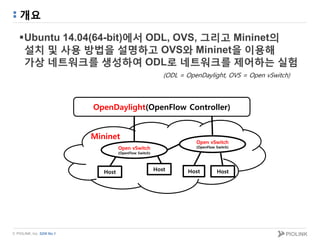
Ubuntu 14.04(64-bit)에서 ODL, OVS, 그리고 Mininet의
설치 및 사용 방법을 설명하고 OVS와 Mininet을 이용해
가상 네트워크를 생성하여 ODL로 네트워크를 제어하는 실험

(ODL = OpenDaylight, OVS = Open vSwitch)
Host
Open vSwitch
(OpenFlow Switch)
Host Host
Mininet
OpenDaylight(OpenFlow Controller)
Open vSwitch
(OpenFlow Switch)
Host
© PIOLINK, Inc. SDN No.1
OpenDaylight
ODL(OpenDayLight)
-Linux Foundation의 SDN/NFV를 위한 Open Source Software platform
-많은 관련 IT 회사들이 커뮤니티를 중심으로 SDN/NFV 발전의 가속화와
품질 향상을 위해 project에 참여 중
(참여 회사 : Cisco, Brocade, Dell, HP, Juniper, VMware, etc…)
-ODL은 표준화된 모델을 사용함으로써 platform간 이식성이 높음
-SDN Controller가 ODL의 core
-다양한 네트워크 장비 제어 protocol을 플러그인 형태로 지원
Ex) OpenFlow, OpFlex, etc...
-ODL project는 제한 없이 누구나 참여가능
© PIOLINK, Inc. SDN No.1
설치 방법(ODL)
 Pre-Built (방법 1)
- http://www.opendaylight.org/software/downloads -> 다운로드 후 압축 해제
- 압축 해제된 경로로 이동 후 Karaf 실행 슬라이드로 이동
 Source build (방법 2)
1. $ sudo apt-get install git maven python-dev python-virtualenv openjdk-7-jdk build-essential
2. $ git clone https://github.com/sdnhub/SDNHub_Opendaylight_Tutorial
3. $ cd SDNHub_Opendaylight_Tutorial
4. $ mvn install
- mvn(=maven) : Java 기반의 프로젝트를 관리 및 build 하기 위한 tool
5. $ cd ./distribution/opendaylight-karaf/target
6. $ tar xzvf distribution-karaf-0.5.0-SNAPSHOT.tar.gz
7. $ cd ./distribution-karaf-0.5.0-SNAPSHOT
© PIOLINK, Inc. SDN No.1
설치 방법(ODL)
 Build 성공 화면
<Build 성공 화면>
© PIOLINK, Inc. SDN No.1
Karaf 실행(ODL)
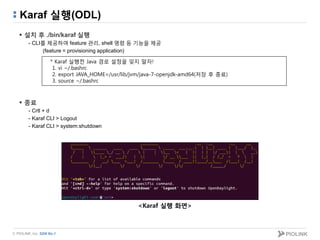
 설치 후 ./bin/karaf 실행
- CLI를 제공하여 feature 관리, shell 명령 등 기능을 제공
(feature = provisioning application)
 종료
- Crtl + d
- Karaf CLI > Logout
- Karaf CLI > system:shutdown
* Karaf 실행전 Java 경로 설정을 잊지 말자!
1. vi ~/.bashrc
2. export JAVA_HOME=/usr/lib/jvm/java-7-openjdk-amd64(저장 후 종료)
3. source ~/.bashrc
<Karaf 실행 화면>
© PIOLINK, Inc. SDN No.1
Web GUI(ODL)
1. Karaf 실행
2. feature 설치 명령을 실행
-Karaf CLI > feature:install odl-dlux-core odl-openflowplugin-all
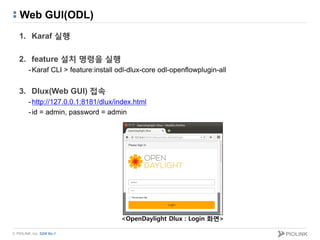
3. Dlux(Web GUI) 접속
-http://127.0.0.1:8181/dlux/index.html
-id = admin, password = admin
<OpenDaylight Dlux : Login 화면>
© PIOLINK, Inc. SDN No.1
Web GUI(ODL)
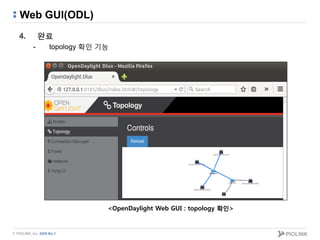
4. 완료
- topology 확인 기능
<OpenDaylight Web GUI : topology 확인>
© PIOLINK, Inc. SDN No.1
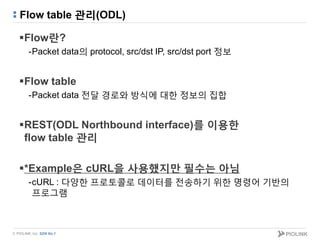
Flow table 관리(ODL)
Flow란?
-Packet data의 protocol, src/dst IP, src/dst port 정보
Flow table
-Packet data 전달 경로와 방식에 대한 정보의 집합
REST(ODL Northbound interface)를 이용한
flow table 관리
*Example은 cURL을 사용했지만 필수는 아님
-cURL : 다양한 프로토콜로 데이터를 전송하기 위한 명령어 기반의
프로그램
© PIOLINK, Inc. SDN No.1
Flow table 관리(ODL)
Flow 추가 : flow table를 추가하는 기능
-METHOD
•PUT
-Headers
•“Content-Type, Accept = application/xml”
-Body: 뒷장에 설명
-URL
•http://<contorller-IP>:8181/restconf/config/opendaylight-
inventory:nodes/node/openflow:<switch-name>/table/<table_id>/flow/<id>
-Example
• $ curl -X PUT -H "Content-Type: application/xml" --upload-file "./send.xml"
"http://127.0.0.1:8181/restconf/config/opendaylight-inventory:nodes/node/openflow:1/table/0/flow/1" -v -u
admin:admin
Body
© PIOLINK, Inc. SDN No.1
Flow table 관리(ODL)
 Flow 추가(Body)
<?xml version="1.0" encoding="UTF-8" standalone="no"?>
<flow xmlns="urn:opendaylight:flow:inventory">
<priority>1</priority>
<flow-name>0</flow-name>
<match>
………….
</match>
<id>0</id>
<table_id>0</table_id>
<instructions>
<instruction>
<order>0</order>
<apply-actions>
………….
</apply-actions>
</instruction>
</instructions>
</flow>
Flow tabla 우선순위
Flow 이름(중복 안됨)
Matching rule 정의(뒷장에 설명)
URL의 id와 같은 값
URL의 table_id와 같은 값
Action 정의(뒷장에 설명)
© PIOLINK, Inc. SDN No.1
Flow table 관리(ODL)
 Flow 추가(Body: match): 들어오는 packet data의 flow match를 위한 항목
- match
- ethernet-match
- ethernet-type
- type
- ethernet-source
- address
- ethernet-destination
- address
- in-port
- ip4-source
- ip4-destination
- ipv6-source
- ipv6-destination
- ip-match
- ip-protocol
- ip-dscp
- ip-ecn
- tcp-source-port
- tcp-destination-port
- udp-source-port
- udp-destination-port
- icmpv4-match
- icmpv4-type
- icmpv4-code
- arp-op
- arp-source-transport-address
- arp-target-transport-address
- arp-source-hardware-address
- address
- arp-target-hardware-address
- address
- vlan-match
- vlan-id
- vlan-id
- vlan-id-present
- vlan-pcp
- protocol-match-fields
- mpls-label
- mpls-tc
- mpls-bos
- tunnel
- tunnel-id
- metadata
- metadata
- metadata-mask
© PIOLINK, Inc. SDN No.1
Flow table 관리(ODL)
 Flow 추가(Body: action): 나가는 packet data의 flow action을 위한 항목
- output-node-connector 값들
•TABLE, INPORT, Physical Port #, LOCAL, NORMAL, FLOOD, ALL, CONTROLLER, ANY
- apply-actions
- action
- order
- drop-action
- dec-nw-ttl
- dec-mpls-ttl
- output-action
- output-node-connector
- max-length
© PIOLINK, Inc. SDN No.1
Flow table 관리(ODL)
 Flow 추가(Body: example)
-table=0, id=1, priority=200, in_port=1, actions=output:2
<?xml version="1.0" encoding="UTF-8" standalone="no"?>
<flow xmlns="urn:opendaylight:flow:inventory">
<priority>200</priority>
<flow-name>0</flow-name>
<id>1</id>
<table_id>0</table_id>
<match>
<in-port>1</in-port>
</match>
<instructions>
<instruction>
<order>0</order>
<apply-actions>
<action>
<order>0</order>
<output-action>
<output-node-connector>2</output-node-connector>
</output-action>
</action>
</apply-actions>
</instruction>
</instructions>
</flow>
추가적인 Example 자료 URL :
https://wiki.opendaylight.org/view/Editing_OpenDaylight_OpenFlow_Plugin:End_to_End_Flows:Example_Flows
© PIOLINK, Inc. SDN No.1
Flow table 관리(ODL)
Flow 확인 : 생성된 flow table을 확인하는 기능
-METHOD
•GET
-URL
•http://<contorller-IP>:8181/restconf/config/opendaylight-
inventory:nodes/node/openflow:<switch-name>/table/<table_id>/
-Example
•$ curl -X GET "http://127.0.0.1:8181/restconf/config/opendaylight-
inventory:nodes/node/openflow:1/table/0/" -u admin:admin
© PIOLINK, Inc. SDN No.1
Flow table 관리(ODL)
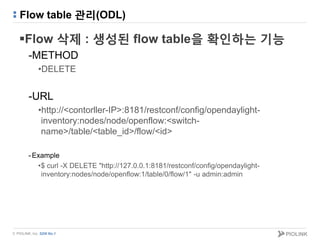
Flow 삭제 : 생성된 flow table을 확인하는 기능
-METHOD
•DELETE
-URL
•http://<contorller-IP>:8181/restconf/config/opendaylight-
inventory:nodes/node/openflow:<switch-
name>/table/<table_id>/flow/<id>
-Example
•$ curl -X DELETE "http://127.0.0.1:8181/restconf/config/opendaylight-
inventory:nodes/node/openflow:1/table/0/flow/1" -u admin:admin
© PIOLINK, Inc. SDN No.1
Open vSwitch
OVS(Open vSwitch)
-Linux 상단의 Multilayer 가상 Switch Software
-Open source Apache 2 License
-NetFlow, sFlow, SPAN, RSPAN, CLI, LACP, 등 지원
-OpenFlow를 지원하여 SDN Switch로 사용 가능
-물리 서버에 존재하는 가상 서버들을 연결시켜주는
분산 가상 스위치 기능 제공
© PIOLINK, Inc. SDN No.1
설치 방법(OVS)
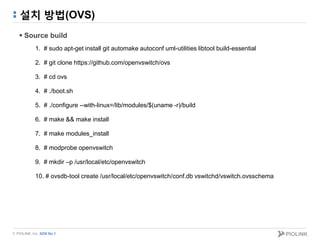
 Source build
1. # sudo apt-get install git automake autoconf uml-utilities libtool build-essential
2. # git clone https://github.com/openvswitch/ovs
3. # cd ovs
4. # ./boot.sh
5. # ./configure --with-linux=/lib/modules/$(uname -r)/build
6. # make && make install
7. # make modules_install
8. # modprobe openvswitch
9. # mkdir –p /usr/local/etc/openvswitch
10. # ovsdb-tool create /usr/local/etc/openvswitch/conf.db vswitchd/vswitch.ovsschema
© PIOLINK, Inc. SDN No.1
실행 방법(OVS)
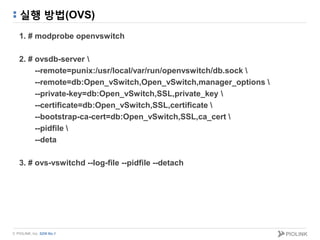
1. # modprobe openvswitch
2. # ovsdb-server 
--remote=punix:/usr/local/var/run/openvswitch/db.sock 
--remote=db:Open_vSwitch,Open_vSwitch,manager_options 
--private-key=db:Open_vSwitch,SSL,private_key 
--certificate=db:Open_vSwitch,SSL,certificate 
--bootstrap-ca-cert=db:Open_vSwitch,SSL,ca_cert 
--pidfile 
--deta
3. # ovs-vswitchd --log-file --pidfile --detach
© PIOLINK, Inc. SDN No.1
Utility(OVS)
ovs-vsctl : ovs-vswitchd(OVS daemon) 관리
-ovs-vsctl show : switch 상태 보기
(Controller, switch, host 연결 정보)
ovs-ofctl : OpenFlow Switch 관리
-ovs-ofctl dump-flows <switch name> : flow table 확인
ovs-controller
-OpenFlow Controller (OVS를 설치 시 기본 제공)
© PIOLINK, Inc. SDN No.1
Mininet
Mininet?
-Open source의 네트워크 emulator software
-네트워크 테스트, 디버깅 등의 용도로 사용 가능
-단일 Linux kernel에 수 백 개의 가상 host, switch, router로 구성된
가상 네트워크 환경을 구성할 수 있음
-가상 네트워크를 생성하는 속도가 빠름
-각 node에서 Linux 프로그램을 실행할 수 있음
Ex) wireshark, tcpdump, web server, etc…
-OpenFlow 지원
-Python API를 이용한 custom topology 생성
-사용에 편의를 위한 CLI 제공
© PIOLINK, Inc. SDN No.1
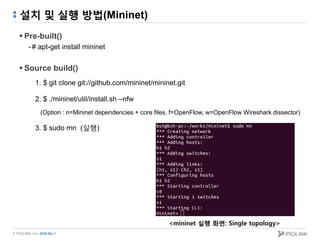
설치 및 실행 방법(Mininet)
 Pre-built()
-# apt-get install mininet
 Source build()
1. $ git clone git://github.com/mininet/mininet.git
2. $ ./mininet/util/install.sh –nfw
(Option : n=Mininet dependencies + core files, f=OpenFlow, w=OpenFlow Wireshark dissector)
3. $ sudo mn (실행)
<mininet 실행 화면: Single topology>
© PIOLINK, Inc. SDN No.1
자주 사용되는 CLI 명령어(Mininet)
 help
 xterm : node의 terminal 접속
-xterm <node name>
 ifconfig : node 정보 출력
-<node name> ifconfig
 ping
-<source node> ping <destination node>
 net : node간 연결 정보 출력
<node의 port 연결 정보>
© PIOLINK, Inc. SDN No.1
Topology 구성(Mininet)
 Command option
-$ sudo mn --topo [topology][,depth=][,fanout=]
-기본으로 지원되는 topology = linear, single, tree
•Ex) sudo mn --topo tree,depth=2,fanout=2
S1
S2 S3
1
Depth
2
1 2
fanout
1 2 1 2
H1 H2 H3 H4
© PIOLINK, Inc. SDN No.1
Topology 구성(Mininet)
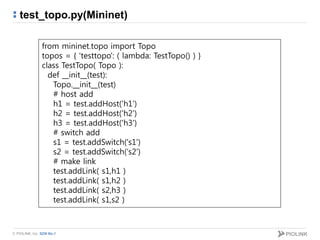
 Python API를 이용한 topology 구성
-addHost() = host 추가
-addSwitch() = switch 추가
-addLink() = link 연결
-Ex) sudo mn --custom=test_topo.py --topo testtopo
<test_topo.py : Python file 뒷장에 첨부> <testtopo>
S1
S2
H1 H2
H3
© PIOLINK, Inc. SDN No.1
test_topo.py(Mininet)
from mininet.topo import Topo
topos = { 'testtopo': ( lambda: TestTopo() ) }
class TestTopo( Topo ):
def __init__(test):
Topo.__init__(test)
# host add
h1 = test.addHost('h1')
h2 = test.addHost('h2')
h3 = test.addHost('h3')
# switch add
s1 = test.addSwitch('s1')
s2 = test.addSwitch('s2')
# make link
test.addLink( s1,h1 )
test.addLink( s1,h2 )
test.addLink( s2,h3 )
test.addLink( s1,s2 )
© PIOLINK, Inc. SDN No.1
실험
목적
-Mininet에 Python API를 이용해 두 개의 가상 switch와 네 개의 host로 구성된
가상 네트워크 환경을 생성
-생성된 네트워크를 ODL의 Web GUI로 확인
-생성된 네트워크에서 host간 교환하는 ICMP packet data를 ODL을 이용해 제어
-Mininet에 각 node의 터미널에서 packet 모니터링 프로그램(tcpdump)으로
네트워크가 제어됨을 확인
순서
1. OVS와 Mininet을 이용한 가상 네트워크 환경 구성
2. ODL과 OVS 연동
3. ODL의 Web GUI를 이용해 topology 확인
4. ODL을 이용해 가상 네트워크상의 ICMP packet data 제어
5. 각 node의 터미널에서 tcpdump를 이용해 확인
© PIOLINK, Inc. SDN No.1
실험
 실험 환경
s1
h1
Controller
s2
h2 h3 h4
1.2.
s1
h1
s2
h2 h3 h4
1.
2.
Normal Control
1. Ping request
2. Ping response
© PIOLINK, Inc. SDN No.1
실험
 Topology 구성(Mininet)
1. ODL와 OVS 실행
2. $ sudo mn --custom=./ex_topo.py --topo extopo --controller remote,port=6633
(ex_topo.py는 뒷장에 첨부)
3. $ sudo ovs-vsctl show (새로운 터미널에서 controller와 switch 연결 확인)
<Switch와 controller 연결 확인>
© PIOLINK, Inc. SDN No.1
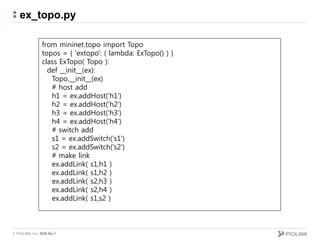
ex_topo.py
from mininet.topo import Topo
topos = { 'extopo': ( lambda: ExTopo() ) }
class ExTopo( Topo ):
def __init__(ex):
Topo.__init__(ex)
# host add
h1 = ex.addHost('h1')
h2 = ex.addHost('h2')
h3 = ex.addHost('h3')
h4 = ex.addHost('h4')
# switch add
s1 = ex.addSwitch('s1')
s2 = ex.addSwitch('s2')
# make link
ex.addLink( s1,h1 )
ex.addLink( s1,h2 )
ex.addLink( s2,h3 )
ex.addLink( s2,h4 )
ex.addLink( s1,s2 )
© PIOLINK, Inc. SDN No.1
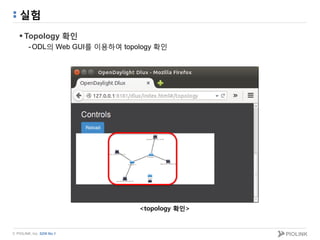
실험
 Topology 확인
-ODL의 Web GUI를 이용하여 topology 확인
<topology 확인>
© PIOLINK, Inc. SDN No.1
실험
 Node 정보
-Mininet CLI에서 net과 ifconfig 명령어로 node 정보 확인
<Mininet CLI로 확인한 node 정보>
s1
h1
s2
h2 h3 h4
eth1 eth2
eth3 eth3
eth1 eth2
node Interface MAC address IP address
s1 eth1 AA:07:D1:49:AF:B3 X
eth2 B2:66:C2:B1:97:08 X
eth3 A6:88:DF:69:68:5A X
s2 eth1 9E:41:30:C8:C0:15 X
eth2 CA:55:51:4A:5D:E3 X
eth3 2A:E8:36:D2:DB:A4 X
h1 eth0 12:CD:90:9C:9A:C0 10.0.0.1/8
h2 eth0 F2:7E:F2:AB:92:A8 10.0.0.2/8
h3 Eth0 66:50:9D:02:38:39 10.0.0.3/8
h4 Eth0 BE:D5:15:27:D6:A7 10.0.0.4/8
© PIOLINK, Inc. SDN No.1
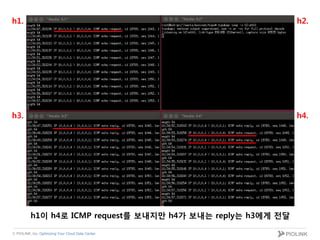
실험
 Normal case
-Mininet CLI > xterm <node name>
-Mininet CLI > h1 ping h4
h1.
h3. h4.
h2.
h1이 h4로 ICMP request를 보내고 reply를 정상적으로 받음
© PIOLINK, Inc. SDN No.1
실험
 Flow control (REST로 upload하는 XML 파일 뒷장에 첨부)
1. s1, s2에 ARP는 NORMAL action 적용(2, 3 항목 보다 priority 높게 설정)
2. s1 : in_port=1, actions=output:3
3. s2 : in_port=2, actions=output:1
4. ovs-ofctl을 이용하여 적용된 rule 확인
($ sudo ovs-ofctl dump-flows <switch name>)
1. ARP : table=0, priority=500, arp, actions=NORMAL
3. priority=300, in_port=2, actions=output:1
2. priority=300, in_port=1, actions=output:3
© PIOLINK, Inc. Optimizing Your Cloud Data Center.
h1.
h3. h4.
h2.
h1이 h4로 ICMP request를 보내지만 h4가 보내는 reply는 h3에게 전달
© PIOLINK, Inc. SDN No.1
XML file(flow control)
<?xml version="1.0" encoding="UTF-8" standalone="no"?>
<flow xmlns="urn:opendaylight:flow:inventory">
<priority>500</priority>
<flow-name>0</flow-name>
<match>
<ethernet-match>
<ethernet-type>
<type>2054</type>
</ethernet-type>
</ethernet-match>
</match>
<id>0</id>
<table_id>0</table_id>
<instructions>
<instruction>
<order>0</order>
<apply-actions>
<action>
<order>0</order>
<output-action>
<output-node-connector>NORMAL</output-node-connector>
</output-action>
</action>
</apply-actions>
</instruction>
</instructions>
</flow>
<?xml version="1.0" encoding="UTF-8" standalone="no"?>
<flow xmlns="urn:opendaylight:flow:inventory">
<priority>500</priority>
<flow-name>1</flow-name>
<match>
<ethernet-match>
<ethernet-type>
<type>2054</type>
</ethernet-type>
</ethernet-match>
</match>
<id>1</id>
<table_id>0</table_id>
<instructions>
<instruction>
<order>0</order>
<apply-actions>
<action>
<order>0</order>
<output-action>
<output-node-connector>NORMAL</output-node-connector>
</output-action>
</action>
</apply-actions>
</instruction>
</instructions>
</flow>
Switch1 ARP NOMAL action Switch2 ARP NOMAL action
ARP : 0x0806
© PIOLINK, Inc. SDN No.1
XML file(flow control)
<?xml version="1.0" encoding="UTF-8" standalone="no"?>
<flow xmlns="urn:opendaylight:flow:inventory">
<priority>300</priority>
<flow-name>2</flow-name>
<match>
<in-port>1</in-port>
</match>
<id>2</id>
<table_id>0</table_id>
<instructions>
<instruction>
<order>0</order>
<apply-actions>
<action>
<order>0</order>
<output-action>
<output-node-connector>3</output-node-connector>
</output-action>
</action>
</apply-actions>
</instruction>
</instructions>
</flow>
<?xml version="1.0" encoding="UTF-8" standalone="no"?>
<flow xmlns="urn:opendaylight:flow:inventory">
<priority>300</priority>
<flow-name>3</flow-name>
<match>
<in-port>2</in-port>
</match>
<id>3</id>
<table_id>0</table_id>
<instructions>
<instruction>
<order>0</order>
<apply-actions>
<action>
<order>0</order>
<output-action>
<output-node-connector>1</output-node-connector>
</output-action>
</action>
</apply-actions>
</instruction>
</instructions>
</flow>
Switch1 port: 1 -> 3 Switch2 port: 2 -> 1
© PIOLINK, Inc. SDN No.1
결과
Mininet에 Python API를 이용해 사용자가 원하는 topology를
생성하는 것이 가능
단일 PC에 Mininet과 OVS로 생성된 네트워크를 ODL의
Web GUI로 확인 가능
Mininet의 각 node에서 packet 모니터링 프로그램을 실행하고
이를 통해 디버깅 가능
ODL을 사용해 OpenFlow protocol로 네트워크를 제어 가능
© PIOLINK, Inc. SDN No.1
참조
 http://www.opendaylight.org
 https://wiki.opendaylight.org/
 http://www.openvswitch.org/
 http://mininet.org/
 http://wikipedia.org/
 http://sdnhub.org/
감사합니다.
㈜파이오링크
서울시 금천구 가산디지털2로 98
(가산동 550-1) IT캐슬 1동 401호
TEL: 02-2025-6900
FAX: 02-2025-6901
www.PIOLINK.com

Open vSwitch와 Mininet을 이용한 가상 네트워크 생성과 OpenDaylight를 사용한 네트워크 제어실험

  • 1.
    Open vSwitch와 Mininet을이용한 가상 네트워크 생성과 OpenDaylight를 사용한 네트워크 제어실험 2015.03.16 ㈜파이오링크 SDN개발실 백승훈 (sh.baek@piolink.com)
  • 2.
    © PIOLINK, Inc.SDN No.1 목차  개요  OpenDaylight 설치 및 사용 방법  Open vSwitch 설치 및 사용 방법  Mininet 설치 및 사용 방법  실험
  • 3.
    © PIOLINK, Inc.SDN No.1 개요 Ubuntu 14.04(64-bit)에서 ODL, OVS, 그리고 Mininet의 설치 및 사용 방법을 설명하고 OVS와 Mininet을 이용해 가상 네트워크를 생성하여 ODL로 네트워크를 제어하는 실험 (ODL = OpenDaylight, OVS = Open vSwitch) Host Open vSwitch (OpenFlow Switch) Host Host Mininet OpenDaylight(OpenFlow Controller) Open vSwitch (OpenFlow Switch) Host
  • 4.
    © PIOLINK, Inc.SDN No.1 OpenDaylight ODL(OpenDayLight) -Linux Foundation의 SDN/NFV를 위한 Open Source Software platform -많은 관련 IT 회사들이 커뮤니티를 중심으로 SDN/NFV 발전의 가속화와 품질 향상을 위해 project에 참여 중 (참여 회사 : Cisco, Brocade, Dell, HP, Juniper, VMware, etc…) -ODL은 표준화된 모델을 사용함으로써 platform간 이식성이 높음 -SDN Controller가 ODL의 core -다양한 네트워크 장비 제어 protocol을 플러그인 형태로 지원 Ex) OpenFlow, OpFlex, etc... -ODL project는 제한 없이 누구나 참여가능
  • 5.
    © PIOLINK, Inc.SDN No.1 설치 방법(ODL)  Pre-Built (방법 1) - http://www.opendaylight.org/software/downloads -> 다운로드 후 압축 해제 - 압축 해제된 경로로 이동 후 Karaf 실행 슬라이드로 이동  Source build (방법 2) 1. $ sudo apt-get install git maven python-dev python-virtualenv openjdk-7-jdk build-essential 2. $ git clone https://github.com/sdnhub/SDNHub_Opendaylight_Tutorial 3. $ cd SDNHub_Opendaylight_Tutorial 4. $ mvn install - mvn(=maven) : Java 기반의 프로젝트를 관리 및 build 하기 위한 tool 5. $ cd ./distribution/opendaylight-karaf/target 6. $ tar xzvf distribution-karaf-0.5.0-SNAPSHOT.tar.gz 7. $ cd ./distribution-karaf-0.5.0-SNAPSHOT
  • 6.
    © PIOLINK, Inc.SDN No.1 설치 방법(ODL)  Build 성공 화면 <Build 성공 화면>
  • 7.
    © PIOLINK, Inc.SDN No.1 Karaf 실행(ODL)  설치 후 ./bin/karaf 실행 - CLI를 제공하여 feature 관리, shell 명령 등 기능을 제공 (feature = provisioning application)  종료 - Crtl + d - Karaf CLI > Logout - Karaf CLI > system:shutdown * Karaf 실행전 Java 경로 설정을 잊지 말자! 1. vi ~/.bashrc 2. export JAVA_HOME=/usr/lib/jvm/java-7-openjdk-amd64(저장 후 종료) 3. source ~/.bashrc <Karaf 실행 화면>
  • 8.
    © PIOLINK, Inc.SDN No.1 Web GUI(ODL) 1. Karaf 실행 2. feature 설치 명령을 실행 -Karaf CLI > feature:install odl-dlux-core odl-openflowplugin-all 3. Dlux(Web GUI) 접속 -http://127.0.0.1:8181/dlux/index.html -id = admin, password = admin <OpenDaylight Dlux : Login 화면>
  • 9.
    © PIOLINK, Inc.SDN No.1 Web GUI(ODL) 4. 완료 - topology 확인 기능 <OpenDaylight Web GUI : topology 확인>
  • 10.
    © PIOLINK, Inc.SDN No.1 Flow table 관리(ODL) Flow란? -Packet data의 protocol, src/dst IP, src/dst port 정보 Flow table -Packet data 전달 경로와 방식에 대한 정보의 집합 REST(ODL Northbound interface)를 이용한 flow table 관리 *Example은 cURL을 사용했지만 필수는 아님 -cURL : 다양한 프로토콜로 데이터를 전송하기 위한 명령어 기반의 프로그램
  • 11.
    © PIOLINK, Inc.SDN No.1 Flow table 관리(ODL) Flow 추가 : flow table를 추가하는 기능 -METHOD •PUT -Headers •“Content-Type, Accept = application/xml” -Body: 뒷장에 설명 -URL •http://<contorller-IP>:8181/restconf/config/opendaylight- inventory:nodes/node/openflow:<switch-name>/table/<table_id>/flow/<id> -Example • $ curl -X PUT -H "Content-Type: application/xml" --upload-file "./send.xml" "http://127.0.0.1:8181/restconf/config/opendaylight-inventory:nodes/node/openflow:1/table/0/flow/1" -v -u admin:admin Body
  • 12.
    © PIOLINK, Inc.SDN No.1 Flow table 관리(ODL)  Flow 추가(Body) <?xml version="1.0" encoding="UTF-8" standalone="no"?> <flow xmlns="urn:opendaylight:flow:inventory"> <priority>1</priority> <flow-name>0</flow-name> <match> …………. </match> <id>0</id> <table_id>0</table_id> <instructions> <instruction> <order>0</order> <apply-actions> …………. </apply-actions> </instruction> </instructions> </flow> Flow tabla 우선순위 Flow 이름(중복 안됨) Matching rule 정의(뒷장에 설명) URL의 id와 같은 값 URL의 table_id와 같은 값 Action 정의(뒷장에 설명)
  • 13.
    © PIOLINK, Inc.SDN No.1 Flow table 관리(ODL)  Flow 추가(Body: match): 들어오는 packet data의 flow match를 위한 항목 - match - ethernet-match - ethernet-type - type - ethernet-source - address - ethernet-destination - address - in-port - ip4-source - ip4-destination - ipv6-source - ipv6-destination - ip-match - ip-protocol - ip-dscp - ip-ecn - tcp-source-port - tcp-destination-port - udp-source-port - udp-destination-port - icmpv4-match - icmpv4-type - icmpv4-code - arp-op - arp-source-transport-address - arp-target-transport-address - arp-source-hardware-address - address - arp-target-hardware-address - address - vlan-match - vlan-id - vlan-id - vlan-id-present - vlan-pcp - protocol-match-fields - mpls-label - mpls-tc - mpls-bos - tunnel - tunnel-id - metadata - metadata - metadata-mask
  • 14.
    © PIOLINK, Inc.SDN No.1 Flow table 관리(ODL)  Flow 추가(Body: action): 나가는 packet data의 flow action을 위한 항목 - output-node-connector 값들 •TABLE, INPORT, Physical Port #, LOCAL, NORMAL, FLOOD, ALL, CONTROLLER, ANY - apply-actions - action - order - drop-action - dec-nw-ttl - dec-mpls-ttl - output-action - output-node-connector - max-length
  • 15.
    © PIOLINK, Inc.SDN No.1 Flow table 관리(ODL)  Flow 추가(Body: example) -table=0, id=1, priority=200, in_port=1, actions=output:2 <?xml version="1.0" encoding="UTF-8" standalone="no"?> <flow xmlns="urn:opendaylight:flow:inventory"> <priority>200</priority> <flow-name>0</flow-name> <id>1</id> <table_id>0</table_id> <match> <in-port>1</in-port> </match> <instructions> <instruction> <order>0</order> <apply-actions> <action> <order>0</order> <output-action> <output-node-connector>2</output-node-connector> </output-action> </action> </apply-actions> </instruction> </instructions> </flow> 추가적인 Example 자료 URL : https://wiki.opendaylight.org/view/Editing_OpenDaylight_OpenFlow_Plugin:End_to_End_Flows:Example_Flows
  • 16.
    © PIOLINK, Inc.SDN No.1 Flow table 관리(ODL) Flow 확인 : 생성된 flow table을 확인하는 기능 -METHOD •GET -URL •http://<contorller-IP>:8181/restconf/config/opendaylight- inventory:nodes/node/openflow:<switch-name>/table/<table_id>/ -Example •$ curl -X GET "http://127.0.0.1:8181/restconf/config/opendaylight- inventory:nodes/node/openflow:1/table/0/" -u admin:admin
  • 17.
    © PIOLINK, Inc.SDN No.1 Flow table 관리(ODL) Flow 삭제 : 생성된 flow table을 확인하는 기능 -METHOD •DELETE -URL •http://<contorller-IP>:8181/restconf/config/opendaylight- inventory:nodes/node/openflow:<switch- name>/table/<table_id>/flow/<id> -Example •$ curl -X DELETE "http://127.0.0.1:8181/restconf/config/opendaylight- inventory:nodes/node/openflow:1/table/0/flow/1" -u admin:admin
  • 18.
    © PIOLINK, Inc.SDN No.1 Open vSwitch OVS(Open vSwitch) -Linux 상단의 Multilayer 가상 Switch Software -Open source Apache 2 License -NetFlow, sFlow, SPAN, RSPAN, CLI, LACP, 등 지원 -OpenFlow를 지원하여 SDN Switch로 사용 가능 -물리 서버에 존재하는 가상 서버들을 연결시켜주는 분산 가상 스위치 기능 제공
  • 19.
    © PIOLINK, Inc.SDN No.1 설치 방법(OVS)  Source build 1. # sudo apt-get install git automake autoconf uml-utilities libtool build-essential 2. # git clone https://github.com/openvswitch/ovs 3. # cd ovs 4. # ./boot.sh 5. # ./configure --with-linux=/lib/modules/$(uname -r)/build 6. # make && make install 7. # make modules_install 8. # modprobe openvswitch 9. # mkdir –p /usr/local/etc/openvswitch 10. # ovsdb-tool create /usr/local/etc/openvswitch/conf.db vswitchd/vswitch.ovsschema
  • 20.
    © PIOLINK, Inc.SDN No.1 실행 방법(OVS) 1. # modprobe openvswitch 2. # ovsdb-server --remote=punix:/usr/local/var/run/openvswitch/db.sock --remote=db:Open_vSwitch,Open_vSwitch,manager_options --private-key=db:Open_vSwitch,SSL,private_key --certificate=db:Open_vSwitch,SSL,certificate --bootstrap-ca-cert=db:Open_vSwitch,SSL,ca_cert --pidfile --deta 3. # ovs-vswitchd --log-file --pidfile --detach
  • 21.
    © PIOLINK, Inc.SDN No.1 Utility(OVS) ovs-vsctl : ovs-vswitchd(OVS daemon) 관리 -ovs-vsctl show : switch 상태 보기 (Controller, switch, host 연결 정보) ovs-ofctl : OpenFlow Switch 관리 -ovs-ofctl dump-flows <switch name> : flow table 확인 ovs-controller -OpenFlow Controller (OVS를 설치 시 기본 제공)
  • 22.
    © PIOLINK, Inc.SDN No.1 Mininet Mininet? -Open source의 네트워크 emulator software -네트워크 테스트, 디버깅 등의 용도로 사용 가능 -단일 Linux kernel에 수 백 개의 가상 host, switch, router로 구성된 가상 네트워크 환경을 구성할 수 있음 -가상 네트워크를 생성하는 속도가 빠름 -각 node에서 Linux 프로그램을 실행할 수 있음 Ex) wireshark, tcpdump, web server, etc… -OpenFlow 지원 -Python API를 이용한 custom topology 생성 -사용에 편의를 위한 CLI 제공
  • 23.
    © PIOLINK, Inc.SDN No.1 설치 및 실행 방법(Mininet)  Pre-built() -# apt-get install mininet  Source build() 1. $ git clone git://github.com/mininet/mininet.git 2. $ ./mininet/util/install.sh –nfw (Option : n=Mininet dependencies + core files, f=OpenFlow, w=OpenFlow Wireshark dissector) 3. $ sudo mn (실행) <mininet 실행 화면: Single topology>
  • 24.
    © PIOLINK, Inc.SDN No.1 자주 사용되는 CLI 명령어(Mininet)  help  xterm : node의 terminal 접속 -xterm <node name>  ifconfig : node 정보 출력 -<node name> ifconfig  ping -<source node> ping <destination node>  net : node간 연결 정보 출력 <node의 port 연결 정보>
  • 25.
    © PIOLINK, Inc.SDN No.1 Topology 구성(Mininet)  Command option -$ sudo mn --topo [topology][,depth=][,fanout=] -기본으로 지원되는 topology = linear, single, tree •Ex) sudo mn --topo tree,depth=2,fanout=2 S1 S2 S3 1 Depth 2 1 2 fanout 1 2 1 2 H1 H2 H3 H4
  • 26.
    © PIOLINK, Inc.SDN No.1 Topology 구성(Mininet)  Python API를 이용한 topology 구성 -addHost() = host 추가 -addSwitch() = switch 추가 -addLink() = link 연결 -Ex) sudo mn --custom=test_topo.py --topo testtopo <test_topo.py : Python file 뒷장에 첨부> <testtopo> S1 S2 H1 H2 H3
  • 27.
    © PIOLINK, Inc.SDN No.1 test_topo.py(Mininet) from mininet.topo import Topo topos = { 'testtopo': ( lambda: TestTopo() ) } class TestTopo( Topo ): def __init__(test): Topo.__init__(test) # host add h1 = test.addHost('h1') h2 = test.addHost('h2') h3 = test.addHost('h3') # switch add s1 = test.addSwitch('s1') s2 = test.addSwitch('s2') # make link test.addLink( s1,h1 ) test.addLink( s1,h2 ) test.addLink( s2,h3 ) test.addLink( s1,s2 )
  • 28.
    © PIOLINK, Inc.SDN No.1 실험 목적 -Mininet에 Python API를 이용해 두 개의 가상 switch와 네 개의 host로 구성된 가상 네트워크 환경을 생성 -생성된 네트워크를 ODL의 Web GUI로 확인 -생성된 네트워크에서 host간 교환하는 ICMP packet data를 ODL을 이용해 제어 -Mininet에 각 node의 터미널에서 packet 모니터링 프로그램(tcpdump)으로 네트워크가 제어됨을 확인 순서 1. OVS와 Mininet을 이용한 가상 네트워크 환경 구성 2. ODL과 OVS 연동 3. ODL의 Web GUI를 이용해 topology 확인 4. ODL을 이용해 가상 네트워크상의 ICMP packet data 제어 5. 각 node의 터미널에서 tcpdump를 이용해 확인
  • 29.
    © PIOLINK, Inc.SDN No.1 실험  실험 환경 s1 h1 Controller s2 h2 h3 h4 1.2. s1 h1 s2 h2 h3 h4 1. 2. Normal Control 1. Ping request 2. Ping response
  • 30.
    © PIOLINK, Inc.SDN No.1 실험  Topology 구성(Mininet) 1. ODL와 OVS 실행 2. $ sudo mn --custom=./ex_topo.py --topo extopo --controller remote,port=6633 (ex_topo.py는 뒷장에 첨부) 3. $ sudo ovs-vsctl show (새로운 터미널에서 controller와 switch 연결 확인) <Switch와 controller 연결 확인>
  • 31.
    © PIOLINK, Inc.SDN No.1 ex_topo.py from mininet.topo import Topo topos = { 'extopo': ( lambda: ExTopo() ) } class ExTopo( Topo ): def __init__(ex): Topo.__init__(ex) # host add h1 = ex.addHost('h1') h2 = ex.addHost('h2') h3 = ex.addHost('h3') h4 = ex.addHost('h4') # switch add s1 = ex.addSwitch('s1') s2 = ex.addSwitch('s2') # make link ex.addLink( s1,h1 ) ex.addLink( s1,h2 ) ex.addLink( s2,h3 ) ex.addLink( s2,h4 ) ex.addLink( s1,s2 )
  • 32.
    © PIOLINK, Inc.SDN No.1 실험  Topology 확인 -ODL의 Web GUI를 이용하여 topology 확인 <topology 확인>
  • 33.
    © PIOLINK, Inc.SDN No.1 실험  Node 정보 -Mininet CLI에서 net과 ifconfig 명령어로 node 정보 확인 <Mininet CLI로 확인한 node 정보> s1 h1 s2 h2 h3 h4 eth1 eth2 eth3 eth3 eth1 eth2 node Interface MAC address IP address s1 eth1 AA:07:D1:49:AF:B3 X eth2 B2:66:C2:B1:97:08 X eth3 A6:88:DF:69:68:5A X s2 eth1 9E:41:30:C8:C0:15 X eth2 CA:55:51:4A:5D:E3 X eth3 2A:E8:36:D2:DB:A4 X h1 eth0 12:CD:90:9C:9A:C0 10.0.0.1/8 h2 eth0 F2:7E:F2:AB:92:A8 10.0.0.2/8 h3 Eth0 66:50:9D:02:38:39 10.0.0.3/8 h4 Eth0 BE:D5:15:27:D6:A7 10.0.0.4/8
  • 34.
    © PIOLINK, Inc.SDN No.1 실험  Normal case -Mininet CLI > xterm <node name> -Mininet CLI > h1 ping h4 h1. h3. h4. h2. h1이 h4로 ICMP request를 보내고 reply를 정상적으로 받음
  • 35.
    © PIOLINK, Inc.SDN No.1 실험  Flow control (REST로 upload하는 XML 파일 뒷장에 첨부) 1. s1, s2에 ARP는 NORMAL action 적용(2, 3 항목 보다 priority 높게 설정) 2. s1 : in_port=1, actions=output:3 3. s2 : in_port=2, actions=output:1 4. ovs-ofctl을 이용하여 적용된 rule 확인 ($ sudo ovs-ofctl dump-flows <switch name>) 1. ARP : table=0, priority=500, arp, actions=NORMAL 3. priority=300, in_port=2, actions=output:1 2. priority=300, in_port=1, actions=output:3
  • 36.
    © PIOLINK, Inc.Optimizing Your Cloud Data Center. h1. h3. h4. h2. h1이 h4로 ICMP request를 보내지만 h4가 보내는 reply는 h3에게 전달
  • 37.
    © PIOLINK, Inc.SDN No.1 XML file(flow control) <?xml version="1.0" encoding="UTF-8" standalone="no"?> <flow xmlns="urn:opendaylight:flow:inventory"> <priority>500</priority> <flow-name>0</flow-name> <match> <ethernet-match> <ethernet-type> <type>2054</type> </ethernet-type> </ethernet-match> </match> <id>0</id> <table_id>0</table_id> <instructions> <instruction> <order>0</order> <apply-actions> <action> <order>0</order> <output-action> <output-node-connector>NORMAL</output-node-connector> </output-action> </action> </apply-actions> </instruction> </instructions> </flow> <?xml version="1.0" encoding="UTF-8" standalone="no"?> <flow xmlns="urn:opendaylight:flow:inventory"> <priority>500</priority> <flow-name>1</flow-name> <match> <ethernet-match> <ethernet-type> <type>2054</type> </ethernet-type> </ethernet-match> </match> <id>1</id> <table_id>0</table_id> <instructions> <instruction> <order>0</order> <apply-actions> <action> <order>0</order> <output-action> <output-node-connector>NORMAL</output-node-connector> </output-action> </action> </apply-actions> </instruction> </instructions> </flow> Switch1 ARP NOMAL action Switch2 ARP NOMAL action ARP : 0x0806
  • 38.
    © PIOLINK, Inc.SDN No.1 XML file(flow control) <?xml version="1.0" encoding="UTF-8" standalone="no"?> <flow xmlns="urn:opendaylight:flow:inventory"> <priority>300</priority> <flow-name>2</flow-name> <match> <in-port>1</in-port> </match> <id>2</id> <table_id>0</table_id> <instructions> <instruction> <order>0</order> <apply-actions> <action> <order>0</order> <output-action> <output-node-connector>3</output-node-connector> </output-action> </action> </apply-actions> </instruction> </instructions> </flow> <?xml version="1.0" encoding="UTF-8" standalone="no"?> <flow xmlns="urn:opendaylight:flow:inventory"> <priority>300</priority> <flow-name>3</flow-name> <match> <in-port>2</in-port> </match> <id>3</id> <table_id>0</table_id> <instructions> <instruction> <order>0</order> <apply-actions> <action> <order>0</order> <output-action> <output-node-connector>1</output-node-connector> </output-action> </action> </apply-actions> </instruction> </instructions> </flow> Switch1 port: 1 -> 3 Switch2 port: 2 -> 1
  • 39.
    © PIOLINK, Inc.SDN No.1 결과 Mininet에 Python API를 이용해 사용자가 원하는 topology를 생성하는 것이 가능 단일 PC에 Mininet과 OVS로 생성된 네트워크를 ODL의 Web GUI로 확인 가능 Mininet의 각 node에서 packet 모니터링 프로그램을 실행하고 이를 통해 디버깅 가능 ODL을 사용해 OpenFlow protocol로 네트워크를 제어 가능
  • 40.
    © PIOLINK, Inc.SDN No.1 참조  http://www.opendaylight.org  https://wiki.opendaylight.org/  http://www.openvswitch.org/  http://mininet.org/  http://wikipedia.org/  http://sdnhub.org/
  • 41.
    감사합니다. ㈜파이오링크 서울시 금천구 가산디지털2로98 (가산동 550-1) IT캐슬 1동 401호 TEL: 02-2025-6900 FAX: 02-2025-6901 www.PIOLINK.com