S E O
Copywriting for SEO
CRO tips
Site Audit
WordPress SEO
S E O
Each session = 40 minutes
- 25 minutes for the presentation
- 15 minutes for Q&A session
Use #semrushlive hashtag!
4 awesome sessions
Our Panel Of Experts
Chris Burgess Tim CapperJim Stewart Frederic Chanut
@chrisburgess @jimboot @GuideTwit @InMktuWeTrust
#semrushlive
#SEMRUSHLIVE
(for quotes and
questions)
COPYWRITING FOR
SEARCH SUCCESS
Jim Stewart
@jimboot
CEO Stew Art Media
Copywri(ng	for	search	success	
Featured	Answers	
	
Jim	Stewart		
@jimboot	
@stewartmedia	
Stewartmedia.com.au	
100s	of	videos	
Youtube.com/jimboot
Featured	Answers	
stewartmedia.com.au
State	Of	Search	2015	
stewartmedia.com.au
Case	Study	
Client:	Problogger.net	
Featured	Answer:	Make	money	blogging	
stewartmedia.com.au
stewartmedia.com.au
stewartmedia.com.au	
•  Ini(ally	ranked	no.6	for	aMachment_id	
•  2	other	posts	ranking	spliOng	authority	
•  Fix	“media	page”	issues	
•  Went	to	no.1	below	featured	answer
FEAR	
•  Rewrite	the	no.1	spot	copy	
•  Incorporate	ranking	elements	
•  Add	featured	answer	elements
stewartmedia.com.au
stewartmedia.com.au	
Numbered	answers	as	H3
stewartmedia.com.au	
Awesome	internal		
resource	list
stewartmedia.com.au	
Did	not	use	our	
main	image
stewartmedia.com.au
Finding	The	Ques(on	
stewartmedia.com.au
24	hours	a]er	republishing	
stewartmedia.com.au
Summary	
•  Be	on	page	1	organically	–	low	as	six	
•  Ask	&	Answer	–	prefer	explicitly	
•  At	least	25%	increase	in	traffic	so	far	
•  Assumes	best	prac(ce		
stewartmedia.com.au
stewartmedia.com.au	
My	Details	
• 03	8545	5900	
• Stewartmedia.com.au	
• @jimboot	
• Youtube/jimboot
BASIC E-COMMERCE
SITE AUDIT
Tim Capper
@GuideTwit
Director of Search at
Online Ownership
Beginners guide to Auditing your E-Commerce site. We cover the most common problems
encountered within an E-Commerce site, and how to check for these problems using both
free and paid tools.
Basic E-Commerce Site Audit
onlineownership.com
plus.google.com/+TimCapper
!  Tools
!  Canonicalization
!  Visibility ( robot.txt & sitemap )
!  Mobile Friendly and AMP
!  Crawl errors & redirects
!  Site & Page speed
!  Images
!  Content
!  SEO wins
E-Commerce Site Audit
onlineownership.com
plus.google.com/+TimCapper
!  You
!  SEMrush
!  Google Search Console ( formerly webmaster tools )
!  Google Page Speed Test
!  Google Mobile Friendly Test
!  Google Structured Data Testing Tool
!  IIS Search Engine Optimization (SEO) Toolkit ( iss.net )
!  Varvy.com ( formerly feed the bot )
Tools for Site Audit
onlineownership.com
plus.google.com/+TimCapper
Domain canonicalization or redirection to the preferred domain is normally taken care of by
most e-commerce CMS systems, however this may only be top level, so it is worth checking
category down to product level.
It is Crucial that you get your sites redirection rules correct !
Domain Canonicalization
onlineownership.com
plus.google.com/+TimCapper
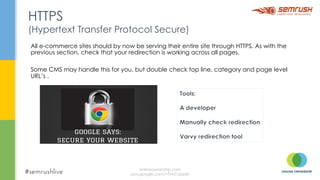
All e-commerce sites should by now be serving their entire site through HTTPS. As with the
previous section, check that your redirection is working across all pages.
Some CMS may handle this for you, but double check top line, category and page level
URL’s .
HTTPS
(Hypertext Transfer Protocol Secure)
onlineownership.com
plus.google.com/+TimCapper
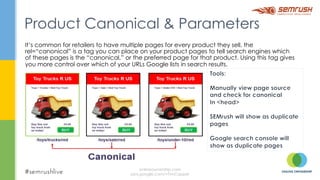
It’s common for retailers to have multiple pages for every product they sell. the
rel=“canonical” is a tag you can place on your product pages to tell search engines which
of these pages is the “canonical,” or the preferred page for that product. Using this tag gives
you more control over which of your URLs Google lists in search results.
Product Canonical & Parameters
onlineownership.com
plus.google.com/+TimCapper
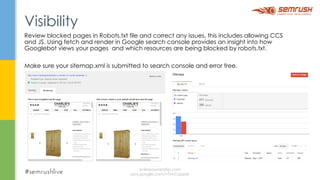
Review blocked pages in Robots.txt file and correct any issues, this includes allowing CCS
and JS. Using fetch and render in Google search console provides an insight into how
Googlebot views your pages and which resources are being blocked by robots.txt.
Make sure your sitemap.xml is submitted to search console and error free.
Visibility
onlineownership.com
plus.google.com/+TimCapper
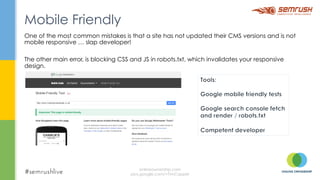
One of the most common mistakes is that a site has not updated their CMS versions and is not
mobile responsive … slap developer!
The other main error, is blocking CSS and JS in robots.txt, which invalidates your responsive
design.
Mobile Friendly
onlineownership.com
plus.google.com/+TimCapper
Fix internal links to any 404 pages. Review redirects are they correct ( 301 or 302 ). Check for
any crawl errors, are they intended. Check 404 pages, do they have any equity, can they be
redirected?
Crawl Errors & Redirects
onlineownership.com
plus.google.com/+TimCapper
Use page speed insights to help diagnose where content of a web page is slowing down the
display of a page. Insights also provides suggestions to help improve the page speed.
Site & Page Speed
onlineownership.com
plus.google.com/+TimCapper
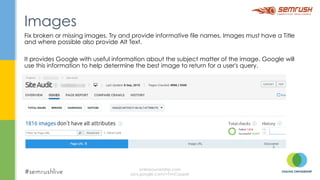
Fix broken or missing images. Try and provide informative file names. Images must have a Title
and where possible also provide Alt Text.
It provides Google with useful information about the subject matter of the image. Google will
use this information to help determine the best image to return for a user's query.
Images
onlineownership.com
plus.google.com/+TimCapper
This is your one shot to sell your product. Provide unique and descriptive information about
your sites Pages, especially your products.
You have 7 sec to make an impression to the customer, don’t blow it by not taking the time to
sell the product.
Content
onlineownership.com
plus.google.com/+TimCapper
Structured Data Markup ( schema ):
!  for site pages ( find your best fit )
!  product markup on product pages
!  review markup.
Blog
!  on main domain
!  provide useful and informative information for your customers.
Google Business Page
!  If your business has a physical address, create a Google business page. Branding for your name that
money cant buy.
Seasonal Landing Pages
!  Don’t 404 these till next season. Provide information about next seasons products, what to expect,
launch date, email alert signup.
SEO Wins
onlineownership.com
plus.google.com/+TimCapper
onlineownership.com
plus.google.com/+TimCapper
10 TECHNIQUES TO
CONVERT YOUR
SEARCH VISITS
Frederic Chanut
@InMktuWeTrust
Managing Director of In
Marketing We Trust
TECHNIQUES TO
CONVERT YOUR
SEARCH VISITS
Frederic Chanut
Managing Director In Marketing We Trust
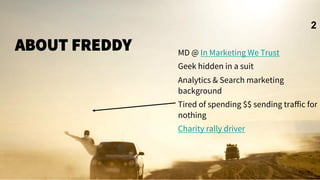
ABOUT FREDDY

MD @ In Marketing We Trust
Geek hidden in a suit
Analytics & Search marketing
background
Tired of spending $$ sending traffic for
nothing
Charity rally driver
2
ON AVERAGE ONLINE ADVERTISERS
#SEMRUSHLIVE
Spend $92 to bring Traffic
3
Source:
Econsultancy & redeye report 2012
OPTIMISE YOUR
SEARCH SNIPPET
LIKE AN AD
4
OPTIMISE YOUR SEARCH
SNIPPET LIKE AN AD
1.  Be Specific
2.  Highlight your Unique Selling
Proposition
3.  Don’t forget your keywords
4.  Include A Call to Action
5.  Stand Out from your Competitors
6.  Get Right To the Point
7.  Ad Formatting is Important
8.  Display URL is a part of your Ad
Copy
9.  Test…Test & Test
5
WILL YOU CLICK?
No Call to Action
6
WILL YOU CLICK?
Match your users Goals
7
SNIPPETS PLEASE!
8
RICH SNIPPETS CAN BOOST
CTR
BY 20-30%
Paul Bruemmer on SearchEngineLand
10
How likely
This one will
Attract your
Attention?
HUMANS PROCESS
VISUALS
60,000 X FASTER
THAN TEXT
11
KEEP IT STUPID
SIMPLE
1
2
ARE YOU LANDING PAGES THE
BEST ANSWER FOR THEIR QUERIES
Query Clicks Landing
Call to
Action
13
KEEP IT SIMPLE
‣  One page
‣  One purpose
‣  One ‘cluster’ of words
‣  One best answer*
Credit: @Aschottmuller
14
GOOD CONTENT CONVERTS
‘Content is the single easiest and potent
factor to test and improve in most
conversion optimisation campaigns’
‣  Brian Massey, The Conversion Scientist
15
WATCH YOUR
BOUNCE/EXIT
1
6
ON YOUR TOP SEO LANDING
PAGES. WHY ARE PEOPLE LEAVING
WHAT ANSWERS ARE THEY LOOKING
FOR?
‣  Vitamin < Painkiller <Narcotic. 
Relieve pain or better, get them hooked
18
MATCH LANDING
PAGE WITH INTENT 
1
9
REDUCE LANDING PAGE BOUNCE
RATE DUE TO MISALIGNMENT
20
Article Worth Reading
ARE THEY READY
TO BUY?
Users give you hints
based on the
query use
Source
21
HOW TO MAKE A LANDING PAGE THAT
CONVERTS
‣  C = Clear Call to Action
‣  O = Offer
‣  N = Narrow Focus
‣  V = VIA: Very Important Attributes
‣  E = Effective Headline
‣  R = Resolution-Savvy Layout
‣  T = Tidy Visuals
‣  S = Social Proof
22
DESIGN FOR YOUR
SPECIFIC AUDIENCE/
PERSONA
2
3
WHY SEGMENTATION ?
We treat all visitors the same 
24
But we know they are unique
APPLYING PERSONAS TO OUR TRAFFIC
UNCOVERS DIFFERENT ON-SITE
BEHAVIOURS AND ISSUES
Article on better tracking using GTM
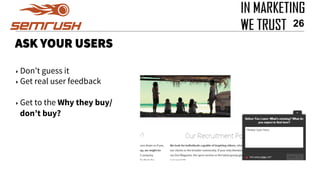
ASK YOUR USERS
‣ Don’t guess it
‣ Get real user feedback
‣ Get to the Why they buy/
don’t buy?
26
USE INTERNAL
SEARCH DATA
2
7
SITE SEARCH, PROBABLY THE MOST UNDERRATED
CRO TOOL
28
FIND TOP EXIT PAGES. WHICH TERMS ARE YOU
NOT FULLFULLING
29
These guys
didn’t find
what they
were looking
for
TRACK THE RIGHT
METRICS
3
0
IF A METRIC WON’T
CHANGE THE WAY YOU BEHAVE
THEN IT’S A BAD METRIC
Ben Yoskovitz
@byosko, author lean Analytics
31
ORGANIC SEARCH CONVERSION
FUNNEL
32
Credit:Angie Schottmuller @Aschottmuller
Frederic Chanut
Managing Director, In Marketing We Trust
e. frederic@inmarketingwetrust.com.au
www.inmarketingwetrust.com.au
Connect with us
33
Keep
in touch if you
want feedback
on your own
strategy
WORDPRESS SEO
TIPS AND TRICKS
Chris Burgess
@chrisburgess
Co-founder at Clickify and
Editor at SitePoint Technology
WordPress SEO Tips
Chris Burgess
@chrisburgess
chrisburgess.com.au
WordPress Basics
WordPress has evolved from:
Blog > CMS > Framework
A lot of WordPress Themes
will offer SEO features
Avoid using these features, Themes
are for look and feel. Lean, lightweight
themes are best. Plugins are what
should be used for extra functionality.
Keep your site lean and mean
While plugins are great, don’t just
install for the sake of it! Only install
what’s critical. Regularly clean up and
deactivate any you don’t use to help
with performance.
By default, WordPress is
Search Engine friendly
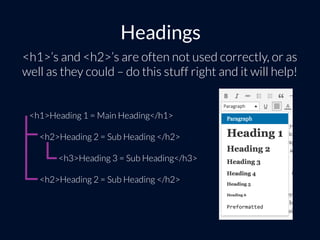
Headings
<h1>’s and <h2>’s are often not used correctly, or as
well as they could – do this stuff right and it will help!
<h1>Heading 1 = Main Heading</h1>
<h2>Heading 2 = Sub Heading </h2>
<h3>Heading 3 = Sub Heading</h3>
<h2>Heading 2 = Sub Heading </h2>
Keywords/Topics
Naturally include your keyword/topic and variations
of it in your page title, meta description, content and
images.
Utilising Category Pages
Utilise Category Pages
Using Yoast and WordPress category settings
https://codex.wordpress.org/Category_Templates
If category description is not supported by your theme you might need to
include the following to display the text at the top of your category template
(usually category.php or archive.php)
<?php echo category_description( $category_id ); ?>
http://www.dandenongrangespoint.com.au/attractions/
Category Page Example
Category description located at top of page…
http://www.dandenongrangespoint.com.au/attractions/
Category Page Example
…category blog posts then follow underneath.
Which leads us to the big Y
WordPress SEO by Yoast
All In One SEO is also very popular, but we’ll
be talking about WordPress SEO by Yoast.
However, many of the same principles apply if
you prefer a different plugin.
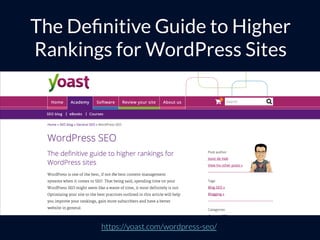
https://yoast.com/wordpress-seo/
The Definitive Guide to Higher
Rankings for WordPress Sites
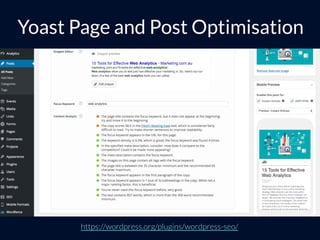
https://wordpress.org/plugins/wordpress-seo/
Yoast Page and Post Optimisation
Tools – Yoast SEO
https://wordpress.org/plugins/wordpress-seo/
Tools – Yoast SEO
https://wordpress.org/plugins/wordpress-seo/
Tools – Yoast SEO
Screen Options
Select ‘Screen Options’ to drop down options panel to
view Yoast SEO fields next to your posts and pages
Yoast SEO Quick Edit Fields
Quick Edit before installing the plugin
https://wordpress.org/plugins/quick-edit-fields-for-yoast-seo/
Yoast SEO Quick Edit Fields
After installing the plugin you can see the additional
Yoast Settings now in Quick Edit
https://wordpress.org/plugins/quick-edit-fields-for-yoast-seo/
Beyond Yoast
Even though Yoast can manage
the majority of SEO-related
functionality, there a few more
plugins that come in handy…
The Right Tool for the Job
Don’t use WordPress for everything
Link Checking Plugins
These plugins can consume a lot of resources, they
are often banned from high-end hosts.
Use Xenu, Integrity, Screaming Frog, Botify, Deep
Crawler or Google Search Console
Autolinking Plugins
They can create horrible, unnatural content.
Linking is important, so control your internal and
external links to help strengthen your content and
improve user experience.
Less is more
Poorly written plugins can cause
performance, maintenance and
security issues. Choose wisely!
Other Plugins
There are a range of other plugins
that do help with SEO and I’ll cover
some popular ones now.
✔
P3 - Plugin Performance Profiler
Data on plugin performance
https://wordpress.org/plugins/p3-profiler/
https://wordpress.org/plugins/restricted-site-access/
Restricted Site Access
Managing Redirections
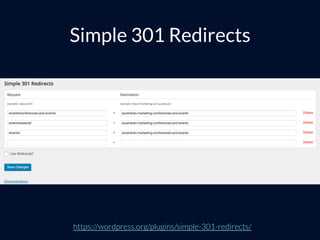
Simple 301 Redirects
https://wordpress.org/plugins/simple-301-redirects/
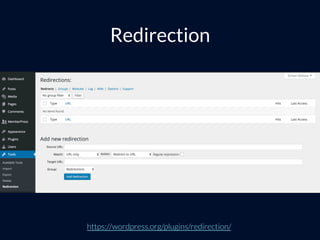
Redirection
https://wordpress.org/plugins/redirection/
Simple URLs
https://wordpress.org/plugins/simple-urls/
Mapping 301 Redirects
https://builtvisible.com/mapping-301-redirects-for-seo-friendly-site-migrations/
rel=“nofollow”
Rel NoFollow Checkbox
https://wordpress.org/plugins/rel-nofollow-checkbox/
Image Optimisation
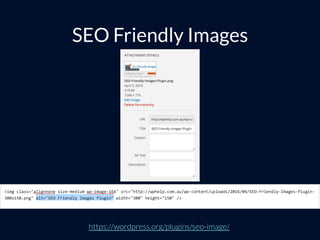
SEO Friendly Images
https://wordpress.org/plugins/seo-image/
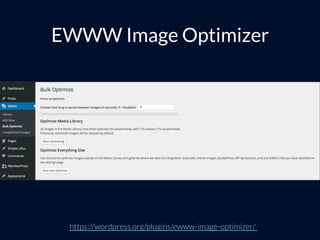
EWWW Image Optimizer
https://wordpress.org/plugins/ewww-image-optimizer/
Imsanity
https://wordpress.org/plugins/imsanity/
HTML Sitemap
WP SEO HTML Sitemap Plugin
https://wordpress.org/plugins/wp-seo-html-sitemap/
Adapt
Good search marketing isn’t just
about technology, it’s also about
being able to quickly adapt.
Utilising Schema
Schema
“Schema.org is a collaborative, community
activity with a mission to create, maintain,
and promote schemas for structured data
on the Internet, on web pages, in email
messages, and beyond.”
http://schema.org
Here are some examples…
Review Schema
Recipe Schema
Event Schema
Product Schema
Here are some examples…
https://developers.google.com/structured-data/testing-tool/
Structured Data Testing Tool
Local SEO Plugin
https://yoast.com/wordpress/plugins/local-seo/
 
•  https://wordpress.org/plugins/schema-creator/
•  https://wordpress.org/plugins/all-in-one-schemaorg-rich-snippets/ 
•  https://wordpress.org/plugins/rich-reviews/
•  https://wordpress.org/plugins/schema-app-structured-data-for-schemaorg/
•  https://wordpress.org/plugins/rich-contact-widget/
 
Schema Plugins
 
•  http://schema.org/
•  https://developers.google.com/structured-data/policies
•  https://moz.com/learn/seo/schema-structured-data
 
Schema Resources
Note: We’ll have a talk on Schema coming up at the SEO Meetup soon!
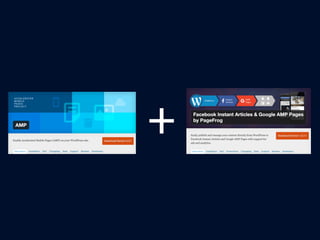
Accelerated Mobile Pages, Instant
Articles and Apple News
https://wordpress.org/plugins/amp/
AMP
https://wordpress.org/plugins/glue-for-yoast-seo-amp/
Glue for Yoast SEO & AMP
https://wordpress.org/plugins/pagefrog/
Facebook Instant Articles &
Google AMP Pages by PageFrog
+
Thanks!
Any questions?
@chrisburgess
chrisburgess.com.au
Online SEO Meetup

Online SEO Meetup