By Debby Caven of Digital Touch Education
A Point to Ponder
 “To design is much more than simply to
 assemble, to order, or even to edit; it is to add value
 and meaning, to illuminate, to simplify, to clarify, to
 modify, to dignify, to dramatize, to persuade, and
 perhaps even to amuse.”

                     ~ Paul Rand
                     Author, graphic designer,
                     teacher
Welcome WEMTA Attendees!
Your presenter for today is:
Debby Caven / debbycaven@mac.com

• Former Educator of 28 years
• SMART Certified Trainer
       • InfoCor, WEI
• Online Certified Teacher
       • eClass4learning
• MEIT from Cardinal Stritch University
• Adjunct professor
       •Viterbo University,
       • Cardinal Stritch University
       • George Williams College of Aurora
       University
Agenda for This Morning
                      Learning Outcomes and Working Backwards
Building the Course
    Foundation        The Online Syllabus and Building Your Lessons


  Elements of an      Taking a tour of a Blended Learning Online Course
  Online Course:      with eClass4learning
      A Tour


  Language &          Clear, concise writing
  Writing Style       Tone, writing instructions and labeling


  Visual Design       Page Layout
     Basics           Text and Graphic Elements
Building the Course Foundation:


           Learning Outcomes


           The Online Course Syllabus


           The Course Outline

           From Course Outline to
           Lessons
Learning Outcomes:

• At the core of a process that creates courses

• Assures the learner of rigor and complexity of
  course

• Provides teacher with clear guidelines for
  developing the online course
Learning Outcome Requirements:

• Are measurable and specific

• Wording is clear and definite

• Course material is sufficient and is directly related

 to learning outcomes
Learning Outcome Requirements: (con’t.)

• Resources and activities support learning

 outcomes

• Assessments determine the degree the

 outcomes have been achieved by students
Writing Learning Outcomes p. 1:

• Be specific

• Be clear and concise

• Clarify why learners are doing something as well as
 what they are doing.
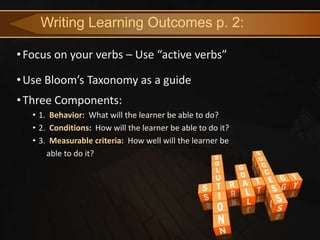
Writing Learning Outcomes p. 2:

• Focus on your verbs – Use “active verbs”

• Use Bloom’s Taxonomy as a guide
• Three Components:
   • 1. Behavior: What will the learner be able to do?
   • 2. Conditions: How will the learner be able to do it?
   • 3. Measurable criteria: How well will the learner be
       able to do it?
Writing Learning Outcomes p. 3:

• See Figure A.3 from the book, Essentials of Online Course
 Design by Marjorie Vai and Kristen Sosulski

• Sets up a format for writing learning outcomes
Figure A-3, page 187: Components of a Learning Outcome


            Behavior             Conditions              Measurable
                                                          Criteria

Explain how….                In a 10 minute video        See Syllabus
                                 presentation
Describe the Process….   In a paper of no more than      See Syllabus
                                 200 words
Show how….                    In a 3 page report         See Syllabus

Outline….                      In a lesson plan          See Syllabus

Analyze….                In writing on your Discussion   See Syllabus
                                     Forum
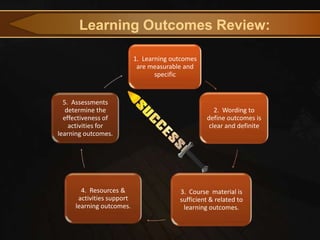
Learning Outcomes Review:

                           1. Learning outcomes
                            are measurable and
                                  specific


  5. Assessments
   determine the                                     2. Wording to
  effectiveness of                                define outcomes is
    activities for                                 clear and definite
learning outcomes.


       4. Resources &                    3. Course material is
      activities support                 sufficient & related to
     learning outcomes.                   learning outcomes.
The Online Syllabus
• Contains many of the same elements as an onsite syllabus
• The core organizing document for both the teachers and
  students

• The place where students go to find out everything they need to
  know about:
       ✓Course requirements
       ✓Evaluation process
       ✓Contact information
       ✓Schedule
       ✓School policies
The Online Syllabus (cont.)
• Must be comprehensive and clear – it is the backbone of your
  course
• Gives students a clear sense of the teacher’s expectations for
  performance – student knows what it will take for him/her to
  succeed
• A framework for teachers – this is your starting point
Elements of an Online Syllabus
• Basic elements of an onsite syllabus:
        Course Title
        Course Name
        Course Description
        Course Objectives
        Evaluation Plan
        Grading
        Required Readings
        Recommended Readings
        Course Outline
Elements of an Online Syllabus (cont.)
• Special characteristics of an Online Syllabus:
      ★ A communication strategy
      ★ A clear description of the course time frame & format
      ★ Guidelines for online class participation
      ★ Technical requirements and support
      ★ A detailed course outline with start and end dates
Elements of an Online Syllabus (cont.)
Communication Strategy:
       • A description of how and when students can
contact you via email, phone, chat, etc.
       • Important to indicate when you will return emails
and phone messages.
Elements of an Online Syllabus (cont.)

A Clear Description of the Course Time Frame & Format:
 Clearly indicate the synchronous and asynchronous components of
  your course
 Include the requirements for class participation in your syllabus and
  count those activities as part of the course grade
 Include a rubric for class participation – leaves little room for
  confusion
Elements of an Online Syllabus (cont.)

A Clear Description of the Course Time Frame & Format:
Elements of an Online Syllabus (cont.)

Guideines for Class Participation:
 Students should be required to contribute substantially to the
  discussion forum at a minimum of 2 to 3 times per week
 Include requirements for class participation in your syllabus and make
  this a part of your course grade
 Rubric leaves little room for confusion.
Elements of an Online Syllabus (cont.)

Guidelines for Class Participation:
Elements of an Online Syllabus (cont.)

Technical Requirements & Support:
 Do not forget to include how students can get help if they are having
  trouble accessing the course.
 Be sure to emphasize the technical requirements of your Learning
  Management System
Elements of an Online Syllabus (cont.)
Technical Requirements & Support:
Elements of an Online Syllabus (cont.)

Course Outline:
 This serves as a calendar and a “to do” list
 Presents a sequence of
  events, assignments, readings, activities and course
  deliverables
 Many items are just a carry-over from the syllabus
Elements of an Online Syllabus (cont.)
Course Outline:
Time for a Tour! eClass4learning Site

Let’s look at a completed online course and briefly
        view the elements we just discussed.

         eClass4learning Blended Course
eClass4learning Site

Other elements found in an online course:

       • Announcements
       • Syllabus
       • Lessons/Topics
       • Discussion forums
       • Dropbox / Assignment uploads
       • Resources
       • Grade book
       • Course emails
eClass4learning Site

More “advanced features” in an online course:

       • Blogs
       • Wikis
       • Tests / Quizzes
       • Online Texts

In Moodle version 2.3 ……….
eClass4learning Site
Language & Writing Style

Clear, concise writing addresses the needs of all
types of online learners

       • It removes one barrier to good communication and
understanding

        • Using clear, concise writing models an accessible
style that learners might emulate
Language & Writing Style
Writing Style:


       “Less is more” “Keep it simple”
                 Motto of Ludwig Mies van der Rohe

       or ……


       “Keep it simple”
                 Per Debby Caven 😃
Language & Writing Style
Paragraphs:

Enormous blocks of print look formidable to a reader. He has a
certain reluctance to tackle them; he can lose his way in them.
Therefore, breaking a paragraph in two, even thought it is not
necessary to do so for sense, meaning, or logical development, is
often a visual help.

                                     ~ Strunk, Jr. 1918

Avoid the scroll of death!

                                     ~ Debby Caven 2013
                              😃
Language & Writing Style

Other Brief Thoughts on Writing:


      • Clear and concise sentences / brief and to the point
      • Familiar or common words are used
      • Jargon, cliches and colloquial and idiomatic   expressions
are avoided.
      • Provide a glossary or definitions when needed
Language & Writing Style

Other Brief Thoughts on Writing: (cont.)


      • Tone is important – a supportive second-person
      conversational tone
      • Labeling is accurate, readable and clear
      • Instructions and requirements are stated simply,
      clearly and logically
      • Course material has been edited for language and
      grammar
Visual Design Basics
 “Online material should be attractive. This is different than
 simply clear text and well-organized material. It should be
 graphically appealing. Researchers at the University of
 British Colombia rated 127 online courses according to 43
 criteria. They found that how a course looks can be just as
 important as the lessons themselves.”

                               ~ Madden (1999)
Visual Design Basics:
              Three Thoughts to Ponder:

1. Good visual design supports understanding through
   simplicity, clarity and organization.

2. Nothing on the page distracts from communication.

3. An open, clear, attractive page design
  enhances communication.

The Red Pyramid Test Site
Visual Design Basics
• Remember that content presented is visual

• Text online replaces speaking through a medium perceived
  as being visual

• Our “digital pros” are used to visual variety
    • The content they see has been reduced, broken
      up, illustrated

   Let’s look at readability on the web through the eyes
Understanding the Use of White Space
Let’s look at readability on the web through the eyes of readability.com
Visual Design Basics: Page Layout


          ~ Open means:
          1. Enough white space on the page to keep the mind
 clear.
         2. Enough white space to allow the online student to
 feel that they are not overburdened
 with the task at hand.
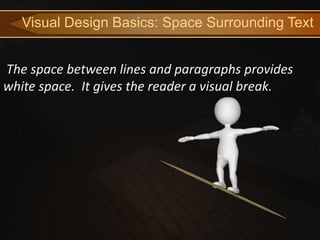
Visual Design Basics: Space Surrounding Text


The space between lines and paragraphs provides
white space. It gives the reader a visual break.
Visual Design Basics: Justification / Headings
   • Text should be left-justified and right margins ragged
      • Justified text is not as readable due to inconsistent
        spacing
   • Headings and subheadings are used consistently to
    logically organize content
Visual Design Basics: Text

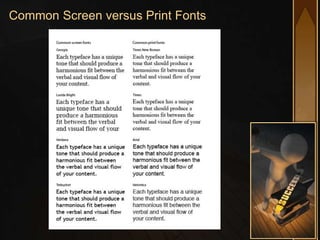
   • Web-safe typefaces: Use sans serif for mobile
   devices (i.e. Arial, Helvetica, Verdana)
          • Enhances screen readability for all platforms
   • Type size should be large enough to be read by all
   students
          • Should be at least a 12-point
Common Screen versus Print Fonts
Visual Design Basics: Text (continued)

 • Bold type should be used sparingly for effective
 use
 • Italicized type is difficult to read online.
 • Underlining is used only for hyperlinks
 • Words in all caps are avoided
Visual Design Basics: Text (continued)
 Color with Care!
 • Contrast is an important factor in readability
 • Color is good for emphasis
 • Readability depends on contrast
Visual Design Basics: Text (continued)
 Color with Care!
 • Warning!!! Always keep focused on color’s power
 to distract.
 • Color should be used with purpose
 • There should be good contrast between text
 and background
Visual Design Basics: Text (continued)
Visual Design Basics: Graphic Elements

Symbols & Icons
      • Useful in signaling small elements in a
website that appear over and over again.
       • Icons immediately signal the presence of a
certain feature
       • Icons can also signal certain types of
activities.
             • Students know what to expect
when they see and icon / Helpful to all learners
Visual Design Basics: Graphic Elements

The Noun Project
• “The Noun Project collects, organizes and adds to
 the highly recognizable symbols that form the
 world's visual language, so we may share them in
 a fun and meaningful way.” All images are free.
Visual Design Basics: Graphic Elements

Bullets & Numbers in a Series
• Use bullets or numbers to set apart items that
  can be listed
• Numbers are used to identify sequential steps in
  a task or process. They are also used for rankings
  and setting priorities
• Bullets are used to highlight a series of items that
  are not prioritized or sequential.
Main Resource for this Presentation
Accompanying Web Site
 • Essentials for Online Course Design Supplemental Site
Time for Questions/Comments
Thank You for Your Time and Attendance!
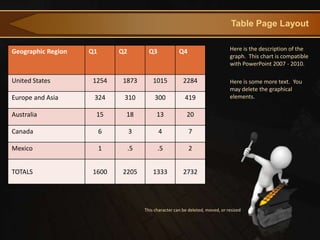
Table Page Layout


Geographic Region   Q1       Q2          Q3             Q4                       Here is the description of the
                                                                                 graph. This chart is compatible
                                                                                 with PowerPoint 2007 - 2010.

United States       1254     1873          1015           2284                   Here is some more text. You
                                                                                 may delete the graphical
Europe and Asia      324      310           300            419                   elements.

Australia            15       18             13             20

Canada                   6        3           4              7

Mexico                   1        .5          .5             2


TOTALS              1600     2205          1333           2732


                                       This character can be deleted, moved, or resized
Animated Content Page
 This page contains a video element and is optimized to work
 with PowerPoint 2010.

 Static versions of all
 layouts are also
 available.
Animated or Static?


 You can change
 between static and
 animated layouts by
 clicking on the Layout
 tab in the HOME
 menu on the ribbon.


 For example this slide
 uses the static layout.
Useful Clipart and Images
Alternate Content Page
An alternate content page.

   FORGING
Bulleted Content Page
 • This Layout Page has bullets
    • And Indented Levels
        • Level 3 Text Placeholder
            • Level 4 Place Holder
                 • Level 5 Place Holder
Agenda or Summary Layout
  Click Mouse Reveal Next Phase


                                  Discussion Item One – Phase 1
   Phase 1                        A Placeholder for text


   Phase 2                        Discussion Item Two – Phase 2
                                  A Placeholder for text


                                  Discussion Item Three – Phase 3
   Phase 3
                                  A Placeholder for text


                                  Discussion Item Four – Phase 4
   Phase 4
                                  A Placeholder for text
Main Content Page Layout
This text is a placeholder.
Here is the second level.
You may change this text
Here is the third level
Formatting is controlled
by the slide master
and the layout pages.
There is a third level
And even a fourth level
Two Picture Page Layout


                 A placeholder for the second picture
                 More information can be added here by
                 changing this text.
                 Make changes to this text.


                 A placeholder for the second picture
                 More information can be added here by
                 changing this text.
                 Make changes to this text.
Three Picture Page Layout


A description of the     A description of the    A description of the
first picture. You may   second picture. You     third picture. You
change this text.        may change this text.   may change this text.

A description of the     A description of the    A description of the
first picture. You may   second picture. You     third picture. You
change this text.        may change this text.   may change this text.
Bar Graph Page Layout

                                                                             Here is the description of the
                                 Chart Title                                 graph. This chart is compatible
                Series 1              Series 2          Series 3             with PowerPoint 2007 - 2010.

                                                                     5       Here is some more text. You
                                                         4.5                 may delete the graphical
4.3                        4.4                                               elements.

                                        3.5
                                                    3          2.8
      2.4           2.5
            2                     2           1.8
Pie Graph Page Layout

                                     Here is the description of the
                                     graph. This chart is compatible
                                     with PowerPoint 2007 - 2010.
                    Chart Title
          4th Qtr
            9%                       Here is some more text. You
                                     may delete the graphical
                                     elements.
  3rd Qtr
   10%

                    1st Qtr
                     58%
2nd Qtr
 23%
Line Chart Page Layout

               Chart Title                   Here is the description of the
                                             graph. This chart is compatible
    Series 1       Series 2   Series 3       with PowerPoint 2007 - 2010.
6
                                             Here is some more text. You
5                                            may delete the graphical
                                             elements.
4

3

2

1

0
Bar Graph Page Layout

                                                                Here is the description of the
                        Chart Title                             graph. This chart is compatible
                                                                with PowerPoint 2007 - 2010.
      Series 1                Series 2           Series 3
                                                                Here is some more text. You
                                                                may delete the graphical
                                                                elements.
5
4
3
2
1
0
    Category 1
                 Category 2
                              Category 3
                                           Category 4
Pie Graph Page Layout

                                                 Here is the description of the
           Chart Title                           graph. This chart is compatible
                                                 with PowerPoint 2007 - 2010.
1st Qtr   2nd Qtr         3rd Qtr   4th Qtr
                                                 Here is some more text. You
                                                 may delete the graphical
                                                 elements.
          58%


                                    23%
          9%        10%
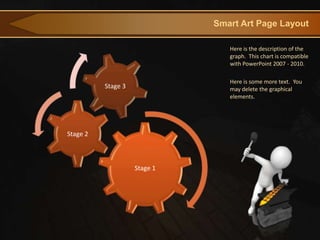
Smart Art Page Layout

                                 Here is the description of the
                                 graph. This chart is compatible
                                 with PowerPoint 2007 - 2010.

                                 Here is some more text. You
          Stage 3                may delete the graphical
                                 elements.


Stage 2


                    Stage 1
Smart Art Page Layout

                                                                      This chart utilizes Smart Art
                         1. Learning outcomes                         which is feature in PowerPoint
                          are measurable and                          2007 - 2010.
                                specific


  5. Assessments
   determine the                                   2. Wording to
  effectiveness of                              define outcomes is
    activities for                               clear and definite
learning outcomes.


                                         3. Course material
           4. Resources &                   is sufficient &
          activities support             related to learning
         learning outcomes.                   outcomes.
Smart Art Page Layout

                                                      This chart utilizes Smart Art
                                                      which is feature in PowerPoint
                    Process 1                         2007 - 2010.
                 A placeholder
                   for text for
                      more
                  information


   Process 3                         Process 2
A placeholder                     A placeholder
  for text for                      for text for
     more                              more
 information                       information
Picture Page Layout
Here is a place holder for the picture caption. You may delete this text.
Questions?   More Information?
                        PresenterMedia.com
                        support@presentermedia.com

                        4416 S. Technology Dr.
                        Sioux Falls, SD 57106

Online course design basics

  • 1.
    By Debby Cavenof Digital Touch Education
  • 2.
    A Point toPonder “To design is much more than simply to assemble, to order, or even to edit; it is to add value and meaning, to illuminate, to simplify, to clarify, to modify, to dignify, to dramatize, to persuade, and perhaps even to amuse.” ~ Paul Rand Author, graphic designer, teacher
  • 3.
    Welcome WEMTA Attendees! Yourpresenter for today is: Debby Caven / debbycaven@mac.com • Former Educator of 28 years • SMART Certified Trainer • InfoCor, WEI • Online Certified Teacher • eClass4learning • MEIT from Cardinal Stritch University • Adjunct professor •Viterbo University, • Cardinal Stritch University • George Williams College of Aurora University
  • 4.
    Agenda for ThisMorning Learning Outcomes and Working Backwards Building the Course Foundation The Online Syllabus and Building Your Lessons Elements of an Taking a tour of a Blended Learning Online Course Online Course: with eClass4learning A Tour Language & Clear, concise writing Writing Style Tone, writing instructions and labeling Visual Design Page Layout Basics Text and Graphic Elements
  • 5.
    Building the CourseFoundation: Learning Outcomes The Online Course Syllabus The Course Outline From Course Outline to Lessons
  • 6.
    Learning Outcomes: • Atthe core of a process that creates courses • Assures the learner of rigor and complexity of course • Provides teacher with clear guidelines for developing the online course
  • 7.
    Learning Outcome Requirements: •Are measurable and specific • Wording is clear and definite • Course material is sufficient and is directly related to learning outcomes
  • 8.
    Learning Outcome Requirements:(con’t.) • Resources and activities support learning outcomes • Assessments determine the degree the outcomes have been achieved by students
  • 9.
    Writing Learning Outcomesp. 1: • Be specific • Be clear and concise • Clarify why learners are doing something as well as what they are doing.
  • 10.
    Writing Learning Outcomesp. 2: • Focus on your verbs – Use “active verbs” • Use Bloom’s Taxonomy as a guide • Three Components: • 1. Behavior: What will the learner be able to do? • 2. Conditions: How will the learner be able to do it? • 3. Measurable criteria: How well will the learner be able to do it?
  • 11.
    Writing Learning Outcomesp. 3: • See Figure A.3 from the book, Essentials of Online Course Design by Marjorie Vai and Kristen Sosulski • Sets up a format for writing learning outcomes
  • 12.
    Figure A-3, page187: Components of a Learning Outcome Behavior Conditions Measurable Criteria Explain how…. In a 10 minute video See Syllabus presentation Describe the Process…. In a paper of no more than See Syllabus 200 words Show how…. In a 3 page report See Syllabus Outline…. In a lesson plan See Syllabus Analyze…. In writing on your Discussion See Syllabus Forum
  • 13.
    Learning Outcomes Review: 1. Learning outcomes are measurable and specific 5. Assessments determine the 2. Wording to effectiveness of define outcomes is activities for clear and definite learning outcomes. 4. Resources & 3. Course material is activities support sufficient & related to learning outcomes. learning outcomes.
  • 14.
    The Online Syllabus •Contains many of the same elements as an onsite syllabus • The core organizing document for both the teachers and students • The place where students go to find out everything they need to know about: ✓Course requirements ✓Evaluation process ✓Contact information ✓Schedule ✓School policies
  • 15.
    The Online Syllabus(cont.) • Must be comprehensive and clear – it is the backbone of your course • Gives students a clear sense of the teacher’s expectations for performance – student knows what it will take for him/her to succeed • A framework for teachers – this is your starting point
  • 16.
    Elements of anOnline Syllabus • Basic elements of an onsite syllabus:  Course Title  Course Name  Course Description  Course Objectives  Evaluation Plan  Grading  Required Readings  Recommended Readings  Course Outline
  • 17.
    Elements of anOnline Syllabus (cont.) • Special characteristics of an Online Syllabus: ★ A communication strategy ★ A clear description of the course time frame & format ★ Guidelines for online class participation ★ Technical requirements and support ★ A detailed course outline with start and end dates
  • 18.
    Elements of anOnline Syllabus (cont.) Communication Strategy: • A description of how and when students can contact you via email, phone, chat, etc. • Important to indicate when you will return emails and phone messages.
  • 19.
    Elements of anOnline Syllabus (cont.) A Clear Description of the Course Time Frame & Format:  Clearly indicate the synchronous and asynchronous components of your course  Include the requirements for class participation in your syllabus and count those activities as part of the course grade  Include a rubric for class participation – leaves little room for confusion
  • 20.
    Elements of anOnline Syllabus (cont.) A Clear Description of the Course Time Frame & Format:
  • 21.
    Elements of anOnline Syllabus (cont.) Guideines for Class Participation:  Students should be required to contribute substantially to the discussion forum at a minimum of 2 to 3 times per week  Include requirements for class participation in your syllabus and make this a part of your course grade  Rubric leaves little room for confusion.
  • 22.
    Elements of anOnline Syllabus (cont.) Guidelines for Class Participation:
  • 23.
    Elements of anOnline Syllabus (cont.) Technical Requirements & Support:  Do not forget to include how students can get help if they are having trouble accessing the course.  Be sure to emphasize the technical requirements of your Learning Management System
  • 24.
    Elements of anOnline Syllabus (cont.) Technical Requirements & Support:
  • 25.
    Elements of anOnline Syllabus (cont.) Course Outline:  This serves as a calendar and a “to do” list  Presents a sequence of events, assignments, readings, activities and course deliverables  Many items are just a carry-over from the syllabus
  • 26.
    Elements of anOnline Syllabus (cont.) Course Outline:
  • 27.
    Time for aTour! eClass4learning Site Let’s look at a completed online course and briefly view the elements we just discussed. eClass4learning Blended Course
  • 28.
    eClass4learning Site Other elementsfound in an online course: • Announcements • Syllabus • Lessons/Topics • Discussion forums • Dropbox / Assignment uploads • Resources • Grade book • Course emails
  • 29.
    eClass4learning Site More “advancedfeatures” in an online course: • Blogs • Wikis • Tests / Quizzes • Online Texts In Moodle version 2.3 ……….
  • 30.
  • 31.
    Language & WritingStyle Clear, concise writing addresses the needs of all types of online learners • It removes one barrier to good communication and understanding • Using clear, concise writing models an accessible style that learners might emulate
  • 32.
    Language & WritingStyle Writing Style: “Less is more” “Keep it simple” Motto of Ludwig Mies van der Rohe or …… “Keep it simple” Per Debby Caven 😃
  • 33.
    Language & WritingStyle Paragraphs: Enormous blocks of print look formidable to a reader. He has a certain reluctance to tackle them; he can lose his way in them. Therefore, breaking a paragraph in two, even thought it is not necessary to do so for sense, meaning, or logical development, is often a visual help. ~ Strunk, Jr. 1918 Avoid the scroll of death! ~ Debby Caven 2013 😃
  • 34.
    Language & WritingStyle Other Brief Thoughts on Writing: • Clear and concise sentences / brief and to the point • Familiar or common words are used • Jargon, cliches and colloquial and idiomatic expressions are avoided. • Provide a glossary or definitions when needed
  • 35.
    Language & WritingStyle Other Brief Thoughts on Writing: (cont.) • Tone is important – a supportive second-person conversational tone • Labeling is accurate, readable and clear • Instructions and requirements are stated simply, clearly and logically • Course material has been edited for language and grammar
  • 36.
    Visual Design Basics “Online material should be attractive. This is different than simply clear text and well-organized material. It should be graphically appealing. Researchers at the University of British Colombia rated 127 online courses according to 43 criteria. They found that how a course looks can be just as important as the lessons themselves.” ~ Madden (1999)
  • 37.
    Visual Design Basics: Three Thoughts to Ponder: 1. Good visual design supports understanding through simplicity, clarity and organization. 2. Nothing on the page distracts from communication. 3. An open, clear, attractive page design enhances communication. The Red Pyramid Test Site
  • 38.
    Visual Design Basics •Remember that content presented is visual • Text online replaces speaking through a medium perceived as being visual • Our “digital pros” are used to visual variety • The content they see has been reduced, broken up, illustrated Let’s look at readability on the web through the eyes
  • 39.
    Understanding the Useof White Space Let’s look at readability on the web through the eyes of readability.com
  • 40.
    Visual Design Basics:Page Layout ~ Open means: 1. Enough white space on the page to keep the mind clear. 2. Enough white space to allow the online student to feel that they are not overburdened with the task at hand.
  • 41.
    Visual Design Basics:Space Surrounding Text The space between lines and paragraphs provides white space. It gives the reader a visual break.
  • 42.
    Visual Design Basics:Justification / Headings • Text should be left-justified and right margins ragged • Justified text is not as readable due to inconsistent spacing • Headings and subheadings are used consistently to logically organize content
  • 43.
    Visual Design Basics:Text • Web-safe typefaces: Use sans serif for mobile devices (i.e. Arial, Helvetica, Verdana) • Enhances screen readability for all platforms • Type size should be large enough to be read by all students • Should be at least a 12-point
  • 44.
  • 45.
    Visual Design Basics:Text (continued) • Bold type should be used sparingly for effective use • Italicized type is difficult to read online. • Underlining is used only for hyperlinks • Words in all caps are avoided
  • 46.
    Visual Design Basics:Text (continued) Color with Care! • Contrast is an important factor in readability • Color is good for emphasis • Readability depends on contrast
  • 47.
    Visual Design Basics:Text (continued) Color with Care! • Warning!!! Always keep focused on color’s power to distract. • Color should be used with purpose • There should be good contrast between text and background
  • 48.
    Visual Design Basics:Text (continued)
  • 49.
    Visual Design Basics:Graphic Elements Symbols & Icons • Useful in signaling small elements in a website that appear over and over again. • Icons immediately signal the presence of a certain feature • Icons can also signal certain types of activities. • Students know what to expect when they see and icon / Helpful to all learners
  • 50.
    Visual Design Basics:Graphic Elements The Noun Project • “The Noun Project collects, organizes and adds to the highly recognizable symbols that form the world's visual language, so we may share them in a fun and meaningful way.” All images are free.
  • 51.
    Visual Design Basics:Graphic Elements Bullets & Numbers in a Series • Use bullets or numbers to set apart items that can be listed • Numbers are used to identify sequential steps in a task or process. They are also used for rankings and setting priorities • Bullets are used to highlight a series of items that are not prioritized or sequential.
  • 52.
    Main Resource forthis Presentation
  • 53.
    Accompanying Web Site • Essentials for Online Course Design Supplemental Site
  • 54.
  • 55.
    Thank You forYour Time and Attendance!
  • 59.
    Table Page Layout GeographicRegion Q1 Q2 Q3 Q4 Here is the description of the graph. This chart is compatible with PowerPoint 2007 - 2010. United States 1254 1873 1015 2284 Here is some more text. You may delete the graphical Europe and Asia 324 310 300 419 elements. Australia 15 18 13 20 Canada 6 3 4 7 Mexico 1 .5 .5 2 TOTALS 1600 2205 1333 2732 This character can be deleted, moved, or resized
  • 60.
    Animated Content Page This page contains a video element and is optimized to work with PowerPoint 2010. Static versions of all layouts are also available.
  • 61.
    Animated or Static? You can change between static and animated layouts by clicking on the Layout tab in the HOME menu on the ribbon. For example this slide uses the static layout.
  • 62.
  • 63.
    Alternate Content Page Analternate content page.
  • 64.
    An alternate contentpage. FORGING
  • 65.
    Bulleted Content Page • This Layout Page has bullets • And Indented Levels • Level 3 Text Placeholder • Level 4 Place Holder • Level 5 Place Holder
  • 66.
    Agenda or SummaryLayout Click Mouse Reveal Next Phase Discussion Item One – Phase 1 Phase 1 A Placeholder for text Phase 2 Discussion Item Two – Phase 2 A Placeholder for text Discussion Item Three – Phase 3 Phase 3 A Placeholder for text Discussion Item Four – Phase 4 Phase 4 A Placeholder for text
  • 67.
    Main Content PageLayout This text is a placeholder. Here is the second level. You may change this text Here is the third level Formatting is controlled by the slide master and the layout pages. There is a third level And even a fourth level
  • 68.
    Two Picture PageLayout A placeholder for the second picture More information can be added here by changing this text. Make changes to this text. A placeholder for the second picture More information can be added here by changing this text. Make changes to this text.
  • 69.
    Three Picture PageLayout A description of the A description of the A description of the first picture. You may second picture. You third picture. You change this text. may change this text. may change this text. A description of the A description of the A description of the first picture. You may second picture. You third picture. You change this text. may change this text. may change this text.
  • 70.
    Bar Graph PageLayout Here is the description of the Chart Title graph. This chart is compatible Series 1 Series 2 Series 3 with PowerPoint 2007 - 2010. 5 Here is some more text. You 4.5 may delete the graphical 4.3 4.4 elements. 3.5 3 2.8 2.4 2.5 2 2 1.8
  • 71.
    Pie Graph PageLayout Here is the description of the graph. This chart is compatible with PowerPoint 2007 - 2010. Chart Title 4th Qtr 9% Here is some more text. You may delete the graphical elements. 3rd Qtr 10% 1st Qtr 58% 2nd Qtr 23%
  • 72.
    Line Chart PageLayout Chart Title Here is the description of the graph. This chart is compatible Series 1 Series 2 Series 3 with PowerPoint 2007 - 2010. 6 Here is some more text. You 5 may delete the graphical elements. 4 3 2 1 0
  • 73.
    Bar Graph PageLayout Here is the description of the Chart Title graph. This chart is compatible with PowerPoint 2007 - 2010. Series 1 Series 2 Series 3 Here is some more text. You may delete the graphical elements. 5 4 3 2 1 0 Category 1 Category 2 Category 3 Category 4
  • 74.
    Pie Graph PageLayout Here is the description of the Chart Title graph. This chart is compatible with PowerPoint 2007 - 2010. 1st Qtr 2nd Qtr 3rd Qtr 4th Qtr Here is some more text. You may delete the graphical elements. 58% 23% 9% 10%
  • 75.
    Smart Art PageLayout Here is the description of the graph. This chart is compatible with PowerPoint 2007 - 2010. Here is some more text. You Stage 3 may delete the graphical elements. Stage 2 Stage 1
  • 76.
    Smart Art PageLayout This chart utilizes Smart Art 1. Learning outcomes which is feature in PowerPoint are measurable and 2007 - 2010. specific 5. Assessments determine the 2. Wording to effectiveness of define outcomes is activities for clear and definite learning outcomes. 3. Course material 4. Resources & is sufficient & activities support related to learning learning outcomes. outcomes.
  • 77.
    Smart Art PageLayout This chart utilizes Smart Art which is feature in PowerPoint Process 1 2007 - 2010. A placeholder for text for more information Process 3 Process 2 A placeholder A placeholder for text for for text for more more information information
  • 78.
    Picture Page Layout Hereis a place holder for the picture caption. You may delete this text.
  • 79.
    Questions? More Information? PresenterMedia.com support@presentermedia.com 4416 S. Technology Dr. Sioux Falls, SD 57106