On hyper-local web pages
Dmitry Namiot, Manfred Sneps-Sneppe
Lomonosov Moscow State University,
Ventspils University College
dnamiot@gmail.com,
manfreds.sneps@gmail.com
Network proximity
• A special model for context-aware
services
• Context described as a set of wireless
networks (nodes)
• Wi-Fi access points, Bluetooth nodes,
Bluetooth tags
• Data could be directly associated with
network nodes.
Context
• Context is anything we can add to location
• Models for context-aware systems:
• Data exchange depending on the context
• Situational awareness
• Context-aware data discovery and data
search
Network nodes
• Wi-Fi (Bluetooth) devices are everywhere
• Wi-Fi (Bluetooth) is presented in every
mobile phone
• Easy to measure (existing standards)
• We can reuse existing infrastructure
• There is no connection with location (geo-
coordinates)
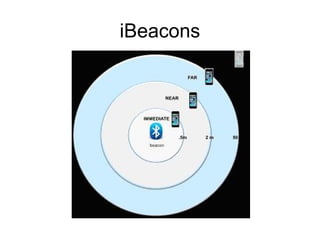
iBeacons
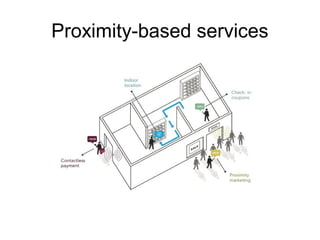
Proximity-based services
Information Service
• A set of rules:
• Network fingerprint – > data chunks
(information)
• Can use existing networks as well as
especially created wireless nodes
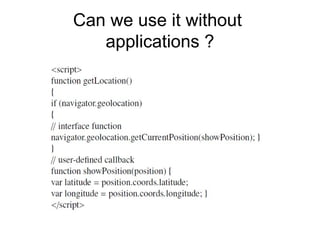
Can we use it without
applications ?
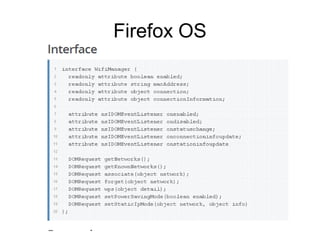
Firefox OS
Firefox OS
• This API is available on Firefox OS for
internal applications only.
• This feature is not on a current W3C
standards track
• Bluetooth API has got own interface
• Can we separate connectivity and
availability?
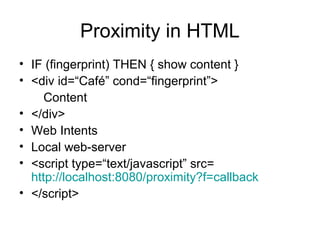
Proximity in HTML
• IF (fingerprint) THEN { show content }
• <div id=“Café” cond=“fingerprint”>
Content
• </div>
• Web Intents
• Local web-server
• <script type=“text/javascript” src=
http://localhost:8080/proximity?f=callback
• </script>
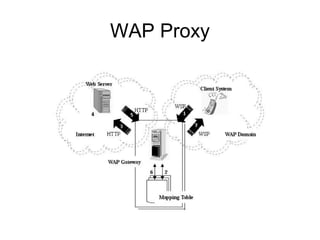
WAP Proxy
W3C Semantic Sensors
• W3C Semantic Sensor Network Incubator Group (SSN-XG):
• An ontology to describe sensors and their device, system and
platform related attributes.
• A semantic markup and recommends methods to use ontology to
describe the data available based on the existing models such as
the Open Geospatial Consortium’s (OGC) Sensor Web Enablement
(SWE) standards:
• 1.Observations & Measurements Schema (O&M). It is the XML
Schema for encoding observations and measurements from a
sensor, both archived and real-time.
• 2.Sensor Model Language (SensorML). It is a set of standard
models and XML Schema for describing sensors, systems and
processes; provides information needed for discovery of sensors,
location of sensor observations, processing of low-level sen- sor
observations, and listing of their properties. Bluetooth node could be
described as a ”standard” sensor with observable properties ”MAC-
address” and ”RSSI”. In the terms of Sensor Ontology, it should be
a simple element.
W3C Semantic Sensors
• 3.Transducer Markup Language (TransducerML or TML): the
conceptual model and XML Schema for describing transducers and
supporting real-time streaming of data to and from sensor systems.
• 4.The Sensor Observations Service (SOS) provides a standard web
service interface for requesting, filtering, and retrieving observations
and sensor system information: the proxy between a client and an
observation repository or near real-time sensor channel.
• 5.The Sensor Planning Service (SPS) is similar to SOS, but used for
the management: provides a web service interface for requesting
user-driven acquisitions and observations: the broker between a
client and a sensor collection management environment.
• 6.The Sensor Alert Service (SAS) - provides a standard web service
interface for publishing and subscribing to alerts from sensors.
• 7.The Web Notification Services (WNS) - provides a standard web
service interface for asynchronous delivery of messages or alerts
from SAS and SPS web services.
W3C Web Applications WG
• Create specifications that enable improved client-side
application development on the Web
• APIs for client-side development and for markup
vocabularies for describing and controlling client-side
application behavior.
• A part of the Rich Web Clients Activity in the W3C
Interaction Domain:
• 1.Templates: chunks of the markup that are inert, but
can be activated for use later.
• 2.Decorators: apply templates, based on CSS selectors
• 3.Custom Elements: let authors (developers) define their
own elements, with new tag names and new script
interfaces. There are so-called widgets.
Widgets
• Widgets are defined as full-fledged client-
side applications
• Widgets are authored using technologies
such as HTML, then packaged for
distribution and, typically, downloaded and
installed on a client machine or device
• Could be run as standalone applications,
and embedded into Web pages and run in
a Web browser.
W3C Ubiquitous Web Domain WG
• Technologies to enable Web access for anyone, anywhere,
anytime, using any device: Web access from mobile phones as well
as other emerging environments such as consumer electronics,
interactive television, automobiles
• The Device APIs and Policy Working Group: client side
programming interfaces and security polices to enable Web
applications and widgets to access device services, including the
calendar, contacts, camera, etc. Proximity Events interface:
• The DeviceProximityEvent interface provides web developers
information about the distance between the hosting device and a
nearby object.
• The UserProximityEvent interface provides web developers a user-
agent and platform-specific approximation that the hosting device
has sensed a nearby object.
W3C Ubiquitous Web Domain WG
• This is achieved by interrogating a proximity sensor of a device,
which is a sensor that can detect the presence of a physical object
without physical contact.
• Not all devices contain a proximity sensor
• Supports so-called proximity sensors. They can use radiation (e.g.,
an infrared light or a magnetic field), certain material properties can
interfere with the sensor’s ability to sense the presence of a physical
object.
• Conceptually, covers the network proximity too. But nobody threats
wireless network nodes as potential things in proximity tasks.
• There is a sub-division of this group which targets Network API:
declare the interest on the network connectivity only.
• The network proximity deserves a separate API. For example, there
is an existing initiative for NFC related Web API, and we see no
reasons why more widespread Bluetooth and Wi-Fi have not such
development.
Android Web View
• As a workaround and prototype for this development, we
can present a custom WebView for Android.
• On Android platform is possible to access from
JavaScript to Java code for a web page, loaded into
WebView control.
• Java code will provide a list of nearby network nodes
(calculate the network fingerprint).
• The key moment here is the need for an asynchronous
call from JavaScript, because scanning for wireless
networks in Java is the asynchronous process.
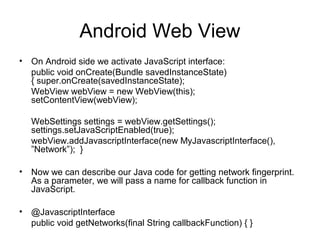
Android Web View
• On Android side we activate JavaScript interface:
public void onCreate(Bundle savedInstanceState)
{ super.onCreate(savedInstanceState);
WebView webView = new WebView(this);
setContentView(webView);
WebSettings settings = webView.getSettings();
settings.setJavaScriptEnabled(true);
webView.addJavascriptInterface(new MyJavascriptInterface(),
”Network”); }
• Now we can describe our Java code for getting network fingerprint.
As a parameter, we will pass a name for callback function in
JavaScript.
• @JavascriptInterface
public void getNetworks(final String callbackFunction) { }

On hyper-local web pages

  • 1.
    On hyper-local webpages Dmitry Namiot, Manfred Sneps-Sneppe Lomonosov Moscow State University, Ventspils University College dnamiot@gmail.com, manfreds.sneps@gmail.com
  • 2.
    Network proximity • Aspecial model for context-aware services • Context described as a set of wireless networks (nodes) • Wi-Fi access points, Bluetooth nodes, Bluetooth tags • Data could be directly associated with network nodes.
  • 3.
    Context • Context isanything we can add to location • Models for context-aware systems: • Data exchange depending on the context • Situational awareness • Context-aware data discovery and data search
  • 4.
    Network nodes • Wi-Fi(Bluetooth) devices are everywhere • Wi-Fi (Bluetooth) is presented in every mobile phone • Easy to measure (existing standards) • We can reuse existing infrastructure • There is no connection with location (geo- coordinates)
  • 5.
  • 6.
  • 7.
    Information Service • Aset of rules: • Network fingerprint – > data chunks (information) • Can use existing networks as well as especially created wireless nodes
  • 8.
    Can we useit without applications ?
  • 9.
  • 10.
    Firefox OS • ThisAPI is available on Firefox OS for internal applications only. • This feature is not on a current W3C standards track • Bluetooth API has got own interface • Can we separate connectivity and availability?
  • 11.
    Proximity in HTML •IF (fingerprint) THEN { show content } • <div id=“Café” cond=“fingerprint”> Content • </div> • Web Intents • Local web-server • <script type=“text/javascript” src= http://localhost:8080/proximity?f=callback • </script>
  • 12.
  • 13.
    W3C Semantic Sensors •W3C Semantic Sensor Network Incubator Group (SSN-XG): • An ontology to describe sensors and their device, system and platform related attributes. • A semantic markup and recommends methods to use ontology to describe the data available based on the existing models such as the Open Geospatial Consortium’s (OGC) Sensor Web Enablement (SWE) standards: • 1.Observations & Measurements Schema (O&M). It is the XML Schema for encoding observations and measurements from a sensor, both archived and real-time. • 2.Sensor Model Language (SensorML). It is a set of standard models and XML Schema for describing sensors, systems and processes; provides information needed for discovery of sensors, location of sensor observations, processing of low-level sen- sor observations, and listing of their properties. Bluetooth node could be described as a ”standard” sensor with observable properties ”MAC- address” and ”RSSI”. In the terms of Sensor Ontology, it should be a simple element.
  • 14.
    W3C Semantic Sensors •3.Transducer Markup Language (TransducerML or TML): the conceptual model and XML Schema for describing transducers and supporting real-time streaming of data to and from sensor systems. • 4.The Sensor Observations Service (SOS) provides a standard web service interface for requesting, filtering, and retrieving observations and sensor system information: the proxy between a client and an observation repository or near real-time sensor channel. • 5.The Sensor Planning Service (SPS) is similar to SOS, but used for the management: provides a web service interface for requesting user-driven acquisitions and observations: the broker between a client and a sensor collection management environment. • 6.The Sensor Alert Service (SAS) - provides a standard web service interface for publishing and subscribing to alerts from sensors. • 7.The Web Notification Services (WNS) - provides a standard web service interface for asynchronous delivery of messages or alerts from SAS and SPS web services.
  • 15.
    W3C Web ApplicationsWG • Create specifications that enable improved client-side application development on the Web • APIs for client-side development and for markup vocabularies for describing and controlling client-side application behavior. • A part of the Rich Web Clients Activity in the W3C Interaction Domain: • 1.Templates: chunks of the markup that are inert, but can be activated for use later. • 2.Decorators: apply templates, based on CSS selectors • 3.Custom Elements: let authors (developers) define their own elements, with new tag names and new script interfaces. There are so-called widgets.
  • 16.
    Widgets • Widgets aredefined as full-fledged client- side applications • Widgets are authored using technologies such as HTML, then packaged for distribution and, typically, downloaded and installed on a client machine or device • Could be run as standalone applications, and embedded into Web pages and run in a Web browser.
  • 17.
    W3C Ubiquitous WebDomain WG • Technologies to enable Web access for anyone, anywhere, anytime, using any device: Web access from mobile phones as well as other emerging environments such as consumer electronics, interactive television, automobiles • The Device APIs and Policy Working Group: client side programming interfaces and security polices to enable Web applications and widgets to access device services, including the calendar, contacts, camera, etc. Proximity Events interface: • The DeviceProximityEvent interface provides web developers information about the distance between the hosting device and a nearby object. • The UserProximityEvent interface provides web developers a user- agent and platform-specific approximation that the hosting device has sensed a nearby object.
  • 18.
    W3C Ubiquitous WebDomain WG • This is achieved by interrogating a proximity sensor of a device, which is a sensor that can detect the presence of a physical object without physical contact. • Not all devices contain a proximity sensor • Supports so-called proximity sensors. They can use radiation (e.g., an infrared light or a magnetic field), certain material properties can interfere with the sensor’s ability to sense the presence of a physical object. • Conceptually, covers the network proximity too. But nobody threats wireless network nodes as potential things in proximity tasks. • There is a sub-division of this group which targets Network API: declare the interest on the network connectivity only. • The network proximity deserves a separate API. For example, there is an existing initiative for NFC related Web API, and we see no reasons why more widespread Bluetooth and Wi-Fi have not such development.
  • 19.
    Android Web View •As a workaround and prototype for this development, we can present a custom WebView for Android. • On Android platform is possible to access from JavaScript to Java code for a web page, loaded into WebView control. • Java code will provide a list of nearby network nodes (calculate the network fingerprint). • The key moment here is the need for an asynchronous call from JavaScript, because scanning for wireless networks in Java is the asynchronous process.
  • 20.
    Android Web View •On Android side we activate JavaScript interface: public void onCreate(Bundle savedInstanceState) { super.onCreate(savedInstanceState); WebView webView = new WebView(this); setContentView(webView); WebSettings settings = webView.getSettings(); settings.setJavaScriptEnabled(true); webView.addJavascriptInterface(new MyJavascriptInterface(), ”Network”); } • Now we can describe our Java code for getting network fingerprint. As a parameter, we will pass a name for callback function in JavaScript. • @JavascriptInterface public void getNetworks(final String callbackFunction) { }