Let’s Connect:  Integrate Authentic Global Collaboration and Communication in Student Learning Rita Oates, PhD  www.epals.com
What collaborations do you have now? Within school? Within district? Within state? Within U.S.? Outside U.S. borders? How do you  find partners ? How do you  communicate ? Any ePals users here ?
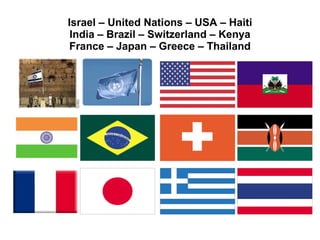
How many of these do you know?
Israel – United Nations – USA – Haiti India – Brazil – Switzerland – Kenya France – Japan – Greece – Thailand
Hill City Elementary Bringing the world to rural Kansas through social networking
Statewide projects with ePals Maine :   150,000 students Wisconsin : 800,000 Pennsylvania :  1.8 million students, Classroom For the Future Kansas : 400,000 students,  on the state’s KanEd portal Colorado :   800,000 students through eNet Colorado
Example profile: Students learning to speak English 190+ Turkish teachers have submitted profiles in 2011! (All seek English speakers.)
ePals user since 2002
Goals What is ePals? Stories of collaboration Finding a global partner How to use ePals SchoolMail What are my first steps?  More resources and what’s new!
Learners Connect, Communicate and Collaborate Largest K-12 social learning network globally, reaching more than  25 million students, teachers and parents in  200 countries Leading provider of cloud-based,  policy-managed email and social learning solutions  for schools and districts CONNECT COMMUNICATE COLLABORATE 25 Million Students & Teachers Worldwide Next Generation Email and Communications Social Learning Environment for Collaboration and Community  Largest Community of Connected, Global Classrooms
ePals is Where Learners Connect ePals’ solutions enable schools to deploy ePal’s safe and collaborative next generation learning – all accessed through the SchoolSafe® education desktop CONNECT COMMUNICATE COLLABORATE Largest social learning network globally. Links all ePals students and teachers to participate in collaborative projects, join community discussions and connect with other classrooms in a safe environment.  Distributed Learning  Platform CREATE Enterprise-grade, cloud email and communications specifically designed for K-12.  Robust policies set by the school govern all communications and manage access to third-party learning applications. Social learning environment for community and collaboration.  Designed for project-based learning and group collaboration in virtual workspaces across a full suite of safe social media tools. ePals’ SchoolSafe desktop is where students and educators go daily to connect, communicate, collaborate and discover content and apps in a safe, policy-managed environment LEARN Curriculum-based literacy program matches students with e-mentors to enhance reading, writing and critical thinking skills. First in a series of learning applications built on the ePals platform. Provides partners with access to ePal’s education cloud platform capabilities, enabling them to rapidly build and deploy policy-managed, collaborative, next generation learning applications surfaced on the SchoolSafe desktop. ePals’ Solutions SchoolSafe Desktop Unifies Solutions
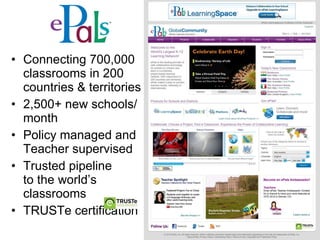
Connecting 700,000 classrooms in 200 countries & territories 2,500+ new schools/month Policy managed and Teacher supervised Trusted pipeline  to the world’s classrooms TRUSTe certification
ePals Brings Next-Generation Solutions to Schools free  -- students and their teachers locate, connect with and work collaboratively with another class free  -- secure online communication for students, parents, teachers and administrators, instant translation in 58 languages. “Problem word” filter and ability to control how widely students can send/receive email.
ePals Brings Next-Generation Solutions to Schools NEW in Feb. 2011!  Safe, secure online communication for students, teachers, administrators, parents.  ICT administrator can establish school-safe usage policies . Used by New York City Schools.  $4/student + setup fee. No ads. A virtual workspace optimized for creating, sharing, managing and collaborating on educational content. Integrated web 2.0 tools: SchoolBlog, wikis, forums, digital portfolios, cloud-based storage and ePals SchoolMail, all with industry-leading safety and security for K-12 schools.
 
World Class Partners and Customers > 900K students 140 countries 1.1MM students 1,700 schools Integrated with state-wide portal  Opportunity of 460k students 63,000 students 94 schools Provides state-wide portal  Opportunity of 850k students Example Customers Content and Technology Partners
Partners  One Laptop Per Child  (OLPC) (on all desktops, third world countries) Intel Classmate PC  (designed for K-6 students, widely used in Portugal and other countries) * Ministry of Education, Kenya   *  LEAP, Thailand *  Eduteka, Latin America , 75,000 teachers and Spanish-language content
Goals What is ePals? Stories of collaboration Finding a global partner How to use ePals SchoolMail What are my first steps?  More resources and what’s new!
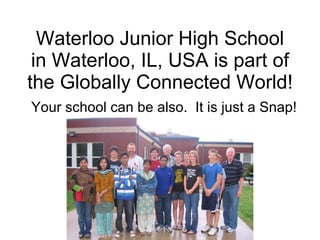
Waterloo Junior High School in Waterloo, IL, USA is part of the Globally Connected World! Your school can be also.  It is just a Snap!
Bill Theobald Waterloo Junior High, Waterloo, IL
Bill Theobald 32 Years at Waterloo Junior High School in Waterloo, IL, USA 6 th  Grade Social Studies Boys’ Basketball (24 years)  Girls’ Volleyball (30 years) “ Old Dog who learned some New Tricks!” I’m not a techie!
“ Travels with Mr. T” A nine-week Geography Travelogue for students in grades 6, 7, and 8.   Grade 6 concentrates on Western Hemisphere Grade 7 on Eastern Hemisphere Grade 8 focuses on Current Events
6 th  Grade “Keypals” 6 th  Grade Encore students have “Keypals” in Canada Ms. Pat Cone, Hafford School, Hafford, Saskatchewan, Canada
7 th  Grade “Keypals” 7 th  grade students have “Keypals” in  Trieste, Italy . Professori Fabiana Degrassi, teaches English as a Second Language (ESL) at Instituto Comprensivo, Trieste, Italy My wife and I visited the Degrassi family in Italy after several years of collaborating through ePals!
8 th  Grade “Keypals” 8th grade students have “Keypals” in  Pointe a Pitre, Guadeloupe, French West Indies . Professors Lucienne Zecler and Lena Racon teach English as a Second Language, College Front de Mer, Pointe a Pitre, Guadeloupe, French West Indies
Find a Cooperating International Classroom Use ePals “Connect” feature to find classroom partners. Look at “New Profiles” and post your request in “Teacher Forum.” Discuss with students “Safe use of the Internet.” Decide on a project or activity. Select or assign “Keypals.” Send your cooperating classroom an Excel file with first names, gender, and ePals addresses of your students.  Learn to “Approve” or “Delete” emails as the Monitor of your account. Enjoy exchanging ePals emails worldwide.
For Fall 2008 collaboration,  I posted in Teacher Forum  on July 28
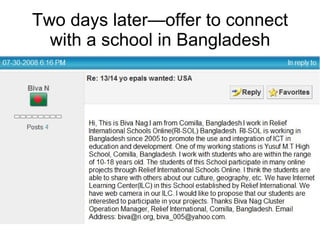
Two days later—offer to connect with a school in Bangladesh
Teacher Forum: Post looking for more partners for Bangladesh schools
Relief International-SOL Bangladesh January 7, 2009 -  Email from Relief International in Washington, D.C. “ Would you be interested in submitting an application to travel all-expenses-paid to Bangladesh as part of Teacher Exchange 2009?  You would be one of two teachers from the U.S. leaving February 14 and returning February 28.”
Chosen for the trip Selection letter received January 15. “ Your application indicates that you are a deeply invested teacher and global citizen, and that you have worked to develop connections with Bangladeshi students through RI-SOL Youth Connect Worldwide.”
I kept an ePals SchoolBlog during the trip! Students, parents, and international Keypals could follow our trip. Postings and comments were limited to Teachers given access. http://sites.epals.com/theo
“ Student Exchange – 2009” Lazina Sharmin, the (RI-B) chaperone, brought four of the most wonderful student-ambassadors to Waterloo, IL, USA. Mohammed Hasibur Rahman, Shubham Roy, Jannatul (Netu) Ferdous, and Afsana Mannan gave the city of Waterloo, IL a lesson in “Culture.” See Picture Show–“Student Exchange – 2009”
Where We Are in 2009-2010 40 Pairs of Waterloo, IL, USA - Comilla, Bangladesh “Keypals” have completed the ePals Project “ The Way We Are ” Each pair of Waterloo, IL, USA - Comilla, Bangladesh “Keypals” collaborated while 12,000 miles apart.
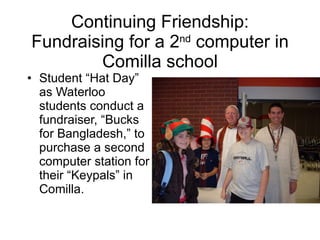
Continuing Friendship: Fundraising for a 2 nd  computer in Comilla school Student “Hat Day” as Waterloo students conduct a fundraiser, “Bucks for Bangladesh,” to purchase a second computer station for their “Keypals” in Comilla.
We use Skype to talk with International “Keypals” www.skype.com Used by organizations and people worldwide, free. For cost of a $50 webcam you can talk to students, classrooms, or family members “Face to Face” anywhere in the world. Meet my great teaching partner, Professori Fabiana Degrassi, Instituto Comprensivo, Trieste, Italy. Projected on wall in gym so all can participate!


We'd like you to meet our ePals from Brazil Mrs. Russell's First Grade Glenwood Elementary Vestal, NY
School:   EMEIF "Terezinha do Menino Jesus Porto Wuó" Town:   Santa Branca State:   Sao Paolo Country:   Brazil Hello From Sao Paolo, Brazil
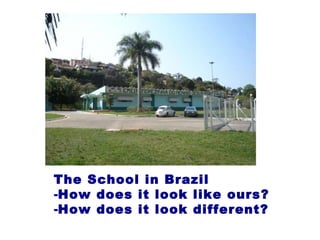
The School in Brazil How does it look like ours? How does it look different?
Our square is being rebuilt.  See how our town is a hilly place!
Collaboration across the Digital Divide :  New York Students and their ePals in Botswana A story of global connections that transcend socio-economic status, culture and place.
Students from the  Guangxi School, China   Shared language and cultural awareness, China-San Diego, ages 16-18
Their California ePals These teachers have worked together for eight years….some projects are just a few weeks or months!
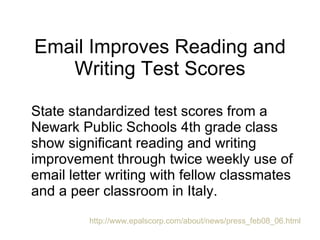
Email Improves Reading and Writing Test Scores State standardized test scores from a Newark Public Schools 4th grade class show significant reading and writing improvement through twice weekly use of email letter writing with fellow classmates and a peer classroom in Italy.  http://www.epalscorp.com/about/news/press_feb08_06.html
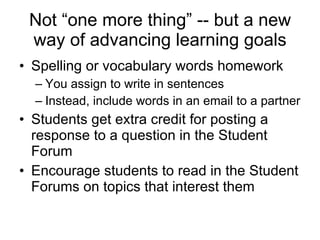
Not “one more thing” -- but a new way of advancing learning goals Spelling or vocabulary words homework You assign to write in sentences  Instead, include words in an email to a partner Students get extra credit for posting a response to a question in the Student Forum Encourage students to read in the Student Forums on topics that interest them
Louisiana and United Kingdom The student groups wrote about different aspects of their schools and videoed themselves to create a "documentary" about their school and community. We then exchanged "culture parcels" with the other class. The students had so much fun reading emails from their new friends. They learned many ways they were alike as well as different.
Loudoun County (VA)  Public Schools Students study communities in grade 3. Contact classrooms from elsewhere in Virginia (urban/rural/suburban) and exchange information about their communities.   Children grasp the idea of “rural,” “urban,” to compare to their own “suburban” as they communicate with peers from these areas.   Next the class has a collaboration with a classroom in an area like theirs but in another country! Teachers use videoconferences with classrooms.   Students use presentations and Google Earth to showcase their communities.
Most Popular Long-term Matches #1 English as a Second Language teachers outside an English-speaking country want to pair their students with students in English countries #2 Teachers of foreign language want to pair their students with native speakers (i.e., teacher of Spanish wants to have Spanish speakers in Mexico)
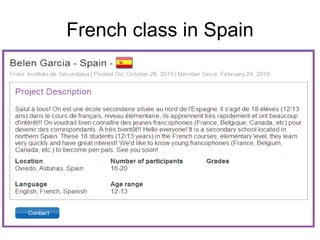
French class in Spain
Spanish class in S. Korea
One-email exchanges too! Students create 10 questions for a classroom in a country they are studying in Geography, things “not in the book” Students search global community and find  five  potential partner classes Students copy profiles into a Word file Students submit questions and profiles to teacher Teacher writes to the other teachers, pasting in the student questions…..
Sample one-email from teacher Dear (teachername), My geography class in Massachusetts has questions about your country. Could you please have a few students answer these questions in an email to me?  If possible I would like to have the answers by Sept. 26. Here are the questions: <paste in the students’ questions> Thanks so much for your help. Please let us know if we can answer any questions about Massachusetts!
Join the Conversation   Did any of these stories resonate with you?  How would your students benefit from these types of experiences?  Do you know of possible partner schools elsewhere?
Goals What is ePals? Stories of collaboration Finding a global partner How to use ePals SchoolMail What are my first steps?  More resources and what’s new!
Finding a global partner Search by  map Search by  classroom Search by  project Look at the “ new schools ” scrolling on the home page of ePals for newest profiles Search in  Project Forums  or  Teacher Forums  for very specific matches
Search by Map Select a continent
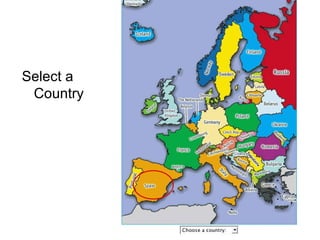
Select a Country
3. Select a classroom from the profiles
 
Eliminate language barriers  with translation tool!
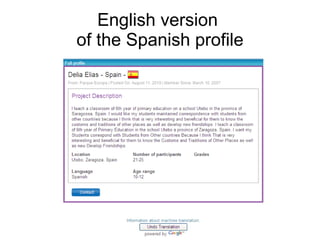
English version  of the Spanish profile
Translation to 58 languages! Most common languages listed first Less common languages listed second Both in alphabetical order This is an expansion as of late June 2009 from eight languages
 
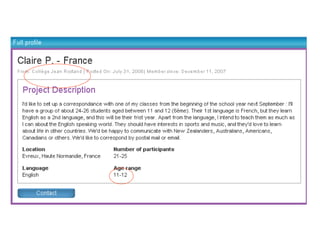
Cautions…about your assumptions What age students are in Primary School? What age students are in a school called “College”? Or a “colegio”? When does the school year start and end? When are vacations or holidays?


Be specific about what you want! What do you study?  Use keywords from your curriculum Geography: Mexico, Brazil, Russia Do you want to use an ePals project? Which one?  When does your school year start and end? March-June is end of year in Iowa, but start of school year in Chile Interesting way for your students to practice writing to non-English speakers  Make them more aware of how they say things so they aren’t confusing!
How do you get a profile? You fill out some basic contact info You write your profile We have real people who read and approve them…or ask for revisions! Teachers can’t contact other classrooms without having a profile submitted and approved.
ePals Global Community Classroom Match – Create Your Classroom Profile
 
 
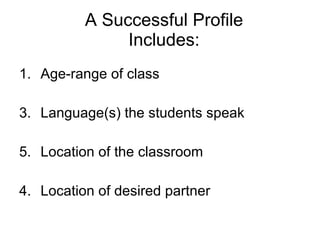
A Successful Profile Includes: Age-range of class Language(s) the students speak Location of the classroom 4. Location of desired partner
A Successful Profile Includes: Collaboration tools (email, postal mail, blogs, video conferences) Length of desired collaboration (3 weeks in October) Frequency of desired collaboration (weekly, monthly, at holidays) 8. Topic of desired collaboration (You can update this when you have a new project in mind!)
ePals Forums (also free) Student Forums We mediate the forums, so you don’t have to read and approve postings. Your students can collaborate with other students safely, over the weekend. Your students can search and read student postings to see what others have said, a great way to practice authentic reading and writing! Project Forums  make it easier to find matches for ePals projects Teacher Forums  for topics you generate Parent Forums  to help parents learn from other parents Adults can post in adult forums; students in Student Forum
Student Forums
Student Forum: Social Issues
Student viewpoints: Turkey, USA
Goals What is ePals? Stories of collaboration Finding a global partner How to use ePals SchoolMail What are my first steps? More resources and what’s new!
SchoolMail: built for school use Features teachers asked for Teacher moderation:  incoming/outgoing option Multiple levels of filtering Teachers can get copies for alternative assessment Translation to 58 languages
SchoolMail usernames Student:  [email_address] Teacher:  [email_address] No extra charge for custom subdomain as maine.epals.com in district with 10,000+ st. Use existing names or we create them Roles and responsibilities assigned Batch upload from SIS (49K students in 2+ hours)
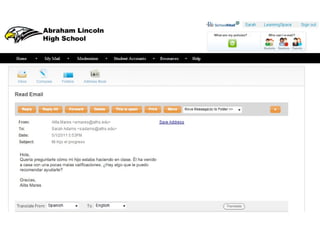
First Email with Built-in Language Translation
Safe and Protected Student Email:   Safely  integrate student email in appropriate, educational ways. Ask students to use academic language, spelling, punctuation – and practice skills valuable in the business world. Preview  students’ incoming and outgoing email messages.  Use email messages for alternative assessment. Ensure that messages are  appropriate  to age, setting and context.
Filter Levels Level 1 All messages must be approved by the  monitor, whether they contain profanity  or not. Level 2 Messages containing profanity must be  approved by the monitor, but unflagged  messages will reach their recipients  automatically.  The monitor will also  receive a copy of every unflagged  message. Level 3 Messages containing profanity must be  approved by the monitor, but unflagged  messages will reach their recipients  automatically. The monitor will not see  unflagged messages.  Level 4 All profanity filters are off.
Note: Click “flagged student messages.”
 
 
Six Access Levels (when set up as a district account) Class/Monitor Students are limited to mailing other students who have the  same monitor. Choose this access level if you want  students to  use email only for internal exercises within the classroom . School Students are limited to mailing students and teachers in the  same school. Choose this access level if you want  students to  use email only for school-based projects and communication . District This option, available only if your ePALS SchoolMail™ system  includes multiple schools, limits students to mailing students and  teachers at schools created within your system. Choose this access level if you want  students to use email only for district-  and school-based projects and communication . and…….
Six Access Levels (widening the walls) ePALS SchoolMail™ This restricts  student communication to other students with an   ePals SchoolMail account  regardless of school / district. ePals   Allows students to  communicate with other students with active  accounts in the ePals Global Community .  Internet This option allows your  students to email anyone with an email  address , whether they are inside your district, part of ePALS or  using the Internet through other means. Choose this access  level to  allow students to email anyone, anywhere . Note: as a teacher, you might then go to Filter Level 1 and  preview all outgoing and incoming messages.
Best-of-breed security + safety technologies Role-Based Permissions   Each user is assigned a role in their LearningSpace community (student, teacher, parent, administrator).  Policies determine whether a role can create groups, view connections, and invite groups to collaborate. Controlled Connections   A policy can be set to manage student interaction with other members of your LearningSpace community.  High school students may not be able to view profiles or request connections with K-5 students, unless they are in the same group.
Best-of-breed security + safety technologies Content Moderation Written content (blog and forum posts, comments) can be reviewed before publishing or removed afterward by a designated moderator. Inappropriate Language Filters Multiple spellings of inappropriate words written in a blog, comment or message are automatically flagged and removed. Questionable content in emails sent to designated moderator.
Goals What is ePals? Stories of collaboration Finding a global partner How to use ePals SchoolMail What are my first steps?  More resources and what’s new!
District issues to consider Do you need to go through a district committee or director or your principal? TRUSTe certification for all ePals! At the bottom of each page of ePals, you can see:  Privacy Policy   Advertising Policy   Terms of Use   Copyright and Trademark Policy
School-wide setup We prefer to provision all teachers in your school with accounts, even though only a few may want to start right away. You provide a list of all teachers, and we can create teacher user names. We can upload student names with a “batch upload tool” and that can create student account names (unless you have names you want to use)
Starting a Collaboration using ePals in 3 easy steps : Step 1: Come up with a GREAT idea! (or choose one of our projects, such as  The Way We Are ) Step 2: Find Partners from profiles or search the Project Forums Step 3: Create a Plan and Timeline or Calendar of Email and Events (use example from our projects)
Project-Based Learning Free to use, adapt Developed jointly with National Geographic Also feature great teacher-created projects SCIS-Pudong UN Day G4, Mrs. Smith
Types of Global Projects Empathy for others… visits ,  pen pals Finding new ways to enrich and engage… global   citizenship Desire for social justice… peace   studies, fundraising, activism
Start with a Specific Project
 
 
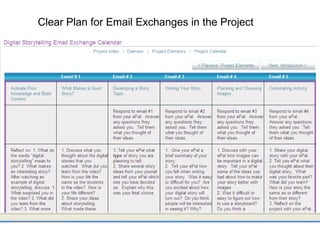
Clear Plan for Email Exchanges in the Project
Brief Lesson Plans
Great teacher-created projects
 
ePals Teacher Ambassador Contest Winners
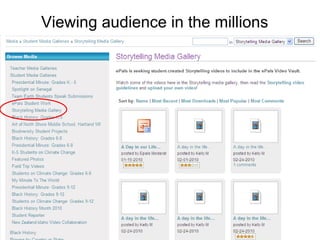
Publish student work to a worldwide audience
Viewing audience in the millions
Join the Conversation   Do you have questions about getting started with ePals?
Goals What is ePals? Stories of collaboration Finding a global partner How to use ePals SchoolMail What are my first steps?   More resources and what’s new!
How Tos, Manuals  Under  Help  from home page
 
 
New: ePals Email Extras http://www.epals.com
Sign up online
Choices of Email Extras
Smithsonian – The Natural World
Further Learning Opportunities ePals 101 webinar:  http://epals.101.sgizmo.com Global Education conference in November:  http://globaleducation.ning.com/
Customer Fulfillment and Account Management ePals has a team of Activation Specialists that will assist you every step of the way: Help upload accounts for your teachers and students Provide online training materials for you and your teachers Schedule “Getting Started” webinars Offer “After-School” webinar sessions for you and your teachers Provide tech administrators assistance with site support issues To schedule a Webinar session: [email_address]
INTERRoBANG
ePals Customer Team Rita Oates, Ph.D., Vice President, Education Markets [email_address]   Victoria McEachern, Vice President, Customer Fulfillment and Management [email_address] Steve Hodgin, Director, Customer Activation [email_address]   Jacky Little, Account Activation [email_address]   Julie Martin, Sales Administrator [email_address]   ePals Customer Fulfillment Team (General Delivery Mailbox) [email_address]   ePals Support Team (unlimited email support) [email_address]
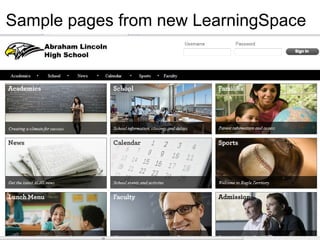
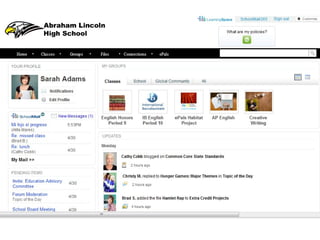
Sample pages from new LearningSpace


ePals LearningSpace TM Safely have multiple web 2.0 tools, a digital locker, email, blog, wiki, online portfolio, and much more. It’s the next generation of web 2.0 for schools! (safer than Facebook, Ning or Google) https://l earningspace.epals.com   View 10-minute video Sign up for a webinar Sign up for a 30-day pilot Open architecture: you can plug in other applications within the safe/secure settings. A school or district purchase.  Teacher Lounge for sharing best practices, etc. One district has purchased LS to effect a cost savings of $500,000 a year. Items formerly printed and shipped to schools will now be available in their LearningSpace.
Join us! Twitter:  @ePals @RitaOates Rita Oates, PhD [email_address]   www.epals.com

Integrate Authentic Global Collaboration and Communication in Student Learning

  • 1.
    Let’s Connect: Integrate Authentic Global Collaboration and Communication in Student Learning Rita Oates, PhD www.epals.com
  • 2.
    What collaborations doyou have now? Within school? Within district? Within state? Within U.S.? Outside U.S. borders? How do you find partners ? How do you communicate ? Any ePals users here ?
  • 3.
    How many ofthese do you know?
  • 4.
    Israel – UnitedNations – USA – Haiti India – Brazil – Switzerland – Kenya France – Japan – Greece – Thailand
  • 5.
    Hill City ElementaryBringing the world to rural Kansas through social networking
  • 6.
    Statewide projects withePals Maine : 150,000 students Wisconsin : 800,000 Pennsylvania : 1.8 million students, Classroom For the Future Kansas : 400,000 students, on the state’s KanEd portal Colorado : 800,000 students through eNet Colorado
  • 7.
    Example profile: Studentslearning to speak English 190+ Turkish teachers have submitted profiles in 2011! (All seek English speakers.)
  • 8.
  • 9.
    Goals What isePals? Stories of collaboration Finding a global partner How to use ePals SchoolMail What are my first steps? More resources and what’s new!
  • 10.
    Learners Connect, Communicateand Collaborate Largest K-12 social learning network globally, reaching more than 25 million students, teachers and parents in 200 countries Leading provider of cloud-based, policy-managed email and social learning solutions for schools and districts CONNECT COMMUNICATE COLLABORATE 25 Million Students & Teachers Worldwide Next Generation Email and Communications Social Learning Environment for Collaboration and Community Largest Community of Connected, Global Classrooms
  • 11.
    ePals is WhereLearners Connect ePals’ solutions enable schools to deploy ePal’s safe and collaborative next generation learning – all accessed through the SchoolSafe® education desktop CONNECT COMMUNICATE COLLABORATE Largest social learning network globally. Links all ePals students and teachers to participate in collaborative projects, join community discussions and connect with other classrooms in a safe environment. Distributed Learning Platform CREATE Enterprise-grade, cloud email and communications specifically designed for K-12. Robust policies set by the school govern all communications and manage access to third-party learning applications. Social learning environment for community and collaboration. Designed for project-based learning and group collaboration in virtual workspaces across a full suite of safe social media tools. ePals’ SchoolSafe desktop is where students and educators go daily to connect, communicate, collaborate and discover content and apps in a safe, policy-managed environment LEARN Curriculum-based literacy program matches students with e-mentors to enhance reading, writing and critical thinking skills. First in a series of learning applications built on the ePals platform. Provides partners with access to ePal’s education cloud platform capabilities, enabling them to rapidly build and deploy policy-managed, collaborative, next generation learning applications surfaced on the SchoolSafe desktop. ePals’ Solutions SchoolSafe Desktop Unifies Solutions
  • 12.
    Connecting 700,000 classroomsin 200 countries & territories 2,500+ new schools/month Policy managed and Teacher supervised Trusted pipeline to the world’s classrooms TRUSTe certification
  • 13.
    ePals Brings Next-GenerationSolutions to Schools free -- students and their teachers locate, connect with and work collaboratively with another class free -- secure online communication for students, parents, teachers and administrators, instant translation in 58 languages. “Problem word” filter and ability to control how widely students can send/receive email.
  • 14.
    ePals Brings Next-GenerationSolutions to Schools NEW in Feb. 2011! Safe, secure online communication for students, teachers, administrators, parents. ICT administrator can establish school-safe usage policies . Used by New York City Schools. $4/student + setup fee. No ads. A virtual workspace optimized for creating, sharing, managing and collaborating on educational content. Integrated web 2.0 tools: SchoolBlog, wikis, forums, digital portfolios, cloud-based storage and ePals SchoolMail, all with industry-leading safety and security for K-12 schools.
  • 15.
  • 16.
    World Class Partnersand Customers > 900K students 140 countries 1.1MM students 1,700 schools Integrated with state-wide portal Opportunity of 460k students 63,000 students 94 schools Provides state-wide portal Opportunity of 850k students Example Customers Content and Technology Partners
  • 17.
    Partners OneLaptop Per Child (OLPC) (on all desktops, third world countries) Intel Classmate PC (designed for K-6 students, widely used in Portugal and other countries) * Ministry of Education, Kenya * LEAP, Thailand * Eduteka, Latin America , 75,000 teachers and Spanish-language content
  • 18.
    Goals What isePals? Stories of collaboration Finding a global partner How to use ePals SchoolMail What are my first steps? More resources and what’s new!
  • 19.
    Waterloo Junior HighSchool in Waterloo, IL, USA is part of the Globally Connected World! Your school can be also. It is just a Snap!
  • 20.
    Bill Theobald WaterlooJunior High, Waterloo, IL
  • 21.
    Bill Theobald 32Years at Waterloo Junior High School in Waterloo, IL, USA 6 th Grade Social Studies Boys’ Basketball (24 years) Girls’ Volleyball (30 years) “ Old Dog who learned some New Tricks!” I’m not a techie!
  • 22.
    “ Travels withMr. T” A nine-week Geography Travelogue for students in grades 6, 7, and 8. Grade 6 concentrates on Western Hemisphere Grade 7 on Eastern Hemisphere Grade 8 focuses on Current Events
  • 23.
    6 th Grade “Keypals” 6 th Grade Encore students have “Keypals” in Canada Ms. Pat Cone, Hafford School, Hafford, Saskatchewan, Canada
  • 24.
    7 th Grade “Keypals” 7 th grade students have “Keypals” in Trieste, Italy . Professori Fabiana Degrassi, teaches English as a Second Language (ESL) at Instituto Comprensivo, Trieste, Italy My wife and I visited the Degrassi family in Italy after several years of collaborating through ePals!
  • 25.
    8 th Grade “Keypals” 8th grade students have “Keypals” in Pointe a Pitre, Guadeloupe, French West Indies . Professors Lucienne Zecler and Lena Racon teach English as a Second Language, College Front de Mer, Pointe a Pitre, Guadeloupe, French West Indies
  • 26.
    Find a CooperatingInternational Classroom Use ePals “Connect” feature to find classroom partners. Look at “New Profiles” and post your request in “Teacher Forum.” Discuss with students “Safe use of the Internet.” Decide on a project or activity. Select or assign “Keypals.” Send your cooperating classroom an Excel file with first names, gender, and ePals addresses of your students. Learn to “Approve” or “Delete” emails as the Monitor of your account. Enjoy exchanging ePals emails worldwide.
  • 27.
    For Fall 2008collaboration, I posted in Teacher Forum on July 28
  • 28.
    Two days later—offerto connect with a school in Bangladesh
  • 29.
    Teacher Forum: Postlooking for more partners for Bangladesh schools
  • 30.
    Relief International-SOL BangladeshJanuary 7, 2009 - Email from Relief International in Washington, D.C. “ Would you be interested in submitting an application to travel all-expenses-paid to Bangladesh as part of Teacher Exchange 2009? You would be one of two teachers from the U.S. leaving February 14 and returning February 28.”
  • 31.
    Chosen for thetrip Selection letter received January 15. “ Your application indicates that you are a deeply invested teacher and global citizen, and that you have worked to develop connections with Bangladeshi students through RI-SOL Youth Connect Worldwide.”
  • 32.
    I kept anePals SchoolBlog during the trip! Students, parents, and international Keypals could follow our trip. Postings and comments were limited to Teachers given access. http://sites.epals.com/theo
  • 33.
    “ Student Exchange– 2009” Lazina Sharmin, the (RI-B) chaperone, brought four of the most wonderful student-ambassadors to Waterloo, IL, USA. Mohammed Hasibur Rahman, Shubham Roy, Jannatul (Netu) Ferdous, and Afsana Mannan gave the city of Waterloo, IL a lesson in “Culture.” See Picture Show–“Student Exchange – 2009”
  • 34.
    Where We Arein 2009-2010 40 Pairs of Waterloo, IL, USA - Comilla, Bangladesh “Keypals” have completed the ePals Project “ The Way We Are ” Each pair of Waterloo, IL, USA - Comilla, Bangladesh “Keypals” collaborated while 12,000 miles apart.
  • 35.
    Continuing Friendship: Fundraisingfor a 2 nd computer in Comilla school Student “Hat Day” as Waterloo students conduct a fundraiser, “Bucks for Bangladesh,” to purchase a second computer station for their “Keypals” in Comilla.
  • 36.
    We use Skypeto talk with International “Keypals” www.skype.com Used by organizations and people worldwide, free. For cost of a $50 webcam you can talk to students, classrooms, or family members “Face to Face” anywhere in the world. Meet my great teaching partner, Professori Fabiana Degrassi, Instituto Comprensivo, Trieste, Italy. Projected on wall in gym so all can participate!
  • 37.
  • 38.
  • 39.
  • 40.
  • 41.
  • 42.
    We'd like youto meet our ePals from Brazil Mrs. Russell's First Grade Glenwood Elementary Vestal, NY
  • 43.
    School: EMEIF &quot;Terezinha do Menino Jesus Porto Wuó&quot; Town: Santa Branca State: Sao Paolo Country: Brazil Hello From Sao Paolo, Brazil
  • 44.
    The School inBrazil How does it look like ours? How does it look different?
  • 45.
    Our square isbeing rebuilt. See how our town is a hilly place!
  • 46.
    Collaboration across theDigital Divide : New York Students and their ePals in Botswana A story of global connections that transcend socio-economic status, culture and place.
  • 47.
    Students from the Guangxi School, China Shared language and cultural awareness, China-San Diego, ages 16-18
  • 48.
    Their California ePalsThese teachers have worked together for eight years….some projects are just a few weeks or months!
  • 49.
    Email Improves Readingand Writing Test Scores State standardized test scores from a Newark Public Schools 4th grade class show significant reading and writing improvement through twice weekly use of email letter writing with fellow classmates and a peer classroom in Italy. http://www.epalscorp.com/about/news/press_feb08_06.html
  • 50.
    Not “one morething” -- but a new way of advancing learning goals Spelling or vocabulary words homework You assign to write in sentences Instead, include words in an email to a partner Students get extra credit for posting a response to a question in the Student Forum Encourage students to read in the Student Forums on topics that interest them
  • 51.
    Louisiana and UnitedKingdom The student groups wrote about different aspects of their schools and videoed themselves to create a &quot;documentary&quot; about their school and community. We then exchanged &quot;culture parcels&quot; with the other class. The students had so much fun reading emails from their new friends. They learned many ways they were alike as well as different.
  • 52.
    Loudoun County (VA) Public Schools Students study communities in grade 3. Contact classrooms from elsewhere in Virginia (urban/rural/suburban) and exchange information about their communities.  Children grasp the idea of “rural,” “urban,” to compare to their own “suburban” as they communicate with peers from these areas.  Next the class has a collaboration with a classroom in an area like theirs but in another country! Teachers use videoconferences with classrooms.  Students use presentations and Google Earth to showcase their communities.
  • 53.
    Most Popular Long-termMatches #1 English as a Second Language teachers outside an English-speaking country want to pair their students with students in English countries #2 Teachers of foreign language want to pair their students with native speakers (i.e., teacher of Spanish wants to have Spanish speakers in Mexico)
  • 54.
  • 55.
  • 56.
    One-email exchanges too!Students create 10 questions for a classroom in a country they are studying in Geography, things “not in the book” Students search global community and find five potential partner classes Students copy profiles into a Word file Students submit questions and profiles to teacher Teacher writes to the other teachers, pasting in the student questions…..
  • 57.
    Sample one-email fromteacher Dear (teachername), My geography class in Massachusetts has questions about your country. Could you please have a few students answer these questions in an email to me? If possible I would like to have the answers by Sept. 26. Here are the questions: <paste in the students’ questions> Thanks so much for your help. Please let us know if we can answer any questions about Massachusetts!
  • 58.
    Join the Conversation Did any of these stories resonate with you? How would your students benefit from these types of experiences? Do you know of possible partner schools elsewhere?
  • 59.
    Goals What isePals? Stories of collaboration Finding a global partner How to use ePals SchoolMail What are my first steps? More resources and what’s new!
  • 60.
    Finding a globalpartner Search by map Search by classroom Search by project Look at the “ new schools ” scrolling on the home page of ePals for newest profiles Search in Project Forums or Teacher Forums for very specific matches
  • 61.
    Search by MapSelect a continent
  • 62.
  • 63.
    3. Select aclassroom from the profiles
  • 64.
  • 65.
    Eliminate language barriers with translation tool!
  • 66.
    English version of the Spanish profile
  • 67.
    Translation to 58languages! Most common languages listed first Less common languages listed second Both in alphabetical order This is an expansion as of late June 2009 from eight languages
  • 68.
  • 69.
    Cautions…about your assumptionsWhat age students are in Primary School? What age students are in a school called “College”? Or a “colegio”? When does the school year start and end? When are vacations or holidays?
  • 70.
  • 71.
  • 72.
  • 73.
    Be specific aboutwhat you want! What do you study? Use keywords from your curriculum Geography: Mexico, Brazil, Russia Do you want to use an ePals project? Which one? When does your school year start and end? March-June is end of year in Iowa, but start of school year in Chile Interesting way for your students to practice writing to non-English speakers Make them more aware of how they say things so they aren’t confusing!
  • 74.
    How do youget a profile? You fill out some basic contact info You write your profile We have real people who read and approve them…or ask for revisions! Teachers can’t contact other classrooms without having a profile submitted and approved.
  • 75.
    ePals Global CommunityClassroom Match – Create Your Classroom Profile
  • 76.
  • 77.
  • 78.
    A Successful ProfileIncludes: Age-range of class Language(s) the students speak Location of the classroom 4. Location of desired partner
  • 79.
    A Successful ProfileIncludes: Collaboration tools (email, postal mail, blogs, video conferences) Length of desired collaboration (3 weeks in October) Frequency of desired collaboration (weekly, monthly, at holidays) 8. Topic of desired collaboration (You can update this when you have a new project in mind!)
  • 80.
    ePals Forums (alsofree) Student Forums We mediate the forums, so you don’t have to read and approve postings. Your students can collaborate with other students safely, over the weekend. Your students can search and read student postings to see what others have said, a great way to practice authentic reading and writing! Project Forums make it easier to find matches for ePals projects Teacher Forums for topics you generate Parent Forums to help parents learn from other parents Adults can post in adult forums; students in Student Forum
  • 81.
  • 82.
  • 83.
  • 84.
    Goals What isePals? Stories of collaboration Finding a global partner How to use ePals SchoolMail What are my first steps? More resources and what’s new!
  • 85.
    SchoolMail: built forschool use Features teachers asked for Teacher moderation: incoming/outgoing option Multiple levels of filtering Teachers can get copies for alternative assessment Translation to 58 languages
  • 86.
    SchoolMail usernames Student: [email_address] Teacher: [email_address] No extra charge for custom subdomain as maine.epals.com in district with 10,000+ st. Use existing names or we create them Roles and responsibilities assigned Batch upload from SIS (49K students in 2+ hours)
  • 87.
    First Email withBuilt-in Language Translation
  • 88.
    Safe and ProtectedStudent Email: Safely integrate student email in appropriate, educational ways. Ask students to use academic language, spelling, punctuation – and practice skills valuable in the business world. Preview students’ incoming and outgoing email messages. Use email messages for alternative assessment. Ensure that messages are appropriate to age, setting and context.
  • 89.
    Filter Levels Level 1All messages must be approved by the monitor, whether they contain profanity or not. Level 2 Messages containing profanity must be approved by the monitor, but unflagged messages will reach their recipients automatically. The monitor will also receive a copy of every unflagged message. Level 3 Messages containing profanity must be approved by the monitor, but unflagged messages will reach their recipients automatically. The monitor will not see unflagged messages. Level 4 All profanity filters are off.
  • 90.
    Note: Click “flaggedstudent messages.”
  • 91.
  • 92.
  • 93.
    Six Access Levels(when set up as a district account) Class/Monitor Students are limited to mailing other students who have the same monitor. Choose this access level if you want students to use email only for internal exercises within the classroom . School Students are limited to mailing students and teachers in the same school. Choose this access level if you want students to use email only for school-based projects and communication . District This option, available only if your ePALS SchoolMail™ system includes multiple schools, limits students to mailing students and teachers at schools created within your system. Choose this access level if you want students to use email only for district- and school-based projects and communication . and…….
  • 94.
    Six Access Levels(widening the walls) ePALS SchoolMail™ This restricts student communication to other students with an ePals SchoolMail account regardless of school / district. ePals Allows students to communicate with other students with active accounts in the ePals Global Community . Internet This option allows your students to email anyone with an email address , whether they are inside your district, part of ePALS or using the Internet through other means. Choose this access level to allow students to email anyone, anywhere . Note: as a teacher, you might then go to Filter Level 1 and preview all outgoing and incoming messages.
  • 95.
    Best-of-breed security +safety technologies Role-Based Permissions   Each user is assigned a role in their LearningSpace community (student, teacher, parent, administrator). Policies determine whether a role can create groups, view connections, and invite groups to collaborate. Controlled Connections   A policy can be set to manage student interaction with other members of your LearningSpace community. High school students may not be able to view profiles or request connections with K-5 students, unless they are in the same group.
  • 96.
    Best-of-breed security +safety technologies Content Moderation Written content (blog and forum posts, comments) can be reviewed before publishing or removed afterward by a designated moderator. Inappropriate Language Filters Multiple spellings of inappropriate words written in a blog, comment or message are automatically flagged and removed. Questionable content in emails sent to designated moderator.
  • 97.
    Goals What isePals? Stories of collaboration Finding a global partner How to use ePals SchoolMail What are my first steps? More resources and what’s new!
  • 98.
    District issues toconsider Do you need to go through a district committee or director or your principal? TRUSTe certification for all ePals! At the bottom of each page of ePals, you can see: Privacy Policy Advertising Policy Terms of Use Copyright and Trademark Policy
  • 99.
    School-wide setup Weprefer to provision all teachers in your school with accounts, even though only a few may want to start right away. You provide a list of all teachers, and we can create teacher user names. We can upload student names with a “batch upload tool” and that can create student account names (unless you have names you want to use)
  • 100.
    Starting a Collaborationusing ePals in 3 easy steps : Step 1: Come up with a GREAT idea! (or choose one of our projects, such as The Way We Are ) Step 2: Find Partners from profiles or search the Project Forums Step 3: Create a Plan and Timeline or Calendar of Email and Events (use example from our projects)
  • 101.
    Project-Based Learning Freeto use, adapt Developed jointly with National Geographic Also feature great teacher-created projects SCIS-Pudong UN Day G4, Mrs. Smith
  • 102.
    Types of GlobalProjects Empathy for others… visits , pen pals Finding new ways to enrich and engage… global citizenship Desire for social justice… peace studies, fundraising, activism
  • 103.
    Start with aSpecific Project
  • 104.
  • 105.
  • 106.
    Clear Plan forEmail Exchanges in the Project
  • 107.
  • 108.
  • 109.
  • 110.
    ePals Teacher AmbassadorContest Winners
  • 111.
    Publish student workto a worldwide audience
  • 112.
    Viewing audience inthe millions
  • 113.
    Join the Conversation Do you have questions about getting started with ePals?
  • 114.
    Goals What isePals? Stories of collaboration Finding a global partner How to use ePals SchoolMail What are my first steps? More resources and what’s new!
  • 115.
    How Tos, Manuals Under Help from home page
  • 116.
  • 117.
  • 118.
    New: ePals EmailExtras http://www.epals.com
  • 119.
  • 120.
  • 121.
    Smithsonian – TheNatural World
  • 122.
    Further Learning OpportunitiesePals 101 webinar: http://epals.101.sgizmo.com Global Education conference in November: http://globaleducation.ning.com/
  • 123.
    Customer Fulfillment andAccount Management ePals has a team of Activation Specialists that will assist you every step of the way: Help upload accounts for your teachers and students Provide online training materials for you and your teachers Schedule “Getting Started” webinars Offer “After-School” webinar sessions for you and your teachers Provide tech administrators assistance with site support issues To schedule a Webinar session: [email_address]
  • 124.
  • 125.
    ePals Customer TeamRita Oates, Ph.D., Vice President, Education Markets [email_address] Victoria McEachern, Vice President, Customer Fulfillment and Management [email_address] Steve Hodgin, Director, Customer Activation [email_address] Jacky Little, Account Activation [email_address] Julie Martin, Sales Administrator [email_address] ePals Customer Fulfillment Team (General Delivery Mailbox) [email_address] ePals Support Team (unlimited email support) [email_address]
  • 126.
    Sample pages fromnew LearningSpace
  • 127.
  • 128.
  • 129.
  • 130.
  • 131.
  • 132.
  • 133.
  • 134.
    ePals LearningSpace TMSafely have multiple web 2.0 tools, a digital locker, email, blog, wiki, online portfolio, and much more. It’s the next generation of web 2.0 for schools! (safer than Facebook, Ning or Google) https://l earningspace.epals.com View 10-minute video Sign up for a webinar Sign up for a 30-day pilot Open architecture: you can plug in other applications within the safe/secure settings. A school or district purchase. Teacher Lounge for sharing best practices, etc. One district has purchased LS to effect a cost savings of $500,000 a year. Items formerly printed and shipped to schools will now be available in their LearningSpace.
  • 135.
    Join us! Twitter: @ePals @RitaOates Rita Oates, PhD [email_address] www.epals.com

Editor's Notes

  • #2 Partnership for Global Learning 2011, Rockville, MD July 8, 2011
  • #3 In the UK, every classroom must have a collaborative partner. How about in YOUR school? One of the challenges of doing collaboration is getting a partner and having a way to communicate safely. ePals offers both!
  • #4 Ask to figure out what YOU know….. Then consult with two others sitting by you….combining your knowledge, how many do you know? Demonstration that you know more when you are collaborating.
  • #5 Here are the answers….left to right, top to bottom BRIC = Brazil Russia India China
  • #6 This is a picture of Anita Kerbaugh and her grade 4 class from Hill City! This K-8 school won the global education award, in part because every classroom in the school has some global collaborative project. The school is 100 miles from the nearest Wal-Mart….definitely a rural area!
  • #7 These are states where the leadership in education has examined ePals and decided that it should be used throughout the state. They have examined the safety and security aspects, as well as the opportunities for student learning, and want to encourage wider use. In all these states, there are a few large urban areas and then a great number of rural schools. Maine Connects : 150K students http://www.epals.com/connects/usa/maine Wisconsin Connects : 800K students http://www.epals.com/connects/usa/wisconsin Pennsylvania Connects : 1.8 million students http://www.epals.com/connects/usa/pennsylvania Project supported by Holly Jobe for Pennsylvania Classroom For the Future (high school reform) Kansas : 400K students On the state’s KanEd portal Colorado : 800K students through eNet Colorado
  • #18 Some examples of the organizations that ePals works with. National Geographic has invested in ePals and also has given us a seat on their board and has a seat on our board. You will see many digital assets from NatGeo used in ePals too! Eduteka joins ePals, bringing Spanish-language content and a Spanish-speaking community of educators Do you want Spanish teachers to have pen pals for their classes? Do you want high school classes to collaborate with southern hemisphere classes? (in school from April-December) Many technology and business classes for high school, also ESL classes are available
  • #38 http://www.epals.com/blogs/teacherspotlight/archive/2010/11/11/a-virtual-sightseeing-tour-of-trieste-italy.aspx
  • #39 http://www.epals.com/blogs/teacherspotlight/archive/2010/11/11/a-virtual-sightseeing-tour-of-trieste-italy.aspx
  • #43 Vestal Central School District (Vestal, New York) Students and teachers from Vestal made international classroom-to-classroom connections through the global ePals community with schools in India, Sweden, South Korea, Germany and Brazil.   Through the use of ePals safe email and blogs, they practiced literacy skill building via shared book reading, foreign language practice with native speakers,  learned about other countries and cultures, shared maps and photos of their lives and home in upstate New York with their ePals classrooms across the globe.  Vestal teachers integrated ePals technology and community as an essential communication and collaboration tool connecting both educator and learner. Teachers reported their students being more on-task, having a motivational purpose for their reading and an authentic peer audience for their writing. As evidenced in their work, collaborating with their epals across the globe encouraged Vestal students to use proper sentence structure, punctuate and spellcheck their work as they cared about what they were sending.
  • #44 Many email collaborations begin by sharing personal and community information. Sometimes pictures are exchanged. A gr. 1 teacher can find many “teachable moments” from a photo like this. How many boys? How many girls? (counting) What are they wearing that is like what we wear? (comparison/contrast) How does this class look like our class?
  • #45 Students are excited to discover that schools in different parts of the world can look very different from their own. This is a GREAT way to kick off the school year with kids of all ages. A child in NY said, “My dad drives a car just like that VW bug…but we don’t have palm trees outside our school.”
  • #46 Even grade 1 students can write simple sentences (with help from teacher/parent). The vocabulary of their environment is a great way to start reading and writing.
  • #47 New York and Botswana: A story of global connections that transcend socio-economic status, culture, and place. This is a class in a very affluent area of New York, and they partnered with a class in a very remote area of Botswana. After one month of weekly collaboration, they exchanged photographs. Notice what they are holding over their shoulders in the picture. Notice that the children in Botswana are playing soccer without shoes! The kids in America sent them soccer shoes. What do you think the response was of the children in Botswana? – They considered the shoes too precious to wear, except to church on Sunday. They did not want to get the shoes dirty.
  • #48 California and Southern China: A story that embraces shared language and cultural awareness. The students involved in this partnership used the English version of SchoolMail on a daily basis to communicate. They also used SchoolBlog to share photos in a safe and protected way. A high school English teacher in San Diego has been paired for 8 years with a Chinese teacher who teaches English in a “tech school.”
  • #49 The California students learned about Chinese culture, and the Chinese students learned English and about American culture. In China, people who speak English, understand American culture and can use computers can get good jobs!
  • #50 The 4th grade class at Roseville Avenue Elementary School in Newark Public Schools used a protected and multi-lingual school email solution and global classroom network called ePals Classroom Exchange for email letter writing exchanges twice a week with an ePals peer classroom in Bologna, Italy. At the end of the school year, those students scored 72.4% on the New Jersey State ASK4 Language Arts Literacy Test, a 30 point higher score on the state standardized test than the previous year&apos;s fourth grade class, which had been taught by the same teacher, using the same curriculum and goals. Twice a week, the students were required to read and write proper email letters using the ePals SchoolMail solution as part of the curriculum. Students became increasingly motivated to email their peers and gradually increasing the amount of reading and writing they normally would perform each week. The Newark pilot also suggests students may be more motivated to do classroom assignments with a collaborative peer using email, than for the teacher with pencil and paper. &amp;quot;Students studied volcanoes, collected photos of famous Italian cities, ruins, Mt. Etna, and corresponded in email letters on specific topics. They learned to create and send Microsoft PowerPoint presentations, even created a class Haiku poetry book, which they brought home to parents and sent electronically to Italy. Using email and connecting the students with a peer enabled more literacy skill building to occur and they were self-motivated knowing other students would be receiving their work,” said Newark teacher Mary Carille .
  • #52 This story was shared during a training in Louisiana last year. At the morning break, the classroom teacher stopped to tell about this project that she had completed through ePals last year! Our Story The 2nd grade classes at LeBleu Settlement Elementary participated in the Louisiana Region V Teaching, Learning, and Technology Center&apos;s (TLTC) Making Collaborative Connections (MC2) project by partnering with another class in Plymoth, Devon, United Kingdom using the ePals global community. This is our story! To begin we learned all the safety precautions that must be taken when children are utilizing the Internet. Then we introduced the students to email using ePals. After practicing sending email to each other we began sending emails to the students of Pomphlett Primary. The students had so much fun reading emails from their new friends. They learned many ways they were alike as well as different. To follow up the emails the student groups wrote about different aspects of their schools and videoed themselves to create a &amp;quot;documentary&amp;quot; about their school and community. We then exchanged &amp;quot;culture parcels&amp;quot; with the other class. It was great fun to receive mail from our new friends including their DVD, newspaper, soccer magazine, a popular English comic, English candy (confections), and post cards on which the students wrote messages about the pictures. We included our DVD, local newpaper, a visitor&apos;s guide for Southwest Louisiana, postcards, small bottles of Tobasco hot sauce, small packages of Tony Chachere&apos;s seasoning, Mardi Gras beads, a Cajun cookbook, postcards, an American Flag pin, and a stack of brochures about Southwest Louisiana.
  • #53 Loudoun schools have videoconference equipment and are encouraged to use it!
  • #62 Searching by Location is also fun! If you are involving your students in the search, you might enjoy projecting our interactive map on a screen. You may select the continent, or ask a student volunteer to make a recommendation. This is a great way to review geography.
  • #63 Awareness of countries increases!
  • #66 Note that the original profile was typed in Spanish. To ease searching, we translated it into Spanish and added that to the profile. That way, when someone is searching in English, they will turn up profiles with the key words in English, even though the original content wasn’t in English. In this example, the words “Greek and Roman mythology” might be important for the search!
  • #69 The most common 13 languages are first, and the others are below, both in alphabetical order.
  • #71 Primary school…..ages 10-12
  • #72 “ College” in France….ages 11-12!
  • #76 Then You’ll Click My Profile and complete.
  • #77 We collect information that is NOT displayed. For example, we ask for the school address and phone number, but that is not displayed for the public. That is so we can verify that there IS such a school and that the people who claim to be teachers there…are teachers there!
  • #78 A sample description has some key info highlighted.
  • #79 A Successful Profile includes a variety of pieces of information. Plan to provide as much detail as possible about yourself, your students, and your classroom project. We have included this slide and the next within the participant handout. Participants will find that this handy checklist is a great reference tool as they compose and submit their own profile during the training.
  • #80 A successful profile includes: age-range of class (age in years as well as grade level); language(s) the students speak; location of the classroom; location of desired partner; methods with which you would like to collaborate (email, postal mail, blogs, video conferences) If you are interested in a particular method of communication, but do not know how to undertake it (i.e. you want to do a video conference but don&apos;t know how) please indicate this.); Length of desired collaboration (school year, semester, a week, one-time exchange, etc.); Frequency of desired collaboration (weekly, monthly, at holidays); Topic of desired collaboration (the more specific the better. Global warming is better than science).
  • #81 “ mediate the forums” means that anything a student writes, we preview before posting it. It does slow down the discussion, but it guarantees that nothing inappropriate is posted.
  • #86 In Maine, we are using maine.epals.com for ALL schools. In Wisconsin and Pennsylvania, we are using wisc.epals.com or pa.epals.com for districts smaller than 5,000 students or for individual schools in the state.
  • #87 In Maine, we are using maine.epals.com for ALL schools. In Wisconsin and Pennsylvania, we are using wisc.epals.com or pa.epals.com for districts smaller than 5,000 students or for individual schools in the state.
  • #89 ePALS SchoolM@il™ filters words it considers to be profanity when detected in student messages. When questionable language is detected on student incoming or outgoing email, you will be able to read the email and either approve or delete it. If you approve the student email that was caught on the filter, it will be sent to its intended recipient. If you delete the student email that was caught on the filter, it will not be sent to the intended recipient.
  • #90 ePals offers a range of filter levels to keep students safe. ePALS SchoolMail™ filters words it considers to be profanity when detected in student messages. This filter level can be adjusted for each individual student or for your building.
  • #92 This is the inbox for your monitored mail. Notice the tabs at the top of the screen. You can use those tabs to go back and forth between your own teacher ePals email account and your student monitored mail. Note: You’ll see flag marks next to student monitored mail messages on the right side of the screen. Click the message hyperlink to check a student message that has been flagged on the filter system.
  • #93 This is what you’ll see when you actually read the student message. You’ll have the ability to see both incoming and outgoing student messages when they are flagged on the filter system. Note: Depending upon the content of the message, you’ll click approve or delete. You might also choose to forward questionable messages to your building desktop administrator for extra support depending upon your building policy.
  • #94 ePals offers a range of access levels to keep students safe. ePALS SchoolMail™ access level determines where students can send email to and receive email from.
  • #96 LearningSpace regularly updates its security suite of tools to provide the most current versions possible.
  • #97 LearningSpace regularly updates its security suite of tools to provide the most current versions possible.
  • #111 NOTE: If you want to see more stories of collaboration, get the two-part PPT shows available on scribd.com.