E-Pals:
A Professional Development Workshop by
Richard Pardo
At the End of This Workshop, You’ll…
…know what E-Pals is.
…know the functions and capabilities of the site.
…see examples of real student work.
…have set up your own E-Pals account!
What is E-Pals?
A free, easy to use pen-pal service that
connects educators and students in over 200
countries.
Each student has their own account to
connect to their “e-pen-pal”, which can be
monitored by teachers. Nothing can be sent
or seen by your students without your
approval first.
Let’s Watch a Quick Video About E-
Pals
Click Here!
Benefits of E-Pals
Easy to address the culture standard of World Language, which
is hard to do.
E-Pals makes it easy to monitor student activity for a safe
learning environment.
It’s a collaborative learning tool, which benefits future learners,
workers and global citizens.
The technology helps students become 21st century learners.
Allows students to make authentic connections and have
meaningful interactions around topic chosen by you and your
collaborating partner.
By connecting with peers in a different region, students will also
learn global awareness, experience cultural understanding, and
build lasting relationships.
World Language Standards Met
With E-Pals
World Language standards are met when using
E-Pals!
Standard 1b: Reading and Writing
Standard 2: Developing cross-cultural skills
and understandings
International Society for Technology in Education
Standards for Students Met With E-Pals
Standard 2: Students use digital media and environments to
communicate and work collaboratively, including at a distance,
to support individual learning and contribute to the learning of
others. (A and C)
Standard 4: Students use critical thinking skills to plan and
conduct research, manage projects, solve problems, and make
informed decisions using appropriate digital tools and
resources. (A, B and C)
Standard 5: Students understand human, cultural, and societal
issues related to technology and practice legal and ethical
behavior. (A, B, C and D)
Standard 6: Students demonstrate a sound understanding of
technology concepts, systems, and operations. (A and B)
International Society for Technology in Education
Standards for Teachers Met With E-Pals
Standard 1: Facilitate and inspire student learning and creativity - Teachers use their
knowledge of subject matter, teaching and learning, and technology to facilitate
experiences that advance student learning, creativity, and innovation in both face-to-
face and virtual environments. (A, B, C and D)
Standard 2: Design and develop digital age learning experiences and assessments -
Teachers design, develop, and evaluate authentic learning experiences and
assessments incorporating contemporary tools and resources to maximize content
learning in context and to develop the knowledge, skills, and attitudes.(A and B)
Standard 3: Model digital age work and learning - Teachers exhibit knowledge, skills,
and work processes representative of an innovative professional in a global and
digital society. (B and C)
Standard 4: Promote and model digital citizenship - Teachers understand local and
global societal issues and responsibilities in an evolving digital culture and exhibit
legal and ethical behavior in their professional practices.(A, C and D)
Follow Along With Me!
Make sure you’re logged into your
computer and follow along with me!
www.epals.com
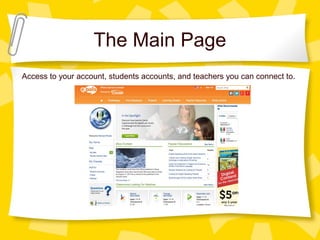
The Main Page
Access to your account, students accounts, and teachers you can connect to.
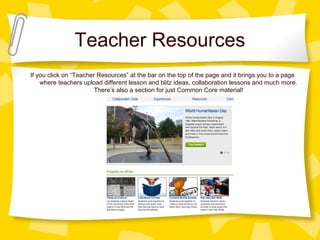
Teacher Resources
If you click on “Teacher Resources” at the bar on the top of the page and it brings you to a page
where teachers upload different lesson and blitz ideas, collaboration lessons and much more.
There’s also a section for just Common Core material!
Let’s Start Connecting!
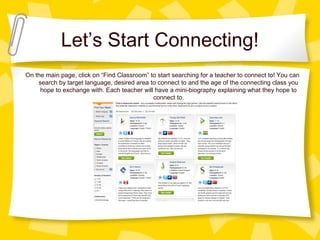
On the main page, click on “Find Classroom” to start searching for a teacher to connect to! You can
search by target language, desired area to connect to and the age of the connecting class you
hope to exchange with. Each teacher will have a mini-biography explaining what they hope to
connect to.
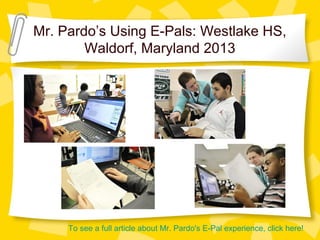
Mr. Pardo’s Using E-Pals: Westlake HS,
Waldorf, Maryland 2013
To see a full article about Mr. Pardo's E-Pal experience, click here!
My First Connection
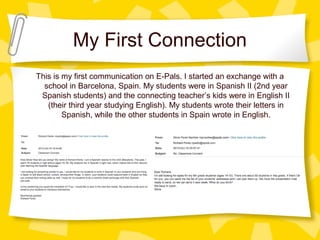
This is my first communication on E-Pals. I started an exchange with a
school in Barcelona, Spain. My students were in Spanish II (2nd year
Spanish students) and the connecting teacher’s kids were in English II
(their third year studying English). My students wrote their letters in
Spanish, while the other students in Spain wrote in English.
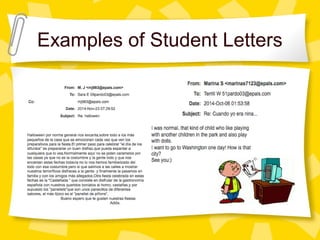
Examples of Student Letters
FREE TIME!
Take time to explore E-Pals for yourself!
Ideas:
Create an account
Look up countries available and
connect with another teacher
Create accounts for your students
THANK YOU!
Please take a minute and go to this site to complete a survey so I
can tailor this workshop for future attendees!
https://www.surveymonkey.com/s/hy2jsw
x

E-Pals pd

  • 1.
    E-Pals: A Professional DevelopmentWorkshop by Richard Pardo
  • 2.
    At the Endof This Workshop, You’ll… …know what E-Pals is. …know the functions and capabilities of the site. …see examples of real student work. …have set up your own E-Pals account!
  • 3.
    What is E-Pals? Afree, easy to use pen-pal service that connects educators and students in over 200 countries. Each student has their own account to connect to their “e-pen-pal”, which can be monitored by teachers. Nothing can be sent or seen by your students without your approval first.
  • 4.
    Let’s Watch aQuick Video About E- Pals Click Here!
  • 5.
    Benefits of E-Pals Easyto address the culture standard of World Language, which is hard to do. E-Pals makes it easy to monitor student activity for a safe learning environment. It’s a collaborative learning tool, which benefits future learners, workers and global citizens. The technology helps students become 21st century learners. Allows students to make authentic connections and have meaningful interactions around topic chosen by you and your collaborating partner. By connecting with peers in a different region, students will also learn global awareness, experience cultural understanding, and build lasting relationships.
  • 6.
    World Language StandardsMet With E-Pals World Language standards are met when using E-Pals! Standard 1b: Reading and Writing Standard 2: Developing cross-cultural skills and understandings
  • 7.
    International Society forTechnology in Education Standards for Students Met With E-Pals Standard 2: Students use digital media and environments to communicate and work collaboratively, including at a distance, to support individual learning and contribute to the learning of others. (A and C) Standard 4: Students use critical thinking skills to plan and conduct research, manage projects, solve problems, and make informed decisions using appropriate digital tools and resources. (A, B and C) Standard 5: Students understand human, cultural, and societal issues related to technology and practice legal and ethical behavior. (A, B, C and D) Standard 6: Students demonstrate a sound understanding of technology concepts, systems, and operations. (A and B)
  • 8.
    International Society forTechnology in Education Standards for Teachers Met With E-Pals Standard 1: Facilitate and inspire student learning and creativity - Teachers use their knowledge of subject matter, teaching and learning, and technology to facilitate experiences that advance student learning, creativity, and innovation in both face-to- face and virtual environments. (A, B, C and D) Standard 2: Design and develop digital age learning experiences and assessments - Teachers design, develop, and evaluate authentic learning experiences and assessments incorporating contemporary tools and resources to maximize content learning in context and to develop the knowledge, skills, and attitudes.(A and B) Standard 3: Model digital age work and learning - Teachers exhibit knowledge, skills, and work processes representative of an innovative professional in a global and digital society. (B and C) Standard 4: Promote and model digital citizenship - Teachers understand local and global societal issues and responsibilities in an evolving digital culture and exhibit legal and ethical behavior in their professional practices.(A, C and D)
  • 9.
    Follow Along WithMe! Make sure you’re logged into your computer and follow along with me! www.epals.com
  • 10.
    The Main Page Accessto your account, students accounts, and teachers you can connect to.
  • 11.
    Teacher Resources If youclick on “Teacher Resources” at the bar on the top of the page and it brings you to a page where teachers upload different lesson and blitz ideas, collaboration lessons and much more. There’s also a section for just Common Core material!
  • 12.
    Let’s Start Connecting! Onthe main page, click on “Find Classroom” to start searching for a teacher to connect to! You can search by target language, desired area to connect to and the age of the connecting class you hope to exchange with. Each teacher will have a mini-biography explaining what they hope to connect to.
  • 13.
    Mr. Pardo’s UsingE-Pals: Westlake HS, Waldorf, Maryland 2013 To see a full article about Mr. Pardo's E-Pal experience, click here!
  • 14.
    My First Connection Thisis my first communication on E-Pals. I started an exchange with a school in Barcelona, Spain. My students were in Spanish II (2nd year Spanish students) and the connecting teacher’s kids were in English II (their third year studying English). My students wrote their letters in Spanish, while the other students in Spain wrote in English.
  • 15.
  • 16.
    FREE TIME! Take timeto explore E-Pals for yourself! Ideas: Create an account Look up countries available and connect with another teacher Create accounts for your students
  • 17.
    THANK YOU! Please takea minute and go to this site to complete a survey so I can tailor this workshop for future attendees! https://www.surveymonkey.com/s/hy2jsw x