Tim DiScipio Founder ePals [email_address] www.epals.com Safe Collaborative Technology In The Globally  Connected Social  Classroom
Internet’s largest and fastest growing K-12 social learning network ( reaching 29M teachers / students in 200 countries and territories)  Leading provider of safe, policy-managed collaborative K12 technology, Web 2.0 workspace tools, distributed learning platform in the cloud……..within a single and shared work environment
Allows students and their teachers to locate, connect with and work collaboratively on projects with another class down the street and around the world.  Enterprise-grade, cloud based school email with integrated Microsoft.  G ives students, parents, teachers and administrators a secure way to communicate online, offers instant translation in 35 languages, and allows administrators to establish school-safe usage policies.  A safe enterprise-grade, eRATE eligible virtual workspace and email with collaborative tools, schoolwork / doc storage, access to high-quality content, digital storage areas and Global Community.   ePals Products  $4 student 365
  International Baccalaureate  - LearningSpace for 700,000 global IB students / teachers / alumni mentors New York City DOE  - selected ePals SchoolMail with LearningSpace access to power 2 Million students and parents   Notable Recent ePals Deployments
Public/Private Partnerships
ePals + Microsoft ePals with integrated Live@edu and Office programs (Word, Powerpoint etc…)  / Web Apps Planned development   integration of Outlook Live calendar Office Web Apps integration planned for Q2 2011
LearningSpace A safe and protected virtual workspace designed for K12 ePals, Inc. Confidential
ePals LearningSpace A safe K-12 virtual workspace where tools and docs resides in one safe online space with authorized classmates / teachers / mentors Tools  - email, blogs, wikis, shared portfolios   Schoolwork / documents  - Word, Powerpoints, files & rich media Contact Groups  - Teachers and classmates   Shared environment with project and document access Open architecture / 3 rd  Party Apps (skype, moodle etc..)
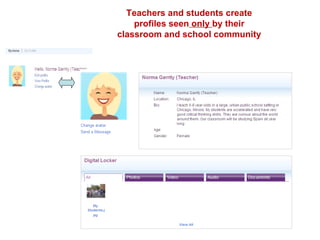
Teachers and students create profiles seen  only  by their classroom and school community


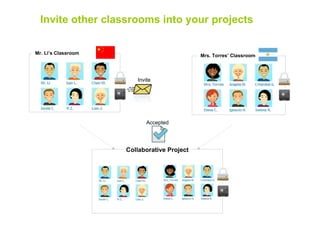
Mr. Li’s Classroom Mrs. Torres’ Classroom Invite other classrooms into your projects Invite Collaborative Project Accepted
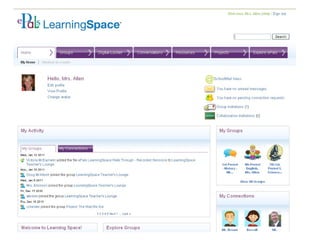
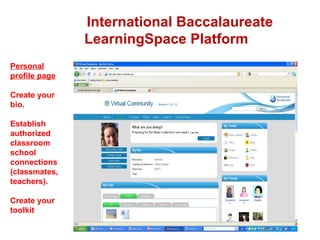
International Baccalaureate  LearningSpace Platform Personal profile page Create your bio. Establish authorized classroom school connections (classmates, teachers). Create your toolkit
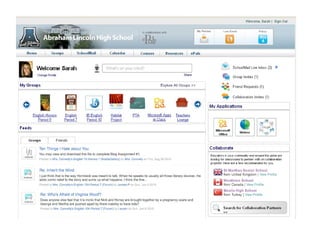
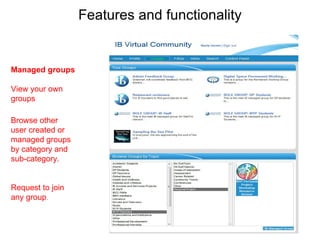
Features and functionality Managed groups View your own groups  Browse other user created or managed groups by category and sub-category. Request to join any group .
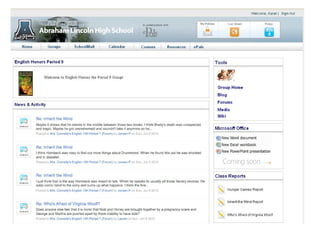
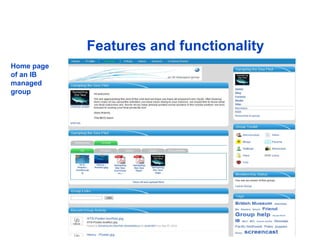
Features and functionality Home page of an IB managed  group
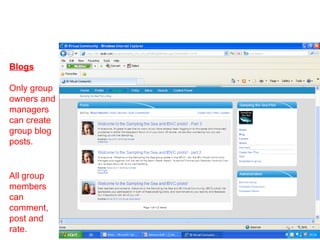
Blogs Only group owners and managers can create group blog posts. All group members can comment, post and rate.
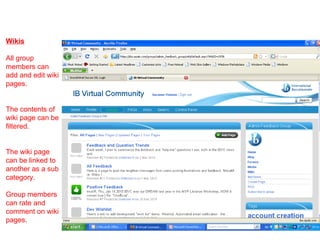
Wikis All group members can add and edit wiki pages.  The contents of wiki page can be filtered. The wiki page can be linked to another as a sub category. Group members can rate and comment on wiki pages.
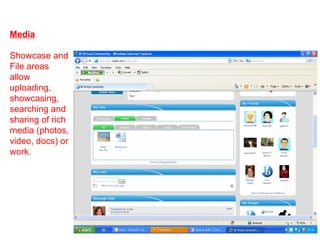
Media Showcase and File areas allow uploading, showcasing, searching and sharing of rich media (photos, video, docs) or work.
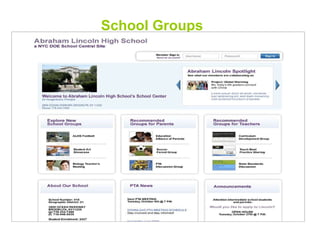
School Groups Platform Demonstration
  “ The amount of writing that our fourth graders are doing in LearningSpace has increased 9 – 10 times over the last year”  “ The quality of work has increased because they now see and comment on each others work.”     - ePals LearningSpace Teacher in Hauppauge, NY
Shakespeare On Snow Days An entire classroom students in Hauppauge, NY logged into their ePals LearningSpace on an emergency snow day to complete their Shakespeare project.  The teacher never asked them to, she never participated, she just watched the teamwork, self-directed learning and critical thinking all happening virtually – on a snow day off!
Cloud Benefits To Districts Anytime , Anywhere Learning 24/7 Cost Minimal IT Staff No On-Premise Infrastructure Can Scale, Deploy and Upgrade Faster
The Past Decade Set-up of “One-off” products / services (teachers, admin, students).  Separate Username / Passwords No integration or Single Sign-On “ Web-Sprawl” Anxiety
Today School tech teams now expected to managed the “ Web Sprawl” mess Eve of Transformation  –  Totally Digital Work Flow and Teaching / Learning Consolidation of Services To Integrated Platform Cloud Digital Transition Must Be Mandated and Utilize Initial USDOE Funding
District Ed-Tech Trends Policy-Managed, Open Arch, All-In-One Solutions  Integrated and Complimentary (Communication tools, student work, projects, data, parents) Mandatory Teacher-Student Cloud Based Deployment Use  Shift In School / District Tech Team Staff  Roles to Platform / ToolConfiguration, Safety & Usage Policy Assessment And Ability To Articulate Cloud Service Access / Benefit  Training / PD Deployment Planning Ability Providing Accurate Cost-Savings Analysis  (i.e. “Free is not always free”)
What Is Your K-12 Cloud Provider Business Model?   Free-Only Services  = No Business Model or K12 Design and Support Approach Fee-Based Services  = K-12 Curricular Approach, Interface And Support  
ePals Is A “Free-ium” Model (Free + Premium $)   FREE - Global Community / Social Learning Network & SchoolMail (basic) Premium / Subscription - LearningSpace & SchoolMail365  ($4/year);  eRATE eligible
Edu Providers Think and Design Around: * K-12 Requirements / Anticipated Configuration * Teacher-Student-Parent Functionality & Access * Tech Support (phone / web-based) * Curricular Integration Training w/Case Studies * Build From In-Classroom Experience * Policies, Roles and Permissions
Is The Cloud Service Safe, Protected and  Policy-Managed To Meet District Usage and Safety Policies?  Google, Facebook, Twitter breach most district policies and open up liability risks vs. edu designed services. Non-Edu services can create more teacher work and  don’t always provide an “on-task” student environment
Edu Companies ($)  – Policy Managed; eRATE / grant eligible, curricular functionality and support General Market Tools (free)  – No Safety Controls; User profiling/data capture; advertising Goodwill Vs. “A Good Headache”
Australian Ed-Tech At A Glance Country-wide One-to-One Laptop Deployment (All Students: Grades 7-12) Workspace & Collaborative Accounts All Schools Connected with Cisco-Tanberg Video-Conferencing Mandatory Use! Australian Government Contracting ePals To Connect and  Create Global Curricular Project-Sharing Bridges To Asian Schools Enhancing Long-Term Economic Commerce And Cross-Cultural Potential

Calet

  • 1.
    Tim DiScipio FounderePals [email_address] www.epals.com Safe Collaborative Technology In The Globally Connected Social Classroom
  • 2.
    Internet’s largest andfastest growing K-12 social learning network ( reaching 29M teachers / students in 200 countries and territories) Leading provider of safe, policy-managed collaborative K12 technology, Web 2.0 workspace tools, distributed learning platform in the cloud……..within a single and shared work environment
  • 3.
    Allows students andtheir teachers to locate, connect with and work collaboratively on projects with another class down the street and around the world. Enterprise-grade, cloud based school email with integrated Microsoft. G ives students, parents, teachers and administrators a secure way to communicate online, offers instant translation in 35 languages, and allows administrators to establish school-safe usage policies. A safe enterprise-grade, eRATE eligible virtual workspace and email with collaborative tools, schoolwork / doc storage, access to high-quality content, digital storage areas and Global Community. ePals Products $4 student 365
  • 4.
    InternationalBaccalaureate - LearningSpace for 700,000 global IB students / teachers / alumni mentors New York City DOE - selected ePals SchoolMail with LearningSpace access to power 2 Million students and parents Notable Recent ePals Deployments
  • 5.
  • 6.
    ePals + MicrosoftePals with integrated Live@edu and Office programs (Word, Powerpoint etc…) / Web Apps Planned development integration of Outlook Live calendar Office Web Apps integration planned for Q2 2011
  • 7.
    LearningSpace A safeand protected virtual workspace designed for K12 ePals, Inc. Confidential
  • 8.
    ePals LearningSpace Asafe K-12 virtual workspace where tools and docs resides in one safe online space with authorized classmates / teachers / mentors Tools - email, blogs, wikis, shared portfolios Schoolwork / documents - Word, Powerpoints, files & rich media Contact Groups - Teachers and classmates Shared environment with project and document access Open architecture / 3 rd Party Apps (skype, moodle etc..)
  • 9.
    Teachers and studentscreate profiles seen only by their classroom and school community
  • 10.
  • 11.
  • 12.
  • 13.
    Mr. Li’s ClassroomMrs. Torres’ Classroom Invite other classrooms into your projects Invite Collaborative Project Accepted
  • 14.
    International Baccalaureate LearningSpace Platform Personal profile page Create your bio. Establish authorized classroom school connections (classmates, teachers). Create your toolkit
  • 15.
    Features and functionalityManaged groups View your own groups Browse other user created or managed groups by category and sub-category. Request to join any group .
  • 16.
    Features and functionalityHome page of an IB managed group
  • 17.
    Blogs Only groupowners and managers can create group blog posts. All group members can comment, post and rate.
  • 18.
    Wikis All groupmembers can add and edit wiki pages. The contents of wiki page can be filtered. The wiki page can be linked to another as a sub category. Group members can rate and comment on wiki pages.
  • 19.
    Media Showcase andFile areas allow uploading, showcasing, searching and sharing of rich media (photos, video, docs) or work.
  • 20.
  • 21.
    The amount of writing that our fourth graders are doing in LearningSpace has increased 9 – 10 times over the last year” “ The quality of work has increased because they now see and comment on each others work.” - ePals LearningSpace Teacher in Hauppauge, NY
  • 22.
    Shakespeare On SnowDays An entire classroom students in Hauppauge, NY logged into their ePals LearningSpace on an emergency snow day to complete their Shakespeare project. The teacher never asked them to, she never participated, she just watched the teamwork, self-directed learning and critical thinking all happening virtually – on a snow day off!
  • 23.
    Cloud Benefits ToDistricts Anytime , Anywhere Learning 24/7 Cost Minimal IT Staff No On-Premise Infrastructure Can Scale, Deploy and Upgrade Faster
  • 24.
    The Past DecadeSet-up of “One-off” products / services (teachers, admin, students). Separate Username / Passwords No integration or Single Sign-On “ Web-Sprawl” Anxiety
  • 25.
    Today School techteams now expected to managed the “ Web Sprawl” mess Eve of Transformation – Totally Digital Work Flow and Teaching / Learning Consolidation of Services To Integrated Platform Cloud Digital Transition Must Be Mandated and Utilize Initial USDOE Funding
  • 26.
    District Ed-Tech TrendsPolicy-Managed, Open Arch, All-In-One Solutions Integrated and Complimentary (Communication tools, student work, projects, data, parents) Mandatory Teacher-Student Cloud Based Deployment Use Shift In School / District Tech Team Staff Roles to Platform / ToolConfiguration, Safety & Usage Policy Assessment And Ability To Articulate Cloud Service Access / Benefit Training / PD Deployment Planning Ability Providing Accurate Cost-Savings Analysis (i.e. “Free is not always free”)
  • 27.
    What Is YourK-12 Cloud Provider Business Model?   Free-Only Services = No Business Model or K12 Design and Support Approach Fee-Based Services = K-12 Curricular Approach, Interface And Support  
  • 28.
    ePals Is A“Free-ium” Model (Free + Premium $)   FREE - Global Community / Social Learning Network & SchoolMail (basic) Premium / Subscription - LearningSpace & SchoolMail365 ($4/year); eRATE eligible
  • 29.
    Edu Providers Thinkand Design Around: * K-12 Requirements / Anticipated Configuration * Teacher-Student-Parent Functionality & Access * Tech Support (phone / web-based) * Curricular Integration Training w/Case Studies * Build From In-Classroom Experience * Policies, Roles and Permissions
  • 30.
    Is The CloudService Safe, Protected and Policy-Managed To Meet District Usage and Safety Policies? Google, Facebook, Twitter breach most district policies and open up liability risks vs. edu designed services. Non-Edu services can create more teacher work and don’t always provide an “on-task” student environment
  • 31.
    Edu Companies ($) – Policy Managed; eRATE / grant eligible, curricular functionality and support General Market Tools (free) – No Safety Controls; User profiling/data capture; advertising Goodwill Vs. “A Good Headache”
  • 32.
    Australian Ed-Tech AtA Glance Country-wide One-to-One Laptop Deployment (All Students: Grades 7-12) Workspace & Collaborative Accounts All Schools Connected with Cisco-Tanberg Video-Conferencing Mandatory Use! Australian Government Contracting ePals To Connect and Create Global Curricular Project-Sharing Bridges To Asian Schools Enhancing Long-Term Economic Commerce And Cross-Cultural Potential

Editor's Notes

  • #14 Once they accept the invitation, teachers and students become members of a special project group, with all the tools and materials needed to get started and work together, and in a safe and secure environment.
  • #16 **Mention two different types: IB Managed and IB user** IB Managed groups Clearly marked as IB Managed. IB Managed Groups are only created by the IB on request. An IB staff member must be the owner, responsible for the content and moderation. Functionality includes multiple showcases, wikis, forums and blogs.