NSCC High
Performance
Computing Cluster
Introduction
[19-Feb-2016]
• Introduction to NSCC
• About HPC
• More about NSCC HPC cluster
• PBS Pro (Scheduler)
• Compilers and Libraries
• Developer Tools
• Co-processor / Accelerators
• Environment Modules
• Applications
• User registration procedures
• Feedback
2
The Discussion
3
Introduction to NSCC
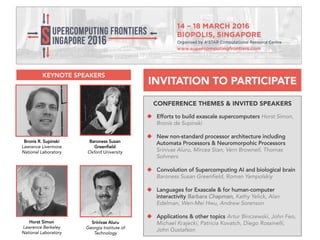
CONFERENCE THEMES & INVITED SPEAKERS
 Efforts to build exascale supercomputers Horst
Simon, Bronis de Supinski
 New non-standard processor architecture including
Automata Processors & Neuromorpohic Processors
Srinivas Aluru, Mircea Stan, Vern Brownell, Thomas
Sohmers
 Convolution of Supercomputing AI and biological
brain Baroness Susan Greenfield, Roman Yampolskiy
 Languages for Exascale & for human-computer
interactivity Barbara Chapman, Kathy Yelick, Alan
Edelman, Wen-Mei Hwu, Andrew Sorenson
 Applications & other topics Artur Binczewski, John
Feo, Michael Krajecki, Patricia Kovatch, Diego Rossinelli,
John Gustafson
Bronis R. Supinski
Lawrence Livermore
National Laboratory
Horst Simon
Lawrence Berkeley
National Laboratory
Baroness Susan
Greenfield
Oxford University
Srinivas Aluru
Georgia Institute of
Technology
INVITATION TO PARTICIPATE
KEYNOTE SPEAKERS
• State-of-the-art national facility with computing, data
and resources to enable users to solve science and
technological problems, and stimulate industry to use
computing for problem solving, testing designs and
advancing technologies.
• Facility will be linked by high bandwidth networks to
connect these resources and provide high speed access
to users anywhere and everyone.
Introduction:
The National Supercomputing Centre (NSCC)
5
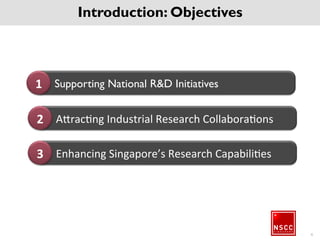
Supporting National R&D Initiatives1
Attracting Industrial Research Collaborations2
Enhancing Singapore’s Research Capabilities3
6
Introduction: Objectives
7
What is HPC?
8
What is HPC?
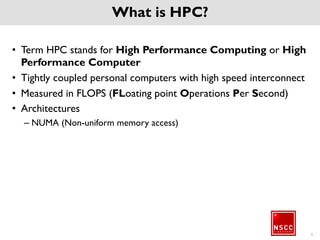
• Term HPC stands for High Performance Computing or High
Performance Computer
• Tightly coupled personal computers with high speed
interconnect
• Measured in FLOPS (FLoating point Operations Per Second)
• Architectures
– NUMA (Non-uniform memory access)
Major Domains where HPC is used
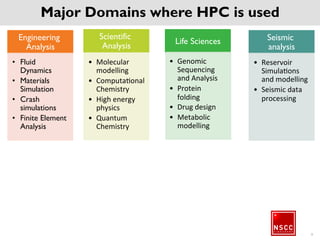
Engineering
Analysis
• Fluid
Dynamics
• Materials
Simulation
• Crash
simulations
• Finite
Element
Analysis
Scientific
Analysis
• Molecular
modelling
• Computational
Chemistry
• High energy
physics
• Quantum
Chemistry
Life Sciences
• Genomic
Sequencing
and Analysis
• Protein
folding
• Drug design
• Metabolic
modelling
Seismic
analysis
• Reservoir
Simulations
and modelling
• Seismic data
processing
9
Major Domains where HPC is used
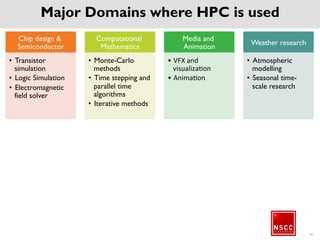
Chip design &
Semiconductor
• Transistor
simulation
• Logic Simulation
• Electromagnetic
field solver
Computational
Mathematics
• Monte-Carlo
methods
• Time stepping
and parallel time
algorithms
• Iterative
methods
Media and
Animation
• VFX and
visualization
• Animation
Weather
research
• Atmospheric
modelling
• Seasonal time-
scale research
• -
Major Domains where HPC is used
10
Major Domains where HPC is used
• And More
– Bigdata
– Information Technology
– Cyber security
– Banking and Finance
– Data mining
11
12
Introduction to NSCC HPC
Cluster
Objectives
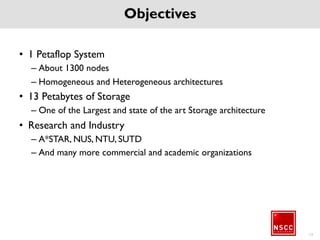
• 1 Petaflop System
– About 1300 nodes
– Homogeneous and Heterogeneous architectures
• 13 Petabytes of Storage
– One of the Largest and state of the art Storage architecture
• Research and Industry
– A*STAR, NUS, NTU, SUTD
– And many more commercial and academic organizations
13
HPC Stack in NSCC
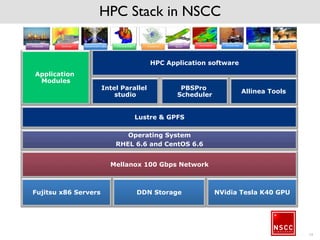
Mellanox 100 Gbps Network
Intel Parallel
studio
Allinea Tools
PBSPro
Scheduler
Lustre & GPFS
HPC Application software
Operating System
RHEL 6.6 and CentOS 6.6
Fujitsu x86 Servers NVidia Tesla K40 GPUDDN Storage
Application
Modules
14
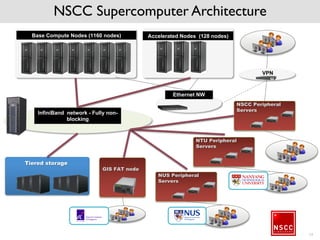
NSCC Supercomputer Architecture
Base Compute Nodes (1160 nodes) Accelerated Nodes (128 nodes)
InfiniBand network - Fully non-
blocking
Tiered storage
Ethernet NW
NSCC Peripheral
Servers
VPN
NTU Peripheral
Servers
NUS Peripheral
Servers
GIS FAT node
15
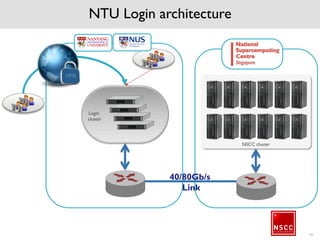
NTU Login architecture
16
Login
cluster
40/80Gb/s
Link
NSCC cluster
17
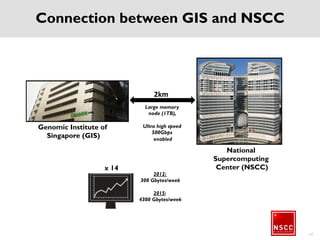
Genomic Institute of
Singapore (GIS)
National
Supercomputing
Center (NSCC)
2km
Connection between GIS and NSCC
Large memory
node (1TB),
Ultra high speed
500Gbps
enabled
2012:
300 Gbytes/week
2015:
4300 Gbytes/week
x 14
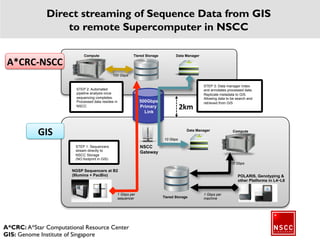
NGSP Sequencers at B2
(Illumina + PacBio)
NSCC
Gateway
STEP 2: Automated
pipeline analysis once
sequencing completes.
Processed data resides in
NSCC
500Gbps
Primary
Link
Data Manager
STEP 3: Data manager index
and annotates processed data.
Replicate metadata to GIS.
Allowing data to be search and
retrieved from GIS
Data ManagerCompute Tiered Storage
POLARIS, Genotyping &
other Platforms in L4~L8
Tiered Storage
STEP 1: Sequencers
stream directly to
NSCC Storage
(NO footprint in GIS)
Compute
1 Gbps per
sequencer
10 Gbps
1 Gbps per
machine
100 Gbps
10 Gbps
A*CRC-NSCC
GIS
A*CRC: A*Star Computational Resource Center
GIS: Genome Institute of Singapore
Direct streaming of Sequence Data from GIS
to remote Supercomputer in NSCC
2km
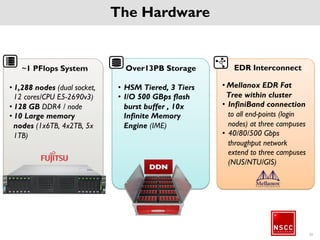
The Hardware
EDR Interconnect
• Mellanox EDR Fat Tree
within cluster
• InfiniBand connection
to all end-points (login
nodes) at three
campuses
• 40/80/500 Gbps
throughput network
extend to three
campuses
(NUS/NTU/GIS)
Over13PB Storage
• HSM Tiered, 3 Tiers
• I/O 500 GBps flash
burst buffer , 10x
Infinite Memory
Engine (IME)
~1 PFlops System
• 1,288 nodes (dual
socket, 12 cores/CPU
E5-2690v3)
• 128 GB DDR4 / node
• 10 Large memory
nodes (1x6TB, 4x2TB,
5x 1TB)
20
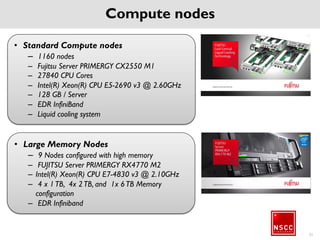
Compute nodes
21
• Large Memory Nodes
– 9 Nodes configured with high memory
– FUJITSU Server PRIMERGY RX4770 M2
– Intel(R) Xeon(R) CPU E7-4830 v3 @
2.10GHz
– 4 x 1 TB, 4x 2 TB, and 1x 6 TB Memory
configuration
– EDR Infiniband
• Standard Compute nodes
– 1160 nodes
– Fujitsu Server PRIMERGY CX2550 M1
– 27840 CPU Cores
– Intel(R) Xeon(R) CPU E5-2690 v3 @
2.60GHz
– 128 GB / Server
– EDR InfiniBand
– Liquid cooling system
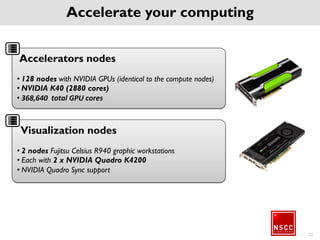
Accelerate your computing
Accelerators nodes
• 128 nodes with NVIDIA GPUs (identical to the compute
nodes)
• NVIDIA K40 (2880 cores)
• 368,640 total GPU cores
Visualization nodes
• 2 nodes Fujitsu Celsius R940 graphic workstations
• Each with 2 x NVIDIA Quadro K4200
• NVIDIA Quadro Sync support
22
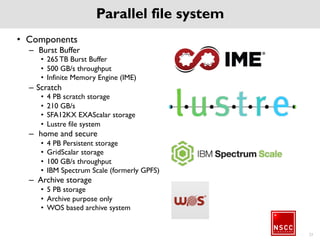
Parallel file system
• Components
– Burst Buffer
• 265 TB Burst Buffer
• 500 GB/s throughput
• Infinite Memory Engine (IME)
– Scratch
• 4 PB scratch storage
• 210 GB/s
• SFA12KX EXAScalar storage
• Lustre file system
– home and secure
• 4 PB Persistent storage
• GridScalar storage
• 100 GB/s throughput
• IBM Spectrum Scale (formerly GPFS)
– Archive storage
• 5 PB storage
• Archive purpose only
• WOS based archive system
23
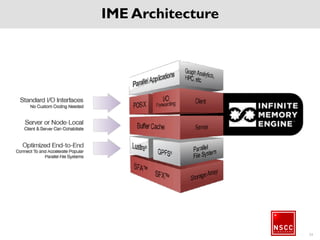
IME Architecture
24
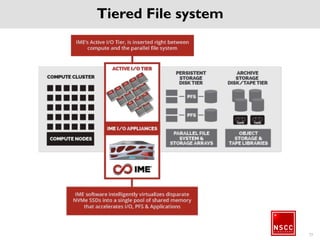
Tiered File system
25
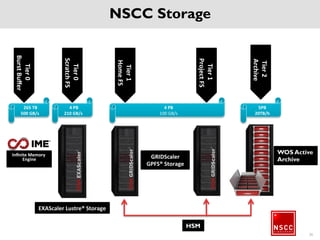
NSCC Storage
26
Tier0
BurstBuffer
Tier0
ScratchFS
Tier1
HomeFS
Tier1
ProjectFS
Tier2
Archive
265 TB
500 GB/s
4 PB
210 GB/s
4 PB
100 GB/s
WOS Active
Archive
Infinite Memory
Engine GRIDScaler
GPFS® Storage
HSM
5PB
20TB/h
EXAScaler Lustre® Storage
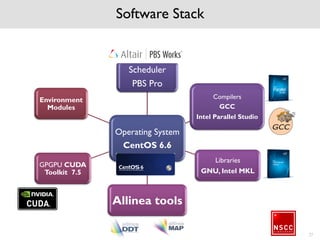
Software Stack
Operating
System
CentOS 6.6
Scheduler
PBS Pro
Compilers
GCC
Intel Parallel Studio
Libraries
GNU, Intel MKL
Allinea tools
GPGPU CUDA
Toolkit 7.5
Environment
Modules
27
NSCC system is
expected to be
ready by 15th
Mar 2016 *
28
The information on the following slides are only
an indicative information and likely be confirmed
by 15th of Mar 2016
PBS Professional (Scheduler)
29
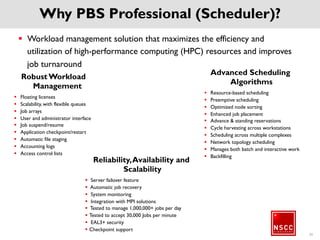
Why PBS Professional (Scheduler)?
30
 Workload management solution that maximizes the efficiency and
utilization of high-performance computing (HPC) resources and
improves job turnaround
Robust Workload
Management
 Floating licenses
 Scalability, with flexible queues
 Job arrays
 User and administrator interface
 Job suspend/resume
 Application checkpoint/restart
 Automatic file staging
 Accounting logs
 Access control lists
Advanced Scheduling
Algorithms
 Resource-based scheduling
 Preemptive scheduling
 Optimized node sorting
 Enhanced job placement
 Advance & standing reservations
 Cycle harvesting across workstations
 Scheduling across multiple complexes
 Network topology scheduling
 Manages both batch and interactive
work
 BackfillingReliability, Availability and Scalability
 Server failover feature
 Automatic job recovery
 System monitoring
 Integration with MPI solutions
 Tested to manage 1,000,000+ jobs per day
 Tested to accept 30,000 Jobs per minute
 EAL3+ security
 Checkpoint support
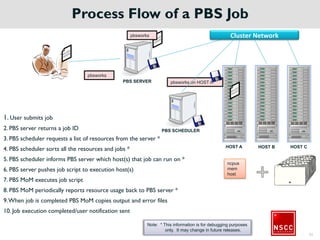
Process Flow of a PBS Job
1. User submits job
2. PBS server returns a job ID
3. PBS scheduler requests a list of resources from the server *
4. PBS scheduler sorts all the resources and jobs *
5. PBS scheduler informs PBS server which host(s) that job can run on *
6. PBS server pushes job script to execution host(s)
7. PBS MoM executes job script
8. PBS MoM periodically reports resource usage back to PBS server *
9. When job is completed PBS MoM copies output and error files
10. Job execution completed/user notification sent
HOST A HOST B HOST C
PBS SCHEDULER
PBS SERVER
pbsworks
ncpus
mem
host
pbsworks on HOST A
pbsworks
Note: * This information is for debugging purposes
only. It may change in future releases.
31
Cluster Network
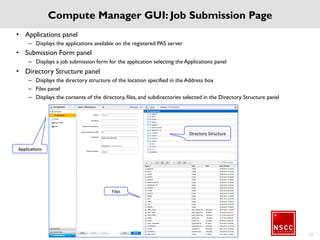
Compute Manager GUI: Job Submission Page
• Applications panel
– Displays the applications available on the registered PAS server
• Submission Form panel
– Displays a job submission form for the application selecting the Applications panel
• Directory Structure panel
– Displays the directory structure of the location specified in the Address box
– Files panel
– Displays the contents of the directory, files, and subdirectories selected in the Directory Structure panel
32
Directory Structure
Files
Applications
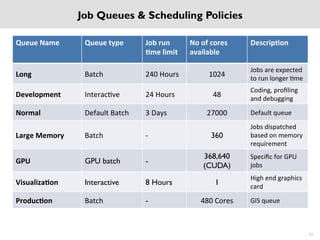
Job Queues & Scheduling Policies
33
Queue Name Queue type Job run
time limit
No of cores
available
Description
Long Batch 240 Hours 1024 Jobs are expected
to run longer time
Development Interactive 24 Hours 48 Coding, profiling
and debugging
Normal Default Batch 3 Days 27000 Default queue
Large Memory Batch - 360
Jobs dispatched
based on memory
requirement
GPU GPU batch -
368,640
(CUDA)
Specific for GPU
jobs
Visualization Interactive 8 Hours 1 High end graphics
card
Production Batch - 480 Cores GIS queue
Compilers & Libraries
34
35
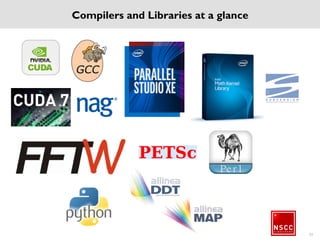
Compilers and Libraries at a glance
Parallel programming OpenMP
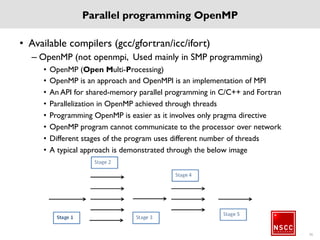
• Available compilers (gcc/gfortran/icc/ifort)
– OpenMP (not openmpi, Used mainly in SMP programming)
• OpenMP (Open Multi-Processing)
• OpenMP is an approach and OpenMPI is an implementation of MPI
• An API for shared-memory parallel programming in C/C++ and Fortran
• Parallelization in OpenMP achieved through threads
• Programming OpenMP is easier as it involves only pragma directive
• OpenMP program cannot communicate to the processor over network
• Different stages of the program uses different number of threads
• A typical approach is demonstrated through the below image
36
Parallel Programming MPI
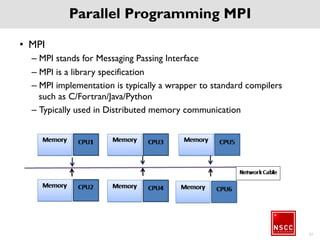
• MPI
– MPI stands for Messaging Passing Interface
– MPI is a library specification
– MPI implementation is typically a wrapper to standard
compilers such as C/Fortran/Java/Python
– Typically used in Distributed memory communication
37
38
Developer Tools
39
Allinea DDT
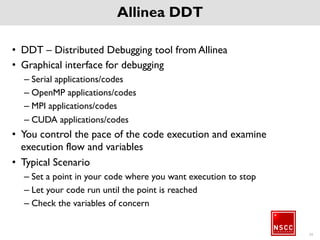
• DDT – Distributed Debugging tool from Allinea
• Graphical interface for debugging
– Serial applications/codes
– OpenMP applications/codes
– MPI applications/codes
– CUDA applications/codes
• You control the pace of the code execution and examine
execution flow and variables
• Typical Scenario
– Set a point in your code where you want execution to stop
– Let your code run until the point is reached
– Check the variables of concern
40
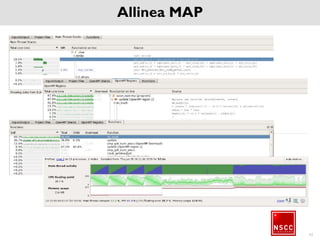
Allinea MAP
• MAP – Application Profiling tool from Allinea
• Graphical interface for profilling
– Serial applications/codes
– OpenMP applications/codes
– MPI applications/codes
41
Allinea MAP
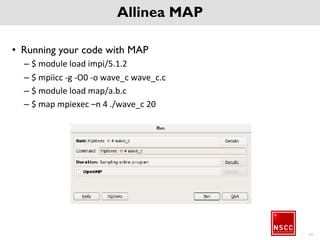
• Running your code with MAP
– $ module load impi/5.1.2
– $ mpiicc -g -O0 -o wave_c wave_c.c
– $ module load map/a.b.c
– $ map mpiexec –n 4 ./wave_c 20
42
Allinea MAP
43
Co-processor / Accelerators
GPU
• GPUs – Graphic Processing Units were initially made to
render better graphics performance
• With the amount of research put on GPUs, it was
identified that GPUs can perform better with Floating
Point Operations as well
• The term GPU changed to GPGPUs (General Purpose
GPUs)
• CUDA Toolkit includes compiler, math libraries, tools, and
debuggers
44
GPU in NSCC
• GPU Configuration
– Total 128 GPU nodes
– Each server with 1 Tesla K40 GPU
– 128 GB host memory per server
– 12GB device memory
– 2880 CUDA Cores
• Connect to GPU server
– To compile GPU application:
• Submit interactive job requesting for GPU resource
• Compile job using NVCC compiler
– To submit GPU job
• Flexible to among qsub for login nodes
• OR login to compute manager
45
46
Environment Modules
What is Environment modules
• Environment modules helps to dynamically load/unload
environment variables such as PATH, LD_LIBRARY_PATH,
etc.,
• Environment modules are based on module files which
are written in TCL language
• Environment modules are shell independent
• Helpful to maintain different version of same software
• Flexibility to create module files by the users
47
Applications
48
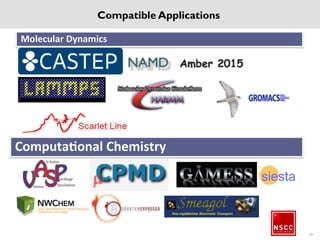
Molecular Dynamics
Computational Chemistry
Compatible Applications
49
Compatible Applications
Engineering Applications
Quasiparticle calculationQuantum Chemistry
Numerical Analysis Weather research
50
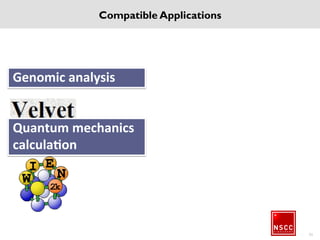
Genomic analysis
Quantum mechanics
calculation
51
Compatible Applications
August 27, 2015 52
Compatible Applications
Proposed services to be offered
• Computational resources
• Storage services
• Interactive Job submission portal
• Customized portal to report issues
• Request for a service via portal
• Report your issue via Portal/e-Mail/Phone
• Compile your own code
• Get advice to compile/optimize your code
• Also compile/optimize on your behalf
• Share and collaborate with others
53
Where is NSCC
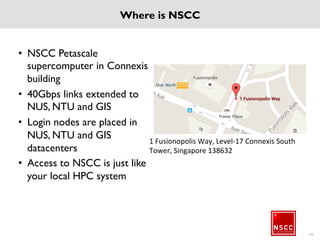
• NSCC Petascale
supercomputer in
Connexis building
• 40Gbps links extended to
NUS, NTU and GIS
• Login nodes are placed in
NUS, NTU and GIS
datacenters
• Access to NSCC is just
like your local HPC
system
54
1 Fusionopolis Way, Level-17 Connexis South
Tower, Singapore 138632
Supported Login methods
• How do I login
– SSH
From a Windows PC use Putty or any standard SSH client software hostname is
nscclogin.nus.edu.sg, use NSCC Credentials
From Linux machine, use ssh username@<to be confirmed>
From MAC, open terminal and ssh username@<to be confirmed>
– File Transfer
SCP or any other secure shell file transfer software from Windows
Use the command scp to transfer files from MAC/Linux
– Compute Manager
Open any standard web browser
In the address bar, type https://<to be decided>
Use NSCC credentials to login
– Outside campus
Connect to Campus VPN gain above mentioned services
55
NSCC HPC Support (Proposed to be available by 15th Mar)
• Corporate Info – web portal
http://nscc.sg http://beta.nscc.sg
• NSCC HPC web portal
http://help.nscc.sg
• NSCC support email
help@nscc.sg
• NSCC Workshop portal
http://workshop.nscc.sg
56
57
Help us improve. Take the online survey!
Visit: http://workshop.nscc.sg >> Survey
Proposed Help portal
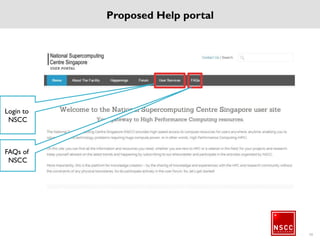
58
FAQs of
NSCC
Login to
NSCC
Registration Procedures
59
Registration Procedure
60
Web Site : http://www.nscc.sg
Helpdesk : https://help.nscc.sg
Email : help@nscc.sg
Phone : +65 6645 3412
61
NSCC Training  Introductory Class

NSCC Training Introductory Class

  • 1.
  • 2.
    • Introduction toNSCC • About HPC • More about NSCC HPC cluster • PBS Pro (Scheduler) • Compilers and Libraries • Developer Tools • Co-processor / Accelerators • Environment Modules • Applications • User registration procedures • Feedback 2 The Discussion
  • 3.
  • 4.
    CONFERENCE THEMES &INVITED SPEAKERS  Efforts to build exascale supercomputers Horst Simon, Bronis de Supinski  New non-standard processor architecture including Automata Processors & Neuromorpohic Processors Srinivas Aluru, Mircea Stan, Vern Brownell, Thomas Sohmers  Convolution of Supercomputing AI and biological brain Baroness Susan Greenfield, Roman Yampolskiy  Languages for Exascale & for human-computer interactivity Barbara Chapman, Kathy Yelick, Alan Edelman, Wen-Mei Hwu, Andrew Sorenson  Applications & other topics Artur Binczewski, John Feo, Michael Krajecki, Patricia Kovatch, Diego Rossinelli, John Gustafson Bronis R. Supinski Lawrence Livermore National Laboratory Horst Simon Lawrence Berkeley National Laboratory Baroness Susan Greenfield Oxford University Srinivas Aluru Georgia Institute of Technology INVITATION TO PARTICIPATE KEYNOTE SPEAKERS
  • 5.
    • State-of-the-art nationalfacility with computing, data and resources to enable users to solve science and technological problems, and stimulate industry to use computing for problem solving, testing designs and advancing technologies. • Facility will be linked by high bandwidth networks to connect these resources and provide high speed access to users anywhere and everyone. Introduction: The National Supercomputing Centre (NSCC) 5
  • 6.
    Supporting National R&DInitiatives1 Attracting Industrial Research Collaborations2 Enhancing Singapore’s Research Capabilities3 6 Introduction: Objectives
  • 7.
  • 8.
    8 What is HPC? •Term HPC stands for High Performance Computing or High Performance Computer • Tightly coupled personal computers with high speed interconnect • Measured in FLOPS (FLoating point Operations Per Second) • Architectures – NUMA (Non-uniform memory access)
  • 9.
    Major Domains whereHPC is used Engineering Analysis • Fluid Dynamics • Materials Simulation • Crash simulations • Finite Element Analysis Scientific Analysis • Molecular modelling • Computational Chemistry • High energy physics • Quantum Chemistry Life Sciences • Genomic Sequencing and Analysis • Protein folding • Drug design • Metabolic modelling Seismic analysis • Reservoir Simulations and modelling • Seismic data processing 9
  • 10.
    Major Domains whereHPC is used Chip design & Semiconductor • Transistor simulation • Logic Simulation • Electromagnetic field solver Computational Mathematics • Monte-Carlo methods • Time stepping and parallel time algorithms • Iterative methods Media and Animation • VFX and visualization • Animation Weather research • Atmospheric modelling • Seasonal time- scale research • - Major Domains where HPC is used 10
  • 11.
    Major Domains whereHPC is used • And More – Bigdata – Information Technology – Cyber security – Banking and Finance – Data mining 11
  • 12.
  • 13.
    Objectives • 1 PetaflopSystem – About 1300 nodes – Homogeneous and Heterogeneous architectures • 13 Petabytes of Storage – One of the Largest and state of the art Storage architecture • Research and Industry – A*STAR, NUS, NTU, SUTD – And many more commercial and academic organizations 13
  • 14.
    HPC Stack inNSCC Mellanox 100 Gbps Network Intel Parallel studio Allinea Tools PBSPro Scheduler Lustre & GPFS HPC Application software Operating System RHEL 6.6 and CentOS 6.6 Fujitsu x86 Servers NVidia Tesla K40 GPUDDN Storage Application Modules 14
  • 15.
    NSCC Supercomputer Architecture BaseCompute Nodes (1160 nodes) Accelerated Nodes (128 nodes) InfiniBand network - Fully non- blocking Tiered storage Ethernet NW NSCC Peripheral Servers VPN NTU Peripheral Servers NUS Peripheral Servers GIS FAT node 15
  • 16.
  • 17.
    17 Genomic Institute of Singapore(GIS) National Supercomputing Center (NSCC) 2km Connection between GIS and NSCC Large memory node (1TB), Ultra high speed 500Gbps enabled 2012: 300 Gbytes/week 2015: 4300 Gbytes/week x 14
  • 18.
    NGSP Sequencers atB2 (Illumina + PacBio) NSCC Gateway STEP 2: Automated pipeline analysis once sequencing completes. Processed data resides in NSCC 500Gbps Primary Link Data Manager STEP 3: Data manager index and annotates processed data. Replicate metadata to GIS. Allowing data to be search and retrieved from GIS Data ManagerCompute Tiered Storage POLARIS, Genotyping & other Platforms in L4~L8 Tiered Storage STEP 1: Sequencers stream directly to NSCC Storage (NO footprint in GIS) Compute 1 Gbps per sequencer 10 Gbps 1 Gbps per machine 100 Gbps 10 Gbps A*CRC-NSCC GIS A*CRC: A*Star Computational Resource Center GIS: Genome Institute of Singapore Direct streaming of Sequence Data from GIS to remote Supercomputer in NSCC 2km
  • 19.
    The Hardware EDR Interconnect •Mellanox EDR Fat Tree within cluster • InfiniBand connection to all end-points (login nodes) at three campuses • 40/80/500 Gbps throughput network extend to three campuses (NUS/NTU/GIS) Over13PB Storage • HSM Tiered, 3 Tiers • I/O 500 GBps flash burst buffer , 10x Infinite Memory Engine (IME) ~1 PFlops System • 1,288 nodes (dual socket, 12 cores/CPU E5-2690v3) • 128 GB DDR4 / node • 10 Large memory nodes (1x6TB, 4x2TB, 5x 1TB) 20
  • 20.
    Compute nodes 21 • LargeMemory Nodes – 9 Nodes configured with high memory – FUJITSU Server PRIMERGY RX4770 M2 – Intel(R) Xeon(R) CPU E7-4830 v3 @ 2.10GHz – 4 x 1 TB, 4x 2 TB, and 1x 6 TB Memory configuration – EDR Infiniband • Standard Compute nodes – 1160 nodes – Fujitsu Server PRIMERGY CX2550 M1 – 27840 CPU Cores – Intel(R) Xeon(R) CPU E5-2690 v3 @ 2.60GHz – 128 GB / Server – EDR InfiniBand – Liquid cooling system
  • 21.
    Accelerate your computing Acceleratorsnodes • 128 nodes with NVIDIA GPUs (identical to the compute nodes) • NVIDIA K40 (2880 cores) • 368,640 total GPU cores Visualization nodes • 2 nodes Fujitsu Celsius R940 graphic workstations • Each with 2 x NVIDIA Quadro K4200 • NVIDIA Quadro Sync support 22
  • 22.
    Parallel file system •Components – Burst Buffer • 265 TB Burst Buffer • 500 GB/s throughput • Infinite Memory Engine (IME) – Scratch • 4 PB scratch storage • 210 GB/s • SFA12KX EXAScalar storage • Lustre file system – home and secure • 4 PB Persistent storage • GridScalar storage • 100 GB/s throughput • IBM Spectrum Scale (formerly GPFS) – Archive storage • 5 PB storage • Archive purpose only • WOS based archive system 23
  • 23.
  • 24.
  • 25.
    NSCC Storage 26 Tier0 BurstBuffer Tier0 ScratchFS Tier1 HomeFS Tier1 ProjectFS Tier2 Archive 265 TB 500GB/s 4 PB 210 GB/s 4 PB 100 GB/s WOS Active Archive Infinite Memory Engine GRIDScaler GPFS® Storage HSM 5PB 20TB/h EXAScaler Lustre® Storage
  • 26.
    Software Stack Operating System CentOS 6.6 Scheduler PBSPro Compilers GCC Intel Parallel Studio Libraries GNU, Intel MKL Allinea tools GPGPU CUDA Toolkit 7.5 Environment Modules 27
  • 27.
    NSCC system is expectedto be ready by 15th Mar 2016 * 28 The information on the following slides are only an indicative information and likely be confirmed by 15th of Mar 2016
  • 28.
  • 29.
    Why PBS Professional(Scheduler)? 30  Workload management solution that maximizes the efficiency and utilization of high-performance computing (HPC) resources and improves job turnaround Robust Workload Management  Floating licenses  Scalability, with flexible queues  Job arrays  User and administrator interface  Job suspend/resume  Application checkpoint/restart  Automatic file staging  Accounting logs  Access control lists Advanced Scheduling Algorithms  Resource-based scheduling  Preemptive scheduling  Optimized node sorting  Enhanced job placement  Advance & standing reservations  Cycle harvesting across workstations  Scheduling across multiple complexes  Network topology scheduling  Manages both batch and interactive work  BackfillingReliability, Availability and Scalability  Server failover feature  Automatic job recovery  System monitoring  Integration with MPI solutions  Tested to manage 1,000,000+ jobs per day  Tested to accept 30,000 Jobs per minute  EAL3+ security  Checkpoint support
  • 30.
    Process Flow ofa PBS Job 1. User submits job 2. PBS server returns a job ID 3. PBS scheduler requests a list of resources from the server * 4. PBS scheduler sorts all the resources and jobs * 5. PBS scheduler informs PBS server which host(s) that job can run on * 6. PBS server pushes job script to execution host(s) 7. PBS MoM executes job script 8. PBS MoM periodically reports resource usage back to PBS server * 9. When job is completed PBS MoM copies output and error files 10. Job execution completed/user notification sent HOST A HOST B HOST C PBS SCHEDULER PBS SERVER pbsworks ncpus mem host pbsworks on HOST A pbsworks Note: * This information is for debugging purposes only. It may change in future releases. 31 Cluster Network
  • 31.
    Compute Manager GUI:Job Submission Page • Applications panel – Displays the applications available on the registered PAS server • Submission Form panel – Displays a job submission form for the application selecting the Applications panel • Directory Structure panel – Displays the directory structure of the location specified in the Address box – Files panel – Displays the contents of the directory, files, and subdirectories selected in the Directory Structure panel 32 Directory Structure Files Applications
  • 32.
    Job Queues &Scheduling Policies 33 Queue Name Queue type Job run time limit No of cores available Description Long Batch 240 Hours 1024 Jobs are expected to run longer time Development Interactive 24 Hours 48 Coding, profiling and debugging Normal Default Batch 3 Days 27000 Default queue Large Memory Batch - 360 Jobs dispatched based on memory requirement GPU GPU batch - 368,640 (CUDA) Specific for GPU jobs Visualization Interactive 8 Hours 1 High end graphics card Production Batch - 480 Cores GIS queue
  • 33.
  • 34.
  • 35.
    Parallel programming OpenMP •Available compilers (gcc/gfortran/icc/ifort) – OpenMP (not openmpi, Used mainly in SMP programming) • OpenMP (Open Multi-Processing) • OpenMP is an approach and OpenMPI is an implementation of MPI • An API for shared-memory parallel programming in C/C++ and Fortran • Parallelization in OpenMP achieved through threads • Programming OpenMP is easier as it involves only pragma directive • OpenMP program cannot communicate to the processor over network • Different stages of the program uses different number of threads • A typical approach is demonstrated through the below image 36
  • 36.
    Parallel Programming MPI •MPI – MPI stands for Messaging Passing Interface – MPI is a library specification – MPI implementation is typically a wrapper to standard compilers such as C/Fortran/Java/Python – Typically used in Distributed memory communication 37
  • 37.
  • 38.
    39 Allinea DDT • DDT– Distributed Debugging tool from Allinea • Graphical interface for debugging – Serial applications/codes – OpenMP applications/codes – MPI applications/codes – CUDA applications/codes • You control the pace of the code execution and examine execution flow and variables • Typical Scenario – Set a point in your code where you want execution to stop – Let your code run until the point is reached – Check the variables of concern
  • 39.
    40 Allinea MAP • MAP– Application Profiling tool from Allinea • Graphical interface for profilling – Serial applications/codes – OpenMP applications/codes – MPI applications/codes
  • 40.
    41 Allinea MAP • Runningyour code with MAP – $ module load impi/5.1.2 – $ mpiicc -g -O0 -o wave_c wave_c.c – $ module load map/a.b.c – $ map mpiexec –n 4 ./wave_c 20
  • 41.
  • 42.
  • 43.
    GPU • GPUs –Graphic Processing Units were initially made to render better graphics performance • With the amount of research put on GPUs, it was identified that GPUs can perform better with Floating Point Operations as well • The term GPU changed to GPGPUs (General Purpose GPUs) • CUDA Toolkit includes compiler, math libraries, tools, and debuggers 44
  • 44.
    GPU in NSCC •GPU Configuration – Total 128 GPU nodes – Each server with 1 Tesla K40 GPU – 128 GB host memory per server – 12GB device memory – 2880 CUDA Cores • Connect to GPU server – To compile GPU application: • Submit interactive job requesting for GPU resource • Compile job using NVCC compiler – To submit GPU job • Flexible to among qsub for login nodes • OR login to compute manager 45
  • 45.
  • 46.
    What is Environmentmodules • Environment modules helps to dynamically load/unload environment variables such as PATH, LD_LIBRARY_PATH, etc., • Environment modules are based on module files which are written in TCL language • Environment modules are shell independent • Helpful to maintain different version of same software • Flexibility to create module files by the users 47
  • 47.
  • 48.
  • 49.
    Compatible Applications Engineering Applications QuasiparticlecalculationQuantum Chemistry Numerical Analysis Weather research 50
  • 50.
  • 51.
    August 27, 201552 Compatible Applications
  • 52.
    Proposed services tobe offered • Computational resources • Storage services • Interactive Job submission portal • Customized portal to report issues • Request for a service via portal • Report your issue via Portal/e-Mail/Phone • Compile your own code • Get advice to compile/optimize your code • Also compile/optimize on your behalf • Share and collaborate with others 53
  • 53.
    Where is NSCC •NSCC Petascale supercomputer in Connexis building • 40Gbps links extended to NUS, NTU and GIS • Login nodes are placed in NUS, NTU and GIS datacenters • Access to NSCC is just like your local HPC system 54 1 Fusionopolis Way, Level-17 Connexis South Tower, Singapore 138632
  • 54.
    Supported Login methods •How do I login – SSH From a Windows PC use Putty or any standard SSH client software hostname is nscclogin.nus.edu.sg, use NSCC Credentials From Linux machine, use ssh username@<to be confirmed> From MAC, open terminal and ssh username@<to be confirmed> – File Transfer SCP or any other secure shell file transfer software from Windows Use the command scp to transfer files from MAC/Linux – Compute Manager Open any standard web browser In the address bar, type https://<to be decided> Use NSCC credentials to login – Outside campus Connect to Campus VPN gain above mentioned services 55
  • 55.
    NSCC HPC Support(Proposed to be available by 15th Mar) • Corporate Info – web portal http://nscc.sg http://beta.nscc.sg • NSCC HPC web portal http://help.nscc.sg • NSCC support email help@nscc.sg • NSCC Workshop portal http://workshop.nscc.sg 56
  • 56.
    57 Help us improve.Take the online survey! Visit: http://workshop.nscc.sg >> Survey
  • 57.
    Proposed Help portal 58 FAQsof NSCC Login to NSCC
  • 58.
  • 59.
  • 60.
    Web Site :http://www.nscc.sg Helpdesk : https://help.nscc.sg Email : help@nscc.sg Phone : +65 6645 3412 61

Editor's Notes

  • #18 GIS’ capacity grew by 14 times within 3 years. We need more firepower to store & compute – As such GIS will need to work together with NSCC in order to process their ever growing amount of data. But transferring data by network will take at least a day. This was the typical situation ~ 6 months ago. Even though we know of the compute resources in FP, many researchers are reluctant to use them as they’ll end up spending most of their time waiting for data movement. We are testing a 2km 500Gbps link from the sequencing labs in GIS to our supercomputers in Fusionopolis building direct from data generation to CPU and storage. A project task force has been set up. We are also scheduling for the Systems Biology Garuda stems on our HPC cloud in time for live demo at the ICSB 2015 congress come November. 
  • #19 This image was extracted from current planning document. What I want to convey with this slide: Given the new network infrastructure, we’re going to be fully integrated with the up-coming NSCC. Not simply a matter of copying files there quickly. The network will enable us to use NSCC resources as it’s just next to our desk. i.e. The speed of transfer is so fast, latency so low that the distance becomes irrelevant. Due to the high speed connection (500Gbps enabled), we can now stream sequencing data from GIS to remote supercomputers in NSCC (which is 2km away) to analyze sequence data! Summary of Setup (together with ACRC (LongBow and HPC FP) and ITSS GIS HS4000 is currently streaming sequencing data directly (no local footprint) to FP via IB or ExaNet. A Single HS4000 will stream ~300GB worth of data every 24 hours. Once Sequencing is completed. Automated Primary Analysis Results from Analysis will return to GIS via the 500Gbps IB link This simple-looking trial setup took quite a bit of effort to setup.
  • #24 Overall 14 Racks of storage and Parallel file system
  • #32 PBS server Central focus for a PBS complex Routes job to compute host Processes PBS commands Provides central batch services Server maintains its own server and queue settings Daemon executes as pbs_server.bin PBS MoM (machine-oriented miniserver) Executes jobs at request of PBS scheduler Monitors resource usage of running jobs Enforces resource limits on jobs Reports system resource limits, configuration Daemon executes as pbs_mom PBS scheduler Queries list of running and queued jobs from the PBS server Queries queue, server, and node properties Queries resource consumption and availability from each PBS MoM Sorts available jobs according to local scheduling policies Determines which job is eligible to run next Daemon executes as pbs_sched Machine Oriented Mini-server
  • #43 Stacks view OpenMP Regions view Functions view Metrics view
  • #51 Briefly run through the list of popular applications that are compatible on NSCC HPC cluster.
  • #56 NUS