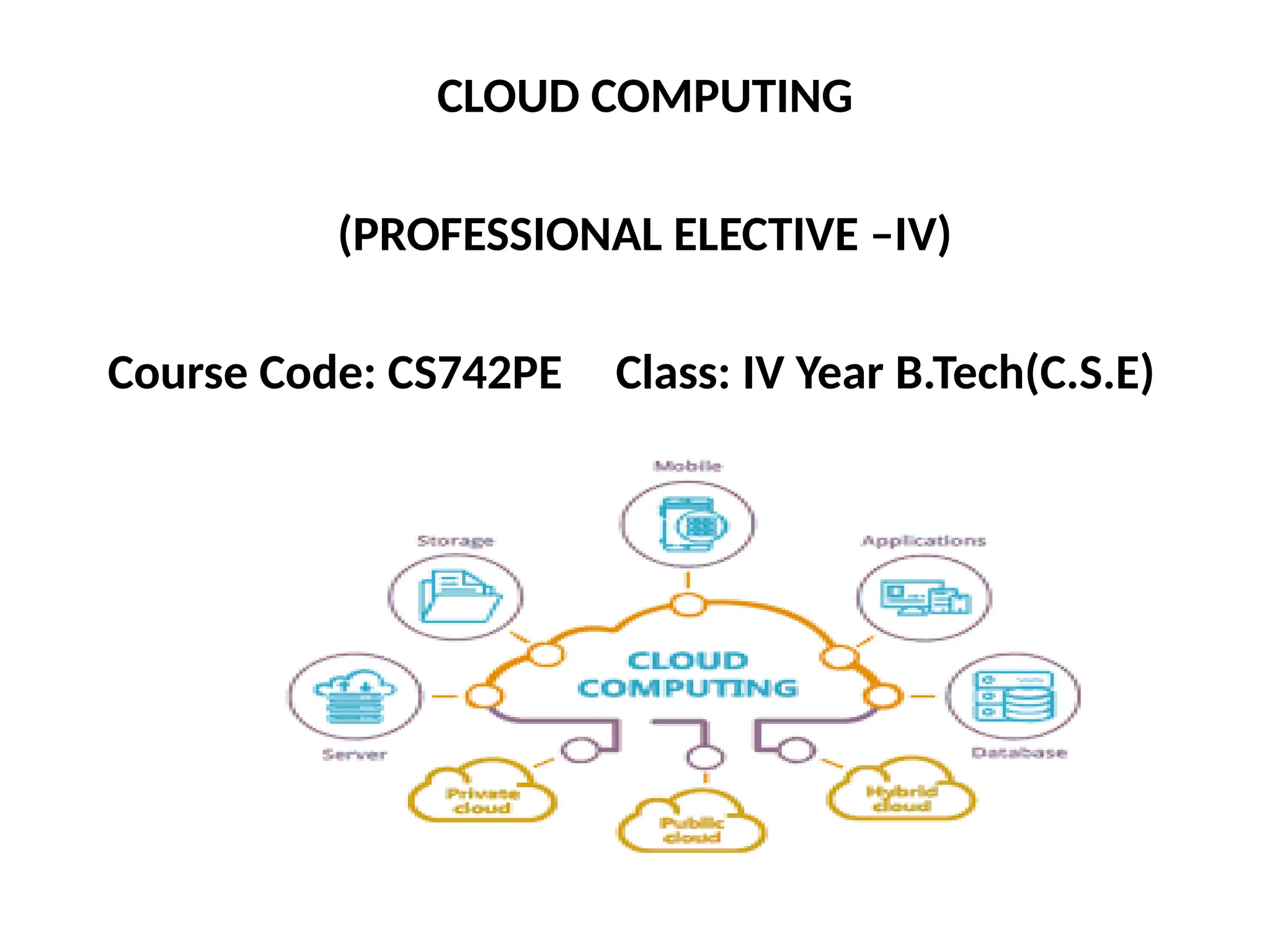
CLOUD COMPUTING
(PROFESSIONAL ELECTIVE –IV)
Course Code: CS742PE Class: IV Year B.Tech(C.S.E)
Prerequisites:
• A course on “Computer Networks”
• A course on “Operating Systems”
• A course on “Distributed Systems”
Course Objectives:
• This course provides an insight into cloud computing
• Topics covered include-distributed system models,
different cloud service models, service-oriented
architectures, cloud programming and software
environments, resource management
Course Outcomes:
• Ability to understand various service
delivery models of a cloud computing
architecture
• Ability to understand the ways in which the
cloud can be programmed and deployed
• Understanding cloud service providers
cloud computing job roles to advance the career
• Cloud architect
• Cloud administrator
• Cloud engineer
• Cloud security manager
• Cloud application developer
• Cloud network engineer
• Cloud automation engineer
Syllabus Unit-1
Computing Paradigms:
High-Performance Computing,
Parallel Computing,
Distributed Computing,
Cluster Computing,
Grid Computing,
Cloud Computing,
Bio computing,
Mobile Computing,
Quantum Computing,
Optical Computing,
Nano computing.
Syllabus Unit-2
Cloud Computing Fundamentals:
Motivation for Cloud Computing,
The Need for Cloud Computing,
Defining Cloud Computing,
Definition of Cloud computing,
Cloud Computing Is a Service,
Cloud Computing Is a Platform,
Principles of Cloud computing,
Five Essential Characteristics,
Four Cloud Deployment Models
Syllabus Unit-3
Cloud Computing Architecture and Management:
Cloud architecture,
Layer,
Anatomy of the Cloud,
Network Connectivity in Cloud Computing,
Applications on the Cloud,
Managing the Cloud,
Managing the Cloud Infrastructure
Managing the Cloud application,
Migrating Application to Cloud,
Phases of Cloud Migration Approaches for Cloud migration.
Syllabus Unit-4
Cloud Service Models:
Infrastructure as a Service, Characteristics of IaaS.
Suitability of IaaS, Pros and Cons of IaaS, Summary
of IaaS Providers,
Platform as a Service, Characteristics of PaaS,
Suitability of PaaS, Pros and Cons of PaaS,
Summary of PaaS Providers,
Software as a Service,Characteristics of SaaS,
Suitability of SaaS, Pros and Cons of SaaS, Summary
of SaaS Providers,
Other Cloud Service Models.
Syllabus Unit-5
Cloud Service Providers:
EMC, EMC IT, Captiva Cloud Toolkit,
Google, Cloud Platform, Cloud Storage, Google Cloud Connect,
Google Cloud Print, Google App Engine,
Amazon Web Services, Amazon Elastic Compute Cloud,
Amazon Simple Storage Service, Amazon Simple Queue service,
Microsoft, Windows Azure, Microsoft Assessment and Planning
Toolkit, SharePoint,
IBM, Cloud Models, IBM Smart Cloud,
SAP Labs, SAP HANA Cloud Platform, Virtualization Services
Provided by SAP,
Sales force, Sales Cloud, Service Cloud:
Knowledge as a Service, Rack space, VMware, Manjra soft,
Aneka Platform
TEXT BOOK:
Essentials of cloud Computing: K. Chandrasekhran, CRC press,
2014
REFERENCE BOOKS:
1. Cloud Computing: Principles and Paradigms by Rajkumar
Buyya, James Broberg and Andrzej M. Goscinski, Wiley, 2011.
2. Distributed and Cloud Computing, Kai Hwang, Geoffery C.
Fox, Jack J. Dongarra, Elsevier, 2012.
3.Cloud Security and Privacy: An Enterprise Perspective on
Risks and Compliance, Tim Mather, Subra Kumaraswamy,
Shahed Latif, O’Reilly, SPD, rp2011.
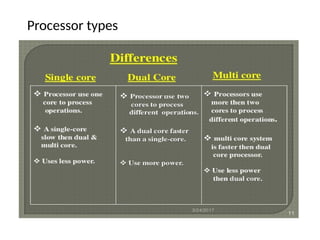
Processor types
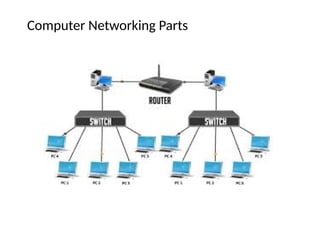
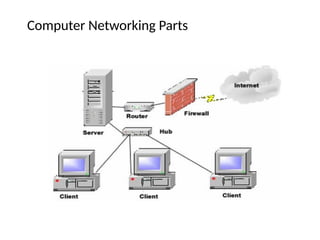
Computer Networking Parts
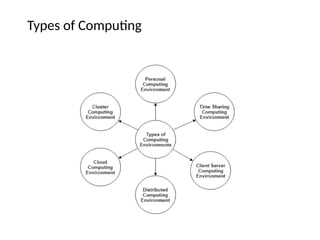
Types of Computing
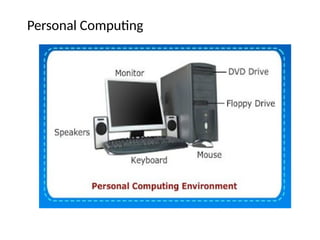
Personal Computing
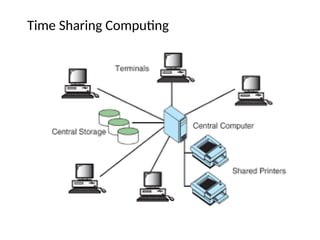
Time Sharing Computing
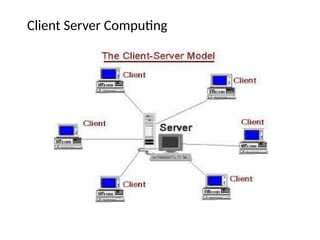
Client Server Computing
Distributed Computing
Cluster Computing
Mobile Computing
Cloud Computing
Computing
• Computing is any activity that uses computers to manage,
process, and communicate information.
• It includes development of both hardware and software.
• In a general computing means any goal-oriented activity
requiring, benefiting from, or creating computers.
• Examples include enterprise software, accounting
software, office suites, graphics software and media player
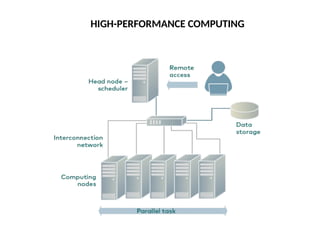
HIGH-PERFORMANCE COMPUTING
In high-performance computing systems, a pool of processors
(processor machines or central processing units [CPUs]) connected
(networked) with other resources like memory, storage, and input
and output devices, and the deployed software is enabled to run in
the entire system of connected components.
Examples of HPC include a small cluster of desktop computers or
personal computers (PCs) to the fastest supercomputers. HPC
systems are normally found in those applications where it is
required to use or solve scientific problems
Scientific examples such as protein folding in molecular biology
and studies on developing models and applications based on
nuclear fusion are worth noting as potential applications for HPC.
HIGH-PERFORMANCE COMPUTING
PARALLEL COMPUTING
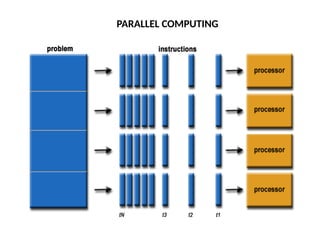
Parallel computing is also one of the facets of HPC. Here, a set of
processors work cooperatively to solve a computational problem.
These processor machines or CPUs are mostly of homogeneous type.
Therefore, this definition is the same as that of HPC
In parallel computing, since there is simultaneous use of multiple
processor machines, the following apply:
1) It is run using multiple processors (multiple CPUs).
2) A problem is broken down into discrete parts that can be solved
concurrently.
3) Each part is further broken down into a series of instructions.
4) Instructions from each part are executed simultaneously on
different processors.
5) An overall control/coordination mechanism is employed.
PARALLEL COMPUTING
DOWNUNDER GEOSOLUTIONS
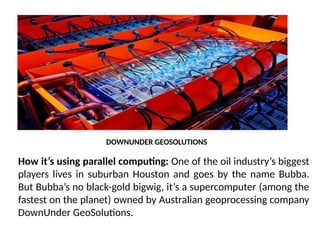
How it’s using parallel computing: One of the oil industry’s biggest
players lives in suburban Houston and goes by the name Bubba.
But Bubba’s no black-gold bigwig, it’s a supercomputer (among the
fastest on the planet) owned by Australian geoprocessing company
DownUnder GeoSolutions.
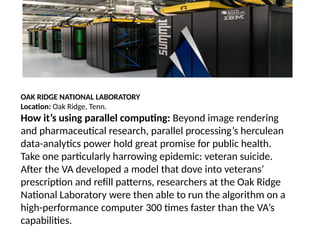
OAK RIDGE NATIONAL LABORATORY
Location: Oak Ridge, Tenn.
How it’s using parallel computing: Beyond image rendering
and pharmaceutical research, parallel processing’s herculean
data-analytics power hold great promise for public health.
Take one particularly harrowing epidemic: veteran suicide.
After the VA developed a model that dove into veterans’
prescription and refill patterns, researchers at the Oak Ridge
National Laboratory were then able to run the algorithm on a
high-performance computer 300 times faster than the VA’s
capabilities.
DISTRIBUTED COMPUTING
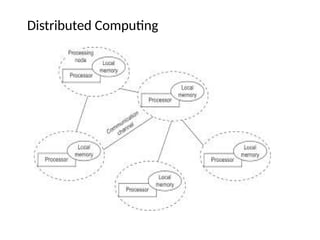
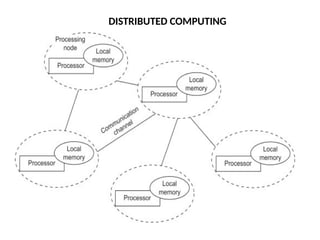
Distributed computing is also a computing system that
consists of multiple computers or processor machines
connected through a network, which can be homogeneous
or heterogeneous, but run as a single system.
The connectivity can be such that the CPUs in a distributed
system can be physically close together and connected by a
local network, or they can be geographically distant and
connected by a wide area network.
The heterogeneity in a distributed system supports any
number of possible configurations in the processor
machines, such as mainframes, PCs, workstations, and
minicomputers.
Examples :Internet,Intranet
FEATURES OF DISTRIBUTED SYSTEMS
Scalability: It is the ability of the system to be easily
expanded by adding more machines as needed, and
vice versa, without affecting the existing setup.
Redundancy or replication: Here, several machines can
provide the same services, so that even if one is
unavailable (or failed), work does not stop because
other similar computing supports will be available.
CLUSTER COMPUTING
CLUSTER COMPUTING
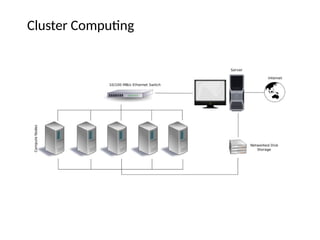
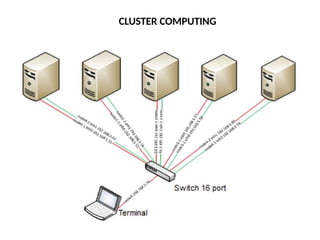
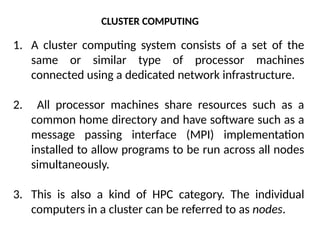
1. A cluster computing system consists of a set of the
same or similar type of processor machines
connected using a dedicated network infrastructure.
2. All processor machines share resources such as a
common home directory and have software such as a
message passing interface (MPI) implementation
installed to allow programs to be run across all nodes
simultaneously.
3. This is also a kind of HPC category. The individual
computers in a cluster can be referred to as nodes.
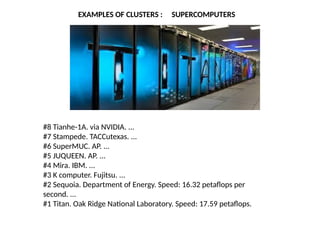
EXAMPLES OF CLUSTERS : SUPERCOMPUTERS
#8 Tianhe-1A. via NVIDIA. ...
#7 Stampede. TACCutexas. ...
#6 SuperMUC. AP. ...
#5 JUQUEEN. AP. ...
#4 Mira. IBM. ...
#3 K computer. Fujitsu. ...
#2 Sequoia. Department of Energy. Speed: 16.32 petaflops per
second. ...
#1 Titan. Oak Ridge National Laboratory. Speed: 17.59 petaflops.
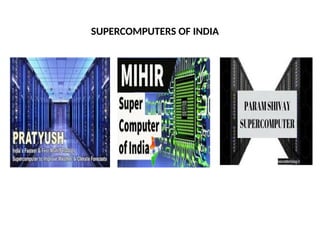
SUPERCOMPUTERS OF INDIA
1. The idea of grid computing is to make use of such non utilized
computing power by the needy organizations, and thereby the
return on investment (ROI) on computing investments can be
increased.
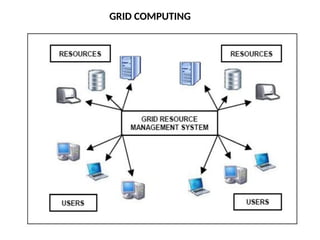
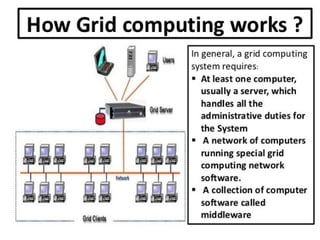
2. Grid computing is a network of computing or processor
machines managed with a kind of software such as middleware,
in order to access and use the resources remotely.
3. The managing activity of grid resources through the middleware
is called grid services.
4. Grid services provide access control, security, access to data
including digital libraries and databases, and access to large-
scale interactive and long-term storage facilities.
GRID COMPUTING
GRID COMPUTING
1) Its ability to make use of unused computing power, and thus,
it is a cost-effective solution (reducing investments, only
recurring costs)
2) As a way to solve problems in line with any HPC-based
application
3) Enables heterogeneous resources of computers to work
cooperatively and collaboratively to solve a scientific problem
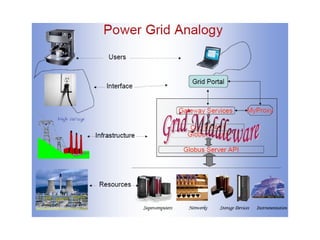
4) Researchers associate the term grid to the way electricity is
distributed in municipal areas for the common man. In this
context, the difference between electrical power grid and grid
computing is worth noting
GRID COMPUTING
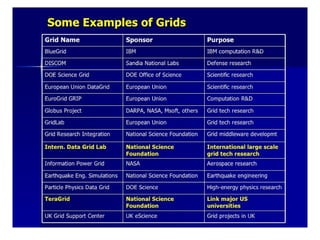
TeraGrid was an e-Science grid computing infrastructure
combining resources at eleven partner sites. The project started
in 2001 and operated from 2004 through 2011.
The TeraGrid integrated high-performance computers, data
resources and tools, and experimental facilities. Resources
included more than a petaflops of computing capability and
more than 30 petabytes of online and archival data storage, with
rapid access and retrieval over high-performance computer
network connections. Researchers could also access more than
100 discipline-specific databases.
TeraGrid was coordinated through the Grid Infrastructure Group
(GIG) at the University of Chicago, working in partnership with
the resource provider sites in the United States.
TERA GRID
TERA GRID
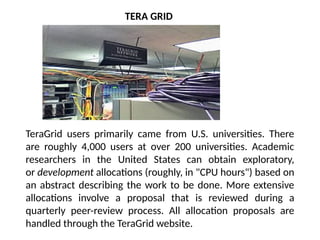
TeraGrid users primarily came from U.S. universities. There
are roughly 4,000 users at over 200 universities. Academic
researchers in the United States can obtain exploratory,
or development allocations (roughly, in "CPU hours") based on
an abstract describing the work to be done. More extensive
allocations involve a proposal that is reviewed during a
quarterly peer-review process. All allocation proposals are
handled through the TeraGrid website.
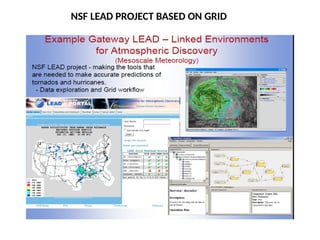
NSF LEAD PROJECT BASED ON GRID
1. The computing trend moved toward cloud from the
concept of grid computing, particularly when large
computing resources are required to solve a single
problem, using the ideas of computing power as a utility
and other allied concepts.
2. However, the potential difference between grid and cloud
is that grid computing supports leveraging several
computers in parallel to solve a particular application, while
cloud computing supports -leveraging multiple resources,
including computing resources, to deliver a unified service
to the end user.
CLOUD COMPUTING
CLOUD COMPUTING
Cloud Computing
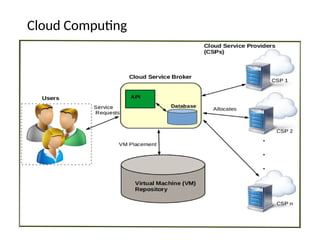
The computing trend moved toward cloud from the concept of
grid computing, particularly when large computing resources are
required to solve a single problem, using the ideas of computing
power as a utility and other allied concepts.
However, the potential difference between grid and cloud is that
grid computing supports leveraging several computers in parallel
to solve a particular application, while cloud computing supports
-leveraging multiple resources, including computing resources, to
deliver a unified service to the end user.
CLOUD COMPUTING
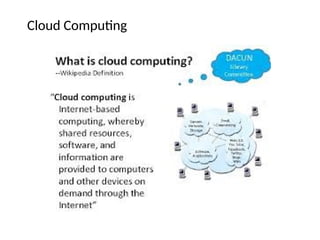
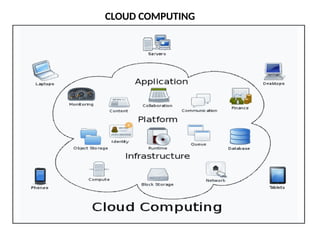
In cloud computing, the IT and business resources, such as
servers, storage, network, applications, and processes, can be
dynamically provisioned to the user needs and workload.
In addition, while a cloud can provision and support a grid, a
cloud can also support non grid environments, such as a three-tier
web architecture running on traditional or Web 2.0 applications.
CLOUD COMPUTING
CLOUD COMPUTING
SaaS, PaaS, and IaaS are simply three ways to describe how you
can use the cloud for your business.
IaaS: cloud-based services, pay-as-you-go for services such as
storage, networking, and virtualization.
PaaS: hardware and software tools available over the internet.
SaaS: software that’s available via a third-party over the
internet.
On-premise: software that’s installed in the same building as
your business.
CLOUD COMPUTING EXAMPLES
SaaS examples: BigCommerce, Google Apps, Salesforce,
Dropbox, MailChimp, ZenDesk, DocuSign, Slack, Hubspot.
PaaS examples: AWS Elastic Beanstalk, Heroku, Windows
Azure (mostly used as PaaS), Force.com, OpenShift, Apache
Stratos, Magento Commerce Cloud.
IaaS examples: AWS EC2, Rackspace, Google Compute
Engine (GCE), Digital Ocean, Magento 1 Enterprise Edition*.
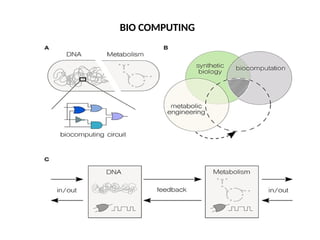
BIO COMPUTING
1. Biocomputing systems use the concepts of biologically
derived or simulated molecules (or models) that perform
computational processes in order to solve a problem.
2. The biologically derived models aid in structuring the
computer programs that become part of the application.
3. Biocomputing provides the theoretical background and
practical tools for scientists to explore proteins and DNA.
BIO COMPUTING
4. DNA and proteins are nature’s building blocks, but these
building blocks are not exactly used as bricks; the function of
the final molecule rather strongly depends on the order of
these blocks.
5. Thus, the biocomputing scientist works on inventing the
order suitable for various applications mimicking biology.
6. Biocomputing shall, therefore, lead to a better
understanding of life and the molecular causes of certain
diseases.
BIO COMPUTING
MOBILE COMPUTING
MOBILE COMPUTING
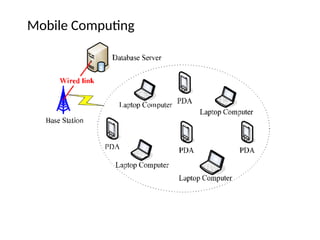
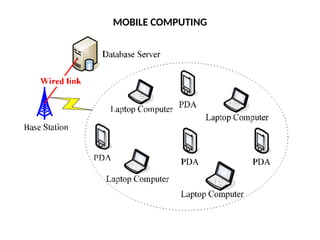
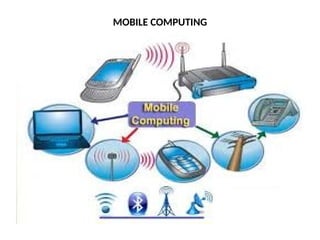
• Mobile communication for voice applications (e.g., cellular
phone) is widely established throughout the world and
witnesses a very rapid growth in all its dimensions including
the increase in the number of subscribers of various cellular
networks.
• An extension of this technology is the ability to send and
receive data across various cellular networks using small
devices such as smart phones.
MOBILE COMPUTING
• There can be numerous applications based on this technology;
for example, video call or conferencing is one of the important
applications that people prefer to use in place of existing voice
(only) communications on mobile phones.
• Mobile computing–based applications are becoming very
important and rapidly evolving with various technological
advancements as it allows users to transmit data from remote
locations to other remote or fixed locations.
MOBILE COMPUTING
QUANTUM COMPUTING
Manufacturers of computing systems say that there is a limit for
cramming more and more transistors into smaller and smaller
spaces of integrated circuits (ICs) and thereby doubling the
processing power about every 18 months.
This problem will have to be overcome by a new quantum
computing–based solution, wherein the dependence is on
quantum information, the rules that govern the subatomic world.
Quantum computers are millions of times faster than even our
most powerful supercomputers today.
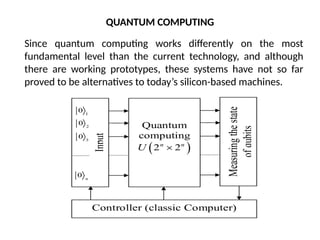
Since quantum computing works differently on the most
fundamental level than the current technology, and although
there are working prototypes, these systems have not so far
proved to be alternatives to today’s silicon-based machines.
QUANTUM COMPUTING
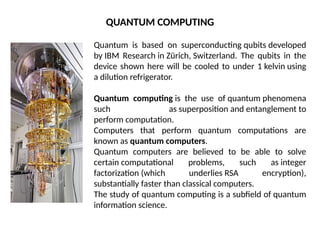
Quantum is based on superconducting qubits developed
by IBM Research in Zürich, Switzerland. The qubits in the
device shown here will be cooled to under 1 kelvin using
a dilution refrigerator.
Quantum computing is the use of quantum phenomena
such as superposition and entanglement to
perform computation.
Computers that perform quantum computations are
known as quantum computers.
Quantum computers are believed to be able to solve
certain computational problems, such as integer
factorization (which underlies RSA encryption),
substantially faster than classical computers.
The study of quantum computing is a subfield of quantum
information science.
QUANTUM COMPUTING
OPTICAL COMPUTING
Optical computing system uses the photons in visible light or infrared
beams, rather than electric current, to perform digital computations.
An electric current flows at only about 10% of the speed of light.
This limits the rate at which data can be exchanged over long
distances and is one of the factors that led to the evolution of optical
fiber.
By applying some of the advantages of visible and/or IR networks at
the device and component scale, a computer can be developed that
can perform operations 10 or more times faster than a conventional
electronic computer.
OPTICAL COMPUTING
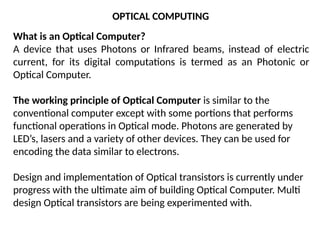
What is an Optical Computer?
A device that uses Photons or Infrared beams, instead of electric
current, for its digital computations is termed as an Photonic or
Optical Computer.
The working principle of Optical Computer is similar to the
conventional computer except with some portions that performs
functional operations in Optical mode. Photons are generated by
LED’s, lasers and a variety of other devices. They can be used for
encoding the data similar to electrons.
Design and implementation of Optical transistors is currently under
progress with the ultimate aim of building Optical Computer. Multi
design Optical transistors are being experimented with.
OPTICAL COMPUTING
OPTICAL COMPUTING
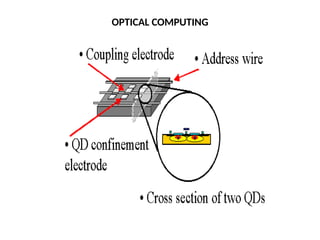
Optical or photonic computing uses photons produced by lasers or diodes for
computation. For decades, photons have promised to allow a
higher bandwidth than the electrons used in conventional computers
Most research projects focus on replacing current computer components with
optical equivalents, resulting in an optical digital computer system
processing binary data. This approach appears to offer the best short-term
prospects for commercial optical computing, since optical components could be
integrated into traditional computers to produce an optical-electronic hybrid.
However, optoelectronic devices lose 30% of their energy converting electronic
energy into photons and back; this conversion also slows the transmission of
messages. All-optical computers eliminate the need for optical-electrical-optical
(OEO) conversions, thus lessening the need for electrical power.
Application-specific devices, such as synthetic aperture radar (SAR) and optical
correlators, have been designed to use the principles of optical computing.
Correlators can be used, for example, to detect and track objects, and to classify
serial time-domain optical data.
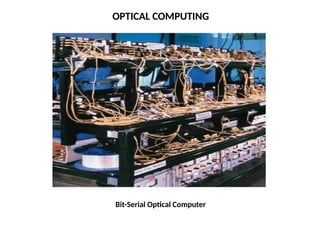
Bit-Serial Optical Computer
OPTICAL COMPUTING
NANO COMPUTING
Nano computing refers to computing systems that are constructed
from nano scale components.
The silicon transistors in traditional computers may be replaced by
transistors based on carbon nano tubes.
The successful realization of nano computers relates to the scale
and integration of these nano tubes or components.
The issues of scale relate to the dimensions of the components;
they are, at-most, a few nanometers in at least two dimensions.
NANO COMPUTING
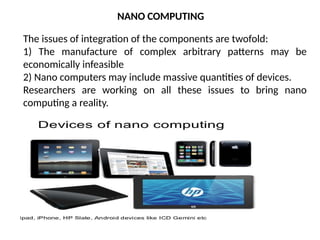
The issues of integration of the components are twofold:
1) The manufacture of complex arbitrary patterns may be
economically infeasible
2) Nano computers may include massive quantities of devices.
Researchers are working on all these issues to bring nano
computing a reality.
NANO COMPUTING
Nanocomputer refers to a computer smaller than
the microcomputer, which is smaller than the minicomputer.
Microelectronic components that are at the core of all modern
electronic devices employ semiconductor transistors.
The term nanocomputer is increasingly used to refer to general
computing devices of size comparable to a credit card.
Modern Single-Board Computers such as the Raspberry
Pi and Gumstix would fall under this classification.
Arguably, Smartphones and Tablets would also be classified as
nanocomputers.
NANO COMPUTING EXAMPLES
Without nanotechnology, we wouldn't have many of the
electronics we use in everyday life. Intel is undoubtedly a leader in
tiny computer processors, and the latest generation of Intel’s Core
processor technology is a 10-nanometer chip. When you think a
nanometer is one-billionth of a meter, that’s incredibly impressive!
Network computing is a generic term in computing which refers
to computers or nodes working together over a network.
It may also mean:
1) Cloud computing, a kind of Internet-based computing that
provides shared processing resources and data to devices on
demand
2) Distributed computing
3) Virtual Network Computing
NETWORK COMPUTING
UNIT I COMPLETED

CC UNIT I.pptx cloud computing cloud services

  • 1.
    CLOUD COMPUTING (PROFESSIONAL ELECTIVE–IV) Course Code: CS742PE Class: IV Year B.Tech(C.S.E)
  • 2.
    Prerequisites: • A courseon “Computer Networks” • A course on “Operating Systems” • A course on “Distributed Systems” Course Objectives: • This course provides an insight into cloud computing • Topics covered include-distributed system models, different cloud service models, service-oriented architectures, cloud programming and software environments, resource management
  • 3.
    Course Outcomes: • Abilityto understand various service delivery models of a cloud computing architecture • Ability to understand the ways in which the cloud can be programmed and deployed • Understanding cloud service providers
  • 4.
    cloud computing jobroles to advance the career • Cloud architect • Cloud administrator • Cloud engineer • Cloud security manager • Cloud application developer • Cloud network engineer • Cloud automation engineer
  • 5.
    Syllabus Unit-1 Computing Paradigms: High-PerformanceComputing, Parallel Computing, Distributed Computing, Cluster Computing, Grid Computing, Cloud Computing, Bio computing, Mobile Computing, Quantum Computing, Optical Computing, Nano computing.
  • 6.
    Syllabus Unit-2 Cloud ComputingFundamentals: Motivation for Cloud Computing, The Need for Cloud Computing, Defining Cloud Computing, Definition of Cloud computing, Cloud Computing Is a Service, Cloud Computing Is a Platform, Principles of Cloud computing, Five Essential Characteristics, Four Cloud Deployment Models
  • 7.
    Syllabus Unit-3 Cloud ComputingArchitecture and Management: Cloud architecture, Layer, Anatomy of the Cloud, Network Connectivity in Cloud Computing, Applications on the Cloud, Managing the Cloud, Managing the Cloud Infrastructure Managing the Cloud application, Migrating Application to Cloud, Phases of Cloud Migration Approaches for Cloud migration.
  • 8.
    Syllabus Unit-4 Cloud ServiceModels: Infrastructure as a Service, Characteristics of IaaS. Suitability of IaaS, Pros and Cons of IaaS, Summary of IaaS Providers, Platform as a Service, Characteristics of PaaS, Suitability of PaaS, Pros and Cons of PaaS, Summary of PaaS Providers, Software as a Service,Characteristics of SaaS, Suitability of SaaS, Pros and Cons of SaaS, Summary of SaaS Providers, Other Cloud Service Models.
  • 9.
    Syllabus Unit-5 Cloud ServiceProviders: EMC, EMC IT, Captiva Cloud Toolkit, Google, Cloud Platform, Cloud Storage, Google Cloud Connect, Google Cloud Print, Google App Engine, Amazon Web Services, Amazon Elastic Compute Cloud, Amazon Simple Storage Service, Amazon Simple Queue service, Microsoft, Windows Azure, Microsoft Assessment and Planning Toolkit, SharePoint, IBM, Cloud Models, IBM Smart Cloud, SAP Labs, SAP HANA Cloud Platform, Virtualization Services Provided by SAP, Sales force, Sales Cloud, Service Cloud: Knowledge as a Service, Rack space, VMware, Manjra soft, Aneka Platform
  • 10.
    TEXT BOOK: Essentials ofcloud Computing: K. Chandrasekhran, CRC press, 2014 REFERENCE BOOKS: 1. Cloud Computing: Principles and Paradigms by Rajkumar Buyya, James Broberg and Andrzej M. Goscinski, Wiley, 2011. 2. Distributed and Cloud Computing, Kai Hwang, Geoffery C. Fox, Jack J. Dongarra, Elsevier, 2012. 3.Cloud Security and Privacy: An Enterprise Perspective on Risks and Compliance, Tim Mather, Subra Kumaraswamy, Shahed Latif, O’Reilly, SPD, rp2011.
  • 11.
  • 12.
  • 13.
  • 14.
  • 15.
  • 16.
  • 17.
  • 18.
  • 19.
  • 20.
  • 21.
  • 22.
    Computing • Computing isany activity that uses computers to manage, process, and communicate information. • It includes development of both hardware and software. • In a general computing means any goal-oriented activity requiring, benefiting from, or creating computers. • Examples include enterprise software, accounting software, office suites, graphics software and media player
  • 23.
  • 24.
    In high-performance computingsystems, a pool of processors (processor machines or central processing units [CPUs]) connected (networked) with other resources like memory, storage, and input and output devices, and the deployed software is enabled to run in the entire system of connected components. Examples of HPC include a small cluster of desktop computers or personal computers (PCs) to the fastest supercomputers. HPC systems are normally found in those applications where it is required to use or solve scientific problems Scientific examples such as protein folding in molecular biology and studies on developing models and applications based on nuclear fusion are worth noting as potential applications for HPC. HIGH-PERFORMANCE COMPUTING
  • 25.
  • 26.
    Parallel computing isalso one of the facets of HPC. Here, a set of processors work cooperatively to solve a computational problem. These processor machines or CPUs are mostly of homogeneous type. Therefore, this definition is the same as that of HPC In parallel computing, since there is simultaneous use of multiple processor machines, the following apply: 1) It is run using multiple processors (multiple CPUs). 2) A problem is broken down into discrete parts that can be solved concurrently. 3) Each part is further broken down into a series of instructions. 4) Instructions from each part are executed simultaneously on different processors. 5) An overall control/coordination mechanism is employed. PARALLEL COMPUTING
  • 27.
    DOWNUNDER GEOSOLUTIONS How it’susing parallel computing: One of the oil industry’s biggest players lives in suburban Houston and goes by the name Bubba. But Bubba’s no black-gold bigwig, it’s a supercomputer (among the fastest on the planet) owned by Australian geoprocessing company DownUnder GeoSolutions.
  • 28.
    OAK RIDGE NATIONALLABORATORY Location: Oak Ridge, Tenn. How it’s using parallel computing: Beyond image rendering and pharmaceutical research, parallel processing’s herculean data-analytics power hold great promise for public health. Take one particularly harrowing epidemic: veteran suicide. After the VA developed a model that dove into veterans’ prescription and refill patterns, researchers at the Oak Ridge National Laboratory were then able to run the algorithm on a high-performance computer 300 times faster than the VA’s capabilities.
  • 29.
  • 30.
    Distributed computing isalso a computing system that consists of multiple computers or processor machines connected through a network, which can be homogeneous or heterogeneous, but run as a single system. The connectivity can be such that the CPUs in a distributed system can be physically close together and connected by a local network, or they can be geographically distant and connected by a wide area network. The heterogeneity in a distributed system supports any number of possible configurations in the processor machines, such as mainframes, PCs, workstations, and minicomputers. Examples :Internet,Intranet
  • 31.
    FEATURES OF DISTRIBUTEDSYSTEMS Scalability: It is the ability of the system to be easily expanded by adding more machines as needed, and vice versa, without affecting the existing setup. Redundancy or replication: Here, several machines can provide the same services, so that even if one is unavailable (or failed), work does not stop because other similar computing supports will be available.
  • 32.
  • 33.
    CLUSTER COMPUTING 1. Acluster computing system consists of a set of the same or similar type of processor machines connected using a dedicated network infrastructure. 2. All processor machines share resources such as a common home directory and have software such as a message passing interface (MPI) implementation installed to allow programs to be run across all nodes simultaneously. 3. This is also a kind of HPC category. The individual computers in a cluster can be referred to as nodes.
  • 34.
    EXAMPLES OF CLUSTERS: SUPERCOMPUTERS #8 Tianhe-1A. via NVIDIA. ... #7 Stampede. TACCutexas. ... #6 SuperMUC. AP. ... #5 JUQUEEN. AP. ... #4 Mira. IBM. ... #3 K computer. Fujitsu. ... #2 Sequoia. Department of Energy. Speed: 16.32 petaflops per second. ... #1 Titan. Oak Ridge National Laboratory. Speed: 17.59 petaflops.
  • 35.
  • 36.
    1. The ideaof grid computing is to make use of such non utilized computing power by the needy organizations, and thereby the return on investment (ROI) on computing investments can be increased. 2. Grid computing is a network of computing or processor machines managed with a kind of software such as middleware, in order to access and use the resources remotely. 3. The managing activity of grid resources through the middleware is called grid services. 4. Grid services provide access control, security, access to data including digital libraries and databases, and access to large- scale interactive and long-term storage facilities. GRID COMPUTING
  • 37.
    GRID COMPUTING 1) Itsability to make use of unused computing power, and thus, it is a cost-effective solution (reducing investments, only recurring costs) 2) As a way to solve problems in line with any HPC-based application 3) Enables heterogeneous resources of computers to work cooperatively and collaboratively to solve a scientific problem 4) Researchers associate the term grid to the way electricity is distributed in municipal areas for the common man. In this context, the difference between electrical power grid and grid computing is worth noting
  • 39.
  • 42.
    TeraGrid was ane-Science grid computing infrastructure combining resources at eleven partner sites. The project started in 2001 and operated from 2004 through 2011. The TeraGrid integrated high-performance computers, data resources and tools, and experimental facilities. Resources included more than a petaflops of computing capability and more than 30 petabytes of online and archival data storage, with rapid access and retrieval over high-performance computer network connections. Researchers could also access more than 100 discipline-specific databases. TeraGrid was coordinated through the Grid Infrastructure Group (GIG) at the University of Chicago, working in partnership with the resource provider sites in the United States. TERA GRID
  • 43.
    TERA GRID TeraGrid usersprimarily came from U.S. universities. There are roughly 4,000 users at over 200 universities. Academic researchers in the United States can obtain exploratory, or development allocations (roughly, in "CPU hours") based on an abstract describing the work to be done. More extensive allocations involve a proposal that is reviewed during a quarterly peer-review process. All allocation proposals are handled through the TeraGrid website.
  • 44.
    NSF LEAD PROJECTBASED ON GRID
  • 45.
    1. The computingtrend moved toward cloud from the concept of grid computing, particularly when large computing resources are required to solve a single problem, using the ideas of computing power as a utility and other allied concepts. 2. However, the potential difference between grid and cloud is that grid computing supports leveraging several computers in parallel to solve a particular application, while cloud computing supports -leveraging multiple resources, including computing resources, to deliver a unified service to the end user. CLOUD COMPUTING
  • 46.
  • 47.
  • 48.
    The computing trendmoved toward cloud from the concept of grid computing, particularly when large computing resources are required to solve a single problem, using the ideas of computing power as a utility and other allied concepts. However, the potential difference between grid and cloud is that grid computing supports leveraging several computers in parallel to solve a particular application, while cloud computing supports -leveraging multiple resources, including computing resources, to deliver a unified service to the end user. CLOUD COMPUTING
  • 49.
    In cloud computing,the IT and business resources, such as servers, storage, network, applications, and processes, can be dynamically provisioned to the user needs and workload. In addition, while a cloud can provision and support a grid, a cloud can also support non grid environments, such as a three-tier web architecture running on traditional or Web 2.0 applications. CLOUD COMPUTING
  • 50.
    CLOUD COMPUTING SaaS, PaaS,and IaaS are simply three ways to describe how you can use the cloud for your business. IaaS: cloud-based services, pay-as-you-go for services such as storage, networking, and virtualization. PaaS: hardware and software tools available over the internet. SaaS: software that’s available via a third-party over the internet. On-premise: software that’s installed in the same building as your business.
  • 51.
    CLOUD COMPUTING EXAMPLES SaaSexamples: BigCommerce, Google Apps, Salesforce, Dropbox, MailChimp, ZenDesk, DocuSign, Slack, Hubspot. PaaS examples: AWS Elastic Beanstalk, Heroku, Windows Azure (mostly used as PaaS), Force.com, OpenShift, Apache Stratos, Magento Commerce Cloud. IaaS examples: AWS EC2, Rackspace, Google Compute Engine (GCE), Digital Ocean, Magento 1 Enterprise Edition*.
  • 52.
  • 53.
    1. Biocomputing systemsuse the concepts of biologically derived or simulated molecules (or models) that perform computational processes in order to solve a problem. 2. The biologically derived models aid in structuring the computer programs that become part of the application. 3. Biocomputing provides the theoretical background and practical tools for scientists to explore proteins and DNA. BIO COMPUTING
  • 54.
    4. DNA andproteins are nature’s building blocks, but these building blocks are not exactly used as bricks; the function of the final molecule rather strongly depends on the order of these blocks. 5. Thus, the biocomputing scientist works on inventing the order suitable for various applications mimicking biology. 6. Biocomputing shall, therefore, lead to a better understanding of life and the molecular causes of certain diseases. BIO COMPUTING
  • 55.
  • 56.
    MOBILE COMPUTING • Mobilecommunication for voice applications (e.g., cellular phone) is widely established throughout the world and witnesses a very rapid growth in all its dimensions including the increase in the number of subscribers of various cellular networks. • An extension of this technology is the ability to send and receive data across various cellular networks using small devices such as smart phones.
  • 57.
    MOBILE COMPUTING • Therecan be numerous applications based on this technology; for example, video call or conferencing is one of the important applications that people prefer to use in place of existing voice (only) communications on mobile phones. • Mobile computing–based applications are becoming very important and rapidly evolving with various technological advancements as it allows users to transmit data from remote locations to other remote or fixed locations.
  • 58.
  • 59.
    QUANTUM COMPUTING Manufacturers ofcomputing systems say that there is a limit for cramming more and more transistors into smaller and smaller spaces of integrated circuits (ICs) and thereby doubling the processing power about every 18 months. This problem will have to be overcome by a new quantum computing–based solution, wherein the dependence is on quantum information, the rules that govern the subatomic world. Quantum computers are millions of times faster than even our most powerful supercomputers today.
  • 60.
    Since quantum computingworks differently on the most fundamental level than the current technology, and although there are working prototypes, these systems have not so far proved to be alternatives to today’s silicon-based machines. QUANTUM COMPUTING
  • 61.
    Quantum is basedon superconducting qubits developed by IBM Research in Zürich, Switzerland. The qubits in the device shown here will be cooled to under 1 kelvin using a dilution refrigerator. Quantum computing is the use of quantum phenomena such as superposition and entanglement to perform computation. Computers that perform quantum computations are known as quantum computers. Quantum computers are believed to be able to solve certain computational problems, such as integer factorization (which underlies RSA encryption), substantially faster than classical computers. The study of quantum computing is a subfield of quantum information science. QUANTUM COMPUTING
  • 62.
    OPTICAL COMPUTING Optical computingsystem uses the photons in visible light or infrared beams, rather than electric current, to perform digital computations. An electric current flows at only about 10% of the speed of light. This limits the rate at which data can be exchanged over long distances and is one of the factors that led to the evolution of optical fiber. By applying some of the advantages of visible and/or IR networks at the device and component scale, a computer can be developed that can perform operations 10 or more times faster than a conventional electronic computer.
  • 63.
  • 64.
    What is anOptical Computer? A device that uses Photons or Infrared beams, instead of electric current, for its digital computations is termed as an Photonic or Optical Computer. The working principle of Optical Computer is similar to the conventional computer except with some portions that performs functional operations in Optical mode. Photons are generated by LED’s, lasers and a variety of other devices. They can be used for encoding the data similar to electrons. Design and implementation of Optical transistors is currently under progress with the ultimate aim of building Optical Computer. Multi design Optical transistors are being experimented with. OPTICAL COMPUTING
  • 65.
    OPTICAL COMPUTING Optical orphotonic computing uses photons produced by lasers or diodes for computation. For decades, photons have promised to allow a higher bandwidth than the electrons used in conventional computers Most research projects focus on replacing current computer components with optical equivalents, resulting in an optical digital computer system processing binary data. This approach appears to offer the best short-term prospects for commercial optical computing, since optical components could be integrated into traditional computers to produce an optical-electronic hybrid. However, optoelectronic devices lose 30% of their energy converting electronic energy into photons and back; this conversion also slows the transmission of messages. All-optical computers eliminate the need for optical-electrical-optical (OEO) conversions, thus lessening the need for electrical power. Application-specific devices, such as synthetic aperture radar (SAR) and optical correlators, have been designed to use the principles of optical computing. Correlators can be used, for example, to detect and track objects, and to classify serial time-domain optical data.
  • 66.
  • 67.
    NANO COMPUTING Nano computingrefers to computing systems that are constructed from nano scale components. The silicon transistors in traditional computers may be replaced by transistors based on carbon nano tubes. The successful realization of nano computers relates to the scale and integration of these nano tubes or components. The issues of scale relate to the dimensions of the components; they are, at-most, a few nanometers in at least two dimensions.
  • 68.
    NANO COMPUTING The issuesof integration of the components are twofold: 1) The manufacture of complex arbitrary patterns may be economically infeasible 2) Nano computers may include massive quantities of devices. Researchers are working on all these issues to bring nano computing a reality.
  • 69.
    NANO COMPUTING Nanocomputer refersto a computer smaller than the microcomputer, which is smaller than the minicomputer. Microelectronic components that are at the core of all modern electronic devices employ semiconductor transistors. The term nanocomputer is increasingly used to refer to general computing devices of size comparable to a credit card. Modern Single-Board Computers such as the Raspberry Pi and Gumstix would fall under this classification. Arguably, Smartphones and Tablets would also be classified as nanocomputers.
  • 70.
    NANO COMPUTING EXAMPLES Withoutnanotechnology, we wouldn't have many of the electronics we use in everyday life. Intel is undoubtedly a leader in tiny computer processors, and the latest generation of Intel’s Core processor technology is a 10-nanometer chip. When you think a nanometer is one-billionth of a meter, that’s incredibly impressive!
  • 71.
    Network computing isa generic term in computing which refers to computers or nodes working together over a network. It may also mean: 1) Cloud computing, a kind of Internet-based computing that provides shared processing resources and data to devices on demand 2) Distributed computing 3) Virtual Network Computing NETWORK COMPUTING
  • 72.