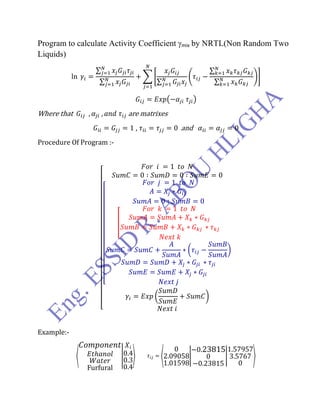
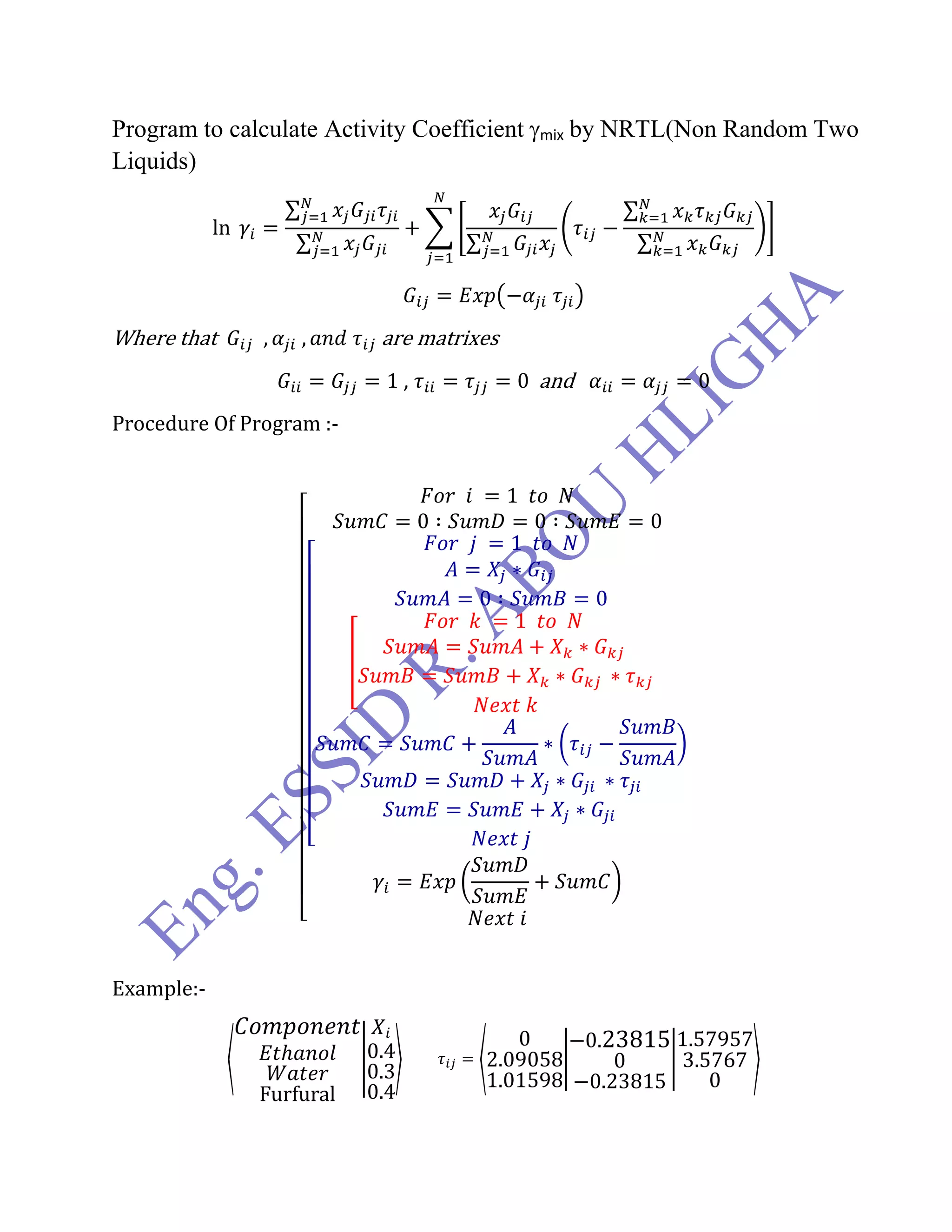
Program to calculate Activity Coefficient mix by NRTL(Non Random Two
Liquids)
Where that are matrixes
, and
Procedure Of Program :-
Example:-
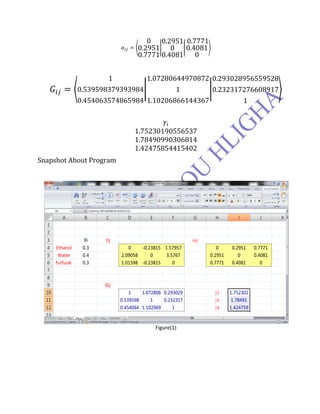
Snapshot About Program
Figure(1)
How to Execute Calculations:-
As you see there are two programs first to calculate Gij and the second to calculate
(i) so.
1. select regna of array as showing in Figure1 (D10:F12).
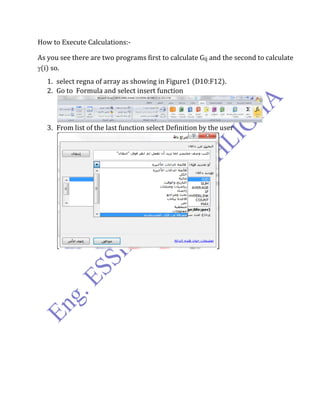
2. Go to Formula and select insert function
3. From list of the last function select Definition by the user
4. Select Gij_matrix and fill the requests in the following
5. Finally you should press three keys as counting from [1 to 3]
CTRL+SHIFT+ENTER .
6. Repeat the steps to calculate (i).
I Wish You All The Best
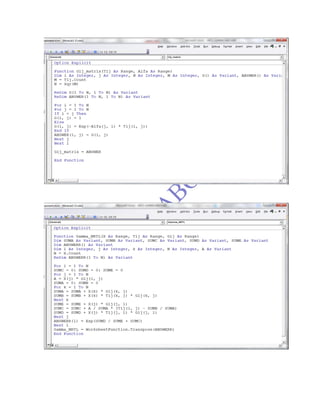
Option Explicit
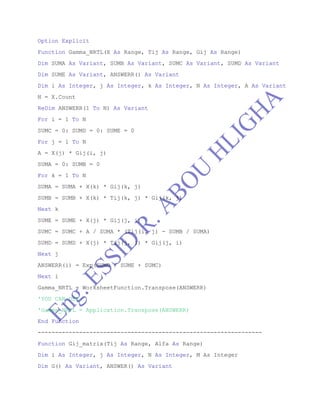
Function Gamma_NRTL(X As Range, Tij As Range, Gij As Range)
Dim SUMA As Variant, SUMB As Variant, SUMC As Variant, SUMD As Variant
Dim SUME As Variant, ANSWERR() As Variant
Dim i As Integer, j As Integer, k As Integer, N As Integer, A As Variant
N = X.Count
ReDim ANSWERR(1 To N) As Variant
For i = 1 To N
SUMC = 0: SUMD = 0: SUME = 0
For j = 1 To N
A = X(j) * Gij(i, j)
SUMA = 0: SUMB = 0
For k = 1 To N
SUMA = SUMA + X(k) * Gij(k, j)
SUMB = SUMB + X(k) * Tij(k, j) * Gij(k, j)
Next k
SUME = SUME + X(j) * Gij(j, i)
SUMC = SUMC + A / SUMA * (Tij(i, j) - SUMB / SUMA)
SUMD = SUMD + X(j) * Tij(j, i) * Gij(j, i)
Next j
ANSWERR(i) = Exp(SUMD / SUME + SUMC)
Next i
Gamma_NRTL = WorksheetFunction.Transpose(ANSWERR)
'YOU CAN USE
'Gamma_NRTL = Application.Transpose(ANSWERR)
End Function
-----------------------------------------------------------------
Function Gij_matrix(Tij As Range, Alfa As Range)
Dim i As Integer, j As Integer, N As Integer, M As Integer
Dim G() As Variant, ANSWER() As Variant
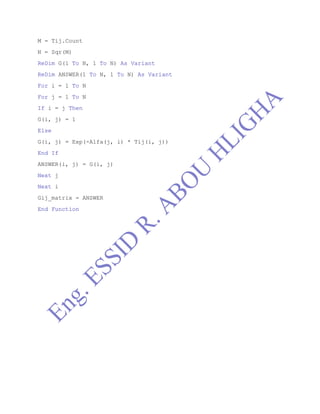
M = Tij.Count
N = Sqr(M)
ReDim G(1 To N, 1 To N) As Variant
ReDim ANSWER(1 To N, 1 To N) As Variant
For i = 1 To N
For j = 1 To N
If i = j Then
G(i, j) = 1
Else
G(i, j) = Exp(-Alfa(j, i) * Tij(i, j))
End If
ANSWER(i, j) = G(i, j)
Next j
Next i
Gij_matrix = ANSWER
End Function

Nrtl activity coefficient for mixture1

  • 1.
    Program to calculateActivity Coefficient mix by NRTL(Non Random Two Liquids) Where that are matrixes , and Procedure Of Program :- Example:-
  • 2.
  • 3.
    How to ExecuteCalculations:- As you see there are two programs first to calculate Gij and the second to calculate (i) so. 1. select regna of array as showing in Figure1 (D10:F12). 2. Go to Formula and select insert function 3. From list of the last function select Definition by the user
  • 4.
    4. Select Gij_matrixand fill the requests in the following 5. Finally you should press three keys as counting from [1 to 3] CTRL+SHIFT+ENTER . 6. Repeat the steps to calculate (i). I Wish You All The Best
  • 6.
    Option Explicit Function Gamma_NRTL(XAs Range, Tij As Range, Gij As Range) Dim SUMA As Variant, SUMB As Variant, SUMC As Variant, SUMD As Variant Dim SUME As Variant, ANSWERR() As Variant Dim i As Integer, j As Integer, k As Integer, N As Integer, A As Variant N = X.Count ReDim ANSWERR(1 To N) As Variant For i = 1 To N SUMC = 0: SUMD = 0: SUME = 0 For j = 1 To N A = X(j) * Gij(i, j) SUMA = 0: SUMB = 0 For k = 1 To N SUMA = SUMA + X(k) * Gij(k, j) SUMB = SUMB + X(k) * Tij(k, j) * Gij(k, j) Next k SUME = SUME + X(j) * Gij(j, i) SUMC = SUMC + A / SUMA * (Tij(i, j) - SUMB / SUMA) SUMD = SUMD + X(j) * Tij(j, i) * Gij(j, i) Next j ANSWERR(i) = Exp(SUMD / SUME + SUMC) Next i Gamma_NRTL = WorksheetFunction.Transpose(ANSWERR) 'YOU CAN USE 'Gamma_NRTL = Application.Transpose(ANSWERR) End Function ----------------------------------------------------------------- Function Gij_matrix(Tij As Range, Alfa As Range) Dim i As Integer, j As Integer, N As Integer, M As Integer Dim G() As Variant, ANSWER() As Variant
  • 7.
    M = Tij.Count N= Sqr(M) ReDim G(1 To N, 1 To N) As Variant ReDim ANSWER(1 To N, 1 To N) As Variant For i = 1 To N For j = 1 To N If i = j Then G(i, j) = 1 Else G(i, j) = Exp(-Alfa(j, i) * Tij(i, j)) End If ANSWER(i, j) = G(i, j) Next j Next i Gij_matrix = ANSWER End Function