programming in MATLAB Environment: 100 basic programs.pdf
1.
MATLAB Environment
• CommandWindow: Used to execute commands directly.
• Editor: For writing scripts and functions.
• Workspace: Displays variables that are in memory.
• Current Folder: Shows the files in the working directory.
• Command History: Displays previously executed commands.
2. Basic Operations
• Arithmetic: +, -, *, /, .^ (element-wise power)
• Variables: Variables are created without declaration. Example: a = 5;
• Matrices and Vectors: MATLAB is matrix-based. You can create matrices with square
brackets:
o A = [1 2; 3 4];
• Built-in Functions: sqrt(), abs(), sin(), cos(), etc.
• Plotting: plot(x, y) for basic graphs.
3. Comments
• Single-line: %% This is a comment
%{
This is a
multi-line comment
%}
% Basic Matrix Operations in MATLAB
% Create two matrices
A = [1, 2, 3; 4, 5, 6; 7, 8, 9]; % 3x3 matrix
B = [9, 8, 7; 6, 5, 4; 3, 2, 1]; % Another 3x3 matrix
% Matrix addition
C = A + B; % Element-wise addition
disp('Matrix Addition:');
disp(C);
% Matrix subtraction
D = A - B; % Element-wise subtraction
disp('Matrix Subtraction:');
disp(D);
% Matrix multiplication
E = A * B; % Matrix multiplication
disp('Matrix Multiplication:');
disp(E);
% Element-wise multiplication
2.
F = A.* B; % Element-wise multiplication
disp('Element-wise Multiplication:');
disp(F);
% Transpose of a matrix
G = A'; % Transpose of matrix A
disp('Transpose of Matrix A:');
disp(G);
% Determinant of a matrix
H = det(A); % Determinant of matrix A
disp('Determinant of Matrix A:');
disp(H);
% Inverse of a matrix
I = inv(A); % Inverse of matrix A
disp('Inverse of Matrix A:');
disp(I);
% Rank of a matrix
rank_A = rank(A); % Rank of matrix A
disp('Rank of Matrix A:');
disp(rank_A);
% Eigenvalues of a matrix
eigenvalues_A = eig(A); % Eigenvalues of matrix A
disp('Eigenvalues of Matrix A:');
disp(eigenvalues_A);
% Trace of a matrix
trace_A = trace(A); % Trace of matrix A
disp('Trace of Matrix A:');
disp(trace_A);
% Element-wise division
J = A ./ B; % Element-wise division
disp('Element-wise Division:');
disp(J);
% Matrix division
K = A / B; % Matrix division
disp('Matrix Division (Right):');
disp(K);
% Left division
L = A B; % Matrix division (Left)
disp('Matrix Division (Left):');
disp(L);
% Matrix power
M = A^2; % A squared (Matrix multiplication)
disp('Matrix Power (A^2):');
disp(M);
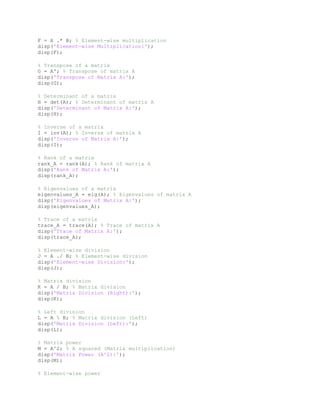
% Element-wise power
3.
N = A.^ 2; % Element-wise power
disp('Element-wise Power (A.^2):');
disp(N);
% Create an identity matrix
I_matrix = eye(3); % 3x3 identity matrix
disp('Identity Matrix:');
disp(I_matrix);
% Create a diagonal matrix
diag_matrix = diag([1, 2, 3]); % Diagonal matrix
disp('Diagonal Matrix:');
disp(diag_matrix);
% Create a zero matrix
zero_matrix = zeros(3, 3); % 3x3 zero matrix
disp('Zero Matrix:');
disp(zero_matrix);
% Create a ones matrix
ones_matrix = ones(3, 3); % 3x3 ones matrix
disp('Ones Matrix:');
disp(ones_matrix);
% Create a random matrix
random_matrix = rand(3, 3); % 3x3 random matrix
disp('Random Matrix:');
disp(random_matrix);
% Create a random integer matrix
random_int_matrix = randi([1, 10], 3, 3); % 3x3 random integers between 1 and
10
disp('Random Integer Matrix:');
disp(random_int_matrix);
% Solve a linear system
b = [1; 2; 3]; % Right-hand side vector
x = A b; % Solve Ax = b
disp('Solution to Ax = b:');
disp(x);
% Singular Value Decomposition (SVD)
[U, S, V] = svd(A); % SVD of matrix A
disp('Singular Value Decomposition (SVD) of A:');
disp('U:'); disp(U);
disp('S:'); disp(S);
disp('V:'); disp(V);
% LU Decomposition
[L, U, P] = lu(A); % LU decomposition of A
disp('LU Decomposition of A:');
disp('L:'); disp(L);
disp('U:'); disp(U);
disp('P:'); disp(P);
4.
% QR Decomposition
[Q,R] = qr(A); % QR decomposition of A
disp('QR Decomposition of A:');
disp('Q:'); disp(Q);
disp('R:'); disp(R);
% Reshape a matrix
reshaped_matrix = reshape(A, 1, 9); % Reshape A into a 1x9 matrix
disp('Reshaped Matrix:');
disp(reshaped_matrix);
% Concatenate matrices horizontally
horizontal_concat = [A, B]; % Horizontal concatenation
disp('Horizontal Concatenation:');
disp(horizontal_concat);
% Concatenate matrices vertically
vertical_concat = [A; B]; % Vertical concatenation
disp('Vertical Concatenation:');
disp(vertical_concat);
% Flip matrix horizontally
flipped_horizontally = fliplr(A); % Flip A horizontally
disp('Horizontally Flipped Matrix:');
disp(flipped_horizontally);
% Flip matrix vertically
flipped_vertically = flipud(A); % Flip A vertically
disp('Vertically Flipped Matrix:');
disp(flipped_vertically);
% Circular shift
circ_shift = circshift(A, 1); % Circular shift by 1
disp('Circularly Shifted Matrix:');
disp(circ_shift);
% Extract upper triangular part
upper_triangular = triu(A); % Upper triangular part of A
disp('Upper Triangular Part:');
disp(upper_triangular);
% Extract lower triangular part
lower_triangular = tril(A); % Lower triangular part of A
disp('Lower Triangular Part:');
disp(lower_triangular);
% Compute column-wise mean
col_mean = mean(A); % Mean of each column
disp('Column-wise Mean:');
disp(col_mean);
% Compute row-wise mean
row_mean = mean(A, 2); % Mean of each row
disp('Row-wise Mean:');
disp(row_mean);
5.
% Compute standarddeviation
std_dev = std(A); % Standard deviation of each column
disp('Standard Deviation of Columns:');
disp(std_dev);
% Sum of all elements
element_sum = sum(A, 'all'); % Sum of all elements
disp('Sum of All Elements:');
disp(element_sum);
% Cumulative sum (column-wise)
cum_sum = cumsum(A); % Cumulative sum
disp('Cumulative Sum (Column-wise):');
disp(cum_sum);
% Generate a meshgrid
[x, y] = meshgrid(1:3, 1:3); % Generate a 3x3 meshgrid
disp('Meshgrid X:');
disp(x);
disp('Meshgrid Y:');
disp(y);
% Perform element-wise sine computation
sin_matrix = sin(A); % Sine of each element in A
disp('Element-wise Sine:');
disp(sin_matrix);
% Perform element-wise exponential computation
exp_matrix = exp(A); % Exponential of each element in A
disp('Element-wise Exponential:');
disp(exp_matrix);
% Perform element-wise logarithmic computation
log_matrix = log(A); % Natural logarithm of each element in A
disp('Element-wise Logarithm:');
disp(log_matrix);
% Basic Digital Signal Processing (DSP) Programs in MATLAB
% 1. Signal Folding
n = -5:5; % Define discrete time indices
x = [0 0 0 1 2 3 2 1 0 0 0]; % Original signal
folded_x = fliplr(x); % Folded signal
figure;
stem(n, x, 'b', 'LineWidth', 1.5); hold on;
stem(-n, folded_x, 'r', 'LineWidth', 1.5);
title('Signal Folding');
xlabel('n'); ylabel('Amplitude');
legend('Original Signal', 'Folded Signal'); grid on;
6.
% 2. SignalDelay
n = -5:5;
delay = 2; % Delay by 2 samples
delayed_x = [zeros(1, delay), x(1:end-delay)];
figure;
stem(n, x, 'b', 'LineWidth', 1.5); hold on;
stem(n, delayed_x, 'r', 'LineWidth', 1.5);
title('Signal Delay');
xlabel('n'); ylabel('Amplitude');
legend('Original Signal', 'Delayed Signal'); grid on;
% 3. Signal Advance
advance = 2; % Advance by 2 samples
advanced_x = [x(advance+1:end), zeros(1, advance)];
figure;
stem(n, x, 'b', 'LineWidth', 1.5); hold on;
stem(n, advanced_x, 'r', 'LineWidth', 1.5);
title('Signal Advance');
xlabel('n'); ylabel('Amplitude');
legend('Original Signal', 'Advanced Signal'); grid on;
% 4. Signal Scaling
scaling_factor = 2; % Scaling factor
scaled_x = scaling_factor * x; % Scaled signal
figure;
stem(n, x, 'b', 'LineWidth', 1.5); hold on;
stem(n, scaled_x, 'r', 'LineWidth', 1.5);
title('Signal Scaling');
xlabel('n'); ylabel('Amplitude');
legend('Original Signal', 'Scaled Signal'); grid on;
% 5. Combined Operations (Folding, Delay, Scaling)
folded_scaled_x = scaling_factor * fliplr(x); % Folded and scaled
figure;
stem(n, x, 'b', 'LineWidth', 1.5); hold on;
stem(-n, folded_scaled_x, 'r', 'LineWidth', 1.5);
title('Combined Folding and Scaling');
xlabel('n'); ylabel('Amplitude');
legend('Original Signal', 'Folded & Scaled Signal'); grid on;
% Basic MATLAB Programs for Beginners
% Program 1: Adding two numbers
a = 10;
b = 20;
c = a + b;
disp('Sum of a and b:');
disp(c);
% Program 2: Subtracting two numbers
a = 30;
b = 15;
c = a - b;
disp('Difference of a and b:');
7.
disp(c);
% Program 3:Multiplying two numbers
a = 7;
b = 6;
c = a * b;
disp('Product of a and b:');
disp(c);
% Program 4: Dividing two numbers
a = 50;
b = 10;
c = a / b;
disp('Quotient of a and b:');
disp(c);
% Program 5: Modulus of two numbers
a = 23;
b = 5;
c = mod(a, b);
disp('Remainder of a divided by b:');
disp(c);
% Program 6: Creating a vector
a = [1, 2, 3, 4, 5];
disp('Vector a:');
disp(a);
% Program 7: Creating a matrix
A = [1, 2; 3, 4];
disp('Matrix A:');
disp(A);
% Program 8: Transpose of a matrix
A = [1, 2, 3; 4, 5, 6];
B = A';
disp('Transpose of A:');
disp(B);
% Program 9: Plotting a sine wave
x = 0:0.1:2*pi;
y = sin(x);
plot(x, y);
title('Sine Wave');
xlabel('x');
ylabel('sin(x)');
% Program 10: Plotting a cosine wave
x = 0:0.1:2*pi;
y = cos(x);
plot(x, y);
title('Cosine Wave');
xlabel('x');
ylabel('cos(x)');
8.
% Program 11:Generate random numbers
random_numbers = rand(1, 5);
disp('Random numbers:');
disp(random_numbers);
% Program 12: Conditional statement
x = 10;
if x > 5
disp('x is greater than 5');
else
disp('x is not greater than 5');
end
% Program 13: Loop example (for loop)
for i = 1:5
disp(['Value of i: ', num2str(i)]);
end
% Program 14: Loop example (while loop)
i = 1;
while i <= 5
disp(['Value of i: ', num2str(i)]);
i = i + 1;
end
% Program 15: Element-wise multiplication
a = [1, 2, 3];
b = [4, 5, 6];
c = a .* b;
disp('Element-wise multiplication:');
disp(c);
% Program 16: Matrix multiplication
A = [1, 2; 3, 4];
B = [5, 6; 7, 8];
C = A * B;
disp('Matrix multiplication:');
disp(C);
% Program 17: Creating an identity matrix
I = eye(3);
disp('Identity Matrix:');
disp(I);
% Program 18: Solving linear equations
A = [2, -1; 1, 1];
b = [3; 5];
x = A b;
disp('Solution to linear equations:');
disp(x);
% Program 19: Finding the determinant of a matrix
A = [1, 2; 3, 4];
det_A = det(A);
disp('Determinant of A:');
9.
disp(det_A);
% Program 20:Eigenvalues and eigenvectors
A = [1, 2; 3, 4];
[eig_vectors, eig_values] = eig(A);
disp('Eigenvalues of A:');
disp(eig_values);
disp('Eigenvectors of A:');
disp(eig_vectors);
% Program 21: Logical indexing
A = [1, 2, 3; 4, 5, 6; 7, 8, 9];
B = A(A > 5);
disp('Elements greater than 5:');
disp(B);
% Program 22: Generate a meshgrid
[x, y] = meshgrid(1:3, 1:3);
disp('Meshgrid X:');
disp(x);
disp('Meshgrid Y:');
disp(y);
% Program 23: Save variables to a file
a = 10;
b = 20;
save('variables.mat', 'a', 'b');
disp('Variables saved to file.');
% Program 24: Load variables from a file
load('variables.mat');
disp('Loaded variables:');
disp(a);
disp(b);
% Program 25: Compute factorial
n = 5;
factorial_n = factorial(n);
disp(['Factorial of ', num2str(n), ':']);
disp(factorial_n);
% Program 26: Create a diagonal matrix
diagonal_matrix = diag([1, 2, 3]);
disp('Diagonal Matrix:');
disp(diagonal_matrix);
% Program 27: Flip a matrix horizontally
A = [1, 2, 3; 4, 5, 6];
flipped_horizontally = fliplr(A);
disp('Horizontally Flipped Matrix:');
disp(flipped_horizontally);
% Program 28: Flip a matrix vertically
flipped_vertically = flipud(A);
disp('Vertically Flipped Matrix:');
10.
disp(flipped_vertically);
% Program 29:Compute mean of a matrix
A = [1, 2, 3; 4, 5, 6];
mean_A = mean(A, 'all');
disp('Mean of A:');
disp(mean_A);
% Program 30: Compute median of a matrix
median_A = median(A, 'all');
disp('Median of A:');
disp(median_A);
% Program 31: Compute standard deviation of a matrix
std_A = std(A, 0, 'all');
disp('Standard Deviation of A:');
disp(std_A);
% Program 32: Create a zeros matrix
zeros_matrix = zeros(3, 3);
disp('Zeros Matrix:');
disp(zeros_matrix);
% Program 33: Create a ones matrix
ones_matrix = ones(3, 3);
disp('Ones Matrix:');
disp(ones_matrix);
% Program 34: Element-wise sine of a matrix
sin_matrix = sin(A);
disp('Sine of Elements in A:');
disp(sin_matrix);
% Program 35: Element-wise cosine of a matrix
cos_matrix = cos(A);
disp('Cosine of Elements in A:');
disp(cos_matrix);
% Program 36: Sort elements of a matrix
sorted_A = sort(A, 2);
disp('Row-wise Sorted Matrix:');
disp(sorted_A);
% Program 37: Reshape a matrix
reshaped_A = reshape(A, 3, 2);
disp('Reshaped Matrix:');
disp(reshaped_A);
% Program 38: Pad a matrix
padded_matrix = padarray(A, [1, 1], 0);
disp('Padded Matrix:');
disp(padded_matrix);
% Program 39: Compute the trace of a matrix
trace_A = trace(A);
11.
disp('Trace of A:');
disp(trace_A);
%Program 40: Sum of elements column-wise
column_sum = sum(A);
disp('Column-wise Sum:');
disp(column_sum);
% Program 41: Sum of elements row-wise
row_sum = sum(A, 2);
disp('Row-wise Sum:');
disp(row_sum);
% Program 42: Maximum element in a matrix
max_element = max(A, [], 'all');
disp('Maximum Element in A:');
disp(max_element);
% Program 43: Minimum element in a matrix
min_element = min(A, [], 'all');
disp('Minimum Element in A:');
disp(min_element);
% Program 44: Replace specific elements in a matrix
A(A > 5) = 0;
disp('Matrix After Replacing Elements > 5:');
disp(A);
% Program 45: Check if a matrix is symmetric
is_symmetric = issymmetric(A);
disp('Is Matrix A Symmetric?');
disp(is_symmetric);
% Program 46: Multiply a matrix by a scalar
scalar_multiplied = 2 * A;
disp('Matrix After Scalar Multiplication:');
disp(scalar_multiplied);
% Program 47: Extract diagonal of a matrix
diagonal_A = diag(A);
disp('Diagonal of A:');
disp(diagonal_A);
% Program 48: Create a magic square
magic_square = magic(3);
disp('Magic Square:');
disp(magic_square);
% Program 49: Compute cumulative sum
cumulative_sum = cumsum(A);
disp('Cumulative Sum of A:');
disp(cumulative_sum);
% Program 50: Generate a 2D grid
[X, Y] = meshgrid(1:3, 1:3);
12.
disp('2D Grid X:');
disp(X);
disp('2DGrid Y:');
disp(Y);
% Signals and Systems Operations in MATLAB
% 1. Generate a sinusoidal signal
t = 0:0.01:1; % Time vector
f = 5; % Frequency in Hz
sin_signal = sin(2*pi*f*t); % Sinusoidal signal
figure;
plot(t, sin_signal);
title('Sinusoidal Signal');
xlabel('Time (s)'); ylabel('Amplitude');
% 2. Generate a cosine signal
cos_signal = cos(2*pi*f*t); % Cosine signal
figure;
plot(t, cos_signal);
title('Cosine Signal');
xlabel('Time (s)'); ylabel('Amplitude');
% 3. Generate a unit step signal
unit_step = t >= 0.5; % Unit step signal starting at t = 0.5
figure;
stem(t, unit_step);
title('Unit Step Signal');
xlabel('Time (s)'); ylabel('Amplitude');
% 4. Generate an impulse signal
impulse = t == 0.5; % Impulse signal at t = 0.5
figure;
stem(t, impulse);
title('Impulse Signal');
xlabel('Time (s)'); ylabel('Amplitude');
% 5. Generate a ramp signal
ramp = t.*(t >= 0); % Ramp signal
figure;
plot(t, ramp);
title('Ramp Signal');
xlabel('Time (s)'); ylabel('Amplitude');
% 6. Generate an exponential signal
exp_signal = exp(-t); % Exponential decay signal
figure;
plot(t, exp_signal);
13.
title('Exponential Signal');
xlabel('Time (s)');ylabel('Amplitude');
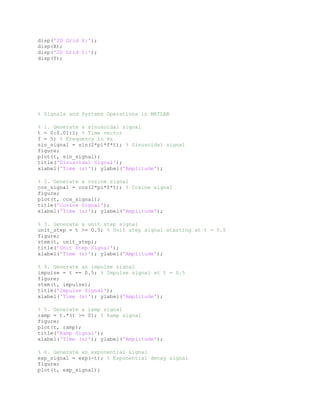
% 7. Perform time-shifting on a signal
shifted_signal = sin(2*pi*f*(t - 0.2)); % Shifted sinusoidal signal
figure;
plot(t, shifted_signal);
title('Time-shifted Signal');
xlabel('Time (s)'); ylabel('Amplitude');
% 8. Perform time-scaling on a signal
scaled_signal = sin(2*pi*f*2*t); % Time-scaled sinusoidal signal
figure;
plot(t, scaled_signal);
title('Time-scaled Signal');
xlabel('Time (s)'); ylabel('Amplitude');
% 9. Perform signal addition
signal_sum = sin_signal + cos_signal; % Adding two signals
figure;
plot(t, signal_sum);
title('Signal Addition');
xlabel('Time (s)'); ylabel('Amplitude');
% 10. Perform signal multiplication
signal_product = sin_signal .* cos_signal; % Element-wise multiplication
figure;
plot(t, signal_product);
title('Signal Multiplication');
xlabel('Time (s)'); ylabel('Amplitude');
% 11. Compute the convolution of two signals
h = [1, 2, 1]; % Impulse response
y = conv(sin_signal, h, 'same'); % Convolution
t_conv = linspace(0, 1, length(y));
figure;
plot(t_conv, y);
title('Convolution of Signals');
xlabel('Time (s)'); ylabel('Amplitude');
% 12. Compute the Fourier Transform of a signal
fft_signal = fft(sin_signal); % Fourier Transform
freq = linspace(0, 50, length(fft_signal)); % Frequency vector
figure;
plot(freq, abs(fft_signal));
title('Magnitude Spectrum');
xlabel('Frequency (Hz)'); ylabel('Magnitude');
% 13. Generate a square wave
square_wave = square(2*pi*f*t); % Square wave
figure;
plot(t, square_wave);
title('Square Wave');
xlabel('Time (s)'); ylabel('Amplitude');
14.
% 14. Generatea sawtooth wave
sawtooth_wave = sawtooth(2*pi*f*t); % Sawtooth wave
figure;
plot(t, sawtooth_wave);
title('Sawtooth Wave');
xlabel('Time (s)'); ylabel('Amplitude');
% 15. Perform auto-correlation of a signal
[auto_corr, lags] = xcorr(sin_signal);
figure;
plot(lags, auto_corr);
title('Auto-correlation of Sinusoidal Signal');
xlabel('Lags'); ylabel('Amplitude');
This program solves a system of linear equations Ax=b.
% Program 18: Solving linear equations
A = [2, -1; 1, 1]; % Coefficient matrix
b = [3; 5]; % Constants vector
x = A b; % Solve for x using matrix left division
disp('Solution to linear equations:');
disp(x);
![MATLAB Environment
• Command Window: Used to execute commands directly.
• Editor: For writing scripts and functions.
• Workspace: Displays variables that are in memory.
• Current Folder: Shows the files in the working directory.
• Command History: Displays previously executed commands.
2. Basic Operations
• Arithmetic: +, -, *, /, .^ (element-wise power)
• Variables: Variables are created without declaration. Example: a = 5;
• Matrices and Vectors: MATLAB is matrix-based. You can create matrices with square
brackets:
o A = [1 2; 3 4];
• Built-in Functions: sqrt(), abs(), sin(), cos(), etc.
• Plotting: plot(x, y) for basic graphs.
3. Comments
• Single-line: %% This is a comment
%{
This is a
multi-line comment
%}
% Basic Matrix Operations in MATLAB
% Create two matrices
A = [1, 2, 3; 4, 5, 6; 7, 8, 9]; % 3x3 matrix
B = [9, 8, 7; 6, 5, 4; 3, 2, 1]; % Another 3x3 matrix
% Matrix addition
C = A + B; % Element-wise addition
disp('Matrix Addition:');
disp(C);
% Matrix subtraction
D = A - B; % Element-wise subtraction
disp('Matrix Subtraction:');
disp(D);
% Matrix multiplication
E = A * B; % Matrix multiplication
disp('Matrix Multiplication:');
disp(E);
% Element-wise multiplication](https://image.slidesharecdn.com/matlabenvironment-251010091303-b8fd9236/85/programming-in-MATLAB-Environment-100-basic-programs-pdf-1-320.jpg)
![MATLAB Environment
• Command Window: Used to execute commands directly.
• Editor: For writing scripts and functions.
• Workspace: Displays variables that are in memory.
• Current Folder: Shows the files in the working directory.
• Command History: Displays previously executed commands.
2. Basic Operations
• Arithmetic: +, -, *, /, .^ (element-wise power)
• Variables: Variables are created without declaration. Example: a = 5;
• Matrices and Vectors: MATLAB is matrix-based. You can create matrices with square
brackets:
o A = [1 2; 3 4];
• Built-in Functions: sqrt(), abs(), sin(), cos(), etc.
• Plotting: plot(x, y) for basic graphs.
3. Comments
• Single-line: %% This is a comment
%{
This is a
multi-line comment
%}
% Basic Matrix Operations in MATLAB
% Create two matrices
A = [1, 2, 3; 4, 5, 6; 7, 8, 9]; % 3x3 matrix
B = [9, 8, 7; 6, 5, 4; 3, 2, 1]; % Another 3x3 matrix
% Matrix addition
C = A + B; % Element-wise addition
disp('Matrix Addition:');
disp(C);
% Matrix subtraction
D = A - B; % Element-wise subtraction
disp('Matrix Subtraction:');
disp(D);
% Matrix multiplication
E = A * B; % Matrix multiplication
disp('Matrix Multiplication:');
disp(E);
% Element-wise multiplication](https://image.slidesharecdn.com/matlabenvironment-251010091303-b8fd9236/75/programming-in-MATLAB-Environment-100-basic-programs-pdf-1-2048.jpg)
![N = A .^ 2; % Element-wise power
disp('Element-wise Power (A.^2):');
disp(N);
% Create an identity matrix
I_matrix = eye(3); % 3x3 identity matrix
disp('Identity Matrix:');
disp(I_matrix);
% Create a diagonal matrix
diag_matrix = diag([1, 2, 3]); % Diagonal matrix
disp('Diagonal Matrix:');
disp(diag_matrix);
% Create a zero matrix
zero_matrix = zeros(3, 3); % 3x3 zero matrix
disp('Zero Matrix:');
disp(zero_matrix);
% Create a ones matrix
ones_matrix = ones(3, 3); % 3x3 ones matrix
disp('Ones Matrix:');
disp(ones_matrix);
% Create a random matrix
random_matrix = rand(3, 3); % 3x3 random matrix
disp('Random Matrix:');
disp(random_matrix);
% Create a random integer matrix
random_int_matrix = randi([1, 10], 3, 3); % 3x3 random integers between 1 and
10
disp('Random Integer Matrix:');
disp(random_int_matrix);
% Solve a linear system
b = [1; 2; 3]; % Right-hand side vector
x = A b; % Solve Ax = b
disp('Solution to Ax = b:');
disp(x);
% Singular Value Decomposition (SVD)
[U, S, V] = svd(A); % SVD of matrix A
disp('Singular Value Decomposition (SVD) of A:');
disp('U:'); disp(U);
disp('S:'); disp(S);
disp('V:'); disp(V);
% LU Decomposition
[L, U, P] = lu(A); % LU decomposition of A
disp('LU Decomposition of A:');
disp('L:'); disp(L);
disp('U:'); disp(U);
disp('P:'); disp(P);](https://image.slidesharecdn.com/matlabenvironment-251010091303-b8fd9236/85/programming-in-MATLAB-Environment-100-basic-programs-pdf-3-320.jpg)
![% QR Decomposition
[Q, R] = qr(A); % QR decomposition of A
disp('QR Decomposition of A:');
disp('Q:'); disp(Q);
disp('R:'); disp(R);
% Reshape a matrix
reshaped_matrix = reshape(A, 1, 9); % Reshape A into a 1x9 matrix
disp('Reshaped Matrix:');
disp(reshaped_matrix);
% Concatenate matrices horizontally
horizontal_concat = [A, B]; % Horizontal concatenation
disp('Horizontal Concatenation:');
disp(horizontal_concat);
% Concatenate matrices vertically
vertical_concat = [A; B]; % Vertical concatenation
disp('Vertical Concatenation:');
disp(vertical_concat);
% Flip matrix horizontally
flipped_horizontally = fliplr(A); % Flip A horizontally
disp('Horizontally Flipped Matrix:');
disp(flipped_horizontally);
% Flip matrix vertically
flipped_vertically = flipud(A); % Flip A vertically
disp('Vertically Flipped Matrix:');
disp(flipped_vertically);
% Circular shift
circ_shift = circshift(A, 1); % Circular shift by 1
disp('Circularly Shifted Matrix:');
disp(circ_shift);
% Extract upper triangular part
upper_triangular = triu(A); % Upper triangular part of A
disp('Upper Triangular Part:');
disp(upper_triangular);
% Extract lower triangular part
lower_triangular = tril(A); % Lower triangular part of A
disp('Lower Triangular Part:');
disp(lower_triangular);
% Compute column-wise mean
col_mean = mean(A); % Mean of each column
disp('Column-wise Mean:');
disp(col_mean);
% Compute row-wise mean
row_mean = mean(A, 2); % Mean of each row
disp('Row-wise Mean:');
disp(row_mean);](https://image.slidesharecdn.com/matlabenvironment-251010091303-b8fd9236/85/programming-in-MATLAB-Environment-100-basic-programs-pdf-4-320.jpg)
![% Compute standard deviation
std_dev = std(A); % Standard deviation of each column
disp('Standard Deviation of Columns:');
disp(std_dev);
% Sum of all elements
element_sum = sum(A, 'all'); % Sum of all elements
disp('Sum of All Elements:');
disp(element_sum);
% Cumulative sum (column-wise)
cum_sum = cumsum(A); % Cumulative sum
disp('Cumulative Sum (Column-wise):');
disp(cum_sum);
% Generate a meshgrid
[x, y] = meshgrid(1:3, 1:3); % Generate a 3x3 meshgrid
disp('Meshgrid X:');
disp(x);
disp('Meshgrid Y:');
disp(y);
% Perform element-wise sine computation
sin_matrix = sin(A); % Sine of each element in A
disp('Element-wise Sine:');
disp(sin_matrix);
% Perform element-wise exponential computation
exp_matrix = exp(A); % Exponential of each element in A
disp('Element-wise Exponential:');
disp(exp_matrix);
% Perform element-wise logarithmic computation
log_matrix = log(A); % Natural logarithm of each element in A
disp('Element-wise Logarithm:');
disp(log_matrix);
% Basic Digital Signal Processing (DSP) Programs in MATLAB
% 1. Signal Folding
n = -5:5; % Define discrete time indices
x = [0 0 0 1 2 3 2 1 0 0 0]; % Original signal
folded_x = fliplr(x); % Folded signal
figure;
stem(n, x, 'b', 'LineWidth', 1.5); hold on;
stem(-n, folded_x, 'r', 'LineWidth', 1.5);
title('Signal Folding');
xlabel('n'); ylabel('Amplitude');
legend('Original Signal', 'Folded Signal'); grid on;](https://image.slidesharecdn.com/matlabenvironment-251010091303-b8fd9236/85/programming-in-MATLAB-Environment-100-basic-programs-pdf-5-320.jpg)
![% 2. Signal Delay
n = -5:5;
delay = 2; % Delay by 2 samples
delayed_x = [zeros(1, delay), x(1:end-delay)];
figure;
stem(n, x, 'b', 'LineWidth', 1.5); hold on;
stem(n, delayed_x, 'r', 'LineWidth', 1.5);
title('Signal Delay');
xlabel('n'); ylabel('Amplitude');
legend('Original Signal', 'Delayed Signal'); grid on;
% 3. Signal Advance
advance = 2; % Advance by 2 samples
advanced_x = [x(advance+1:end), zeros(1, advance)];
figure;
stem(n, x, 'b', 'LineWidth', 1.5); hold on;
stem(n, advanced_x, 'r', 'LineWidth', 1.5);
title('Signal Advance');
xlabel('n'); ylabel('Amplitude');
legend('Original Signal', 'Advanced Signal'); grid on;
% 4. Signal Scaling
scaling_factor = 2; % Scaling factor
scaled_x = scaling_factor * x; % Scaled signal
figure;
stem(n, x, 'b', 'LineWidth', 1.5); hold on;
stem(n, scaled_x, 'r', 'LineWidth', 1.5);
title('Signal Scaling');
xlabel('n'); ylabel('Amplitude');
legend('Original Signal', 'Scaled Signal'); grid on;
% 5. Combined Operations (Folding, Delay, Scaling)
folded_scaled_x = scaling_factor * fliplr(x); % Folded and scaled
figure;
stem(n, x, 'b', 'LineWidth', 1.5); hold on;
stem(-n, folded_scaled_x, 'r', 'LineWidth', 1.5);
title('Combined Folding and Scaling');
xlabel('n'); ylabel('Amplitude');
legend('Original Signal', 'Folded & Scaled Signal'); grid on;
% Basic MATLAB Programs for Beginners
% Program 1: Adding two numbers
a = 10;
b = 20;
c = a + b;
disp('Sum of a and b:');
disp(c);
% Program 2: Subtracting two numbers
a = 30;
b = 15;
c = a - b;
disp('Difference of a and b:');](https://image.slidesharecdn.com/matlabenvironment-251010091303-b8fd9236/85/programming-in-MATLAB-Environment-100-basic-programs-pdf-6-320.jpg)
![disp(c);
% Program 3: Multiplying two numbers
a = 7;
b = 6;
c = a * b;
disp('Product of a and b:');
disp(c);
% Program 4: Dividing two numbers
a = 50;
b = 10;
c = a / b;
disp('Quotient of a and b:');
disp(c);
% Program 5: Modulus of two numbers
a = 23;
b = 5;
c = mod(a, b);
disp('Remainder of a divided by b:');
disp(c);
% Program 6: Creating a vector
a = [1, 2, 3, 4, 5];
disp('Vector a:');
disp(a);
% Program 7: Creating a matrix
A = [1, 2; 3, 4];
disp('Matrix A:');
disp(A);
% Program 8: Transpose of a matrix
A = [1, 2, 3; 4, 5, 6];
B = A';
disp('Transpose of A:');
disp(B);
% Program 9: Plotting a sine wave
x = 0:0.1:2*pi;
y = sin(x);
plot(x, y);
title('Sine Wave');
xlabel('x');
ylabel('sin(x)');
% Program 10: Plotting a cosine wave
x = 0:0.1:2*pi;
y = cos(x);
plot(x, y);
title('Cosine Wave');
xlabel('x');
ylabel('cos(x)');](https://image.slidesharecdn.com/matlabenvironment-251010091303-b8fd9236/85/programming-in-MATLAB-Environment-100-basic-programs-pdf-7-320.jpg)
![% Program 11: Generate random numbers
random_numbers = rand(1, 5);
disp('Random numbers:');
disp(random_numbers);
% Program 12: Conditional statement
x = 10;
if x > 5
disp('x is greater than 5');
else
disp('x is not greater than 5');
end
% Program 13: Loop example (for loop)
for i = 1:5
disp(['Value of i: ', num2str(i)]);
end
% Program 14: Loop example (while loop)
i = 1;
while i <= 5
disp(['Value of i: ', num2str(i)]);
i = i + 1;
end
% Program 15: Element-wise multiplication
a = [1, 2, 3];
b = [4, 5, 6];
c = a .* b;
disp('Element-wise multiplication:');
disp(c);
% Program 16: Matrix multiplication
A = [1, 2; 3, 4];
B = [5, 6; 7, 8];
C = A * B;
disp('Matrix multiplication:');
disp(C);
% Program 17: Creating an identity matrix
I = eye(3);
disp('Identity Matrix:');
disp(I);
% Program 18: Solving linear equations
A = [2, -1; 1, 1];
b = [3; 5];
x = A b;
disp('Solution to linear equations:');
disp(x);
% Program 19: Finding the determinant of a matrix
A = [1, 2; 3, 4];
det_A = det(A);
disp('Determinant of A:');](https://image.slidesharecdn.com/matlabenvironment-251010091303-b8fd9236/85/programming-in-MATLAB-Environment-100-basic-programs-pdf-8-320.jpg)
![disp(det_A);
% Program 20: Eigenvalues and eigenvectors
A = [1, 2; 3, 4];
[eig_vectors, eig_values] = eig(A);
disp('Eigenvalues of A:');
disp(eig_values);
disp('Eigenvectors of A:');
disp(eig_vectors);
% Program 21: Logical indexing
A = [1, 2, 3; 4, 5, 6; 7, 8, 9];
B = A(A > 5);
disp('Elements greater than 5:');
disp(B);
% Program 22: Generate a meshgrid
[x, y] = meshgrid(1:3, 1:3);
disp('Meshgrid X:');
disp(x);
disp('Meshgrid Y:');
disp(y);
% Program 23: Save variables to a file
a = 10;
b = 20;
save('variables.mat', 'a', 'b');
disp('Variables saved to file.');
% Program 24: Load variables from a file
load('variables.mat');
disp('Loaded variables:');
disp(a);
disp(b);
% Program 25: Compute factorial
n = 5;
factorial_n = factorial(n);
disp(['Factorial of ', num2str(n), ':']);
disp(factorial_n);
% Program 26: Create a diagonal matrix
diagonal_matrix = diag([1, 2, 3]);
disp('Diagonal Matrix:');
disp(diagonal_matrix);
% Program 27: Flip a matrix horizontally
A = [1, 2, 3; 4, 5, 6];
flipped_horizontally = fliplr(A);
disp('Horizontally Flipped Matrix:');
disp(flipped_horizontally);
% Program 28: Flip a matrix vertically
flipped_vertically = flipud(A);
disp('Vertically Flipped Matrix:');](https://image.slidesharecdn.com/matlabenvironment-251010091303-b8fd9236/85/programming-in-MATLAB-Environment-100-basic-programs-pdf-9-320.jpg)
![disp(flipped_vertically);
% Program 29: Compute mean of a matrix
A = [1, 2, 3; 4, 5, 6];
mean_A = mean(A, 'all');
disp('Mean of A:');
disp(mean_A);
% Program 30: Compute median of a matrix
median_A = median(A, 'all');
disp('Median of A:');
disp(median_A);
% Program 31: Compute standard deviation of a matrix
std_A = std(A, 0, 'all');
disp('Standard Deviation of A:');
disp(std_A);
% Program 32: Create a zeros matrix
zeros_matrix = zeros(3, 3);
disp('Zeros Matrix:');
disp(zeros_matrix);
% Program 33: Create a ones matrix
ones_matrix = ones(3, 3);
disp('Ones Matrix:');
disp(ones_matrix);
% Program 34: Element-wise sine of a matrix
sin_matrix = sin(A);
disp('Sine of Elements in A:');
disp(sin_matrix);
% Program 35: Element-wise cosine of a matrix
cos_matrix = cos(A);
disp('Cosine of Elements in A:');
disp(cos_matrix);
% Program 36: Sort elements of a matrix
sorted_A = sort(A, 2);
disp('Row-wise Sorted Matrix:');
disp(sorted_A);
% Program 37: Reshape a matrix
reshaped_A = reshape(A, 3, 2);
disp('Reshaped Matrix:');
disp(reshaped_A);
% Program 38: Pad a matrix
padded_matrix = padarray(A, [1, 1], 0);
disp('Padded Matrix:');
disp(padded_matrix);
% Program 39: Compute the trace of a matrix
trace_A = trace(A);](https://image.slidesharecdn.com/matlabenvironment-251010091303-b8fd9236/85/programming-in-MATLAB-Environment-100-basic-programs-pdf-10-320.jpg)
![disp('Trace of A:');
disp(trace_A);
% Program 40: Sum of elements column-wise
column_sum = sum(A);
disp('Column-wise Sum:');
disp(column_sum);
% Program 41: Sum of elements row-wise
row_sum = sum(A, 2);
disp('Row-wise Sum:');
disp(row_sum);
% Program 42: Maximum element in a matrix
max_element = max(A, [], 'all');
disp('Maximum Element in A:');
disp(max_element);
% Program 43: Minimum element in a matrix
min_element = min(A, [], 'all');
disp('Minimum Element in A:');
disp(min_element);
% Program 44: Replace specific elements in a matrix
A(A > 5) = 0;
disp('Matrix After Replacing Elements > 5:');
disp(A);
% Program 45: Check if a matrix is symmetric
is_symmetric = issymmetric(A);
disp('Is Matrix A Symmetric?');
disp(is_symmetric);
% Program 46: Multiply a matrix by a scalar
scalar_multiplied = 2 * A;
disp('Matrix After Scalar Multiplication:');
disp(scalar_multiplied);
% Program 47: Extract diagonal of a matrix
diagonal_A = diag(A);
disp('Diagonal of A:');
disp(diagonal_A);
% Program 48: Create a magic square
magic_square = magic(3);
disp('Magic Square:');
disp(magic_square);
% Program 49: Compute cumulative sum
cumulative_sum = cumsum(A);
disp('Cumulative Sum of A:');
disp(cumulative_sum);
% Program 50: Generate a 2D grid
[X, Y] = meshgrid(1:3, 1:3);](https://image.slidesharecdn.com/matlabenvironment-251010091303-b8fd9236/85/programming-in-MATLAB-Environment-100-basic-programs-pdf-11-320.jpg)
![title('Exponential Signal');
xlabel('Time (s)'); ylabel('Amplitude');
% 7. Perform time-shifting on a signal
shifted_signal = sin(2*pi*f*(t - 0.2)); % Shifted sinusoidal signal
figure;
plot(t, shifted_signal);
title('Time-shifted Signal');
xlabel('Time (s)'); ylabel('Amplitude');
% 8. Perform time-scaling on a signal
scaled_signal = sin(2*pi*f*2*t); % Time-scaled sinusoidal signal
figure;
plot(t, scaled_signal);
title('Time-scaled Signal');
xlabel('Time (s)'); ylabel('Amplitude');
% 9. Perform signal addition
signal_sum = sin_signal + cos_signal; % Adding two signals
figure;
plot(t, signal_sum);
title('Signal Addition');
xlabel('Time (s)'); ylabel('Amplitude');
% 10. Perform signal multiplication
signal_product = sin_signal .* cos_signal; % Element-wise multiplication
figure;
plot(t, signal_product);
title('Signal Multiplication');
xlabel('Time (s)'); ylabel('Amplitude');
% 11. Compute the convolution of two signals
h = [1, 2, 1]; % Impulse response
y = conv(sin_signal, h, 'same'); % Convolution
t_conv = linspace(0, 1, length(y));
figure;
plot(t_conv, y);
title('Convolution of Signals');
xlabel('Time (s)'); ylabel('Amplitude');
% 12. Compute the Fourier Transform of a signal
fft_signal = fft(sin_signal); % Fourier Transform
freq = linspace(0, 50, length(fft_signal)); % Frequency vector
figure;
plot(freq, abs(fft_signal));
title('Magnitude Spectrum');
xlabel('Frequency (Hz)'); ylabel('Magnitude');
% 13. Generate a square wave
square_wave = square(2*pi*f*t); % Square wave
figure;
plot(t, square_wave);
title('Square Wave');
xlabel('Time (s)'); ylabel('Amplitude');](https://image.slidesharecdn.com/matlabenvironment-251010091303-b8fd9236/85/programming-in-MATLAB-Environment-100-basic-programs-pdf-13-320.jpg)
![% 14. Generate a sawtooth wave
sawtooth_wave = sawtooth(2*pi*f*t); % Sawtooth wave
figure;
plot(t, sawtooth_wave);
title('Sawtooth Wave');
xlabel('Time (s)'); ylabel('Amplitude');
% 15. Perform auto-correlation of a signal
[auto_corr, lags] = xcorr(sin_signal);
figure;
plot(lags, auto_corr);
title('Auto-correlation of Sinusoidal Signal');
xlabel('Lags'); ylabel('Amplitude');
This program solves a system of linear equations Ax=b.
% Program 18: Solving linear equations
A = [2, -1; 1, 1]; % Coefficient matrix
b = [3; 5]; % Constants vector
x = A b; % Solve for x using matrix left division
disp('Solution to linear equations:');
disp(x);](https://image.slidesharecdn.com/matlabenvironment-251010091303-b8fd9236/85/programming-in-MATLAB-Environment-100-basic-programs-pdf-14-320.jpg)


