No More Backstabbing... A Faithful Scheduling Policy for
Multithreaded Programs
Kishore Kumar Pusukuri, Rajiv Gupta, Laxmi N. Bhuyan
Department of Computer Science and Engineering
University of California, Riverside
Riverside, USA 92521
[email protected], [email protected], [email protected]
Abstract—Efficient contention management is the key to
achieving scalable performance for multithreaded applications
running on multicore systems. However, contention manage-
ment policies provided by modern operating systems increase
context-switches and lead to performance degradation for
multithreaded applications under high loads. Moreover, this
problem is exacerbated by the interaction between contention
management policies and OS scheduling polices. Time Share
(TS) is the default scheduling policy in a modern OS such as
OpenSolaris and with TS policy, priorities of threads change
very frequently for balancing load and providing fairness in
scheduling. Due to the frequent ping-ponging of priorities,
threads of an application are often preempted by the threads
of the same application. This increases the frequency of
involuntary context-switches as wells as lock-holder thread
preemptions and leads to poor performance. This problem
becomes very serious under high loads.
To alleviate this problem, in this paper, we present a
scheduling policy called Faithful Scheduling (FF), which dra-
matically reduces context-switches as well as lock-holder thread
preemptions. We implemented FF on a 24-core Dell PowerEdge
R905 server running OpenSolaris.2009.06 and evaluated it
using 22 programs including the TATP database application,
SPECjbb2005, programs from PARSEC, SPEC OMP, and
some microbenchmarks. The experimental results show that FF
policy achieves high performance for both lightly and heavily
loaded systems. Moreover it does not require any changes to
the application source code or the OS kernel.
Keywords-Scheduling; priorities; contention; context-
switches
I. INTRODUCTION
The advent of multicore architectures provides an attractive
opportunity for achieving high performance for a wide
variety of multithreaded applications. However, exploiting
the system density, and the parallelism they offer, to improve
performance of multithreaded applications is a challenging
task. This is because multithreaded application performance is
sensitive to the implementations of synchronization primitives
and contention management policies. Therefore the key
to achieving high performance for multithreaded applica-
tions running on multicore systems is to use appropriate
synchronization primitives along with efficient contention
management policies. Contention management policies are
either based on spinning, or blocking, or a combination
of both. Spinning resolves contention by busy waiting,
therefore waiting threads respond to lock handoffs very
quickly. However, spinning threads can wastes CPU resources
and prevent the lock-holder thread from running and releasing
the lock [1], [3], [6]. This dramatically degrades performance
and becomes a prominent problem in systems under high
load conditions. In contrast, the blocking scheme reschedules
waiting threads and allows other threads to use the system
resources. However, blocking scheme increases context-
switches, overloads OS scheduler, and thus leads to poor
performance [1], [3], [6].
To alleviate the above problems with spinning and blocking,
several hybrid schemes have been introduced. The adaptive
mutex provided by OpenSolaris [3], Linux futex [17], and
pthread mutex provided by pthread library are examples
of such hybrid schemes. Both Solaris adaptive mutex and
Linux futex use the state-of-the-art spin-then-block contention
management policy. According to this policy, threads spin if
the lock-holder thread is running on another CPU and block
otherwise. This policy is based on the assumption that mutex
hold times are typically short enough that the time spent
spinning is less than the time it takes to block [3]. However,
this policy faces challenges in providing optimal balance
between spinning and blocking because this balance must
change with increasing core and thread counts [1], [2].
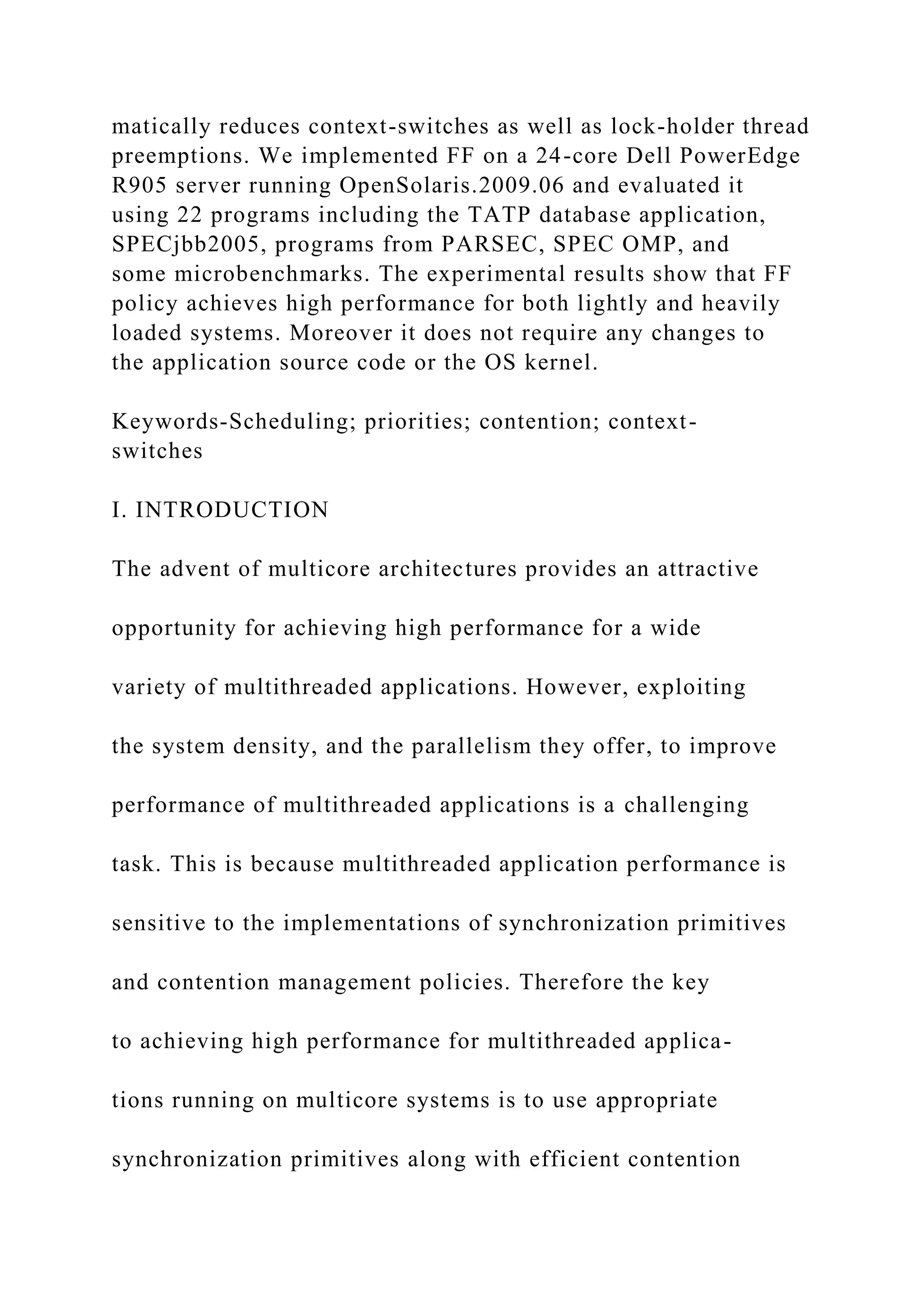
Next we illustrate the above problem using the SPEC
OMP program applu. Fig. 1 shows the speedup and the
3
4
5
6
7
# Threads
S
p
e
e
d
u
p
lSpeedup CX−Rate
l
l
l
l
l
l
6 12 18 24 36 48
2
3
0
0
0
5
0
0
0
0
7
4
0
0
0
9
8
0
0
0
1
2
2
0
0
0
C
X
−
R
a
te
OPT
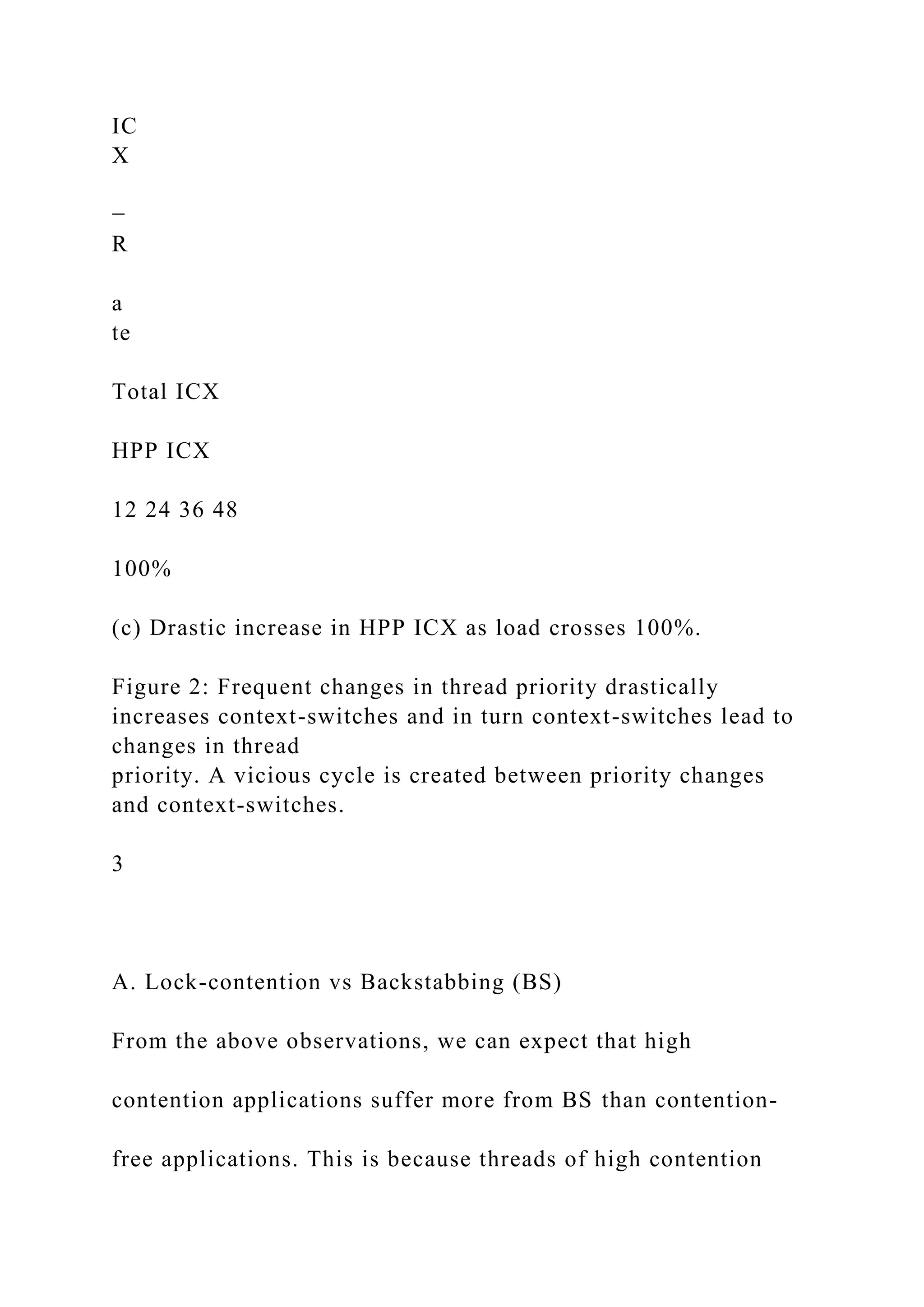
Figure 1: Speedup of applu degrades while CX-Rate increases
as
thread count grows on a 24-core machine. 24 threads represents
100% load.
context-switch (CX) rate observed by running applu on 24-
core machine for varying number of threads. The speedup is
computed relative to the serial execution-time. Applu achieves
the best performance with 18 threads on our 24-core machine.
As we can see, speedup of ‘applu’ drops while CX-Rate
increases as thread count grows. The implementation of
applu is based upon pthreads and pthread mutex uses the
state-of-the-art spin-then-bock contention management. As
we discussed above, as load (thread count) increases, the
spin-then-block policy increases the CX-Rate, overwhelms
the OS scheduler, causing poor performance even with 75%
load (.e., 18 threads). Applu is a contention-bound program
that experiences high CX-Rate and spends around 47% of its
elapsed time in lock-contention even with #threads < #cores,
i.e., less than 100% load.
The CX-Rate increases further because of the unwanted
interactions between the spin-then-block policy and the Time
Share (TS) scheduling policy which is the default scheduling
policy in a modern OS. With TS scheduling policy, priorities
of threads change very frequently for balancing load and
providing fairness in scheduling. Priority adjustments are
made based on the time a thread spends waiting for processor
resources, consuming processor resources, etc. [3]. Therefore,
at any execution point of a multithreaded application, some
of the threads belonging to the application get higher priority
while the others get lower priority. This leads to preemption
of low-priority threads by the high-priority threads of the
same application which often includes lock-holder thread
preemptions. This is what we call “Backstabbing” (BS)
which leads to increased frequency of involuntary context-
switches (ICXs), i.e. context-switches that cause threads to
be involuntarily taken off a core. Whenever a lock-holder
thread is preempted, the threads that are spinning for that lock
will be blocked, which in turn increases voluntary context-
switches (VCXs), i.e. context-switches that happen when a
threads fail to acquire a lock or are blocked due to IO. The
changes in context-switch rates lead to further changes in
thread priorities. Thus, the interaction between the state-of-
the-art spin-then-block policy and the TS scheduling policy
creates a vicious cycle between priority changes and context-
switches, which causes a drastic increase in CX-Rate (ICX-
Rate + VCX-Rate) with increasing load; thus leading to poor
performance.
To alleviate the problems with the state-of-the-art con-
tention management policies, Johnson et al., [1] proposed a
“load control” mechanism that decouples load management
from contention management. This approach uses blocking
to control the number of runnable threads and then spinning
in response to contention. Although this approach works well,
it needs to modify the applications for making spin locks
visible, it is sensitive to spikes in the load, and it does not
function well when priority inversions occur due to nested
critical sections [1]. Moreover, the implementation of the load
controller uses 7 ms as an update interval, with which, it is
difficult to obtain accurate processor-usage statistics, and the
overhead increases linearly with the number of threads [1].
However, unlike the above approach, in this paper we
present a new scheduling policy called faithful scheduling
(FF), where all threads of an application have same priority
for the entire execution. FF allocates the same time-quantum
to all the threads belonging to one application; however,
its value varies according to application’s usage of system
resources. By providing same priority to all the threads
of an application, this policy completely eliminates BS,
breaks the vicious cycle between thread priority changes
and context-switches, dramatically reduces CX-Rate, and
thus leads to high performance. By completely eliminating
BS, FF policy makes all the threads of an application fair to
each other. FF policy is agnostic to dynamic load changes
and improves performance predictability. The overhead of
the FF policy is negligible and it is an attractive approach
as it requires no changes to the application source code or
the OS kernel. Moreover, since it completely avoids priority
inversion problems and thus handles nested critical sections
well.
We implemented FF on a 24-core Dell PowerEdge
R905 server running OpenSolaris and evaluated it using
22 programs including the TATP database application [24],
SPECjbb2005 [27], programs from PARSEC [26], SPEC
OMP [27], and a microbenchmark [1]. The experimental
results show that at 100% load, FF policy achieves more
than 10% performance improvement for five programs with
a maximum of 35% improvement, 4%-10% for six programs,
less than 4% for nine programs, and there is no improvement
for one program over TS policy. At 200% load, FF policy
achieves more than 10% performance improvement for eight
programs with a maximum of 107% improvement, 4%-10%
for six programs, less than 4% for seven programs over TS
policy. Furthermore, FF policy also achieves performance
improvements under light loads, i.e., less than 100% load.
The key contributions of this work are as follows:
• We identify the reasons behind the problems caused by
the interactions between the spin-then-block policy and
TS scheduling policy through an in-depth performance
analysis of several multithreaded programs on a 24-core
multicore system.
• We present a scheduling policy FF, which eliminates
lock-holder thread preemptions, dramatically reduces
context-switches over TS policy, and achieves high
performance for a wide variety of benchmarks for both
lightly and heavily loaded systems.
• Finally, we develop FF policy using simple utilities
available on a modern OS and it requires no changes
to the application source code or the OS kernel. It is
very effective against phase changes of the application,
it completely avoids spikes in the load, and improves
performance predictability. Moreover, it introduces neg-
ligible runtime overhead.
2
The remainder of this paper is organized as follows. Section II
explains the problems caused by the interactions between OS
scheduling and contention management policies. Section III
presents the implementation of FF policy in detail and
Section IV presents the experimental setup. Section V
describes the evaluation of FF policy against a wide variety
of benchmark programs. Related work and conclusions are
given in Sections VI and VII.
II. INTERACTION BETWEEN OS SCHEDULING AND
CONTENTION MANAGEMENT
This section explains how the interaction between con-
tention management policies and OS scheduling policies
hurts the performance of multithreaded programs running on
multicore systems.
Time Share (TS) is the default scheduling policy in a
modern OS such as OpenSolaris. With TS scheduling policy,
priorities of threads change very frequently for balancing load
and providing fairness in scheduling. Priority adjustments
are made based on the times a thread spends waiting for
processor resources, consuming processor resources, etc [3].
Therefore, at a given point in time, some of the threads
belonging to an application get higher priority while the
others get lower priority. This leads to preemptions of the
low-priority threads of an application by the high-priority
threads of the same application, i.e. ‘Backstabbing’ (BS).
BS often includes lock-holder thread preemptions which
increases the ICX rate. We can further divide ICX into two
types: time-quantum context-switches (TQE ICX) happen
because of time-quantum expiration; and preemption context-
switches happen when a higher priority thread preempts a
lower priority thread (HPP ICX).
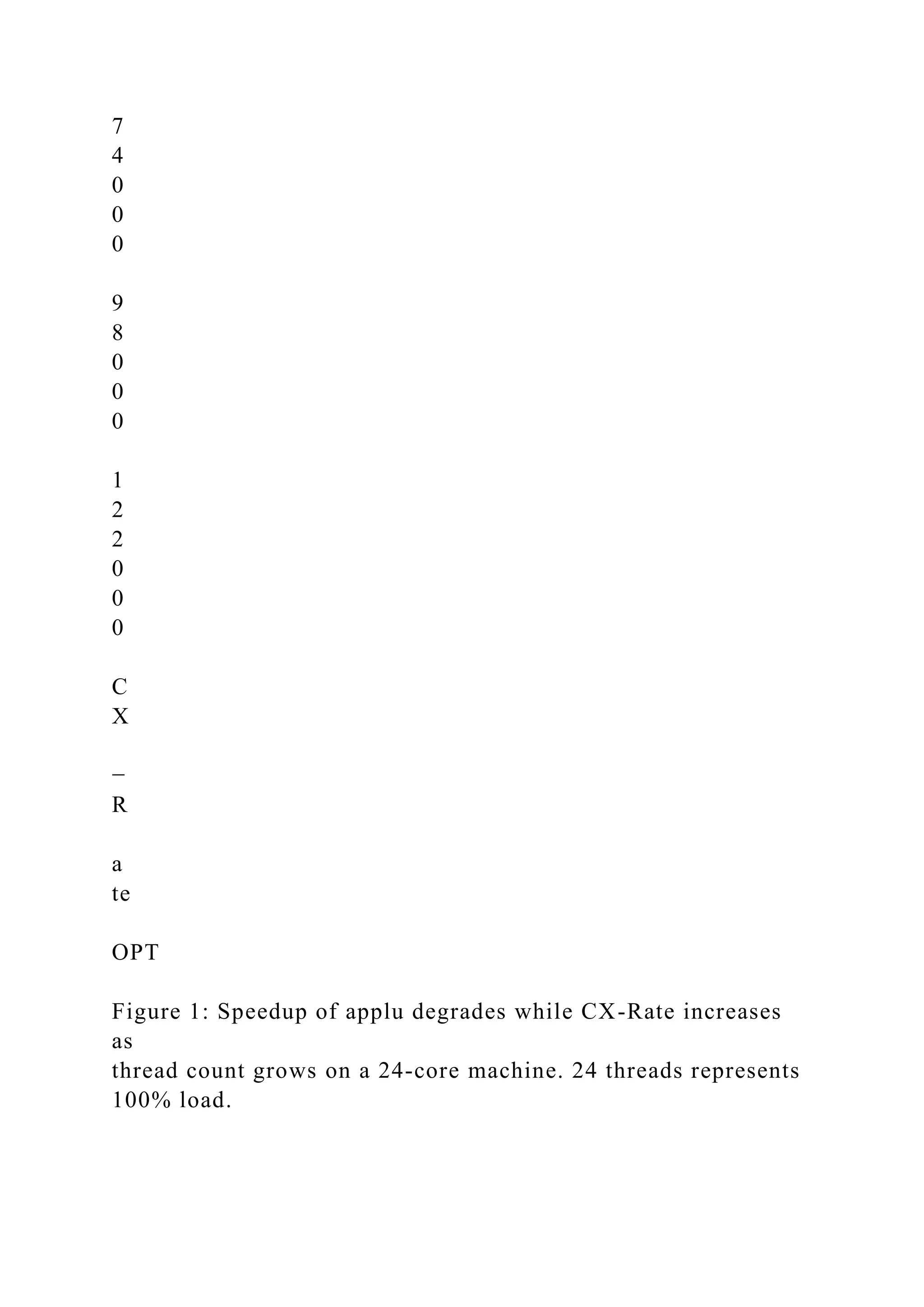
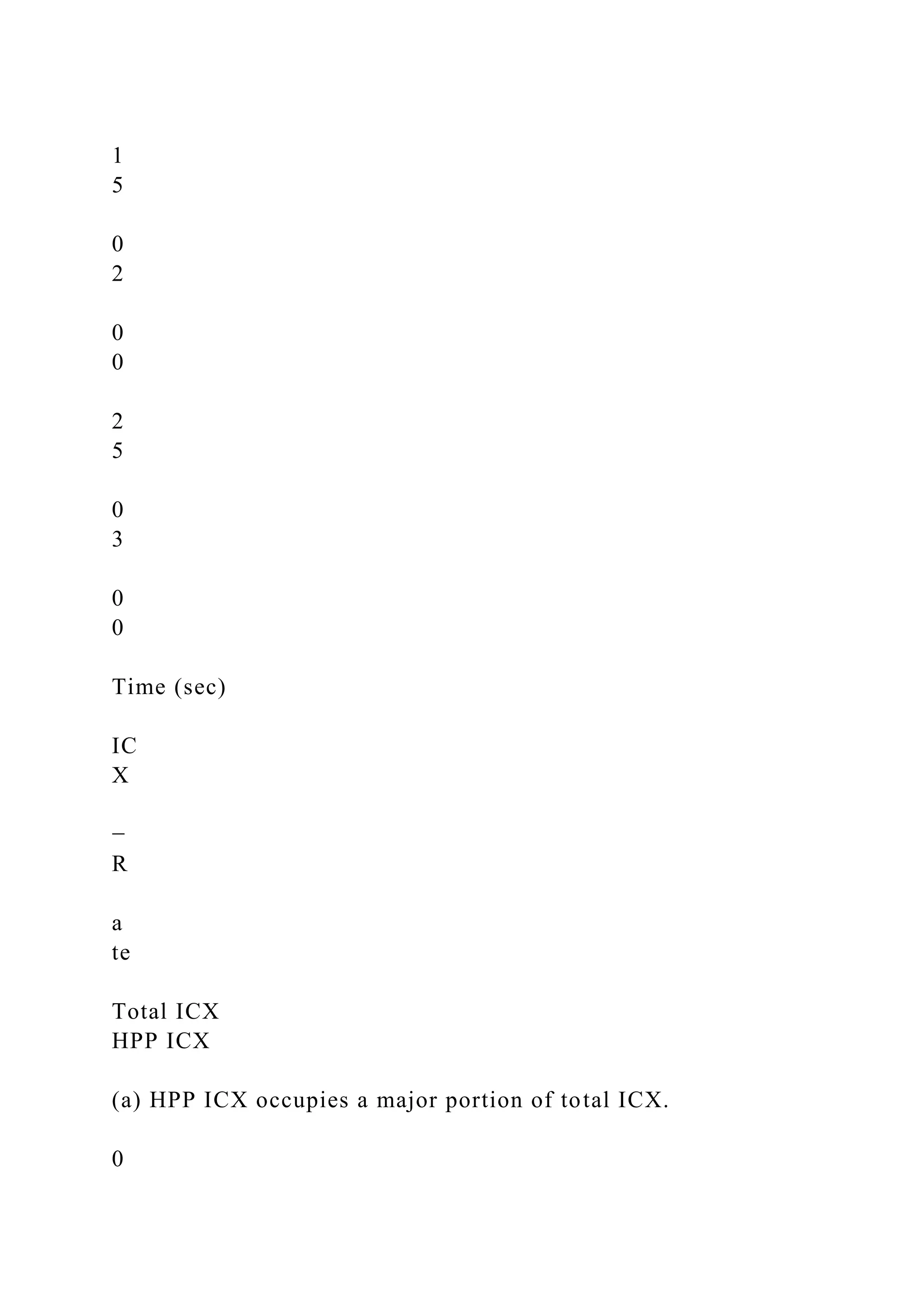
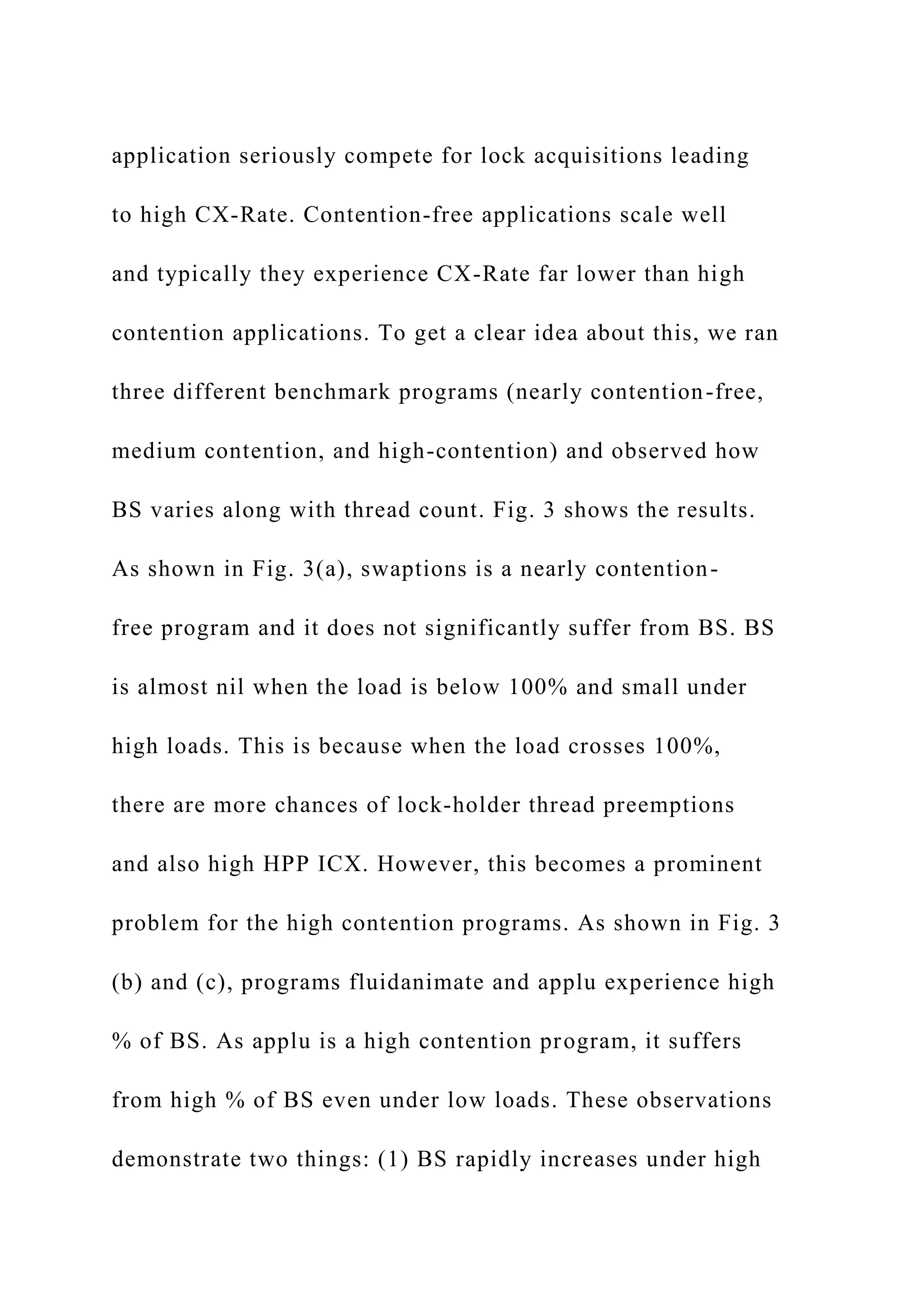
As we can see in Fig. 2(a), applu program experiences a
high degree of HPP ICX (56% of total ICX) when it is run
with 24 threads on 24 cores (100% load). Using DTrace [5]
scripts, we observed that almost all of these HPP ICX are
caused by applu threads i.e., applu experiences around 55%
BS at 100% load. Here BS is specifically defined as % of HPP
ICX caused by the same application threads. This is because
HPP ICX is also caused by high priority system processes
���������
�
��
���
���
��
�
��������
��
�
�����
�
���
���
����
��
�������
����� � !
��
��
�������
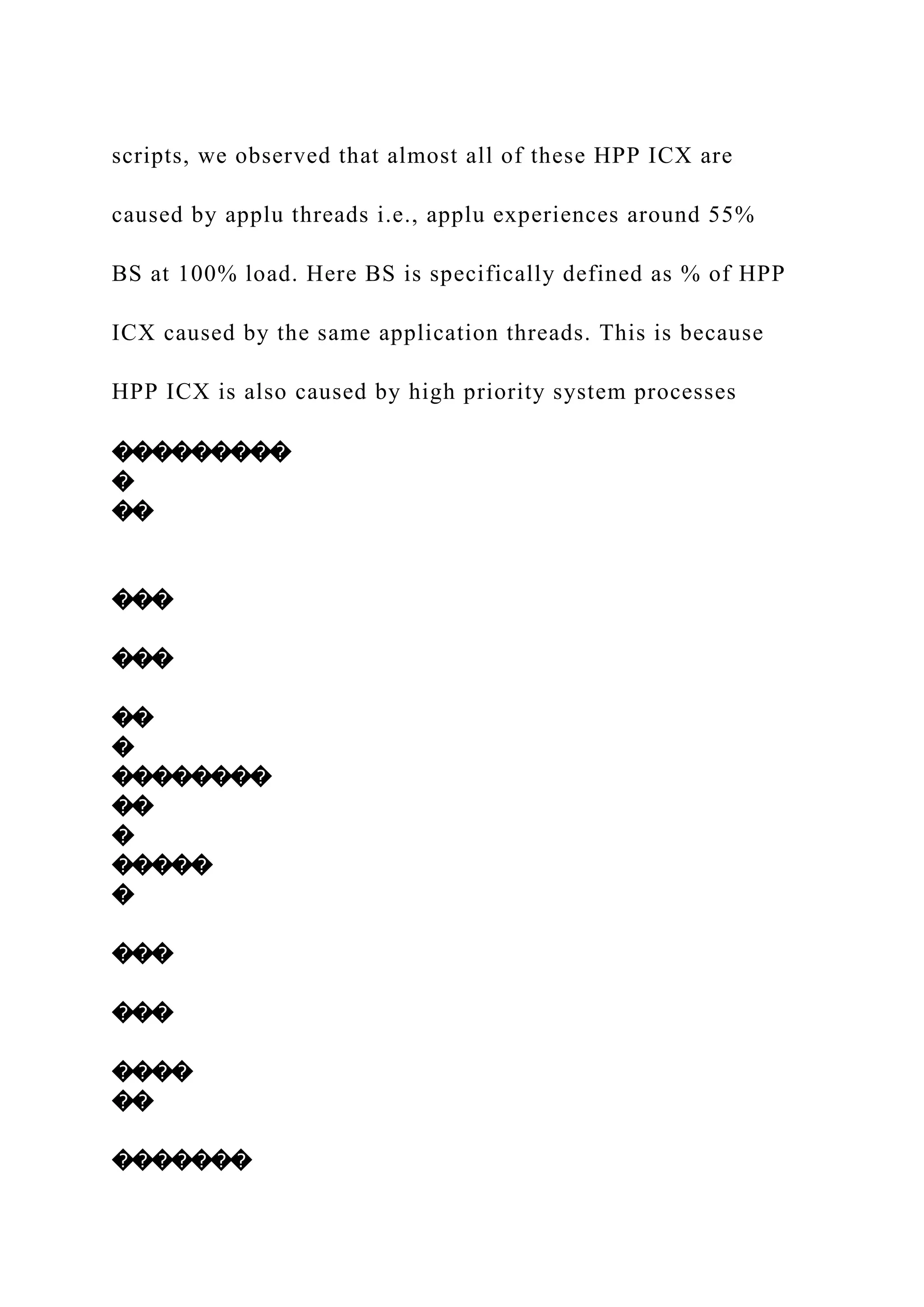
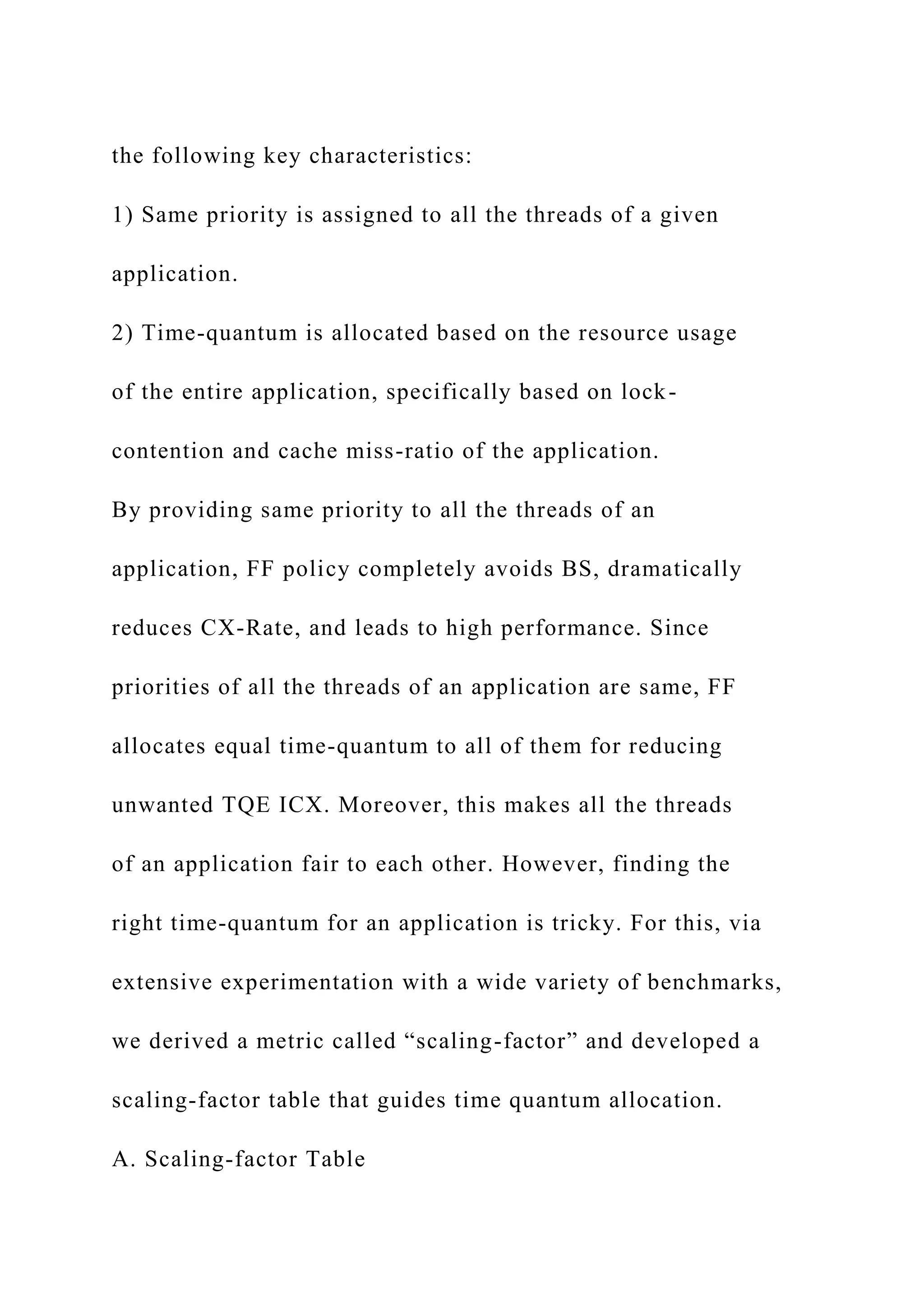
Figure 4: The interactions between the TS policy and the spin-
then-block policy create vicious cycles between priority
changes
and context-switches.
running along with the application threads. However, we
can expect that BS is the major portion of HPP ICX (i.e.,
HPP ICX ∼ BS) when load crosses 100%. As shown in
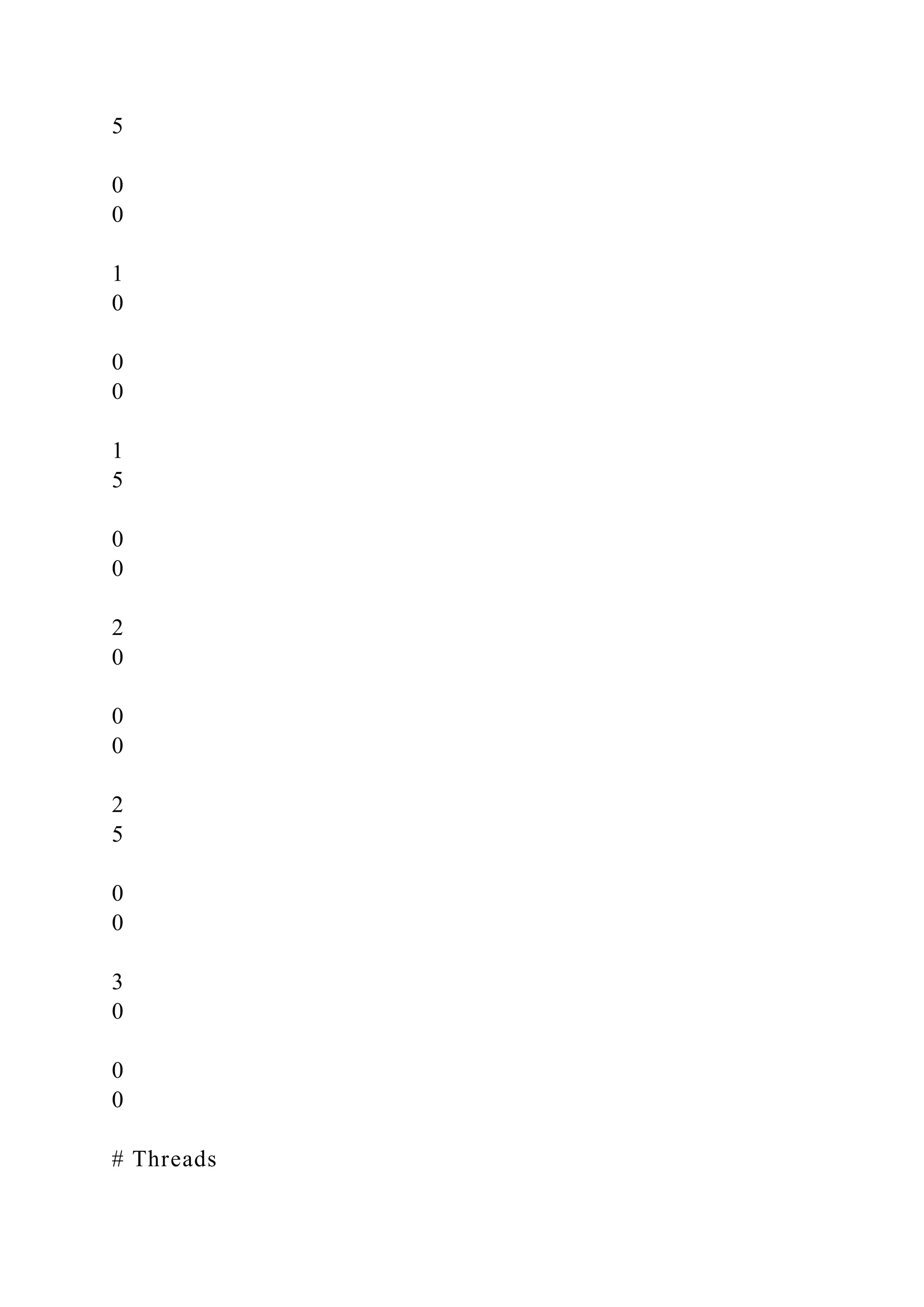
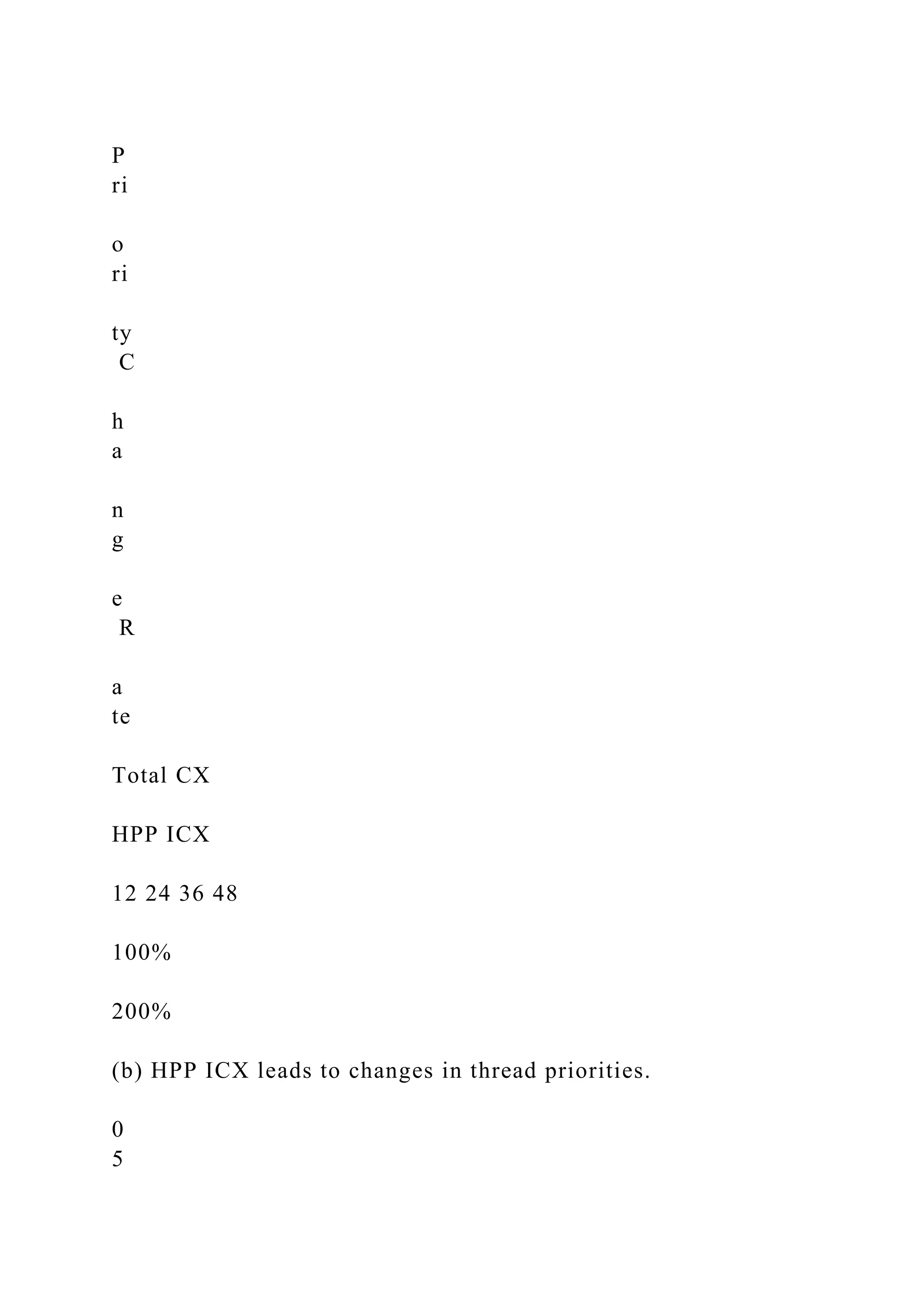
Figure 2(b), priority change-rate increases as load increases
and also a major portion of priority changes are due to HPP
ICX. Another important point to note is that ICX (HPP ICX
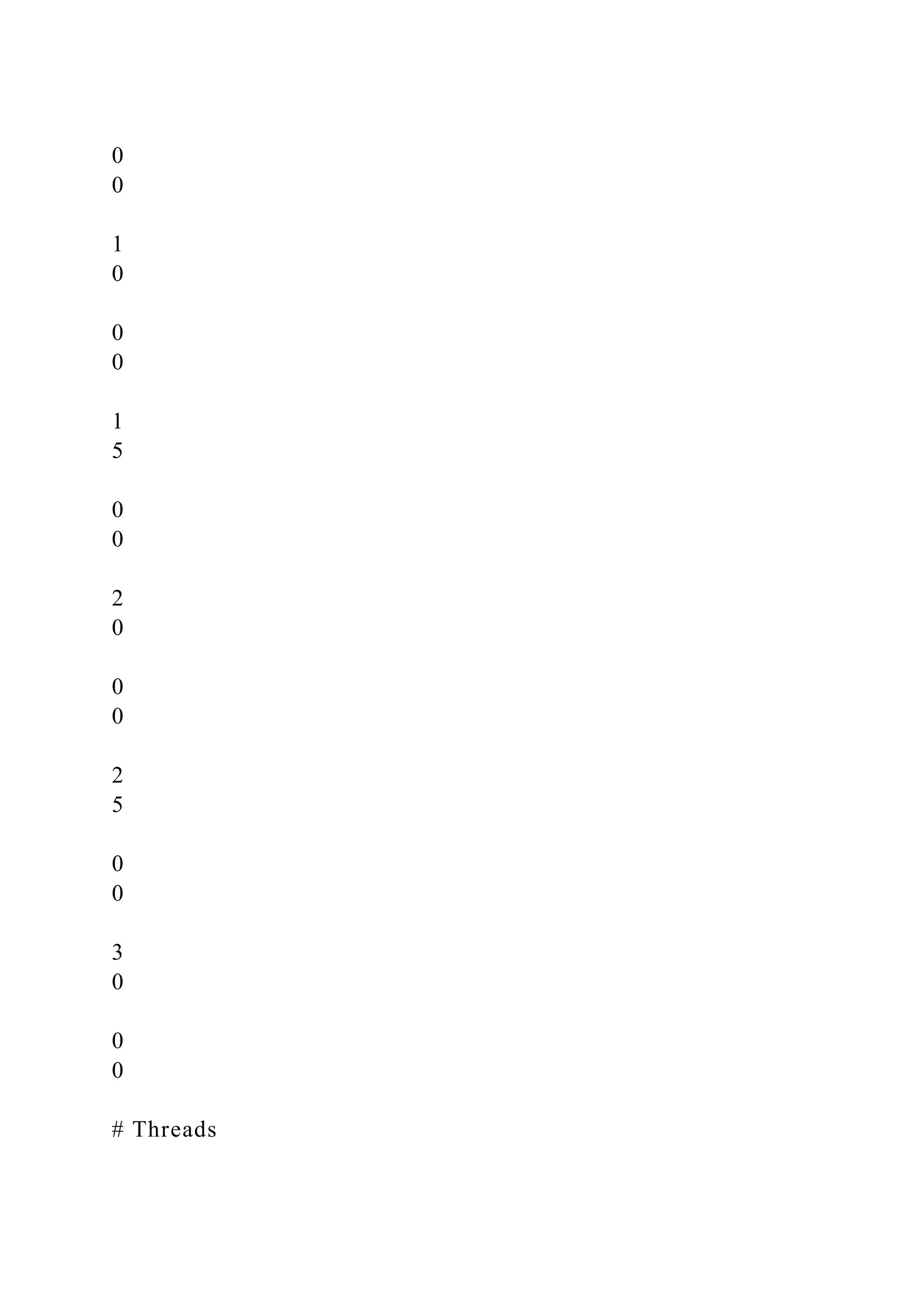
and TQE ICX) causes a major portion of VCX. Figure 2(c)
shows a drastic increase in HPP ICX as load crosses 100%.
Therefore, we can expect that the frequency of lock-holder
thread preemptions will increase once load crosses 100%.
Thus, frequent ping-ponging [3] of thread priorities increases
HPP ICX, specifically BS, which in turn increases CX-Rate
(ICX-Rate + VCX-Rate), and ultimately vicious cycle is
created between context-switches and priority changes.
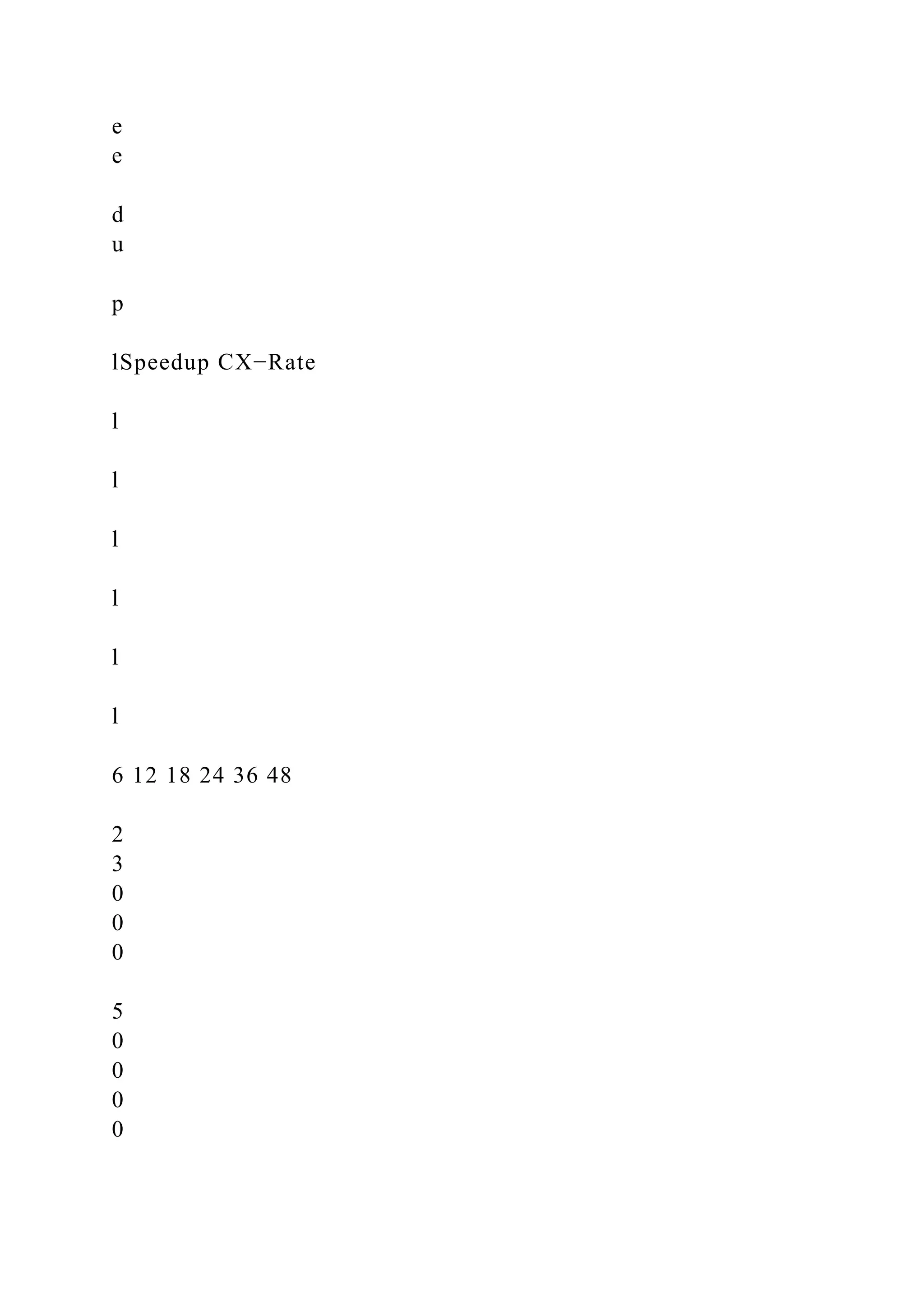
As shown in Fig. 4, the TS policy changes priorities of
threads based on their usage of system resources. Frequent
ping-ponging of thread priorities leads to HPP ICX, i.e., force
the threads off the CPU, which often include lock-holder
threads. When a lock-holder thread is preempted then all
the threads that are waiting for that lock will be blocked,
i.e., generates VCX. Then threads will join the lock’s sleep
queue and their priorities will be changed based on their
waiting time in the sleep queue. Thus, this process repeats
continuously, increasing CX-Rate and priority change-rate,
and thus leads to poor performance.
2 4 6 8 10
0
5
0
1
0
0
1
5
0
2
0
0
2
5
0
3
0
0
Time (sec)
IC
X
−
R
a
te
Total ICX
HPP ICX
(a) HPP ICX occupies a major portion of total ICX.
0
5
0
0
1
0
0
0
1
5
0
0
2
0
0
0
2
5
0
0
3
0
0
0
# Threads
P
ri
o
ri
ty
C
h
a
n
g
e
R
a
te
Total CX
HPP ICX
12 24 36 48
100%
200%
(b) HPP ICX leads to changes in thread priorities.
0
5
0
0
1
0
0
0
1
5
0
0
2
0
0
0
2
5
0
0
3
0
0
0
# Threads
IC
X
−
R
a
te
Total ICX
HPP ICX
12 24 36 48
100%
(c) Drastic increase in HPP ICX as load crosses 100%.
Figure 2: Frequent changes in thread priority drastically
increases context-switches and in turn context-switches lead to
changes in thread
priority. A vicious cycle is created between priority changes
and context-switches.
3
A. Lock-contention vs Backstabbing (BS)
From the above observations, we can expect that high
contention applications suffer more from BS than contention-
free applications. This is because threads of high contention
application seriously compete for lock acquisitions leading
to high CX-Rate. Contention-free applications scale well
and typically they experience CX-Rate far lower than high
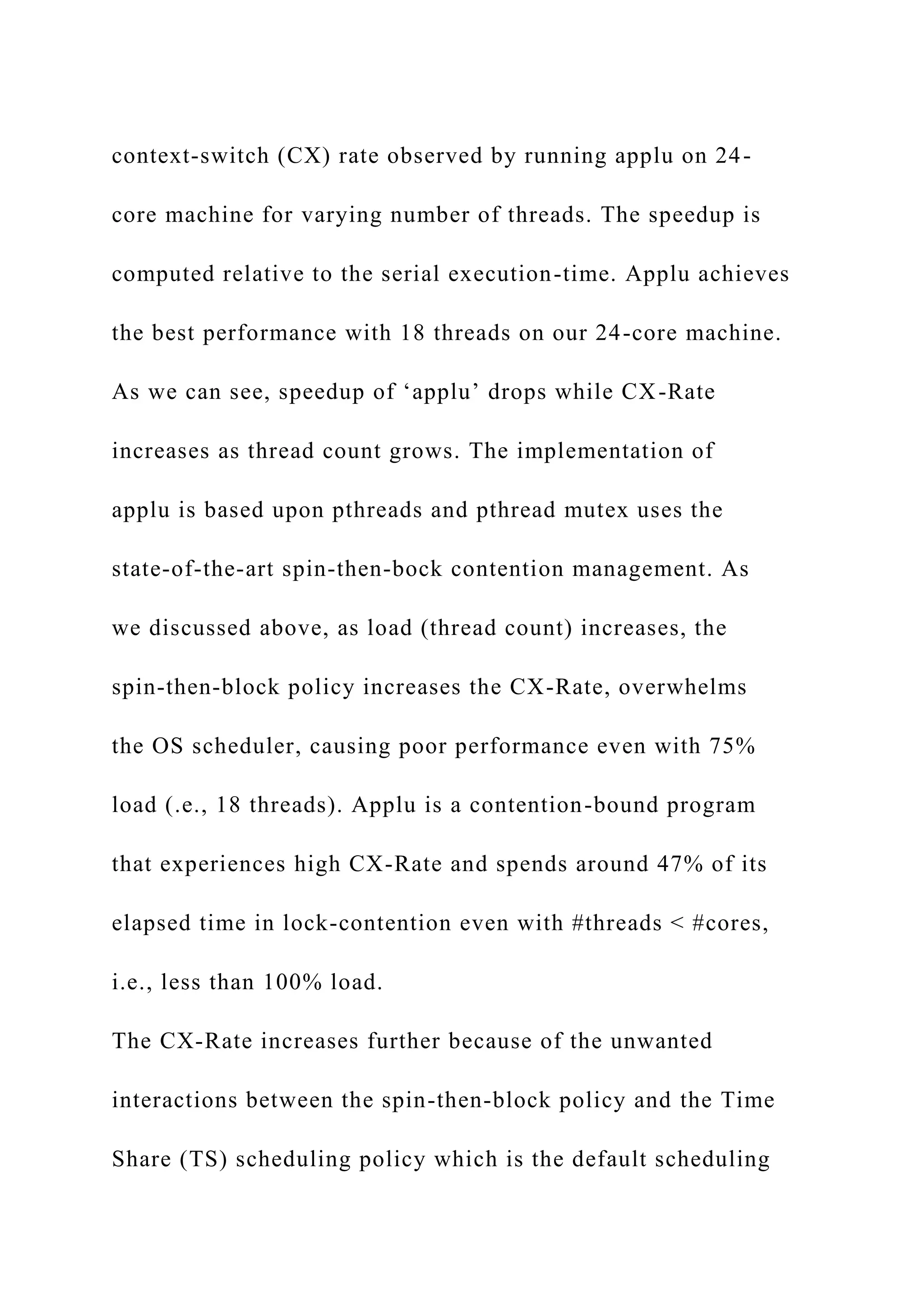
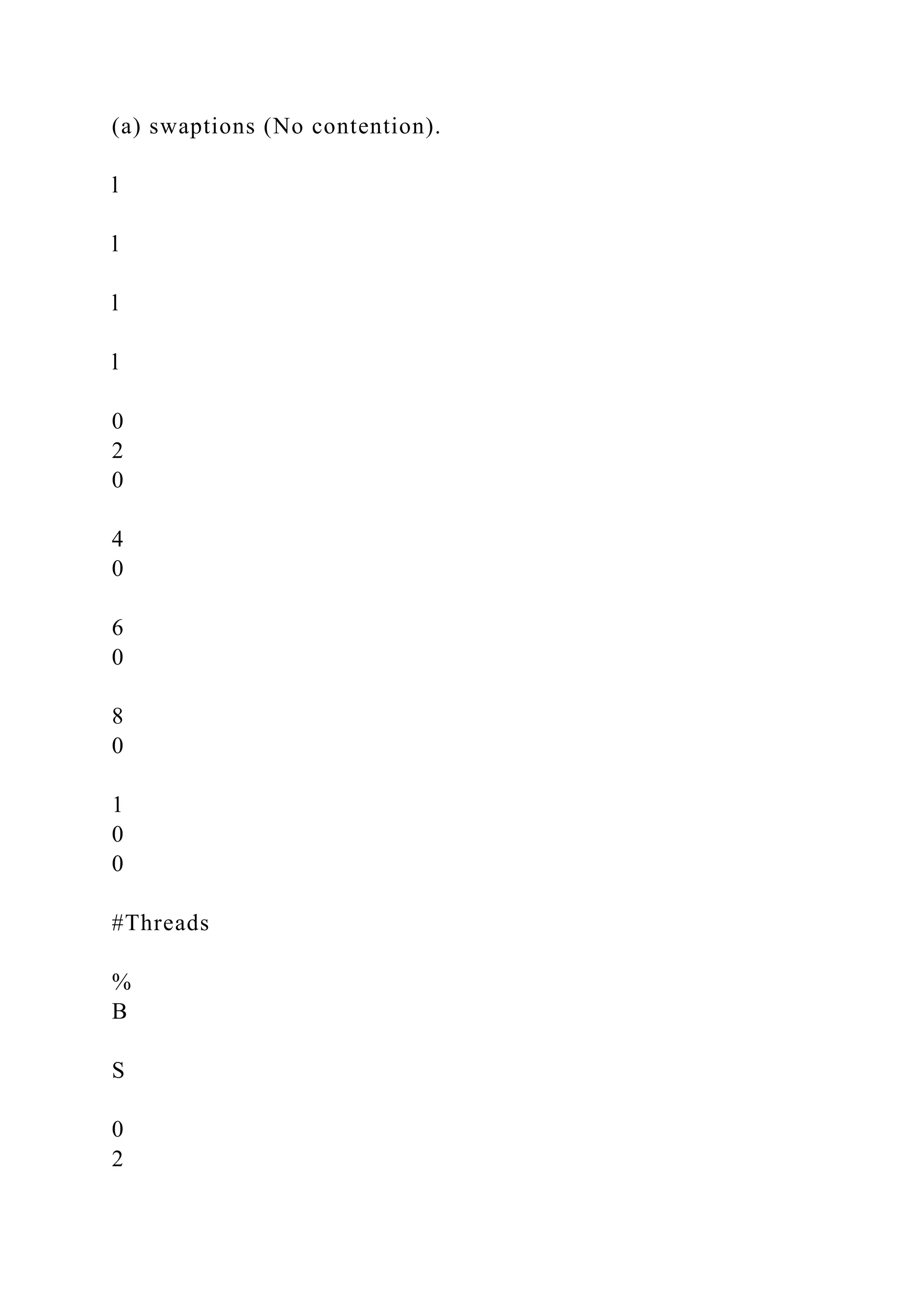
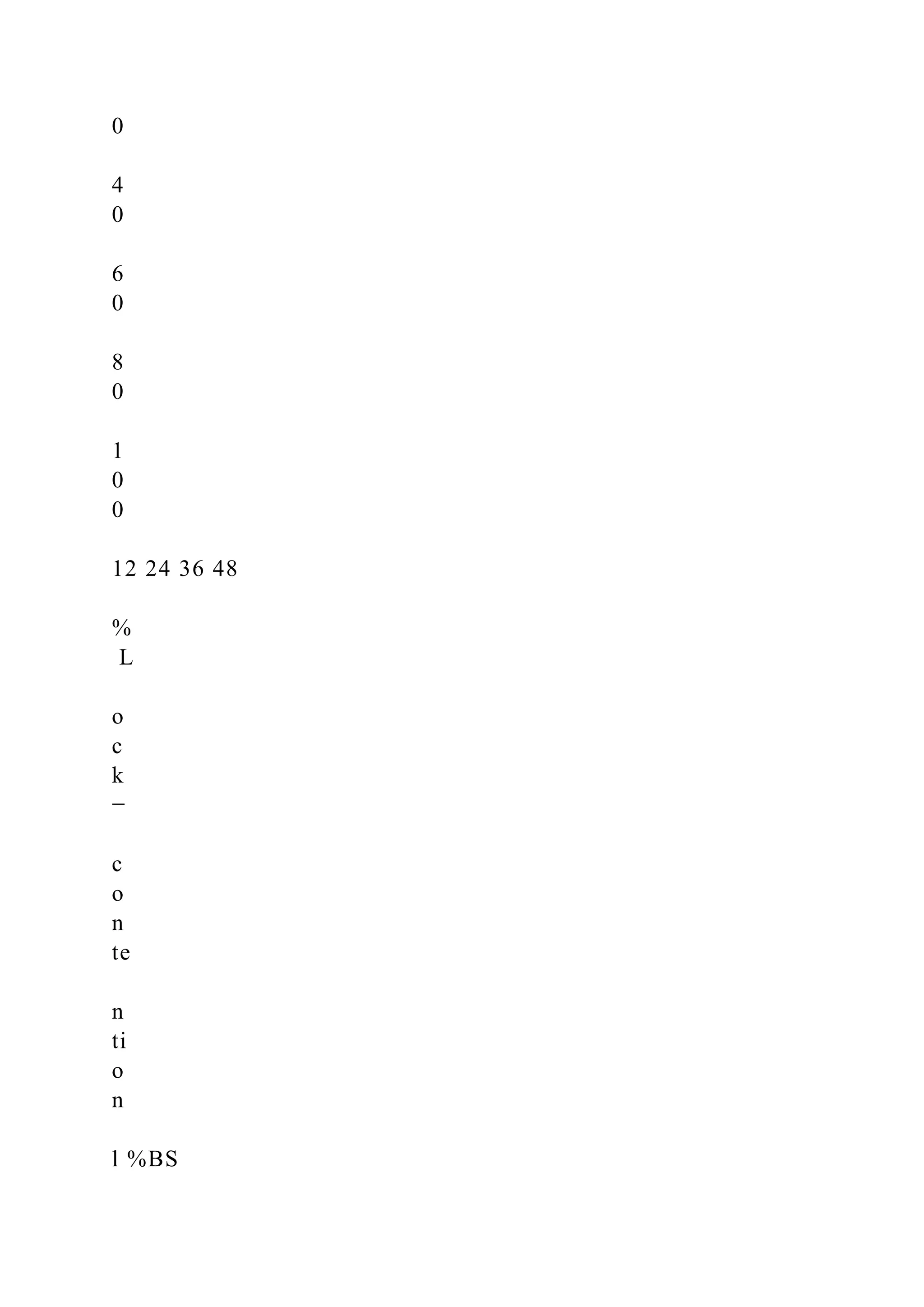
contention applications. To get a clear idea about this, we ran
three different benchmark programs (nearly contention-free,
medium contention, and high-contention) and observed how
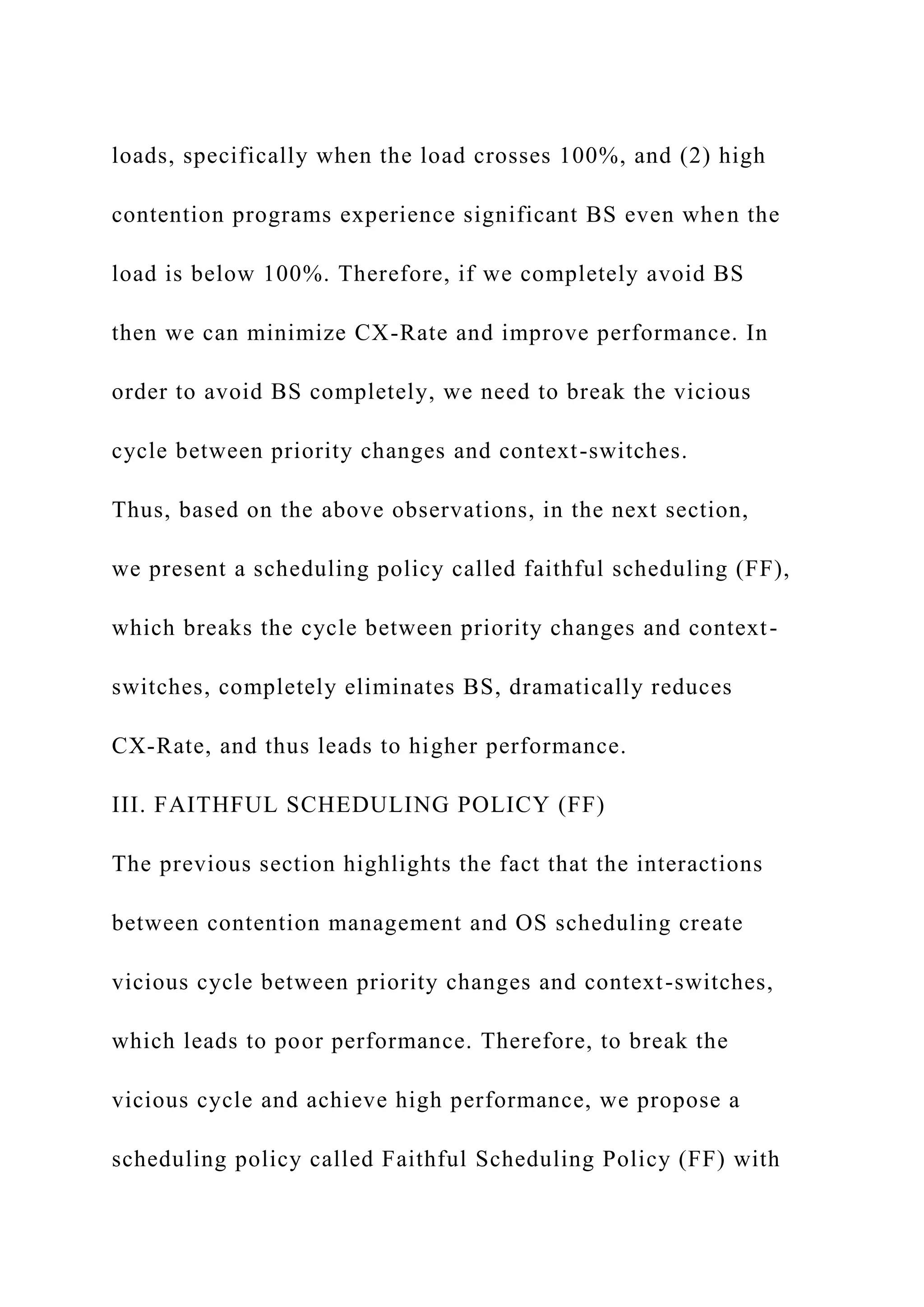
BS varies along with thread count. Fig. 3 shows the results.
As shown in Fig. 3(a), swaptions is a nearly contention-
free program and it does not significantly suffer from BS. BS
is almost nil when the load is below 100% and small under
high loads. This is because when the load crosses 100%,
there are more chances of lock-holder thread preemptions
and also high HPP ICX. However, this becomes a prominent
problem for the high contention programs. As shown in Fig. 3
(b) and (c), programs fluidanimate and applu experience high
% of BS. As applu is a high contention program, it suffers
from high % of BS even under low loads. These observations
demonstrate two things: (1) BS rapidly increases under high
loads, specifically when the load crosses 100%, and (2) high
contention programs experience significant BS even when the
load is below 100%. Therefore, if we completely avoid BS
then we can minimize CX-Rate and improve performance. In
order to avoid BS completely, we need to break the vicious
cycle between priority changes and context-switches.
Thus, based on the above observations, in the next section,
we present a scheduling policy called faithful scheduling (FF),
which breaks the cycle between priority changes and context-
switches, completely eliminates BS, dramatically reduces
CX-Rate, and thus leads to higher performance.
III. FAITHFUL SCHEDULING POLICY (FF)
The previous section highlights the fact that the interactions
between contention management and OS scheduling create
vicious cycle between priority changes and context-switches,
which leads to poor performance. Therefore, to break the
vicious cycle and achieve high performance, we propose a
scheduling policy called Faithful Scheduling Policy (FF) with
the following key characteristics:
1) Same priority is assigned to all the threads of a given
application.
2) Time-quantum is allocated based on the resource usage
of the entire application, specifically based on lock-
contention and cache miss-ratio of the application.
By providing same priority to all the threads of an
application, FF policy completely avoids BS, dramatically
reduces CX-Rate, and leads to high performance. Since
priorities of all the threads of an application are same, FF
allocates equal time-quantum to all of them for reducing
unwanted TQE ICX. Moreover, this makes all the threads
of an application fair to each other. However, finding the
right time-quantum for an application is tricky. For this, via
extensive experimentation with a wide variety of benchmarks,
we derived a metric called “scaling-factor” and developed a
scaling-factor table that guides time quantum allocation.
A. Scaling-factor Table
Finding right time-quantum is very important to provide
fair allocation of CPU cycles for all the threads of a multi-
threaded application. Threads of a CPU-intensive and low
contention application heavily compete for CPU resources.
Therefore, it is appropriate to provide small time quantum for
both CPU-intensive and low contention application threads.
In this way no thread will wait for a long time for a CPU.
In contrast, it is appropriate to provide large time-quantum
for both high-contention and memory-intensive application
threads. In case of high-contention applications, large time-
quantum allows lock-holder thread to complete its work
quickly, release the lock, and allow other threads to make
progress. Moreover large time-quantum for contention bound
application threads reduces unwanted TQE ICX and also
reduces the lock acquisition overhead since a wakeup and a
context-switch are required before the blocking thread can
become the owner of the lock it requires [3]. Based on the
above observations, the metric scaling-factor is defined in
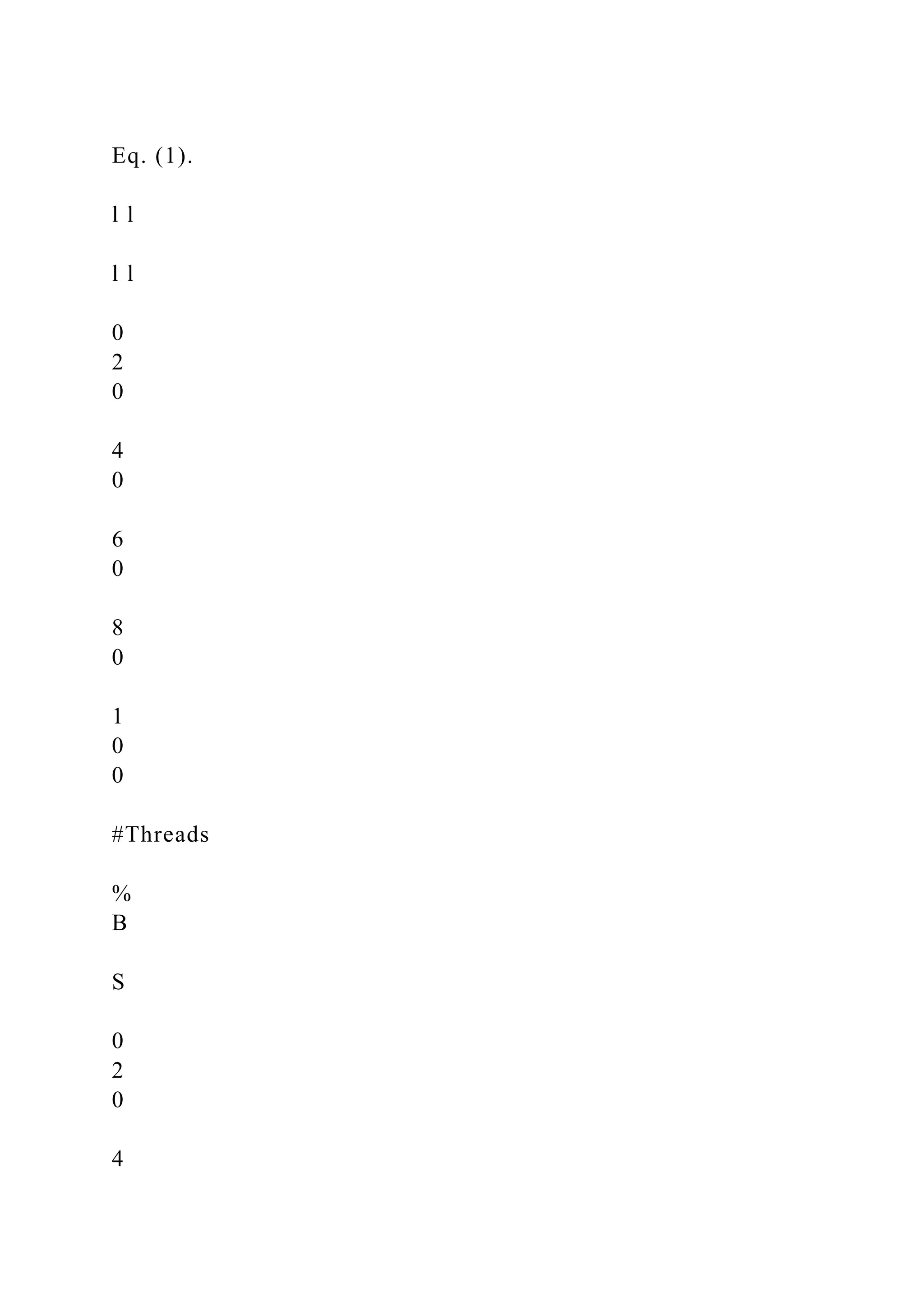
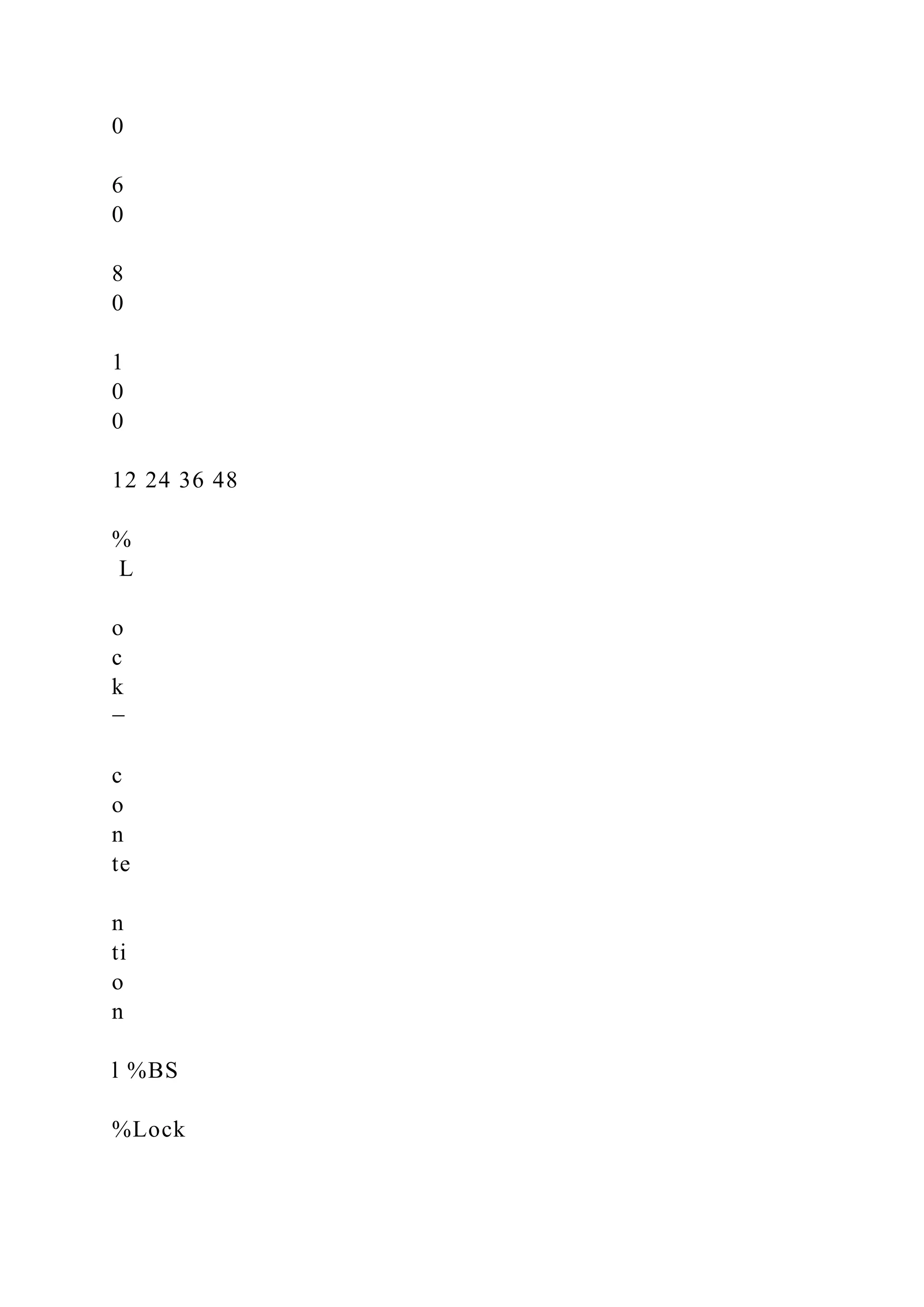
Eq. (1).
l l
l l
0
2
0
4
0
6
0
8
0
1
0
0
#Threads
%
B
S
0
2
0
4
0
6
0
8
0
1
0
0
12 24 36 48
%
L
o
c
k
−
c
o
n
te
n
ti
o
n
l %BS
%Lock
(a) swaptions (No contention).
l
l
l
l
0
2
0
4
0
6
0
8
0
1
0
0
#Threads
%
B
S
0
2
0
4
0
6
0
8
0
1
0
0
12 24 36 48
%
L
o
c
k
−
c
o
n
te
n
ti
o
n
l %BS
%Lock
100%
(b) fluidanimate (Medium contention).
l
l
l l
0
2
0
4
0
6
0
8
0
1
0
0
#Threads
%
B
S
12 24 36 48
%
L
o
c
k
−
c
o
n
te
n
ti
o
n
0
2
0
4
0
6
0
8
0
1
0
0
l %BS
%Lock
100%
(c) applu (High contention).
Figure 3: Lock-contention vs BS (24 threads is 100% load).
4
Scaling-factor = 1 - max(Miss-ratio, Lock-contention) (1)
Where ‘Miss-ratio’ is last-level cache miss-ratio and ‘Lock-
contention’ is the percentage of time application threads
spend waiting for user locks, condition-variables, etc. Using
Miss-ratio we can identify whether an application is memory-
intensive or not.
By conducting experiments with a wide variety of multi-
threaded programs and different time-quanta, we developed
the scaling-factor table shown in Table I, in which the
time-quantum goes down as the scaling-factor goes up
(inspiration from the priority dispatcher tables [3] of modern
OS). More specifically, to derive the table, first we categorize
the applications as memory intensive, CPU intensive, high
contention, or low contention applications. Then we selected
a few of applications from each category -- a total of 8
out of 22 applications, and ran them with varying time-
quantum ranging from 10 ms to 400 ms. The scaling factor
table obtained was then used in our experiments for all 22
applications. The 8 applications used to populate the scaling
factor table are: streamcluster, swim, swaptions, ferret, apsi,
applu, art, and bodytrack.
Therefore, based on the application’s cache miss-ratio and
lock-contention, scaling-factor of the application is between
one and zero. For scalable applications such as CPU-intensive
and low-contention applications, scaling-factor is high and
close to one, and for non-scalable applications such as
high memory-intensive or high lock-contention applications,
scaling-factor is close to zero. One important point here
is that the scaling-factor value is for the entire application
not per thread. Based on the scaling-factor value, FF policy
allocates corresponding time-quantum to all the threads of
the application.
Table I: The Scaling-factor Table. The range of the scaling-
factor
is 0.10.
scaling-factor TQ(ms)
(0.01 -- 0.10) 250
(0.11 -- 0.20) 200
(0.21 -- 0.30) 150
(0.31 -- 0.40) 120
(0.41 -- 0.50) 100
(0.51 -- 0.60) 80
(0.61 -- 0.70) 50
(0.71 -- 0.80) 30
(0.81 -- 0.90) 20
(0.91 -- 1.00) 10
B. Dealing with phase changes
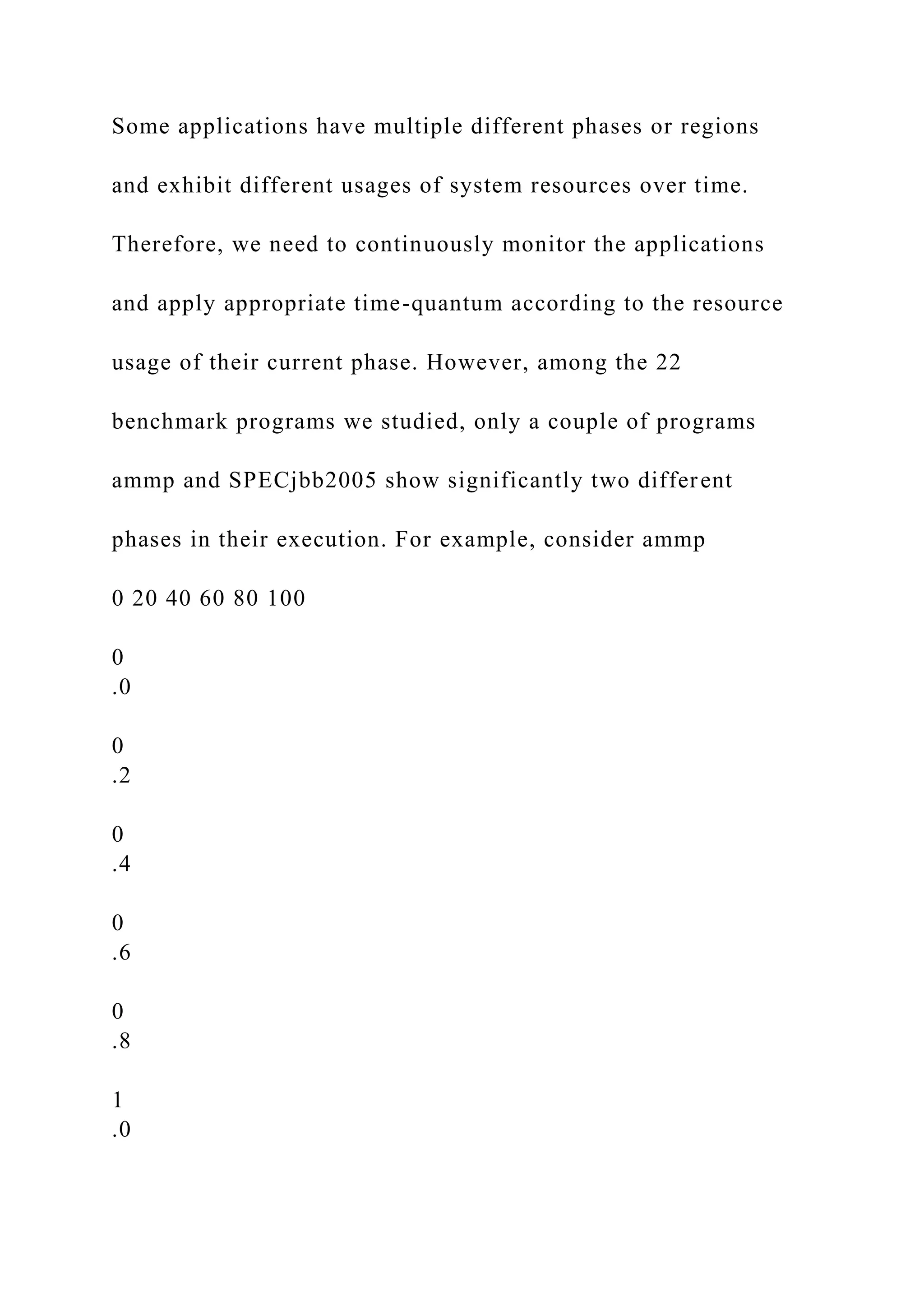
Some applications have multiple different phases or regions
and exhibit different usages of system resources over time.
Therefore, we need to continuously monitor the applications
and apply appropriate time-quantum according to the resource
usage of their current phase. However, among the 22
benchmark programs we studied, only a couple of programs
ammp and SPECjbb2005 show significantly two different
phases in their execution. For example, consider ammp
0 20 40 60 80 100
0
.0
0
.2
0
.4
0
.6
0
.8
1
.0
Time (sec)
M
is
s
−
ra
ti
o
0
.0
0
.2
0
.4
0
.6
0
.8
1
.0
L
o
c
k
−
c
o
n
te
n
ti
o
n
Miss−ratio
Lock−contention
Phase 1 Phase 2
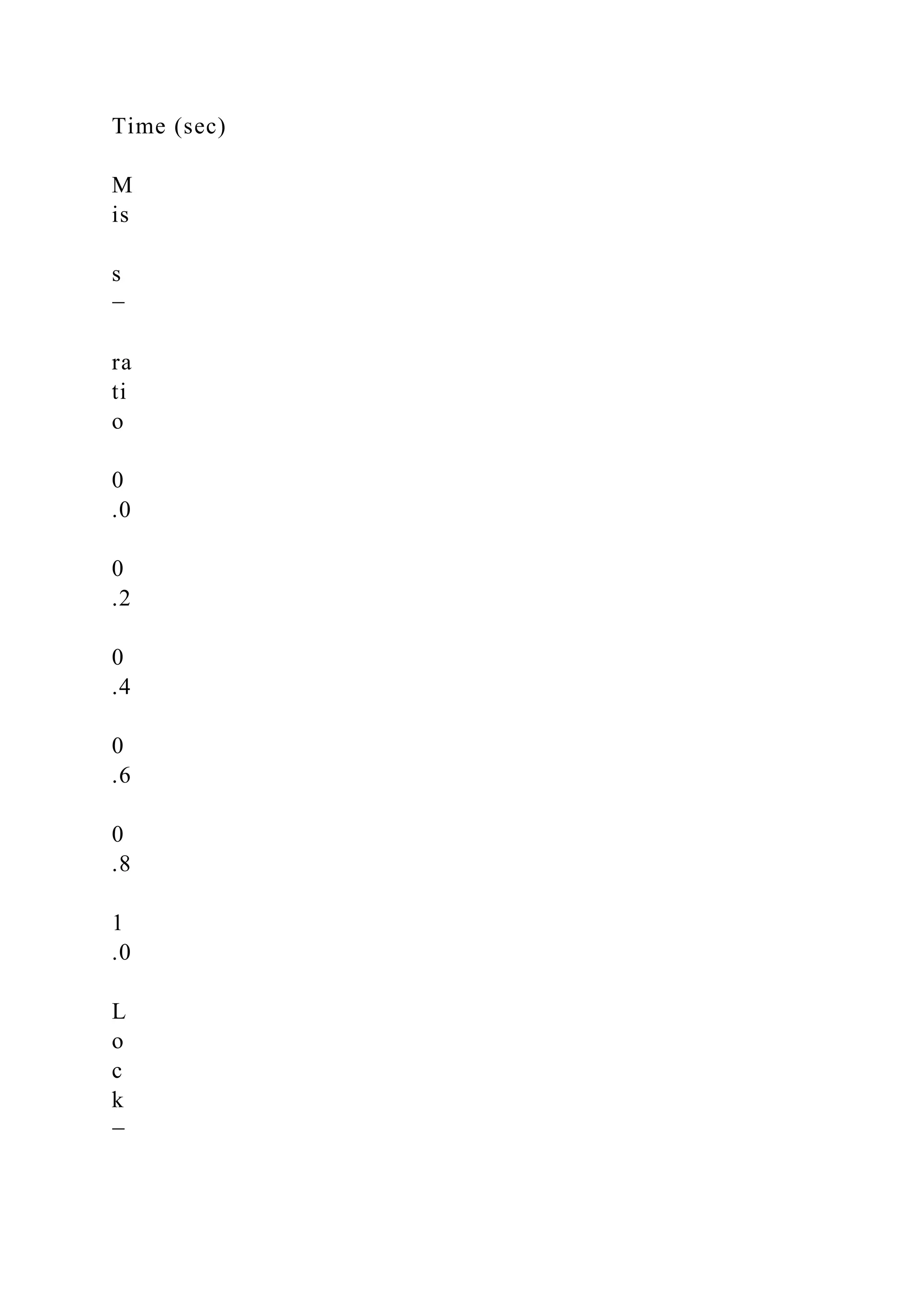
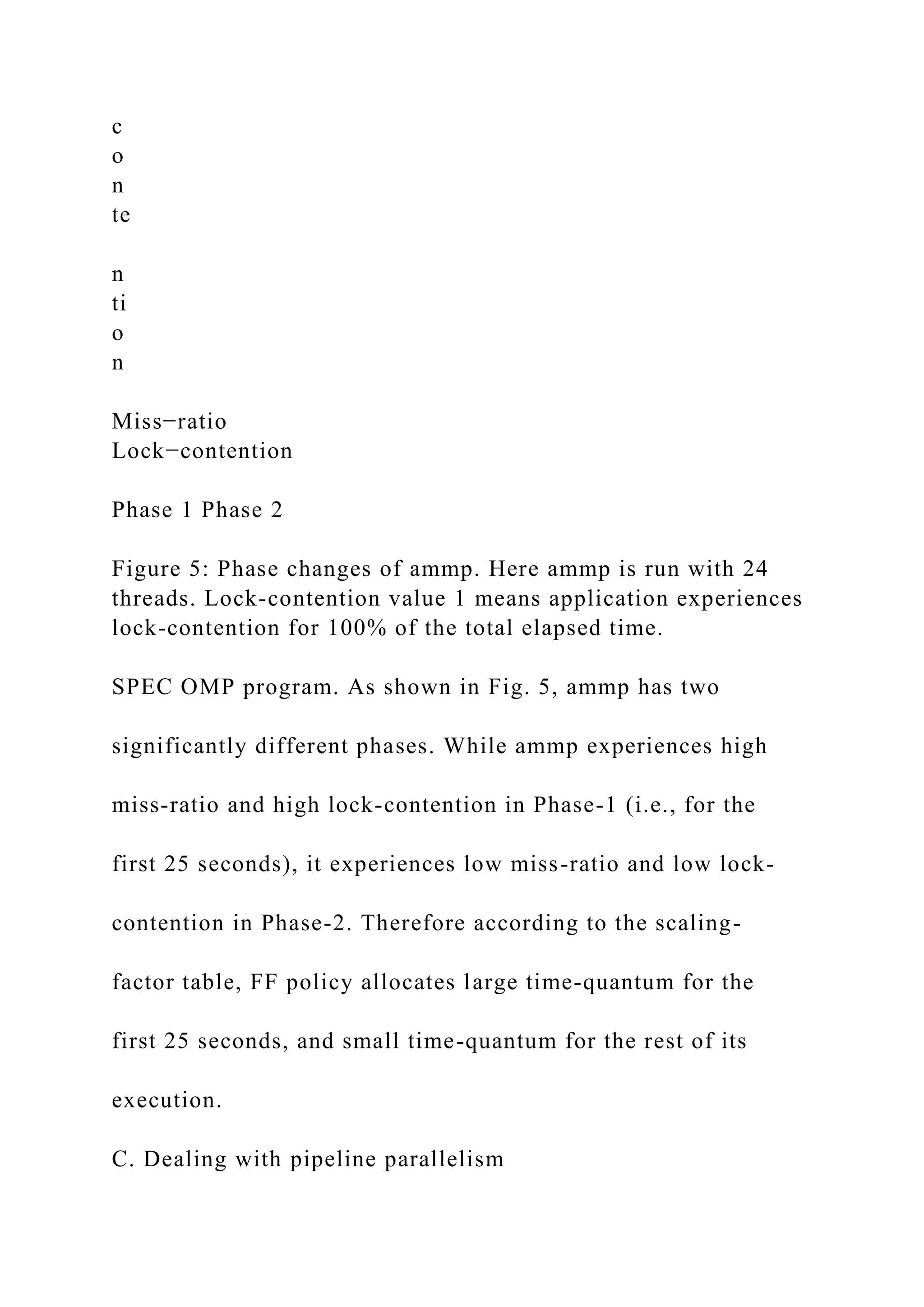
Figure 5: Phase changes of ammp. Here ammp is run with 24
threads. Lock-contention value 1 means application experiences
lock-contention for 100% of the total elapsed time.
SPEC OMP program. As shown in Fig. 5, ammp has two
significantly different phases. While ammp experiences high
miss-ratio and high lock-contention in Phase-1 (i.e., for the
first 25 seconds), it experiences low miss-ratio and low lock-
contention in Phase-2. Therefore according to the scaling-
factor table, FF policy allocates large time-quantum for the
first 25 seconds, and small time-quantum for the rest of its
execution.
C. Dealing with pipeline parallelism
It is fine to allocate equal time-quantum to all the threads of
an application based on pure data-parallelism. This is because,
the threads of a data-parallelism application more or less do
the same work. However, it may not be appropriate to allocate
equal time-quantum to all the threads of an application that
uses pipelined parallelism because resource usage of the
threads from different pipeline stages may differ greatly.
However, our experiments with different pipeline parallel
applications reveal that allocating equal time-quantum to all
the threads also works well for pipeline parallel applications.
This is because the scaling-factor is calculated based on the
resource usage of the entire application, which allows to
account the overall effect of all the threads or the dominating
pipeline stage threads. For example, consider ‘ferret’ pipeline
parallel application from PARSEC benchmark. ferret is a
search engine which finds a set of images similar to a query
image by analyzing their contents. The program is divided
into six pipeline stages -- the results of processing in one
stage are passed on to the next stage. The stages are: Load,
Segment, Extract, Vector, Rank, and Out. The speedup of
ferret increases linearly starting from 6 threads to all the way
up to 63 threads even though only 24 cores are available.
The reason for the observed behavior is as follows. The Rank
stage performs most of the work and thus the speedup of
the application is determined by the Rank stage. Moreover
the other stages perform relatively little work and thus their
threads together use only a fraction of the compute power of
the available cores. Thus, as long as cores are not sufficiently
5
utilized, more speedup can be obtained by creating additional
threads for the Rank stage. Therefore, Rank stage threads of
ferret program dominates the behavior of all other threads
and represents resource usage of whole ferret program. Thus,
since the scaling-factor represents the resource usage of the
entire application, allocating time-quantum based on the
scaling-factor works well also for pipeline parallel programs.
D. Implementation of FF policy
There are two important components of the implementation
of FF policy framework: (1) providing same priority to all
the application threads, and (2) allocating appropriate time-
quantum based on the resource usage of the application.
OpenSolaris provides a scheduling class called Fixed Priority
scheduling [3]; with the combination of this class and
priocntl(1) [4] utility, we can allocate same priority to all the
threads of an application. However, there is no way to find
appropriate time-quantum for an application in OpenSolaris
with the fixed priority scheduling class. Moreover, this
class does not provide any capability for updating time-
quantum [3]. Thus, there is no way to deal with the phase
changes of an application. Therefore, in addition to devel-
oping a scaling-factor table, we also perform continuously
monitoring of an application to allocate appropriate time-
quantum according to its phase changes.
Let us consider the FF policy implementation in detail. As
shown in Algorithm 1, our implementation uses a daemon
thread. First we start the target program with the default TS
policy and start monitoring the program’s last-level cache
miss-ratio and lock-contention after the creation of target
program’s worker threads. We use cputrack(1) utility to
monitor miss-ratio and prstat(1) utility for lock-contention
with one second interval. We used a timer that fires a timer
signal for every one second and the framework catches
the signal and collects miss-ratio and lock-contention of
the target program with one second interval, calculates a
scaling-factor, and based on this it allocates appropriate
time-quantum to the application threads using the scaling-
factor table. More specifically, the framework measures a
scaling-factor of the target application for every one second,
and checks whether to change the time-quantum or not by
comparing the current scaling-factor with the previous one.
Although we can use an interval with milliseconds resolution,
we used one second interval because our experiments showed
that one second interval is enough to deal with the phase
changes of the programs studied in this work. Although,
one second time-interval is the minimum timeout value we
could have used with the default implementation of prstat(1)
utility, we modified this utility to allow time intervals with
millisecond resolution to monitor lock-contention. Therefore,
it is easy to use an interval less than one second for an
application that experiences rapid phase changes.
Thus, our framework continuously monitors the target
multithreaded program and allocates same priority using
Algorithm 1: FF Policy Framework
Profile Data Structure and Variables;
Profile P:
missRatio: last-level cache misses/accesses;
lockContention: (% lock-contention/100);
// range of the scaling-factor
range = 0.10;
Subroutines:
getProfile():
Monitor missRatio using cputrack(1) and lockConetntion
using prstat(1) of the target program with one second
interval and return a Profile P;
…
© SAP AG
CASE STUDY
Product
SAP ERP
GBI
Release 6.04
Level
Undergraduate
Graduate
Focus
Purchase-to-Pay Cycle and
Accounting Entries
Test of Transactions
Application Controls
Authors
Nancy Jones
Jim Mensching
Contributors
Dawna Drum
James Marlatt
Version
1.01
MOTIVATION
Primary learning objectives:
• Experience the steps in a
typical purchasing transaction
• See how an ERP system
handles a typical purchasing
transaction
• Work through the procedures
involved in a test of
transactions
• Investigate the various types of
application controls in an ERP
system
Secondary learning objectives:
• See the integration between
materials management (MM)
and financial accounting (FI)
modules of SAP
• Learn about how a suspense
account (the GR/IR account) is
used
• Look at some of the basic
settings needed in the FI
module in order to have the
system function properly
PREREQUISITES
Before you use this case study, you
should be familiar with navigation in
the SAP system.
You should also be familiar with
internal controls and have a basic
understanding of business processes
and transaction cycles.
.
NOTES
This case study uses the Global Bike
Inc. (GBI) data set, which has
exclusively been created for SAP UA
global curricula.
Purchase-to-Pay Example Using
SAP ERP
The objective of this assignment is for you to become familiar
with the steps
and the documents involved in a typical purchasing transaction
and also
investigate how the SAP system is set up and operates for this
type of
transaction.
Page 2
CASE STUDY
Assignment Overview
For this assignment, we start by examining the master data in
the system. As you should already
know, the chart of accounts is of central importance to any
accounting information system. Thus we
look at the chart of accounts and other settings used to
configure the financial accounting system. We
then create master data for a new material and a new vendor and
then link these together using an
information record. After that we run through a transaction in
which we purchase the material we just
created from the vendor we also just created. As the various
steps of the purchase are recorded in
SAP, we examine the accounts that are affected in both the
financial (FI) and materials management
(MM) modules. In auditing terminology this is called doing a
test of transactions. We will be looking
at typical business-to-business transactions and concentrating
on the internal controls within the SAP
system and the way the system is configured to process these
transactions.
Keep in mind that this business process is normally done by
more than one person in order to
properly segregate duties and maintain authorization controls.
However, in this exercise you will do
all of the steps from your individual SAP logon. As we stressed
in this course, the segregation of
duties is a very strong control. Hence, the different people
involved in the business process would
have unique authorizations set up in the system and few, if any,
people would be allowed to execute
all of the roles that you will assume in this assignment.
Since this course deals with accounting information systems, we
want you to pay particular attention
to the controls that are designed into the SAP system. These
controls are a very important part of an
integrated information system such as an ERP system. The
controls embedded within SAP are a vital
part of the system and essential to the system functioning
properly. Throughout the assignment you
are asked to identify the internal controls that you observe in
SAP. For some of these controls you
are asked what type of application control it is. You are to
select from the following list of possible
application controls. If you don’t remember what these controls
are and what they mean, you should
refer to your course materials regarding application controls and
review that material. Additional
information regarding these controls and more can be found at
the ISACA (Information System Audit
and Control Association), website www.isaca.org.
• Field check
• Sign check
• Limit check
• Range check
• Size (or capacity) check
• Completeness check
• Validity check
• Reasonableness test
http://www.isaca.org/
Page 3
CASE STUDY
For each of the following steps you will also be noting the
nature of the accounting entries involved
in each transaction step.
You will perform the following tasks:
1. Examine the chart of accounts
2. Examine the account settings for financial accounting use
3. Create a material master
4. Create a vendor master
5. Create a purchasing information record to link the vendor and
material
6. Check the inventory and accounting records
7. Create a purchase order for the material
8. Check the inventory and accounting records
9. Receive the material
10. Check the inventory and accounting records
11. Receive the invoice from the vendor
12. Check the inventory and accounting records
13. Make payment to the vendor
14. Check the inventory and accounting records
15. Write down the journal entries that the system made
For all of the following work, you will use your own company
code. This company code is based on
the SAP number assigned to you by your instructor. In
addition, the logon and initial password to a
specific SAP instance and client will be given to you by your
instructor.
Whenever you see the value XX in the assignment you will
substitute your assigned SAP
number for the x’s. Be sure to use only your assigned SAP
number. For this assignment the
company code will be USXX. Whenever you are requested to
enter a company, be sure to enter only
your company code.
Note that as you go through the questions, some of the answers
to these questions may be related to
your accounting theory rather than a specific SAP attribute.
Page 4
CASE STUDY
Company Background
Global Bike Inc., (GBI) is a world class bicycle company
serving the professional and “prosumer”
cyclists for touring and off-road racing. GBI’s riders demand
the highest level of quality, toughness
and performance from their bikes and accessories.
Product development is the most critical element of GBI’s past
and future growth. GBI has invested
heavily in this area, focusing on innovation, quality, safety and
speed to market. GBI has an extensive
innovation network to source ideas from riders, dealers and
professionals to continuously improve the
performance, reliability and quality of its bicycles.
In the touring bike category, GBI’s handcrafted bicycles have
won numerous design awards and are
sold in over 10 countries. GBI’s signature composite frames are
world-renowned for their strength,
light weight and easy maintenance. GBI bikes are consistently
ridden in the Tour de France and other
major international road races. GBI produces two models of
their signature road bikes, a deluxe and
professional model. The key difference between the two models
is the type of wheels used,
aluminum for the basic model and carbon composite for the
professional model.
GBI’s off-road bikes are also recognized as incredibly tough
and easy to maintain. GBI trail bikes are
the preferred choice of world champion off-road racers and have
become synonymous with
performance and strength in one of the most grueling sports in
the world. GBI produces two types of
off-road bike, a men’s and women’s model. The basic
difference between the two models is the
smaller size and ergonomic shaping of the women’s frame.
GBI also sells an accessories product line comprised of helmets,
t-shirts and other riding accessories.
GBI partners with only the highest quality suppliers of
accessories which will help enhance riders’
performance and comfort while riding GBI bikes.
Page 5
CASE STUDY
Task 1 – Examine the Chart of Accounts and General Ledger
Accounts
Understanding the chart of accounts is a very important part of
the overall understanding of the
accounting process within any organization. So first we will
look at the chart of accounts for the
company and also see how it is configured in SAP.
Examine the Chart of Accounts for GBI
Menu Path: Accounting ►Financial Accounting ► General
Ledger ► Information System ►
General Ledger Reports ► Master Data ► Chart of Accounts
(Transaction Code
S_ALR_87012326)
Under general selections, in the field for chart of accountsm
enter GL00 and click on execute.
The chart of accounts for GBI will be displayed. Place your
cursor on the the line for account 200400
“Inventory – Production Supplies” and then click on the detail
icon to see information regarding
the account 200400 in our chart of accounts. Note the
information on the Type/Description tab.
1.1 General ledger accounts are considered master data and
different controls within the master data
allow the system to group accounts that are similar. Under the
“control in chart of accounts” area on
the Type/Description tab, what type of account is account
200400 “Inventory – Production Supplies”?
Now let’s examine the general ledger accounts a bit more
closely. Leave the current view of the
account master data by pressing the back button until you get
to the main menu.
Examine Some General Ledger Accounts for GBI
Menu Path: Accounting ► Financial Accounting ► General
Ledger ► Master Records ► G/L
Accounts ► Individual processing ► Centrally (FS00)
Let’s look at the following two accounts: 100000 Bank Account
and 780000 Cost of Goods Sold.
Make sure that your company code is correct (USXX). Select
the account or input the account code
you want to examine and click on the display icon or hit enter.
The first thing you should notice is
that there are more tabs than there were in our other view. This
is because we are now looking at the
complete record of the general ledger account.
Page 6
CASE STUDY
Tasks 1.2 – 1.3 The SAP system is able to close the books at the
end of a period by simply pressing a
button. Examine the bank account (a real account) and cost of
goods sold (a nominal account) and
find what attribute the system needs to know to do the closing
using each of these two accounts as
examples.
1.2 100000 Bank Account:
1.3 780000 Cost of Goods Sold:
Tasks 1.4 & 1.5 The next two questions deal with special
accounts.
1.4 310000 Goods Receipt/ Invoice Receipt: This account is a
special suspense or temporary account.
Discuss the function of this account and what its status should
be after the successful completion of a
purchasing transaction in a company. (You might have to do a
little research on this account.)
1.5 300000 Payables-Trade Accounts: For this account examine
the Type/Description tab for your
company code (USXX). Look at the Account Group entry.
Now look at the same field for account
300200 Accounts Payable (Direct Posting Account). First,
describe what this field represents and
then explain why this field is different for the two accounts.
Page 7
CASE STUDY
Task 2 – Examine System Settings
In this step we look at one of the important settings in the
system, the fiscal year variant. We will be
looking at how our company set up the system to handle its
specific processing requirements. This is
termed SAP configuration. Configuration is done in the IMG
(implementation guide). Do not make
any changes to the system while you are in the IMG.
Enter Transaction Code: OBY6
Highlight the line with your company code (USXX) by clicking
on the box to the left of the company
code.
Click on the details icon in the upper left of the screen.
2.1 What is the fiscal year variant for your company code
(USXX) and what does this mean from the
point of view of the accounting system? Hint: Use the search
icon to the right of the field for these
two (and other) questions.
.
2.2 The university would use fiscal year variant V6. Explain
why this is the fiscal year variant for the
university.
Click the yellow “Exit” icon until you are at the main menu
again.
Page 8
CASE STUDY
Task 3 – Create a Master Material Record for a Trading Good
Next we start the processing steps that are involved in a
purchasing transaction. For the example that
we use, the company is going to order a good that is not
presently part of our inventory. In addition,
we have not previously purchased goods from the vendor that
we selected to supply the good. That
means that we have to create a master record for the material
and a master record for the vendor.
Remember, as discussed previously, these steps are typically
completed by more than one person so
that proper segregation of duties is maintained.
The material master record contains all the data required to
define and manage a material. In SAP
this is formally part of the Materials Management (MM)
module. However, some important
accounting information is also contained within this record. For
example, product cost and pricing
information and also tax information are contained within the
material master record.
The master record consists of individual views and the
individual views are presented in the form of
tabbed pages. These views are organized on a functional or
departmental basis. Each department has
its own view that permits easy access and maintenance. In
other words, data is integrated from
engineering, manufacturing, sales and distribution, purchasing,
accounting and other departments.
This master data is used as a source of data for purchase order
processing throughout the procurement
cycle. For simplicity, we are ordering a finished good that we
will subsequently sell. Just a reminder:
When you see an “XX” enter your assigned SAP number.
• Create a Material Master record for a Finished Product
Logistics ► Materials Management ►Material Master ►
Material ► Create (Special) ►
Trading Goods (MMH1)
Create Trading Goods: Initial Screen
Field Input
Material (Number) SDSUHMTXX
Industry Sector Retail
Click on Select Views on the application tool bar
Select the following views:
• Basic Data 1
• Purchasing
• General Plant Data/Storage 1
• Accounting 1
Click on Enter.
Page 9
CASE STUDY
Organization Level pop-up window
Field Input
Plant DLXX (Dallas)
Storage Location TGXX (Trading Goods)
Click on Enter.
Basic Data 1(screen):
Field Input
Material description (This is the field to the
right of the material number.)
Special Edition SDSU Logo Helmet XX
Base Unit of Measure EA
Material Group SFTY
Gross Weight 10
Weight Unit OZ
Net Weight 12
Click on Enter.
You should receive an error message regarding net weight.
3.1 What type of application control is used on the field “Net
Weight”?
3.2 What type of application control is used on the field “Base
Unit of Measure”? (Pick from the list
of controls on page 2 of this assignment.)
Page 10
CASE STUDY
Change the net weight to 10.
Click on Enter.
Purchasing:
Field Input
Purchasing Group NXX
Click on Enter.
Plant Data/Storage 1
➢ No information is needed here. However, look at the data on
this tab.
3.3 How might the data on this tab be important to a company
and its inventory management? Can
you think of an example of a company that might use the
information on this tab to reduce inventory
losses and spoilage?
Click on Enter.
Accounting 1:
Field Input
Valuation class 3100 (trading goods)
Price Control V
Moving Price 40
There are two “pricing” choices, moving price and standard
price. The SAP terminology is a little
confusing in this part of the process. What we would normally
term cost, they term price. That is, by
their terminology, price (not cost) is what we paid for the good.
3.4 How is the standard price used in the accounting system?
(Think about what you did in your
cost/managerial accounting class.)
Page 11
CASE STUDY
3.5 The Moving Price is the moving average price of the good.
Why would the moving average price
be different from the standard price?
_____________________________________________________
______________
3.6 Which of the two prices (standard or moving average) would
we typically use when doing
performance evaluation (i.e. variance analysis)?
Click on Enter.
Click on Yes when asked to Save.
Write down the message on the status bar.
Page 12
CASE STUDY
Task 4 – Create a Vendor Master Record
We will buy our trading good from this vendor.
Logistics ► Materials Management ► Purchasing ► Master
Data ► Vendor ► Central
► Create (XK01)
Create Vendor: Initial Screen
Field Input
Vendor VendorXX
Company code USXX
Purchasing organization USXX
Account group LIEF
Click on Enter.
Create Vendor: Address
Field Input
Title Company
Name Your last name XX
Search term 1/2 XX
Street/house number Montezuma 555
Postal code/City 92115 San Diego
Country US
Region CA
Language English
(Note: You may need to expand the street address to see all the
fields.)
As an experiment, enter the time zone EST.
Page 13
CASE STUDY
Click Next Screen or Enter to go to next view.
Note the error and then change the time zone back to the correct
value of “PST” and click the enter
icon.
4.1 What did the system do as an application control? That is,
how did the system know that EST
was wrong?
Create Vendor: Control
➢ No Information needs to be entered.
Click Next Screen or Enter.
Create Vendor: Payment Transactions
➢ No Information needs to be entered.
Click Next Screen or Enter.
Create Vendor Contact Persons
➢ Enter your name as the contact name.
Click Next Screen or Enter.
Create Vendor: Accounting Information Accounting
Field Input
Rec. Account 300000 (payables – trade accounts)
Sort Key 001 (posting date)
Cash mgmnt group A1 (domestic pmt.)
Page 14
CASE STUDY
4.2 The “Rec. Account” is a very important entry. Explain this
entry. (Hint: This links back to the
account you looked at in the chart of accounts.)
Click Next Screen or Enter to go to the next view
Create Vendor: Payment Transactions Accounting
Field Input
Payt Terms (payment terms) 0001 (payable immediately)
Tolerance group (in payment terms) GBI
4.3 What is a tolerance group and how would it be used as an
application control? What type of
application control is tolerance group?
Hint: Create an additional session and look at transaction code
OBA4.
Highlight your company code and then select details.
Click Next Screen.
Create Vendor: Correspondence Accounting
➢ No information needs to be entered
Click Next Screen.
Create Vendor: Purchasing Data
Field Input
Order currency USD
Terms of Paymnt 0001
4.4 Explain the payment terms from this vendor. Since we are a
new customer for this vendor, we
may be able to negotiate changing these terms in the future.
What factors would probably be
important to the vendor to give us more favorable terms?
Page 15
CASE STUDY
Click Next Screen.
Create Vendor: Partner Function
➢ No information needs to be entered.
Click on Save .
Write down the message on the status bar.
Page 16
CASE STUDY
Task 5 – Create an Information Record for the Vendor/Material
The creation of a material and a vendor will allow us to order
those goods from that vendor.
However, as an additional control, we can define the
relationship between the good and the vendor.
In SAP this is done by creating an information record. That is
the next step in the process.
• Create an Information record for Vendor/Material
Logistics ► Materials Management ►Purchasing ► Master
Data ► Info Record ► Create
(ME11)
Create Info Record: Initial Screen
Field Input
Vendor VendorXX
Material SDSUHMTXX
Purchasing Org. USXX
Plant DLXX
Click on Enter.
Create Info Record: General Data
Click on Purch. Org. data 1.
Create Info Record: Purch. Org. data 1
Field Input
Pl.Deliv.Time 2 (days)
Purch. group NXX
Standard qty. 10
Minimum qty 5
Net price 40
Page 17
CASE STUDY
The above data defines the relationship between the material
and the vendor.
5.1 Explain how the above data can be a strong control in the
purchasing process.
Click Save.
Write down the Information Record number shown on the status
bar. ______________________
Page 18
CASE STUDY
Task 6 – Check Status of Various Accounts
The power of an ERP system is that the business transactions
are simultaneously recorded in all of the
affected areas of the business in real time. In order to
understand this we want you to determine
which accounts should be affected by the transactions that
follow. In this case the following accounts
should be checked:
• Check inventory in materials management
• Check inventory in the general ledger
• Check cash in the general ledger
• Check accounts payable in the general ledger
• Check goods received/invoice received account in the general
ledger
• Check accounts payable in the subsidiary ledger
These checks should be done after each step of the transaction.
I would suggest that you open a series
of SAP sessions to do this checking and then refresh the screen
after each business transaction.
- Check MM inventory: Transaction: MMBE, (Stock Overview)
Be sure to check the detailed status report to see important
changes to inventory. Double click
on your material or scroll to the right to see all fields in the
inventory inquiry screen.
- Check GL Cash, GL Inventory, GL AP and Goods
Received/Invoice Received – All of these can be
seen from: Transaction: S_ALR_87012291, (Line Item Journal)
The company code is USXX and use today’s date (or the date of
transaction or the current
month) as the posting date.
- Check A/P sub-ledger: Transaction: FBL1N (Vendor Line
Item Display)
Enter the change in value for each of these accounts after each
step noted. Note: it is very important
that you use the correct reporting period when you run these
reports, (the current month). Otherwise
you may get the values from the journal entry exercise that we
completed earlier in the semester. You
will be completing this table as you go through the subsequent
steps. For MM Inventory Quantity
(MM Inv Qty) include the inventory status; such as unrestricted,
on order, and so on.
MM Inventory
Quantity
GL
Inventory
GL Cash GL A/P GR/IR Vendor
Subledger
After task 5
After task 7
After task 9
After task 11
After task13
Note: on some of the above transactions if there is no value in
the account, you may get an error
message when trying to display the balance. This is normal and
simply means that the balance in
the account is zero.
Page 19
CASE STUDY
Task 7 – Create a Purchase Order to Buy the Trading Good
Now that the master data has been entered into the system, we
are ready to process a purchasing
transaction.
Create a Purchase Order
Logistics ► Materials Management ► Purchasing ► Purchase
Order ► Create ►
Vendor/Supplying Plant Known (ME21N)
Create Purchase Order
Field Input
(Field will be defaulted) Standard purchase order
Vendor VendorXX
Document date Today’s date
Note: If the screen looks like the following, click on Header and
Item Overview icons to expand those
areas.
When you expand your view, an error message may tell you to
enter the organizational data and
redirect you to the Org. Data page.
Page 20
CASE STUDY
If you are not redirected to the org. data page, click on the Org.
Data tab page, enter the following
data:
Field Input
Purchasing org. USXX
Purchasing group NXX
Company code USXX
Click Enter.
Hint: If you get an error message regarding the purchasing
group, hit Enter again and enter the
data for the purchasing group.
Item overview area
Field Data
Material SDSUHMTXX
P.O. Quantity 75
Delivery date Today’s date
Plant DLXX
Storage location TGXX
Click Enter.
7.1 When you click on enter, the description of the material,
unit of measure and price will be filled
in. Where did this data come from?
7.2 Note the warning at the bottom of the screen regarding the
delivery date. What kind of an edit
check is this warning?
Page 21
CASE STUDY
Click Save.
Write down the purchase order number ___________________.
Task 8 – Check Status of Various Accounts
Repeat the checks in task 6 and record in that table.
Page 22
CASE STUDY
Task 9 – Receive the Product from the Vendor
We now need to record that we have received the goods we
ordered in task 7.
Receive Goods from the Vendor
Logistics ► Materials Management ► Inventory Management
► Goods Movement ► Goods
Receipt ► For Purchase Order ► PO Number Known. (MIGO)
Goods Receipt Purchase Order screen.
Field Input
Purchase Order Purchase order # from task 7
or choose your PO from the
My Documents list on the left
side of your screen.
Delivery Note XX
Click on Enter and all the data will be copied from the purchase
order.
Select Item OK at the bottom of the screen to confirm the
receipt.
Click on Save.
Write down the material document number
___________________.
Page 23
CASE STUDY
Task 10 – Check Status of Various Accounts
Repeat the checks in task 6 and record in that table.
Task 11 – Receive the Invoice from the Vendor
The vendor sends the invoice for the delivered goods and we
need to recognize the receipt of the
invoice in the system.
Logistics ► Materials Management ► Purchasing ► Purchase
Order ► Follow-on Functions ►
Logistics Invoice Verification (MIRO)
Note: If a small window appears asking for company code,
enter USXX as company code. If the
company code shown is not your company code select Edit ►
Switch company code and enter your
company code.
Enter Incoming Invoice: Company Code USXX
Field Input
Invoice date Today’s date
Posting date Today’s date
Reference XX
Purchase Order/Scheduling
Agreement
Purchase order # from task 7
Click on Enter, the information will be copied from the
purchase order to the invoice
• Enter Amount (in Basic data tab) same as the Balance shown
in the right corner
Click on Enter, the balance should now be 0.00 and the light
should be green.
Click on Post (Save).
Page 24
CASE STUDY
Write down the invoice number ___________________.
Task 12 – Check Status of Various Accounts
Repeat the checks in task 6 and record in that table.
Task 13 - Make the Payment to the Vendor
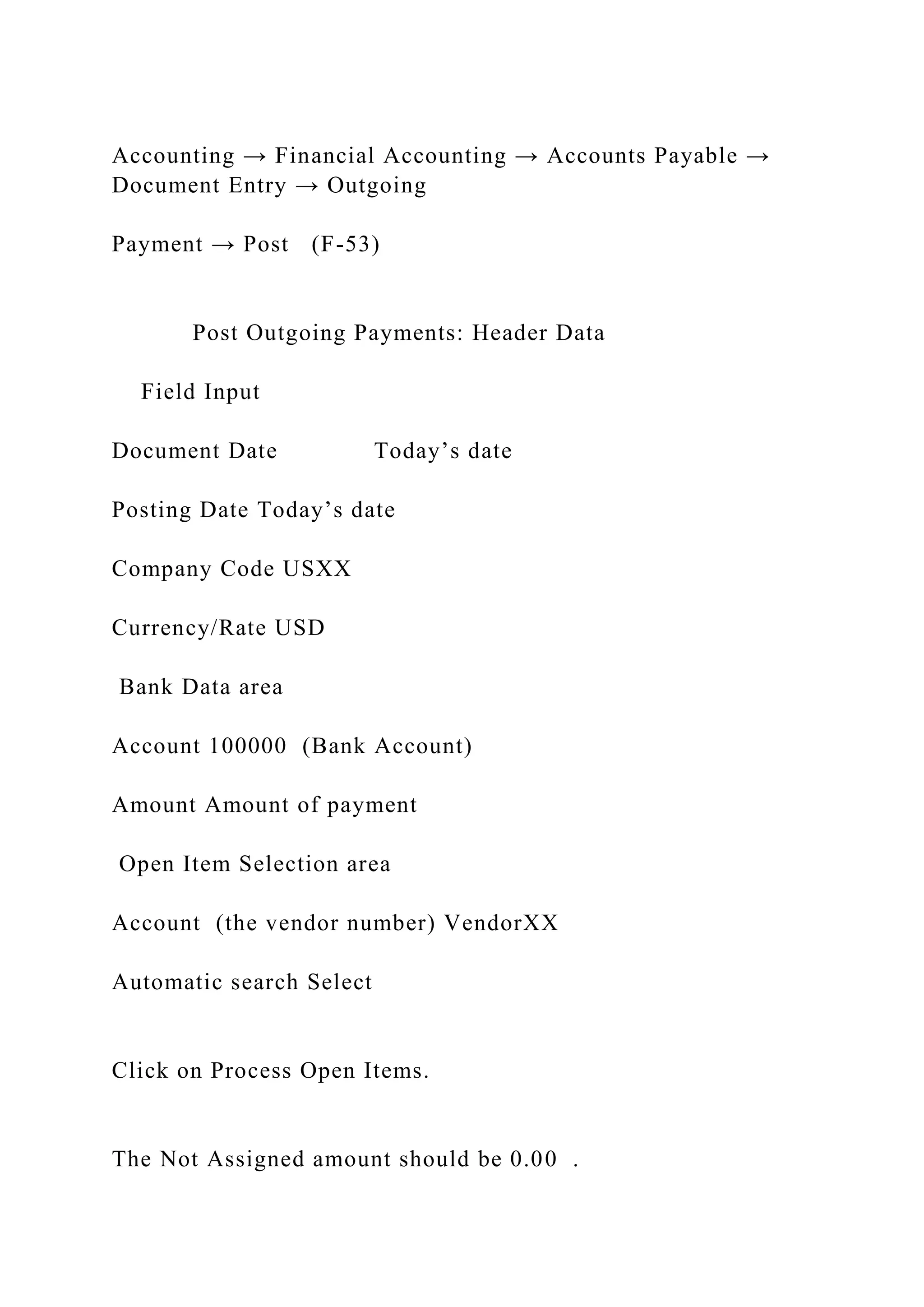
Accounting → Financial Accounting → Accounts Payable →
Document Entry → Outgoing
Payment → Post (F-53)
Post Outgoing Payments: Header Data
Field Input
Document Date Today’s date
Posting Date Today’s date
Company Code USXX
Currency/Rate USD
Bank Data area
Account 100000 (Bank Account)
Amount Amount of payment
Open Item Selection area
Account (the vendor number) VendorXX
Automatic search Select
Click on Process Open Items.
The Not Assigned amount should be 0.00 .
Page 25
CASE STUDY
Post (Save) the transaction.
Write down the document number.
____________________________
Task 14 – Check Status of Various Accounts
Repeat the checks in task 6 and record in that table.
Task 15 – Write down the system-generated journal entries
By using the information contained within the table in task 6,
construct all of the journal entries that
were made by SAP for …
· Purchase-to-Pay Example Using SAPAssignment Submission
Your Name___________________________________ Your
SAP ID# ________________
1.1 What type of account is account 200400 “Inventory –
Production Supplies”?
1.2 100000 Bank Account:
1.3 780000 Cost of Goods Sold:
1.4 310000 Goods Receipt/ Invoice Receipt: This account is a
special suspense or temporary account. Discuss the function of
this account and what its status should be after the successful
completion of the purchasing transaction.
1.5 300000 Payables-Trade Accounts: For this account examine
the Type/Description tab for your company code (USXX). Look
at the Account Group entry. Now look at the same field for
account 300200 Accounts Payable (Direct Posting Account).
First, describe what this field represents and then explain why
this field is different for the two accounts.
2.1 What is the fiscal year variant for your company code
(USXX) and what does this mean from the point of view of the
accounting system?
2.2 The university would use fiscal year variant V6. Explain
why this is the fiscal year variant for the university.
3.1 What type of application control is used on the field “Net
Weight”?
3.2 What type of application control is used on the field “Base
Unit of Measure”?
3.3 How might the data on this tab be important to a company
and its inventory management? Can you think of an example of
a company that might use the information on this tab to reduce
inventory losses and spoilage?
3.4 How is the standard price used in the accounting system?
(Think about what you did in your cost/managerial accounting
class.)
3.5 The Moving Price is the moving average price of the good.
Why would the moving average price be different from the
standard price?
_____________________________________________________
______________
3.6 Which of the two prices (standard or moving average) would
we typically use when doing performance evaluation (i.e.
variance analysis)?
Write down the message.
rite down the message on the status bar.
4.1 What did thesystem do as an application control? That is,
how did the system know that EST was wrong?
4.2 The “Rec. Account” is a very important entry. Explain this
entry. (Hint: This links back to the account you looked at in the
chart of accounts.)
4.3 What is a tolerance group and how would it be used as an
application control? What type of application control is
tolerance group?
4.4 What are the payment terms from this vendor? Since we are
a new customer for this vendor, we may be able to negotiate
changing these terms in the future. What factors would
probably be important to the vendor to give us more favorable
terms?
Write down the message on the status bar.
5.1 Explain how the above data can be a strong control in the
purchasing process.
Write down the Information Record number shown on the status
bar.
6.
MM Inventory Quantity & status
GL Inventory
GL Cash
GL A/P
GR/IR
Vendor Subledger
After task 5
After task 7
After task 9
After task 11
After task13
7.1 When you click on enter, the description of the material,
unit of measure and price will be filled in. Where did this data
come from?
7.2 Note the warning at the bottom of the screen regarding the
delivery date. What kind of an edit check is this warning?
Write down the purchase order number
Task 9: Write down the material document number
Task 11: Write down the invoice number
Task 13: Write down the document number.
By using the information contained within the table in task 6,
construct all of the journal entries that were made by SAP for
these transactions. For each journal entry show the task number
of the transaction, the account names and numbers debited and
credited and the dollar amounts involved. Use the following
format:
Task #: Account 1 $$$
Account 2 $$$
Task #: Account 3 $$$
Account 4 $$$
… etc.
No More Backstabbing... A Faithful Scheduling Policy for Multi.docx

No More Backstabbing... A Faithful Scheduling Policy for Multi.docx

  • 1.
    No More Backstabbing...A Faithful Scheduling Policy for Multithreaded Programs Kishore Kumar Pusukuri, Rajiv Gupta, Laxmi N. Bhuyan Department of Computer Science and Engineering University of California, Riverside Riverside, USA 92521 [email protected], [email protected], [email protected] Abstract—Efficient contention management is the key to achieving scalable performance for multithreaded applications running on multicore systems. However, contention manage- ment policies provided by modern operating systems increase context-switches and lead to performance degradation for multithreaded applications under high loads. Moreover, this problem is exacerbated by the interaction between contention management policies and OS scheduling polices. Time Share (TS) is the default scheduling policy in a modern OS such as OpenSolaris and with TS policy, priorities of threads change very frequently for balancing load and providing fairness in scheduling. Due to the frequent ping-ponging of priorities, threads of an application are often preempted by the threads of the same application. This increases the frequency of involuntary context-switches as wells as lock-holder thread preemptions and leads to poor performance. This problem becomes very serious under high loads. To alleviate this problem, in this paper, we present a scheduling policy called Faithful Scheduling (FF), which dra-
  • 2.
    matically reduces context-switchesas well as lock-holder thread preemptions. We implemented FF on a 24-core Dell PowerEdge R905 server running OpenSolaris.2009.06 and evaluated it using 22 programs including the TATP database application, SPECjbb2005, programs from PARSEC, SPEC OMP, and some microbenchmarks. The experimental results show that FF policy achieves high performance for both lightly and heavily loaded systems. Moreover it does not require any changes to the application source code or the OS kernel. Keywords-Scheduling; priorities; contention; context- switches I. INTRODUCTION The advent of multicore architectures provides an attractive opportunity for achieving high performance for a wide variety of multithreaded applications. However, exploiting the system density, and the parallelism they offer, to improve performance of multithreaded applications is a challenging task. This is because multithreaded application performance is sensitive to the implementations of synchronization primitives and contention management policies. Therefore the key to achieving high performance for multithreaded applica- tions running on multicore systems is to use appropriate synchronization primitives along with efficient contention
  • 3.
    management policies. Contentionmanagement policies are either based on spinning, or blocking, or a combination of both. Spinning resolves contention by busy waiting, therefore waiting threads respond to lock handoffs very quickly. However, spinning threads can wastes CPU resources and prevent the lock-holder thread from running and releasing the lock [1], [3], [6]. This dramatically degrades performance and becomes a prominent problem in systems under high load conditions. In contrast, the blocking scheme reschedules waiting threads and allows other threads to use the system resources. However, blocking scheme increases context- switches, overloads OS scheduler, and thus leads to poor performance [1], [3], [6]. To alleviate the above problems with spinning and blocking, several hybrid schemes have been introduced. The adaptive mutex provided by OpenSolaris [3], Linux futex [17], and pthread mutex provided by pthread library are examples of such hybrid schemes. Both Solaris adaptive mutex and
  • 4.
    Linux futex usethe state-of-the-art spin-then-block contention management policy. According to this policy, threads spin if the lock-holder thread is running on another CPU and block otherwise. This policy is based on the assumption that mutex hold times are typically short enough that the time spent spinning is less than the time it takes to block [3]. However, this policy faces challenges in providing optimal balance between spinning and blocking because this balance must change with increasing core and thread counts [1], [2]. Next we illustrate the above problem using the SPEC OMP program applu. Fig. 1 shows the speedup and the 3 4 5 6 7 # Threads S p
  • 5.
    e e d u p lSpeedup CX−Rate l l l l l l 6 1218 24 36 48 2 3 0 0 0 5 0 0 0 0
  • 6.
    7 4 0 0 0 9 8 0 0 0 1 2 2 0 0 0 C X − R a te OPT Figure 1: Speedupof applu degrades while CX-Rate increases as thread count grows on a 24-core machine. 24 threads represents 100% load.
  • 7.
    context-switch (CX) rateobserved by running applu on 24- core machine for varying number of threads. The speedup is computed relative to the serial execution-time. Applu achieves the best performance with 18 threads on our 24-core machine. As we can see, speedup of ‘applu’ drops while CX-Rate increases as thread count grows. The implementation of applu is based upon pthreads and pthread mutex uses the state-of-the-art spin-then-bock contention management. As we discussed above, as load (thread count) increases, the spin-then-block policy increases the CX-Rate, overwhelms the OS scheduler, causing poor performance even with 75% load (.e., 18 threads). Applu is a contention-bound program that experiences high CX-Rate and spends around 47% of its elapsed time in lock-contention even with #threads < #cores, i.e., less than 100% load. The CX-Rate increases further because of the unwanted interactions between the spin-then-block policy and the Time Share (TS) scheduling policy which is the default scheduling
  • 8.
    policy in amodern OS. With TS scheduling policy, priorities of threads change very frequently for balancing load and providing fairness in scheduling. Priority adjustments are made based on the time a thread spends waiting for processor resources, consuming processor resources, etc. [3]. Therefore, at any execution point of a multithreaded application, some of the threads belonging to the application get higher priority while the others get lower priority. This leads to preemption of low-priority threads by the high-priority threads of the same application which often includes lock-holder thread preemptions. This is what we call “Backstabbing” (BS) which leads to increased frequency of involuntary context- switches (ICXs), i.e. context-switches that cause threads to be involuntarily taken off a core. Whenever a lock-holder thread is preempted, the threads that are spinning for that lock will be blocked, which in turn increases voluntary context- switches (VCXs), i.e. context-switches that happen when a threads fail to acquire a lock or are blocked due to IO. The
  • 9.
    changes in context-switchrates lead to further changes in thread priorities. Thus, the interaction between the state-of- the-art spin-then-block policy and the TS scheduling policy creates a vicious cycle between priority changes and context- switches, which causes a drastic increase in CX-Rate (ICX- Rate + VCX-Rate) with increasing load; thus leading to poor performance. To alleviate the problems with the state-of-the-art con- tention management policies, Johnson et al., [1] proposed a “load control” mechanism that decouples load management from contention management. This approach uses blocking to control the number of runnable threads and then spinning in response to contention. Although this approach works well, it needs to modify the applications for making spin locks visible, it is sensitive to spikes in the load, and it does not function well when priority inversions occur due to nested critical sections [1]. Moreover, the implementation of the load controller uses 7 ms as an update interval, with which, it is
  • 10.
    difficult to obtainaccurate processor-usage statistics, and the overhead increases linearly with the number of threads [1]. However, unlike the above approach, in this paper we present a new scheduling policy called faithful scheduling (FF), where all threads of an application have same priority for the entire execution. FF allocates the same time-quantum to all the threads belonging to one application; however, its value varies according to application’s usage of system resources. By providing same priority to all the threads of an application, this policy completely eliminates BS, breaks the vicious cycle between thread priority changes and context-switches, dramatically reduces CX-Rate, and thus leads to high performance. By completely eliminating BS, FF policy makes all the threads of an application fair to each other. FF policy is agnostic to dynamic load changes and improves performance predictability. The overhead of the FF policy is negligible and it is an attractive approach as it requires no changes to the application source code or
  • 11.
    the OS kernel.Moreover, since it completely avoids priority inversion problems and thus handles nested critical sections well. We implemented FF on a 24-core Dell PowerEdge R905 server running OpenSolaris and evaluated it using 22 programs including the TATP database application [24], SPECjbb2005 [27], programs from PARSEC [26], SPEC OMP [27], and a microbenchmark [1]. The experimental results show that at 100% load, FF policy achieves more than 10% performance improvement for five programs with a maximum of 35% improvement, 4%-10% for six programs, less than 4% for nine programs, and there is no improvement for one program over TS policy. At 200% load, FF policy achieves more than 10% performance improvement for eight programs with a maximum of 107% improvement, 4%-10% for six programs, less than 4% for seven programs over TS policy. Furthermore, FF policy also achieves performance improvements under light loads, i.e., less than 100% load.
  • 12.
    The key contributionsof this work are as follows: • We identify the reasons behind the problems caused by the interactions between the spin-then-block policy and TS scheduling policy through an in-depth performance analysis of several multithreaded programs on a 24-core multicore system. • We present a scheduling policy FF, which eliminates lock-holder thread preemptions, dramatically reduces context-switches over TS policy, and achieves high performance for a wide variety of benchmarks for both lightly and heavily loaded systems. • Finally, we develop FF policy using simple utilities available on a modern OS and it requires no changes to the application source code or the OS kernel. It is very effective against phase changes of the application, it completely avoids spikes in the load, and improves performance predictability. Moreover, it introduces neg- ligible runtime overhead.
  • 13.
    2 The remainder ofthis paper is organized as follows. Section II explains the problems caused by the interactions between OS scheduling and contention management policies. Section III presents the implementation of FF policy in detail and Section IV presents the experimental setup. Section V describes the evaluation of FF policy against a wide variety of benchmark programs. Related work and conclusions are given in Sections VI and VII. II. INTERACTION BETWEEN OS SCHEDULING AND CONTENTION MANAGEMENT This section explains how the interaction between con- tention management policies and OS scheduling policies hurts the performance of multithreaded programs running on multicore systems. Time Share (TS) is the default scheduling policy in a modern OS such as OpenSolaris. With TS scheduling policy,
  • 14.
    priorities of threadschange very frequently for balancing load and providing fairness in scheduling. Priority adjustments are made based on the times a thread spends waiting for processor resources, consuming processor resources, etc [3]. Therefore, at a given point in time, some of the threads belonging to an application get higher priority while the others get lower priority. This leads to preemptions of the low-priority threads of an application by the high-priority threads of the same application, i.e. ‘Backstabbing’ (BS). BS often includes lock-holder thread preemptions which increases the ICX rate. We can further divide ICX into two types: time-quantum context-switches (TQE ICX) happen because of time-quantum expiration; and preemption context- switches happen when a higher priority thread preempts a lower priority thread (HPP ICX). As we can see in Fig. 2(a), applu program experiences a high degree of HPP ICX (56% of total ICX) when it is run with 24 threads on 24 cores (100% load). Using DTrace [5]
  • 15.
    scripts, we observedthat almost all of these HPP ICX are caused by applu threads i.e., applu experiences around 55% BS at 100% load. Here BS is specifically defined as % of HPP ICX caused by the same application threads. This is because HPP ICX is also caused by high priority system processes ��������� � �� ��� ��� �� � �������� �� � ����� � ��� ��� ���� �� �������
  • 16.
    ����� � ! �� �� ������� Figure4: The interactions between the TS policy and the spin- then-block policy create vicious cycles between priority changes and context-switches. running along with the application threads. However, we can expect that BS is the major portion of HPP ICX (i.e., HPP ICX ∼ BS) when load crosses 100%. As shown in Figure 2(b), priority change-rate increases as load increases and also a major portion of priority changes are due to HPP ICX. Another important point to note is that ICX (HPP ICX and TQE ICX) causes a major portion of VCX. Figure 2(c) shows a drastic increase in HPP ICX as load crosses 100%. Therefore, we can expect that the frequency of lock-holder thread preemptions will increase once load crosses 100%. Thus, frequent ping-ponging [3] of thread priorities increases HPP ICX, specifically BS, which in turn increases CX-Rate
  • 17.
    (ICX-Rate + VCX-Rate),and ultimately vicious cycle is created between context-switches and priority changes. As shown in Fig. 4, the TS policy changes priorities of threads based on their usage of system resources. Frequent ping-ponging of thread priorities leads to HPP ICX, i.e., force the threads off the CPU, which often include lock-holder threads. When a lock-holder thread is preempted then all the threads that are waiting for that lock will be blocked, i.e., generates VCX. Then threads will join the lock’s sleep queue and their priorities will be changed based on their waiting time in the sleep queue. Thus, this process repeats continuously, increasing CX-Rate and priority change-rate, and thus leads to poor performance. 2 4 6 8 10 0 5 0 1 0 0
  • 18.
    1 5 0 2 0 0 2 5 0 3 0 0 Time (sec) IC X − R a te Total ICX HPPICX (a) HPP ICX occupies a major portion of total ICX. 0
  • 19.
  • 20.
    P ri o ri ty C h a n g e R a te Total CX HPP ICX 1224 36 48 100% 200% (b) HPP ICX leads to changes in thread priorities. 0 5
  • 21.
  • 22.
    IC X − R a te Total ICX HPP ICX 1224 36 48 100% (c) Drastic increase in HPP ICX as load crosses 100%. Figure 2: Frequent changes in thread priority drastically increases context-switches and in turn context-switches lead to changes in thread priority. A vicious cycle is created between priority changes and context-switches. 3 A. Lock-contention vs Backstabbing (BS) From the above observations, we can expect that high contention applications suffer more from BS than contention- free applications. This is because threads of high contention
  • 23.
    application seriously competefor lock acquisitions leading to high CX-Rate. Contention-free applications scale well and typically they experience CX-Rate far lower than high contention applications. To get a clear idea about this, we ran three different benchmark programs (nearly contention-free, medium contention, and high-contention) and observed how BS varies along with thread count. Fig. 3 shows the results. As shown in Fig. 3(a), swaptions is a nearly contention- free program and it does not significantly suffer from BS. BS is almost nil when the load is below 100% and small under high loads. This is because when the load crosses 100%, there are more chances of lock-holder thread preemptions and also high HPP ICX. However, this becomes a prominent problem for the high contention programs. As shown in Fig. 3 (b) and (c), programs fluidanimate and applu experience high % of BS. As applu is a high contention program, it suffers from high % of BS even under low loads. These observations demonstrate two things: (1) BS rapidly increases under high
  • 24.
    loads, specifically whenthe load crosses 100%, and (2) high contention programs experience significant BS even when the load is below 100%. Therefore, if we completely avoid BS then we can minimize CX-Rate and improve performance. In order to avoid BS completely, we need to break the vicious cycle between priority changes and context-switches. Thus, based on the above observations, in the next section, we present a scheduling policy called faithful scheduling (FF), which breaks the cycle between priority changes and context- switches, completely eliminates BS, dramatically reduces CX-Rate, and thus leads to higher performance. III. FAITHFUL SCHEDULING POLICY (FF) The previous section highlights the fact that the interactions between contention management and OS scheduling create vicious cycle between priority changes and context-switches, which leads to poor performance. Therefore, to break the vicious cycle and achieve high performance, we propose a scheduling policy called Faithful Scheduling Policy (FF) with
  • 25.
    the following keycharacteristics: 1) Same priority is assigned to all the threads of a given application. 2) Time-quantum is allocated based on the resource usage of the entire application, specifically based on lock- contention and cache miss-ratio of the application. By providing same priority to all the threads of an application, FF policy completely avoids BS, dramatically reduces CX-Rate, and leads to high performance. Since priorities of all the threads of an application are same, FF allocates equal time-quantum to all of them for reducing unwanted TQE ICX. Moreover, this makes all the threads of an application fair to each other. However, finding the right time-quantum for an application is tricky. For this, via extensive experimentation with a wide variety of benchmarks, we derived a metric called “scaling-factor” and developed a scaling-factor table that guides time quantum allocation. A. Scaling-factor Table
  • 26.
    Finding right time-quantumis very important to provide fair allocation of CPU cycles for all the threads of a multi- threaded application. Threads of a CPU-intensive and low contention application heavily compete for CPU resources. Therefore, it is appropriate to provide small time quantum for both CPU-intensive and low contention application threads. In this way no thread will wait for a long time for a CPU. In contrast, it is appropriate to provide large time-quantum for both high-contention and memory-intensive application threads. In case of high-contention applications, large time- quantum allows lock-holder thread to complete its work quickly, release the lock, and allow other threads to make progress. Moreover large time-quantum for contention bound application threads reduces unwanted TQE ICX and also reduces the lock acquisition overhead since a wakeup and a context-switch are required before the blocking thread can become the owner of the lock it requires [3]. Based on the above observations, the metric scaling-factor is defined in
  • 27.
    Eq. (1). l l ll 0 2 0 4 0 6 0 8 0 1 0 0 #Threads % B S 0 2 0 4
  • 28.
    0 6 0 8 0 1 0 0 12 24 3648 % L o c k − c o n te n ti o n l %BS %Lock
  • 29.
    (a) swaptions (Nocontention). l l l l 0 2 0 4 0 6 0 8 0 1 0 0 #Threads % B S 0 2
  • 30.
    0 4 0 6 0 8 0 1 0 0 12 24 3648 % L o c k − c o n te n ti o n l %BS
  • 31.
    %Lock 100% (b) fluidanimate (Mediumcontention). l l l l 0 2 0 4 0 6 0 8 0 1 0 0 #Threads % B S
  • 32.
    12 24 3648 % L o c k − c o n te n ti o n 0 2 0 4 0 6 0 8 0 1 0
  • 33.
    0 l %BS %Lock 100% (c) applu(High contention). Figure 3: Lock-contention vs BS (24 threads is 100% load). 4 Scaling-factor = 1 - max(Miss-ratio, Lock-contention) (1) Where ‘Miss-ratio’ is last-level cache miss-ratio and ‘Lock- contention’ is the percentage of time application threads spend waiting for user locks, condition-variables, etc. Using Miss-ratio we can identify whether an application is memory- intensive or not. By conducting experiments with a wide variety of multi- threaded programs and different time-quanta, we developed the scaling-factor table shown in Table I, in which the time-quantum goes down as the scaling-factor goes up
  • 34.
    (inspiration from thepriority dispatcher tables [3] of modern OS). More specifically, to derive the table, first we categorize the applications as memory intensive, CPU intensive, high contention, or low contention applications. Then we selected a few of applications from each category -- a total of 8 out of 22 applications, and ran them with varying time- quantum ranging from 10 ms to 400 ms. The scaling factor table obtained was then used in our experiments for all 22 applications. The 8 applications used to populate the scaling factor table are: streamcluster, swim, swaptions, ferret, apsi, applu, art, and bodytrack. Therefore, based on the application’s cache miss-ratio and lock-contention, scaling-factor of the application is between one and zero. For scalable applications such as CPU-intensive and low-contention applications, scaling-factor is high and close to one, and for non-scalable applications such as high memory-intensive or high lock-contention applications, scaling-factor is close to zero. One important point here
  • 35.
    is that thescaling-factor value is for the entire application not per thread. Based on the scaling-factor value, FF policy allocates corresponding time-quantum to all the threads of the application. Table I: The Scaling-factor Table. The range of the scaling- factor is 0.10. scaling-factor TQ(ms) (0.01 -- 0.10) 250 (0.11 -- 0.20) 200 (0.21 -- 0.30) 150 (0.31 -- 0.40) 120 (0.41 -- 0.50) 100 (0.51 -- 0.60) 80 (0.61 -- 0.70) 50 (0.71 -- 0.80) 30 (0.81 -- 0.90) 20 (0.91 -- 1.00) 10 B. Dealing with phase changes
  • 36.
    Some applications havemultiple different phases or regions and exhibit different usages of system resources over time. Therefore, we need to continuously monitor the applications and apply appropriate time-quantum according to the resource usage of their current phase. However, among the 22 benchmark programs we studied, only a couple of programs ammp and SPECjbb2005 show significantly two different phases in their execution. For example, consider ammp 0 20 40 60 80 100 0 .0 0 .2 0 .4 0 .6 0 .8 1 .0
  • 37.
  • 38.
    c o n te n ti o n Miss−ratio Lock−contention Phase 1 Phase2 Figure 5: Phase changes of ammp. Here ammp is run with 24 threads. Lock-contention value 1 means application experiences lock-contention for 100% of the total elapsed time. SPEC OMP program. As shown in Fig. 5, ammp has two significantly different phases. While ammp experiences high miss-ratio and high lock-contention in Phase-1 (i.e., for the first 25 seconds), it experiences low miss-ratio and low lock- contention in Phase-2. Therefore according to the scaling- factor table, FF policy allocates large time-quantum for the first 25 seconds, and small time-quantum for the rest of its execution. C. Dealing with pipeline parallelism
  • 39.
    It is fineto allocate equal time-quantum to all the threads of an application based on pure data-parallelism. This is because, the threads of a data-parallelism application more or less do the same work. However, it may not be appropriate to allocate equal time-quantum to all the threads of an application that uses pipelined parallelism because resource usage of the threads from different pipeline stages may differ greatly. However, our experiments with different pipeline parallel applications reveal that allocating equal time-quantum to all the threads also works well for pipeline parallel applications. This is because the scaling-factor is calculated based on the resource usage of the entire application, which allows to account the overall effect of all the threads or the dominating pipeline stage threads. For example, consider ‘ferret’ pipeline parallel application from PARSEC benchmark. ferret is a search engine which finds a set of images similar to a query image by analyzing their contents. The program is divided into six pipeline stages -- the results of processing in one
  • 40.
    stage are passedon to the next stage. The stages are: Load, Segment, Extract, Vector, Rank, and Out. The speedup of ferret increases linearly starting from 6 threads to all the way up to 63 threads even though only 24 cores are available. The reason for the observed behavior is as follows. The Rank stage performs most of the work and thus the speedup of the application is determined by the Rank stage. Moreover the other stages perform relatively little work and thus their threads together use only a fraction of the compute power of the available cores. Thus, as long as cores are not sufficiently 5 utilized, more speedup can be obtained by creating additional threads for the Rank stage. Therefore, Rank stage threads of ferret program dominates the behavior of all other threads and represents resource usage of whole ferret program. Thus, since the scaling-factor represents the resource usage of the entire application, allocating time-quantum based on the
  • 41.
    scaling-factor works wellalso for pipeline parallel programs. D. Implementation of FF policy There are two important components of the implementation of FF policy framework: (1) providing same priority to all the application threads, and (2) allocating appropriate time- quantum based on the resource usage of the application. OpenSolaris provides a scheduling class called Fixed Priority scheduling [3]; with the combination of this class and priocntl(1) [4] utility, we can allocate same priority to all the threads of an application. However, there is no way to find appropriate time-quantum for an application in OpenSolaris with the fixed priority scheduling class. Moreover, this class does not provide any capability for updating time- quantum [3]. Thus, there is no way to deal with the phase changes of an application. Therefore, in addition to devel- oping a scaling-factor table, we also perform continuously monitoring of an application to allocate appropriate time- quantum according to its phase changes.
  • 42.
    Let us considerthe FF policy implementation in detail. As shown in Algorithm 1, our implementation uses a daemon thread. First we start the target program with the default TS policy and start monitoring the program’s last-level cache miss-ratio and lock-contention after the creation of target program’s worker threads. We use cputrack(1) utility to monitor miss-ratio and prstat(1) utility for lock-contention with one second interval. We used a timer that fires a timer signal for every one second and the framework catches the signal and collects miss-ratio and lock-contention of the target program with one second interval, calculates a scaling-factor, and based on this it allocates appropriate time-quantum to the application threads using the scaling- factor table. More specifically, the framework measures a scaling-factor of the target application for every one second, and checks whether to change the time-quantum or not by comparing the current scaling-factor with the previous one. Although we can use an interval with milliseconds resolution,
  • 43.
    we used onesecond interval because our experiments showed that one second interval is enough to deal with the phase changes of the programs studied in this work. Although, one second time-interval is the minimum timeout value we could have used with the default implementation of prstat(1) utility, we modified this utility to allow time intervals with millisecond resolution to monitor lock-contention. Therefore, it is easy to use an interval less than one second for an application that experiences rapid phase changes. Thus, our framework continuously monitors the target multithreaded program and allocates same priority using Algorithm 1: FF Policy Framework Profile Data Structure and Variables; Profile P: missRatio: last-level cache misses/accesses; lockContention: (% lock-contention/100); // range of the scaling-factor range = 0.10; Subroutines:
  • 44.
    getProfile(): Monitor missRatio usingcputrack(1) and lockConetntion using prstat(1) of the target program with one second interval and return a Profile P; … © SAP AG CASE STUDY Product SAP ERP GBI Release 6.04
  • 45.
    Level Undergraduate Graduate Focus Purchase-to-Pay Cycle and AccountingEntries Test of Transactions Application Controls Authors Nancy Jones Jim Mensching Contributors Dawna Drum James Marlatt Version 1.01 MOTIVATION Primary learning objectives:
  • 46.
    • Experience thesteps in a typical purchasing transaction • See how an ERP system handles a typical purchasing transaction • Work through the procedures involved in a test of transactions • Investigate the various types of application controls in an ERP system Secondary learning objectives: • See the integration between materials management (MM) and financial accounting (FI) modules of SAP • Learn about how a suspense account (the GR/IR account) is used • Look at some of the basic settings needed in the FI module in order to have the system function properly PREREQUISITES Before you use this case study, you
  • 47.
    should be familiarwith navigation in the SAP system. You should also be familiar with internal controls and have a basic understanding of business processes and transaction cycles. . NOTES This case study uses the Global Bike Inc. (GBI) data set, which has exclusively been created for SAP UA global curricula. Purchase-to-Pay Example Using SAP ERP The objective of this assignment is for you to become familiar with the steps and the documents involved in a typical purchasing transaction and also investigate how the SAP system is set up and operates for this type of transaction.
  • 48.
    Page 2 CASE STUDY AssignmentOverview For this assignment, we start by examining the master data in the system. As you should already know, the chart of accounts is of central importance to any accounting information system. Thus we look at the chart of accounts and other settings used to configure the financial accounting system. We then create master data for a new material and a new vendor and then link these together using an information record. After that we run through a transaction in which we purchase the material we just created from the vendor we also just created. As the various steps of the purchase are recorded in SAP, we examine the accounts that are affected in both the financial (FI) and materials management (MM) modules. In auditing terminology this is called doing a test of transactions. We will be looking at typical business-to-business transactions and concentrating on the internal controls within the SAP system and the way the system is configured to process these
  • 49.
    transactions. Keep in mindthat this business process is normally done by more than one person in order to properly segregate duties and maintain authorization controls. However, in this exercise you will do all of the steps from your individual SAP logon. As we stressed in this course, the segregation of duties is a very strong control. Hence, the different people involved in the business process would have unique authorizations set up in the system and few, if any, people would be allowed to execute all of the roles that you will assume in this assignment. Since this course deals with accounting information systems, we want you to pay particular attention to the controls that are designed into the SAP system. These controls are a very important part of an integrated information system such as an ERP system. The controls embedded within SAP are a vital part of the system and essential to the system functioning properly. Throughout the assignment you are asked to identify the internal controls that you observe in SAP. For some of these controls you are asked what type of application control it is. You are to select from the following list of possible
  • 50.
    application controls. Ifyou don’t remember what these controls are and what they mean, you should refer to your course materials regarding application controls and review that material. Additional information regarding these controls and more can be found at the ISACA (Information System Audit and Control Association), website www.isaca.org. • Field check • Sign check • Limit check • Range check • Size (or capacity) check • Completeness check • Validity check • Reasonableness test http://www.isaca.org/ Page 3
  • 51.
    CASE STUDY For eachof the following steps you will also be noting the nature of the accounting entries involved in each transaction step. You will perform the following tasks: 1. Examine the chart of accounts 2. Examine the account settings for financial accounting use 3. Create a material master 4. Create a vendor master 5. Create a purchasing information record to link the vendor and material 6. Check the inventory and accounting records 7. Create a purchase order for the material 8. Check the inventory and accounting records 9. Receive the material 10. Check the inventory and accounting records 11. Receive the invoice from the vendor 12. Check the inventory and accounting records 13. Make payment to the vendor 14. Check the inventory and accounting records 15. Write down the journal entries that the system made For all of the following work, you will use your own company code. This company code is based on the SAP number assigned to you by your instructor. In addition, the logon and initial password to a specific SAP instance and client will be given to you by your instructor.
  • 52.
    Whenever you seethe value XX in the assignment you will substitute your assigned SAP number for the x’s. Be sure to use only your assigned SAP number. For this assignment the company code will be USXX. Whenever you are requested to enter a company, be sure to enter only your company code. Note that as you go through the questions, some of the answers to these questions may be related to your accounting theory rather than a specific SAP attribute. Page 4 CASE STUDY Company Background Global Bike Inc., (GBI) is a world class bicycle company serving the professional and “prosumer” cyclists for touring and off-road racing. GBI’s riders demand the highest level of quality, toughness and performance from their bikes and accessories.
  • 53.
    Product development isthe most critical element of GBI’s past and future growth. GBI has invested heavily in this area, focusing on innovation, quality, safety and speed to market. GBI has an extensive innovation network to source ideas from riders, dealers and professionals to continuously improve the performance, reliability and quality of its bicycles. In the touring bike category, GBI’s handcrafted bicycles have won numerous design awards and are sold in over 10 countries. GBI’s signature composite frames are world-renowned for their strength, light weight and easy maintenance. GBI bikes are consistently ridden in the Tour de France and other major international road races. GBI produces two models of their signature road bikes, a deluxe and professional model. The key difference between the two models is the type of wheels used, aluminum for the basic model and carbon composite for the professional model. GBI’s off-road bikes are also recognized as incredibly tough and easy to maintain. GBI trail bikes are the preferred choice of world champion off-road racers and have become synonymous with performance and strength in one of the most grueling sports in
  • 54.
    the world. GBIproduces two types of off-road bike, a men’s and women’s model. The basic difference between the two models is the smaller size and ergonomic shaping of the women’s frame. GBI also sells an accessories product line comprised of helmets, t-shirts and other riding accessories. GBI partners with only the highest quality suppliers of accessories which will help enhance riders’ performance and comfort while riding GBI bikes. Page 5 CASE STUDY Task 1 – Examine the Chart of Accounts and General Ledger Accounts Understanding the chart of accounts is a very important part of the overall understanding of the accounting process within any organization. So first we will look at the chart of accounts for the company and also see how it is configured in SAP.
  • 55.
    Examine the Chartof Accounts for GBI Menu Path: Accounting ►Financial Accounting ► General Ledger ► Information System ► General Ledger Reports ► Master Data ► Chart of Accounts (Transaction Code S_ALR_87012326) Under general selections, in the field for chart of accountsm enter GL00 and click on execute. The chart of accounts for GBI will be displayed. Place your cursor on the the line for account 200400 “Inventory – Production Supplies” and then click on the detail icon to see information regarding the account 200400 in our chart of accounts. Note the information on the Type/Description tab. 1.1 General ledger accounts are considered master data and different controls within the master data allow the system to group accounts that are similar. Under the “control in chart of accounts” area on the Type/Description tab, what type of account is account 200400 “Inventory – Production Supplies”?
  • 56.
    Now let’s examinethe general ledger accounts a bit more closely. Leave the current view of the account master data by pressing the back button until you get to the main menu. Examine Some General Ledger Accounts for GBI Menu Path: Accounting ► Financial Accounting ► General Ledger ► Master Records ► G/L Accounts ► Individual processing ► Centrally (FS00) Let’s look at the following two accounts: 100000 Bank Account and 780000 Cost of Goods Sold. Make sure that your company code is correct (USXX). Select the account or input the account code you want to examine and click on the display icon or hit enter. The first thing you should notice is that there are more tabs than there were in our other view. This is because we are now looking at the complete record of the general ledger account.
  • 57.
    Page 6 CASE STUDY Tasks1.2 – 1.3 The SAP system is able to close the books at the end of a period by simply pressing a button. Examine the bank account (a real account) and cost of goods sold (a nominal account) and find what attribute the system needs to know to do the closing using each of these two accounts as examples. 1.2 100000 Bank Account: 1.3 780000 Cost of Goods Sold: Tasks 1.4 & 1.5 The next two questions deal with special accounts. 1.4 310000 Goods Receipt/ Invoice Receipt: This account is a special suspense or temporary account. Discuss the function of this account and what its status should
  • 58.
    be after thesuccessful completion of a purchasing transaction in a company. (You might have to do a little research on this account.) 1.5 300000 Payables-Trade Accounts: For this account examine the Type/Description tab for your company code (USXX). Look at the Account Group entry. Now look at the same field for account 300200 Accounts Payable (Direct Posting Account). First, describe what this field represents and then explain why this field is different for the two accounts. Page 7 CASE STUDY Task 2 – Examine System Settings
  • 59.
    In this stepwe look at one of the important settings in the system, the fiscal year variant. We will be looking at how our company set up the system to handle its specific processing requirements. This is termed SAP configuration. Configuration is done in the IMG (implementation guide). Do not make any changes to the system while you are in the IMG. Enter Transaction Code: OBY6 Highlight the line with your company code (USXX) by clicking on the box to the left of the company code. Click on the details icon in the upper left of the screen. 2.1 What is the fiscal year variant for your company code (USXX) and what does this mean from the point of view of the accounting system? Hint: Use the search icon to the right of the field for these two (and other) questions. .
  • 60.
    2.2 The universitywould use fiscal year variant V6. Explain why this is the fiscal year variant for the university. Click the yellow “Exit” icon until you are at the main menu again. Page 8 CASE STUDY Task 3 – Create a Master Material Record for a Trading Good Next we start the processing steps that are involved in a purchasing transaction. For the example that we use, the company is going to order a good that is not presently part of our inventory. In addition, we have not previously purchased goods from the vendor that we selected to supply the good. That means that we have to create a master record for the material and a master record for the vendor.
  • 61.
    Remember, as discussedpreviously, these steps are typically completed by more than one person so that proper segregation of duties is maintained. The material master record contains all the data required to define and manage a material. In SAP this is formally part of the Materials Management (MM) module. However, some important accounting information is also contained within this record. For example, product cost and pricing information and also tax information are contained within the material master record. The master record consists of individual views and the individual views are presented in the form of tabbed pages. These views are organized on a functional or departmental basis. Each department has its own view that permits easy access and maintenance. In other words, data is integrated from engineering, manufacturing, sales and distribution, purchasing, accounting and other departments. This master data is used as a source of data for purchase order processing throughout the procurement cycle. For simplicity, we are ordering a finished good that we will subsequently sell. Just a reminder: When you see an “XX” enter your assigned SAP number.
  • 62.
    • Create aMaterial Master record for a Finished Product Logistics ► Materials Management ►Material Master ► Material ► Create (Special) ► Trading Goods (MMH1) Create Trading Goods: Initial Screen Field Input Material (Number) SDSUHMTXX Industry Sector Retail Click on Select Views on the application tool bar Select the following views: • Basic Data 1 • Purchasing • General Plant Data/Storage 1 • Accounting 1 Click on Enter. Page 9
  • 63.
    CASE STUDY Organization Levelpop-up window Field Input Plant DLXX (Dallas) Storage Location TGXX (Trading Goods) Click on Enter. Basic Data 1(screen): Field Input Material description (This is the field to the right of the material number.) Special Edition SDSU Logo Helmet XX Base Unit of Measure EA Material Group SFTY Gross Weight 10 Weight Unit OZ Net Weight 12
  • 64.
    Click on Enter. Youshould receive an error message regarding net weight. 3.1 What type of application control is used on the field “Net Weight”? 3.2 What type of application control is used on the field “Base Unit of Measure”? (Pick from the list of controls on page 2 of this assignment.) Page 10 CASE STUDY Change the net weight to 10. Click on Enter.
  • 65.
    Purchasing: Field Input Purchasing GroupNXX Click on Enter. Plant Data/Storage 1 ➢ No information is needed here. However, look at the data on this tab. 3.3 How might the data on this tab be important to a company and its inventory management? Can you think of an example of a company that might use the information on this tab to reduce inventory losses and spoilage? Click on Enter. Accounting 1: Field Input Valuation class 3100 (trading goods)
  • 66.
    Price Control V MovingPrice 40 There are two “pricing” choices, moving price and standard price. The SAP terminology is a little confusing in this part of the process. What we would normally term cost, they term price. That is, by their terminology, price (not cost) is what we paid for the good. 3.4 How is the standard price used in the accounting system? (Think about what you did in your cost/managerial accounting class.) Page 11 CASE STUDY 3.5 The Moving Price is the moving average price of the good. Why would the moving average price
  • 67.
    be different fromthe standard price? _____________________________________________________ ______________ 3.6 Which of the two prices (standard or moving average) would we typically use when doing performance evaluation (i.e. variance analysis)? Click on Enter. Click on Yes when asked to Save. Write down the message on the status bar. Page 12 CASE STUDY
  • 68.
    Task 4 –Create a Vendor Master Record We will buy our trading good from this vendor. Logistics ► Materials Management ► Purchasing ► Master Data ► Vendor ► Central ► Create (XK01) Create Vendor: Initial Screen Field Input Vendor VendorXX Company code USXX Purchasing organization USXX Account group LIEF Click on Enter. Create Vendor: Address Field Input Title Company Name Your last name XX Search term 1/2 XX
  • 69.
    Street/house number Montezuma555 Postal code/City 92115 San Diego Country US Region CA Language English (Note: You may need to expand the street address to see all the fields.) As an experiment, enter the time zone EST. Page 13 CASE STUDY Click Next Screen or Enter to go to next view. Note the error and then change the time zone back to the correct value of “PST” and click the enter icon. 4.1 What did the system do as an application control? That is, how did the system know that EST
  • 70.
    was wrong? Create Vendor:Control ➢ No Information needs to be entered. Click Next Screen or Enter. Create Vendor: Payment Transactions ➢ No Information needs to be entered. Click Next Screen or Enter. Create Vendor Contact Persons ➢ Enter your name as the contact name. Click Next Screen or Enter. Create Vendor: Accounting Information Accounting Field Input Rec. Account 300000 (payables – trade accounts) Sort Key 001 (posting date)
  • 71.
    Cash mgmnt groupA1 (domestic pmt.) Page 14 CASE STUDY 4.2 The “Rec. Account” is a very important entry. Explain this entry. (Hint: This links back to the account you looked at in the chart of accounts.) Click Next Screen or Enter to go to the next view Create Vendor: Payment Transactions Accounting Field Input Payt Terms (payment terms) 0001 (payable immediately) Tolerance group (in payment terms) GBI 4.3 What is a tolerance group and how would it be used as an application control? What type of
  • 72.
    application control istolerance group? Hint: Create an additional session and look at transaction code OBA4. Highlight your company code and then select details. Click Next Screen. Create Vendor: Correspondence Accounting ➢ No information needs to be entered Click Next Screen. Create Vendor: Purchasing Data Field Input Order currency USD Terms of Paymnt 0001 4.4 Explain the payment terms from this vendor. Since we are a new customer for this vendor, we may be able to negotiate changing these terms in the future. What factors would probably be important to the vendor to give us more favorable terms?
  • 73.
    Page 15 CASE STUDY ClickNext Screen. Create Vendor: Partner Function ➢ No information needs to be entered. Click on Save . Write down the message on the status bar. Page 16
  • 74.
    CASE STUDY Task 5– Create an Information Record for the Vendor/Material The creation of a material and a vendor will allow us to order those goods from that vendor. However, as an additional control, we can define the relationship between the good and the vendor. In SAP this is done by creating an information record. That is the next step in the process. • Create an Information record for Vendor/Material Logistics ► Materials Management ►Purchasing ► Master Data ► Info Record ► Create (ME11) Create Info Record: Initial Screen Field Input Vendor VendorXX Material SDSUHMTXX Purchasing Org. USXX Plant DLXX
  • 75.
    Click on Enter. CreateInfo Record: General Data Click on Purch. Org. data 1. Create Info Record: Purch. Org. data 1 Field Input Pl.Deliv.Time 2 (days) Purch. group NXX Standard qty. 10 Minimum qty 5 Net price 40 Page 17 CASE STUDY The above data defines the relationship between the material and the vendor.
  • 76.
    5.1 Explain howthe above data can be a strong control in the purchasing process. Click Save. Write down the Information Record number shown on the status bar. ______________________ Page 18 CASE STUDY Task 6 – Check Status of Various Accounts The power of an ERP system is that the business transactions are simultaneously recorded in all of the affected areas of the business in real time. In order to understand this we want you to determine which accounts should be affected by the transactions that follow. In this case the following accounts should be checked:
  • 77.
    • Check inventoryin materials management • Check inventory in the general ledger • Check cash in the general ledger • Check accounts payable in the general ledger • Check goods received/invoice received account in the general ledger • Check accounts payable in the subsidiary ledger These checks should be done after each step of the transaction. I would suggest that you open a series of SAP sessions to do this checking and then refresh the screen after each business transaction. - Check MM inventory: Transaction: MMBE, (Stock Overview) Be sure to check the detailed status report to see important changes to inventory. Double click on your material or scroll to the right to see all fields in the inventory inquiry screen. - Check GL Cash, GL Inventory, GL AP and Goods Received/Invoice Received – All of these can be seen from: Transaction: S_ALR_87012291, (Line Item Journal) The company code is USXX and use today’s date (or the date of transaction or the current
  • 78.
    month) as theposting date. - Check A/P sub-ledger: Transaction: FBL1N (Vendor Line Item Display) Enter the change in value for each of these accounts after each step noted. Note: it is very important that you use the correct reporting period when you run these reports, (the current month). Otherwise you may get the values from the journal entry exercise that we completed earlier in the semester. You will be completing this table as you go through the subsequent steps. For MM Inventory Quantity (MM Inv Qty) include the inventory status; such as unrestricted, on order, and so on. MM Inventory Quantity GL Inventory GL Cash GL A/P GR/IR Vendor Subledger After task 5 After task 7 After task 9
  • 79.
    After task 11 Aftertask13 Note: on some of the above transactions if there is no value in the account, you may get an error message when trying to display the balance. This is normal and simply means that the balance in the account is zero. Page 19 CASE STUDY Task 7 – Create a Purchase Order to Buy the Trading Good Now that the master data has been entered into the system, we are ready to process a purchasing transaction. Create a Purchase Order Logistics ► Materials Management ► Purchasing ► Purchase Order ► Create ► Vendor/Supplying Plant Known (ME21N)
  • 80.
    Create Purchase Order FieldInput (Field will be defaulted) Standard purchase order Vendor VendorXX Document date Today’s date Note: If the screen looks like the following, click on Header and Item Overview icons to expand those areas. When you expand your view, an error message may tell you to enter the organizational data and redirect you to the Org. Data page. Page 20 CASE STUDY If you are not redirected to the org. data page, click on the Org. Data tab page, enter the following
  • 81.
    data: Field Input Purchasing org.USXX Purchasing group NXX Company code USXX Click Enter. Hint: If you get an error message regarding the purchasing group, hit Enter again and enter the data for the purchasing group. Item overview area Field Data Material SDSUHMTXX P.O. Quantity 75 Delivery date Today’s date Plant DLXX Storage location TGXX Click Enter.
  • 82.
    7.1 When youclick on enter, the description of the material, unit of measure and price will be filled in. Where did this data come from? 7.2 Note the warning at the bottom of the screen regarding the delivery date. What kind of an edit check is this warning? Page 21 CASE STUDY Click Save. Write down the purchase order number ___________________. Task 8 – Check Status of Various Accounts
  • 83.
    Repeat the checksin task 6 and record in that table. Page 22 CASE STUDY Task 9 – Receive the Product from the Vendor We now need to record that we have received the goods we ordered in task 7. Receive Goods from the Vendor Logistics ► Materials Management ► Inventory Management ► Goods Movement ► Goods Receipt ► For Purchase Order ► PO Number Known. (MIGO) Goods Receipt Purchase Order screen. Field Input Purchase Order Purchase order # from task 7 or choose your PO from the My Documents list on the left
  • 84.
    side of yourscreen. Delivery Note XX Click on Enter and all the data will be copied from the purchase order. Select Item OK at the bottom of the screen to confirm the receipt. Click on Save. Write down the material document number ___________________. Page 23 CASE STUDY Task 10 – Check Status of Various Accounts Repeat the checks in task 6 and record in that table. Task 11 – Receive the Invoice from the Vendor
  • 85.
    The vendor sendsthe invoice for the delivered goods and we need to recognize the receipt of the invoice in the system. Logistics ► Materials Management ► Purchasing ► Purchase Order ► Follow-on Functions ► Logistics Invoice Verification (MIRO) Note: If a small window appears asking for company code, enter USXX as company code. If the company code shown is not your company code select Edit ► Switch company code and enter your company code. Enter Incoming Invoice: Company Code USXX Field Input Invoice date Today’s date Posting date Today’s date Reference XX Purchase Order/Scheduling Agreement Purchase order # from task 7
  • 86.
    Click on Enter,the information will be copied from the purchase order to the invoice • Enter Amount (in Basic data tab) same as the Balance shown in the right corner Click on Enter, the balance should now be 0.00 and the light should be green. Click on Post (Save). Page 24 CASE STUDY Write down the invoice number ___________________. Task 12 – Check Status of Various Accounts Repeat the checks in task 6 and record in that table. Task 13 - Make the Payment to the Vendor
  • 87.
    Accounting → FinancialAccounting → Accounts Payable → Document Entry → Outgoing Payment → Post (F-53) Post Outgoing Payments: Header Data Field Input Document Date Today’s date Posting Date Today’s date Company Code USXX Currency/Rate USD Bank Data area Account 100000 (Bank Account) Amount Amount of payment Open Item Selection area Account (the vendor number) VendorXX Automatic search Select Click on Process Open Items. The Not Assigned amount should be 0.00 .
  • 88.
    Page 25 CASE STUDY Post(Save) the transaction. Write down the document number. ____________________________ Task 14 – Check Status of Various Accounts Repeat the checks in task 6 and record in that table. Task 15 – Write down the system-generated journal entries By using the information contained within the table in task 6, construct all of the journal entries that were made by SAP for … · Purchase-to-Pay Example Using SAPAssignment Submission
  • 89.
    Your Name___________________________________ Your SAPID# ________________ 1.1 What type of account is account 200400 “Inventory – Production Supplies”? 1.2 100000 Bank Account: 1.3 780000 Cost of Goods Sold: 1.4 310000 Goods Receipt/ Invoice Receipt: This account is a special suspense or temporary account. Discuss the function of this account and what its status should be after the successful completion of the purchasing transaction. 1.5 300000 Payables-Trade Accounts: For this account examine the Type/Description tab for your company code (USXX). Look at the Account Group entry. Now look at the same field for account 300200 Accounts Payable (Direct Posting Account). First, describe what this field represents and then explain why this field is different for the two accounts. 2.1 What is the fiscal year variant for your company code (USXX) and what does this mean from the point of view of the accounting system?
  • 90.
    2.2 The universitywould use fiscal year variant V6. Explain why this is the fiscal year variant for the university. 3.1 What type of application control is used on the field “Net Weight”? 3.2 What type of application control is used on the field “Base Unit of Measure”? 3.3 How might the data on this tab be important to a company and its inventory management? Can you think of an example of a company that might use the information on this tab to reduce inventory losses and spoilage? 3.4 How is the standard price used in the accounting system? (Think about what you did in your cost/managerial accounting class.) 3.5 The Moving Price is the moving average price of the good. Why would the moving average price be different from the standard price?
  • 91.
    _____________________________________________________ ______________ 3.6 Which ofthe two prices (standard or moving average) would we typically use when doing performance evaluation (i.e. variance analysis)? Write down the message. rite down the message on the status bar. 4.1 What did thesystem do as an application control? That is, how did the system know that EST was wrong? 4.2 The “Rec. Account” is a very important entry. Explain this entry. (Hint: This links back to the account you looked at in the chart of accounts.) 4.3 What is a tolerance group and how would it be used as an application control? What type of application control is tolerance group?
  • 92.
    4.4 What arethe payment terms from this vendor? Since we are a new customer for this vendor, we may be able to negotiate changing these terms in the future. What factors would probably be important to the vendor to give us more favorable terms? Write down the message on the status bar. 5.1 Explain how the above data can be a strong control in the purchasing process. Write down the Information Record number shown on the status bar. 6. MM Inventory Quantity & status GL Inventory GL Cash GL A/P GR/IR Vendor Subledger
  • 93.
    After task 5 Aftertask 7 After task 9 After task 11 After task13
  • 94.
    7.1 When youclick on enter, the description of the material, unit of measure and price will be filled in. Where did this data come from? 7.2 Note the warning at the bottom of the screen regarding the delivery date. What kind of an edit check is this warning? Write down the purchase order number Task 9: Write down the material document number Task 11: Write down the invoice number Task 13: Write down the document number. By using the information contained within the table in task 6, construct all of the journal entries that were made by SAP for these transactions. For each journal entry show the task number of the transaction, the account names and numbers debited and credited and the dollar amounts involved. Use the following format: Task #: Account 1 $$$ Account 2 $$$ Task #: Account 3 $$$ Account 4 $$$ … etc.