
Nic Bonding with two Network card
REDHAT TRAINING VERSION 6
Ethernet Channel Bonding
Ethernet Channel Bonding enables two or more Network Interfaces Card (NIC) to a
single virtual NIC card which may increase the bandwidth and provides redundancy
of NIC Cards. This is a great way to achieve redundant links, fault tolerance or load
balancing networks in production system. If one physical NIC is down or unplugged, it
will automatically move resources to other NIC card. Channel/NIC bonding will work
with the help of bonding driver in Kernel. We’ll be using two NIC to demonstrate the
same
How to configure bonding/teaming on Redhat Linux 6 ?
Nic Bonding with two Network card
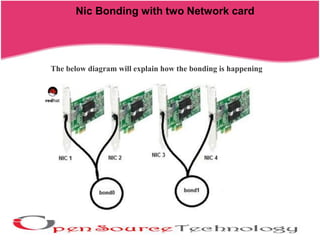
The below diagram will explain how the bonding is happening
Nic Bonding with two Network card
[root@server ~]# cd /etc/sysconfig/network-scripts/
[root@server network-scripts]#cp -p ifcfg-eth0 ifcfg-eth1
[root@server1 network-scripts]# vim ifcfg-eth1
DEVICE=eth1
HWADDR=00:0C:29:0D:AC:14
BOOTPROTO=none
ONBOOT=yes
TYPE=Ethernet
MASTER=bond0
SLAVE=yes
:wq!
[root@server1 network-scripts]# vim ifcfg-eth0
DEVICE=eth0
BOOTPROTO=none
TYPE=Ethernet
HWADDR=00:0C:29:0D:AC:0A
ONBOOT=yes
MASTER=bond0
SLAVE=yes
:wq!
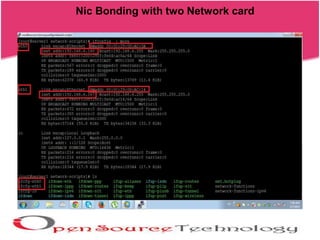
Nic Bonding with two Network card
[root@server1 network-scripts]# vim ifcfg-bond0
DEVICE=bond0
BOOTPROTO=static
ONBOOT=yes
IPADDR=192.168.76.129
NETMASK=255.255.255.0
TYPE=Ethernet
BONDING_OPTS="miimon=100 mode=active-backup primary=eth0 fail_over_mac=1"
:wq!
Configuration for Bond0
Nic Bonding with two Network card
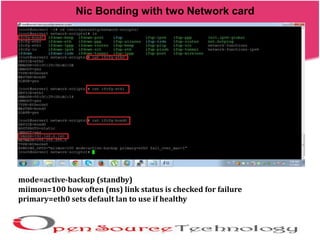
mode=active-backup (standby)
miimon=100 how often (ms) link status is checked for failure
primary=eth0 sets default lan to use if healthy
Nic Bonding with two Network card
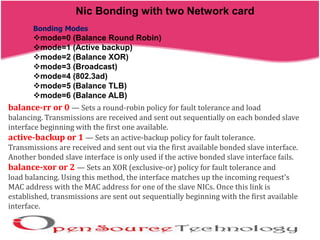
Bonding Modes
mode=0 (Balance Round Robin)
mode=1 (Active backup)
mode=2 (Balance XOR)
mode=3 (Broadcast)
mode=4 (802.3ad)
mode=5 (Balance TLB)
mode=6 (Balance ALB)
balance-rr or 0 — Sets a round-robin policy for fault tolerance and load
balancing. Transmissions are received and sent out sequentially on each bonded slave
interface beginning with the first one available.
active-backup or 1 — Sets an active-backup policy for fault tolerance.
Transmissions are received and sent out via the first available bonded slave interface.
Another bonded slave interface is only used if the active bonded slave interface fails.
balance-xor or 2 — Sets an XOR (exclusive-or) policy for fault tolerance and
load balancing. Using this method, the interface matches up the incoming request's
MAC address with the MAC address for one of the slave NICs. Once this link is
established, transmissions are sent out sequentially beginning with the first available
interface.
Nic Bonding with two Network card
broadcast or 3 — Sets a broadcast policy for fault tolerance. All transmissions
are sent on all slave interfaces.
802.3ad or 4 — Sets an IEEE 802.3ad dynamic link aggregation policy. Creates
aggregation groups that share the same speed and duplex settings. Transmits and
receives on all slaves in the active aggregator. Requires a switch that is 802.3ad
compliant.
balance-tlb or 5 — Sets a Transmit Load Balancing (TLB) policy for fault
tolerance and load balancing. The outgoing traffic is distributed according to the
current load on each slave interface. Incoming traffic is received by the current slave.
If the receiving slave fails, another slave takes over the MAC address of the failed
slave.
balance-alb or 6 — Sets an Active Load Balancing (ALB) policy for fault
tolerance and load balancing. Includes transmit and receive load balancing for IPV4
Nic Bonding with two Network card
# cd /etc/modprobe.d/
[root@server1 modprobe.d]# vim bonding.conf
alias bond0 bonding
:wq!
#modprobe bonding
#reboot
Nic Bonding with two Network card
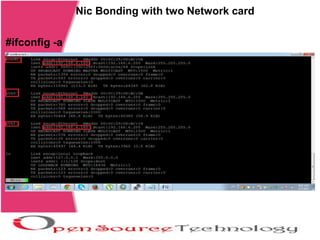
#ifconfig -a
Nic Bonding with two Network card
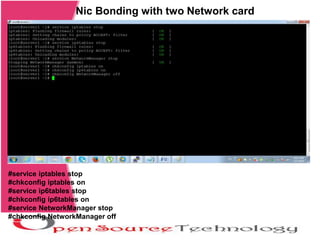
#service iptables stop
#chkconfig iptables on
#service ip6tables stop
#chkconfig ip6tables on
#service NetworkManager stop
#chkconfig NetworkManager off
Nic Bonding with two Network card
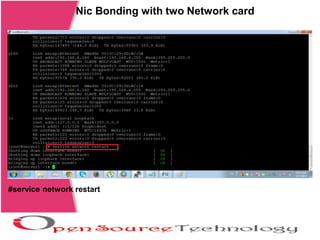
#service network restart
Nic Bonding with two Network card
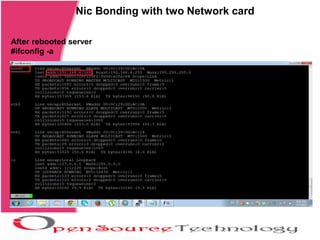
After rebooted server
#ifconfig -a
Nic Bonding with two Network card
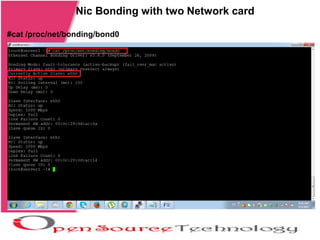
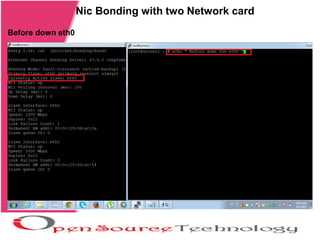
#cat /proc/net/bonding/bond0
Nic Bonding with two Network card
Before down eth0
Nic Bonding with two Network card
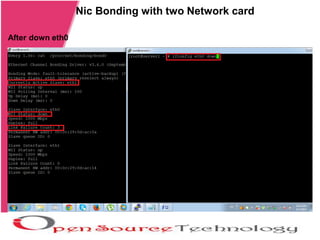
After down eth0
Nic Bonding with two Network card
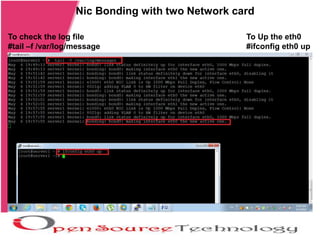
To check the log file
#tail –f /var/log/message
To Up the eth0
#ifconfig eth0 up
Nic Bonding with two Network card
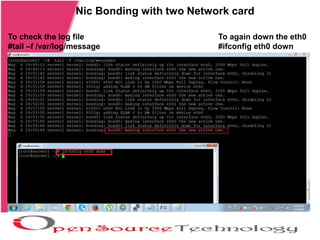
To check the log file
#tail –f /var/log/message
To again down the eth0
#ifconfig eth0 down
Nic Bonding with two Network card
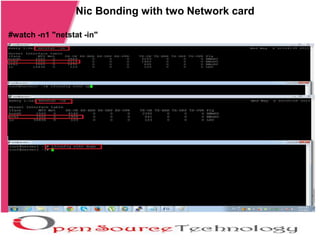
#watch -n1 "netstat -in"
Nic Bonding with two Network card
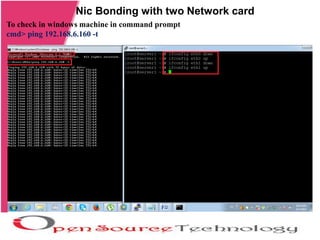
To check in windows machine in command prompt
cmd> ping 192.168.6.160 -t
Nic Bonding with two Network card
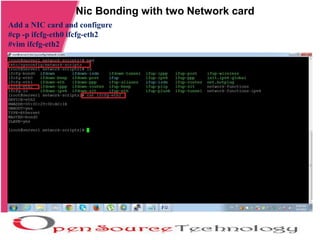
Add a NIC card and configure
#cp -p ifcfg-eth0 ifcfg-eth2
#vim ifcfg-eth2
Nic Bonding with two Network card
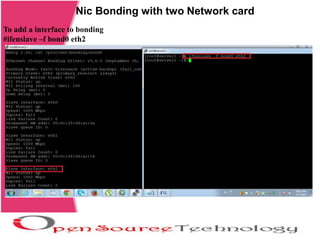
To add a interface to bonding
#ifenslave –f bond0 eth2
Nic Bonding with two Network card
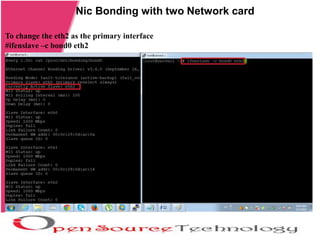
To change the eth2 as the primary interface
#ifenslave –c bond0 eth2
Nic Bonding with two Network card
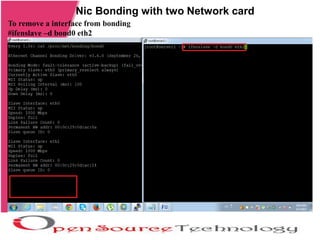
To remove a interface from bonding
#ifenslave –d bond0 eth2
Nic Bonding with two Network card
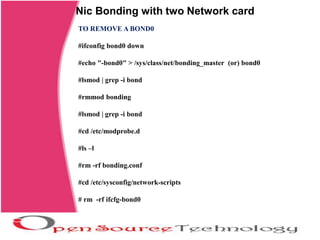
TO REMOVE A BOND0
#ifconfig bond0 down
#echo "-bond0" > /sys/class/net/bonding_master (or) bond0
#lsmod | grep -i bond
#rmmod bonding
#lsmod | grep -i bond
#cd /etc/modprobe.d
#ls –l
#rm -rf bonding.conf
#cd /etc/sysconfig/network-scripts
# rm -rf ifcfg-bond0
THANK YOU
Network Bonding works with server successfully

Nic bonding

  • 1.
    Nic Bonding withtwo Network card REDHAT TRAINING VERSION 6
  • 2.
    Ethernet Channel Bonding EthernetChannel Bonding enables two or more Network Interfaces Card (NIC) to a single virtual NIC card which may increase the bandwidth and provides redundancy of NIC Cards. This is a great way to achieve redundant links, fault tolerance or load balancing networks in production system. If one physical NIC is down or unplugged, it will automatically move resources to other NIC card. Channel/NIC bonding will work with the help of bonding driver in Kernel. We’ll be using two NIC to demonstrate the same How to configure bonding/teaming on Redhat Linux 6 ? Nic Bonding with two Network card
  • 3.
    Nic Bonding withtwo Network card The below diagram will explain how the bonding is happening
  • 4.
    Nic Bonding withtwo Network card
  • 5.
    Nic Bonding withtwo Network card [root@server ~]# cd /etc/sysconfig/network-scripts/ [root@server network-scripts]#cp -p ifcfg-eth0 ifcfg-eth1 [root@server1 network-scripts]# vim ifcfg-eth1 DEVICE=eth1 HWADDR=00:0C:29:0D:AC:14 BOOTPROTO=none ONBOOT=yes TYPE=Ethernet MASTER=bond0 SLAVE=yes :wq! [root@server1 network-scripts]# vim ifcfg-eth0 DEVICE=eth0 BOOTPROTO=none TYPE=Ethernet HWADDR=00:0C:29:0D:AC:0A ONBOOT=yes MASTER=bond0 SLAVE=yes :wq!
  • 6.
    Nic Bonding withtwo Network card [root@server1 network-scripts]# vim ifcfg-bond0 DEVICE=bond0 BOOTPROTO=static ONBOOT=yes IPADDR=192.168.76.129 NETMASK=255.255.255.0 TYPE=Ethernet BONDING_OPTS="miimon=100 mode=active-backup primary=eth0 fail_over_mac=1" :wq! Configuration for Bond0
  • 7.
    Nic Bonding withtwo Network card mode=active-backup (standby) miimon=100 how often (ms) link status is checked for failure primary=eth0 sets default lan to use if healthy
  • 8.
    Nic Bonding withtwo Network card Bonding Modes mode=0 (Balance Round Robin) mode=1 (Active backup) mode=2 (Balance XOR) mode=3 (Broadcast) mode=4 (802.3ad) mode=5 (Balance TLB) mode=6 (Balance ALB) balance-rr or 0 — Sets a round-robin policy for fault tolerance and load balancing. Transmissions are received and sent out sequentially on each bonded slave interface beginning with the first one available. active-backup or 1 — Sets an active-backup policy for fault tolerance. Transmissions are received and sent out via the first available bonded slave interface. Another bonded slave interface is only used if the active bonded slave interface fails. balance-xor or 2 — Sets an XOR (exclusive-or) policy for fault tolerance and load balancing. Using this method, the interface matches up the incoming request's MAC address with the MAC address for one of the slave NICs. Once this link is established, transmissions are sent out sequentially beginning with the first available interface.
  • 9.
    Nic Bonding withtwo Network card broadcast or 3 — Sets a broadcast policy for fault tolerance. All transmissions are sent on all slave interfaces. 802.3ad or 4 — Sets an IEEE 802.3ad dynamic link aggregation policy. Creates aggregation groups that share the same speed and duplex settings. Transmits and receives on all slaves in the active aggregator. Requires a switch that is 802.3ad compliant. balance-tlb or 5 — Sets a Transmit Load Balancing (TLB) policy for fault tolerance and load balancing. The outgoing traffic is distributed according to the current load on each slave interface. Incoming traffic is received by the current slave. If the receiving slave fails, another slave takes over the MAC address of the failed slave. balance-alb or 6 — Sets an Active Load Balancing (ALB) policy for fault tolerance and load balancing. Includes transmit and receive load balancing for IPV4
  • 10.
    Nic Bonding withtwo Network card # cd /etc/modprobe.d/ [root@server1 modprobe.d]# vim bonding.conf alias bond0 bonding :wq! #modprobe bonding #reboot
  • 11.
    Nic Bonding withtwo Network card #ifconfig -a
  • 12.
    Nic Bonding withtwo Network card #service iptables stop #chkconfig iptables on #service ip6tables stop #chkconfig ip6tables on #service NetworkManager stop #chkconfig NetworkManager off
  • 13.
    Nic Bonding withtwo Network card #service network restart
  • 14.
    Nic Bonding withtwo Network card After rebooted server #ifconfig -a
  • 15.
    Nic Bonding withtwo Network card #cat /proc/net/bonding/bond0
  • 16.
    Nic Bonding withtwo Network card Before down eth0
  • 17.
    Nic Bonding withtwo Network card After down eth0
  • 18.
    Nic Bonding withtwo Network card To check the log file #tail –f /var/log/message To Up the eth0 #ifconfig eth0 up
  • 19.
    Nic Bonding withtwo Network card To check the log file #tail –f /var/log/message To again down the eth0 #ifconfig eth0 down
  • 20.
    Nic Bonding withtwo Network card #watch -n1 "netstat -in"
  • 21.
    Nic Bonding withtwo Network card To check in windows machine in command prompt cmd> ping 192.168.6.160 -t
  • 22.
    Nic Bonding withtwo Network card Add a NIC card and configure #cp -p ifcfg-eth0 ifcfg-eth2 #vim ifcfg-eth2
  • 23.
    Nic Bonding withtwo Network card To add a interface to bonding #ifenslave –f bond0 eth2
  • 24.
    Nic Bonding withtwo Network card To change the eth2 as the primary interface #ifenslave –c bond0 eth2
  • 25.
    Nic Bonding withtwo Network card To remove a interface from bonding #ifenslave –d bond0 eth2
  • 26.
    Nic Bonding withtwo Network card TO REMOVE A BOND0 #ifconfig bond0 down #echo "-bond0" > /sys/class/net/bonding_master (or) bond0 #lsmod | grep -i bond #rmmod bonding #lsmod | grep -i bond #cd /etc/modprobe.d #ls –l #rm -rf bonding.conf #cd /etc/sysconfig/network-scripts # rm -rf ifcfg-bond0
  • 27.
    THANK YOU Network Bondingworks with server successfully