VRP Basic Configuration
www.huawei.com
Copyright © 2009 Huawei Technologies Co., Ltd. All rights reserved.
Objectives
Upon completion of this course, you will be able to:
Grasp the basic knowledge to use VRP CLI
Copyright © 2009 Huawei Technologies Co., Ltd. All rights reserved. Page1
Contents
1. Building Configuration Environment
2. VRP Configuration Basis
Copyright © 2009 Huawei Technologies Co., Ltd. All rights reserved. Page2
Building Configuration Environment
Setup via Console
Setup via Telnet
Copyright © 2009 Huawei Technologies Co., Ltd. All rights reserved. Page3
COMMAND LINE INTERFACE
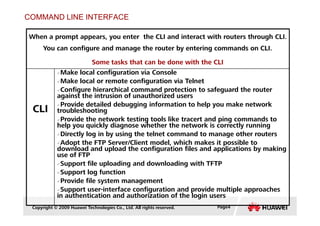
When a prompt appears, you enter the CLI and interact with routers through CLI.
You can configure and manage the router by entering commands on CLI.
Some tasks that can be done with the CLI
CLI
Make local configuration via Console
Make local or remote configuration via Telnet
Configure hierarchical command protection to safeguard the router
against the intrusion of unauthorized users
Provide detailed debugging information to help you make network
troubleshooting
Copyright © 2009 Huawei Technologies Co., Ltd. All rights reserved. Page4
CLI troubleshooting
Provide the network testing tools like tracert and ping commands to
help you quickly diagnose whether the network is correctly running
Directly log in by using the telnet command to manage other routers
Adopt the FTP Server/Client model, which makes it possible to
download and upload the configuration files and applications by making
use of FTP
Support file uploading and downloading with TFTP
Support log function
Provide file system management
Support user-interface configuration and provide multiple approaches
in authentication and authorization of the login users
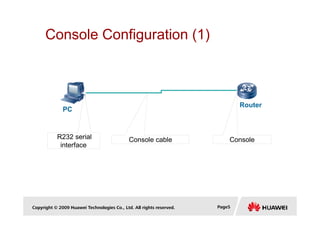
Console Configuration (1)
Router
PC
Copyright © 2009 Huawei Technologies Co., Ltd. All rights reserved. Page5
Console cable
R232 serial
interface
Console
PC
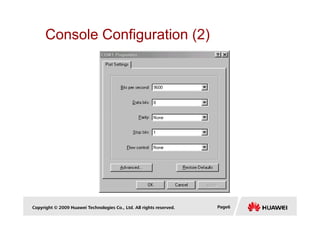
Console Configuration (2)
Copyright © 2009 Huawei Technologies Co., Ltd. All rights reserved. Page6
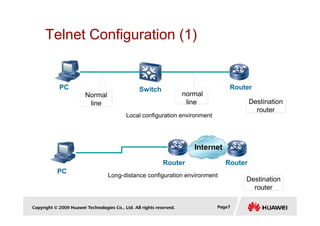
Telnet Configuration (1)
Normal
line Destination
router
PC Switch
normal
line
Local configuration environment
Router
Copyright © 2009 Huawei Technologies Co., Ltd. All rights reserved. Page7
router
Internet
Router
PC
Local configuration environment
Long-distance configuration environment
Destination
router
Router
Telnet Configuration (2)
<Quidway>system-view
[Quidway]interface Ethernet 0/0
[Quidway-Ethernet0/0]ip address 192.168.1.1 255.255.255.0
[Quidway-Ethernet0/0]quit
[Quidway]User-interface vty 0 4
[Quidway-ui-vty0-4]authentication-mode password
[Quidway-ui-vty0-4]set authentication password simple Huawei
[Quidway-ui-vty0-4]user privilege level 3
IP: 192.168.1.2
SM: 255.255.255.0
Ethernet0/0
Copyright © 2009 Huawei Technologies Co., Ltd. All rights reserved. Page8
normal line
PC
L2
Switch
normal line
Destination
router
Router
DG: 192.168.1.1 Ethernet0/0
Contents
1. Building Configuration Environment
2. VRP Configuration Basis
Copyright © 2009 Huawei Technologies Co., Ltd. All rights reserved. Page9
Command View
[Quidway]user-interface vty 0
[Quidway]acl 2000
[Quidway]interface serial 0
system
User interface view
Interface view
ACL view
Copyright © 2009 Huawei Technologies Co., Ltd. All rights reserved. Page10
[Quidway]aaa
[Quidway]acl 2000
[Quidway]ospf
system
ACL view
Routing protocol view
Route policy view
Security view
System-view
[Quidway]
User view
<Quidway>
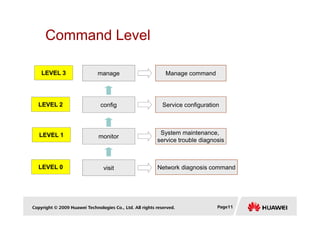
Command Level
config
manage
Service configuration
Manage command
LEVEL 2
LEVEL 2
LEVEL 3
LEVEL 3
Copyright © 2009 Huawei Technologies Co., Ltd. All rights reserved. Page11
visit
monitor
Network diagnosis command
System maintenance,
service trouble diagnosis
LEVEL 0
LEVEL 0
LEVEL 1
LEVEL 1
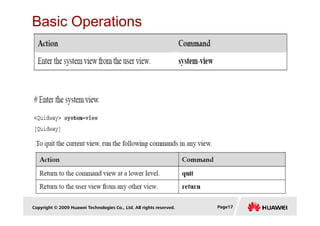
Enter and Quit System View
operation command
Enter the system view from the user view system-view
Return to the user view from the system
view
quit
Copyright © 2009 Huawei Technologies Co., Ltd. All rights reserved. Page12
view
Return to the user view from any other
view
return
<Quidway>system-view
Enter system view, return user view with Ctrl+Z.
[Quidway]
[Quidway]interface Serial 0/0/0
[Quidway-Serial0/0/0]quit
[Quidway]quit
<Quidway>
Command Line Online Help
completeness help
<Quidway> ?
<Quidway> display ?
Command line interface provides the following online help:
Completeness help
Portion help
Copyright © 2009 Huawei Technologies Co., Ltd. All rights reserved. Page13
Command line online help
completeness help
portion help
[Quidway] interface ethernet ?
<Quidway> d?
<Quidway> display h?
Language Mode
operation command
Turn to english mode (default) language-mode english
Turn to chinese mode language-mode chinese
Copyright © 2009 Huawei Technologies Co., Ltd. All rights reserved. Page14
<Quidway>language-mode ?
chinese Chinese environment
english English environment
<Quidway>language-mode chinese
Change language mode, confirm? [Y/N]y
Info:Turn to chinese mode
<Quidway>
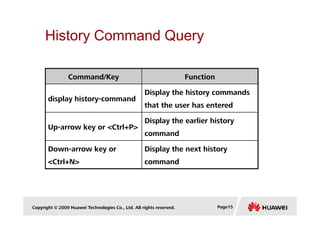
History Command Query
Command/Key Function
display history-command
Display the history commands
that the user has entered
Copyright © 2009 Huawei Technologies Co., Ltd. All rights reserved. Page15
Up-arrow key or <Ctrl+P>
Display the earlier history
command
Down-arrow key or
<Ctrl+N>
Display the next history
command
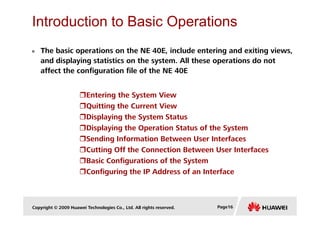
Introduction to Basic Operations
The basic operations on the NE 40E, include entering and exiting views,
and displaying statistics on the system. All these operations do not
affect the configuration file of the NE 40E
Entering the System View
Quitting the Current View
Displaying the System Status
Copyright © 2009 Huawei Technologies Co., Ltd. All rights reserved. Page16
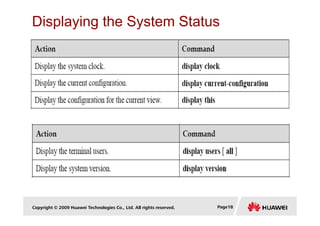
Displaying the System Status
Displaying the Operation Status of the System
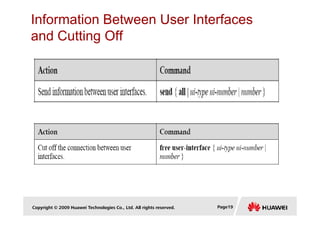
Sending Information Between User Interfaces
Cutting Off the Connection Between User Interfaces
Basic Configurations of the System
Configuring the IP Address of an Interface
Basic Operations
Copyright © 2009 Huawei Technologies Co., Ltd. All rights reserved. Page17
Displaying the System Status
Copyright © 2009 Huawei Technologies Co., Ltd. All rights reserved. Page18
Information Between User Interfaces
and Cutting Off
Copyright © 2009 Huawei Technologies Co., Ltd. All rights reserved. Page19
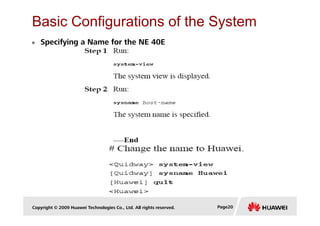
Basic Configurations of the System
Specifying a Name for the NE 40E
Copyright © 2009 Huawei Technologies Co., Ltd. All rights reserved. Page20
Configuring the IP Address of an Interface
[NE40E1]display ip interface brief
*down: administratively down
!down: FIB overload down
(l): loopback
(s): spoofing
The number of interface that is UP in Physical is 6
The number of interface that is DOWN in Physical is 19
The number of interface that is UP in Protocol is 6
The number of interface that is DOWN in Protocol is 19
Copyright © 2009 Huawei Technologies Co., Ltd. All rights reserved. Page21
Interface IP Address/Mask Physical Protocol
Aux0/0/1 unassigned *down down
GigabitEthernet0/0/0 unassigned down down
GigabitEthernet7/0/0 unassigned down down
GigabitEthernet7/0/4 unassigned down down
GigabitEthernet7/0/5 unassigned *down down
GigabitEthernet7/0/6 unassigned *down down
GigabitEthernet7/0/7 unassigned down down
GigabitEthernet7/0/8 unassigned *down down
GigabitEthernet7/0/9 unassigned *down down
Checking the Configuration
[NE40E1]interface GigabitEthernet0/0/0
[NE40E1-GigabitEthernet0/0/0]ip address 172.16.1.1 255.255.255.0
Configuring the IP Address of an
Interface
Copyright © 2009 Huawei Technologies Co., Ltd. All rights reserved. Page22
Checking the Configuration
[NE40E1]display ip interface brief GigabitEthernet0/0/0
*down: administratively down
!down: FIB overload down
(l): loopback
(s): spoofing
Interface IP Address/Mask Physical Protocol
GigabitEthernet0/0/0 172.16.1.1/24 up up
[NE40E1]
Configuring Telnet Users
VTY User Interfaces
user-interface vty first-number [ last-number ]
[Quidway] user-interface vty 0 4
Configuring User Authentication mode “NONE”
authentication-mode
[Quidway-user-interface-vty0-4] authentication-mode none
Copyright © 2009 Huawei Technologies Co., Ltd. All rights reserved. Page23
Configuring Password Authentication
[Quidway-user-interface-vty0-4] authentication-mode none
With NONE the user can log in to the NE directly without being authenticated.
authentication-mode
[Quidway-user-interface-vty0-4] authentication-mode password
[Quidway-user-interface-vty0-4] set authentication password { cipher |
simple } password
The authentication password for login user is set.
Configuring AAA Local Authentication
authentication-mode aaa
[Quidway-user-interface-vty0-4] authentication-mode aaa
Go to the AAA view
aaa
[Quidway] aaa
Authentication mode set to the AAA mode.
Copyright © 2009 Huawei Technologies Co., Ltd. All rights reserved. Page24
Configure local user name, password, service-type and level
[Quidway] aaa
local-user user-name password { simple | cipher } password
local-user user-name service-type { ftp | ppp | ssh | telnet | terminal }
local-user user-name level level
[Quidway-aaa] local-user ADMIN password simple Admin123
[Quidway-aaa] local-user ADMIN service-type telnet
[Quidway-aaa] local-user ADMIN level 3
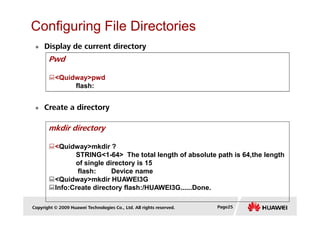
Configuring File Directories
Display de current directory
Pwd
<Quidway>pwd
flash:
Create a directory
Copyright © 2009 Huawei Technologies Co., Ltd. All rights reserved. Page25
mkdir directory
<Quidway>mkdir ?
STRING<1-64> The total length of absolute path is 64,the length
of single directory is 15
flash: Device name
<Quidway>mkdir HUAWEI3G
Info:Create directory flash:/HUAWEI3G......Done.
Configuring File Directories
Change of directory
cd directory
<Quidway>cd HUAWEI3G
<Quidway>pwd
flash:/HUAWEI3G
List a directory
dir [ /all ] [ filename | flash: ]
<Quidway>dir
Copyright © 2009 Huawei Technologies Co., Ltd. All rights reserved. Page26
Directory of flash:/
0 -rw- 12785836 May 21 2009 11:12:47 ne200v100r005c02b236.cc
1 -rw- 609 Dec 04 2009 14:10:19 vrpcfg.zip
2 drw- - Dec 07 2009 10:01:29 huawei3g
29636 KB total (17016 KB free)
<Quidway>dir flash:/huawei3g
Directory of flash:/
0 drw- - Dec 07 2009 10:01:29 huawei3g
29636 KB total (17016 KB free)
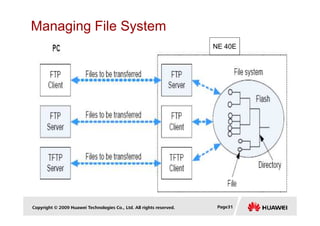
Managing File System
Remove a Directory
rmdir directory
<Quidway>rm flash:/huawei3g
Remove directory flash:/huawei3g?[Y/N]:y
%Removing directory flash:/huawei3g......Done!
Copy files
copy source-filename destination-filename
<Quidway>copy vrpcfg.zip BACKUPvrpcfg.zip
Copy flash:/vrpcfg.zip to flash:/backupvrpcfg.zip?[Y/N]:y
Copyright © 2009 Huawei Technologies Co., Ltd. All rights reserved. Page27
Rename files
Copy flash:/vrpcfg.zip to flash:/backupvrpcfg.zip?[Y/N]:y
100% complete
Info:Copied file flash:/vrpcfg.zip to flash:/backupvrpcfg.zip...Done
rename source-filename destination-filename
<Quidway>rename backupvrpcfg.zip copiavrpcfg.zip
Rename flash:/huawei3g/backupvrpcfg.zip to
flash:/huawei3g/copiavrpcfg.zip?[Y/N]:y
Info:Rename file flash:/huawei3g/backupvrpcfg.zip to
flash:/huawei3g/copiavr pcfg.zip ......Done.
Managing File System
Display de contents of a file
more filename
<Quidway>more prueba.txt
Prueba de conexion de PC a NE
Move files
move source-filename destination-filename
<Quidway>move backupvrpcfg.zip flash:/huawei3g
Copyright © 2009 Huawei Technologies Co., Ltd. All rights reserved. Page28
Warning: Move file flash:/backupvrpcfg.zip to
flash:/huawei3g/backupvrpcfg.zip ?[Y/N]:y
Info: File flash:/backupvrpcfg.zip has been moved to
flash:/huawei3g/backupvrpcfg.zip.
<Quidway>cd huawei3g
<Quidway>dir
Directory of flash:/huawei3g/
0 -rw- 609 Dec 07 2009 10:12:46 backupvrpcfg.zip
29636 KB total (17012 KB free)
Managing File System
Delete a file
delete { filename | flash: }
<Quidway>delete copiavrpcfg.zip
Delete flash:/huawei3g/copiavrpcfg.zip?[Y/N]:y
%Deleting file flash:/huawei3g/copiavrpcfg.zip...Done!
Undelete a file
undelete filename
<Quidway>dir
Copyright © 2009 Huawei Technologies Co., Ltd. All rights reserved. Page29
Info:File can't be found in the directory
29636 KB total (17008 KB free)
<Quidway>pwd
flash:/huawei3g
<Quidway>undelete flash:/huawei3g/copiavrpcfg.zip
Undelete flash:/huawei3g/copiavrpcfg.zip?[Y/N]:y
%Undeleted file flash:/huawei3g/copiavrpcfg.zip.
<Quidway>dir
Directory of flash:/huawei3g/
0 -rw- 609 Dec 07 2009 10:23:07 copiavrpcfg.zip
Managing File System
Delete files permanently.
delete /unreserved { filename | flash: }
<Quidway>delete /unreserved copiavrpcfg.zip
The contents cannot be recycled!!! Delete
flash:/huawei3g/copiavrpcfg.zip?[Y/N]:y
%Deleting file flash:/huawei3g/copiavrpcfg.zip...
Deleting file permanently from flash will take a long time if
needed......Done!
Copyright © 2009 Huawei Technologies Co., Ltd. All rights reserved. Page30
Deleted permanently files in the recycle bin
reset recycle-bin [ filename ]
<Quidway>reset recycle-bin flash:/huawei3g/backupvrpcfg.zip
Squeeze flash:/huawei3g/backupvrpcfg.zip ?[Y/N]:y
Clear file from flash will take a long time if needed.....Done!.
%Cleared file flash:/huawei3g/backupvrpcfg.zip.
Managing File System
NE 40E
Copyright © 2009 Huawei Technologies Co., Ltd. All rights reserved. Page31
Transferring Files Through FTP
(with the NE40E Acting as the FTP Server)
Copyright © 2009 Huawei Technologies Co., Ltd. All rights reserved. Page32
Enabling the FTP Server
ftp server enable
[Quidway]ftp server enable
Info:Start FTP server
Transferring Files Through FTP
local-user user-name password { cipher | simple } [define password ]
Configuring Authentication and Authorization for an FTP Login User
An FTP user must be created in the aaa view configuring the ftp
directory for this user and the ftp service.
Copyright © 2009 Huawei Technologies Co., Ltd. All rights reserved. Page33
local-user user-name password { cipher | simple } [define password ]
local-user user-name ftp-directory [directory]
local-user user-name service-type [ftp]
[Quidway] aaa
[Quidway-aaa]local-user FTPADMIN password simple ftpadmin123
[Quidway-aaa]local-user FTPADMIN ftp-directory flash:/
[Quidway-aaa]local-user FTPADMIN service-type ftp
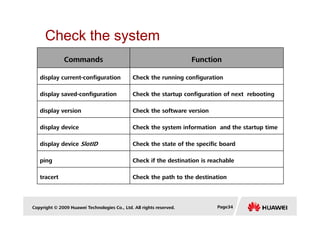
Check the system
Commands Function
display current-configuration Check the running configuration
display saved-configuration Check the startup configuration of next rebooting
display version Check the software version
Copyright © 2009 Huawei Technologies Co., Ltd. All rights reserved. Page34
display version Check the software version
display device Check the system information and the startup time
display device SlotID Check the state of the specific board
ping Check if the destination is reachable
tracert Check the path to the destination
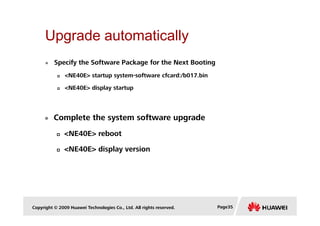
Upgrade automatically
Specify the Software Package for the Next Booting
<NE40E> startup system-software cfcard:/b017.bin
<NE40E> display startup
Complete the system software upgrade
Copyright © 2009 Huawei Technologies Co., Ltd. All rights reserved. Page35
Complete the system software upgrade
<NE40E> reboot
<NE40E> display version
Thank you
www.huawei.com
www.huawei.com

2) VRP Basic Configuration.pdf

  • 1.
    VRP Basic Configuration www.huawei.com Copyright© 2009 Huawei Technologies Co., Ltd. All rights reserved.
  • 2.
    Objectives Upon completion ofthis course, you will be able to: Grasp the basic knowledge to use VRP CLI Copyright © 2009 Huawei Technologies Co., Ltd. All rights reserved. Page1
  • 3.
    Contents 1. Building ConfigurationEnvironment 2. VRP Configuration Basis Copyright © 2009 Huawei Technologies Co., Ltd. All rights reserved. Page2
  • 4.
    Building Configuration Environment Setupvia Console Setup via Telnet Copyright © 2009 Huawei Technologies Co., Ltd. All rights reserved. Page3
  • 5.
    COMMAND LINE INTERFACE Whena prompt appears, you enter the CLI and interact with routers through CLI. You can configure and manage the router by entering commands on CLI. Some tasks that can be done with the CLI CLI Make local configuration via Console Make local or remote configuration via Telnet Configure hierarchical command protection to safeguard the router against the intrusion of unauthorized users Provide detailed debugging information to help you make network troubleshooting Copyright © 2009 Huawei Technologies Co., Ltd. All rights reserved. Page4 CLI troubleshooting Provide the network testing tools like tracert and ping commands to help you quickly diagnose whether the network is correctly running Directly log in by using the telnet command to manage other routers Adopt the FTP Server/Client model, which makes it possible to download and upload the configuration files and applications by making use of FTP Support file uploading and downloading with TFTP Support log function Provide file system management Support user-interface configuration and provide multiple approaches in authentication and authorization of the login users
  • 6.
    Console Configuration (1) Router PC Copyright© 2009 Huawei Technologies Co., Ltd. All rights reserved. Page5 Console cable R232 serial interface Console PC
  • 7.
    Console Configuration (2) Copyright© 2009 Huawei Technologies Co., Ltd. All rights reserved. Page6
  • 8.
    Telnet Configuration (1) Normal lineDestination router PC Switch normal line Local configuration environment Router Copyright © 2009 Huawei Technologies Co., Ltd. All rights reserved. Page7 router Internet Router PC Local configuration environment Long-distance configuration environment Destination router Router
  • 9.
    Telnet Configuration (2) <Quidway>system-view [Quidway]interfaceEthernet 0/0 [Quidway-Ethernet0/0]ip address 192.168.1.1 255.255.255.0 [Quidway-Ethernet0/0]quit [Quidway]User-interface vty 0 4 [Quidway-ui-vty0-4]authentication-mode password [Quidway-ui-vty0-4]set authentication password simple Huawei [Quidway-ui-vty0-4]user privilege level 3 IP: 192.168.1.2 SM: 255.255.255.0 Ethernet0/0 Copyright © 2009 Huawei Technologies Co., Ltd. All rights reserved. Page8 normal line PC L2 Switch normal line Destination router Router DG: 192.168.1.1 Ethernet0/0
  • 10.
    Contents 1. Building ConfigurationEnvironment 2. VRP Configuration Basis Copyright © 2009 Huawei Technologies Co., Ltd. All rights reserved. Page9
  • 11.
    Command View [Quidway]user-interface vty0 [Quidway]acl 2000 [Quidway]interface serial 0 system User interface view Interface view ACL view Copyright © 2009 Huawei Technologies Co., Ltd. All rights reserved. Page10 [Quidway]aaa [Quidway]acl 2000 [Quidway]ospf system ACL view Routing protocol view Route policy view Security view System-view [Quidway] User view <Quidway>
  • 12.
    Command Level config manage Service configuration Managecommand LEVEL 2 LEVEL 2 LEVEL 3 LEVEL 3 Copyright © 2009 Huawei Technologies Co., Ltd. All rights reserved. Page11 visit monitor Network diagnosis command System maintenance, service trouble diagnosis LEVEL 0 LEVEL 0 LEVEL 1 LEVEL 1
  • 13.
    Enter and QuitSystem View operation command Enter the system view from the user view system-view Return to the user view from the system view quit Copyright © 2009 Huawei Technologies Co., Ltd. All rights reserved. Page12 view Return to the user view from any other view return <Quidway>system-view Enter system view, return user view with Ctrl+Z. [Quidway] [Quidway]interface Serial 0/0/0 [Quidway-Serial0/0/0]quit [Quidway]quit <Quidway>
  • 14.
    Command Line OnlineHelp completeness help <Quidway> ? <Quidway> display ? Command line interface provides the following online help: Completeness help Portion help Copyright © 2009 Huawei Technologies Co., Ltd. All rights reserved. Page13 Command line online help completeness help portion help [Quidway] interface ethernet ? <Quidway> d? <Quidway> display h?
  • 15.
    Language Mode operation command Turnto english mode (default) language-mode english Turn to chinese mode language-mode chinese Copyright © 2009 Huawei Technologies Co., Ltd. All rights reserved. Page14 <Quidway>language-mode ? chinese Chinese environment english English environment <Quidway>language-mode chinese Change language mode, confirm? [Y/N]y Info:Turn to chinese mode <Quidway>
  • 16.
    History Command Query Command/KeyFunction display history-command Display the history commands that the user has entered Copyright © 2009 Huawei Technologies Co., Ltd. All rights reserved. Page15 Up-arrow key or <Ctrl+P> Display the earlier history command Down-arrow key or <Ctrl+N> Display the next history command
  • 17.
    Introduction to BasicOperations The basic operations on the NE 40E, include entering and exiting views, and displaying statistics on the system. All these operations do not affect the configuration file of the NE 40E Entering the System View Quitting the Current View Displaying the System Status Copyright © 2009 Huawei Technologies Co., Ltd. All rights reserved. Page16 Displaying the System Status Displaying the Operation Status of the System Sending Information Between User Interfaces Cutting Off the Connection Between User Interfaces Basic Configurations of the System Configuring the IP Address of an Interface
  • 18.
    Basic Operations Copyright ©2009 Huawei Technologies Co., Ltd. All rights reserved. Page17
  • 19.
    Displaying the SystemStatus Copyright © 2009 Huawei Technologies Co., Ltd. All rights reserved. Page18
  • 20.
    Information Between UserInterfaces and Cutting Off Copyright © 2009 Huawei Technologies Co., Ltd. All rights reserved. Page19
  • 21.
    Basic Configurations ofthe System Specifying a Name for the NE 40E Copyright © 2009 Huawei Technologies Co., Ltd. All rights reserved. Page20
  • 22.
    Configuring the IPAddress of an Interface [NE40E1]display ip interface brief *down: administratively down !down: FIB overload down (l): loopback (s): spoofing The number of interface that is UP in Physical is 6 The number of interface that is DOWN in Physical is 19 The number of interface that is UP in Protocol is 6 The number of interface that is DOWN in Protocol is 19 Copyright © 2009 Huawei Technologies Co., Ltd. All rights reserved. Page21 Interface IP Address/Mask Physical Protocol Aux0/0/1 unassigned *down down GigabitEthernet0/0/0 unassigned down down GigabitEthernet7/0/0 unassigned down down GigabitEthernet7/0/4 unassigned down down GigabitEthernet7/0/5 unassigned *down down GigabitEthernet7/0/6 unassigned *down down GigabitEthernet7/0/7 unassigned down down GigabitEthernet7/0/8 unassigned *down down GigabitEthernet7/0/9 unassigned *down down
  • 23.
    Checking the Configuration [NE40E1]interfaceGigabitEthernet0/0/0 [NE40E1-GigabitEthernet0/0/0]ip address 172.16.1.1 255.255.255.0 Configuring the IP Address of an Interface Copyright © 2009 Huawei Technologies Co., Ltd. All rights reserved. Page22 Checking the Configuration [NE40E1]display ip interface brief GigabitEthernet0/0/0 *down: administratively down !down: FIB overload down (l): loopback (s): spoofing Interface IP Address/Mask Physical Protocol GigabitEthernet0/0/0 172.16.1.1/24 up up [NE40E1]
  • 24.
    Configuring Telnet Users VTYUser Interfaces user-interface vty first-number [ last-number ] [Quidway] user-interface vty 0 4 Configuring User Authentication mode “NONE” authentication-mode [Quidway-user-interface-vty0-4] authentication-mode none Copyright © 2009 Huawei Technologies Co., Ltd. All rights reserved. Page23 Configuring Password Authentication [Quidway-user-interface-vty0-4] authentication-mode none With NONE the user can log in to the NE directly without being authenticated. authentication-mode [Quidway-user-interface-vty0-4] authentication-mode password [Quidway-user-interface-vty0-4] set authentication password { cipher | simple } password The authentication password for login user is set.
  • 25.
    Configuring AAA LocalAuthentication authentication-mode aaa [Quidway-user-interface-vty0-4] authentication-mode aaa Go to the AAA view aaa [Quidway] aaa Authentication mode set to the AAA mode. Copyright © 2009 Huawei Technologies Co., Ltd. All rights reserved. Page24 Configure local user name, password, service-type and level [Quidway] aaa local-user user-name password { simple | cipher } password local-user user-name service-type { ftp | ppp | ssh | telnet | terminal } local-user user-name level level [Quidway-aaa] local-user ADMIN password simple Admin123 [Quidway-aaa] local-user ADMIN service-type telnet [Quidway-aaa] local-user ADMIN level 3
  • 26.
    Configuring File Directories Displayde current directory Pwd <Quidway>pwd flash: Create a directory Copyright © 2009 Huawei Technologies Co., Ltd. All rights reserved. Page25 mkdir directory <Quidway>mkdir ? STRING<1-64> The total length of absolute path is 64,the length of single directory is 15 flash: Device name <Quidway>mkdir HUAWEI3G Info:Create directory flash:/HUAWEI3G......Done.
  • 27.
    Configuring File Directories Changeof directory cd directory <Quidway>cd HUAWEI3G <Quidway>pwd flash:/HUAWEI3G List a directory dir [ /all ] [ filename | flash: ] <Quidway>dir Copyright © 2009 Huawei Technologies Co., Ltd. All rights reserved. Page26 Directory of flash:/ 0 -rw- 12785836 May 21 2009 11:12:47 ne200v100r005c02b236.cc 1 -rw- 609 Dec 04 2009 14:10:19 vrpcfg.zip 2 drw- - Dec 07 2009 10:01:29 huawei3g 29636 KB total (17016 KB free) <Quidway>dir flash:/huawei3g Directory of flash:/ 0 drw- - Dec 07 2009 10:01:29 huawei3g 29636 KB total (17016 KB free)
  • 28.
    Managing File System Removea Directory rmdir directory <Quidway>rm flash:/huawei3g Remove directory flash:/huawei3g?[Y/N]:y %Removing directory flash:/huawei3g......Done! Copy files copy source-filename destination-filename <Quidway>copy vrpcfg.zip BACKUPvrpcfg.zip Copy flash:/vrpcfg.zip to flash:/backupvrpcfg.zip?[Y/N]:y Copyright © 2009 Huawei Technologies Co., Ltd. All rights reserved. Page27 Rename files Copy flash:/vrpcfg.zip to flash:/backupvrpcfg.zip?[Y/N]:y 100% complete Info:Copied file flash:/vrpcfg.zip to flash:/backupvrpcfg.zip...Done rename source-filename destination-filename <Quidway>rename backupvrpcfg.zip copiavrpcfg.zip Rename flash:/huawei3g/backupvrpcfg.zip to flash:/huawei3g/copiavrpcfg.zip?[Y/N]:y Info:Rename file flash:/huawei3g/backupvrpcfg.zip to flash:/huawei3g/copiavr pcfg.zip ......Done.
  • 29.
    Managing File System Displayde contents of a file more filename <Quidway>more prueba.txt Prueba de conexion de PC a NE Move files move source-filename destination-filename <Quidway>move backupvrpcfg.zip flash:/huawei3g Copyright © 2009 Huawei Technologies Co., Ltd. All rights reserved. Page28 Warning: Move file flash:/backupvrpcfg.zip to flash:/huawei3g/backupvrpcfg.zip ?[Y/N]:y Info: File flash:/backupvrpcfg.zip has been moved to flash:/huawei3g/backupvrpcfg.zip. <Quidway>cd huawei3g <Quidway>dir Directory of flash:/huawei3g/ 0 -rw- 609 Dec 07 2009 10:12:46 backupvrpcfg.zip 29636 KB total (17012 KB free)
  • 30.
    Managing File System Deletea file delete { filename | flash: } <Quidway>delete copiavrpcfg.zip Delete flash:/huawei3g/copiavrpcfg.zip?[Y/N]:y %Deleting file flash:/huawei3g/copiavrpcfg.zip...Done! Undelete a file undelete filename <Quidway>dir Copyright © 2009 Huawei Technologies Co., Ltd. All rights reserved. Page29 Info:File can't be found in the directory 29636 KB total (17008 KB free) <Quidway>pwd flash:/huawei3g <Quidway>undelete flash:/huawei3g/copiavrpcfg.zip Undelete flash:/huawei3g/copiavrpcfg.zip?[Y/N]:y %Undeleted file flash:/huawei3g/copiavrpcfg.zip. <Quidway>dir Directory of flash:/huawei3g/ 0 -rw- 609 Dec 07 2009 10:23:07 copiavrpcfg.zip
  • 31.
    Managing File System Deletefiles permanently. delete /unreserved { filename | flash: } <Quidway>delete /unreserved copiavrpcfg.zip The contents cannot be recycled!!! Delete flash:/huawei3g/copiavrpcfg.zip?[Y/N]:y %Deleting file flash:/huawei3g/copiavrpcfg.zip... Deleting file permanently from flash will take a long time if needed......Done! Copyright © 2009 Huawei Technologies Co., Ltd. All rights reserved. Page30 Deleted permanently files in the recycle bin reset recycle-bin [ filename ] <Quidway>reset recycle-bin flash:/huawei3g/backupvrpcfg.zip Squeeze flash:/huawei3g/backupvrpcfg.zip ?[Y/N]:y Clear file from flash will take a long time if needed.....Done!. %Cleared file flash:/huawei3g/backupvrpcfg.zip.
  • 32.
    Managing File System NE40E Copyright © 2009 Huawei Technologies Co., Ltd. All rights reserved. Page31
  • 33.
    Transferring Files ThroughFTP (with the NE40E Acting as the FTP Server) Copyright © 2009 Huawei Technologies Co., Ltd. All rights reserved. Page32 Enabling the FTP Server ftp server enable [Quidway]ftp server enable Info:Start FTP server
  • 34.
    Transferring Files ThroughFTP local-user user-name password { cipher | simple } [define password ] Configuring Authentication and Authorization for an FTP Login User An FTP user must be created in the aaa view configuring the ftp directory for this user and the ftp service. Copyright © 2009 Huawei Technologies Co., Ltd. All rights reserved. Page33 local-user user-name password { cipher | simple } [define password ] local-user user-name ftp-directory [directory] local-user user-name service-type [ftp] [Quidway] aaa [Quidway-aaa]local-user FTPADMIN password simple ftpadmin123 [Quidway-aaa]local-user FTPADMIN ftp-directory flash:/ [Quidway-aaa]local-user FTPADMIN service-type ftp
  • 35.
    Check the system CommandsFunction display current-configuration Check the running configuration display saved-configuration Check the startup configuration of next rebooting display version Check the software version Copyright © 2009 Huawei Technologies Co., Ltd. All rights reserved. Page34 display version Check the software version display device Check the system information and the startup time display device SlotID Check the state of the specific board ping Check if the destination is reachable tracert Check the path to the destination
  • 36.
    Upgrade automatically Specify theSoftware Package for the Next Booting <NE40E> startup system-software cfcard:/b017.bin <NE40E> display startup Complete the system software upgrade Copyright © 2009 Huawei Technologies Co., Ltd. All rights reserved. Page35 Complete the system software upgrade <NE40E> reboot <NE40E> display version
  • 37.