Leveraging Your CMMS – From Selection to Daily Use
John Gould
Sr. Principal Consultant, JFC & Associates
Learning Objectives:
1. Identify the proper selection criteria for a
CMMS
2. Establish the tools to aide in defining your
CMMS functional requirements
3. Describe the difference between integration
and enterprise application integration
4. List the best practice considerations for CMMS
Food for thought…
You cannot manage something you cannot control.
You cannot control something you cannot measure.
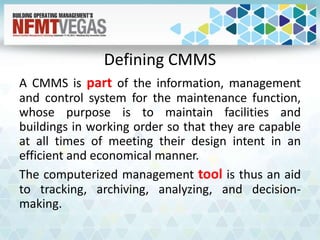
Defining CMMS
A CMMS is part of the information, management
and control system for the maintenance function,
whose purpose is to maintain facilities and
buildings in working order so that they are capable
at all times of meeting their design intent in an
efficient and economical manner.
The computerized management tool is thus an aid
to tracking, archiving, analyzing, and decision-
making.
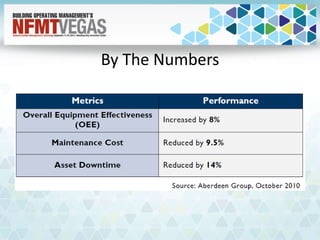
By The Numbers
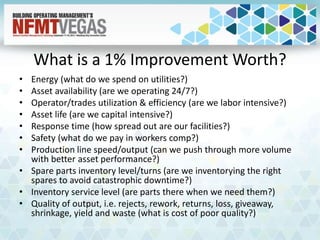
What is a 1% Improvement Worth?
• Energy (what do we spend on utilities?)
• Asset availability (are we operating 24/7?)
• Operator/trades utilization & efficiency (are we labor intensive?)
• Asset life (are we capital intensive?)
• Response time (how spread out are our facilities?)
• Safety (what do we pay in workers comp?)
• Production line speed/output (can we push through more volume
with better asset performance?)
• Spare parts inventory level/turns (are we inventorying the right
spares to avoid catastrophic downtime?)
• Inventory service level (are parts there when we need them?)
• Quality of output, i.e. rejects, rework, returns, loss, giveaway,
shrinkage, yield and waste (what is cost of poor quality?)
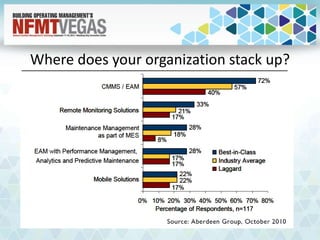
Where does your organization stack up?
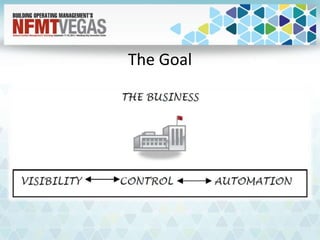
The Goal
Start with a SMARTER Goal
• Specific
• Measurable
• Attainable
• Relevant
• Timely
• Evaluate
• Reevaluate
Benchmark
You need to know where you are now, to know
if you are getting where you want to be.
FAILING TO PLAN = PLANNING TO FAIL
Selection Criteria
• Develop the selection committee
– Functional, technical and managerial
• Review current system
• Review business processes
• Homework – research alternatives
• Engage all users who ‘touch’ the CMMS
• Organizational Analysis – Top level view of the
organizational processes mapped to current system
• Define data deliverables (reports, KPI’s, external
analysis)
Selection Criteria
• Define new key requirements (must haves)
• Determine mobility roadmap (if not yet
determined/being used)
• Communicate the vision with all the stakeholders
• Field Trips – visit similar/leading practice sites with
various CMMS in place
• Request onsite demonstrations from Vendors
• Define requirements for RFP
– Do you need to have a system capable of integrating with
other enterprise level systems?
• Put out to bid / up for recommendation
Integrations vs. Enterprise Application Integration
• Integrations
– The term data integration refers to reducing data
redundancy and establishing "links" (relationships)
between data objects in order to get to all of the data
that was previously not easily accessible.
• EAI
– EAI stands for Enterprise Application Integration. EAI is
middleware that allows one application or database to
"communicate" with another application or database,
which creates a "bridge" between existing systems.
Enterprise Application Integration
• Enterprise Application Integration is important
only if you’re willing to develop the process
• Valuable when performing real-time analytics
• Benefits for financial integrations (billing,
internal and external invoicing, inventory)
• Takes multiple sources of data entry and
reduces to one location to be consumed by
multiple systems.
Functional Requirements
• What is your business and the processes that surround
the maintenance function?
• Do you require mobility in your workforce?
• What type of reporting do you need to make
information based maintenance decisions?
• Who is managing the data and data entry/validation
process?
• What type of real time analytics are you performing?
• Do you require integrations with other systems?
• Are you using other tools currently that could be
combined into a single platform?
Defining Functional Requirements
• Establish Key Stakeholders – communicate the
desire to implement/change CMMS
• Coffee sessions / cross functional
• Whiteboard sessions
• Flowcharts of current business process
• Flowcharts of desired business process
improvements
• Establish standards for Data
– Needs to happen prior to installation
• Communication
Closing Thoughts on Selection
• Implementing or upgrading a CMMS is as much a
technology project as it is a change management
project.
• Most organizations only realize 9% of the full
functionality of the CMMS due to a variety of different
factors.
– First on the list – those who implement not considering the
impact to the culture of the organization.
• Take the time to make the project as much about the
function of the business process as you do the
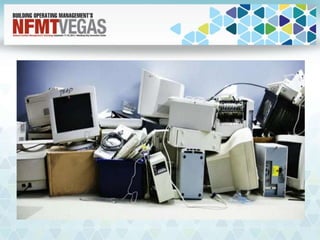
technology behind it. If not you’ll end up with…
Implementation
• Get buy in and commitment from management
– Both financial and attitude
• Define requirements including goals,
expectations, hardware, and timelines.
– Down to the team member level
– Accountability is key
• Provide visibility into the project
– Set project milestones that everyone can see
– Shared documentation
Implementation
• Training – ensure that you have the right blend of
training for the right people at the right time
• Documentation – document everything that you
do! Process, agendas, schedules. The good and
the bad!
• Go Live with the system when you are absolutely
ready, not just a date that you pick.
• Continuous improvement: Review, renew, refine,
and customize.
Important Considerations
• Define needs and requirements clearly
• Involve the IT department early
• Evaluate all options and alternatives
• Data conversion (transfer between systems)
– Both level of effort and costs associated with bringing data to the
system
• Time to Develop
• Perform a high amount of testing prior to rollout
• Avoid bad legacy data brought to new system
• Training…and more training!
– Not only training but timely training
• Explore the use of external professional services
• Consider the importance of a 3 year CMMS ‘Master Plan’
Always moving forward…
Yesterday's Excellence
is
Today's Standard
and
Tomorrow's Mediocrity
Leading The Way
• Web Based Applications
• Asset Hierarchy
• Spare Parts Management
• Work Order Generation
– Automated? Phone Call? EAI?
• Transparency and Access To Information
• Warranty Tracking
• Procurement and Strategic Sourcing
• Credentials and Qualifications Management
• Lockout/Tagout/Hazards and Precautions and Safety Plans
• Integration With Mapping/GIS (Google/Bing Maps/ESRI)
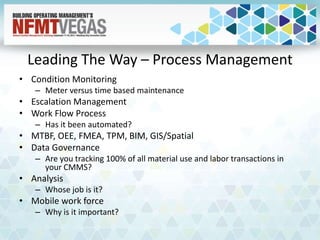
Leading The Way – Process Management
• Condition Monitoring
– Meter versus time based maintenance
• Escalation Management
• Work Flow Process
– Has it been automated?
• MTBF, OEE, FMEA, TPM, BIM, GIS/Spatial
• Data Governance
– Are you tracking 100% of all material use and labor transactions in
your CMMS?
• Analysis
– Whose job is it?
• Mobile work force
– Why is it important?
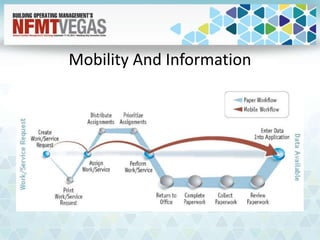
Mobility And Information
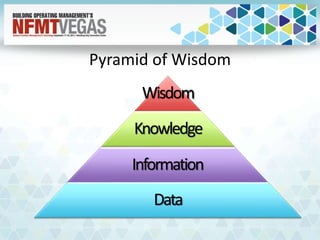
Pyramid of Wisdom
Wisdom
Knowledge
Information
Data
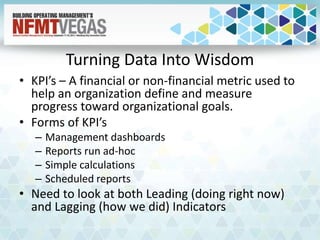
Turning Data Into Wisdom
• KPI’s – A financial or non-financial metric used to
help an organization define and measure
progress toward organizational goals.
• Forms of KPI’s
– Management dashboards
– Reports run ad-hoc
– Simple calculations
– Scheduled reports
• Need to look at both Leading (doing right now)
and Lagging (how we did) Indicators
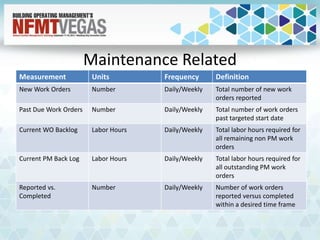
Maintenance Related
Measurement Units Frequency Definition
New Work Orders Number Daily/Weekly Total number of new work
orders reported
Past Due Work Orders Number Daily/Weekly Total number of work orders
past targeted start date
Current WO Backlog Labor Hours Daily/Weekly Total labor hours required for
all remaining non PM work
orders
Current PM Back Log Labor Hours Daily/Weekly Total labor hours required for
all outstanding PM work
orders
Reported vs.
Completed
Number Daily/Weekly Number of work orders
reported versus completed
within a desired time frame
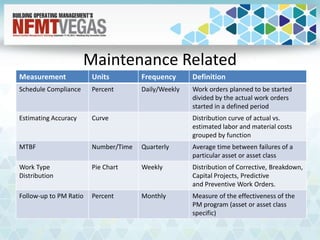
Maintenance Related
Measurement Units Frequency Definition
Schedule Compliance Percent Daily/Weekly Work orders planned to be started
divided by the actual work orders
started in a defined period
Estimating Accuracy Curve Distribution curve of actual vs.
estimated labor and material costs
grouped by function
MTBF Number/Time Quarterly Average time between failures of a
particular asset or asset class
Work Type
Distribution
Pie Chart Weekly Distribution of Corrective, Breakdown,
Capital Projects, Predictive
and Preventive Work Orders.
Follow-up to PM Ratio Percent Monthly Measure of the effectiveness of the
PM program (asset or asset class
specific)
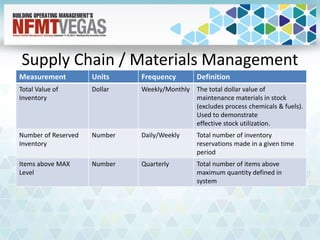
Supply Chain / Materials Management
Measurement Units Frequency Definition
Total Value of
Inventory
Dollar Weekly/Monthly The total dollar value of
maintenance materials in stock
(excludes process chemicals & fuels).
Used to demonstrate
effective stock utilization.
Number of Reserved
Inventory
Number Daily/Weekly Total number of inventory
reservations made in a given time
period
Items above MAX
Level
Number Quarterly Total number of items above
maximum quantity defined in
system
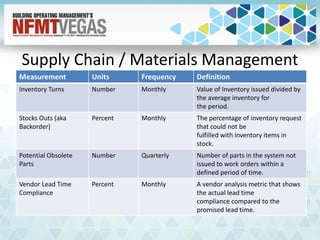
Supply Chain / Materials Management
Measurement Units Frequency Definition
Inventory Turns Number Monthly Value of Inventory issued divided by
the average inventory for
the period.
Stocks Outs (aka
Backorder)
Percent Monthly The percentage of inventory request
that could not be
fulfilled with inventory items in
stock.
Potential Obsolete
Parts
Number Quarterly Number of parts in the system not
issued to work orders within a
defined period of time.
Vendor Lead Time
Compliance
Percent Monthly A vendor analysis metric that shows
the actual lead time
compliance compared to the
promised lead time.
Other KPI Metrics To Consider
• Percent of emergency work (% of work orders and % of total time)
• Percent of maintenance work that is actually planned by a planner (% of
work orders and % of total time)
• Percent of work orders that are started within a week of notification
• Percent of work orders that are completed within a week of notification
• Percent of work that is PM and PdM (% of work orders and % of total time)
• Percent of PM and PdM work that is completed on time (% of work orders
and % of hours)
• Percent of maintenance work that is overtime (budget and actual)
• Percentage of maintenance work that starts on time, per the schedule (%
of work orders and % of total time)
• Percentage of planned maintenance work that is completed within 10% of
estimated time
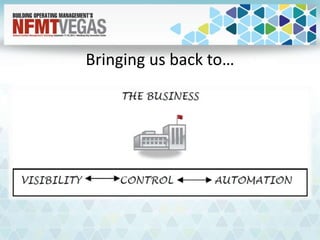
Bringing us back to…
Questions?
John Gould
JFC & Associates
Enterprise Asset Management Consulting
617-365-1158
jgould@jfc-associates.com

Leveraging Your CMMS - From Selection to Daily Use

  • 1.
    Leveraging Your CMMS– From Selection to Daily Use John Gould Sr. Principal Consultant, JFC & Associates
  • 2.
    Learning Objectives: 1. Identifythe proper selection criteria for a CMMS 2. Establish the tools to aide in defining your CMMS functional requirements 3. Describe the difference between integration and enterprise application integration 4. List the best practice considerations for CMMS
  • 3.
    Food for thought… Youcannot manage something you cannot control. You cannot control something you cannot measure.
  • 4.
    Defining CMMS A CMMSis part of the information, management and control system for the maintenance function, whose purpose is to maintain facilities and buildings in working order so that they are capable at all times of meeting their design intent in an efficient and economical manner. The computerized management tool is thus an aid to tracking, archiving, analyzing, and decision- making.
  • 5.
  • 6.
    What is a1% Improvement Worth? • Energy (what do we spend on utilities?) • Asset availability (are we operating 24/7?) • Operator/trades utilization & efficiency (are we labor intensive?) • Asset life (are we capital intensive?) • Response time (how spread out are our facilities?) • Safety (what do we pay in workers comp?) • Production line speed/output (can we push through more volume with better asset performance?) • Spare parts inventory level/turns (are we inventorying the right spares to avoid catastrophic downtime?) • Inventory service level (are parts there when we need them?) • Quality of output, i.e. rejects, rework, returns, loss, giveaway, shrinkage, yield and waste (what is cost of poor quality?)
  • 7.
    Where does yourorganization stack up?
  • 8.
  • 9.
    Start with aSMARTER Goal • Specific • Measurable • Attainable • Relevant • Timely • Evaluate • Reevaluate
  • 10.
    Benchmark You need toknow where you are now, to know if you are getting where you want to be. FAILING TO PLAN = PLANNING TO FAIL
  • 11.
    Selection Criteria • Developthe selection committee – Functional, technical and managerial • Review current system • Review business processes • Homework – research alternatives • Engage all users who ‘touch’ the CMMS • Organizational Analysis – Top level view of the organizational processes mapped to current system • Define data deliverables (reports, KPI’s, external analysis)
  • 12.
    Selection Criteria • Definenew key requirements (must haves) • Determine mobility roadmap (if not yet determined/being used) • Communicate the vision with all the stakeholders • Field Trips – visit similar/leading practice sites with various CMMS in place • Request onsite demonstrations from Vendors • Define requirements for RFP – Do you need to have a system capable of integrating with other enterprise level systems? • Put out to bid / up for recommendation
  • 13.
    Integrations vs. EnterpriseApplication Integration • Integrations – The term data integration refers to reducing data redundancy and establishing "links" (relationships) between data objects in order to get to all of the data that was previously not easily accessible. • EAI – EAI stands for Enterprise Application Integration. EAI is middleware that allows one application or database to "communicate" with another application or database, which creates a "bridge" between existing systems.
  • 14.
    Enterprise Application Integration •Enterprise Application Integration is important only if you’re willing to develop the process • Valuable when performing real-time analytics • Benefits for financial integrations (billing, internal and external invoicing, inventory) • Takes multiple sources of data entry and reduces to one location to be consumed by multiple systems.
  • 15.
    Functional Requirements • Whatis your business and the processes that surround the maintenance function? • Do you require mobility in your workforce? • What type of reporting do you need to make information based maintenance decisions? • Who is managing the data and data entry/validation process? • What type of real time analytics are you performing? • Do you require integrations with other systems? • Are you using other tools currently that could be combined into a single platform?
  • 16.
    Defining Functional Requirements •Establish Key Stakeholders – communicate the desire to implement/change CMMS • Coffee sessions / cross functional • Whiteboard sessions • Flowcharts of current business process • Flowcharts of desired business process improvements • Establish standards for Data – Needs to happen prior to installation • Communication
  • 17.
    Closing Thoughts onSelection • Implementing or upgrading a CMMS is as much a technology project as it is a change management project. • Most organizations only realize 9% of the full functionality of the CMMS due to a variety of different factors. – First on the list – those who implement not considering the impact to the culture of the organization. • Take the time to make the project as much about the function of the business process as you do the technology behind it. If not you’ll end up with…
  • 19.
    Implementation • Get buyin and commitment from management – Both financial and attitude • Define requirements including goals, expectations, hardware, and timelines. – Down to the team member level – Accountability is key • Provide visibility into the project – Set project milestones that everyone can see – Shared documentation
  • 20.
    Implementation • Training –ensure that you have the right blend of training for the right people at the right time • Documentation – document everything that you do! Process, agendas, schedules. The good and the bad! • Go Live with the system when you are absolutely ready, not just a date that you pick. • Continuous improvement: Review, renew, refine, and customize.
  • 21.
    Important Considerations • Defineneeds and requirements clearly • Involve the IT department early • Evaluate all options and alternatives • Data conversion (transfer between systems) – Both level of effort and costs associated with bringing data to the system • Time to Develop • Perform a high amount of testing prior to rollout • Avoid bad legacy data brought to new system • Training…and more training! – Not only training but timely training • Explore the use of external professional services • Consider the importance of a 3 year CMMS ‘Master Plan’
  • 22.
    Always moving forward… Yesterday'sExcellence is Today's Standard and Tomorrow's Mediocrity
  • 23.
    Leading The Way •Web Based Applications • Asset Hierarchy • Spare Parts Management • Work Order Generation – Automated? Phone Call? EAI? • Transparency and Access To Information • Warranty Tracking • Procurement and Strategic Sourcing • Credentials and Qualifications Management • Lockout/Tagout/Hazards and Precautions and Safety Plans • Integration With Mapping/GIS (Google/Bing Maps/ESRI)
  • 24.
    Leading The Way– Process Management • Condition Monitoring – Meter versus time based maintenance • Escalation Management • Work Flow Process – Has it been automated? • MTBF, OEE, FMEA, TPM, BIM, GIS/Spatial • Data Governance – Are you tracking 100% of all material use and labor transactions in your CMMS? • Analysis – Whose job is it? • Mobile work force – Why is it important?
  • 25.
  • 26.
  • 27.
    Turning Data IntoWisdom • KPI’s – A financial or non-financial metric used to help an organization define and measure progress toward organizational goals. • Forms of KPI’s – Management dashboards – Reports run ad-hoc – Simple calculations – Scheduled reports • Need to look at both Leading (doing right now) and Lagging (how we did) Indicators
  • 28.
    Maintenance Related Measurement UnitsFrequency Definition New Work Orders Number Daily/Weekly Total number of new work orders reported Past Due Work Orders Number Daily/Weekly Total number of work orders past targeted start date Current WO Backlog Labor Hours Daily/Weekly Total labor hours required for all remaining non PM work orders Current PM Back Log Labor Hours Daily/Weekly Total labor hours required for all outstanding PM work orders Reported vs. Completed Number Daily/Weekly Number of work orders reported versus completed within a desired time frame
  • 29.
    Maintenance Related Measurement UnitsFrequency Definition Schedule Compliance Percent Daily/Weekly Work orders planned to be started divided by the actual work orders started in a defined period Estimating Accuracy Curve Distribution curve of actual vs. estimated labor and material costs grouped by function MTBF Number/Time Quarterly Average time between failures of a particular asset or asset class Work Type Distribution Pie Chart Weekly Distribution of Corrective, Breakdown, Capital Projects, Predictive and Preventive Work Orders. Follow-up to PM Ratio Percent Monthly Measure of the effectiveness of the PM program (asset or asset class specific)
  • 30.
    Supply Chain /Materials Management Measurement Units Frequency Definition Total Value of Inventory Dollar Weekly/Monthly The total dollar value of maintenance materials in stock (excludes process chemicals & fuels). Used to demonstrate effective stock utilization. Number of Reserved Inventory Number Daily/Weekly Total number of inventory reservations made in a given time period Items above MAX Level Number Quarterly Total number of items above maximum quantity defined in system
  • 31.
    Supply Chain /Materials Management Measurement Units Frequency Definition Inventory Turns Number Monthly Value of Inventory issued divided by the average inventory for the period. Stocks Outs (aka Backorder) Percent Monthly The percentage of inventory request that could not be fulfilled with inventory items in stock. Potential Obsolete Parts Number Quarterly Number of parts in the system not issued to work orders within a defined period of time. Vendor Lead Time Compliance Percent Monthly A vendor analysis metric that shows the actual lead time compliance compared to the promised lead time.
  • 32.
    Other KPI MetricsTo Consider • Percent of emergency work (% of work orders and % of total time) • Percent of maintenance work that is actually planned by a planner (% of work orders and % of total time) • Percent of work orders that are started within a week of notification • Percent of work orders that are completed within a week of notification • Percent of work that is PM and PdM (% of work orders and % of total time) • Percent of PM and PdM work that is completed on time (% of work orders and % of hours) • Percent of maintenance work that is overtime (budget and actual) • Percentage of maintenance work that starts on time, per the schedule (% of work orders and % of total time) • Percentage of planned maintenance work that is completed within 10% of estimated time
  • 33.
  • 34.
    Questions? John Gould JFC &Associates Enterprise Asset Management Consulting 617-365-1158 jgould@jfc-associates.com