New Native Windows
UI Possibilities in
Cincom® ObjectStudio®
By Andreas Hiltner
-  Non-rectangular windows
-  Taskbar Notification
-  Monitor(s)
-  WindowPlacement
-  Security Identifier
-  Filename
-  Workspace
-  And much more
©2016 Cincom Systems Inc. All Rights Reserved.3
Topic
Create a non-rectangular Window using a
Region
A region is a rectangle, polygon, or ellipse
(or a combination of two or more of these
shapes) that can be filled, painted,
inverted, framed, and used to perform hit
testing (testing for the cursor location).
©2016 Cincom Systems Inc. All Rights Reserved.4
Non rectangular windows - Region
Create a non-rectangular Window using
transparent Window.
Using an image with transparent areas,
the window can assume any shape or
form
©2016 Cincom Systems Inc. All Rights Reserved.5
Non rectangular windows - Transparency
The notification area is a portion of the
taskbar that provides a temporary source
for notifications and status.
It can also be used to display icons for
system and program features that have no
presence on the desktop, such as battery
level, volume control, and network status.
The notification area has been known
historically as the system tray or status
area.
©2016 Cincom Systems Inc. All Rights Reserved.6
Taskbar Notification
Class UIDeferredMoveList allows to move several Windows in one
fell swoop, which can reduce flicker in contrast to moving each
window individually.
Simply add the Windows to the list, together with the target
rectangle and any possible flags.
Calling #moveAll will then move all those Windows to their desired
location
©2016 Cincom Systems Inc. All Rights Reserved.7
Deferred-Move-List
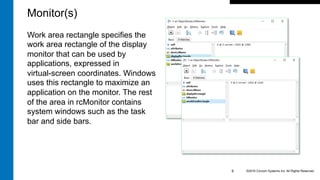
Class UIMonitor returns all available
monitors, currently attached to the
computer.
The display rectangle specifies
the display monitor rectangle,
expressed in virtual-screen
coordinates.
©2016 Cincom Systems Inc. All Rights Reserved.8
Monitor(s)
Work area rectangle specifies the
work area rectangle of the display
monitor that can be used by
applications, expressed in
virtual-screen coordinates. Windows
uses this rectangle to maximize an
application on the monitor. The rest
of the area in rcMonitor contains
system windows such as the task
bar and side bars.
©2016 Cincom Systems Inc. All Rights Reserved.9
Monitor(s)
Class UITitleBarInfo contains the size (rectangle) and state for the
TitleBar and each button on it, e.g. Minimize/Maximize/Help/Close
States are one or more of the following values
-  Focusable
-  Invisible
-  Offscreen
-  Unavailable
-  Pressed
©2016 Cincom Systems Inc. All Rights Reserved.10
TitleBar-Info
Class UIWindowPlacement Contains information about the placement
of a window on the screen.
-  Current show state of the window: maximized/minimized/hidden
-  The coordinates of the window's upper-left corner when the
window is minimized.
-  The coordinates of the window's upper-left corner when the
window is maximized.
-  The window's coordinates when the window is in the restored
position.
(Perfect way to store the current state of a window and restore later)
©2016 Cincom Systems Inc. All Rights Reserved.11
WindowPlacement
Class WndSID wraps the Security Identifier (SID) of a user/group/computer
account.
A SID is a data structure of variable length that identifies user, group, and
computer accounts. Every account on a network is issued a unique SID
when the account is first created.
Internal processes in Windows refer to an account's SID rather than the
account's user or group name.
(Check, if the process is running with Admin rights, if those rights are
needed or not recommended)
©2016 Cincom Systems Inc. All Rights Reserved.12
Security Identifier
Extensions to class PCFilename
-  Added known folders, e.g.
-  Desktop
-  Documents
-  Music
-  Pictures
-  Program Data
-  Program Files
-  Temp
-  Videos
©2016 Cincom Systems Inc. All Rights Reserved.13
Filename
Extensions to class PCFilename
-  Added known folders, e.g. Desktop, Documents,
Music, Pictures, Program Data, Program Files,
Temp, Videos
-  Create a temporary file in a certain folder (preferably
the Temp folder), with a certain prefix and
©2016 Cincom Systems Inc. All Rights Reserved.14
Filename cont’d
Extensions to class PCFilename
-  Retrieve the name of and handle to the executable
(.exe) file associated with a specific document file.
-  Extract the system icon for a file
©2016 Cincom Systems Inc. All Rights Reserved.15
Filename cont’d
Class PowerState provides access to Windows power management
features.
The power management functions and messages retrieve the system
power status, notify applications of power management events, and
notify the system of each application's power requirements.
©2016 Cincom Systems Inc. All Rights Reserved.16
Power State
-  displayRequired Forces the display to be on by resetting the display
idle timer. Windows 8: This flag can only keep a display turned on, it
can't turn on a display that's currently off.
-  hibernate/suspend/forceHibernate/forceSuspend Suspends the
system by shutting power down. The system either enters a suspend
(sleep) state or hibernation (S4).
-  systemRequired Forces the system to be in the working state by
resetting the system idle timer.
©2016 Cincom Systems Inc. All Rights Reserved.17
Power State
Class OSMemInfo contains information about the current state of both
physical and virtual memory, including extended memory.
-  memoryLoad A number between 0 and 100 that specifies the
approximate percentage of physical memory that is in use (0 indicates
no memory use and 100 indicates full memory use).
-  totalPhysical The amount of actual physical memory, in bytes.
-  availablePhysical The amount of physical memory currently available,
in bytes. This is the amount of physical memory that can be
immediately reused without having to write its contents to disk first. It is
the sum of the size of the standby, free, and zero lists.
©2016 Cincom Systems Inc. All Rights Reserved.18
Memory Info
-  totalPageFile The current committed memory limit for the system or the
current process, whichever is smaller, in bytes.
-  availablePageFile The maximum amount of memory the current
process can commit, in bytes. This value is equal to or smaller than the
system-wide available commit value.
-  totalVirtual The size of the user-mode portion of the virtual address
space of the calling process, in bytes. This value depends on the type
of process, the type of processor, and the configuration of the operating
system.
-  availableVirtual The amount of unreserved and uncommitted memory
currently in the user-mode portion of the virtual address space of the
calling process, in bytes.
©2016 Cincom Systems Inc. All Rights Reserved.19
Memory Info
OSPerformanceCounter
Counters are used to provide information as to how well the operating
system or an application, service, or driver is performing.
The counter data can help determine system bottlenecks and fine-tune
system and application performance.
The operating system, network, and devices provide counter data that an
application can consume to provide users with a graphical view of how
well the system is performing.
©2016 Cincom Systems Inc. All Rights Reserved.20
Performance Counter
Class Keyboard loads a new input locale identifier (formerly called
the keyboard layout) into the system.
Prior to Windows 8: Several input locale identifiers can be
loaded at a time, but only one per process is active at a time.
Loading multiple input locale identifiers makes it possible to
rapidly switch between them.
Beginning in Windows 8: The input locale identifier is loaded for
the entire system. This function has no effect if the current
process does not own the window with keyboard focus.
©2016 Cincom Systems Inc. All Rights Reserved.21
Keyboard
New Workspace with multiple tabs.
Text- or Class-Files can be dropped
on the Workspace and are opened in
any available buffer or a new buffer is
created.
©2016 Cincom Systems Inc. All Rights Reserved.22
Workspace
Namespaces can be imported into
Workspace scripts.
-  Script
-  Dialog
Various pre-defined variables
-  #__currentEnvironment
-  #__currentEditor
-  #__currentBuffer
Each tab/buffer has its own set of
imports.
©2016 Cincom Systems Inc. All Rights Reserved.23
Workspace
Questions?
©2016 Cincom Systems Inc. All Rights Reserved.24
Thank You
Contact:	
	
Arden	Thomas:	
athomas@cincom.com	
Suzanne	Fortman:	
sfortman@cincom.com	
Andreas	Hiltner	
ahiltner@cincom.com

New Native Windows UI possibilities in Cincom Smalltalk ObjectStudio

  • 1.
    New Native Windows UIPossibilities in Cincom® ObjectStudio® By Andreas Hiltner
  • 3.
    -  Non-rectangular windows - Taskbar Notification -  Monitor(s) -  WindowPlacement -  Security Identifier -  Filename -  Workspace -  And much more ©2016 Cincom Systems Inc. All Rights Reserved.3 Topic
  • 4.
    Create a non-rectangularWindow using a Region A region is a rectangle, polygon, or ellipse (or a combination of two or more of these shapes) that can be filled, painted, inverted, framed, and used to perform hit testing (testing for the cursor location). ©2016 Cincom Systems Inc. All Rights Reserved.4 Non rectangular windows - Region
  • 5.
    Create a non-rectangularWindow using transparent Window. Using an image with transparent areas, the window can assume any shape or form ©2016 Cincom Systems Inc. All Rights Reserved.5 Non rectangular windows - Transparency
  • 6.
    The notification areais a portion of the taskbar that provides a temporary source for notifications and status. It can also be used to display icons for system and program features that have no presence on the desktop, such as battery level, volume control, and network status. The notification area has been known historically as the system tray or status area. ©2016 Cincom Systems Inc. All Rights Reserved.6 Taskbar Notification
  • 7.
    Class UIDeferredMoveList allowsto move several Windows in one fell swoop, which can reduce flicker in contrast to moving each window individually. Simply add the Windows to the list, together with the target rectangle and any possible flags. Calling #moveAll will then move all those Windows to their desired location ©2016 Cincom Systems Inc. All Rights Reserved.7 Deferred-Move-List
  • 8.
    Class UIMonitor returnsall available monitors, currently attached to the computer. The display rectangle specifies the display monitor rectangle, expressed in virtual-screen coordinates. ©2016 Cincom Systems Inc. All Rights Reserved.8 Monitor(s)
  • 9.
    Work area rectanglespecifies the work area rectangle of the display monitor that can be used by applications, expressed in virtual-screen coordinates. Windows uses this rectangle to maximize an application on the monitor. The rest of the area in rcMonitor contains system windows such as the task bar and side bars. ©2016 Cincom Systems Inc. All Rights Reserved.9 Monitor(s)
  • 10.
    Class UITitleBarInfo containsthe size (rectangle) and state for the TitleBar and each button on it, e.g. Minimize/Maximize/Help/Close States are one or more of the following values -  Focusable -  Invisible -  Offscreen -  Unavailable -  Pressed ©2016 Cincom Systems Inc. All Rights Reserved.10 TitleBar-Info
  • 11.
    Class UIWindowPlacement Containsinformation about the placement of a window on the screen. -  Current show state of the window: maximized/minimized/hidden -  The coordinates of the window's upper-left corner when the window is minimized. -  The coordinates of the window's upper-left corner when the window is maximized. -  The window's coordinates when the window is in the restored position. (Perfect way to store the current state of a window and restore later) ©2016 Cincom Systems Inc. All Rights Reserved.11 WindowPlacement
  • 12.
    Class WndSID wrapsthe Security Identifier (SID) of a user/group/computer account. A SID is a data structure of variable length that identifies user, group, and computer accounts. Every account on a network is issued a unique SID when the account is first created. Internal processes in Windows refer to an account's SID rather than the account's user or group name. (Check, if the process is running with Admin rights, if those rights are needed or not recommended) ©2016 Cincom Systems Inc. All Rights Reserved.12 Security Identifier
  • 13.
    Extensions to classPCFilename -  Added known folders, e.g. -  Desktop -  Documents -  Music -  Pictures -  Program Data -  Program Files -  Temp -  Videos ©2016 Cincom Systems Inc. All Rights Reserved.13 Filename
  • 14.
    Extensions to classPCFilename -  Added known folders, e.g. Desktop, Documents, Music, Pictures, Program Data, Program Files, Temp, Videos -  Create a temporary file in a certain folder (preferably the Temp folder), with a certain prefix and ©2016 Cincom Systems Inc. All Rights Reserved.14 Filename cont’d
  • 15.
    Extensions to classPCFilename -  Retrieve the name of and handle to the executable (.exe) file associated with a specific document file. -  Extract the system icon for a file ©2016 Cincom Systems Inc. All Rights Reserved.15 Filename cont’d
  • 16.
    Class PowerState providesaccess to Windows power management features. The power management functions and messages retrieve the system power status, notify applications of power management events, and notify the system of each application's power requirements. ©2016 Cincom Systems Inc. All Rights Reserved.16 Power State
  • 17.
    -  displayRequired Forcesthe display to be on by resetting the display idle timer. Windows 8: This flag can only keep a display turned on, it can't turn on a display that's currently off. -  hibernate/suspend/forceHibernate/forceSuspend Suspends the system by shutting power down. The system either enters a suspend (sleep) state or hibernation (S4). -  systemRequired Forces the system to be in the working state by resetting the system idle timer. ©2016 Cincom Systems Inc. All Rights Reserved.17 Power State
  • 18.
    Class OSMemInfo containsinformation about the current state of both physical and virtual memory, including extended memory. -  memoryLoad A number between 0 and 100 that specifies the approximate percentage of physical memory that is in use (0 indicates no memory use and 100 indicates full memory use). -  totalPhysical The amount of actual physical memory, in bytes. -  availablePhysical The amount of physical memory currently available, in bytes. This is the amount of physical memory that can be immediately reused without having to write its contents to disk first. It is the sum of the size of the standby, free, and zero lists. ©2016 Cincom Systems Inc. All Rights Reserved.18 Memory Info
  • 19.
    -  totalPageFile Thecurrent committed memory limit for the system or the current process, whichever is smaller, in bytes. -  availablePageFile The maximum amount of memory the current process can commit, in bytes. This value is equal to or smaller than the system-wide available commit value. -  totalVirtual The size of the user-mode portion of the virtual address space of the calling process, in bytes. This value depends on the type of process, the type of processor, and the configuration of the operating system. -  availableVirtual The amount of unreserved and uncommitted memory currently in the user-mode portion of the virtual address space of the calling process, in bytes. ©2016 Cincom Systems Inc. All Rights Reserved.19 Memory Info
  • 20.
    OSPerformanceCounter Counters are usedto provide information as to how well the operating system or an application, service, or driver is performing. The counter data can help determine system bottlenecks and fine-tune system and application performance. The operating system, network, and devices provide counter data that an application can consume to provide users with a graphical view of how well the system is performing. ©2016 Cincom Systems Inc. All Rights Reserved.20 Performance Counter
  • 21.
    Class Keyboard loadsa new input locale identifier (formerly called the keyboard layout) into the system. Prior to Windows 8: Several input locale identifiers can be loaded at a time, but only one per process is active at a time. Loading multiple input locale identifiers makes it possible to rapidly switch between them. Beginning in Windows 8: The input locale identifier is loaded for the entire system. This function has no effect if the current process does not own the window with keyboard focus. ©2016 Cincom Systems Inc. All Rights Reserved.21 Keyboard
  • 22.
    New Workspace withmultiple tabs. Text- or Class-Files can be dropped on the Workspace and are opened in any available buffer or a new buffer is created. ©2016 Cincom Systems Inc. All Rights Reserved.22 Workspace
  • 23.
    Namespaces can beimported into Workspace scripts. -  Script -  Dialog Various pre-defined variables -  #__currentEnvironment -  #__currentEditor -  #__currentBuffer Each tab/buffer has its own set of imports. ©2016 Cincom Systems Inc. All Rights Reserved.23 Workspace
  • 24.
    Questions? ©2016 Cincom SystemsInc. All Rights Reserved.24
  • 25.